Explore our specialized services, tailored solutions, and industry expertise to elevate your digital presence. From custom WordPress development to seamless integrations, we build high-performing websites that deliver impact.
A marketing team needs a website it can work with efficiently every day, whether that means publishing content, updating pages, testing changes, or understanding what brings results.
But even a well-designed website can make that work unnecessarily difficult. A team can edit the text within a section but cannot add or rearrange sections because the page structure is fixed. The same information has to be updated on several pages because each page stores a separate copy. Testing a different headline requires development work because the website was built without a way to run experiments. These everyday limitations come from decisions made during development, and they shape how efficiently the marketing team can work.
At IT Monks, we build websites to help marketing teams spend less time waiting for development support and get their everyday work done faster. A website’s quality shows in how efficiently marketers can work with it after launch: how quickly they can publish content, make changes, and put improvements into practice.
That starts with a website structured around how marketers create pages, manage content, and publish updates. Reusable sections let them assemble pages themselves. Clearly defined editing controls let them change content and adjust layouts without breaking the design. Shared content sources let them update information once wherever it appears. These development choices remove the need to send a request, explain a routine change, and wait for someone else to make it.
When the website already has a suitable hero, testimonial section, and form, a marketer should be able to bring them together in the editor. Whether that takes an editing session or a place in the development queue depends on how those sections were built.
WordPress Block Architecture: Assembling Landing Pages Without a Developer
Marketers should be able to create a landing page from sections already developed for their website, without waiting for a developer to assemble another combination of the same elements.
The website needs a reusable section library inside WordPress, with heroes, logo rows, testimonials, forms, and other components the team regularly uses. Each section should have:
A clear name and preview so marketers can quickly find the right component.
Defined editing options so they know which content and layout settings they can change.
Built-in design constraints so sections stay consistent as marketers combine them.
New functionality still requires development, but assembling pages from existing sections should be work the marketing team can complete itself.
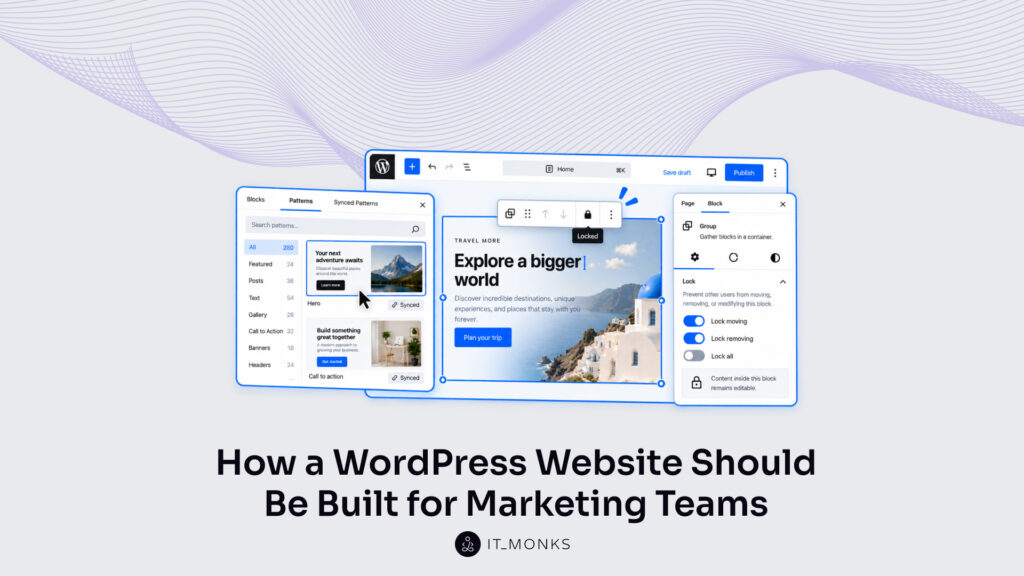
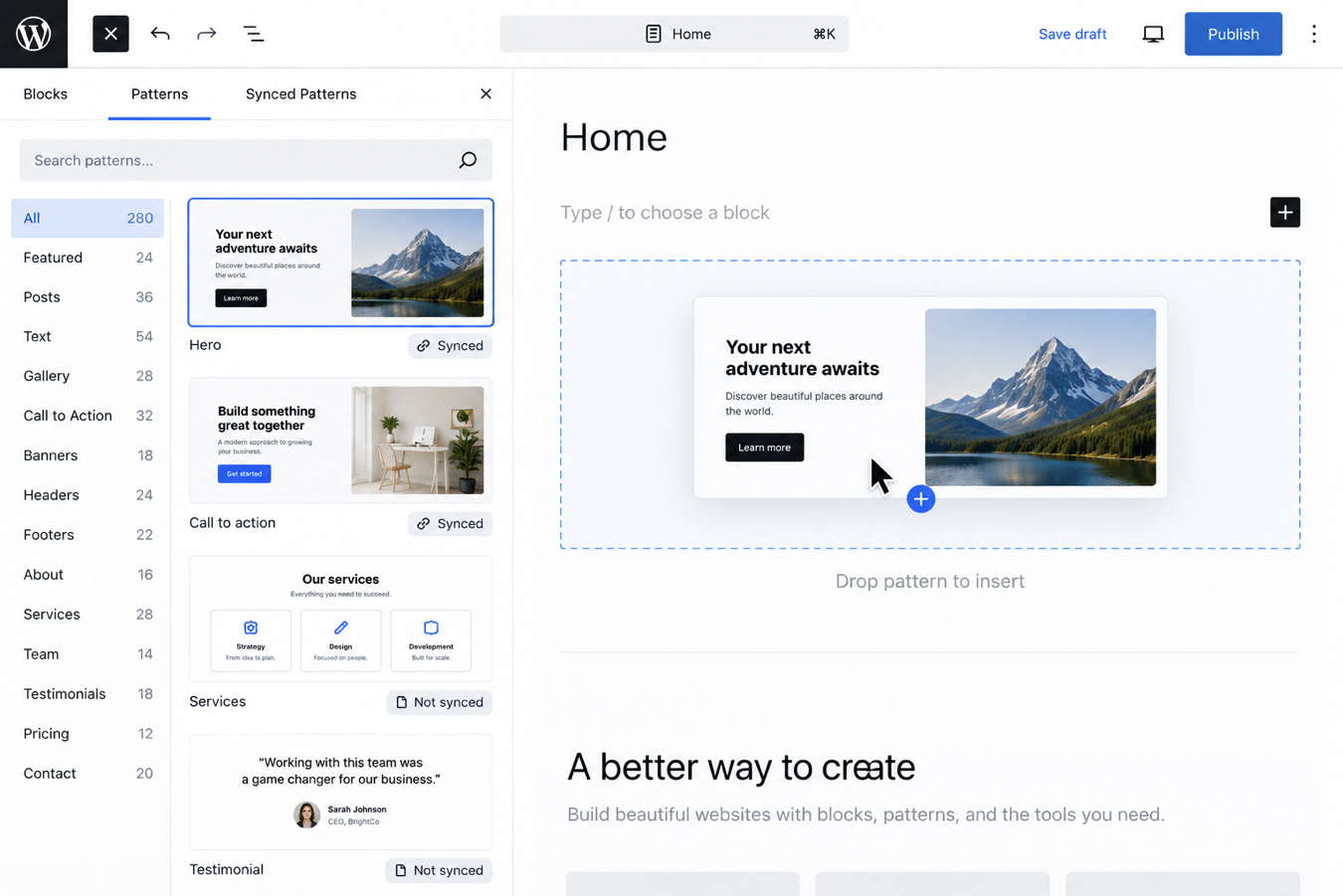
The library starts with standard WordPress blocks and, where needed, custom blocks that developers can build using tools such as ACF. These blocks can be arranged into reusable patterns, which marketers add and edit in Gutenberg, the WordPress editor.
Gutenberg Patterns
A Gutenberg pattern is a saved arrangement of blocks, such as a hero with a heading, image, and button. Once a marketer builds and saves a section, they can add it to another page without waiting for a developer. Patterns can be saved in two ways: unsynced for content that differs between pages, or synced for content that stays the same.
Unsynced patterns let marketers reuse the layout and change the content independently. Each insertion creates a separate copy, so a marketer can adapt the headline, image, and button for one page without changing other pages or the saved pattern.
Synced patterns save time when the same content appears across the website. A shared call to action can be updated once, with the change appearing everywhere that pattern is used. Marketers do not have to find and edit every copy, and pages are less likely to retain outdated information.
The website should make that difference clear before marketers edit a section: will this change affect one page or several? Where the design needs protection, layout restrictions can keep the structure in place while leaving content editable, reducing the need for developers to fix layouts after routine updates.
Custom Blocks
When standard Gutenberg blocks do not give marketers the controls they need, the website should provide custom blocks built around their recurring tasks. These appear inside the same WordPress editor, alongside the standard blocks.
A pricing comparison, for example, might need more than separate text and button blocks. A custom block can let marketers add a plan, enter its price, and list its features, then handle the layout automatically. The team can update the comparison without waiting for a developer to rearrange it.
At IT Monks, we believe the editing options should reflect what marketers need to change regularly. Prices, descriptions, and links should be easy to update, while the surrounding design stays protected.
Where several pages use the same information, a custom block can pull it from a shared source, so marketers update it once instead of editing every copy.
Developers can use Advanced Custom Fields (ACF) to create these editing controls. In the pricing example, ACF can provide fields for each plan’s name, price, and features, plus an option to add another plan. Marketers fill in those fields in Gutenberg, and the custom block handles the layout.
These capabilities require development upfront. Their value is in the time they save afterward: fewer routine requests, fewer manual updates, and less waiting for changes the marketing team should be able to make itself.
Website Page Content: Headlines and CTAs Without a Code Change
A headline helps visitors understand why an offer matters to them. A call to action gives them a way to respond. Together, they influence how effectively a page turns traffic into enquiries, sign-ups, or purchases, and the return on the marketing budget that brought those visitors there.
Marketing teams need control over the whole message, from the headline to what happens after the click. Changing button text is only part of that work. The website should give marketers access to the related settings within the page-editing workflow:
Headlines and supporting copy: update the message wherever it appears on the page. If the visible headline is separate from the page title in WordPress, the editing fields should make that distinction clear.
CTA wording: change the button label to match the offer and tell visitors what to expect.
Link destination: choose where the button leads, including another page, a download, or a booking service.
Form selection: select an existing form where the section supports one, without asking a developer to replace it.
For example, a team may decide that a product page should invite visitors to book a demo instead of downloading a guide. The marketer needs to revise the supporting copy, change the button label, and connect the booking destination or existing demo form. Those changes belong together as one marketing update. Leaving one of them dependent on development delays the entire change.
At IT Monks, we believe the time between that decision and the published update matters. While a request waits in a development queue, visitors continue seeing the previous offer and the team cannot evaluate the new one.
Page Templates: Changing the Structure of a Website Page
Marketing teams need to change how a page presents its message, not just the words it contains. Moving testimonials closer to a form, adding an FAQ, or giving an offer more space can help visitors find the information they need before taking action. Those changes should not require a developer every time.
A WordPress page template provides the page’s overall framework. How the website is built determines how much freedom marketers have within it. A rigid setup can leave the team filling in fixed spaces, even when the content needs a different arrangement.
The structure should support the message marketers need to deliver. The website should provide practical choices within its design:
What the marketer needs to change
What the website should allow
The order visitors see information
Move supported sections up or down
The amount of information on the page
Add or remove approved sections
How text and images sit together
Choose from tested layout options
The overall format of an individual page
Select a suitable existing template
These controls need a clear boundary: changing one page is different from changing a shared template. Moving a section within a page’s own content can affect that page alone. Editing the shared template changes the framework used by other pages too, so access and review should reflect that wider effect.
A marketer should be able to adapt an individual page without accidentally changing the rest of the website. New designs or functionality may still need development, but rearranging supported sections should stay within the marketing workflow.
That flexibility works at two levels: layouts determine how the text, images, and other elements are arranged within them; sections determine which groups of content appear and in what order.
Layouts
A product image may need more space to show its details, while a longer explanation may need a wider text column. Marketers should be able to adjust how content sits within a section without asking a developer to rebuild it. Layout options make those adjustments possible within the website’s design.
The editor should provide useful choices, such as:
Placing an image beside the text or above it.
Choosing from preset column widths.
Adjusting text and button alignment.
Those options should reflect the content the marketing team works with regularly.
Every available layout should already work across desktop and mobile. When a marketer changes column widths or image placement, the website should handle how that arrangement adapts to smaller screens. The team still needs to preview the content, but should not have to work out how to fix overlapping elements or unreadable text.
These controls change the arrangement inside a section. Moving the entire section – for example, placing customer testimonials above a pricing comparison – is a separate part of the page structure.
Sections
A page needs to answer visitors’ questions in an order that makes the next step clear. Some visitors need an explanation of the offer; others need evidence that it works or reassurance before submitting a form. Control over sections lets marketers shape that journey instead of fitting every message into the same fixed page.
A section brings related content together- such as testimonials, pricing, or implementation section -and lets marketers add, remove, or move it as one piece. The website should support these changes because each can serve a different marketing purpose:
Move testimonials before pricing when visitors need evidence of value before considering the cost.
Add an implementation section when visitors need to understand the setup time, required resources, and support included before deciding to enquire.
Remove an irrelevant section to keep the page focused on the offer and the action visitors should take.
These are decisions marketers can test against conversion rate, form completion, and lead quality. Moving a section does not guarantee better results, but a flexible page gives the team a practical way to find out what works.
Reusable sections should give marketers a consistent design with room for different messages and audiences. A product page and a webinar registration page can share components while presenting different information in a different order. Those choices should apply to the individual page, so improving one visitor journey does not unexpectedly change another.
Website Publishing Workflow: Routine Changes Published Without a Developer
A publishing workflow is the route a change takes from edit to live. Every WordPress website has one. On most WordPress websites nobody designed it. The route consists of whatever steps accumulated while the site was built, and it The website should give marketers a clear way to prepare, review, and publish content. They should be able to see what is ready, what needs approval, and when an update will go live, without relying on a developer to move it between those stages.
At IT Monks, we believe the publishing workflow should support four connected steps:
Prepare and preview. Save proposed changes and check how they will appear before making them public.
Review and approve. Share the proposed version with the right reviewer, so feedback and approval refer to the content that will actually be published.
Publish or schedule. Release approved content immediately or choose a publication time that fits the marketing plan.
Check the result. Confirm that the live content, links, and forms work as intended.
Clear review steps reduce mistakes, while scheduling gives marketers control over timing. Together, these capabilities help teams keep the website accurate and coordinate content releases with their wider marketing activity.
Staging Process
Changes to website functionality should be tested on staging first. Staging is a separate copy of the website where developers and marketers can check new blocks, template changes, and form integrations before releasing them. This helps catch problems without interrupting the live pages visitors use.
Minor content updates should be made directly in the live website’s WordPress editor. Marketers can change headlines, correct text, replace images, or update button wording, then preview and approve those edits before publishing. They should not need a staging release for each update.
This separation lets marketing teams keep content current while new functionality is tested separately. Development work can continue without holding routine publishing in the same queue.
Deployment
After a change has been tested on staging, deployment brings it to the live website. This is how a new template, custom block, or form integration becomes available to the marketing team. Once a pricing block is released, for example, marketers should be able to update its prices and features through WordPress whenever needed. Those content updates follow the normal publishing workflow, without another development release.
Marketing work also continues while developers prepare a release. The team may have corrected copy, published articles, or updated offers since the staging copy was created. Deploying new functionality must preserve those newer changes, so releasing a tested block does not accidentally restore outdated content. The release process should include checking the new functionality on the live website and a way to reverse the technical change if it causes problems. That allows the website to improve while protecting the content and visitor journeys already in use.
Changing Spacing and Imagery Without Breaking the Website Design System
Marketing teams regularly replace images, adjust copy, and give important content more space. Those changes should help visitors understand the message while keeping the page consistent with the brand. A new product image should fit its section, and a longer headline should remain readable on mobile.
At IT Monks, we believe the website should make the right design choices easy to apply. Marketers should have useful options in the editor, with the website handling the design rules behind them:
What marketers need to adjust
How the website should support it
Space around content
Offer preset spacing options that stay consistent across pages and adapt to smaller screens.
Images within a section
Provide defined image sizes and proportions, with controls to keep the important part of the image visible when cropped.
This gives the team room to improve the presentation without making a fresh design decision for every update. Marketers can choose an image or adjust spacing, then preview the result, rather than manually fixing dimensions and margins across screen sizes.
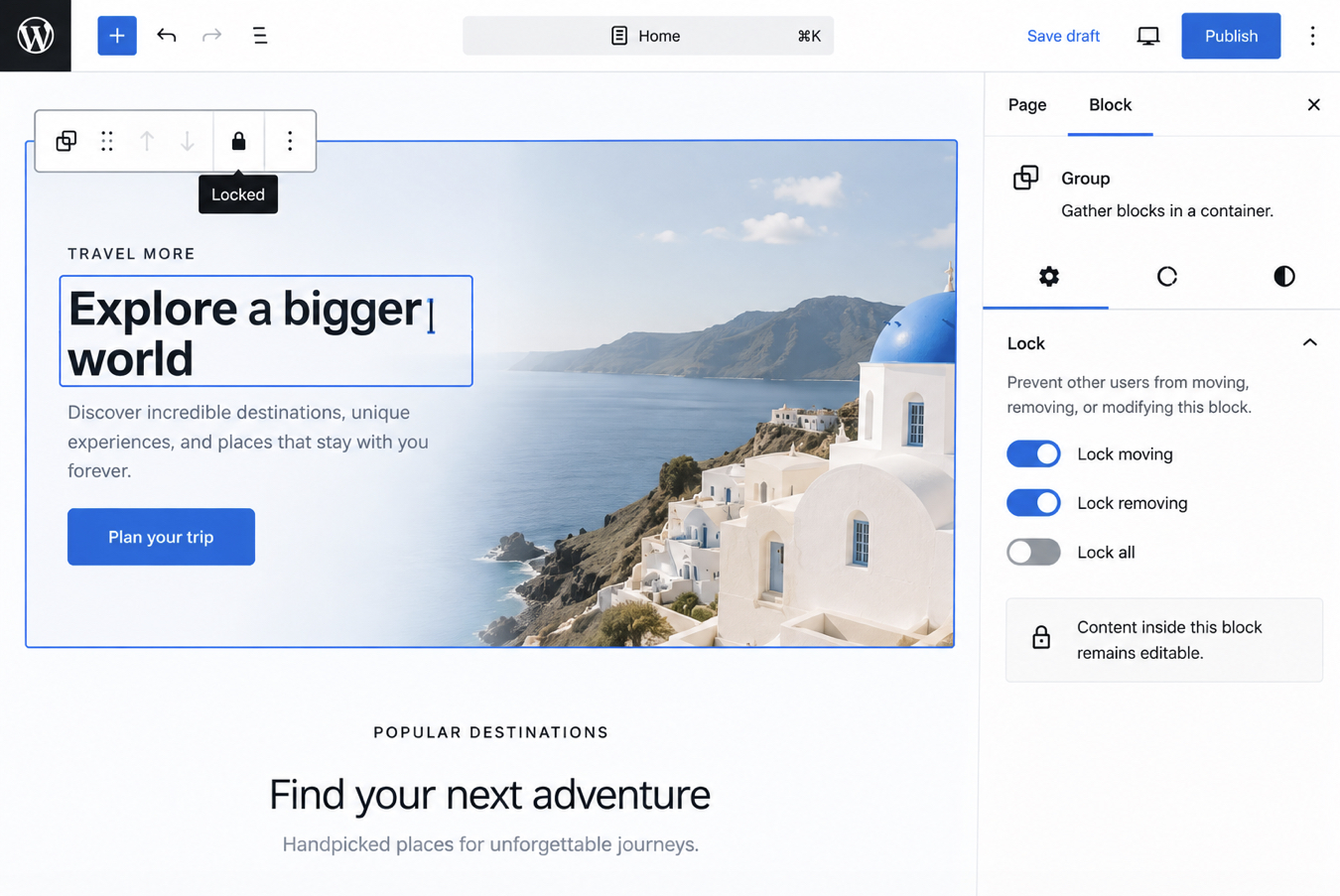
Design consistency should be built into the editing experience. Preset styles guide visual changes, while block locking can protect important elements from being moved or removed. Together, these controls help marketers keep pages readable and recognizably part of the same website as the content changes.
Block Locking
When marketers edit a page, they should be able to change its content without accidentally removing important elements. Block locking stops selected blocks from being moved or deleted. A form can stay in its intended position while the team updates the copy around it.
The website should lock only what needs to stay in place. Marketers can still move other sections where that flexibility is useful. If a section only needs text and image updates, content-only editing can hide the design controls and keep those edits simple.
These settings reduce accidental changes and the time spent fixing them, helping marketers keep pages consistent as they update the content.
And once a team can change a page on its own, a second question arrives with it: did the change do anything?
Launching Tests Without Development Work: Website Experimentation Setup
Marketing teams need to know whether a different headline, offer, or page layout improves results. The website should make it practical to test those changes and measure their effect on conversion rate, so decisions about what to keep are based on evidence.
That requires three connected capabilities:
Creating a variation. Marketers can use existing blocks and layouts to prepare another version, either by duplicating the page or editing a variation within the testing tool.
Sharing traffic between versions. A testing tool shows visitors different versions, allowing the team to compare their performance.
Measuring the intended result. Tracking records the action the test is meant to improve, such as a completed enquiry or purchase. More button clicks alone do not necessarily mean more conversions.
At IT Monks, we believe the initial build should prepare the website for the experiments marketers expect to run. Developers may need to connect the testing tool and configure tracking upfront. After that, the team should be able to run A/B tests within the supported editing options without rebuilding the setup each time.
Website Integration Stack: Adding Analytics Tools Without Technical Risk
CRM and marketing automation connections should send enquiries to the right team and start the follow-up process. This saves manual entry, helps sales respond faster, and lets marketers see which campaigns bring valuable leads. Developers can use existing connectors or REST APIsto exchange information between the website and these systems, with checks that each inquiry reaches its destination.
Analytics and tracking tools, such as GA4, Microsoft Clarity, and Hotjar, help marketers measure conversions and understand how visitors use the website. Teams often add these tools after launch, so the build should make later connections straightforward. Google Tag Manager can manage supported tracking tags without repeated website code changes, while clear events – such as a successful form submission – keep reporting meaningful.
Both need testing: leads should reach the CRM correctly, and tracking should record the intended actions without duplicates.
What Does Website Content Modeling Require After Handover?
Marketers should be able to add content without deciding how to organize it every time. The website should provide clear fields for each type of content:
Case studies: client, industry, challenge, and results.
Services: name, description, and related case studies.
Events: date, location, and registration link.
This is content modeling: deciding what information belongs in each content type. Marketers fill in the fields, and the website displays it using the right template.
Information used in several places should be updated once. Changing an event date should update both the event page and the event listing. Categories and tags should help the team find content and show it on relevant pages.
After handover, marketers need to know where to add content and which pages an update will affect. If the team starts publishing something new, the setup should be adjusted to support it.
Human Review Before Publication on a WordPress Website
A marketer may be responsible for writing an offer, while a marketing lead checks its wording and accuracy before publication. The website should support that division of work. WordPress user roles can let the marketer prepare and edit the draft while giving the reviewer access to publish it. When the draft is ready, the marketer marks it Pending Review, and the reviewer opens the preview to check the actual page. The approval happens where the content will be published, instead of relying on a separate document that may no longer match it.
For an existing page, the current version needs to stay available while proposed changes are checked. A tool such as PublishPress Revisions lets a marketer submit those changes without immediately replacing the live content. The reviewer can then approve the updated version, keeping the page available throughout the review.
Editing a WordPress Website When the Site Operator Is Unavailable
A holiday or unexpected absence should not leave the marketing team unable to update its website. Another marketer should be able to find the right content, make the change, and move it through approval without needing instructions from the person who usually handles it.
That requires more than a spare login. The website and its handover should give a trained teammate three things:
What the teammate needs
What should be provided
Access to do the work
Their own account with the editing or publishing access needed to cover the role.
Clear instructions
A short guide showing where content is managed, which pages an update affects, and how review and publishing work.
An understandable editor
Clearly named fields, useful instructions beside unfamiliar settings, and section names that match how marketers describe them.
Before handover, a second team member should try a routine update using these resources. If they cannot complete it without help from the usual operator, the missing instructions or controls need attention.
Website Maintenance After Handover
Handover should include a clear maintenance plan: who handles security, updates, backups, and technical problems, and how marketers request support. Finding a broken form or receiving a security alert should not leave a marketer responsible for investigating it.
The marketing team can keep content current: update offers, correct links, replace images, and retire outdated campaign pages. It should also confirm that enquiries reach the right people and that follow-up instructions still match the business.
Technical maintenance needs a developer or support team responsible for:
Updating WordPress, themes, and plugins, then checking that key functions still work.
Maintaining security protections, monitoring for suspicious activity and malware, and responding to incidents.
Reviewing technical access and removing accounts that are no longer needed.
Maintaining backups and testing that the website can be restored.
Investigating failed forms, tracking errors, and performance problems.
Fixing faults in blocks, templates, and integrations.
Agreed priorities and response times help protect lead generation while keeping routine improvements organised.
Monitoring can also flag failures before a marketer happens to notice them, reducing the time a problem affects visitors or leaves enquiries unhandled.
Governance of Shared Components and Permissions on a WordPress Website
Marketing teams need clear responsibilities across the content lifecycle: creating, reviewing, publishing, updating, and retiring content. Without them, pages become outdated, teams duplicate work, and changes can overwrite information someone else still needs.
Each content area should have an owner, whether it is the blog, service pages, product information, or campaign content. That ownership includes checking accuracy, approving major changes, and deciding when to update or remove content.
The website should support those responsibilities through WordPress user roles and approval workflows. Content creators can prepare drafts, reviewers can check them, and authorised publishers can release them. Access should match each person’s work, with a backup available when the usual owner is absent.
Shared content needs its own controls. Changes to navigation, reusable sections, or site-wide messages can affect several teams. The editor should make that reach clear, and the responsible owner should review the change before it goes live.
IT Monks Develops WordPress Websites for Marketing Teams
We build WordPress websites that help marketing teams publish faster, improve conversion rates, and increase marketing ROI. That means reducing the effort spent on routine website work and helping your team turn more of its existing traffic into valuable inquiries and sales.
The work starts with understanding what your team needs to do and which parts of the current website make it difficult. Together, we identify the changes your marketers should be able to handle themselves, from creating landing pages and testing messages to updating shared content and connecting inquiries to your CRM.
Our job is to turn those requirements into a website your team can use every day. We develop and test the functionality, show your marketers how to use it, and make handover responsibilities clear. Ongoing technical support covers the maintenance and security work that needs specialist attention.
Whether you are replacing your website or improving an existing WordPress build, we can help prioritize changes based on their potential to save time, improve results, and deliver a return on your investment.




 ChatGPT
  Claude
  Grok
Grok  Gemini