Explore our specialized services, tailored solutions, and industry expertise to elevate your digital presence. From custom WordPress development to seamless integrations, we build high-performing websites that deliver impact.
The campaign launch date is set. The budget is approved, the ads are ready, but the landing pages aren’t. Or worse, they’re already live, but something breaks when visitors open them on mobile.
Sometimes, the problem comes down to an outdated WordPressplugin. A form stops working after an update, a page builder conflicts with the latest WordPress version, or an abandoned plugin introduces a security vulnerability. These issues can go unnoticed for months until the marketing team needs to launch a new campaign.
The consequences can be expensive. A landing page launch gets delayed, mobile layouts break, ads are rejected, or paid traffic ends up on a compromised website. Even when ads keep running, a broken form or checkout can mean paying for visitors who have no way to convert.
In this article, we’ll look at the warning signs of outdated WordPress plugins, how they can affect advertising campaigns, and what teams can do to fix problems before they start costing money.
How Do Outdated WordPress Plugins Harm Ads Preparation?
A landing page may look ready for launch, but the plugins behind it can cause problems that aren’t immediately visible. Page builders, caching tools, form plugins, and other WordPress extensions affect how pages load, display, and function. When these plugins become outdated, they can create compatibility issues or expose the website to security threats.
For marketing teams preparing paid campaigns, the risks generally fall into two categories.
Technical failures. An outdated plugin can conflict with a newer WordPress version or another plugin, breaking page layouts, slowing down loading times, or preventing forms from working. These issues can delay a campaign launch, reduce conversions, or lead to ad disapproval if the destination page becomes inaccessible or stops functioning properly.
Security vulnerabilities. Plugins with unpatched vulnerabilities can give attackers a way into the website. Once compromised, landing pages may redirect visitors to malicious websites or display unauthorized content. Google Ads may disapprove ads pointing to compromised destinations, while undetected redirects can waste advertising budgets and put visitors at risk.
Both scenarios can disrupt a campaign even when the ads, targeting, and budget are ready. That’s why checking plugin health should be part of website preparation before launching paid traffic.
Delayed Landing Page Launch
An outdated page builder can delay a campaign before it even starts. If the plugin is no longer compatible with the current WordPress setup, the marketing team may struggle to create, edit, or publish new landing pages.
When campaign deadlines can’t be moved, businesses sometimes launch ads anyway, directing traffic to existing pages that weren’t designed for those campaigns. This can weaken the connection between the ad and its destination, reducing the chances of conversion.
Chris Kirksey, CEO of Direction.com, shared an example with us. One of the agency’s clients, an orthodontic group using WordPress, needed three location-specific landing pages for a September advertising campaign. However, its page builder hadn’t been updated in approximately three years.
With only two people on the marketing team and no in-house developer, the company struggled to resolve the issue. As a result, the three landing pages went live five weeks later than planned.
This meant that all of our ads in September went to the home page, and starting in October when the location pages were live we were seeing about a 2x conversion rate on the location pages.
Chris Kirksey
Founder & CEO, Direction.com
We see the same pattern whenever a page builder falls years behind. Every new landing page turns into a developer task, the marketing team ends up waiting on developers to publish changes, and the campaign date stops being the date the pages go live.
The fix starts with the plugin. Update it, or replace it if updates have stopped, before the next campaign needs pages built with it.
Page Templates Broken on Mobile
An outdated WordPress plugin can cause layout issues that aren’t immediately visible on desktop. A landing page might look fine on a laptop but have overlapping elements, misplaced buttons, or forms that don’t work properly on mobile devices.
These problems are particularly costly for paid campaigns. If someone clicks an ad on their phone but can’t complete a form or tap a CTA button, the business pays for a visit that has little chance of converting. Mobile usability can also affect landing page experience, which Google Ads considers when evaluating ad quality.
That’s why we test every new landing page on an actual mobile device before launching ads, rather than relying solely on a resized browser window. It’s the same routine we run on landing pages built for ads, and it comes down to four checks:
Layout: Check that sections display in the correct order and text is readable without zooming.
Buttons and links: Make sure every button is easy to tap and leads to the correct destination.
Forms: Submit a test form and confirm that the information reaches the intended recipient or system.
Images: Verify that images load correctly and fit the screen without breaking the layout.
If something fails, investigate the underlying cause before making changes. A plugin update may resolve the issue, but it could also require adjustments to the theme, styles, or page builder. Always back up the website, test changes, and check the mobile page again before sending paid traffic to it
Ad Disapproval
Ad disapproval is Google Ads refusing to run an ad after it reviews the ad and its destination, the page the ad sends people to, and finds that the page breaks an ad policy, for example, because it is hacked or broken. Outdated WordPress plugins lead to disapproved ads through the destination, and they do it along two routes.
The first route is a hacked page. Google Ads disapproves ads whose destinations are “hijacked and hacked,” under its compromised sites policy. Plugins are also where most new WordPress vulnerabilities turn up: in 2025, 91% of them were found in plugins, according to Patchstack’s State of WordPress Security in 2026.
An outdated plugin can leave open a security vulnerability that its own update already fixed, and that gap is the first thing we look for when we review WordPress security vulnerabilities on a newly handed-over site.
The second route related to Google’s destination requirements, which also cover destinations that “don’t function properly or have been set up incorrectly.” A landing page that errors or fails to load after its plugin breaks can land there. A form that won’t submit may still pass review, yet it throws away the lead each paid click was meant to bring.
Either way, the campaign stops. A disapproved ad doesn’t run until the page is fixed, whatever the launch date says.
For a hacked destination, Google’s compromised sites guidance recommends cleaning and securing the site, then requesting a review in Google Ads. If Google Safe Browsing has also flagged the site as unsafe, request a security review through Google Search Console. At IT Monks, we update or remove the plugin that let the attacker in, so the same vulnerability is closed before the appeal goes out. The disapproved ads come back through their own appeal in Google Ads, once the site is clean.
For a broken destination, update the plugin, fix the page, and check it on a phone before the campaign restarts.
Redirected Paid Traffic
Redirected paid traffic is ad clicks sent to a destination the advertiser never set, after someone takes over a WordPress site through an unpatched plugin and points its visitors somewhere else. Google Ads disapproves ads whose destination is hacked, but until that review catches it or the site is cleaned, every paid click is wasted. The people who click never reach the landing page.
Outdated WordPress plugins open that risk because landing pages depend on plugins for the jobs marketers care about most: speed, pop-ups, forms, the layout itself. Each plugin that speeds up a page or captures a lead is part of landing page optimization, and each one needs its updates like any other code on the site.
Our first check on any campaign site is which plugins under its landing pages lag behind their current version. Often it’s the ones nobody remembers installing.
Three public cases show where a plugin takeover sent site visitors, or could have sent them:
LiteSpeed Cache, a speed plugin on 5M+ WordPress sites. A 2024 flaw in every version up to 6.3.0.1 could lead to a complete site takeover, with redirected traffic among the listed outcomes (BleepingComputer).
Popup Builder, a pop-up plugin. On 7,100+ sites still running a version before 4.2.3, the plugin became the way in, and visitors were sent to scam pages: bogus tech support, fake lottery wins, push-notification scams (The Hacker News).
Elementor Pro, a page builder (the drag-and-drop tool many landing pages are laid out with). In 2023, sites running version 3.11.6 or earlier were taken over and had the site URL changed to a malicious domain, so the whole site pointed somewhere else (Security Affairs).
Had a site running ads been one of them, every paid click would have landed on that scam page or that strange domain until Google’s review caught it or the site was cleaned, and the advertiser would have paid for each one.
So if a speed, pop-up or page builder plugin sits behind on the campaign pages, update it now. If its developer has closed it, replace it before the ads go live.
What Are the Warnings of an Outdated WordPress Plugin?
An unpatched WordPress plugin can expose a website to security vulnerabilities that attackers exploit to redirect visitors to another destination. Instead of reaching the intended landing page, people who click an ad may end up on a malicious or unrelated website.
Google Ads may disapprove ads pointing to compromised websites, but harmful redirects can go undetected for some time. During that period, businesses risk wasting their advertising budget, losing potential customers, and damaging their reputation.
We run these checks in every plugin update routine. None of them needs a developer to spot.
No update in years. Every plugin page in the WordPress.org directory shows a “Last updated” date. When we audit a plugin list, two or three years with no new release usually means nobody is shipping fixes for what breaks next.
Untested with recent WordPress. The directory adds a notice when a plugin hasn’t been tested with the latest three major WordPress releases, warning that it may no longer be maintained or supported. A plugin that hasn’t been updated since the latest core release “may be incompatible, or its compatibility may be unknown” (WordPress.org documentation). The next WordPress core update could break pages built on it.
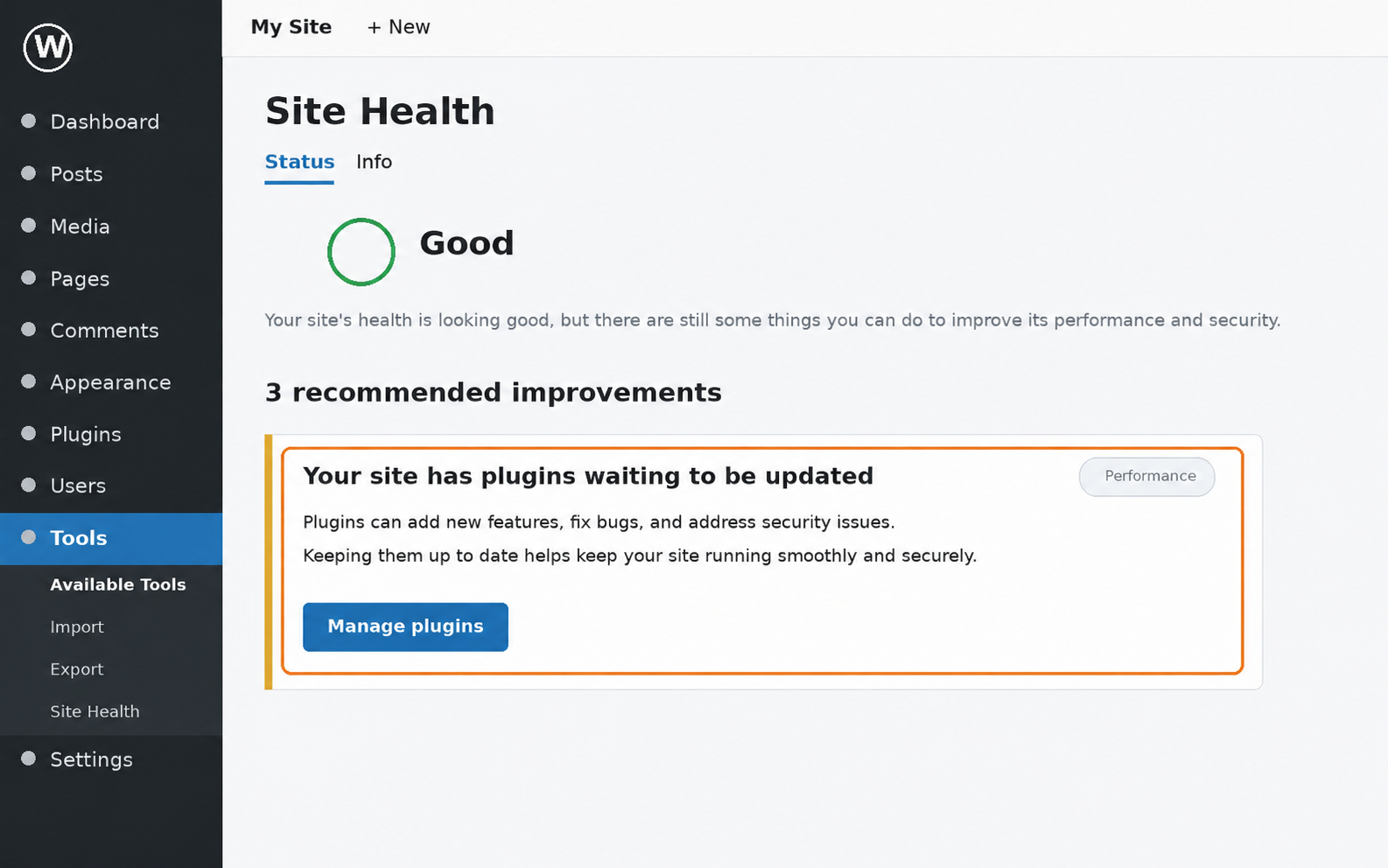
Pending updates. Site Health, the checkup screen WordPress includes under Tools, lists plugins with updates waiting. Here the fix exists; it just isn’t installed. That gap is real: when the File Manager plugin was attacked in September 2020, only 21.3% of sites running it had the patched version in place (ESET WeLiveSecurity).
Closed. A closed plugin carries a notice on its WordPress.org page and gets no more updates while it stays closed. Some closures are temporary: WP GDPR Compliance, a consent plugin, was pulled from the directory in 2018 and stayed out until its flaw was fixed. A plugin that stays closed with no fix announced is the one to replace.
New owner. Plugins get sold, and the author name on the plugin page is where that shows. Display Widgets changed hands in 2017, and code added under the new owner got it permanently removed from the directory.
Warning sign
Where it shows in WordPress
What it means for the campaign
What to do
No update in years
Plugin page, “Last updated”
Whatever breaks on the landing pages stays broken
Update or replace
Untested with recent WordPress
Plugin page warning
Landing pages may break on the next WordPress update
Test pages first
Pending updates
Tools > Site Health
A fixed flaw stays open; a hacked page gets ads disapproved
Back up, update, check
Closed
WordPress.org notice
No fix will come for a break or hack on campaign pages
Replace
New owner
Plugin page author
New code may change what the campaign pages show
Ask who maintains it
Check the plugins behind the landing pages for these signs as if the campaign launched next Monday.
If a sign shows, fix it before the ads run.
How Do You Fix Outdated WordPress Plugins?
Finding an outdated plugin is only the first step. The next challenge is fixing the issue without breaking other parts of the website, especially when a campaign launch is approaching.
There are three main approaches: update, replace, or rebuild. The right choice depends on whether the plugin is still supported, how it interacts with other parts of the website, and how much of the site’s functionality depends on it.
In most cases, updating the plugin is enough. Before making changes, create a backup and test the update in a staging environment to catch potential compatibility issues.
If a plugin is no longer maintained or has been removed from the WordPress plugin directory, replacing it with a supported alternative may be safer. However, removing it requires care, particularly if it controls forms, page layouts, or other features used by landing pages.
A website rebuild is a more substantial decision. It may be worth considering when the site relies heavily on abandoned plugins, outdated page builders, or custom functionality that can no longer be maintained safely.
Whatever approach you choose, test the affected landing pages before launching your ads. Check their mobile layouts, forms, loading performance, and conversion tracking to make sure the campaign is ready to receive traffic.
Updating Outdated Plugins with a Current Backup
Updating an outdated plugin means installing its current version, and doing it only after a current backup of the site is in place. Order matters here. If the update misbehaves, the backup lets the developer put the site back the way it was, instead of rebuilding broken pages while the campaign date gets closer.
WordPress’s own plugin documentation sets the same order: a current backup of the site comes before any plugin update.
Then test. An update can change how a plugin behaves on the front end, so check the key functions right after it, starting with forms, landing pages and anything an ad points to.
Four key functions get checked after every plugin update:
Forms submit and the entries arrive.
Landing pages load.
Pages display correctly on a phone.
Ad destination URLs open the right page.
We run these checks on the campaign pages first, because a broken form there loses the lead from every paid click, while a glitch on an old blog post can wait until morning. Plugin updates are one part of the routine set out in our WordPress maintenance guide.
No developer on the team, or an agency handling the site? The technical steps can stay with them. The marketing team needs answers to three questions from the developer or agency:
Is there a current backup of the site?
Where is the update tested first?
Who checks the campaign pages after the update?
Sometimes there is nothing to update to. The author stopped working on the plugin, or it was pulled from the directory. Then the fix is to replace it.
Replacing a Closed Plugin
A closed plugin is a plugin removed from the WordPress.org directory, and a closed plugin gets no more updates. The rule comes from the WordPress Plugin Review Team handbook: “Closed plugins push no updates.”
So updating is off the table. Whatever version runs on the campaign pages now is the version it stays on.
Sites running Display Widgets started showing spam in 2017, after the plugin was sold to a new owner, and WordPress.org removed it for good; the advice from WP Tavern was short: “find something else to use.” Spam turned up again in 2024, when five WordPress.org plugins, social-sharing and form add-ons among them, were backdoored and some were delisted, as BleepingComputer reported.
That leaves two ways to replace a closed plugin. One is a maintained alternative that does the same job and still gets updates. The other is to replace it with a custom WordPress plugin built for the site, so the code behind the forms or pop-ups has an owner who keeps it current. Either way, write down what the old plugin does on each landing page before the swap, so no form field or tracking setting goes missing on launch day.
One closed plugin is a swap. When several plugins under the campaign pages are closed at once, replacing them one by one stops being enough.
Rebuilding the Website
Rebuilding the website means replacing the pages, or the whole site, when the plugin stack under them (the set of plugins those pages depend on) can no longer be updated or replaced. It is the biggest of the three fixes, and how far it goes depends on how deep the old plugins reach. A page builder that runs every template is a different job from one outdated slider on the home page.
Not every team says yes to a rebuild right away. When it is declined, hand-coded pages built outside the page builder are a workable stopgap, the route Direction.com’s developers took to get the orthodontic group’s pages out quicker.
A stopgap is not a long-term fix, though. The outdated plugin stack is still there, under every page nobody hand-coded, and the next landing page starts from the same old templates.
A rebuild also carries a risk that sits outside the ads, in organic search: the rankings and links the old pages earned over the years, the search equity. When we rebuild a site, we keep the existing URLs wherever we can, point each old URL to its new page where we can’t, and carry the page content over, which is how we approach a WordPress redesign that outdated plugins made necessary. The same URL work protects the ads: an ad that still uses an old destination URL lands on the right new page until its final URL is updated in Google Ads, including when the rebuild moves the site to a new platform as part of a site migration.
The result is campaign pages built on a plugin stack that can be updated again.
How Do You Prevent Outdated WordPress Plugins?
Preventing outdated WordPress plugins means keeping every plugin current and building landing pages that rely on fewer plugins, so the pages are ready by the next launch date instead of waiting on a fix.
Fixing happens after the harm; prevention happens weeks earlier, before any ad spend is booked.
When we set up a WordPress website for marketing teams, a new landing page depends on as few plugins as possible, and each plugin it does rely on has a named maintainer.
Prevention depends on three things working together: a maintenance plan, automatic updates, and better web architecture for marketers. None of them is enough alone.
Maintenance Plan
A maintenance plan names who handles security, updates, backups and technical problems on a site after launch. Simple on paper. In practice, the handover after launch is where we most often see that name go missing: the build team moves on, the marketing team assumes someone is updating plugins, and nobody is.
With a named owner, whether an in-house developer or an agency, plugins get updated and checked before the campaign date, not after the ads start sending traffic. A broken form found during a routine check is a small repair; the same form found by paid visitors means wasted ad spend.
These four lines are what we handle in WordPress maintenance, and they double as a quick ownership test for any site that runs ads:
Security: who watches plugins for vulnerabilities and acts on them
Updates: who updates WordPress, themes and plugins, then checks key functions
Backups: who keeps a current backup before every update
Technical problems: who fixes what breaks before the campaign date
A line with no name next to it is where the next outdated plugin is likely to come from.
No plan stops every break. What the plan decides is who finds the break first. A named owner keeps the plugins current and checks the campaign pages before each launch, so the marketing team hears about a problem from a person rather than from the ad account.
Automatic Updates
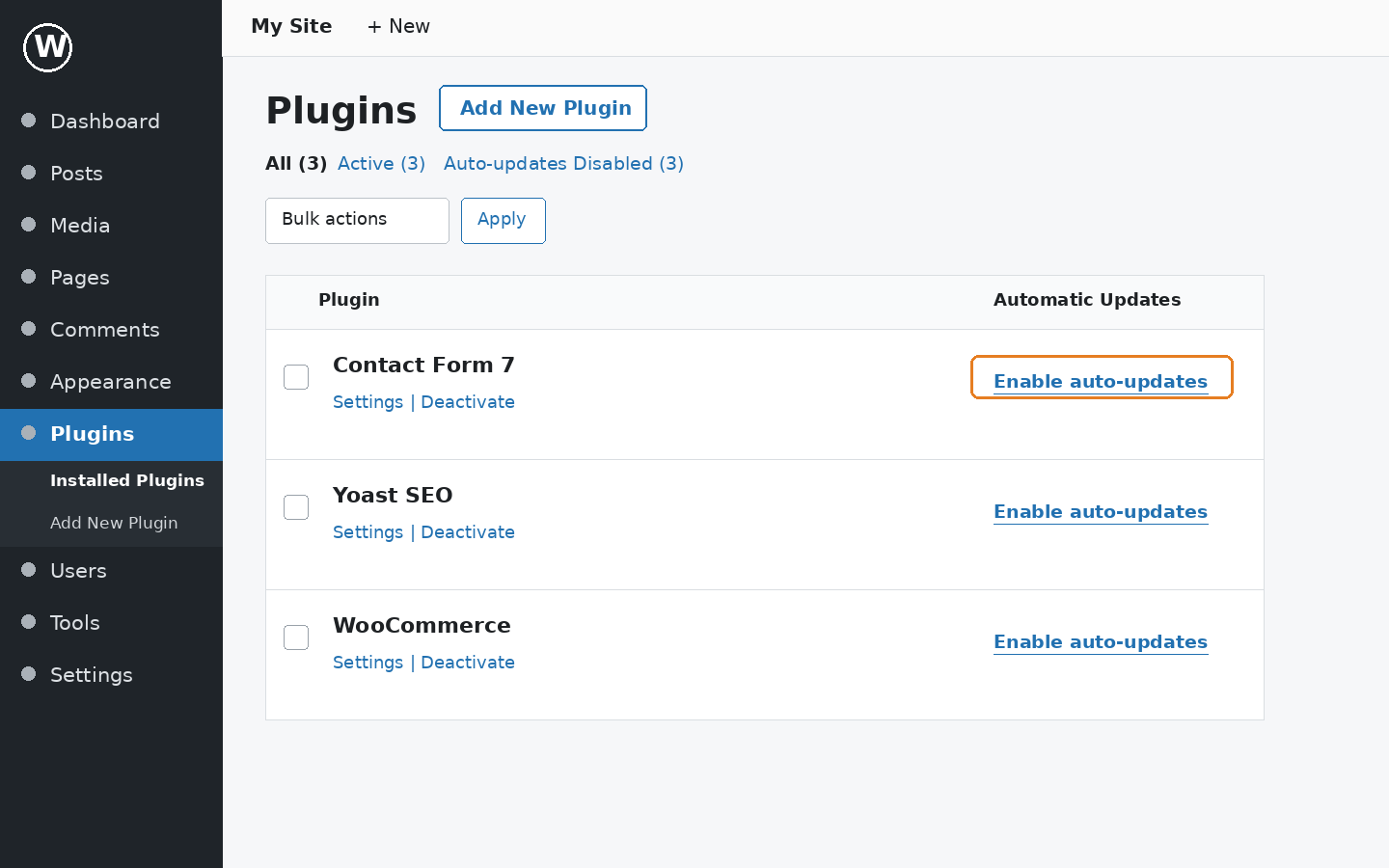
Automatic updates mean WordPress installs a plugin’s new version on its own, without anyone clicking Update. Since WordPress 5.5, administrators opt in to automatic updates plugin by plugin, as the WordPress.org guide to plugin and theme auto-updates describes.
For the plugins under the campaign pages (the page builder, the form plugin, the pop-up tool), that opt-in keeps each one current between maintenance checks. A security release lands without waiting for the next scheduled round. We turn auto-updates on deliberately, starting with the plugins the landing pages rely on, and only on sites with scheduled backups, because an automatic update skips the backup-first order. Page builder updates get the closest look after they run, since a page builder release is the one most likely to shift a layout.
Here is the condition, though. An automatic update still needs someone to check key functions afterwards: forms that submit, landing pages that load, a layout that holds on mobile. It is the same check as after a manual update with a current backup, only now nobody chose when the update ran.
Who runs that check, and how soon, belongs in the maintenance plan. Turn auto-updates on for the page builder, form and pop-up plugins under the campaign pages, then keep the check. Automation changes when an update lands; the check decides whether the owner finds a break before paid visitors do.
Better Web Architecture for Marketers
Better web architecture for marketers is a way of structuring a site so campaign pages depend on as few third-party plugins as possible. Think of it as website architecture planned around the campaign pages a marketing team publishes and their launch dates, not around whichever plugin was popular the year the site went live.
It starts with the pages published most. The marketing team builds each new landing page from sections already developed for the site: the hero, the offer, the form, the reviews. Nobody waits in a developer’s queue before the campaign date.
Underneath those sections sit core blocks, the editing blocks that ship with Gutenberg, the WordPress block editor. Core blocks get updates with every WordPress update, so the parts landing pages depend on stay current without one more plugin to watch. Our Gutenberg vs Elementor guide includes the details on how the block editor gets those updates.
That is how we build sites for marketing teams: campaign pages come from developed sections and core blocks, the plugins that stay are fewer, each one has a job, and we maintain them on a schedule. The developed sections are code too, so they need a named owner and updates of their own.
Plugins stay on the site, but one outdated plugin no longer sets the date the landing page goes live.
Outdated WordPress plugins can turn up on any site. Build the site so the date campaign pages go live depends on the campaign calendar, not on a plugin’s update schedule.





 ChatGPT
 Claude
 Grok
 Gemini