WordPress Global Styles: Complete Guide

Table of Contents
WordPress Global Styles controls how an entire WordPress site looks – from typography and color palettes to layout structure and block-level spacing. This styling system operates through a configuration layer tied directly to theme.json, the file that defines shared design rules across block themes. Rather than editing each template or block individually, Global Styles centralizes those decisions in a single interface and configuration source.
The Site Editor makes these controls visible, and the theme.json file contains the data for the controls. This relationship affects the overall process of building a theme, the experience of working with design settings as a Site Editor, and the design’s front-end output.
The following is a broad overview of the entire process, from the role of Global Styles in defining and applying styles, the interface of Global Styles, the role of style variations in increasing flexibility, and the role of Global Styles in the overall WordPress development process, including the benefits and limitations of the feature.
What are WordPress Global Styles?
WordPress Global Styles is a site-wide styling feature integrated with the block editor that lets users control the styling of the entire block theme. This feature essentially controls the styling of the site, including typography, colors, and block-level styling, through the site-wide configuration layer and the theme.json file. It essentially replaces the styling of different pages and templates with a single configuration file that controls the styling of the entire site.
WordPress Global styles are a core part of Full Site Editing and are exclusively used with block themes, the latest theme development pattern in WordPress that has replaced the older Customizer-based theme development pattern.
What WordPress Global Styles Controls
WordPress Global Styles define the common visual characteristics that guide the way in which the site’s design is rendered on the screen. At the highest level, it controls the typography styles, including the font family, font sizes, line heights, and letter spacing that apply to all text-bearing blocks on the site unless overridden on a block-by-block basis. Colors are also managed at this level of the site, with site-wide color schemes, background, text, link, and gradient colors all controlled through Global Styles.
Layout and spacing are also managed at the same level of the site as the other visual styles. This includes the content width, wide alignment boundaries, block gap, padding, and margin styles, all of which are set globally and apply equally to all templates. In addition to these visual styles, Global Styles also control the tools and presets available to the editor, including the ability to use custom colors, adjust spacing, and access other typography tools.
It also controls the blocks on the site, with the Global Styles applying the default styles to different types of blocks, including paragraphs, headings, buttons, and images. This way, the heading block will have the same look and feel site-wide without any further intervention. If the block needs to be overridden in any way, the block-level styles are applied, providing layered control over the site’s styles.
How Global Styles Relate to Full Site Editing
WordPress Global Styles is the control layer for WordPress’s Full Site Editing. Full Site Editing is the system that allows WordPress to control headers, footers, templates, and content blocks as block-based structures that can be edited. This is done using the WordPress Gutenberg block editor. Global Styles is another dimension of the WordPress interface that controls how all those structures are visually presented.
The relationship between Full Site Editing and WordPress Global Styles is not just surface-level. Full Site Editing is the editing system that allows WordPress to build site layouts using blocks and templates. Global Styles is the common rules system that those blocks and templates will inherit. Full Site Editing is necessary for the WordPress Site Editor. Global Styles are necessary for controlling how the WordPress Site Editor output is presented to visitors.
Both Full Site Editing and WordPress Global Styles require block themes. Block themes enable the WordPress Site Editor and make the Global Styles tab visible. This tab reads the settings in the theme.json file and allows them to be applied and controlled from a single location. Global Styles is the styling component of Full Site Editing.
Global Styles vs. the WordPress Customizer
WordPress Global Styles differs from the WordPress Customizer in scope, architecture, and theme dependency. WordPress Customizer is based on the classic theme model. Each theme has its own set of appearance settings that can be controlled through PHP-based controls. The appearance settings are generally limited to what the theme developers want to offer for customization.
For example, a classic theme can offer options for selecting a header image, a color scheme, and layout options. All other settings must be handled through CSS and/or code.
Global Styles control the appearance of a WordPress site. They are used to apply all settings, such as color, font, spacing, etc., together.
This is different from the Customizer. In classic themes, each theme has its own set of design options. This means the available options for change depend on how the theme was written. Global Styles do not work this way. They are based on a shared system. This means the site’s appearance can be consistently controlled across all block themes.
The theme type determines whether Global Styles are used. Classic themes use the Customizer. Block themes use the Site Editor and Global Styles. These two options are mutually exclusive. If a block theme is active, the Customizer will not be used. If a classic theme is active, Global Styles will not be used.
The change comes from how WordPress controls a site’s appearance. In classic themes, PHP settings are used. In block themes, a central JSON-based setup is used.
How WordPress Global Styles Works
WordPress’s global styles feature is based on a model that starts from configuration, moves to structured styling data, and finally to site-wide styling. The first step is in the theme.json file, where global configuration and styles are defined in a structured JSON format. WordPress reads this file and interprets its values, generating corresponding CSS custom properties and styles.
The CSS styles are then applied according to a managed cascade, which is essentially a hierarchy that defines which source is used for a style when multiple sources are available. Ultimately, this results in a deterministic site-wide styling output that starts from site-wide defaults and moves through block styles to user customizations.
The theme.json Configuration File
WordPress Global Styles uses theme.json as its primary configuration source. The theme.json file is located in the block theme’s root directory. It contains the structured data used for the design tools and the final visual presentation on the site. All settings in the Global Styles interface, such as font family, colors, and white space, are derived from the theme.json file.
The theme.json file is not the style sheet. It is the JSON-structured layer used for the site’s configurations. The layer is separated into well-defined areas for the design.
The WordPress parser uses the theme.json file during theme initialization, before any template is rendered. As such, it can set default values for the entire site. The data structure of the theme.json file is similar to what the site editor displays. The data displayed in the site editor, the data the site editor uses for presets, and the default styles used are all found in the theme.json file.
Therefore, the theme.json file is the only source for the Global Styles. A block theme’s design tools are defined by the theme.json file. The CSS used for the site’s frontend is also derived from the theme.json file. The relationship between the configuration source and the final styling is straightforward.
Settings and Styles Sections in theme.json
The WordPress Global Styles system has two main sections in the theme.json file: one for the design tools and one for the site’s appearance. The settings section is for the design tools and determines the availability of the tools, the color palette to be used, the ability to have custom font sizes, the spacing units to be used, and the layout settings. The styles section determines the actual output and is responsible for the colors to be used, the font sizes to be applied, the spacing values, and the layout settings.
The purpose of separating the settings and styles in the WordPress Global Styles system is to have clear boundaries and defaults. In settings, you can set the color boundaries by registering a palette. In Styles, you can set the default colors to use from the palette. In settings, you can also set the boundary for having custom colors by disabling them. This will prevent the custom color picker from being visible in the editor. However, the actual colors to be used will be those set in styles.
The settings and styles sections can have both global and block declarations. In styles, a typography rule can be set to apply to all text-containing blocks. This can be further restricted to a single block type by adding a block declaration. The same case applies to settings. In settings, a global setting can be set to enable a control for the entire site.
CSS Custom Properties Generated by Global Styles
WordPress Global Styles translates the values defined in theme.json into CSS custom properties that are injected into the site’s stylesheet. Each preset color, font size, spacing value, or custom setting declared in the configuration file maps to a corresponding CSS variable. A color palette entry with the slug primary becomes –wp–preset–color–primary. A font size preset named large becomes –wp–preset–font-size–large. WordPress handles this naming automatically based on the configuration structure.
The generated variables are the core of the theme’s styling. Blocks, templates, and other elements will use these variables instead of direct values. This means that if the configuration file changes, all occurrences of the variable in the theme will be automatically updated.
The custom settings are further extensions of this process. A theme can have any set of values in the ‘settings.custom’ section of the configuration file. These values are then automatically converted to CSS custom properties. This makes the theme.json file the central hub for all tokens on the site, with all values flowing through the generated variables into the site’s rendered CSS.
Style Cascade and Specificity in Global Styles
WordPress Global Styles applies its styling through a structured cascade that determines which declarations take priority when multiple style sources exist. WordPress manages the style hierarchy deliberately, layering sources from lowest to highest priority: core defaults sit at the base, theme-level styles from theme.json override those defaults, and user customizations made through the Site Editor override everything the theme declared.
Within this cascade, specificity follows the scope of the declaration. Global styles define the broadest defaults. Block-level styles narrow the scope to specific block types. Element-level styles target HTML elements, such as links or headings, within a block. Each step down the hierarchy gains more specificity, so a paragraph block’s color declaration overrides the global text color without conflicting with it.
WordPress also manages the CSS output to prevent specificity collisions. Instead of generating rules with escalating selector complexity, the system uses a flat specificity model combined with CSS layers and careful ordering. This keeps the front-end output clean and predictable; higher-priority sources override lower ones without relying on !important declarations or deeply nested selectors.
WordPress Global Styles Interface
How to Access Global Styles in the Site Editor
The WordPress Global Styles can be accessed by using the Site Editor in any active block theme. The route to WordPress Global Styles begins in the WordPress admin menu under Appearance > Editor. This opens the WordPress Site Editor. From there, the Styles icon in the WordPress editor toolbar in the top-right area opens the WordPress Global Styles panel.
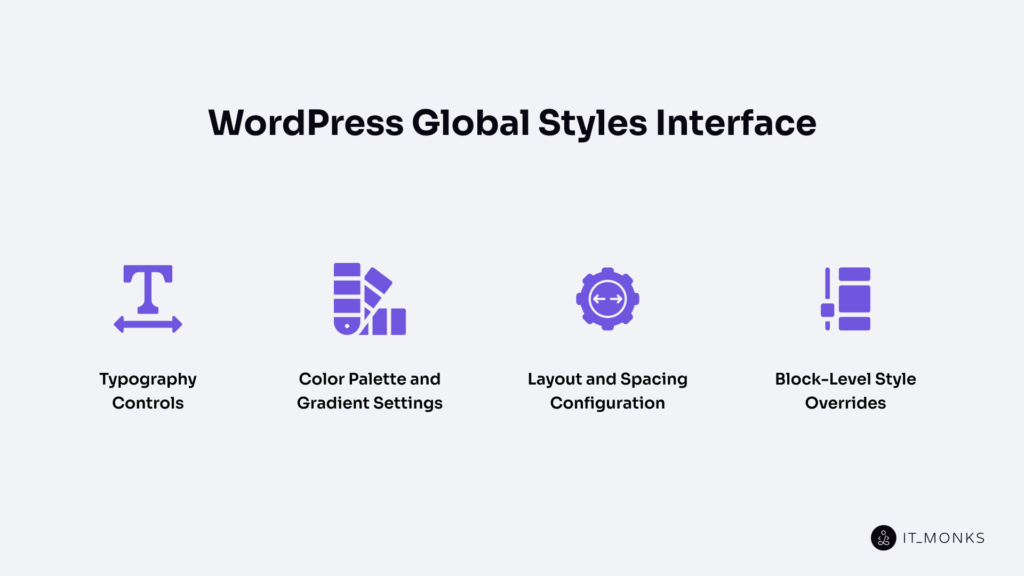
This is the place where you can control all aspects of the site’s design. The Styles icon opens options for typography, colors, layout, and block-level styles. It will also open up options for style variations and additional CSS. All changes made here will be site-wide unless specified otherwise for individual blocks and pages.
Typography Controls
WordPress’s Global Styles controls site-wide text styling via the typography options in the Styles panel. The typography options enable site-wide control over the font family, along with other properties such as font size, font appearance, line height, letter spacing, text decoration, and letter case.
Each and every one of these typography properties is site-wide and is applied to all site-wide text-rendering blocks, including paragraphs, headings, lists, buttons, and other text-rendering elements that can inherit these properties as defaults. The typography properties are available within a structured panel, with each property in a separate input field, allowing easy, convenient site-wide adjustment from a single location.
In addition to site-wide typography properties, individual block-level typography properties can also be adjusted via this panel. By selecting a particular block type, such as headings or paragraphs, the same typography properties will be available, allowing individual block types to override site-wide defaults without affecting all other site-wide elements.
Color Palette and Gradient Settings
WordPress Global Styles controls site-wide color styling through the color and gradient settings in the Styles panel. The color controls define the site’s palette, which is a set of named color presets that blocks and elements reference for text, background, link, and accent colors. These presets appear as selectable swatches in the editor whenever a block supports color options.
Background color and text color are set at the global level, establishing the site’s base visual contrast.
Link colors, including hover states, are configured separately. Gradient presets follow the same pattern: a set of predefined gradients that any gradient-supporting block can apply.
The palette defined here is functional. Every color preset maps to a CSS custom property, so changing a palette entry in Global Styles propagates that change to every block and element that references it. Duotone filters, which control image color treatment, are also managed from this section when the theme supports them.
Layout and Spacing Configuration
WordPress Global Styles controls structural layout and spacing values through dedicated settings in the Styles panel. The layout controls define the default content width and wide width for the site, the maximum widths that constrain how wide content and wide-aligned blocks can stretch within templates.
Spacing controls manage padding and block gap at the global level. The padding represents the space in the content area, and the block gap represents the space between two blocks. These values apply to all templates unless overridden in a template or block.
The units allowed in the editor for spacing settings, as well as the allowed custom values or value scales, are also defined in the rules. These rules define the layout structure, which applies to all pages on the site.
Block-Level Style Overrides
The WordPress Global Styles feature also includes block-level overrides. This is where every block type can have its own set of style options within the global styles framework. In this feature, the Styles panel shows a list of blocks. When a block is selected, only that block’s style options are displayed.
For example, a button block can have its own background color, font size, and padding. These can differ from the global styles. A heading block can have its own font family and weight. These are not replacements for global styles, but extensions. If a block type is not overridden, it will default to the global styles.
There is a hierarchy here. Global styles are at the foundation. Then there are the block overrides. These override specific elements if needed. This override is for every block of that type. It is not for individual blocks. Every button block will have this override unless edited individually in the editor.
WordPress Global Style Variations
WordPress Global Style Variations are alternative design configurations that change the site’s look without altering the theme’s underlying templates, blocks, or functionality. A Global Style Variation is a separate JSON file, similar to theme.json, that can redefine any available settings and styles, inheriting all other parts from the original theme.json file.
This feature allows a single block theme to have multiple looks or identities. For instance, a variation can have a dark color scheme with condensed typography, while another variation can have a serif typography stack with increased spacing.
The underlying templates and layout structure of the site are the same, but the design can be changed by switching between style variations.
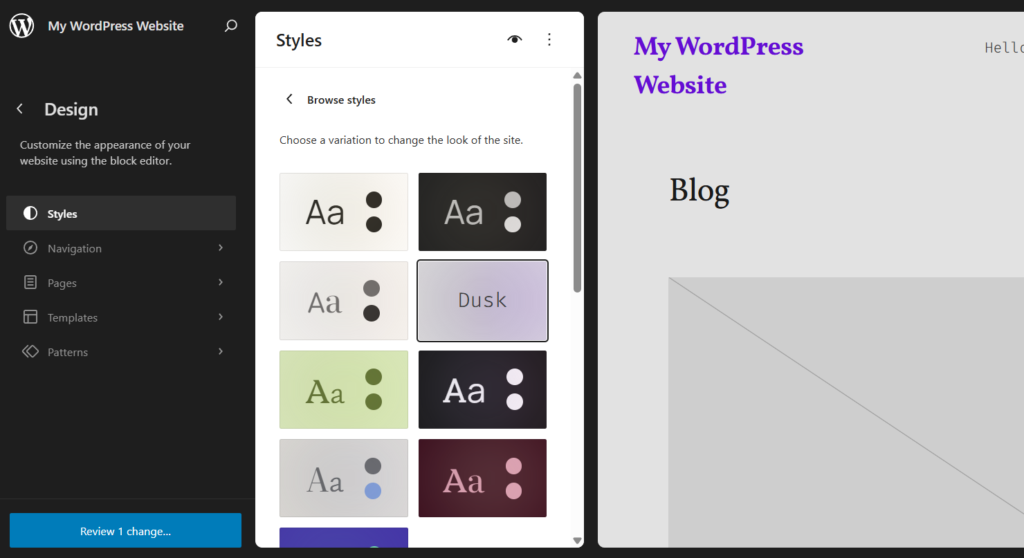
The style variations are available in the Global Styles panel of the Site Editor, allowing editors to choose from the available variations, preview the changes each variation makes to the site, and apply a variation with a single selection.
How to Create Custom Style Variations
A custom WordPress Global Style Variation is created by adding a JSON file to the theme’s /styles/ directory. Each file defines an alternate set of global settings and styles that WordPress detects and makes available in the Site Editor.
- Create a new JSON file in the /styles/ folder of the active block theme.
- Name the file with a descriptive slug, such as soft-dark.json.
- Add a title and version at the top level so WordPress can identify and display the variation.
- Define the settings and styles properties that differ from the base theme.json; only the overrides are needed, not the full configuration.
- Save the file.
- Open the Site Editor, go to Styles, and browse the available variations.
- Verify that the new variation appears and previews correctly.
{
  "version": 2,
  "title": "Soft Dark",
  "settings": {
    "color": {
      "palette": [
        { "slug": "base", "name": "Base", "color": "#111111" },
        { "slug": "contrast", "name": "Contrast", "color": "#f5f5f5" }
      ]
    }
  },
  "styles": {
    "color": {
      "background": "var: preset|color|base",
      "text": "var:preset|color|contrast"
    },
    "typography": {
      "fontSize": "18px"
    }
  }
}
Once WordPress detects the file in the /styles/ directory, the variation becomes selectable in the Global Styles panel alongside any other variations bundled with the theme.
How to Switch Between Style Variations
WordPress Global Style Variations are switched directly inside the Site Editor through the Styles panel.
- Open the WordPress admin and go to Appearance → Editor.
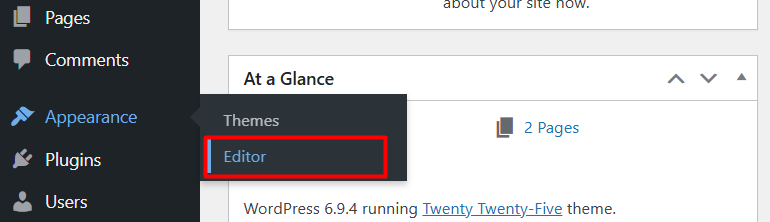
- Select the Styles icon in the top-right area of the Site Editor.
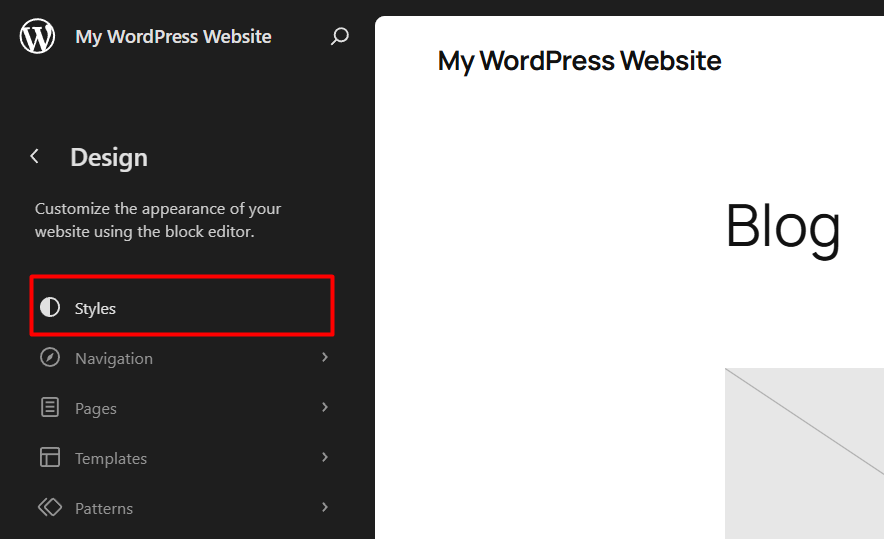
- Browse the available style variations displayed as visual previews in the panel.
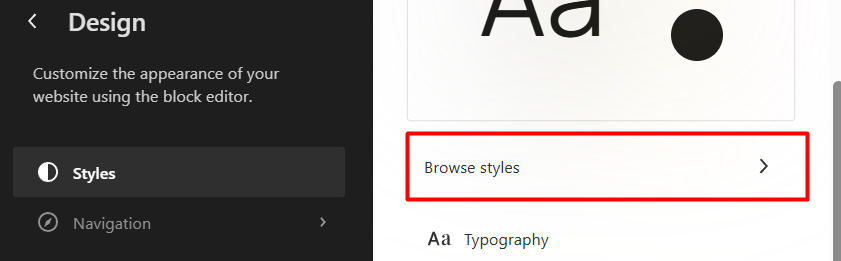
- Preview any variation by clicking on it; the editor updates to reflect the new design.
- Choose the variation that fits the intended site appearance and save the changes to apply the selected variation site-wide.
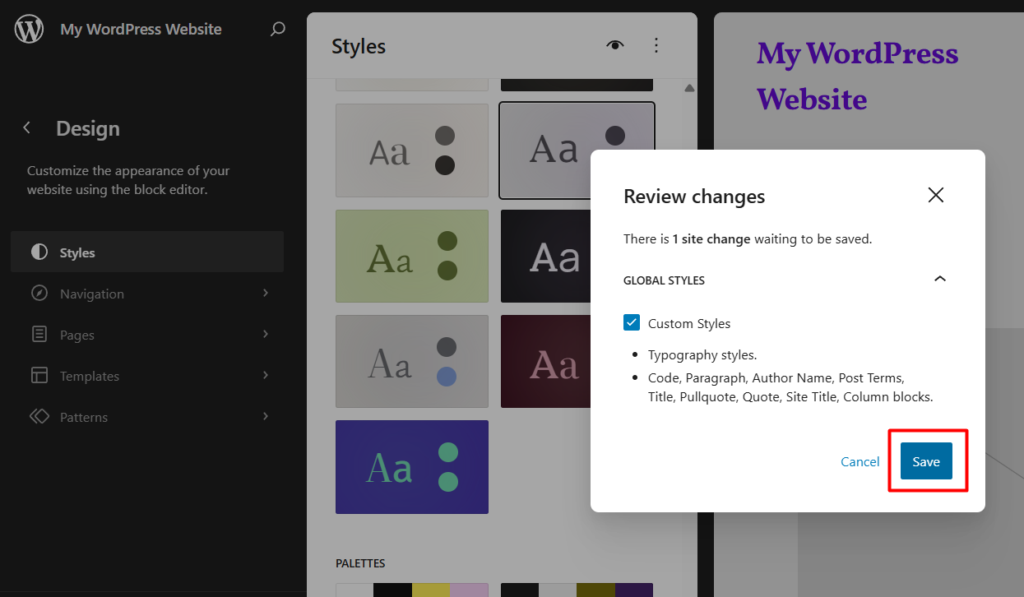
The switch takes effect immediately after saving. All global settings and styles defined in the selected variation override the base theme.json values, while any property not redefined in the variation falls back to the theme’s defaults. The site’s templates, blocks, and content remain unchanged; only the design layer shifts.
WordPress Global Styles for Theme Development
How Global Styles Change Theme Development Workflow
WordPress Global Styles is a new paradigm for theme development that replaces a fragmented, file-by-file styling methodology with a more centralized, configuration-based one. Until Global Styles was developed, it was common for WordPress theme developers to disperse styling decisions across multiple stylesheets, PHP template files, and Customizer option pages.
For example, a change in a color scheme might involve altering three separate CSS files. Similarly, a change in a typographical scheme might involve altering a stylesheet and a PHP-based font-loading scheme.
With Global Styles, all of this is handled in a single, structured file: theme.json. Here, developers can store all of a given theme’s design system, including colors, fonts, spacing, layout constraints, and block-specific overrides, in a single location. This allows for a more centralized, configuration-based methodology for styling a given WordPress website. Changes to a given preset value in Global Styles automatically update all related CSS custom properties, so developers do not have to search and replace values across multiple files.
The block-based methodology for template development is another feature of Global Styles that helps to centralize a given WordPress website’s styling. Blocks are used to build a given template, and blocks are, in turn, styled by Global Styles.
By requiring teams to follow coding standards, the structure of theme.json ensures design decisions are auditable and version-controlled, unlike the scattered use of CSS. This is especially evident in professional WordPress development, which uses centralized configuration rather than the scattered styling approach of classic themes.
Block Presets and Per-Block Configuration
WordPress Global Styles defines block presets as shared default style values that every instance of a block type inherits. A button block, for example, inherits the preset background color, font size, and border radius defined in the global configuration. A heading block inherits the preset font family and weight. These defaults create visual consistency across the theme without requiring manual styling of each block instance.
Per-block configuration adds precision on top of that foundation. In theme.json, the settings and styles sections accept block-specific entries that override or extend the global defaults for individual block types. A paragraph block can have a different line height from the global default.
A quote block can use a distinct border style. These per-block rules are scoped; they affect only the targeted block type, leaving everything else untouched.
Together, presets and per-block configuration create a two-tier styling model. The first tier establishes uniformity. The second tier introduces controlled variation where the global defaults do not fit the block’s purpose or design intent.
Custom Presets and CSS Custom Properties
WordPress Global Styles defines custom presets in theme.json as reusable design values that WordPress automatically converts into CSS custom properties. Standard presets, such as colors, font sizes, and spacing scales, follow a predefined structure and generate variables with predictable naming patterns, such as –wp–preset–color–primary or –wp–preset–font-size–medium.
Custom presets go further. The settings. custom section in theme.json accepts arbitrary key-value pairs, and WordPress generates CSS custom properties from each entry. A custom value for line-height.body becomes –wp–custom–line-height–body. A custom value for spacing.gutter becomes –wp–custom–spacing–gutter. This turns theme.json into a design token registry where every meaningful value, whether standard or theme-specific, exists as a reusable variable.
The practical outcome is a styling system where no value is hardcoded. Block styles, template styles, and even custom CSS added in the editor can reference these properties. A single update to a custom preset in theme.json propagates across every reference point, keeping the theme’s design output consistent and maintainable.
Benefits of WordPress Global Styles
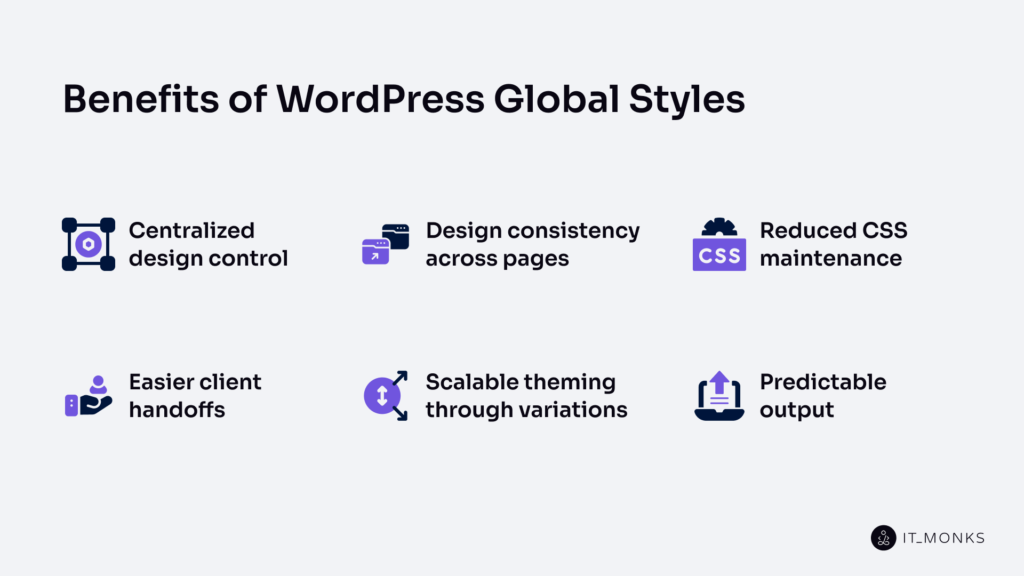
WordPress Global Styles provides several concrete advantages for site styling, theme development, and ongoing maintenance.
Centralized design control. All site-wide styling decisions, such as colors, typography, spacing, and layout, are managed from one configuration source and one interface. This eliminates the need to edit multiple stylesheets or template files when a design change is needed.
Design consistency across pages. Global Styles enforces shared visual rules across every page, post, and template. A color palette change or typography adjustment applies site-wide automatically, preventing the visual fragmentation that comes from managing styles per-page or per-template.
Reduced CSS maintenance. Because Global Styles generates CSS custom properties from structured configuration, themes need far less handwritten CSS. Preset values propagate through variables, so updating a single value in theme.json replaces what used to require search-and-replace across multiple files.
Easier client handoffs. The Site Editor exposes Global Styles through a visual interface that does not require code access. Clients and content editors can adjust typography, colors, and spacing without touching theme files, while the theme’s configuration constrains those changes to prevent breaking the design system.
Scalable theming through variations. Style variations let a single block theme offer multiple visual configurations. Adding a new design option means adding a JSON file, not rebuilding templates or duplicating stylesheets.
Predictable output. The managed cascade and CSS custom property system produce deterministic styling. The relationship between configuration input and rendered output is direct, auditable, and version-controllable.
Limitations of WordPress Global Styles
Global Styles in WordPress provides a structured styling system. However, this structured styling system has its own set of restrictions that may be problematic for certain workflows.
Block theme dependency. Global Styles demands a block theme. Classic themes cannot utilize Site Editor or Global Styles. Therefore, classic themes must be migrated to a block-based theme. This includes restructuring templates, migrating Customizer settings, and recreating PHP-based styling logic in a theme.json file.
Customization limits. The design controls include typography, color, spacing, and layout. However, it is not possible to customize all CSS. Therefore, for more complex styling, including animations, transforms, and pseudo-element styling, additional CSS is required. This is suitable for standard themes but may be a problem for more complex themes.
Configuration complexity for advanced themes. For simple themes, a standard theme.json is used. For more complex themes, including those that require many block-specific overrides, presets, and nested configurations, this is a problem. This is due to a flat JSON format that is not modular as developers expect.
Learning curve. For developers used to classic WordPress themes, including functions.php, template hierarchy, and enqueueing styles, this is a conceptual change. Therefore, developers must learn how settings differ from styles, how styles cascade, and how CSS custom properties are generated.
Limited backward compatibility. Themes built for Global Styles cannot be easily migrated back to a classic workflow. A block theme without a block-based environment is effectively rendered without a styling system. Therefore, this is a commitment to block themes.
Contact
Don't like forms?
Shoot us an email at [email protected]
