Explore our specialized services, tailored solutions, and industry expertise to elevate your digital presence. From custom WordPress development to seamless integrations, we build high-performing websites that deliver impact.
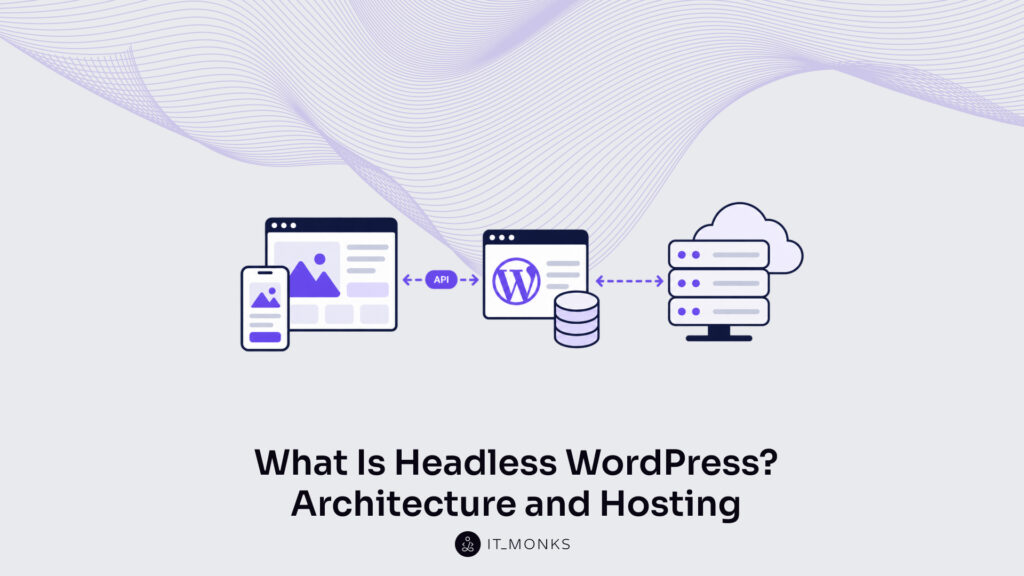
Headless WordPress is WordPress used as a content store and editorial interface only, with the public site rendered by a separate frontend application that pulls content through an API. WordPress ships coupled, and headless is a way of using it rather than a WordPress edition: there is no separate download, no headless licence, and no part of core that has to be swapped out. A headless WordPress content management system is the same install editors already know, minus the theme layer that turned database rows into rendered pages.
So what is a headless WordPress site? It is one project split across two deployables, each with its own host, build process, and recurring bill. A WordPress headless build has a definition and a decoupled model behind it, a three-part architecture, two hosting surfaces whose costs stack, a short list of gains and costs, one condition that decides when a site needs the split, three phases of work to reach it, and a yes-or-no answer on whether WordPress qualifies as a headless CMS at all.
The Headless Model Defined
The headless model means managing content in one system and delivering it through another. WordPress headless builds keep authoring, revisions, taxonomies and media in the WordPress database, then hand finished content to whatever application is responsible for display. Nothing about the content itself changes; what changes is which piece of software decides how that content looks.
The term comes from the part that gets removed. In a standard install the theme is the head: it receives a request, queries the database, and returns markup a browser can paint. Take that head off and everything behind it keeps working. The editor still loads, the database still stores, content still resolves over an API. The install no longer renders a public page. A headless WordPress CMS is a complete content operation with no presentation layer attached to it. Two framings account for it: headless WordPress as one member of a wider headless CMS class, and decoupling as the architectural state that class describes.
Headless CMS as the Parent Concept
A headless content management system is any content management system that stores, edits and serves content without rendering the public pages built from it. The class is wider than WordPress. Several platforms were designed headless from their first release and have never shipped a theme layer. Headless WordPress belongs to that class by configuration rather than by design, and that difference is the whole point: the same software runs either way.
Membership in the class carries consequences. A headless WordPress CMS inherits the category’s traits (API-first delivery, frontend independence, no rendering of its own) while keeping what purpose-built headless platforms lack: the post and taxonomy model, editorial roles and revisions, and the plugin library built around them. Running WordPress as a headless CMS is a trade between two mature arrangements, not an upgrade. What the class describes in the abstract, decoupling describes as a concrete architectural state.
The Decoupled Architecture Model
Decoupled architecture separates the system that manages content from the system that presents it, and WordPress supports both states. Coupled, one PHP application does everything: a request arrives, WordPress queries the database, the active theme renders markup, and the response leaves from the same server. Decoupled, the request never reaches WordPress at all. It reaches a separate frontend application, which has either already fetched the content it needs from the WordPress API or fetches it on demand.
Decoupled and headless describe the same arrangement from two angles. Decoupled names the separation; headless names the missing presentation layer. In fact, the two words are used interchangeably. One usage keeps them apart: a progressively decoupled build, where WordPress still renders some pages while a separate frontend handles others, is decoupled in part without being headless. A fully headless build is architectural rather than partial: two applications, two deploy targets, two sets of credentials, and three parts to assemble.
Architecture of a Headless Build
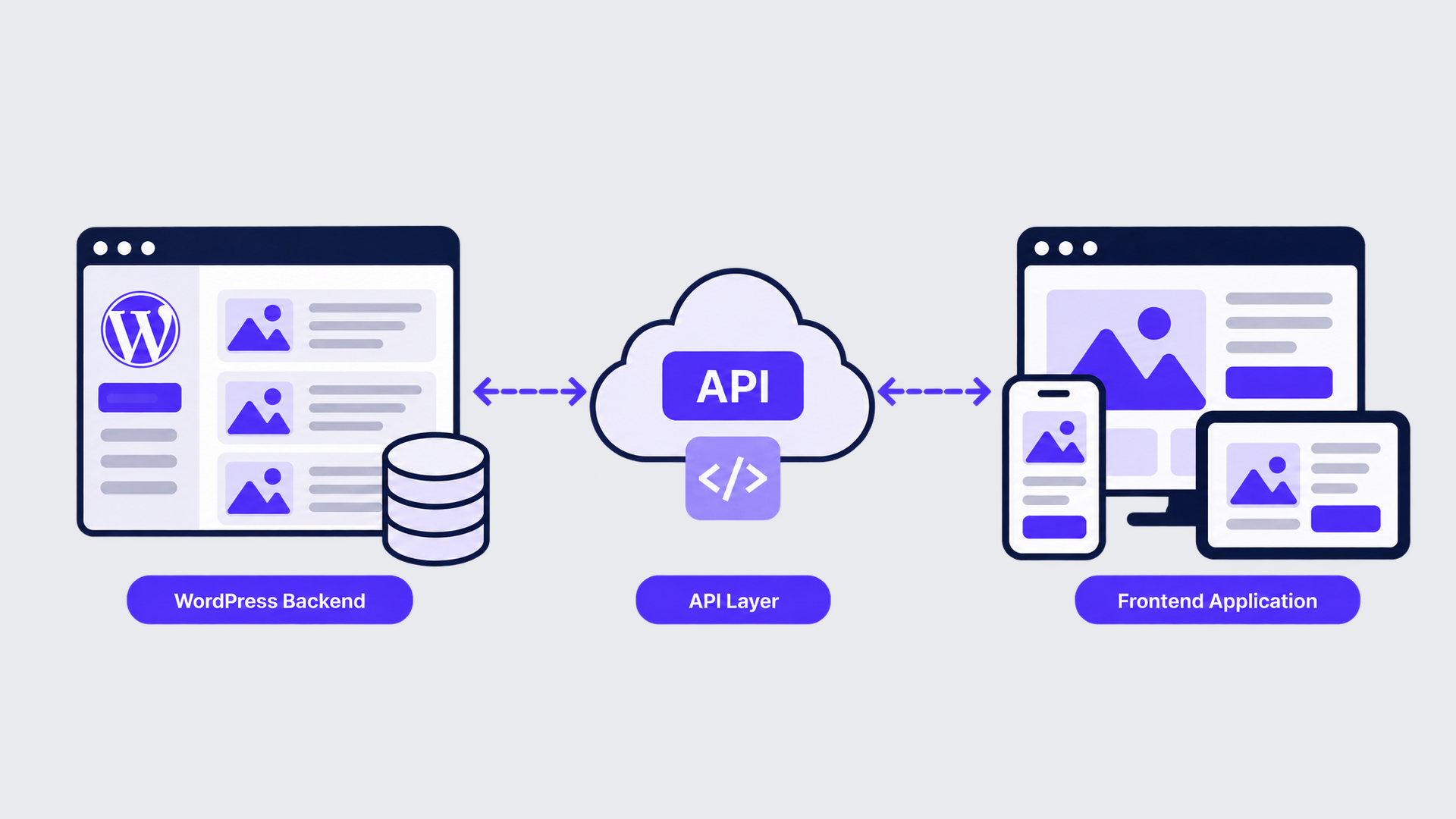
Every headless WordPress build has three parts. WordPress itself holds and manages the content. A query layer exposes that content over HTTP as structured data. A frontend application requests the data and renders the pages a visitor actually sees. A headless WordPress site is the sum of those three, and it runs one way: content in, data out, pages rendered.
What makes the arrangement headless rather than merely modular is that the three parts are separately deployable: each is built, versioned and shipped on its own schedule. The backend holds the content, the query layer exposes it, and the application renders what that layer returns.
The WordPress Backend
The WordPress backend keeps everything editorial. Posts, pages, custom post types, taxonomies, media, revisions and scheduled publishing stay where they were, as do user roles and capabilities, so an editor’s permissions survive the move unchanged. The database remains MySQL or MariaDB. Structured fields keep working too, with Advanced Custom Fields still the common way to define them.
One thing stops. The theme layer is no longer the delivery surface: templates render no public pages, and plugins that inject markup, scripts or styles into a theme have nothing left to inject into. WordPress in a headless build is an authoring and storage system whose output is data, and that data has to get out through a layer built for the purpose.
The API Layer
The API layer serves content out of WordPress as structured data, and it is the only point where the two halves of a headless build touch. Two options carry almost all of this work. The WordPress REST API ships inside core and exposes posts, pages, taxonomies, users and media at fixed endpoints that return JSON. WPGraphQL, a plugin, exposes one endpoint and a typed schema, so a frontend asks for exactly the fields it needs.
Which one fits is an architecture decision, not a matter of taste, and the usual deciding factor is how many separate content types a single page assembles: the more a page combines, the more a typed schema earns. The REST side of that decision is set out in a dedicated REST API headless architecture guide, and a WPGraphQL query layer carries design questions of its own. Either option feeds the same consumer: the frontend application.
The Frontend Application
The frontend application is a separate program that consumes the API and renders what visitors see. It is not a WordPress theme and does not run inside WordPress. It runs as its own codebase, with its own dependencies, build output and release cycle, and treats WordPress purely as a content source.
Frontend frameworks used for headless WordPress include React, Vue, Next.js, Nuxt and Svelte, with Gatsby behind a generation of earlier builds. A Next.js headless WordPress frontend and a headless WordPress Vue build differ in tooling, not in architecture. A separate application also needs a separate place to run.
Headless WordPress Hosting
Headless WordPress hosting needs two accounts, not one. A headless build splits delivery across two hosting surfaces, because the WordPress backend and the frontend application are separate deployables with incompatible runtime needs: one requires PHP and a database, the other requires a build step and static or edge delivery. Neither is served from the other’s stack.
Two surfaces usually mean two recurring bills. They also mean two sets of credentials, two uptime records, two patch schedules and two places a deployment can fail. Hosting headless WordPress therefore involves two procurement decisions instead of one, and the requirements differ enough that both are rarely bought from the same vendor. The backend carries the more familiar of the two requirement sets.
Hosting the WordPress Backend
Hosting headless WordPress starts with the backend, and on that side it stays a PHP and database job. A decoupled install still needs a PHP runtime, a MySQL or MariaDB database, object caching, cron, and somewhere to keep uploaded media, so the host categories that suit a coupled install (managed WordPress platforms, general-purpose virtual servers, container platforms) remain usable.
What changes is which performance number matters. Page-render time for anonymous visitors stops being the primary metric, because in a headless build anonymous visitors never reach this host. API response time takes its place: how fast the backend answers a content query during a build or on request from the frontend.
Security posture changes with it. A backend that serves no public pages can be locked down hard (restricted by IP address, placed behind authentication, kept off the public domain entirely) because the only clients it answers are the frontend build process and the editors who sign in. The frontend it answers runs on an altogether different class of platform.
Hosting the Frontend
Hosting the frontend means a different class of platform. This side runs no PHP and needs no database. What it needs is somewhere to build the application, store the resulting assets, and deploy them to edge locations close to visitors, which is what static hosting and edge rendering platforms such as Vercel, Netlify, and Cloudflare exist to do.
The build step is the real difference. On a coupled site, publishing a post changes what visitors see immediately. On a decoupled one, the frontend applies the change according to the rendering strategy it was built with. Deploying the frontend becomes part of hosting rather than something that happens before it: a pipeline watches the repository, builds the output, and deploys it once it passes. Each surface then bills on its own terms.
What Headless Hosting Costs to Run
Headless hosting costs to run take a four-part shape rather than a single monthly figure. Two subscriptions replace one, since the backend host and the frontend platform bill separately. Build minutes become a metered cost on the frontend side, scaling with how often content changes and how long each build takes. A deploy pipeline has to be maintained, which is engineering time rather than a line item. And two environments have to be patched, monitored, and backed up instead of one.
Those four parts together cost more than a single coupled stack at equivalent traffic, in money and in engineering attention both. What the arrangement returns for that outlay is the other half of the decision.
Benefits and Trade-offs of Going Headless
Headless WordPress offers six benefits:
Multichannel delivery is the largest: one content source feeding several delivery surfaces.
Frontend freedom comes with it.
So does a smaller public attack surface.
So does a redesign path that replaces the frontend and leaves the content in place.
Faster first paint on a prerendered or edge-served page is one more.
Content reuse across a second brand’s site is the last.
The costs are structural rather than incidental. Visual editing of the live page goes away. Routine content and layout changes become developer-dependent. Two environments replace one, with two release paths to keep current. Preview, plugin output, and everything a theme used to render for free must be rebuilt on the frontend. Search, redirects, and metadata controls need frontend equivalents. The range of roles to hire widens. Weighing headless WordPress benefits and trade-offs against each other is a separate exercise from naming them, and it begins with one question about delivery.
When Does a Site Need to Go Headless?
A site needs to go headless when its delivery requirements exceed what a WordPress theme can provide. That one condition decides most cases. A theme renders pages for a browser, so a project whose content must also arrive on an application screen, a kiosk, a connected device or a second brand’s domain needs a delivery layer the theme cannot supply.
Where the requirement stops at pages on one domain, the coupled arrangement (traditional WordPress, in the usual phrasing) already satisfies it, and a WordPress headless build becomes an expense without a return. Budget, team composition, and timeline then adjust that answer; any serious headless WordPress decision framework treats them as modifiers, not as the deciding question. Two kinds of projects follow from the condition: those it fits, and those it does not.
Projects That Suit a Headless Build
Three project shapes suit a headless build.
One content source feeding several surfaces is the clearest: a publisher serving a website, a mobile application and a syndication partner from a single editorial backend, the scale at which enterprise WordPress development usually arrives.
An application with a content layer behind it is another, where most of the interface is software, and WordPress holds the text, media and taxonomy around it.
A product build that needs an editorial backend quickly is the third, the minimum viable product case set out in this account of headless WordPress for a product MVP.
Headless WordPress ecommerce fits the first shape, with WooCommerce holding the catalog and a separate storefront selling from it while product data stays editable in one place. The shapes that don’t fit are even easier to recognize.
Projects That Stay Better Coupled
A brochure site, a single-location service business, and a blog its owner updates stay better coupled. Going headless adds both costs to a team that had neither problem beforehand: the editor loses visual editing of the live page, and every layout change adds a developer dependency.
Plugin output a theme rendered for free needs reimplementing, and the second hosting surface adds a recurring charge. Content with one destination returns nothing for the separation, so the choice between headless versus traditional WordPress resolves toward the arrangement already installed. Where the split is warranted, reaching it is three phases of work.
Using WordPress as a Headless CMS
Using WordPress as a headless CMS is three phases of work rather than one switch, and how to use WordPress as a headless CMS is largely a matter of taking them in order.
Content exposure is the first phase. The existing install keeps its posts, pages, custom fields and taxonomies, and the query layer publishes them as data: the WordPress REST API by default, WPGraphQL where a typed schema matters. Field-level decisions land in this phase, because anything the frontend will render has to be retrievable; the procedure itself is carried by a dedicated WordPress REST API integration guide.
Frontend construction is the second phase. That application is a separate codebase that requests content, decides what renders on the server and what renders in the browser, and reimplements the routing, menus, forms, and search a theme used to provide.
Separate deployment is the third phase. WordPress keeps its own host and release process; the frontend gains a build step, a deploy pipeline, and an environment of its own, and the API contract, not a shared directory, is what joins them.
None of the three phases retires the WordPress editor. Use WordPress as a headless CMS and the writing experience stays recognizable. Whether running it that way makes WordPress a headless CMS outright is a separate question.
Is WordPress a Headless CMS?
WordPress is not a headless CMS by default, though it becomes one when it is used headlessly.
Is WordPress headless on a standard install? No. An installation serving pages from its own theme is coupled, no matter what APIs sit behind it.
Two conditions make the answer yes:
Content is requested through the WordPress REST API or WPGraphQL rather than rendered by a theme.
A separate frontend application owns delivery.
Headless is therefore a mode of operating WordPress rather than a WordPress edition, and the same installation moves into that mode without being replaced. An agency’s capabilities come in when it commissions that move.
Working With a Headless WordPress Development Agency
A coupled build needs three capabilities that a headless WordPress development agency provides.
Frontend application development is one: a React, Vue, or comparable codebase with its own state handling, routing, and rendering strategy, maintained as software rather than configured as a theme.
An agency also designs the API contract: which content the query layer exposes, in what shape, and how caching and versioning behave once the frontend moves faster than the backend.
The remaining capability spans both hosts, covering build pipelines, environment parity, and monitoring across two surfaces rather than one.
Teams commissioning a headless WordPress website development agency are buying that span as much as the code. Headless WordPress, then, is one arrangement of familiar parts: a WordPress backend, a query layer, a separate frontend application, and the two hosting surfaces that keep them running, chosen when a project’s delivery needs exceed what a theme can serve.




 ChatGPT
  Claude
  Grok
Grok  Gemini