Explore our specialized services, tailored solutions, and industry expertise to elevate your digital presence. From custom WordPress development to seamless integrations, we build high-performing websites that deliver impact.
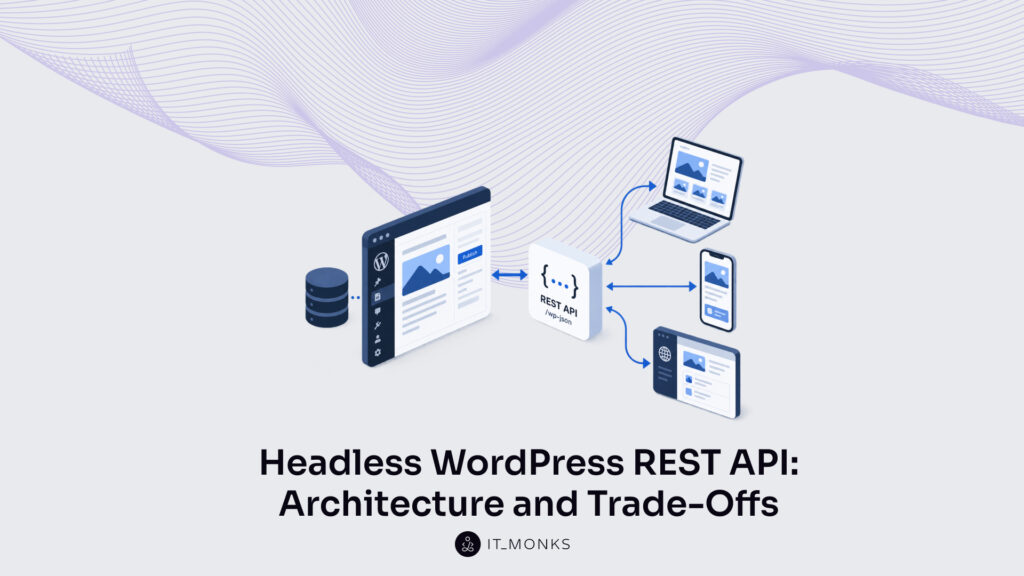
Headless WordPress with the REST API is a decoupled architecture: WordPress runs as the content back-end, and the REST API serves that content to a separate front-end that runs and is hosted outside WordPress itself. In this arrangement the headless WordPress API becomes the one connection between two halves that no longer share a codebase or a template layer. A monolithic WordPress site couples those halves. The same PHPapplication that stores an article also renders the page a visitor sees. Decoupling breaks that link on purpose.
That single design choice reshapes almost everything downstream, which is why an agency rarely treats it as a default. Headless is a trade-off, and the trade weighs differently for a marketing brochure site than it does for an application front-end that pulls WordPress content alongside three other data sources. Speed, editorial comfort, security exposure, front-end freedom, and long-term maintenance all move at once when the front-end leaves WordPress.
The REST-API headless architecture sits inside the wider practice of WordPress REST API integration, where WordPress content already travels to external systems over the same endpoints. Understanding the wiring comes first: how the decoupled back-end returns content, what the REST API actually hands over, and where the WordPress admin ends and an external front-end begins.
From there the evaluation turns to performance, flexibility, and security as measured trade-offs, then to the plainer question an agency has to answer for each client (whether headless earns its extra moving parts at all), and finally to which plugins keep working once the front-end is decoupled. How a decoupled WordPress back-end returns content over the REST API is where that wiring starts.
How a Decoupled WordPress Back-End Returns Content Over the REST API?
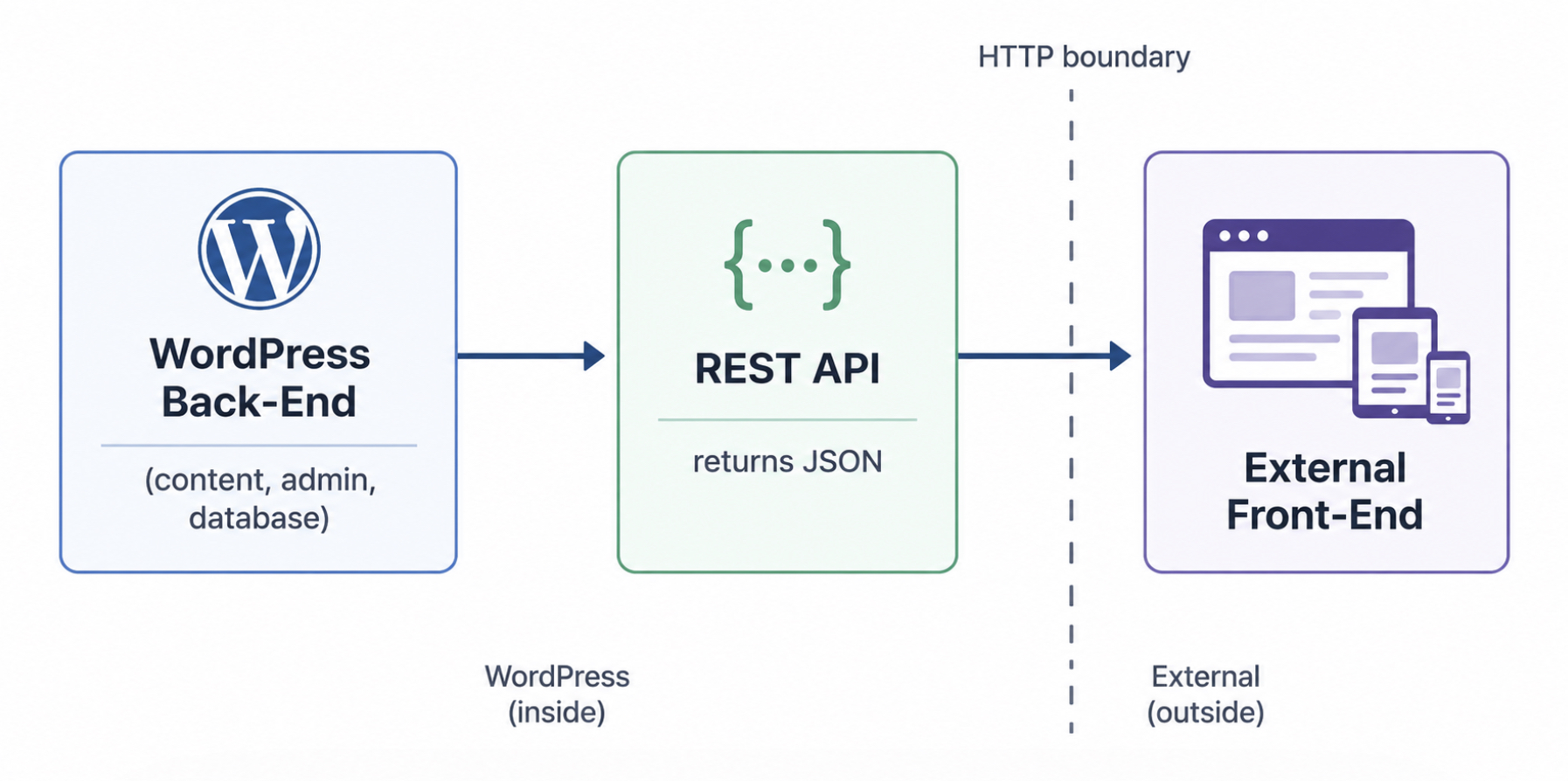
A decoupled WordPress back-end separates content management from content presentation. WordPress keeps its familiar role as the place editors write, organize, and publish, while a separate front-end that runs on a different technology decides what a visitor actually sees; the REST API returns the content as JSON over an ordinary HTTP request so the two sides can stay apart. Nothing about the editing experience changes on the WordPress side. What changes is where the rendered page comes from.
The back-end half comprises the content, the admin dashboard, and the database, the entire WordPress application, minus the theme layer that would normally render the public page. Editors log in, draft a post, set a featured image, and publish, exactly as on any WordPress site. The front-end half runs elsewhere: a separate application, on its own hosting, that requests content and renders it. Because that front-end is external, it never touches the database directly. Every piece of content it shows arrives through the WordPress headless API as JSON, and it consumes those responses on its own terms.
Decoupling the back-end from the front-end this way is the defining move of headless WordPress, the broader pattern this REST-API architecture belongs to; the full case for going headless (what it is, why teams choose it, where it pays off) belongs to that umbrella.
Three parts carry the whole arrangement, and each stands on its own: the REST API as the layer that returns the data, the WordPress back-end as the source that content comes from, and the external front-end as the consumer that requests and renders it.
REST API
The REST API is the endpoint layer that returns JSON, each endpoint exposes one slice of WordPress content as JSON at a predictable URL under /wp-json. Posts, pages, and taxonomies each get their own endpoint, so a request to /wp-json/wp/v2/posts returns published posts, /wp-json/wp/v2/pages returns pages, and the taxonomy endpoints return categories and tags. WordPress exposes these routes on every standard installation; they are the same endpoints that any REST API integration already relies on.
A request to the posts endpoint returns a JSON array, and a single trimmed post object shows the shape that a front-end works with:
Each field arrives as plain data: an id to reference the post, a title.rendered string, a content.rendered block of HTML, and a date timestamp. The REST API delivers that JSON and stops there. It sends the content, not a finished page. Turning content.rendered into something a visitor reads is the external front-end’s job, and the front-end consumes exactly this payload to do it.
WordPress Back-End
The WordPress back-end is the content-management side of the platform: the admin, the editorial workflow, and the database that a headless setup keeps intact. Content does not move. Authors still draft in the familiar dashboard, editors still schedule, and every post, page, and taxonomy term still stores in the same database tables it always did.
What changes is narrow but decisive: the back-end no longer turns that content into finished theme pages. Presentation has left the platform, so the decoupled back-end holds a smaller and more focused job than a traditional WordPress site. It manages the content model, serves the admin, and stores everything a site owner writes, without spending any effort on how the result looks.
All of that content still needs an output surface, and that surface is the REST API. Instead of outputting a rendered page, the back-end exposes its stored content as structured data, ready for whatever consumes it next.
Front-End
The external front-end is the presentation layer that runs outside WordPress and consumes the REST endpoints to render content on its own terms. It is a separate application, written in whatever framework the team prefers, and it requests JSON from the back-end rather than reading a theme.
When someone visits the site, the front-end fetches the posts or pages it needs, then renders and displays them; the design, the routing, and the interaction all belong here, not to WordPress. Because the layer is decoupled, the same endpoints can feed more than one front-end: a website today, an application or another channel later.
The front-end build most agencies reach for is a JavaScript framework, and Next.js headless WordPress is the dominant choice for it. That leaves the architecture as three parts wired together over a single channel: the WordPress back-end that stores and exposes content, the REST API that carries it as JSON, and the external front-end that consumes and displays it. Each part independent, each connected only by the request that passes between them.
Performance of Decoupled WordPress
Performance in a headless WordPress API architecture means the page speed the end user actually experiences, not a server benchmark measured in isolation.
Decoupled WordPress can be markedly faster on this front, and the reason is delivery. Because the front-end has already fetched its content, that content can be rendered ahead of time and served as static files from an edge location near the visitor. A request that would otherwise travel back to PHP and the database (a round trip on the order of a few hundred milliseconds) instead returns pre-built, cached markup on the order of tens of milliseconds, and a full page can finish loading in roughly a second rather than several.
Those are typical order-of-magnitude figures for the architecture rather than measured benchmarks, and the exact numbers shift with the host and the edge network. Static delivery accelerates the parts of the page that used to wait on the server, and edge caching reduces the distance every response has to travel.
That speed is not free. It depends on a second codebase, the front-end application maintained alongside WordPress, and on a build step that regenerates the static output whenever content changes. A monolithic WordPress site serves a page directly; a decoupled one pays for its millisecond response times by adding a layer that someone has to keep running.
For a content-heavy site that publishes constantly, that rebuild cost is real; for a marketing site that changes rarely, it is negligible. The performance of decoupled WordPress reads, then, as a genuine speed gain weighed against a genuine maintenance cost, and which way the balance tips depends on the project rather than on the architecture alone.
Flexibility of Decoupled WordPress
Flexibility in a decoupled WordPress setup means front-end freedom, the liberty to present published content in any framework, on any surface a project calls for. Decoupled WordPress, the architecture that exposes content through the headless WordPress API, splits the editing back-end from the presentation layer, so the front-end no longer inherits the theme system a traditional setup locks it into. That split is where the freedom comes from.
Any front-end framework can consume the API. A React application, a static-site generator, a native mobile client, each reads the same JSON the back-end returns, and that shared feed is what lets one content source supply several channels at once. A single editorial back-end serves a marketing website, a companion mobile app, and a handful of other surfaces such as kiosks or connected displays, all drawing from the same published entries. Multichannel delivery stops being a second project and becomes a property of the architecture itself.
The gain carries a cost, and the cost is ownership. Because decoupled WordPress hands over no ready-made front-end, the team must produce and maintain that presentation layer itself: every route, every template, every piece of interface logic a monolithic theme would otherwise have supplied. Freedom over the framework and the upkeep of the framework arrive in the same package. Flexibility here weighs broader reach across channels against a front-end the team now owns outright, and which way that trade lands is a call the specific project makes.
Security of Decoupled WordPress
Security in a decoupled WordPress architecture means the site’s exposure to attackers, the attack surface an intruder can actually reach. Decoupled WordPress changes the shape of that exposure rather than erasing it. Once the editing back-end is separated from the public front-end, visitors hit a static or framework-rendered front-end, and content travels outward as JSON; the database and the wp-admin login no longer sit on the path a public visitor lands on.
That separation only becomes a real reduction when the team additionally restricts the back-end (a protected origin, an IP allowlist, a private network) because the WordPress install still runs on an internet-facing origin, the login screen stays reachable until the team restricts it, and the REST endpoints the front-end reads remain public by default.
Moving the database and the admin off the public request path is the gain worth having. A monolithic site answers every visitor request straight from PHP and the database, so the login screen, the plugin endpoints, and the query layer all sit in the open. With the decoupled back-end held behind that restriction rather than answering public traffic directly, that whole class of exposure narrows: fewer reachable entry points, a smaller attack surface, less that an automated scanner can even see.
The cost is that a surface appears where none existed before. The front-end and the API path it calls now need protection of their own, because content requests that once stayed inside a single server cross a network boundary instead. That path rests on WordPress REST API authentication, which governs how a headless front-end proves it is allowed to read or write.
Security here is not erased; it is shifted, off the exposed database and onto the API layer the front-end talks to. Which of those two exposures a project would rather manage is a judgment the project’s own profile settles.
Which Projects Fit Headless WordPress with the REST API?
Whether headless WordPress fits a project depends on what the project is: its content, its team, and the surfaces it has to deliver to. A content-simple brochure site and a multichannel product platform ask different things of an architecture, and the REST-decoupled route answers some of those demands well and others poorly. Fit is the whole question, and it is decided case by case.
Projects that favor headless share a profile. A project that has to feed several front-ends at once (a website plus a native mobile app plus other surfaces) suits headless, since one REST back-end already serves them all. A performance-critical project, where response time is the deciding feature, leans the same way. App-backed products, where WordPress is the editorial store behind a custom interface, fall on the same side.
The opposite profile points elsewhere. A content-simple site (a blog, a small business presence, a marketing page a standard theme already renders well) is better served by a monolithic WordPress site. So is a small team with no front-end engineers to own the presentation layer, because the decoupled route hands them a front-end to maintain and a second surface to secure, and the dollars for that ongoing work rarely pay back on a simple site.
Trade-off
Headless WordPress with the REST API
Monolithic WordPress
Performance
Pre-rendered front-end answers in milliseconds; the read path scales on its own
Each page assembles per request; adequate for typical traffic
Security
Database and admin moved off the public request path once the back-end is restricted; a new API surface needs its own authentication
Familiar single-server surface; database and login publicly reachable
Flexibility
Any framework, many channels (web, app, other surfaces) from one back-end
One theme, one web front-end; extra work to reach further channels
When it fits
Multichannel, performance-critical, or app-backed projects with a team to own the front-end: higher setup and upkeep cost in USD
Content-simple sites and small teams, where a standard theme delivers at lower cost
No single row decides it. A project that reads as headless-leaning across all three (several surfaces to serve, speed as a feature, a team able to own and secure a front-end) warrants the decoupled route despite the higher cost in dollars and effort. A project that leans monolithic on most rows, a content-simple one on a small team above all, is better and cheaper left whole. The go or no-go follows the project, not the architecture’s reputation.
Which Plugins Work with Headless WordPress?
Whether headless wordpress plugins keep working once the front-end is decoupled comes down to where each plugin sends its output. A plugin runs its logic on the WordPress back-end and stores its data there, so the dividing line falls between plugins whose results travel out through the REST API and plugins that only ever reach a visitor by way of the WordPress theme.
Two classes of plugin behave in opposite ways once WordPress runs decoupled, and the split follows where each one sends its output:
Server-side and data plugins keep working. A custom-fields plugin, a WooCommerce store’s product and order records, an SEO metadata plugin, each writes to the database and surfaces its values in REST API responses, which the external front-end reads as JSON and renders on its own.
Theme and front-end-rendering plugins break once decoupled. A page builder, a gallery or slider plugin, any plugin that injects markup through a WordPress theme hook requires the theme to draw the page; a decoupled front-end never loads that theme, so the feature never reaches the visitor.
The data path a headless project runs on decides how those working plugins get queried. The REST API returns fixed JSON per endpoint, which supports most decoupled projects with nothing extra. The GraphQL alternative, WPGraphQL, adds a single query layer over the same WordPress data, so the front-end asks for exactly the fields it needs in one call instead of combining several REST API responses. A front-end that queries narrow, deeply nested data compares the two and favors that query layer; one reading whole posts and pages stays on the REST API. Where a project settles on the query layer, WPGraphQL headless integration covers how it replaces the REST data path.






 ChatGPT
  Claude
  Grok
Grok  Gemini