Gutenberg vs Elementor: Key Differences

Table of Contents
Gutenberg is included by default in WordPress since version 5.0, released in December 2018. Elementor is a third-party page builder plugin that has over 13 million active installations. The major architectural difference is that the choice between the block editor and the page builder will dictate how a WordPress site is built, maintained, and scaled.
Gutenberg is automatically available for all WordPress sites. Elementor, on the other hand, has to be installed separately. Elementor is essentially a different application on top of WordPress. The difference has significant implications for WordPress development decisions.
The comparison in the sections that follow will cover features, performance, design, pricing, and usage. The information provided in each section is specific to WordPress development decisions.
What Is the Gutenberg Block Editor
Gutenberg is a block-based content editor that replaced WordPress’s Classic Editor in the 5.0 release in December 2018. Under Gutenberg’s content editing system, every content component, whether a paragraph of text, a photograph, a heading, a button, or a set of images in a gallery, is a block by itself and ready to be added and edited.
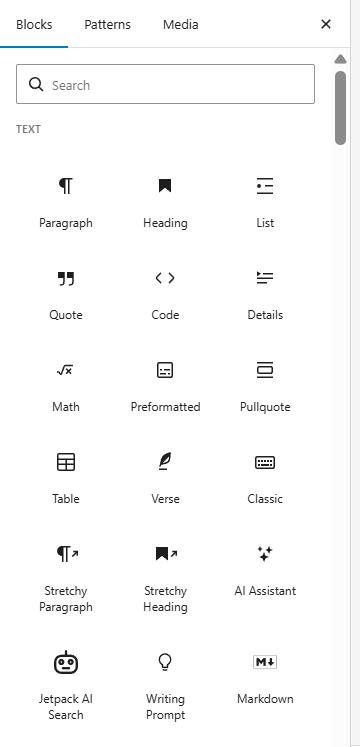
The block inserter in Gutenberg’s content editing system offers around 90 blocks, grouped into six categories: Text, Media, Design, Widgets, Theme, and Embeds. Under Text are Paragraph, Heading, List, Quote, Code, and Verse blocks. Media includes Image, Gallery, Audio, Video, and Cover blocks. Design has Blocks like Buttons, Columns, Group, Separator, and Spacer. Theme blocks like Navigation, Site Logo, Query Loop, and Template Part are part of the Full Site Editing framework.
Full Site Editing is Gutenberg’s extension into a complete website editing system from a content editing system. With Full Site Editing and a block theme, users can edit headers, footers, templates, and navigation menus in Gutenberg’s block editor. This transition, often detailed in a WordPress Gutenberg guide for developers, reflects a shift from PHP-based theme control to a block-driven interface.
Gutenberg is open source and maintained by Automattic and the WordPress community. It gets updates along with every WordPress update. There are several third-party plugins available in the WordPress ecosystem, including Spectra, Otter Blocks, and GutenKit, which add more blocks to Gutenberg’s system.
What Is Elementor
Elementor is a visual drag-and-drop page editor plugin. It was first released in 2016 by Elementor Ltd. Elementor is a separate frontend editing mode on top of WordPress. It has a live visual preview of the page. Today, over 13 million websites use Elementor.
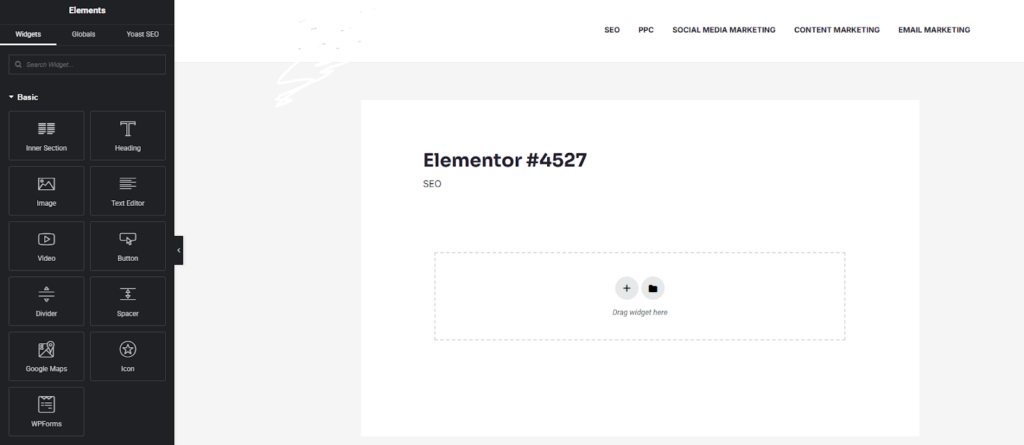
Unlike other page builders, Elementor does not use blocks. Instead, it uses widgets. Elementor has over 40 widgets in its free version. These widgets are Heading, Image, Text Editor, Video, Button, Divider, Spacer, Google Maps, Icon, and more. If you upgrade to Elementor Pro, which costs between $59 to $399 per year, you get over 90 widgets, a theme builder, WooCommerce widgets, a pop-up builder, a form builder, and access to 300+ templates.
For every widget you add, there are three tabs: Content, Style, and Advanced. The Content tab is for defining the widget’s content. The Style tab is for defining the styles. Finally, the Advanced tab is for defining the advanced features. Elementor offers much more customization per element than Gutenberg does per block in the current version. Elementor generates its own HTML and CSS. Elementor generates its own HTML and CSS, which is separate from the current WordPress theme. By doing this, Elementor has precise control over the page’s visual representation. However, this also means that Elementor has a larger page size.
Gutenberg vs Elementor: Core Differences
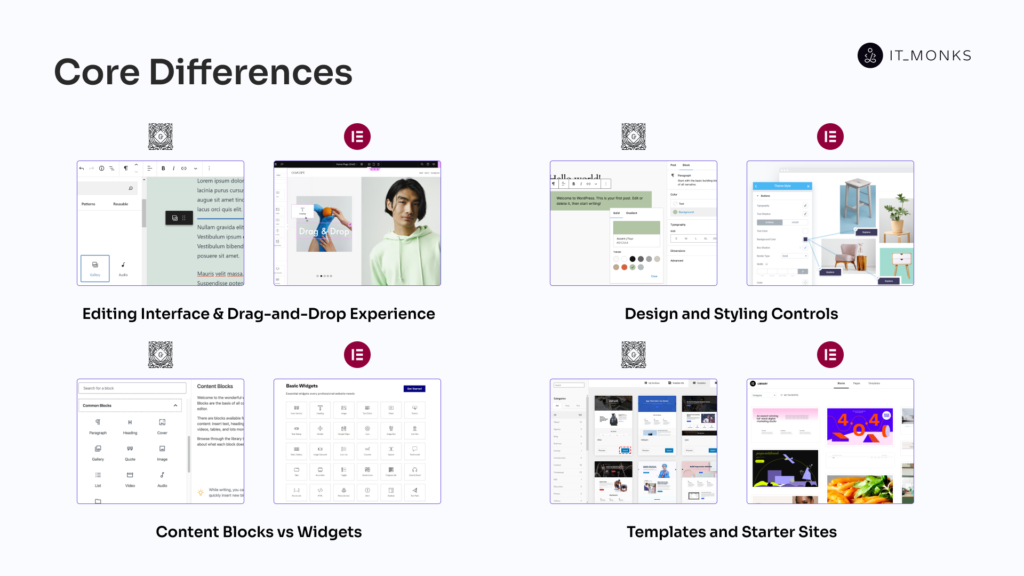
Editing Interface and Drag-and-Drop Experience
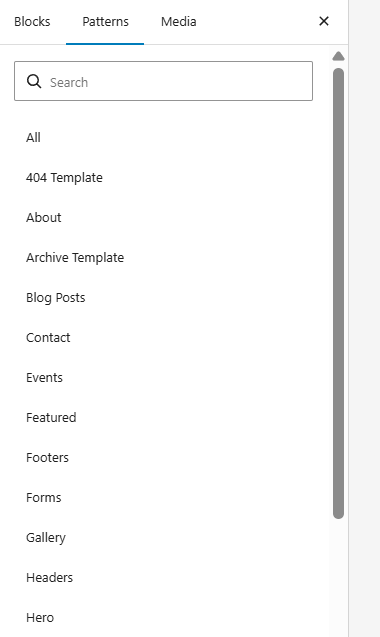
Gutenberg’s editor renders inside the WordPress admin backend. The content area is centered, with a right-side settings panel for the selected block or document. Block insertion uses the “+” inserter with search and category tabs for Blocks, Patterns, and Media.
Drag-and-drop positions blocks through a specific mechanism: each block displays a small drag-handle icon (a six-dot grip) on its left edge. Repositioning requires clicking and holding this handle, a precision requirement that slows rearrangement. Gutenberg compensates with markdown shortcuts (“/” to quick-insert blocks, “##” for headings, “>” for quotes) and keyboard-based content creation that supports high-volume WordPress web design for WordPress publishing workflows. The Code Editor toggle provides direct HTML editing access.

Elementor’s editor separates from the standard WordPress interface entirely. The left panel displays the widget library; the right panel renders a live page preview. Drag-and-drop operates on a grid system; widgets snap to columns and sections. Repositioning requires only a click-and-hold anywhere on a widget, then dragging to the new position. No precision click on a specific handle icon.
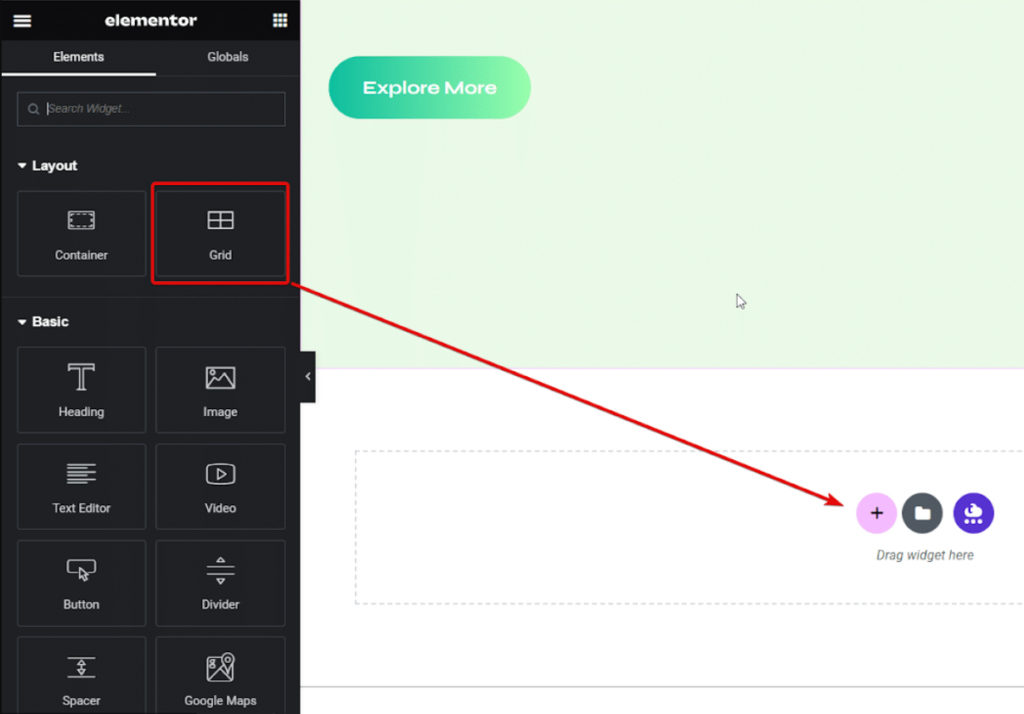
Content, Style, and Advanced tabs appear for every selected widget. Changes display instantly in the preview. Elementor’s editing model positions the page itself as the canvas, closer to a standalone web design application than a traditional CMS editor.
Design and Styling Controls
The Block panel of Gutenberg’s layout includes typography settings such as font size, font style, and line height, along with color pickers for text and background color, space settings for margin and padding, border settings, and dimension fields. A hover toolbar is also provided for inline text editing, HTML editing, and duplicating a block. Customization of individual blocks is also possible by accessing the Advanced settings and entering custom CSS classes and HTML anchors.
The design options provided by Gutenberg are basic but do not go any further. Gutenberg does not offer hover animations, CSS filters (such as blur, brightness, and contrast), or mask effects (such as rotation, scaling, and skewing).
Elementor’s Style tab provides extensive options for typography by allowing Google Fonts integration, gradient color options, border radius, box shadow, and text shadow. The Style tab also provides hover animations such as fade, grow, shrink, and pulse, CSS filters and blend mode options, mask options including shapes and gradients, and transformation options such as rotation and scaling. The Advanced tab provides options for custom widget CSS, responsive visibility for desktop, tablet, and mobile devices, widget positioning (absolute, fixed, or relative), and z-index control.
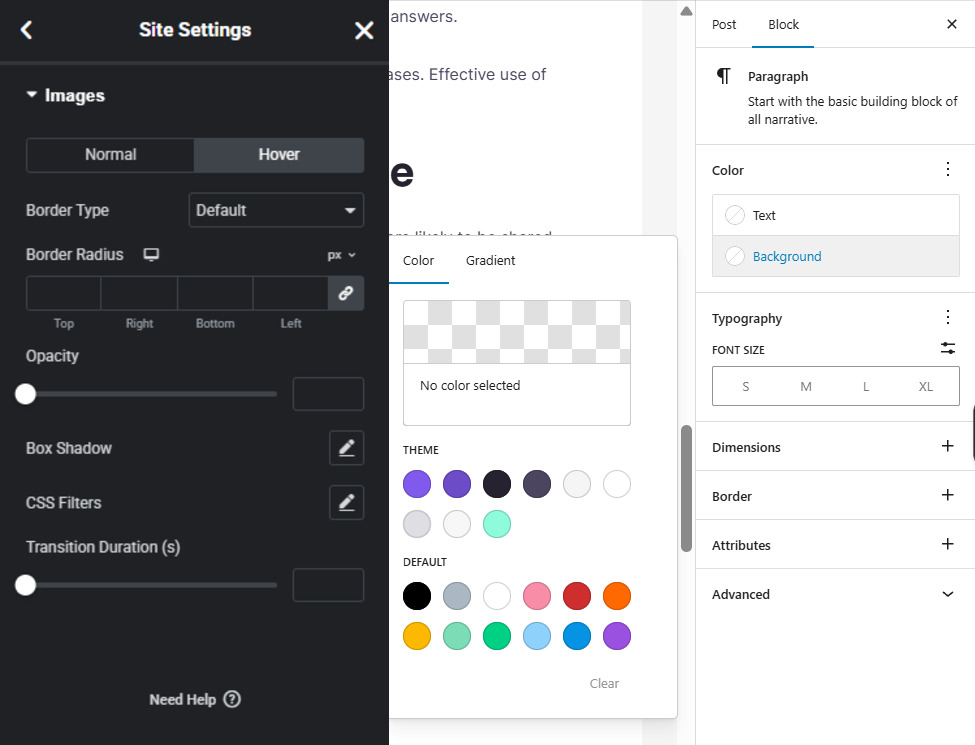
Content Blocks vs Widgets
Gutenberg’s core library organizes approximately 90 blocks into categories. Text includes Paragraph, Heading, List, Quote, Code, Preformatted, Pullquote, and Verse. Media covers Image, Gallery, Audio, Video, Cover, and File. Design provides Buttons, Columns, Group, Row, Stack, Separator, and Spacer.
Widgets categorize functional elements: Archives, Calendar, Categories, Latest Posts, Search, and Tag Cloud. Theme blocks include Navigation, Site Logo, Query Loop, and Template Part. Embeds embed content from 30+ platforms, such as YouTube, Twitter, Spotify, Reddit, TikTok, and Pinterest.
Third-party block plugins extend the library significantly. Spectra, Otter Blocks, GutenKit, Stackable, and Kadence Blocks each add 40 to 80+ blocks covering pricing tables, testimonials, icon lists, and advanced layout elements.
Elementor Free includes approximately 40 widgets: Heading, Image, Text Editor, Video, Button, Divider, Spacer, Google Maps, Icon, and Star Rating. Elementor Pro adds 60+ widgets across categories, including General (Slides, Animated Headline, Price Table, Flip Box), Site (Nav Menu, Site Logo, Sitemap), WooCommerce (Product Grid, Cart, Checkout, Add to Cart, Product Gallery), and Theme Builder elements (Post Title, Post Content, Featured Image, Author Box).
Widget settings run deeper than block settings. Each Elementor widget typically provides three tabs (Content, Style, and Advanced) with granular controls, hover overlays, CSS filters, entrance animations, custom positioning, and responsive visibility, which Gutenberg blocks do not match natively.
Templates and Starter Sites
Gutenberg’s Patterns tab provides reusable section-level layouts, which are hero sections, call-to-action rows, and feature grids. WordPress.org hosts a block pattern directory where developers contribute patterns for import. Full site templates require third-party plugins: Spectra, Twentig, and Starter Templates by Brainstorm Force each provide pre-designed page layouts and website starter kits. Block themes like Twenty Twenty-Four include FSE templates for headers, footers, single posts, archives, and search results, but these require understanding the Site Editor interface.
Elementor’s Template Library includes 300+ pre-designed templates. Categories cover pages, sections, headers, footers, single posts, archives, search results, 404 pages, WooCommerce product pages, and product archives. Full website kits bundle multiple coordinated page templates into cohesive designs. Pop-up templates are available in Pro. Users can save custom sections or pages as reusable templates accessible across all sites connected to their Elementor account.
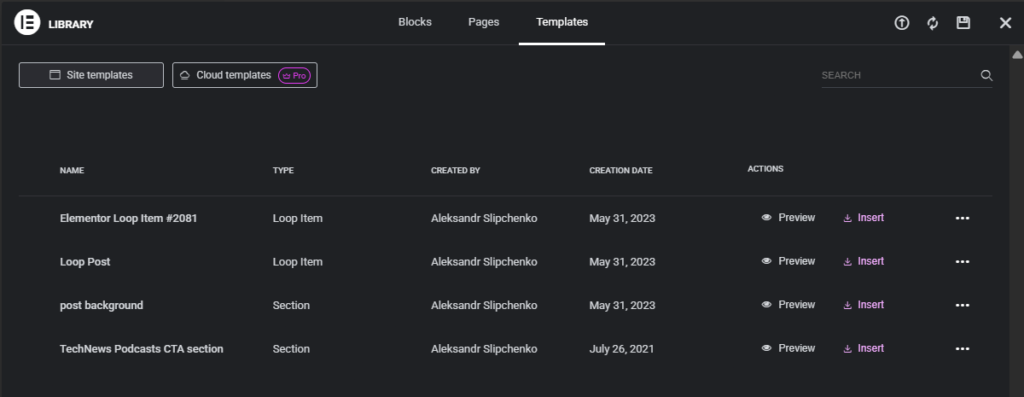
Most Elementor templates require a Pro subscription. Gutenberg’s template ecosystem requires assembly, which includes patterns from WordPress.org, FSE templates from block themes, and starter sites from third-party plugins, but the components exist across the WordPress theme ecosystem.
Gutenberg vs Elementor: Performance and SEO
Page Speed and Resource Footprint
Gutenberg pages generate minimal additional CSS or JavaScript beyond the active theme. Blocks render as standard HTML elements with inline styles or theme-provided classes. No additional framework loads.
Benchmark data from multiple independent tests shows consistent patterns. Gutenberg-built pages typically measure 900 KB to 1.5 MB in total page size, generate 19 to 25 HTTP requests, load in 0.9 to 1.3 seconds, and score 93 to 99 on Google PageSpeed Insights for desktop.
Elementor-built pages load the plugin’s CSS framework (elementor.min.css, elementor-pro.min.css), JavaScript handlers, and a nested div structure for its grid layout system. Benchmark ranges: 2.0 to 2.5 MB page size, 48 to 51 HTTP requests, 1.2 to 2.0 second load times, and PageSpeed scores of 81 to 94 on desktop.
The gap reduces with optimization. Elementor’s Improved Asset Loading setting loads CSS and JavaScript only on pages built with Elementor rather than site-wide. Additional optimization includes CSS/JS minification, lazy loading for images and iframes, and quality hosting. With these settings configured, Elementor pages can approach Gutenberg-level performance scores.
Hosting quality affects both tools equally. The performance difference matters most on content-heavy sites with many pages, where the cumulative resource overhead compounds.
SEO Impact
Both Gutenberg and Elementor lack built-in SEO options, including meta titles, descriptions, or schema markup. Both use SEO plugins such as Yoast, Rank Math, and All in One SEO, and are fully compatible with all SEO plugins.
The difference in SEO is due to the code’s structure. Gutenberg uses clean, simple HTML with a minimal number of wrapping tags. The heading block uses an H2 tag, a paragraph block uses a P tag, and the structure is flat. Elementor uses a highly nested structure, including section containers, column containers, widget containers, and content wrappers, increasing the depth and number of elements. This may negatively affect crawlability for large sites.
The Core Web Vitals are affected by the difference in size and complexity. Gutenberg, with its smaller footprint, performs better on Largest Contentful Paint, Cumulative Layout Shift, and Interaction to Next Paint without any additional optimization. Elementor pages can also achieve these results if the asset loading is configured correctly.
Heading structure is available in both Gutenberg and Elementor, with proper use of H1-H6 tags. The only difference is that Elementor, because of its freedom to place elements, may cause a problem if the headings are not carefully managed. It is easy to place an H3 heading before an H2 heading because of their visual placement, even though this is technically incorrect and may interfere with search engines’ understanding of content hierarchy.
Gutenberg vs Elementor: Advanced Capabilities
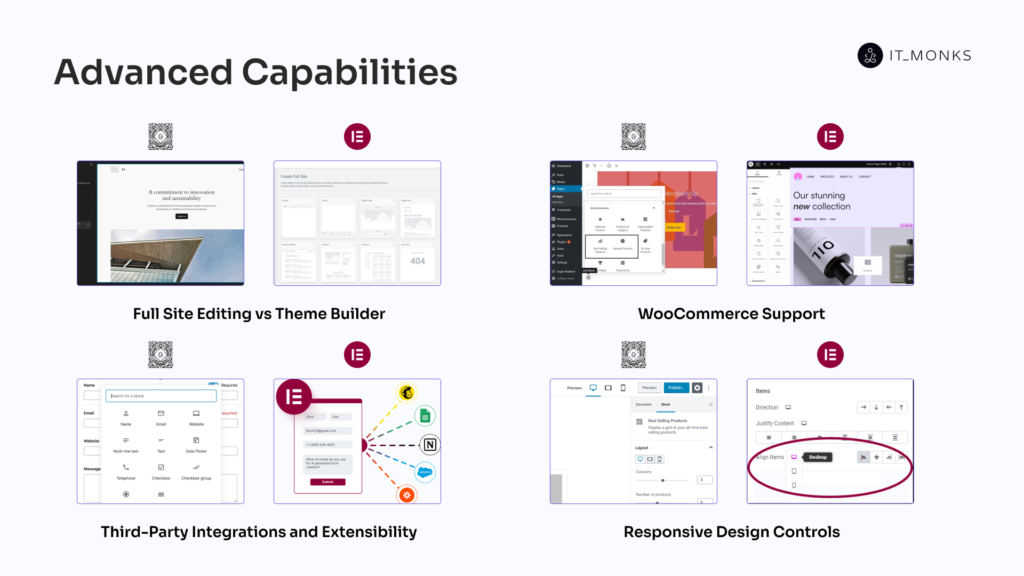
Gutenberg and Elementor have both expanded beyond content editing into full site management. The sections below compare Full Site Editing versus Theme Builder, WooCommerce support, third-party integrations and extensibility, and responsive design controls. Elementor’s advanced features are concentrated in the Pro tier. Gutenberg’s advanced capabilities come from WordPress core updates and free plugins.
Full Site Editing vs Theme Builder
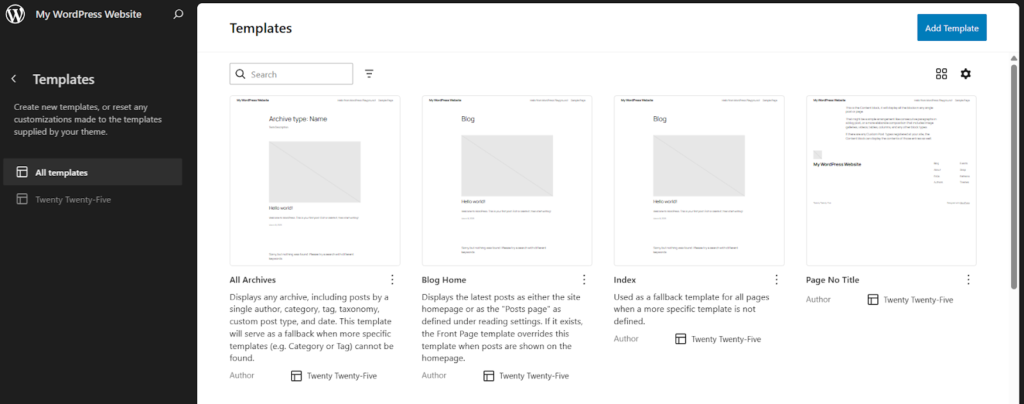
Full Site Editing (FSE) launched with WordPress 5.9 in January 2022. FSE requires a block theme, a theme built with block markup files rather than traditional PHP templates. Twenty Twenty-Four, the current default WordPress theme, is a block theme.
The WordPress Full Site Editor controls headers, footers, page templates, template parts, and navigation menus using Gutenberg blocks. The Global Styles panel configures site-wide typography, color palettes, and spacing values that cascade across every template. Template hierarchy uses block markup files instead of PHP template files.
FSE is still maturing; some features carry experimental labels, and the template editing experience has a steeper learning curve than traditional theme customization. But block themes and FSE represent how WordPress intends all theme development to work going forward.
Elementor Theme Builder is available exclusively in Elementor Pro. Theme Builder assigns custom visual templates for headers, footers, single posts, archives, search results, 404 pages, and WooCommerce product pages. Display conditions control where each template appears: “show this header on all pages,” “apply this single post template only to the News category.” Dynamic tags pull live data from custom fields, post meta, site settings, and WooCommerce product data into templates.
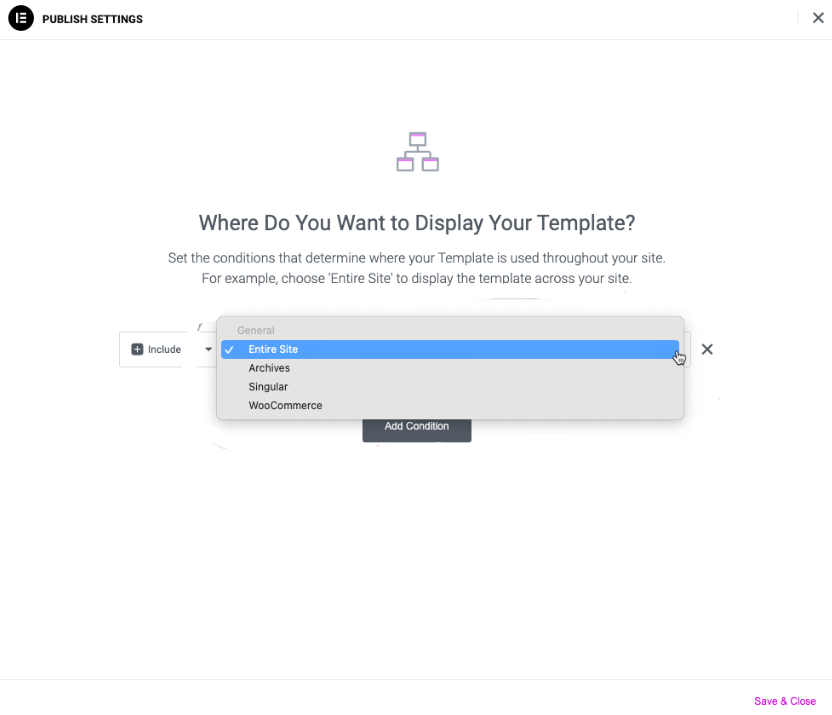
The fundamental distinction: FSE evolves WordPress’s core architecture; block themes replace PHP templates entirely. Elementor Theme Builder works as a visual layer on top of any compatible theme without changing WordPress’s underlying template system. FSE has the advantage of long-term WordPress core alignment. Elementor Theme Builder has the advantage of a more immediately visual, condition-based design workflow.
WooCommerce Support
WooCommerce adds 26+ dedicated Gutenberg blocks upon installation, such as Product Search, Best Selling Products, Product Categories, Active Filters, Featured Product, All Products grid, Cart, and Checkout. These blocks are free and included with the WooCommerce plugin. WooCommerce has committed to block-based cart and checkout experiences as the default going forward.
Elementor’s WooCommerce integration requires Elementor Pro. The Pro tier provides 20+ WooCommerce-specific widgets: Product Images, Product Price, Add to Cart, Product Rating, Product Gallery, Related Products, Upsells, Product Meta, Cart page, Checkout page, and My Account page. Elementor also provides WooCommerce page templates for product archives and single product pages through Theme Builder.
Gutenberg’s WooCommerce blocks are free and represent WooCommerce’s strategic frontend direction. Elementor Pro’s WooCommerce widgets offer deeper visual customization; every product page element can be styled independently through the three-tab widget interface.
Third-Party Integrations and Extensibility
Gutenberg uses embeds from 30+ external sources with embed blocks: YouTube, Twitter, Spotify, Reddit, Pinterest, SoundCloud, Dailymotion, Imgur, Kickstarter, Amazon Kindle, TikTok, and Openverse.
Block plugin extensibility provides a lot of functionality. Spectra has 40+ blocks, Otter Blocks has 40+, GutenKit has 40+, Stackable has 40+, and Kadence Blocks has 80+ blocks.
Gutenberg’s open Block API enables creating custom blocks with React and JavaScript.
The WordPress integration ecosystem has 60,000+ plugins.
Elementor integrates with 40+ marketing and business platforms directly: email marketing (MailChimp, ActiveCampaign, ConvertKit, Drip, HubSpot), payment gateways (PayPal, Stripe), social networks (Facebook embed/comments/buttons, YouTube, Vimeo), and utility integrations (Zapier, Discord, Slack, ReCaptcha, Google Maps) using Elementor’s form widgets and native integrations.
Elementor’s widget add-ons expand functionality: JetElements has 50+, Essential Addons has
50+, and Qi Addons has 100+ widgets.
Elementor’s developer API provides the ability to create custom widgets with PHP.
Gutenberg’s integrations are centered around content embeds and open-source extensibility.
Responsive Design Controls
Gutenberg’s responsive design inherits from the active WordPress theme. Block content uses the theme’s CSS breakpoints and responsive rules. The editor previews desktop, tablet, and mobile viewports, but this preview is read-only. No per-device styling controls exist natively; font size, padding, margin, and column widths cannot be adjusted separately for mobile versus desktop through the block interface.
Some blocks include limited responsive behavior; the Columns block adjusts stacking order for mobile screens, and the Spacer block changes height. Third-party block plugins (Spectra, Kadence Blocks) add responsive controls for font sizes, spacing, and visibility.
Elementor’s responsive editor builds device switching directly into the interface. Three buttons (Desktop, Tablet, Mobile) in the editor’s bottom toolbar switch the preview and activate per-device controls for nearly every style property. Font sizes, padding, margin, column widths, and element spacing all accept separate values per device. Visibility toggles hide specific sections or widgets on specific screen sizes.
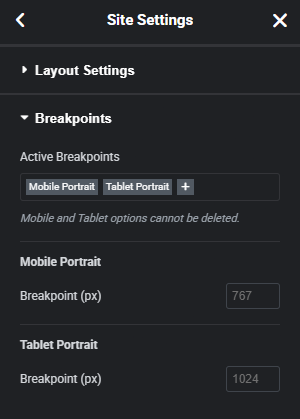
Custom breakpoints extend the system beyond the three default tiers. Elementor defines additional responsive breakpoints: wide desktop (1400px+), large tablet (900px), through the site settings panel. Responsive editing is available in both Elementor Free and Pro.
Gutenberg vs Elementor: Pricing and Ecosystem
Cost Structure
Gutenberg costs nothing as part of WordPress core. For basic content editing, including blog posts, standard pages, and layouts with core blocks, the total cost is zero.
Matching Elementor’s feature depth typically requires premium block plugins. Spectra Pro ranges from $49 to $249 per year. Kadence Blocks Pro costs $59 to $199 per year. Other block suites, including Stackable, Otter Pro, and GenerateBlocks Pro, range from $50 to $150 annually. Total realistic cost: $0 for basic use, $50 to $200 per year with premium block plugins.
Elementor Free provides 40+ widgets and the drag-and-drop editor at no cost. Pro plans include Essential at $59 per year (1 site), Expert at $199 per year (25 sites), and Agency at $399 per year (1,000 sites). Every Pro tier bundle includes Theme Builder, WooCommerce widgets, pop-up builder, form builder, dynamic tags, 300+ templates, and premium support. No lifetime license exists; all plans renew annually.
Elementor Pro bundles capabilities that would require three or four separate Gutenberg plugins. For single-site projects, the total cost comparison often comes out similar between Gutenberg-plus-plugins and Elementor Pro. For multi-site agencies, Elementor’s tiered pricing may be more cost-efficient than licensing multiple block plugins across dozens of sites.
Plugin and Theme Compatibility
Gutenberg supports near-universal compatibility with WordPress themes and plugins. As the default editor, theme, and plugin developers build with Gutenberg support as a baseline requirement. All modern themes render Gutenberg blocks correctly. Plugin developers increasingly ship Gutenberg blocks alongside their features, such as contact form plugins, SEO tools, and WooCommerce extensions, which all provide dedicated blocks. Compatibility issues surface rarely, limited to plugins that haven’t been updated since the Classic Editor era.
Elementor integrates with most WordPress themes and plugins, with exceptions. Elementor maintains a documented list of known plugin conflicts. Themes must explicitly support Elementor; most popular options do: Astra, Hello Elementor, GeneratePress, OceanWP. Hello Elementor is a minimal theme built specifically for Elementor, providing the cleanest integration with the fewest potential conflicts.
Elementor’s separate rendering pipeline processes page content through its own system rather than WordPress’s default content rendering. Plugins that hook into WordPress’s standard content output may not interact correctly with Elementor-built pages. From a WordPress development perspective, Gutenberg’s universal compatibility reduces troubleshooting. Elementor requires compatibility verification during theme and plugin selection, which is manageable, but an additional step in project planning.
Community and Support
Gutenberg provides no dedicated customer support team. Support channels include WordPress.org support forums (Gutenberg plugin forum), community Slack (Make WordPress), developer documentation (Block Editor Handbook), and the WordPress ecosystem’s blog and tutorial resources. WordPress.com paid plan users receive dedicated support covering Gutenberg. Bug reports and feature requests route through the WordPress/gutenberg GitHub repository, which is an open-source development model.
Elementor offers community forums and Elementor Academy (a knowledge base with tutorials, documentation, and video courses) for free users. Pro subscribers receive email-based premium support. Live chat handles sales inquiries only, not technical issues. An active community surrounds Elementor: Facebook groups, YouTube channels, third-party courses on Udemy and Skillshare, and an annual community conference.
When to Use Gutenberg and Elementor
The choice depends on project requirements, team expertise, and long-term maintenance plans. These tools are not mutually exclusive; many WordPress sites use both, with Gutenberg for blog content and Elementor for marketing pages.
Best Use Cases for Gutenberg
Content-heavy sites fit Gutenberg best. Blogs, news publications, documentation portals, and knowledge bases benefit from the clean HTML output and lightweight page footprint. Every page loads fast, and the markup stays maintainable.
Developer-built custom WordPress sites align with Gutenberg’s architecture. Custom block development uses React and JavaScript, the same stack as modern frontend development. The resulting blocks output predictable, standards-compliant HTML.
Projects prioritizing long-term WordPress core alignment leverage Gutenberg’s FSE direction. Block themes are replacing traditional PHP themes. WordPress core development resources focus on the block editor. Adopting Gutenberg now aligns a project with WordPress’s architectural future.
Budget-zero projects, such as personal blogs, nonprofit sites, and internal company resources, get full content editing capabilities without plugin expenditure. WordPress multisite environments benefit from zero plugin overhead per site. Teams already fluent in the WordPress admin interface face the shortest learning curve with Gutenberg. Sites using block themes leverage FSE for complete site customization.
Best Use Cases for Elementor
Visually complex sites fit Elementor best. Portfolios, agency showcase sites, and marketing landing pages require pixel-level layout control, such as precise spacing, custom positioning, hover animations, and entrance effects, that Elementor enables natively without custom CSS.
WooCommerce stores needing custom product page layouts beyond default WooCommerce styling benefit from Elementor Pro’s visual product page customization. Custom product galleries, unique Add to Cart button placements, and branded checkout flows are all configurable through the drag-and-drop interface.
Teams without development resources gain the most from Elementor’s visual editor. Non-technical team members can build pages, adjust responsive layouts, create popups, and design forms without writing code. This reduces dependency on developers for routine page updates.
Marketing-heavy sites that cycle through landing pages, promotional popups, lead capture forms, and campaign-specific layouts accelerate delivery with Elementor’s template and widget ecosystem. Website kits and pre-built templates let teams prototype and launch pages rapidly.
Client projects where non-technical users maintain the site after handoff work well with Elementor. The visual editor controls responsive design granularity, which is per-device font sizes, spacing, and visibility toggles, without requiring custom CSS.
Using Gutenberg and Elementor Together
Many WordPress sites combine both editors. Gutenberg handles blog posts, articles, and standard content pages where performance and clean markup matter. Elementor builds homepage layouts, marketing landing pages, and visually complex pages where design control takes priority.
This approach works because Gutenberg remains the default editor even when Elementor is installed. Users choose “Edit with Elementor” on a per-page basis. One consideration: installing Elementor adds its CSS and JavaScript framework to the site. Elementor’s Improved Asset Loading setting mitigates this by loading assets only on Elementor-built pages.
From a workflow perspective, the separation maps to team roles. Content teams, such as writers, editors, and SEO specialists, use Gutenberg for daily publishing. Design teams use Elementor for page builds, template creation, and visual campaigns. Each team works in the interface that matches their workflow.
Contact
Don't like forms?
Shoot us an email at [email protected]
