WordPress Multisite: Complete Guide

Table of Contents
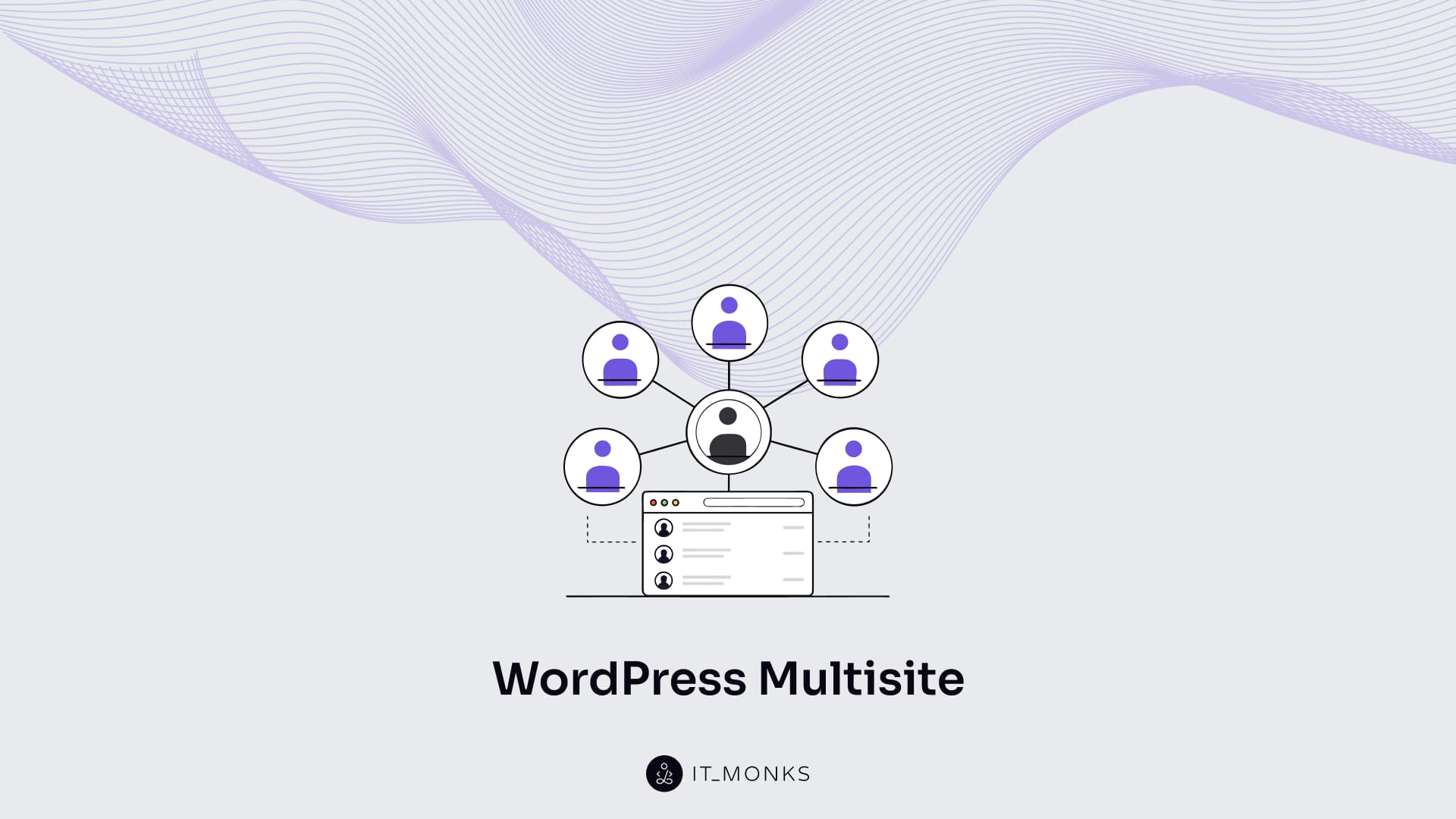
WordPress Multisite defines one WordPress installation as the foundation for running multiple sites inside a single Multisite network. WordPress Multisite differs from a single site: a single site uses one installation for one website, while a Multisite network groups and manages multiple sites under a single shared structure within WordPress.
That structural difference drives the decision to use it. Organizations decide to use WordPress Multisite when consistent governance, shared platform control, and centralized management matter more than full technical isolation between sites. Use cases typically involve multiple locations, departments, regions, or brands that must operate independently in content but consistently in infrastructure and policy.
A Multisite network is the governing unit that contains all sites and applies shared rules across them. Network settings and network admin act as the primary control surfaces: network settings define network-wide defaults and limits, and network admin controls site creation, shared themes and plugins, updates, and global configuration. Governance depends on clearly defined users and roles, where Super Admin controls the entire network, and Site Admin manages one site within defined boundaries.
WordPress Multisite depends on a network structure based on subdomains or subdirectories, and that choice determines how routing and DNS must be configured. Hosting must support the shared environment because traffic, updates, and database activity accumulate in one system.
Setup follows that dependency chain: structure choice precedes routing readiness; routing and DNS must align before enabling the network; the setup wizard connects the installation to the Multisite network; validation confirms that URLs, permissions, and network admin access behave as expected.
Security depends on the shared model. WordPress Multisite requires network-wide controls to protect Super Admin access, shared plugins and themes, and centralized updates, while Site Admin roles operate within defined limits. Protection combines controlled permissions, disciplined updates, and infrastructure safeguards to reduce network-wide impact.
A Multisite network must support consistent technical SEO across sites, optimized internal linking to manage link equity, and infrastructure that enables accurate crawling and indexing. Network structure influences how search engines interpret relationships between sites, and governance influences how authority is distributed.
Management sustains the Multisite network after deployment. Ongoing management requires maintaining hosting performance, monitoring routing and DNS stability, preserving security controls, optimizing for crawling and indexing, and updating sites in alignment with network-level governance. Operational stability depends on the coordinated maintenance of structure, permissions, security, SEO, and infrastructure within WordPress website services.
What is WordPress Multisite?
Multisite is a WordPress configuration in which a single installation manages a network of multiple sites under a single centralized control surface.
Within this architecture, the network shares core files, themes, and plugins as resources across all sites. At the same time, each site maintains its own content, URLs, and site-level settings, establishing clear site isolation inside the unified infrastructure.
Operational control is centralized at the network level through network-level settings that apply across the entire Multisite network and are managed by the network admin. Full authority over structural and global configuration changes is reserved for the Super Admin, who controls network-wide governance.
User roles are scoped per site, meaning permissions can differ between sites even though they exist within the same installation. This establishes a clear boundary between network governance and local site management.
The Multisite network also organizes sites through domain structure, using either subdomains or subdirectories as its addressing model. Together, the shared codebase, configuration scope, governance hierarchy, and domain structure define Multisite as a distinct operational model and establish the evaluation criteria for comparing it with a single-site WordPress installation.
Multisite vs Single Site
Multisite differs from a single site in its scope: WordPress Multisite uses one WordPress installation to operate a Multisite network with multiple sites, whereas a single site uses one WordPress installation to operate only one site.
| Attribute | Multisite | Single-Site |
|---|---|---|
| Governance Surface | Centralizes control through network settings governed by a network admin, with full authority reserved for the Super Admin across the entire Multisite network. | Governs only its own site-level settings under a site admin, with no network-wide control layer. |
| Resource Sharing | Shares themes, plugins, and core files across all sites, reducing duplication and simplifying maintenance. | Isolates themes, plugins, and core within one site, increasing independence but duplicating maintenance effort across installations. |
| Update Workflow | Applies core, theme, and plugin updates at the network level through centralized updates, reducing repetitive administrative work while increasing the impact radius of errors. | Applies updates per site, increasing maintenance workload while limiting cross-site exposure. |
| User and Role Scope | Scopes users at the network level and assigns roles per site, with the Super Admin controlling network-wide permissions. | Manages users and roles only within that site under a site admin, with no shared identity layer. |
| Isolation & Blast Radius | Shares one installation across multiple sites, so failures in core, plugins, or network settings can impact the entire network. | Isolates failures to a single installation, reducing the blast radius and simplifying troubleshooting. |
| Customization Flexibility | Favors standardization because shared themes and plugins affect multiple sites, increasing consistency but restricting per-site deviation. | Allows unrestricted customization without impacting other installations. |
| Infrastructure Requirements | Requires routing support for subdomains or subdirectories and depends on correct domain configuration within the Multisite network. | Uses simpler routing and domain configuration for one installation. |
| Operational Overhead | Increases governance complexity but reduces duplicated maintenance across sites. | Reduces governance layers but increases repetitive operational work as independent installations grow. |
When to Use WordPress Multisite?
Use WordPress Multisite when one organization must operate multiple related sites that require shared governance, shared platform components, and centralized management while keeping content separated at the site level. WordPress Multisite is well-suited for organizations where many sites must follow the same policies, brand standards, and technical rules, and where centralized updates and shared themes/plugins reduce operational overhead.
- Educational organizations benefit from WordPress Multisite when campuses, faculties, or programs require separate sites while maintaining shared institutional standards. A Multisite network centralizes updates and shared themes/plugins through network settings managed by a network admin, while Site Admin roles control local content and publishing.
- Enterprise organizations with multiple departments or branches use WordPress Multisite when compliance rules, brand governance, and technical standards must apply across all sites. The Multisite network standardizes structure and tooling under a Super Admin, while departments retain site-level control through defined roles, reducing duplicated maintenance and configuration drift.
- Multi-country and regional organizations apply WordPress Multisite when localized content must operate within a consistent global framework. Subdomains or subdirectories support regional separation, while centralized updates and shared components maintain consistency across regions.
- Membership, franchise, or partner networks use WordPress Multisite when each location needs its own site while still following common templates, features, and update policies. Network governance centralizes management, and Site Admin roles preserve independent content ownership, lowering operational overhead as the network grows.
- Publishing and program-based networks fit WordPress Multisite when multiple program sites run on the same platform with controlled variation. Shared themes and plugins, along with centralized updates, support consistency, while separate Site Admin roles maintain editorial independence.
WordPress Multisite is not suitable when sites require full technical isolation, entirely different feature stacks, or unrelated user experiences. In those cases, separate WordPress installations provide stronger independence than a shared Multisite network.
What is WordPress Multisite Network?
A WordPress Multisite Network is a configuration that lets you run multiple websites from one WordPress installation, all grouped together under one network. WordPress Multisite lets one setup act as the shared base, while the network serves as the umbrella that contains all the individual sites inside it. Because the sites share this base, themes, plugins, and updates can be managed once at the network level instead of separately for each site.
At the same time, the network keeps separate site content such as pages, posts, media, and day-to-day settings. This balance allows different teams to manage their own sites without mixing content, while still using the same shared tools.
Users and roles are also divided by scope. A Super Admin controls the entire WordPress Multisite Network, while a site admin manages only one site within the network. This structure allows centralized governance while preserving local control.
Network settings and network admin are the two main areas for managing the WordPress Multisite Network.
Network Settings
Network settings define the rules and defaults that apply to every site in the Multisite network. These settings control site registration, default site options, network email behavior, upload limits, and permission boundaries. In multi-language or multi-country networks, network settings can also define language and locale defaults so new sites start with the correct baseline.
Permissions are enforced at this level. Network settings determine what site admins can and cannot do, while Super Admins control these limits across the entire network.
By applying consistent rules everywhere, network settings reduces repeated configuration work and prevents drift across sites.
Network Admin
Network admin is the administrative interface for managing the Multisite network as a whole. It is where Super Admins add or remove sites, manage shared themes and plugins, apply network-wide updates, and oversee user access across sites.
Actions taken in network admin affect multiple sites at once, unlike a standard site dashboard, which applies only to a single site.
Users and Roles in Multisite
Users in Multisite are people who can access one or more sites, and roles are the permission levels that determine what each user can do on a specific site or across the network.
User accounts are created once at the Multisite network level and can then be connected to one or more sites. The same user account can be assigned different roles on different sites. This structure means that one person can manage content on one site, have limited access to another, and have no access to a third, even though all sites belong to the same network.
Roles control permissions such as creating content, editing pages, managing settings, and accessing administrative areas. Role scope is important in WordPress Multisite: most roles apply at the site level, while a small set of permissions apply at the network level.
Access control in a Multisite network supports clear responsibility and safer management when many sites operate together. Shared user accounts reduce duplication, site-level roles keep duties separated, and network-level permissions limit high-impact changes.
Super Admin vs Site Admin
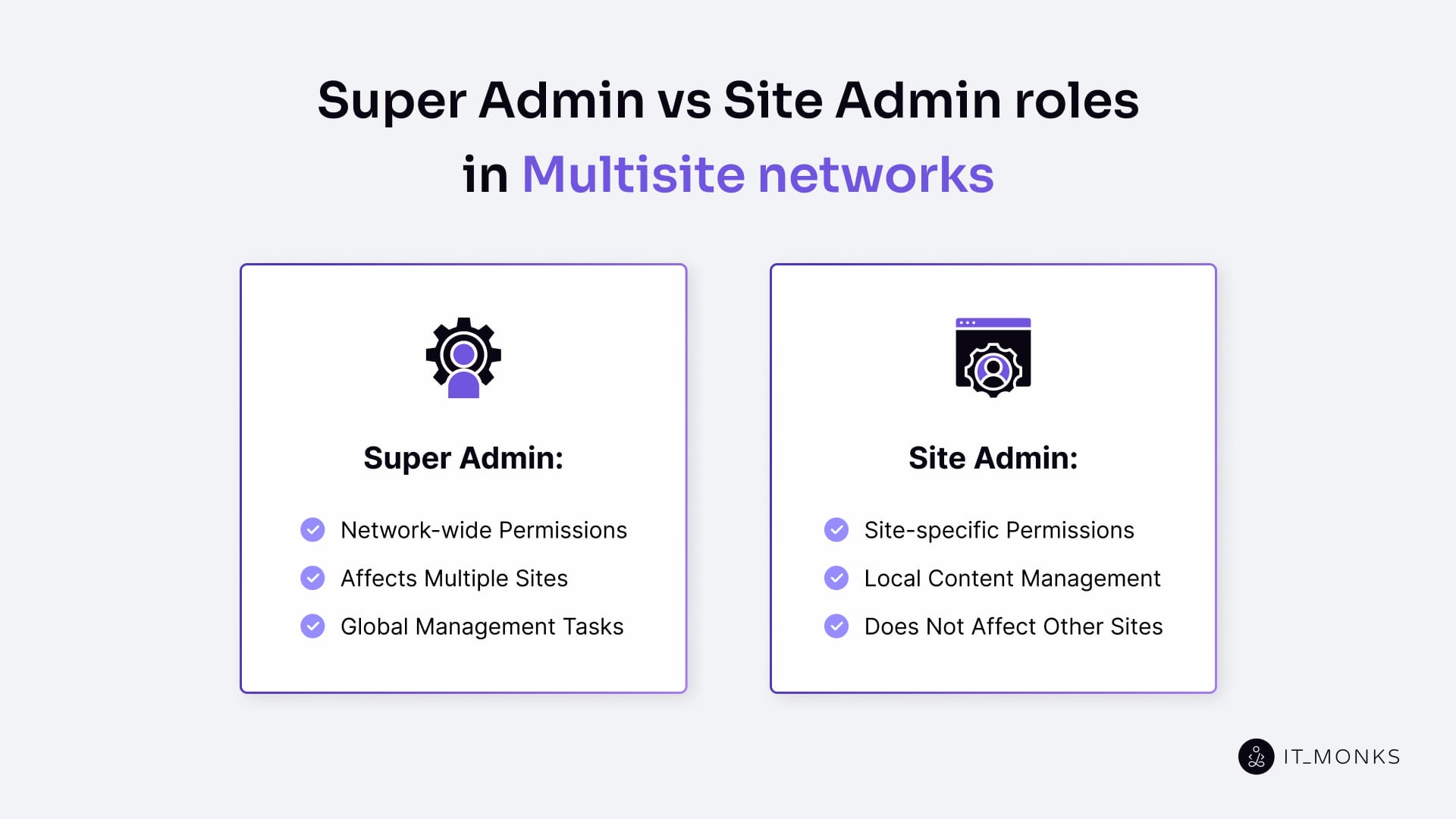
The difference between super admin and site admin is defined by scope. Super admin permissions apply to the entire Multisite network, while site admin permissions apply only to a single site.
A super admin manages the network as a whole. This role controls network-wide rules through network settings and performs global management tasks in network admin, including managing sites, shared themes and plugins, updates, and network-level access. Actions taken by a super admin can affect multiple sites at once.
A site admin manages an individual site within the network. This role focuses on site-specific content, local settings, and day-to-day management, while operating within the network’s defined limits. Site admin actions do not affect other sites.
Hosting for WordPress Multisite
Hosting for WordPress Multisite requires a hosting environment that supports multiple sites within a single shared WordPress installation. A Multisite network concentrates traffic, updates, and content management into a single system, so hosting must provide stronger performance, scalable resource allocation, and reliable routing support than typical single-site hosting.
Server resources such as CPU or vCPU and RAM (GB) must handle concurrency, traffic spikes, and background processes across the network. Limited resources can create bottlenecks that affect every site in the shared environment. Storage should use SSDs or NVMe drives with sufficient capacity (GB/TB) and high IOPS to reduce latency and maintain throughput.
Database performance is central to Multisite reliability. MySQL or MariaDB must handle higher query volume from multiple sites, and proper configuration improves stability during peak load. Caching layers, including page and object caches such as Redis or Memcached, reduce database load, while a CDN improves asset delivery during traffic spikes.
DNS and routing must match the network structure. Subdomain-based Multisite requires wildcard DNS, while subdirectory setups depend on correct routing. A misconfiguration at this layer can affect multiple sites simultaneously.
Backups, restore speed, and disaster recovery planning are higher priorities in a Multisite network because centralized updates and shared configuration changes can impact many sites. Hosting should define clear backup frequency and fast restore time objectives (RTO/RPO).
Security controls must protect the shared environment. SSL/TLS, firewall protection, and server-level isolation reduce the risk that a single issue spreads across the network.
Monitoring and support complete the foundation. Continuous monitoring, clear SLA terms, and responsive support improve uptime and operational reliability.
How to Set Up WordPress Multisite?
Decide Your Website Structure
Choose the website structure for the Multisite network before starting setup. The structure, subdomains or subdirectories, defines the URL pattern for every site and determines routing, DNS, SSL/TLS coverage, redirects, and future SEO constraints.
Subdomains assign each site its own hostname under the main domain. This structure requires DNS control, usually wildcard DNS, and server routing that accepts multiple hostnames for a single WordPress installation.
Subdirectories place each site under a path on the main domain. This structure relies on rewrite rules and path-based routing, avoiding the DNS dependencies required by subdomains.
Evaluate the choice using four checks:
- User-facing clarity: subdomains read as separate properties, while subdirectories read as sections of one site.
- Domain and DNS access: subdomain mode requires reliable DNS management and wildcard DNS support.
- Future growth: the structure must remain consistent as sites are added, because switching later would change URLs and require migration.
- Routing and SSL/TLS: all site addresses must route correctly and be covered by valid certificates.
Once the structure is chosen, it locks in the setup direction and allows routing and configuration to be prepared without later reversals.
Prepare Your Current WordPress Site
Prepare the existing site before enabling Multisite, because the change adds a network layer and affects shared configuration.
- Create and verify full backups of files and the database. Enabling Multisite modifies core configuration and routing rules, so a tested restore point is essential.
- Update WordPress core, themes, and plugins to minimize compatibility issues. Outdated code increases the risk of conflicts when resources are shared across sites.
- Review theme and plugin compatibility with Multisite. After activation, shared themes and plugins can affect multiple sites, causing incompatibilities across the network.
- Clean up users and admin access. Remove unnecessary admin accounts and clarify ownership so roles and permissions start from a controlled baseline.
- Confirm permalinks function correctly and document existing redirects. Multisite depends on rewrite rules, and unknown redirects can break routing after the switch.
- Plan a controlled activation using a staging environment or a short maintenance window. Staging is preferred; maintenance mode is a fallback when staging is unavailable.
After backups, updates, compatibility checks, and access cleanup are complete, the WordPress installation is stable enough to enable Multisite through the Network Setup process in WordPress.
Make Sure Your Server Can Route Multisite Correctly
Confirm that server routing supports the Multisite network before running network setup. Server routing must send every Multisite URL to the correct site within WordPress; otherwise, the network will return 404 errors, incorrect redirects, or incorrect site content.
Verify that permalinks and rewrite rules work correctly. Multisite relies on clean URLs, so requests must resolve without 404 errors, and the server must forward them to WordPress using rewrite rules.
Confirm you have access to the server configuration so you can apply the routing rules generated by the setup wizard. Apache typically uses .htaccess, while Nginx requires changes in the server block configuration. Routing readiness depends on being able to apply these rules at the server level.
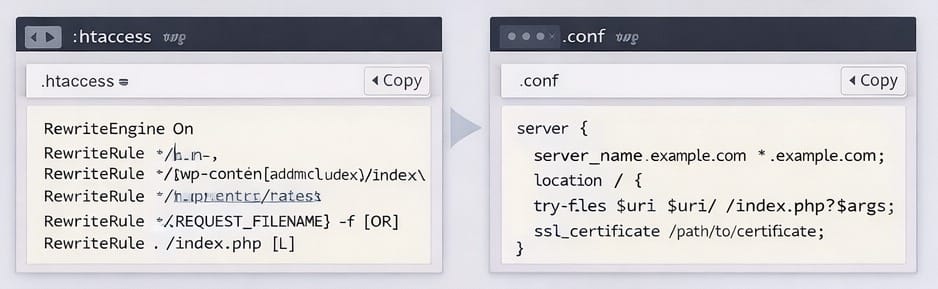
Validate routing based on the chosen site address structure:
- Subdirectories require path-based routing that handles nested URLs without conflicts.
- Subdomains require host-based routing that accepts multiple subdomain hostnames for the same installation and forwards them into WordPress. Subdomain mode also depends on DNS configuration, which is handled separately.
Confirm SSL/TLS coverage matches the address pattern. HTTPS must work for every site URL, including all subdomains, if subdomain mode is used. Certificate mismatches can block access or trigger browser warnings even if Multisite is configured correctly.
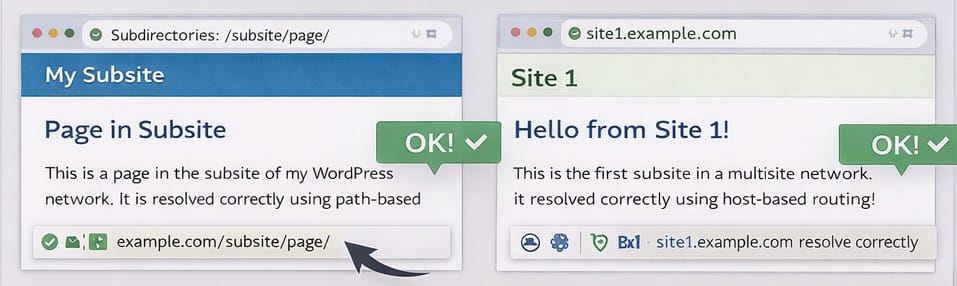
Routing is ready when site URLs resolve into WordPress without 404 errors or redirect loops. Once routing works, you can safely enable the Network Setup menu and proceed.
Turn on the “Network Setup” Menu in wp-admin
Enable the Network Setup menu so WordPress allows Multisite configuration. By default, this menu is hidden and must be enabled in wp-config.php.Confirm file access through a hosting file manager or FTP, then open wp-config.php. Add the following line near the other define() statements (before the “stop editing” line if present), then save the file:
define('WP_ALLOW_MULTISITE', true);Refresh the admin dashboard and verify that Tools → Network Setup appears. If the menu does not show immediately, log out and log back in to clear the session.
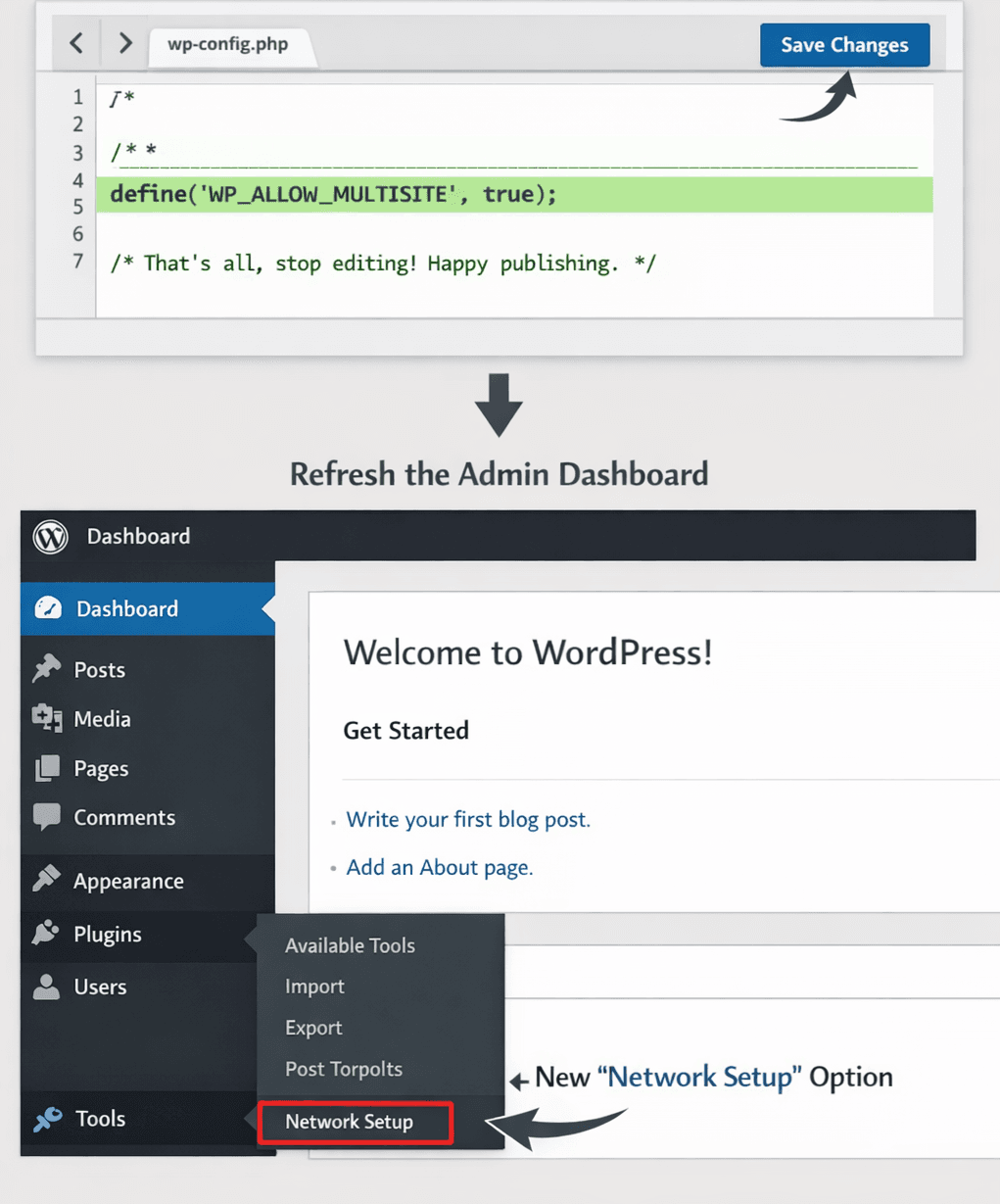
Once the network setup menu is visible, you are ready to run the network setup wizard in WordPress.
Run the Network Setup Wizard
Open Tools → Network Setup and run the wizard to create the Multisite network. This step defines the network identity and generates the exact configuration and routing rules the network requires.
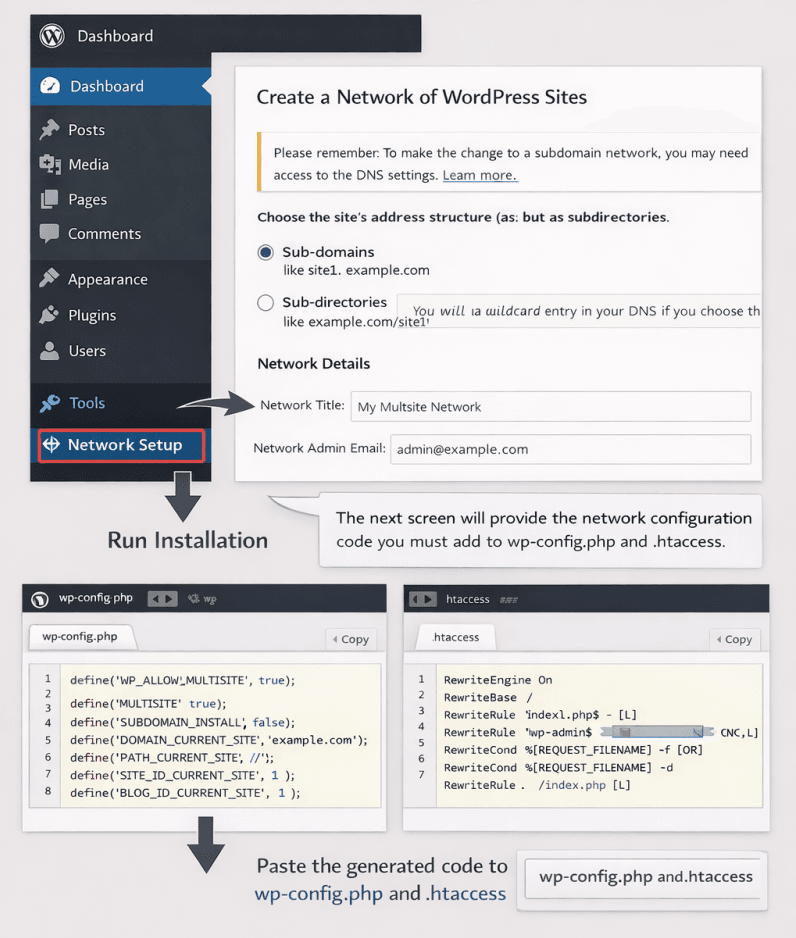
Confirm the selected site address structure (subdomains or subdirectories) before continuing. The wizard generates a configuration based on this choice, and changing it later requires updating the URL and performing migration work.
Enter the network title and admin email. These values define the network identity used across the admin interface and network-level controls.
Run the installation and copy both generated outputs exactly as provided:
- The wp-config.php lines that enable Multisite and define network constants.
- The rewrite and routing rules (shown for .htaccess on Apache or as equivalent rules for Nginx).
Paste the generated lines without modification, save the files, and refresh. WordPress may require you to log in again so the admin session reflects the new network mode. Once complete, the network admin area should become available.
DNS + Routing (only for subdomains)
If the network uses subdomains, configure DNS and routing so all subdomain requests reach the same WordPress installation.
Confirm the network is in subdomain mode before changing DNS. DNS configuration must match the selected network structure.
Ensure you have access to DNS management through the domain registrar or DNS provider. Add or enable a wildcard DNS record so all subdomains resolve to the same server. This is typically done using an A record that maps a hostname to an IP address, or a CNAME record that maps a hostname to another hostname.
Confirm the hosting environment accepts multiple subdomain hostnames and routes them into WordPress using the wizard-generated rules. Verify SSL/TLS coverage includes subdomains so HTTPS works without certificate warnings.
After DNS propagation, test several subdomain URLs. If issues occur, they typically originate from one of the following layers: DNS records, server hostname handling, SSL/TLS coverage, or the applied routing rules.
Log back in and Sanity-Check
Log out and log back in to ensure the new network scope and permissions are applied correctly.
Confirm the Network Admin dashboard is visible. This indicates the network layer is active.
Verify that the original site loads normally, then test at least one additional site. Subdomain networks should be tested across multiple subdomains; subdirectory networks across multiple paths.
Check permalinks by opening several pages or posts and confirming there are no 404 errors. Test media uploads to ensure files can be written and that upload limits behave as expected.
Validate role boundaries by confirming a Super Admin can access network tools and a Site Admin remains restricted to a single site.
If a check fails, return to the directly related step (wizard configuration, routing rules, DNS alignment, or SSL/TLS coverage) rather than applying unrelated changes. Once these checks pass, the Multisite network is stable enough to proceed with security, SEO, and ongoing management in WordPress.
How to Secure WordPress Multisite?
Secure WordPress Multisite by protecting the Multisite network first, then each individual site. A shared setup increases the blast radius of mistakes and attacks, so network-wide controls must come before site-level adjustments.
- Super Admin access is the primary security boundary. Super Admin permissions apply across the entire Multisite network, so access should be restricted to a small, trusted group. Strong passwords and 2FA must be required for Super Admin and Site Admin accounts to reduce the risk of account takeover across multiple sites.
- Users and roles should follow least privilege. Site Admin roles should manage only their own sites, and network-level permissions should be limited to what is necessary. Clear role scope reduces accidental changes and limits the impact of compromised accounts.
- Updates must be controlled through Network Admin. Core, plugins, and themes are shared in WordPress Multisite, so updates should be reviewed, scheduled, and tested before broad deployment. Uncontrolled updates can introduce network-wide issues.
- Plugins and themes should be limited at the network level. Remove unused tools and disable unnecessary features, because every enabled plugin or theme increases the attack surface across multiple sites.
- Network Settings should reduce exposure. Restrict site registration, limit file uploads, and block unnecessary admin capabilities. Network-wide rules help prevent weak configurations on individual sites.
- SSL/TLS must protect all site addresses in the network. Firewall or WAF protections should block common attacks before they reach the shared environment. Malware scanning and server-level protections add another layer of defense.
- Backups must cover the entire Multisite network. Back up regularly, verify restore procedures, and test recovery so the network can be restored quickly if a failure affects multiple sites.
- Logs and monitoring should track network-wide activity. Centralized monitoring and alerts help detect unusual behavior early and reduce downtime across all sites.
SEO for WordPress Multisite
SEO for WordPress Multisite focuses on making each site in a Multisite network crawlable, interpretable, and indexable by search engines without creating conflicts between sites. In WordPress website services, Multisite SEO is critical because many sites and URLs share a single platform layer, so misconfigurations can scale across the network rather than remaining isolated to a single site.
A Multisite network consists of multiple sites, each with its own pages and URLs, connected through shared infrastructure and settings. This shared base improves efficiency, but it also increases SEO risk. Issues such as duplicate content, incorrect canonical signals, or blocked URLs can affect multiple sites simultaneously if introduced at the network level. Structured SEO management prevents these problems and preserves separation between sites where required.
Multisite SEO operates through three connected pillars:
- Technical SEO ensures each site sends clear signals through its site structure, canonicals, sitemaps, robots.txt, and the correct handling of subdomains and subdirectories.
- Link equity management controls how internal links connect sites within the network and how authority flows between them without creating unintended competition.
- A crawling and indexing strategy defines which URLs search engines discover, crawl, and index, maintaining clean, predictable index coverage across many sites.
Because Multisite SEO combines network-wide decisions with site-level outcomes, it is typically handled as part of a broader WordPress SEO service rather than through isolated optimizations. Technical signals establish the foundation, authority flow shapes visibility, and crawl and index control align search engines with the intended structure of the Multisite network.
Technical SEO
Technical SEO in a WordPress Multisite network ensures that search engines can access, interpret, and trust every site and URL in the network. Because many technical settings are applied at the network level, a single misconfiguration can cause the same issue to recur across multiple sites, making network-wide validation and per-site verification essential.
Indexability and crawlability are the first priority. Clear robots.txt rules, correct meta-robots usage, and valid sitemaps determine whether pages can be crawled and indexed. Network-level templates or defaults can unintentionally apply noindex across many sites, so index status must be confirmed on a per-site basis.
Canonical URLs prevent duplicate content and indicate the preferred version of each page. In Multisite, shared themes and repeated layouts increase the risk of duplication, so canonicals must clearly distinguish between URLs that should be consolidated and those that should remain separate.
URL integrity and redirects keep signals consistent. HTTPS enforcement, trailing-slash consistency, and correct 301 redirects prevent search engines from processing multiple URL versions. Redirect errors introduced at the network level can cascade across sites and must be handled deliberately.
Performance and stability support crawl efficiency and trust. Caching, basic Core Web Vitals improvements, and reliable uptime reduce crawl friction. Because resources are shared, performance issues often affect multiple sites if not addressed centrally.
Structured data should follow consistent rules across the network while allowing controlled site-level variation. Predictable structured data prevents conflicting interpretations by search engines.
International or multi-region signals apply only when the network spans languages or countries. In those cases, language and locale signals must align with the chosen subdomain or subdirectory structure.
Without these technical foundations, link authority and crawl control cannot function effectively.
Link Authority Sharing
Link authority sharing describes how links between sites in a Multisite network pass trust and ranking signals. Although sites share infrastructure, search engines still evaluate each site and page individually, so links act as intentional signals rather than automatic benefits.
Cross-site links pass value only when they are relevant. Links between related sites, programs, or topics help search engines understand site relationships and importance. Descriptive anchor text strengthens these signals by clearly indicating destination context.
Navigation and internal linking shape authority flow. Menus and contextual links that reflect real user paths reinforce meaningful connections and improve crawler discovery across the network.
Sitewide links and forced patterns introduce risk. Repeated footer links, identical anchor text across unrelated sites, or excessive cross-linking can dilute signals and confuse search engines. In Multisite, these patterns often originate from shared templates and must be controlled at the network level.
Link authority sharing is effective only after technical SEO is stable.
Crawling and Indexing Strategy
A crawling and indexing strategy defines which URLs search engines should discover, crawl, and index for inclusion in search results across a Multisite network. Multisite environments generate URLs quickly, making inclusion and exclusion rules more critical than in single-site setups.
Crawling determines which URLs search engines find, while indexing determines which of those URLs appear in search results. Repeated templates, archives, and filters can multiply URLs, increasing the need for deliberate control.
Sitemaps guide discovery by listing important URLs per site and signaling crawl priority across the network.
Robots rules and noindex directives control exposure. robots.txt limits crawling, while the meta robots noindex tag allows crawling without indexing, preventing low-value pages from appearing in search results.
Canonical URLs consolidate duplicate content by indicating which version to use when similar content appears across URLs or sites.
Internal linking influences crawl priority. Pages linked from navigation or key content are discovered and crawled more frequently, while isolated pages may be ignored.
How to Manage WordPress Multisite?
Manage WordPress Multisite by centralizing network-level control while keeping daily site work isolated at the site level. In WordPress website services, effective Multisite management balances governance and efficiency without blocking local teams from publishing and maintaining their own sites.
Governance and role boundaries are foundational. Multisite management depends on a clear separation between super admin and site admin. Super admin controls network-wide settings and changes, while site admin manages content and local configuration for a single site.
Network admin and network settings provide centralized control. Network admin is used to manage shared updates, themes, plugins, users, and site lifecycle actions. Network settings enforce defaults and restrictions to keep sites consistent without requiring repeated manual configuration.
Updates, themes, and plugins require disciplined handling. In Multisite, updates are applied once but impact many sites, so they should be reviewed, scheduled, and tested before rollout. Shared themes and plugins support standardization, while limiting unnecessary tools reduces network-wide exposure.
Site lifecycle management keeps the network organized. Adding, configuring, and retiring sites through network admin prevents unused sites, orphaned content, and permission sprawl, ensuring each site serves a defined purpose.
Backups and restore readiness protect the shared environment. Backups must cover the entire network, including files and the database, because recovery often affects more than one site. Restore procedures should be tested so rollback is possible after a failed update or configuration change.
Monitoring and performance checks safeguard reliability. Because hosting resources are shared, traffic spikes or errors on one site can impact others. Network-wide monitoring helps detect issues early and maintain stable performance.
Change control closes the loop. Testing changes before rollout and keeping a rollback option prevents one update from creating network-wide downtime. This process is often supported as part of an ongoing WordPress maintenance service, where updates, monitoring, and recovery are handled consistently over time.
Contact
Don't like forms?
Shoot us an email at [email protected]