Explore our specialized services, tailored solutions, and industry expertise to elevate your digital presence. From custom WordPress development to seamless integrations, we build high-performing websites that deliver impact.
CI/CD is a software delivery practice, and a CI/CD pipeline is the automated workflow that runs from commit to deploy, carrying that practice into real execution.
The CI/CD pipeline automates the release workflow in software delivery, replacing manual, error-prone steps with a consistent process that builds, tests, and deploys code directly from source control. When a developer makes a commit, the pipeline runs a connected sequence that executes build, test, and deployment actions so each release moves toward production without manual handoffs.
This article covers what a CI/CD pipeline is, how its stages work together, how to build one, and how automation, security, and measurement fit into it, starting with a clear answer to that question.
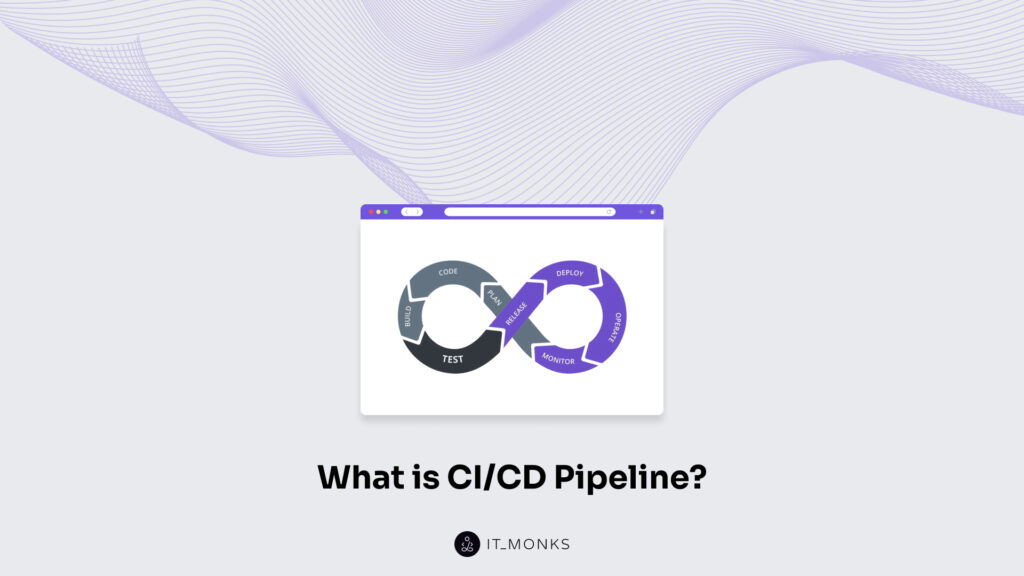
What is CI/CD Pipeline?
A CI/CD pipeline is an automated, orchestrated workflow that moves a code change from a commit in source control through building, automated testing, and deployment to a running environment.
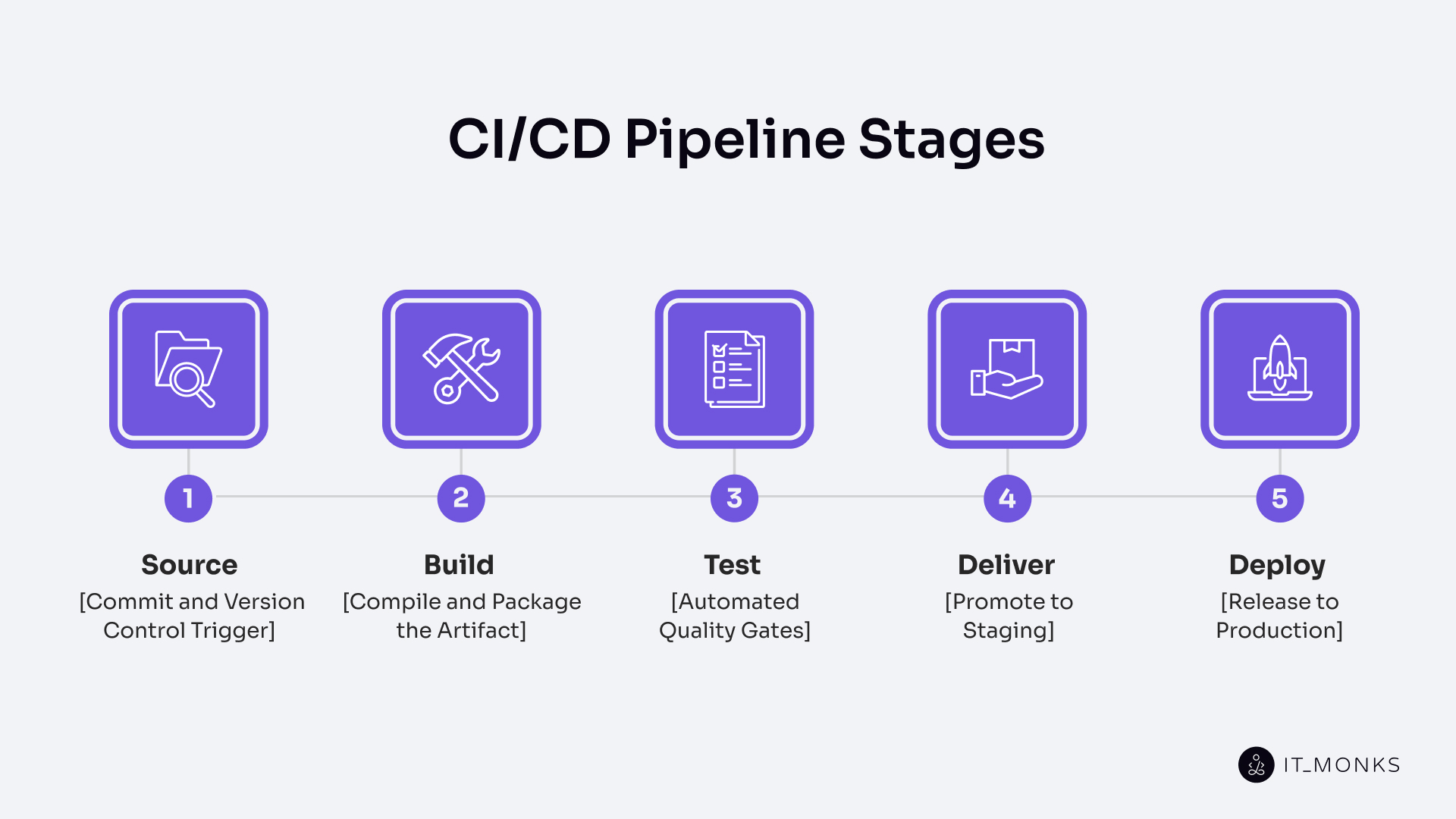
Its constitutive parts follow a fixed chain: a source trigger on commit; a build stage that compiles and packages an artifact; automated test gates covering unit, integration, and security checks; a deliver stage that promotes the artifact to staging; and a deploy stage that releases it into production. The purpose of the sequence is to ship code safely, frequently, and predictably, shortening lead time from weeks to hours and catching regressions before they reach users.
CI/CD Pipeline vs. a Generic Software Pipeline
The term “pipeline” has many meanings in software, which often creates confusion when asking what a pipeline is in programming or in software. A pipeline can refer to several concepts, including CPU pipelining, data pipelines, machine learning pipelines, and software delivery pipelines, each belonging to a separate domain with its own purpose.
A software delivery pipeline, also called a software development pipeline or development pipeline, is an ordered sequence of stages that moves work through software production. In this sense, a pipeline in software or pipeline coding simply describes a structured flow in which code or tasks pass through defined steps, but it does not, by default, require automation, continuous integration, or continuous delivery. These software pipelines, or delivery pipelines, can take many forms, ranging from partially manual workflows to fully automated systems.
A CI/CD pipeline is a software delivery pipeline that automates continuous integration and continuous delivery or deployment end-to-end. While every CI/CD pipeline belongs to the broader category of software pipelines, not every software delivery pipeline qualifies as a CI/CD pipeline because it may lack the automated, continuous commit-to-deploy flow defined earlier.
At the same time, several similarly named concepts must be clearly separated:
CPU pipelining is a hardware-level technique and is unrelated to CI/CD pipelines, as it concerns instruction processing within processors.
Data pipelines and machine learning pipelines are also not the same as CI/CD pipelines, since they focus on data movement, transformation, or model training rather than software delivery.
Continuous Integration vs. Continuous Delivery vs. Continuous Deployment
Continuous integration, continuous delivery, and continuous deployment are often confused because teams use the same abbreviation “CD” to refer to both continuous delivery and continuous deployment, even though they represent different levels of automation and control in a CI/CD pipeline.
Continuous integration is the practice of automatically merging, building, and testing every commit on a tracked branch. It ensures that code changes integrate cleanly by running build and test steps on each commit, and it stops at a tested artifact that is ready for further stages but not yet deployed.
Continuous delivery extends continuous integration by producing a release-ready artifact and automatically promoting it to a staging environment, where it can be validated before release. In continuous delivery, an approval gate is required before production, meaning a human decides when the release moves from staging to production.
Continuous deployment extends continuous delivery by automating the production release as well, so every change that passes the build and test stages is deployed directly to production. Continuous deployment removes the approval gate, allowing code to move from commit to production without manual intervention.
Dimension
Continuous Integration
Continuous Delivery
Continuous Deployment
What it automates
Merge, build, and automated tests on every commit
CI plus automated promotion of a release-ready artifact to staging
Continuous delivery plus automated release to production
Where it ends
A tested artifact in the pipeline
A release-ready artifact in staging, awaiting approval
A running deploy in production
Human approval gate required?
No (automated tests are the gate)
Yes, a human approves the production release
No, no manual gate between commit and production
Artifact state at section end
Tested but not deployed
Release-ready, deployed to staging
Live in production
Typical trigger
Commit or merge to a tracked branch
Successful CI run
Successful continuous delivery run
Risk profile
Lowest, no release happens automatically
Medium, staging is automatic, production gated
Highest, every passing commit reaches production
Canonical example
Unit-tested commits merged safely into main
Nightly staging promotions with Friday production release windows
Multiple production deploys per day, triggered automatically by merges
Why CI/CD Pipelines Matter
A CI/CD pipeline matters because it replaces manual, error-prone release work with a repeatable, automated workflow that every commit passes through.
Deliver faster feedback at the test stage by surfacing build or test failures within minutes of a commit instead of days later.
Reduce integration conflicts by continuously merging every commit, avoiding long-running branches and complex merge situations.
Shorten lead time for changes at the deliver and deploy stages by ensuring each artifact follows the same automated path every time.
Ensure predictable releases by moving the same built artifact through identical stages without variation.
Lower the failure rate by catching regressions early with automated test gates.
Improve recovery speed by keeping a known-good artifact ready for quick rollback when issues occur.
Support key performance tracking through DORA metrics such as deployment frequency, lead time for changes, change failure rate, and mean time to recovery.
Produce consistent delivery outcomes by running every commit through the same ordered stages.
How a CI/CD Pipeline Works: The Stages
A CI/CD pipeline is an ordered workflow that defines the CI/CD process from start to finish and consists of five stages in a fixed sequence: Source, Build, Test, Deliver, and Deploy. This sequence forms the core of typical CI/CD pipeline steps and represents the CI/CD software lifecycle from a single commit to a running application.
The CI/CD pipeline runs as an ordered chain, where each stage consumes the output of the previous stage and gates the next stage, so work advances only when the current stage succeeds. A commit or merge in source control triggers the pipeline run, which starts the entire flow automatically without manual intervention. Each stage processes artifacts, passes results forward, and ensures that the workflow continues only when conditions are met.
If any stage fails, the pipeline stops immediately, and the failure is relayed to the developer responsible for the commit, preventing downstream stages from executing. This failure model ensures that errors are caught early and do not propagate further into the workflow.
Source: Commit and Version Control Trigger
The Source stage is the pipeline’s entry point. It is the first link in the commit-to-build-to-test-to-deliver-to-deploy chain, where a new commit, merge, pull request, tag, or scheduled run triggers everything downstream. Git is the dominant substrate in practice, and branch strategies such as trunk-based, Gitflow, or per-feature branches shape which commits fire which runs. The stage’s output is a known commit SHA, which serves as the input that the Build stage runs against.
Build: Compile and Package the Artifact
The Build stage is the second link in the canonical commit to build, test, deliver, deploy chain. It is the stage that compiles source code into runnable code and packages it as a deployable artifact. This stage resolves dependencies, bundles assets, and pushes the result to an artifact registry. The same artifact built here flows through every subsequent stage, and no downstream stage recompiles it. This single source of truth ensures reproducibility. Once the artifact is versioned and published, the Test stage runs against it.
Test: Automated Quality Gates
The Test stage is the automated quality gate of the canonical chain. On this stage, the pipeline runs layered automated tests against the built artifact and blocks promotion on any failure. Unit tests run first; integration tests check component interactions; end-to-end tests exercise the full system; and security scans and performance smoke checks sit in the same gate. A clean pass hands the artifact to Deliver; any failure stops the pipeline.
Deliver: Promote to Staging
The Deliver stage is the fourth link in the canonical chainб the stage where the pipeline promotes the tested artifact to a staging environment that mirrors production and marks the structural boundary between the continuous integration half and the delivery half. Continuous delivery holds here at an approval gate; continuous deployment skips the gate and flows straight through. Either way, a release-ready artifact reaches Deploy.
Deploy: Release to Production
The Deploy stage releases the approved artifact to the production environment using a rollout strategy – blue-green, canary, rolling, or feature flag activation – and monitors the rollout for health-check and error-rate signals. Every deploy must be reversible; if the release fails a health check or breaches an error-rate threshold, the pipeline redeploys the previous known-good artifact. Monitoring signals from production then feed back into the next run, closing the loop.
A Typical CI/CD Pipeline Example (with Diagram)
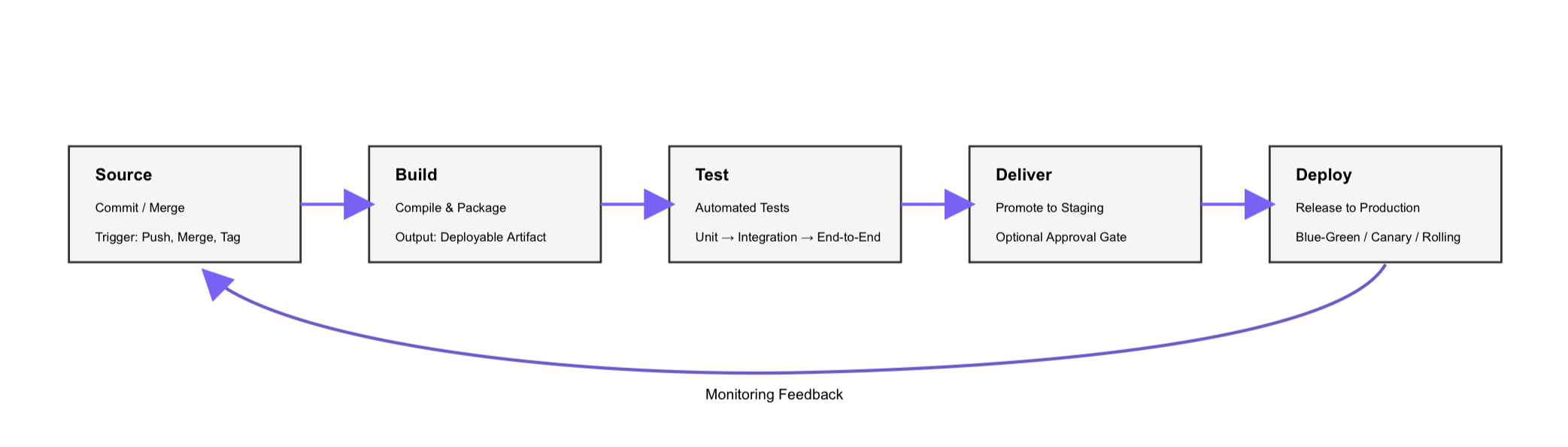
A developer pushes a small fix to a feature branch, and the pipeline traces a predictable path across its five stages – the canonical horizontal flow from Source through Build, Test, Deliver, and Deploy with a feedback loop returning from Deploy to Source.
The walkthrough starts at Source. The developer pushes a commit to `feature/checkout-validation` with the message “Add null check to checkout form,” and the push to the tracked branch triggers the pipeline with that commit SHA as input.
Build receives the SHA next. It resolves dependencies, compiles the service, and packages the output as `checkout-service-1.4.2.jar`, publishing the versioned artifact to the registry in roughly three minutes – the same artifact every later stage will consume.
Test runs against that artifact. Unit tests pass in 90 seconds, integration tests complete in about 4 minutes, and end-to-end tests finish in under 10 minutes, with a security scan running in parallel. Every layer passes, so the artifact moves forward.
Deliver promotes `checkout-service-1.4.2.jar` to `staging-us-east`, the staging environment that mirrors production. On a continuous delivery setup, a release manager reviews the staging run and clicks approve; on continuous deployment, the gate is absent, and the artifact advances automatically.
Deploy then releases the approved artifact to production as a rolling deploy across eight instances, replacing them two at a time while monitoring error rates and latency. If any signal crosses its threshold – error rate spikes past threshold, latency breaches SLO – the pipeline rolls back to the previous known-good build.
That end-to-end pipeline run from Source to Deploy is the atomic shape every domain-specific extension of CI/CD builds on.
How to Build a CI/CD Pipeline
A CI/CD pipeline is built by configuring the canonical commit to build, test, deliver, and deploy chain as a concrete set of decisions.
A CI/CD pipeline requires five prerequisites:
a source control repository
build tooling for the language and runtime
an automated test suite
a target runtime environment
a pipeline orchestrator: Jenkins, GitLab CI, GitHub Actions, Tekton, and CircleCI are common category examples in the orchestrator space.
The through-line is pipeline-as-code: the definition lives in a versioned file, not a UI. Construction breaks down into eight ordered steps that wire the canonical chain end to end, and the pipeline definition that ties those steps together lives as a versioned code file alongside the application rather than as hand-edited UI state. Start with the smallest viable pipeline that runs on every commit, then add layers.
Step-by-Step Implementation
The step-by-step implementation below gives the full sequence for setting up a working CI/CD pipeline from stage definition to end-to-end verification.
Define the stages. Commit to the canonical chain: Source, Build, Test, Deliver, Deploy. Name the stages in your pipeline definition exactly in this order; this is the ordered chain every run will follow.
Configure the trigger. Wire the Source stage to fire on the events your team uses: push to the main branch, merge/pull request events, tag creation, and optionally scheduled runs for time-triggered pipelines.
Wire the build. In the Build stage, configure dependency resolution, compilation (or bundling), static asset building, container image build if applicable, and artifact publishing to an artifact registry. Produce exactly one artifact per run.
Wire the tests. In the Test stage, configure test layers in order of speed: unit tests first, integration tests next, end-to-end tests last. Each layer is a gate, a failure at any layer stops the pipeline and feeds back to the developer who committed.
Wire the deliver stage. In the Deliver stage, configure automatic promotion of the tested artifact to a staging environment that mirrors production. For continuous delivery, add an approval gate before the next stage; for continuous deployment, skip the gate.
Wire the deploy stage. In the Deploy stage, configure the production release with an explicit rollout strategy: blue-green, canary, rolling deploy, or feature flag activation. Wire in rollback so the previous known-good artifact can be redeployed quickly.
Verify the full run end to end. On a throwaway branch, commit a trivial change and watch it flow through every stage from Source to production (or to staging, for continuous delivery). The pipeline is not considered “built” until a full run succeeds.
Iterate. Add security scans to the Test stage, add performance smoke tests before Deploy, add approval gates where compliance requires them, and add deeper rollback automation. Each addition is its own small change to the pipeline definition, reviewed and merged like any code change.
Configuration as Code (Pipeline-as-Code)
Configuration as code, also called pipeline as code, stores the CI/CD pipeline definition as a versioned YAML file beside the application. Examples include `.gitlab-ci.yml`, a GitHub Actions workflow, `Jenkinsfile`, or a Tekton Pipeline.
The benefits of version control include reproducibility, code review of pipeline changes, an audit trail, rollback of pipeline definitions, and branch parity. Each branch carries its own pipeline definition.
A pipeline declared in code is a pipeline that can be reviewed, diffed, and rolled back like any other application change, which is what makes the automation layer that runs the declared chain trustworthy in the first place.
Automation and Automated Testing in the Pipeline
CI/CD pipeline automation is the machinery layer of the chain. It consists of scripted and orchestrated actions that run every step without manual input. This includes the commit trigger, the build, all test layers, deployment, and rollback to the previous artifact in case of failure.
An automated CI/CD pipeline treats manual intervention as the exception, not the rule. Most steps run automatically from commit to deployment. The only step that may remain manual is the approval gate in a continuous delivery setup. In that case, a human signs off before production.
CI/CD pipeline integration represents the continuous integration part of the chain. This is where every commit is automatically merged, built, and tested. Most of the automation is concentrated here because this part runs on every single commit.
CI/CD pipeline automation testing is structured as a layered pyramid. Fast and inexpensive unit tests form the broad base. Slower integration tests sit in the middle. Slow and resource-intensive end-to-end tests form the narrow top.
Security checks run alongside these layers as parallel gates. These include SAST, SCA, DAST, and container image scans. DAST runs against a deployed preview environment, which sets it apart from SAST and SCA that analyze source code and dependencies.
Each layer acts as a gate. If a layer fails, the pipeline stops. The pyramid structure makes the cost-and-coverage trade-off clear. Higher coverage requires more compute and more maintenance per test. Security scanning then takes the next position in the chain of automated gates.
CI/CD Pipeline Security and Compliance
CI/CD pipeline security and compliance treats the pipeline as both an attack surface and a policy enforcement point. It focuses on hardening the pipeline itself while adding security and regulatory checks to the workflow it runs. Frameworks like NIST’s Secure Software Development Framework (SSDF) provide a reference for how these controls fit together.
Securing the pipeline means treating it as a potential target. Secrets are stored in vaults and issued as short-lived tokens. Runners operate with least-privilege access. Commits and artifacts are signed. Supply chain integrity is enforced through SBOMs, pinned dependencies, and provenance attestations aligned with the SLSA framework.
Security inside the pipeline follows a DevSecOps approach. SAST scans source code. SCA checks dependencies. DAST runs against a deployed preview environment. Container image scans run before release. These controls follow the static and dynamic analysis model defined by OWASP.
The CI/CD pipeline also enforces compliance at its gates. Policy-as-code defines the rules. An immutable audit trail records every action. Separation of duties ensures that the author and approver are different people. Approval gates are added where regulations require them.
Monitoring a CI/CD Pipeline and DORA Metrics
CI/CD monitoring is how a team measures whether the pipeline actually delivers the value described earlier. Faster releases, lower failure rates, and shorter recovery times only matter if they are tracked. A CI/CD pipeline must be monitored continuously so teams can see what is improving and what is not.
At the pipeline level, monitoring focuses on health signals that reflect how each run behaves. These signals measure reliability and speed inside the workflow itself.
Pipeline health signals (run-level metrics):
Build success rate: percent of pipeline runs that complete successfully (target: ≥ 95%).
Pipeline duration: total time from trigger to deploy, measured in minutes.
Flaky-test rate: percent of tests that fail intermittently without code changes (target: < 1%).
Queue time: the time a pipeline waits before execution starts, measured in seconds or minutes.
These signals show whether the pipeline is stable and efficient, but they do not measure delivery outcomes. That is the role of the DORA metrics.
Deployment frequency: how often the pipeline successfully deploys to production.
Unit: deploys per day/deploys per week/deploys per month.
Elite: multiple deploys per day (on-demand).
High: between once per day and once per week.
Medium: between once per week and once per month.
Low: fewer than once per month.
Lead time for changes: the time from a commit landing in source control until that same change is running in production.
Unit: hours or days (minutes for elite performers).
Elite: less than one hour.
High: less than one day.
Medium: between one day and one week.
Low: more than one week.
Change failure rate: the percentage of production deploys that cause an incident, require a hotfix, or require a rollback.
Unit: percent (%).
Elite: 0–15%.
High / Medium: up to 30%.
Low: more than 30%.
Mean time to recovery (MTTR): the time from a production incident starting until service is restored.
Unit: minutes or hours.
Elite: less than one hour.
High: less than one day.
Medium: between one day and one week.
Low: more than one week.
These DORA metrics, defined by the DORA research and published in the State of DevOps Reports, measure how well a CI/CD pipeline performs in real delivery conditions. They connect pipeline activity to business outcomes by showing how often changes are delivered, how fast they move, how often they fail, and how quickly systems recover.
A well-monitored pipeline creates a feedback loop. Metrics show what is working and what needs improvement. Without measurement, a team cannot tell whether changes to the pipeline actually improve delivery.
How Do CI/CD Pipelines Fit Into Modern DevOps and Cloud Delivery?
A CI/CD pipeline fits into a broader delivery ecosystem that includes DevOps, Git-based source control, cloud delivery, and CMS-specific workflows such as WordPress integration.
CI/CD Pipelines as the DevOps Backbone
A CI/CD pipeline is the automation backbone of a DevOps practice, the concrete machinery that makes the practice visible, measurable, and repeatable. DevOps is larger than the pipeline. The practice extends beyond any single workflow, but without a CI/CD pipeline, a DevOps adoption has nothing tangible to show.
Source Control and Git Integration
Source control in CI/CD is the Git-based input layer of the pipeline, and Git integration is the mechanism by which Git events trigger pipeline runs. Git is the dominant source control substrate for CI/CD pipelines in practice, and nearly every modern pipeline triggers from Git events. A push fires a branch run; a pull request kicks off a pre-merge validation; a tag creation starts a release pipeline. Trunk-based flows run every main-branch commit; Gitflow runs distinct pipelines per branch type.
Cloud CI/CD Pipelines
Cloud CI/CD pipelines run in two directions: hosted runners execute pipeline jobs on cloud compute resources, and the resulting artifacts are deployed to cloud-managed targets. Runners are typically ephemeral, container-based, and billed per minute. Common deploy targets include managed Kubernetes, serverless functions, managed application platforms, and object storage for static sites.
CI/CD Pipelines for WordPress and CMS Deployments
A CI/CD pipeline for WordPress and CMS deployments follows the same canonical chain as any other pipeline, but the work within the stages differs. Most CI/CD examples assume a generic backend service. They assume a compiled app, a container image, and a standard production runtime. WordPress and CMS projects have different shapes, so the Build and Deploy stages require different responsibilities.
The Build stage often compiles theme SCSS and JavaScript, then runs plugin asset builds where needed. In this case, the deployable artifact is not a JAR file or a backend container by default. It is usually the built theme or plugin directory, along with the files needed for the target environment. That is one reason a WordPress CI/CD pipeline needs a more CMS-aware build definition.
Composer also matters here. Many modern WordPress projects use Composer to manage core, plugins, themes, and shared packages. In those setups, the Build stage runs composer install –no-dev and produces a vendor/ directory as part of the deployable artifact. This is a normal part of modern WordPress development workflows, especially when projects are versioned and deployed through structured environments instead of manual file updates.
Database migration handling is another major difference. WordPress and CMS databases carry both schema and live content. The Deliver and Deploy stages often need to run database migration steps via WP-CLI or similar tooling. They may also need careful search-replace operations for serialized URLs, because naive replacements can break stored values. In branch preview environments, seeded or synchronized content may also be required to enable realistic feature review.
The wp-content structure adds another deployment rule. Theme and plugin code inside wp-content is usually versioned in the repository. The wp-content/uploads directory usually is not, because it contains runtime media and editor-managed assets. A CI/CD pipeline for WordPress has to respect that split so deployments update source-controlled code without overwriting uploads.
Preview environments are also more important in CMS projects. A branch preview often gives reviewers a temporary WordPress site on a subdomain so they can check the visual result before merge. That makes the pipeline useful not only for developers, but also for designers, QA, and content stakeholders who need to review how a change actually looks.
Deployment coordination matters too. WordPress sites are often live editorial systems, not just application runtimes. Editors may be creating or updating content during a release. Because of that, the Deploy stage must handle cache flushing, migration timing, and release behavior carefully to avoid interrupting logged-in users or creating avoidable content conflicts.
So the chain does not change. A WordPress or CMS pipeline still runs commit, build, test, deliver, and deploy in the same order. What changes is the content of those stages. In CMS projects, Build and Deploy perform CMS-specific work within the same CI/CD pipeline.
Frequently Asked Questions About CI/CD Pipelines
Is a CI/CD Pipeline the Same as CI/CD?
No. CI/CD is the practice, while a CI/CD pipeline is the automated workflow that implements it. CI/CD describes the delivery approach a team follows, and the pipeline is the running system that enforces that approach on every commit.
Do You Need a CI/CD Pipeline for a Small Project?
Yes, if the small project has more than one contributor or more than one planned release. Even a minimal CI/CD pipeline can replace manual steps that are easy to get wrong. For a true one-off script that no one will touch again, the setup effort may not be worth it. In most cases, though, a minimum pipeline with a trigger, a test run, and a deploy is small enough to justify.
Can You Have Continuous Integration Without Continuous Deployment?
Yes. Continuous integration stops at a tested artifact, so it does not require an automatic production release. A common setup is continuous integration plus continuous delivery, where the artifact automatically moves to staging, while production remains behind a human approval gate, especially in regulated environments.





 ChatGPT
  Claude
  Grok
Grok  Gemini