Explore our specialized services, tailored solutions, and industry expertise to elevate your digital presence. From custom WordPress development to seamless integrations, we build high-performing websites that deliver impact.
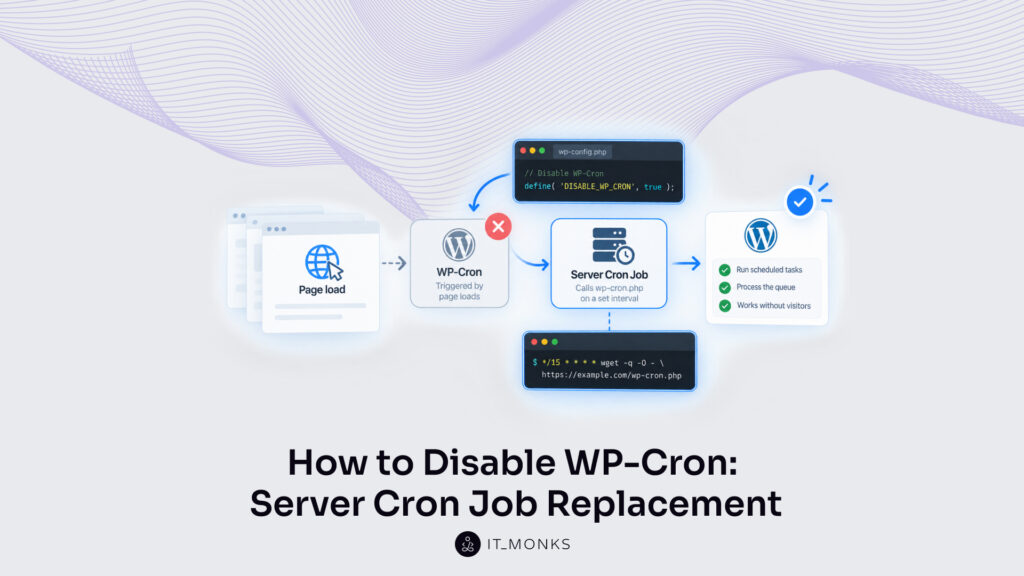
WP-Cron is the scheduler WordPress runs on page load rather than from a server clock, so practitioners often disable WordPress cron on a client site and replace it with a real server cron job. It is a page-load-triggered imitation of a system cron: a request reaches the site, WordPress reads the scheduled task queue, and it requests wp-cron.php to run whatever is due.
Nothing on the server watches a clock for the queue. A system cron job runs at a fixed interval and fires whether or not anyone visits; WP-Cron holds only a next-run time, and it needs a visit before that time for anything to happen.
Replacing it is not one act but four. A reading of the client site’s traffic says whether the scheduler is in the wrong place at all. The DISABLE_WP_CRON constant stops wp-cron.php firing on every page load. A server cron job then calls the same file on a set interval, stated in minutes and chosen against what the site’s scheduled work actually needs rather than copied from a default.
A confirmation check says the entry is firing. Inside WordPress, disabling cron is one line in wp-config.php. The rest of the switch is server-side, and the order between those two halves is a prerequisite: the server entry has to be calling wp-cron.php before that line goes in, because the reverse order stops the scheduled work silently.
None of it touches how events are booked. A queued event keeps its hook name, its next run time, and its recurrence; what changes is what triggers the queue, not what sits in it. Whether that change is worth making at all depends on the value you’re trying to protect.
Site Traffic: When to Disable WP-Cron
Site traffic is what WP-Cron uses to determine its run times, which makes it the key factor in deciding when to disable WordPress cron on a client site. Replacing the scheduler is one branch of WordPress cron jobs as a whole, and traffic is what separates the sites that need the switch from the sites that are fine without it.
On a busy client site the cost is the extra request. A page load that finds due work makes WordPress request wp-cron.php as a second, separate request, and that request needs a PHP worker of its own from the same finite pool serving visitors. Not every page load produces one. WordPress holds a cron lock and makes no such request while a run started inside the last WP_CRON_LOCK_TIMEOUT seconds (60 seconds by default, per developer.wordpress.org), so the ceiling is one extra request a minute rather than one per visitor.
The page being served is not held open while it runs. Server capacity is what pays instead: at high request volume the site runs cron checks alongside the traffic, and page load time rises across the site rather than on one page. A client site also runs on a count of PHP threads rather than an unlimited supply, so a queued cron run holds its place until one of those threads is free before it fires.
Too few visits is the opposite reading. No request arrives, the queue is never read, and a schedule kept correctly in code sits past its run time until somebody loads a page. The booking is right. Nothing fired it.
No visits-per-day figure marks the line between the two, and no source states one. The reading is across both values together (page load time carrying cron work on one side, run times missed on the other), and either side says the same thing about the same mechanism: run times inherited from traffic are run times nobody controls. That is the signal. What the switch then stops is narrower than the name suggests, and the constant is the half most often read as doing more than it does.
What Does the DISABLE_WP_CRON Constant in wp-config.php Disable?
The DISABLE_WP_CRON constant in wp-config.php is the single line that exists to disable WordPress cron, and it disables exactly one thing: the request WordPress makes to wp-cron.php when a page is loaded. It is a configuration constant, defined in wp-config.php and read on every request, and its entire effect sits on that single path, which leaves a request sent straight to the file, from outside any page visit, open.
The pair is plain enough to state in two clauses. Before the constant, a page visit makes WordPress read the scheduled task queue and request wp-cron.php for whatever is due; after the constant, the same visit does neither.
define( 'DISABLE_WP_CRON', true );
One line, two arguments. 'DISABLE_WP_CRON' is the constant name WordPress checks before it requests the file, and true is the boolean value that switches that request off: the constant defined with false, or left undefined, leaves the page-load request in place. Placement inside the file matters as much as the value: the line belongs above the line that loads wp-settings.php, because a constant defined after WordPress is already loaded is defined too late to be read.
Scheduled events stay in the queue. The constant holds no authority over what is booked there: bookings, next run times, and recurrences are all where they were, and none of them is touched by the switch. DISABLE_WP_CRON is also not ALTERNATE_WP_CRON, which is a separate constant naming a redirect method whose cron request still comes from a visit.
That is why the constant is the second half of the switch, never the first. The line belongs in wp-config.php only once a server cron entry is already calling wp-cron.php on its interval, because the reverse order (constant in, entry later) stops the scheduled work silently: nothing errors, nothing writes to a log, and every due event simply sits in the queue. One path closes. One does not.
Direct Calls to wp-cron.php
A direct call is a request made directly to wp-cron.php, not one produced by a page visit, and it is the path the constant leaves open. A practitioner who has chosen to disable WordPress cron on a client site still needs the file reachable, because the replacement does the same thing.
DISABLE_WP_CRON governs the page-load path only. WordPress stops requesting the file when a page loads; the file itself keeps doing what it always did: running whatever the scheduled task queue has due when it is requested. A server cron job reaches it exactly this way (the same file, the same work, a different caller), and that is the reason the entry has to exist before the constant does.
The request WordPress makes for itself carries a doing_wp_cron query argument holding the cron lock value WordPress set when it made that request, which wp-cron.php then checks against the stored lock; a server cron entry carries no such argument and needs none.
Anything able to reach the file can request it. That is a property of wp-cron.php sitting in the web root, not a failure of the constant, and the constant was never the thing in front of it.
So the page load was the only caller a default install holds, and the constant closes it. Something else has to call the file on a clock, at a fixed interval in minutes.
Server Cron Job Replacement on a Set Interval
A server cron job is the scheduled caller held by the server itself, and on a WordPress site its whole task is to request wp-cron.php on a set interval. Disabling WordPress cron takes away the page-load trigger, so something on the server rather than a visitor takes over the calling. What sits in the queue does not change. Every event already booked there runs on the same recurrence it always had; only the clock behind the request moves.
Order matters in one direction only. The server cron job has to be calling wp-cron.php before the DISABLE_WP_CRON constant goes into wp-config.php, because the reverse order stops the scheduled work silently.
The interval belongs to the site, not to a source. A cron job set on a longer gap than the shortest recurrence the site’s own scheduled tasks need lets those tasks sit past their due time, which is the failure the switch was meant to end. So the basis is that shortest gap, in minutes, read against the two signals that make the replacement worth making at all: what the page-load run adds to a visit, and how often a due task is found unrun.
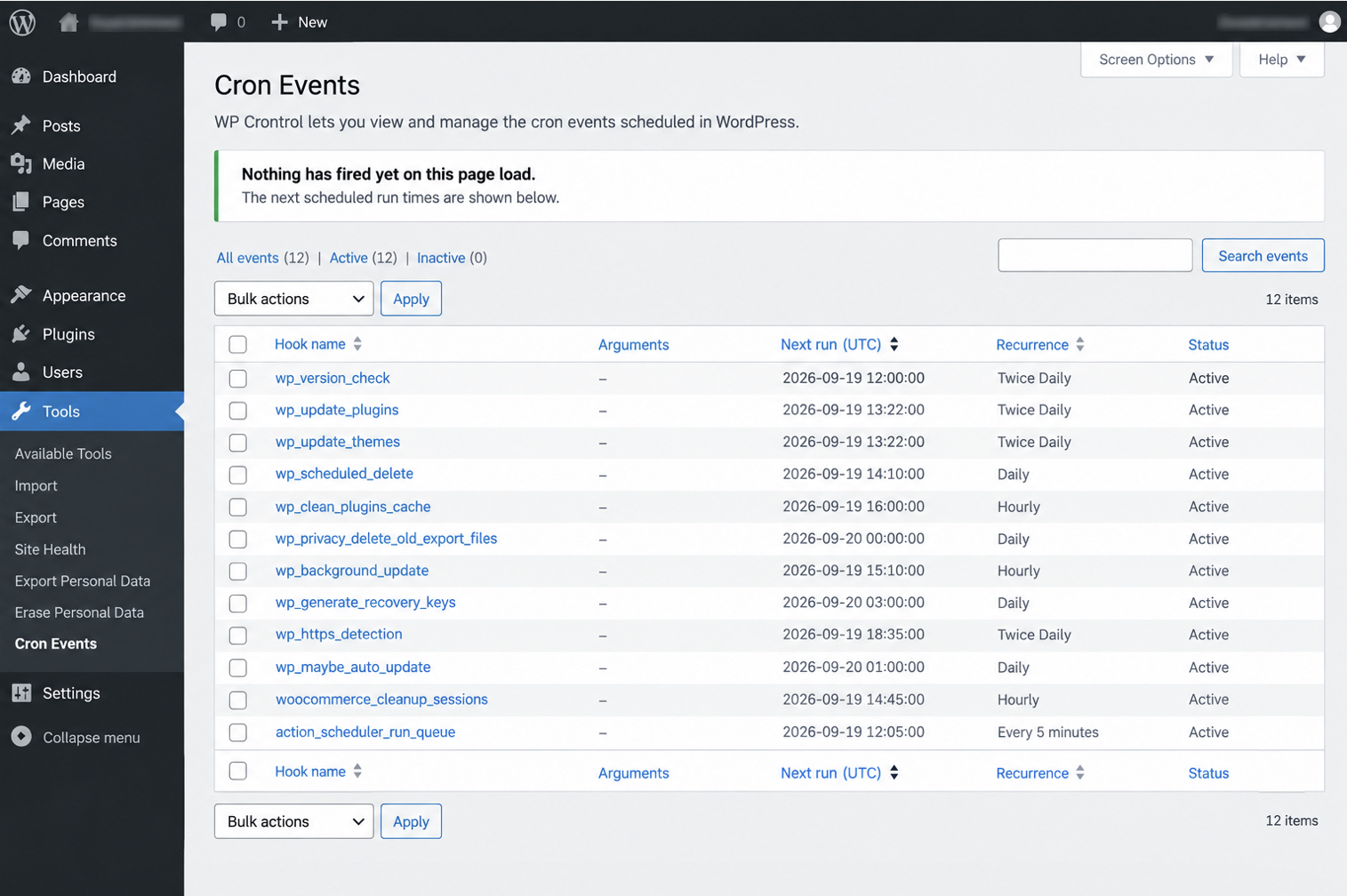
That gap is a readable number, not an estimate. It is the shortest recurrence the site’s own queued events were booked with, and a cron events screen holds every one of those events against its recurrence and its next run time.
Three paths put the entry in place, and they differ only in where the clock sits. A crontab line belongs to a practitioner with shell access on the server. A host control panel holds the same request for a site with no shell. A service outside the site holds it where there is no server access at all. Whichever path is used, this cron job and its interval are what a confirmation check reads.
Crontab Entry on the Server
The crontab is the server’s own list of timed commands, and one line in it is the whole of a request to wp-cron.php on a schedule.
Two parts sit in that line, and the first is the interval: */15 in the minute field fires the command at every fifteenth minute of the hour, and the four asterisks after it leave hour, day of month, month and day of week unrestricted, so the pattern repeats around the clock. Everything after those fields is the request. wget fetches the URL the way a visitor’s browser would, and a request to wp-cron.php is all WordPress needs to run whatever is due. --delete-after throws the fetched response away once the fetch completes, because the response body holds nothing worth keeping and wget left to itself would write a file on the server on every single run.
Fifteen minutes is the interval developer.wordpress.org uses in its own example, not a figure a client site inherits. The minute field takes whatever the shortest recurrence on the site needs: five minutes where a five-minute task exists, an hour where the shortest job is hourly. From one client site to the next, only that first field and the site host in the URL change.
Where there is no shell access, the same request goes in through the host’s own interface.
cPanel Cron Job
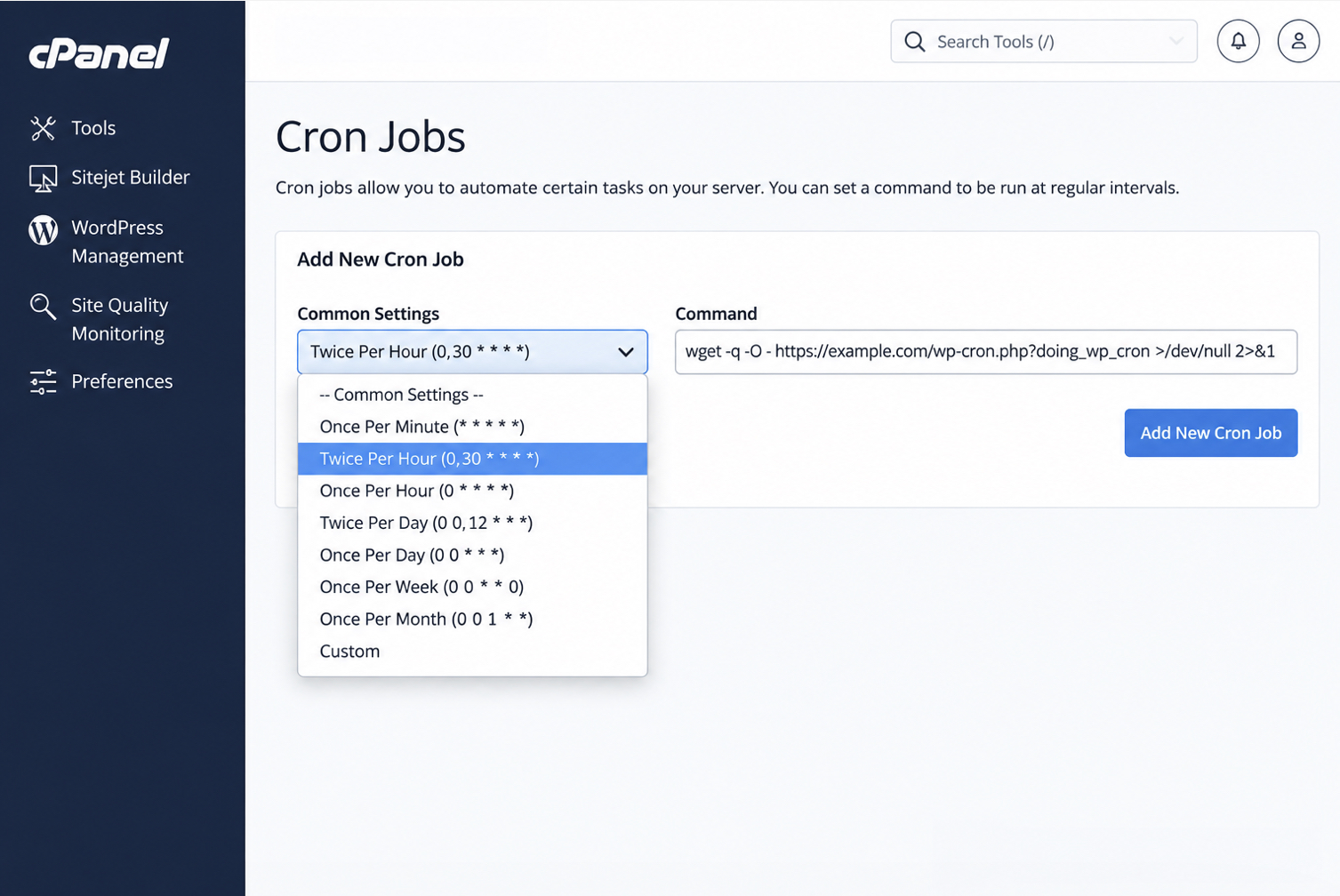
A cPanel cron job is the same timed request to wp-cron.php, entered through a host interface instead of a command line. Two fields on the Cron Jobs screen carry it: the Common Settings dropdown and the Command field.
Each field maps onto one half of the crontab line. The Common Settings dropdown does the work of the five interval fields, offering a list of ready-made schedules rather than the asterisk syntax, and the panel writes the fields out from whatever is picked. The Command field holds the request itself, typed in exactly as it reads on the server. Nothing is different about the entry once it is saved; the panel edits the same crontab.
Twice per hour is one panel’s preset, and a preset is a starting point rather than an answer. Checked against the basis, it suits a site whose shortest scheduled task runs hourly or less often, and falls short of a site with a task due every ten minutes. The dropdown usually holds a custom option for that case.
A site with no server access at all reaches the same result from outside.
Third-Party Cron Service
A third-party cron service is a clock outside the site that requests wp-cron.php on a schedule the service holds, which makes it a replacement on the same terms as a crontab line or a panel entry: the call arrives on its interval whether or not anyone visits.
A third-party cron service is not the alternate-cron redirect method, which is a separate constant in wp-config.php and is still visitor-triggered. Alternate cron waits for a visitor. WordPress hands that browser a redirect when a run is due, so it replaces no page-load trigger at all. ALTERNATE_WP_CRON and DISABLE_WP_CRON sit in separate sections of the wp-config.php documentation on developer.wordpress.org for that reason.
Confusing the two costs a client site the thing the switch was for. A site set on alternate cron still depends on traffic, so a task due at three in the morning on a quiet site waits for whoever arrives first, exactly as it did before.
Thirty minutes is the interval one published walkthrough selects from a service’s schedule field: a guide’s choice, not a service default. Measured against the basis, it fits a site whose shortest recurrence is hourly and is too slow for anything tighter, and a service’s schedule field takes a shorter interval where the site needs one.
Whichever of the three paths holds the clock, the reading afterwards is the same: either something is requesting wp-cron.php on its interval, or nothing is.
Confirmation of the Server Cron Job
Confirmation of the server cron job is a single reading taken after the entry is in place, and it reads one thing: which clock requests wp-cron.php. The request arrives on the interval the server holds or it arrives on a page load, and only the first is a replacement, which is where the decision to disable WordPress cron holds, not at the moment the constant is saved.
Two readings answer that from opposite sides: one shows what happens to the queue, the other shows the request itself. The first is the cron events screen, at Tools → Cron Events with WP Crontrol active, where every event still in the queue sits against the time it is next due, and the recurrence each one was booked with. What matters there is an absence: with the constant in place, no event shows as having fired on the page load that just opened the screen, and the next run times stay ahead on the clock. Kinsta’s guide to the same switch reads it the same way: events firing at the intervals the server cron holds, not on every visit.
The server log is the second reading, and it holds the request rather than its effect. A crontab entry whose output is written where it is readable, or an access log containing a request to wp-cron.php stamped at the times the entry names; either one records that the timed call was made. Read the log after one full interval in minutes has passed, because a log says nothing about the entry until at least one scheduled run has come around.
A line at each interval is the clean result: the entry calls wp-cron.php on a clock, and WordPress runs the due queue when that call arrives instead of when a visitor arrives. An empty log after a full interval is the other result, and it is a statement about the entry rather than about the events: nothing requested the file, so the site sits with WP-Cron prevented on page load and nothing in its place.
Read together, the four changes are one working arrangement. A client site whose own traffic never supplied the page loads its schedule needed gave the reason to switch; DISABLE_WP_CRON in wp-config.php stopped the page load from triggering the queue; a server-side entry took over the request to wp-cron.php on its fixed interval; and these two readings show that entry firing. Confirmation ends there. An event that comes due while its own work still never runs is a separate question, and neither reading answers it.
Disabling WP-Cron switches what triggers the queue and not how anything is set into it, so how each event is set in PHP against an action hook belongs to scheduling a custom WP-Cron event. That separate question (the entry firing on its interval while an event in the queue still never runs) sits with debugging WP-Cron events that are not running.
At larger client sites the same crontab holds more than one request, since WordPress work also runs through WP-CLI commands on that clock, and that pattern is WP-CLI and system cron automation. The hosting tier at which a real server cron entry stops being optional at all sits upstream, with enterprise WordPress development.







 ChatGPT
  Claude
  Grok
Grok  Gemini