Explore our specialized services, tailored solutions, and industry expertise to elevate your digital presence. From custom WordPress development to seamless integrations, we build high-performing websites that deliver impact.
A MySQL user account is created as a named security principal expressed as ‘user’@’host’, establishing the identity that connects to the MySQL server. It exists within the mysql.user system table that maintains authentication metadata.
A MySQL user account requires a lifecycle that includes CREATE USER, GRANT, SHOW, ALTER, and DROP operations. For a WordPress developer, this lifecycle supports staging environments, backup-tool access, migration workflows, and developer-shell usage patterns that depend on distinct user provisioning.
Working through this lifecycle involves moving from account creation to authentication plugin selection, privilege assignment, enumeration, password rotation, removal, and privilege inspection, with a later parallel in GUI-based tools. The process begins by creating the MySQL user account, during which the ‘user’@’host’ identity is first established.
Creating a MySQL User Account
CREATE USER is the statement that adds a new named security principal to mysql.user, identified by a ‘user’@’host’ pair and a matching credential. The canonical form is short:
CREATE USER 'wp_user'@'localhost' IDENTIFIED BY 'password';
A generalized template keeps the three inputs visible at a glance:
CREATE USER 'username'@'host' IDENTIFIED BY 'password';
Three inputs, three jobs.
The username fixes identity > the string the server hears on login.
The host fixes the connection scope > the origin the server will accept that identity from.
The IDENTIFIED BY clause fixes the authentication secret > the password the server checks at connect time.
Each is required; none substitutes for the others.
Host values deserve a closer look because they decide whether an account is usable at all.
‘localhost’ accepts connections only through the local Unix socket on the MySQL server, which is the right choice when the application and database share a machine.
‘%’ accepts any remote host, useful for a multi-server topology, but dangerous if the account also holds broad privileges.
A specific IP, such as ‘10.0.0.42,’ pins the principal to one origin, the pattern a migration runner or a backup process usually wants.
The same username paired with different host values is not the same account; each ‘user’@’host’ is unique.
The authentication plugin is the other consequential choice at creation. From MySQL 8.0 onward, the default is caching_sha2_password, which is secure and modern but requires a client runtime on the mysqlnd driver path to speak to. Older deployments still ship mysql_native_password, which is broader in terms of legacy-client compatibility and is deprecated as of 8.4. The decision lives in an optional IDENTIFIED WITH clause:
CREATE USER 'wp_user'@'localhost' IDENTIFIED WITH caching_sha2_password BY 'password';
MariaDB, a drop-in fork found on many shared hosts, shares the base CREATE USER syntax with MySQL.
Small defaults differ; the authentication plugin family is the most visible of them.
One thing the newly created account does not yet have: privileges. CREATE USER creates the identity and credentials. GRANT must run before the account can perform any operations against a database.
Authentication Plugin for a MySQL User Account
The authentication plugin that protects a MySQL user account is the algorithm the server uses to verify the password at connection time. The server ships several of them; the choice set at CREATE USER time decides which hashing and challenge path runs whenever the account logs in.
Plugin
Default in MySQL version
Client / PHP compatibility
caching_sha2_password
8.0+ default
PHP 7.4+ on mysqlnd ≥ 7.4
mysql_native_password
Legacy default (pre-8.0)
Widest client compatibility; deprecated in 8.4
auth_socket
Linux socket-peer auth
Server-side admin only
caching_sha2_password uses SHA-256-based hashing with a server-side cache; it is the modern default and the one MySQL 8.x expects unless you override it.
mysql_native_password is the legacy SHA1-based algorithm that older client stacks speak fluently; it’s still present and usable, but on the way out.
auth_socket tests the operating-system identity of the connecting process against a Linux peer socket; it is a local-admin shortcut, not a scheme to hand to an ordinary application account.
Client-runtime compatibility is the reason the choice matters. The mysqlnd driver versions shipped with PHP 7.4 and later natively support caching_sha2_password; older PHP builds, and a handful of legacy stacks still require the native plugin to complete the handshake. An application that refuses to connect with a freshly created account, even when the credentials are correct, indicates a plugin mismatch as a common root cause.
Two SQL surfaces pick the plugin. CREATE USER … IDENTIFIED WITH <plugin> BY ‘<password>’ sets it at the moment the account is created. ALTER USER flips an existing account to a different scheme without touching any of its privileges:
ALTER USER 'wp_user'@'localhost' IDENTIFIED WITH mysql_native_password BY 'password';
The same question appears in MariaDB, with a different default family.
Creating a MariaDB User Account
MariaDB is a drop-in fork of MySQL, and the MariaDB user account inherits the MySQL CREATE USER grammar verbatim:
-- MariaDB-side
CREATE USER 'wp_user'@'localhost' IDENTIFIED BY 'password';
It is worth flagging family differences for anyone who moves between engines. MariaDB 10.x and 11.x favor a different default authentication plugin family, most shipped builds still default to mysql_native_password, and recent releases add ed25519 as a modern option in place of caching_sha2_password. Account-lock clauses behave with small but documented divergences from MySQL’s; they rarely bite an ordinary provisioning flow, but they exist.
GRANT, SHOW, ALTER, and DROP all behave the same in MariaDB as they do in MySQL for the provisioning patterns a WordPress developer encounters. A MariaDB-backed database reads identically to a MySQL one from the moment the CREATE USER statement commits; the engine label changes, the grammar does not.
Granting Privileges to a MySQL User Account
GRANT is the statement that grants privileges at a named scope to the ‘user’@’host’ the creation step just added. It reads like a short sentence: what rights, on which object, to whom.
GRANT SELECT, INSERT, UPDATE, DELETE ON wp_database.* TO 'wp_user'@'localhost';
Written as a template the three building blocks are obvious:
GRANT <privileges> ON <scope> TO '<user>'@'<host>';
The privilege list holds what the account can do. The scope holds where the rights apply:
*.* for the whole server, dbname
* for every table in one schema, dbname.
tablename for a single table, with column- and routine-level variants available when the pattern calls for them.
The ‘user’@’host’ grantee holds who receives them. Each piece is independent: revising the scope does not revise the privilege list, and revising the privilege list does not narrow the scope.
MySQL sorts privileges into two categories.
Static privileges (SELECT, INSERT, UPDATE, DELETE, CREATE, DROP, ALTER, INDEX, and their peers) cover the day-to-day rights that application accounts need.
Dynamic administrative privileges (SYSTEM_VARIABLES_ADMIN and others in the same family) are granted to database administrators and rarely appear in an application account grant.
Two forms of GRANT cover nearly every provisioning case.
The blanket GRANT ALL PRIVILEGES hands the grantee the full static set at a chosen scope in one statement: maximum power, maximum risk.
The per-database GRANT <list> ON dbname.* grants a specified set at a narrower scope, the form an application account should almost always receive.
One footnote on FLUSH PRIVILEGES. The statement reloads the grant tables after a direct edit to mysql.user (an INSERT or UPDATE against the system tables). It is not required after a GRANT. GRANT takes effect immediately on the running server. Running FLUSH after every GRANT is a habit left over from an older configuration workflow; it is harmless but unnecessary.
The blanket form has the most surface area, so understanding its risk profile helps explain why the scoped form is the recommended pattern for an application account.
Granting All Privileges to a MySQL User Account
GRANT ALL PRIVILEGES is the form that grants every static privilege at the chosen scope to the grantee in a single statement. At its most permissive:
GRANT ALL PRIVILEGES ON *.* TO 'wp_user'@'localhost' WITH GRANT OPTION;
The suffix after ON is the single lever that controls power.
ON *.* covers every database on the server, which is to say everything.
ON dbname.* covers every table inside one database — still broad, but confined to a single schema.
WITH GRANT OPTION is the clause that lets the grantee pass its own privileges to other ‘user’@’host’ accounts; it belongs on administrator credentials, not application users.
Risk callout. ALL PRIVILEGES ON *.* is root-equivalent. A grantee holding it holds read and write reach into every database on the server, can create and drop other accounts, and, with WITH GRANT OPTION, can hand the same power to any other account. An application account should almost never receive this. The per-database-scoped form that follows is the correct pattern for an application account.
The principle of least privilege is the reason the scoped form exists at all. An application account touches one database; a backup runner touches two, maybe three. Granting the full static set across the entire server means an SQL injection inside the application becomes a server-wide incident instead of a database-wide one. The scope suffix is where that distinction lives, and the per-database scope (the one a provisioning script actually writes) is the shape most application accounts end up with.
Granting Database Access to a MySQL User Account
Per-database scoping means the account holds privileges only against the target database’s schema: every table inside wp_database, and nothing elsewhere on the server. The statement swaps one scope suffix for another, and the power attached to the account changes with it:
GRANT SELECT, INSERT, UPDATE, DELETE, CREATE, ALTER, INDEX, DROP ON wp_database.* TO 'wp_user'@'localhost';
The scope suffix is what separates a safe application account from a root-equivalent one.
ON dbname.* scopes the grant to a single schema; the account cannot see, query, or modify anything in the other databases on the same server.
ON *.* does the opposite. The same privilege list attached to the two scopes produces two wildly different security postures, and that difference is the whole point.
ON dbname.tablename is the tighter form that shows up for specialized accounts. This read-replica user only touches one analytics table, a reporting tool that runs against a materialized view. It is the right tool for accounts with a single narrow job, though most application accounts need access to every table in their database and use ON dbname.* instead.
The eight privileges the statement names are the standard application set.
Data privileges (SELECT, INSERT, UPDATE, DELETE) cover the read and write paths that an application issues during normal page loads.
Schema privileges (CREATE, ALTER, INDEX, DROP) cover the operations an application runs during installation, release upgrades, and feature activation, when tables appear, take new shape, or go away.
That combined set is what an application account actually needs:
GRANT <data+schema list> ON wp_database.* TO ‘wp_user’@’localhost’ (scoped to one database, full coverage of the application privilege set).
GRANT ALL PRIVILEGES ON *.* TO ‘wp_user’@’localhost’ (server-wide, root-equivalent, wrong for an application account).
Principle of least privilege reads as the scope suffix more than the privilege list. Pick the narrowest scope the account actually needs.
Showing MySQL User Accounts
Enumerating MySQL user accounts involves querying the mysql database.user system table, which stores a row for every named ‘user’@’host’ principal the server knows about. A common first instinct is to reach for SHOW USERS (the phrase is a popular search query), but MySQL has no such statement. The enumeration is a plain SELECT:
-- ❌ SHOW USERS;           (not a valid MySQL statement)
-- ✅
SELECT User, Host FROM mysql.user;
User and Host are the two columns that uniquely key each principal. They are the pair that corresponds one-for-one to the ‘user’@’host’ form seen at CREATE USER time, and every row in mysql.user has them filled. A ‘wp_user’@’localhost’ on one server and a ‘wp_user’@’10.0.0.42’ on the same server are two rows, two principals, and two independent sets of privileges, regardless of the shared username.
For an administrator tracking down one installation’s accounts, two filters do most of the real work:
SELECT User, Host FROM mysql.user WHERE User = 'wp_user';
SELECT User, Host FROM mysql.user WHERE Host LIKE '10.0.%';
The first narrows the output to every ‘wp_user’@’host’ row on the server (useful when an application has been deployed to several hosts and the same username appears on each one).
The second narrows by host pattern, picking up every account bound to a private network range (the shape a migration or a backup runner tends to take).
Combined, the two filters let an administrator walk from a messy mysql.user into a clean list of “accounts that belong to this installation” in a few seconds.
Other columns exist in mysql.user (authentication string, plugin, password expiration flag), but they belong to the account’s credential lifecycle rather than its identity.
Password Management for a MySQL User Account
Password management is the post-creation credential lifecycle of a ‘user’@’host’ principal: rewriting the secret, expiring it on a cadence, putting a fresh one in place when an event demands it.
The canonical statement for rewriting a password has been ALTER USER since MySQL 5.7.6. It replaces the older SET PASSWORD FOR … = PASSWORD(‘…’) form, which is deprecated:
-- ❌ SET PASSWORD FOR 'wp_user'@'localhost' = PASSWORD('new_password');
-- ✅
ALTER USER 'wp_user'@'localhost' IDENTIFIED BY 'new_password';
The new statement identifies the account by its ‘user’@’host’ key, accepts the new secret under the familiar IDENTIFIED BY clause, and takes effect immediately. Existing privileges stay in place: ALTER USER operates on the credential, not on the grants. Open connections keep their current session; the new password applies to the next login.
Scheduled rotation rides on PASSWORD EXPIRE INTERVAL:
ALTER USER 'wp_user'@'localhost' PASSWORD EXPIRE INTERVAL 90 DAY;
The server tracks when the credential was last rewritten and refuses new connections once the interval lapses, until ALTER USER … IDENTIFIED BY writes a fresh secret. The cadence that fits depends on the account. A long-lived staging account that an application hits on every request probably wants the interval; a backup runner that connects once a night, even more so. An interactive developer-shell account (a credential stored on someone’s laptop for ad-hoc work) usually skips expiration entirely because the human at the keyboard provides the rotation mechanism.
Once the password story is in order, the remaining lifecycle step is retirement.
Removing a MySQL User Account
DROP USER is the statement that drops a ‘user’@’host’ principal from mysql.user, ending authentication for that account in one step. Removing an account and dropping its row are the same operation, one is the English description, the other is the SQL verb that performs it:
DROP USER 'wp_user'@'localhost';
Host qualification matters the same way it did at creation. ‘user’@’host’ is the unique key for a principal, and running DROP USER ‘wp_user’@’localhost’ drops only the localhost-scoped account (a separate ‘wp_user’@’10.0.0.42’ row stays untouched, with its privileges intact, until it is dropped on its own line). The same username on different hosts is a different principal, dropped separately.
Scripted-provisioning work, the kind that reruns against an existing server as part of a deploy, tends to prefer the idempotent form:
DROP USER IF EXISTS 'wp_user'@'localhost';
IF EXISTS turns a missing account into a no-op rather than an error, allowing the same provisioning script to run on a fresh server and a partially migrated one without branching.
Two post-drop guarantees are worth naming. Privileges attached to the account are automatically revoked; there is no preceding REVOKE to run. The grant tables stay tidy after DROP USER on their own.
Active sessions the account holds are not terminated by DROP USER in any current version of MySQL. An open connection continues until the client disconnects or an administrator issues KILL CONNECTION against its thread ID. New logins, however, are refused the moment the statement commits. If immediate cut-off matters, pair DROP USER with a KILL against any rows the account still owns in SHOW PROCESSLIST
The trigger for running the statement is typically a lifecycle event rather than a periodic sweep. A migration finishes, and the migration user retires. A staging environment shuts down, and its scoped wp_user follows. A developer leaves the team, and the shell account is dropped the same day. Each is one line; each drops exactly one principal.
Sometimes, before the statement runs, it’s useful to look at what privileges the account had in the first place.
Checking Privileges on a MySQL User Account
Checking the privileges on a MySQL user account means showing what ‘user’@’host’ has been granted, and at what scope. The canonical CLI statement is SHOW GRANTS:
SHOW GRANTS FOR 'wp_user'@'localhost';
Each row in the output echoes one issued GRANT statement: the privileges, the scope, the grantee, in the form it was originally written. An account that holds a blanket ALL PRIVILEGES ON *.* surfaces as one row; a scoped account with a CREATE USER line plus two GRANTs surfaces as three. For a quick audit of whether a freshly created wp_user holds exactly what it should, it is the first place to look.
INFORMATION_SCHEMA.USER_PRIVILEGES surfaces the same data in queryable form, which matters for programmatic provisioning audits that need a SELECT-able result:
SELECT * FROM INFORMATION_SCHEMA.USER_PRIVILEGES WHERE GRANTEE = "'wp_user'@'localhost'";
Two peer views cover the other scope levels: SCHEMA_PRIVILEGES for per-database rights and TABLE_PRIVILEGES for per-table rights. An audit script that walks a whole server usually joins against all three, depending on how granular the report needs to be. The GRANTEE column uses the double-quoted ‘user’@’host’ literal, quoting style included.
The discipline this step enforces is straightforward. A newly provisioned account should hold the exact grant set the provisioning plan specified, nothing extra, nothing missing. SHOW GRANTS yields a human-readable confirmation in a single statement; the INFORMATION_SCHEMA views yield an automated version of the same check. For any team running standard staging, backup-tooling, and migration provisioning, the audit is a three-minute step before the account goes live.
The same workflow exists visually. phpMyAdmin’s per-user privilege panel shows the same grants on a checkbox grid, useful for anyone whose daily surface is a browser rather than a terminal.
Adding a MySQL User Account with phpMyAdmin
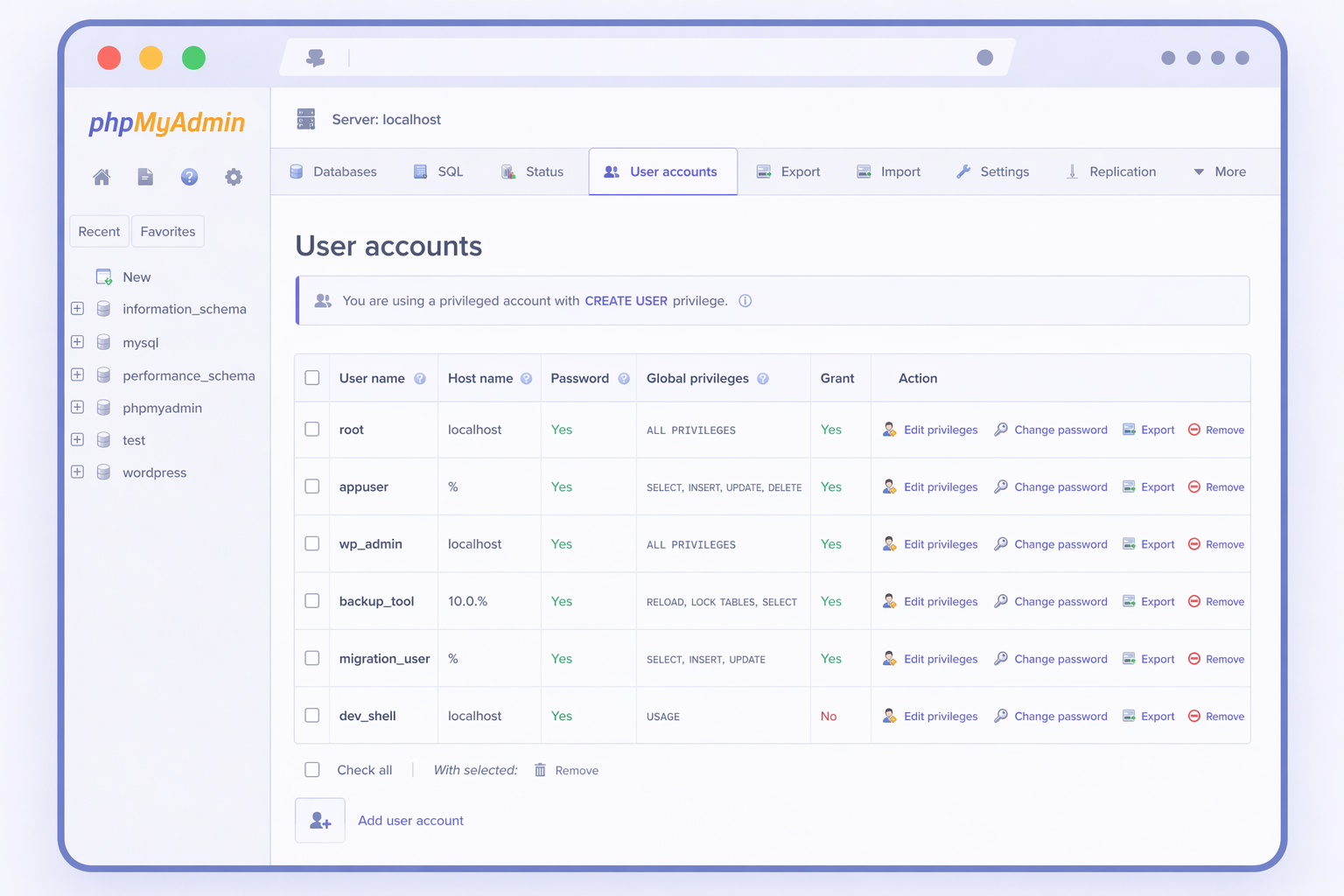
phpMyAdmin’s User accounts tab is a GUI surface for the same lifecycle that CLI users complete with CREATE USER and GRANT: a ‘user’@’host’ principal is created, an authentication method is selected, and privileges are attached. The interface changes the input method (clicks instead of statements), but the outcome is the same: an account record (including the mysql.user row) plus a privilege set bound to that account.
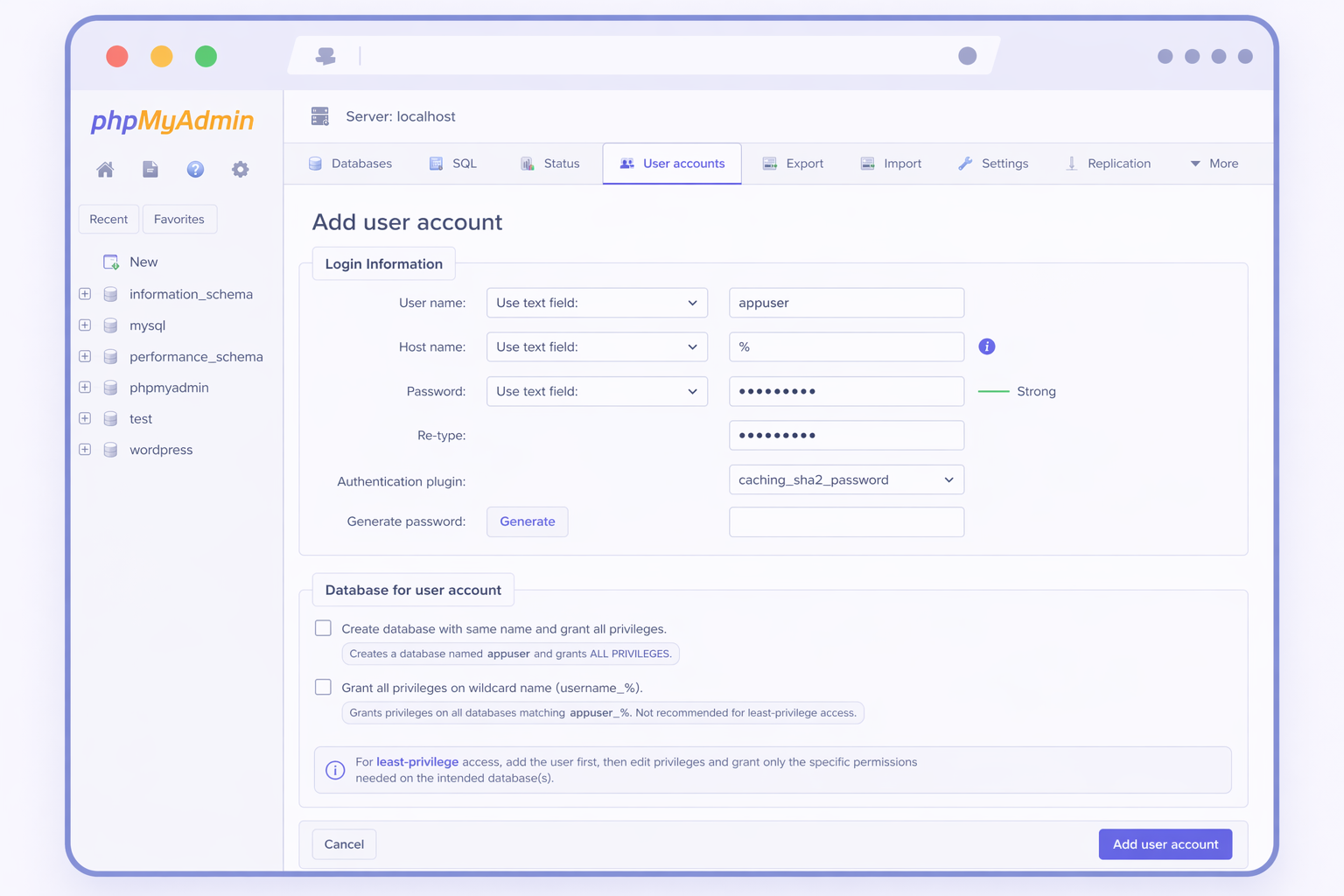
The Add user account form opens with two key areas: Login Information and Database for user account. Login Information captures the username, host restriction, and password; the authentication plugin dropdown is where options like caching_sha2_password or mysql_native_password are selected, the same decision CLI users make when defining how the account authenticates. The privilege scope is determined next, and phpMyAdmin supports two distinct paths depending on whether access should be limited to one database or applied globally across the server.
Scenario 1 (primary for WordPress): grant access to one existing database
For a WordPress application account, least-privilege typically means permissions scoped to a single database (for example, wp_database), not server-wide rights. In phpMyAdmin, that scope is applied via the Database for user account panel during creation, or later via the user’s Database privileges view. This is the GUI equivalent of a scoped GRANT for one database.
The checkbox Create database with same name and grant all privileges is useful when a brand-new schema is being created alongside the user and should be owned entirely by that user. It should stay unchecked when the goal is to attach the account to an existing WordPress database.
Important: the checkbox Grant all privileges on wildcard name (username_%) does not scope privileges to one database. It grants ALL PRIVILEGES to every database whose name starts with username_. That can be appropriate in shared-hosting patterns, but it is usually too broad for a WordPress app account. For the least-privilege WordPress scenario, it should be left unchecked (or explicitly called out if it remains enabled in the screenshot).
Scenario 2: grant global privileges across the server (admin/service accounts)
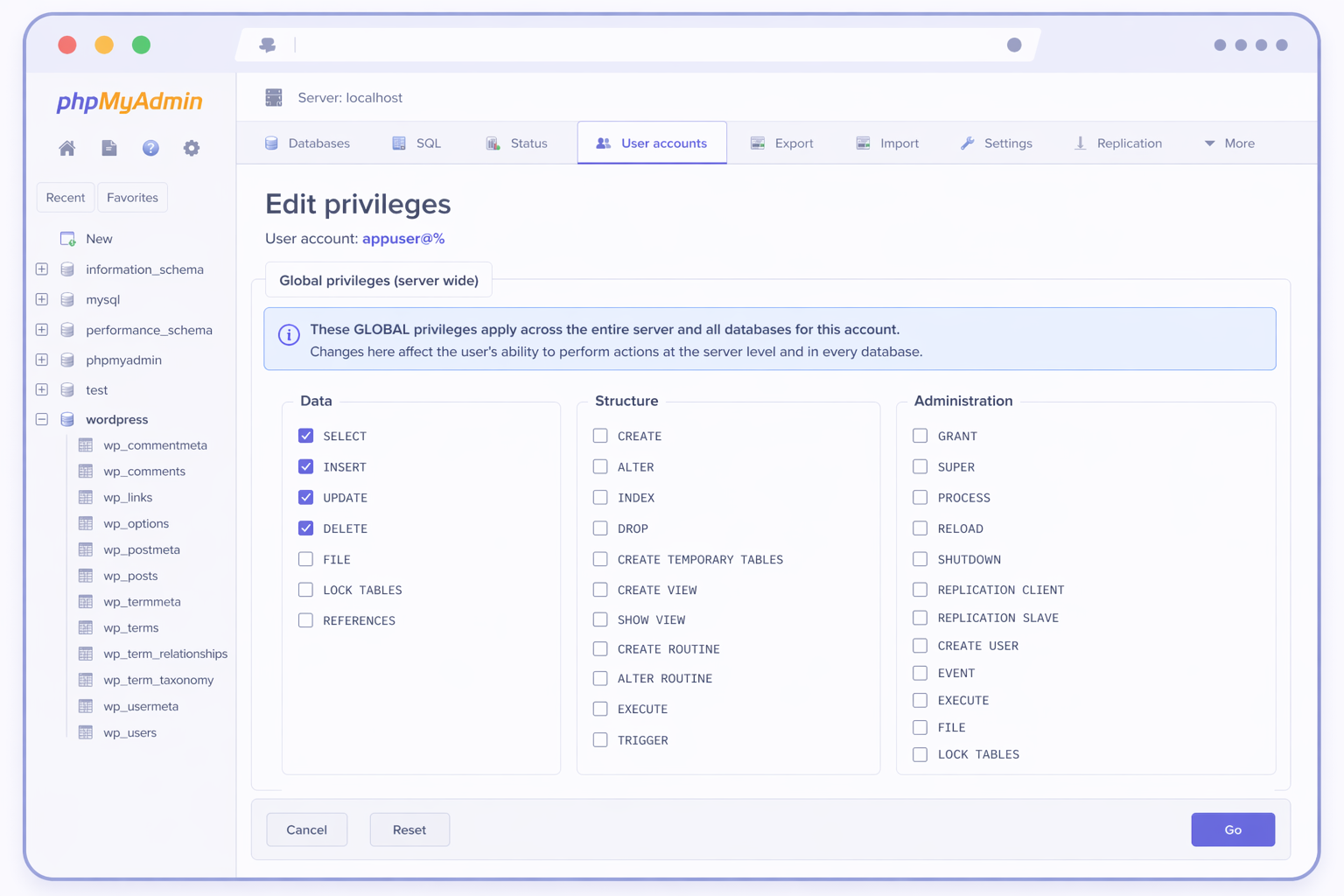
The Global privileges grid assigns permissions at the server level, meaning they apply across all databases, not a single WordPress schema. This is a separate scenario, appropriate for administrative tasks, server management, or certain service accounts, but it is not the default least-privilege path for a WordPress application user.
In the Global privileges grid, privileges are grouped (for example, Data / Structure / Administration). Even if a WordPress account needs SELECT, INSERT, UPDATE, and DELETE, those should normally be granted at the database level under the Database-scoped path, not globally. Administration privileges in particular should remain reserved for administrator-only accounts.
phpMyAdmin and the command line are simply two surfaces of the same lifecycle. The key difference is scope: a database-scoped grant matches least-privilege for WordPress, while Global privileges intentionally produce server-wide access.
An IT Monks engineer provisions these accounts for WordPress clients who prefer a browser to a terminal, supporting features such as WordPress star ratings and other application functionality. The WordPress-agency accounts look identical to their CLI counterparts (staging database users, backup-tooling accounts, migration users, developer-shell users), and the credentials that come from the form end up in wp-config.php in the same way. The form is the path; the file is the destination.
The command line and phpMyAdmin are two surfaces of a single lifecycle. A reader who wrote CREATE USER by hand has already done the work the form is asking for. A reader who clicked through the User accounts tab has produced the same mysql.user row a CREATE USER statement would have produced. Pick the surface that fits the situation, the account behaves the same either way.
 | updated:






 ChatGPT
  Claude
  Grok
Grok  Gemini