WordPress Permalinks: Best Structure and Setup Guide

Table of Contents
WordPress permalinks are the permanent links used to access a specific piece of content, such as posts and pages, on a WordPress website. They shape the content URL structure that connects each page address to its place in the website architecture, forming the link format that visitors and search engines use to reach a specific content location.
WordPress permalinks determine how the URL format presents content, using elements such as the URL path and slug pattern. These elements guide how content is arranged within the website hierarchy and how clearly a page address reflects the content’s topic. When the link structure is clean and readable, it improves navigation, helps users understand where they are on the site, and supports clearer indexing of content URLs.
WordPress permalink structure and related permalink settings control how content paths are configured across the website. The selected URL pattern influences how descriptive and flexible each link remains as content evolves, and how easily the site maintains consistent, SEO-friendly URLs over time.
WordPress website management often includes choosing the right permalink setup, adjusting the URL structure when needed, and handling cases where a custom structure or store-related content requires a different URL pattern. Understanding how WordPress permalinks work helps website owners organize content links effectively, maintain clear navigation paths, and manage permalink settings confidently as the site evolves.
What is a Permalink in WordPress?
WordPress permalink is the permanent URL that identifies and points to a specific piece of content on a WordPress website, such as a post, page, or product. It serves as the stable content address that allows visitors, browsers, and search engines to locate the same content item through a consistent web address.
A WordPress permalink links the website domain to a content-specific URL path. This path usually includes a slug, the readable part of the URL that represents the content’s title or topic. Together, these elements form the complete content URL that leads directly to a particular post or page.
Example of permalink structure:
https://example.com/blog/wordpress-permalinks-guideIn this structure, example.com is the website’s base domain, blog represents a path segment that organizes content within the site, and wordpress-permalinks-guide is the slug that uniquely identifies the specific post.
What is the Purpose of Permalinks in WordPress?
The purpose of WordPress permalinks is to provide a stable URL that identifies and consistently accesses a specific piece of content on a WordPress website. Each permalink acts as a permanent content address that helps users and systems reach the same post or page.
WordPress permalinks organize content URLs so every page has a clear place in the site structure. A readable URL path connected to the domain improves site organization and shows how content pieces relate.
WordPress permalinks guide visitors through predictable link paths. Readable URLs improve browsing by helping users quickly recognize the page topic.
WordPress permalinks also improve URL clarity for users and search engines. Clear content URLs help search engines interpret pages and make links easier to access and share.
What is the Difference Between a URL and a Permalink?
A URL is the general web address used to access any resource on the internet, while a WordPress permalink is a specific type of URL that permanently points to a particular piece of content on a WordPress website. In other words, every permalink is a URL, but not every URL is a permalink.
A URL represents the full address structure of the web and can point to many different types of resources, such as web pages, images, files, or scripts. It usually includes the domain name and a path that leads to the requested resource.
A WordPress permalink is a content-specific URL that identifies and accesses a single content item, such as a post or page, in a stable way. It serves as the permanent address for that content, so users can reliably reach the same page via the same link.
Within that permalink structure, the slug forms part of the URL path. The slug is usually the last segment of an address and serves as the content’s readable identifier, such as the post title. However, the slug alone is not the full URL. It is only one component of the larger web address that includes the domain and other path elements.
What are Permalinks Types?
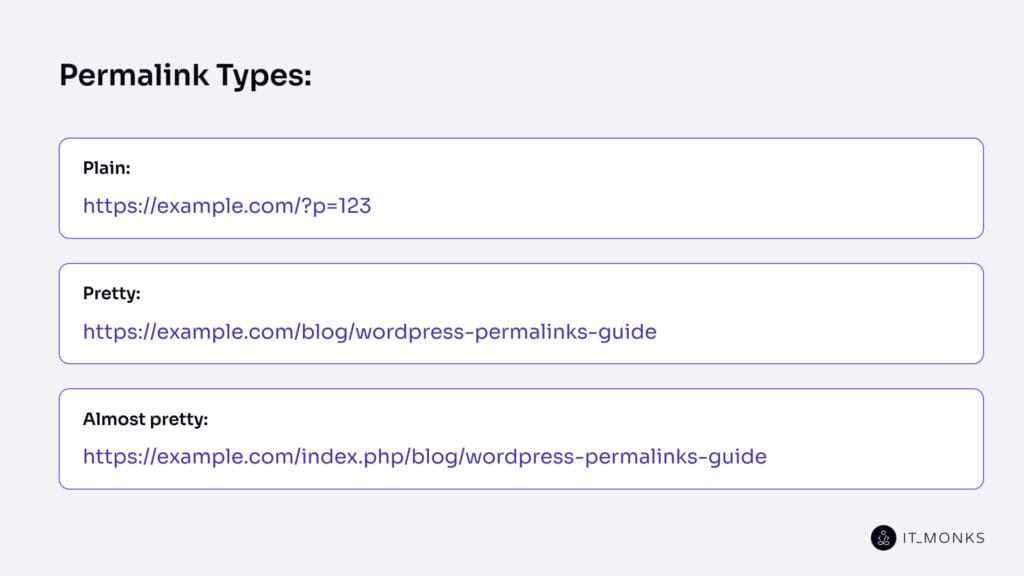
WordPress permalinks are commonly grouped into three main types: plain permalinks, pretty permalinks, and almost pretty permalinks. These permalink types classify how a content URL is formed and presented inside a WordPress site.
Plain Permalinks
Plain permalinks are the default WordPress URL format that uses query parameters to identify content. This WordPress permalink type relies on a parameter-based URL structure rather than a clean, readable path.
In this format, the URL includes a query string that identifies the content by an ID rather than by descriptive words.
Example of a plain permalink:
https://example.com/?p=123In this example, the parameter p=123 identifies the specific post within WordPress.
Pretty Permalinks
Pretty permalinks are WordPress URLs that use clean and readable path-based structures instead of query parameters. This permalink type creates a descriptive URL path using words that reflect the content topic.
The structure usually includes readable segments and a slug that represents the content’s title or subject.
Example of a pretty permalink:
https://example.com/blog/wordpress-permalinks-guideAlmost Pretty Permalinks
Almost pretty permalinks are WordPress URLs that use readable path segments but still include an index-based part in the structure. This permalink type combines a word-based URL path with an index.php segment, so the address is partially readable but not fully clean.
The structure appears similar to pretty permalinks, but still contains an index-based element.
Example of an almost pretty permalink:
https://example.com/index.php/blog/wordpress-permalinks-guideIn this example, the path includes descriptive words, but the index.php part remains in the URL, which places this format between plain and fully pretty permalinks.
What is Permalink Structure?
Permalink structure is the URL format that WordPress uses to create the address pattern for a content page, such as a post or page. It defines how the elements of a URL are arranged so that each piece of content receives a consistent, recognizable web address.
WordPress provides several built-in permalink structure options that use different URL patterns:
Plain. Uses a simple query-based URL that identifies content by ID (e.g., https://example.com/?p=123).

Day and name. Uses the publication date and post name in the URL path (e.g., https://example.com/2024/03/10/sample-post/).

Month and name. Uses the year and month together with the post name (e.g., https://example.com/2024/03/sample-post/).

Numeric. Uses a numeric identifier in the URL path (e.g., https://example.com/archives/123).

Post name. Uses only the post name as the readable part of the URL (e.g., https://example.com/sample-post/).

Custom Structure. Allows a custom permalink pattern built from different URL elements (e.g.,  https://example.com/blog/sample-post/).
Structure Tags
Structure tags are WordPress placeholders used inside permalink patterns to insert specific content attributes into the URL. These tags act as markers that WordPress replaces with actual values, such as the year, post name, category, or author when generating a permalink.
By combining different structure tags, WordPress builds custom permalink patterns that control which pieces of information appear in the final URL.
Common WordPress structure tags include:
%year%: inserts the year the post was published.
Example structure: / %year% /sample-post/ → example.com/2024/sample-post/

%monthnum%: inserts the numeric month of publication.
Example structure: / %monthnum% /sample-post/ → example.com/03/sample-post/

%day%: inserts the day of the month.
Example structure: / %day% /sample-post/ → example.com/10/sample-post/

%hour%: inserts the hour the post was published.
Example structure: / %hour% /sample-post/

%minute%: inserts the minute value of publication time.
Example structure: / %minute% /sample-post/

%second%: inserts the second value of publication time.
Example structure: / %second% /sample-post/

%post_id%: inserts the numeric ID of the post.
Example structure: / %post_id% /sample-post/ → example.com/123/sample-post/

%postname%: inserts the post slug or title-based identifier.
Example structure: / %postname% / → example.com/sample-post/

%category%: inserts the category assigned to the post.
Example structure: / %category% /sample-post/ → example.com/tutorials/sample-post/

%author%: inserts the author username into the URL path.
Example structure: / %author% /sample-post/ → example.com/john/sample-post/
Which Permalink Structure is The Best?
The Post name permalink structure is the best choice for most WordPress websites, though it is not the best option in every case. For most websites, this structure works well because it keeps URLs simple, readable, and focused on the page’s topic rather than on dates, numbers, or technical identifiers.
This format works well for blogs, business websites, service pages, documentation, and most general content sites because it avoids unnecessary elements that can make URLs longer or less relevant over time.
Example of a Post name permalink structure:
https://example.com/wordpress-permalink-guideWhen a Custom Structure Makes Sense?
A custom permalink structure makes sense when a website needs its URLs to reflect a specific content organization system rather than a general format. Some WordPress websites benefit from adding additional context to the URL so that the structure clearly shows how content is grouped or categorized.
This situation often appears on larger blogs, news sites, or content-heavy websites where categories or publishing patterns help organize large amounts of information. A custom permalink structure can also help when a website uses multiple content types or needs a clearer URL hierarchy for different sections. For example, websites that use specialized content models, such as a custom post type, can benefit from URL patterns that reflect how that content is organized.
Example of a custom permalink structure:
https://example.com/tutorials/wordpress-permalinks-guideIn this example, the category segment tutorials helps group related content and shows users where the page belongs in the website structure. This approach works well for websites with clear content categories or editorial sections, while smaller websites often do not need this extra layer in their URLs.
Permalink Structures to Avoid
Avoid permalink structures that rely on IDs, unnecessary date elements, or unreadable URL patterns.
Structures such as plain permalinks, numeric formats, or heavy date-based patterns can reduce URL clarity because they do not clearly show what the content is about. They may also make links less flexible over time, especially when the date or numeric identifier does not reflect the page’s topic.
Example of a weaker permalink structure:
https://example.com/?p=123Permalink Best Practices for SEO
SEO-friendly permalinks should be clear, simple, and consistent so that both users and search engines can easily understand the content behind a URL. Following a few practical permalink habits helps improve readability, maintain a clean site structure, and support stronger search relevance.
Using short, descriptive URLs makes it easier for users and search engines to quickly understand the page’s topic. They improve readability and help keep the content focus clear.
Example:
https://example.com/wordpress-permalink-guideUsing words instead of numeric IDs creates a descriptive URL that signals the page’s topic and makes the link easier to remember and share.
Example:
Preferred: https://example.com/seo-permalink-tips
Avoid: https://example.com/?p=482
Using hyphens instead of underscores improves readability and helps search engines interpret the individual terms more accurately.
Example:
Preferred: https://example.com/wordpress-permalink-guide
Avoid: https://example.com/wordpress_permalink_guide
Keeping a single main version of a page URL helps maintain consistency and reduces the risk of duplicate content.
Example:
Preferred: https://example.com/wordpress-permalink-guide
Avoid mixing versions like:
https://example.com/wordpress-permalink-guide/
https://example.com/?p=123
Avoiding unnecessary URL complexity. Simple URL structures are easier to read, easier to maintain, and help keep the content topic clear without adding unnecessary path elements.
Example:
Preferred: https://example.com/permalink-structure
Avoid: https://example.com/2024/03/10/blog/wordpress/permalink-structure-guide
Important Preparation Before Changing Permalinks
Preparation before changing WordPress permalinks is important because modifying URL structures can affect existing links, page access, and how visitors reach content across the site. It involves:
- Old-to-new redirect mapping means creating a document that matches each existing URL with its new permalink version after the change. It helps implement redirects correctly, prevent broken links, and send users or search engines from old URLs to the right updated pages.
- Backup means saving the current state of the website before making permalink changes. This preparation step protects the site by enabling a quick restoration if the changes introduce errors or unexpected issues.
- Staging testing means applying and testing permalink changes in a separate copy of the website before updating the live site. This process helps identify potential problems early and reduces the risk of errors affecting users on the main website.
How to Change Permalinks?
Changing WordPress permalinks does not happen in just one way, because the right method depends on how broad or specific the URL change needs to be. Some permalink changes apply to the entire website, while others affect only a single post, a single page, or a specific part of a WooCommerce store.
How to Change Permalinks Sitewide?
A sitewide permalink change updates the main URL structure for the entire WordPress website through the global permalink settings. It is typically done to improve URL readability, adopt a cleaner URL format, or apply a better structure for posts and other content across the site. This change affects the overall content URL pattern rather than a single page.
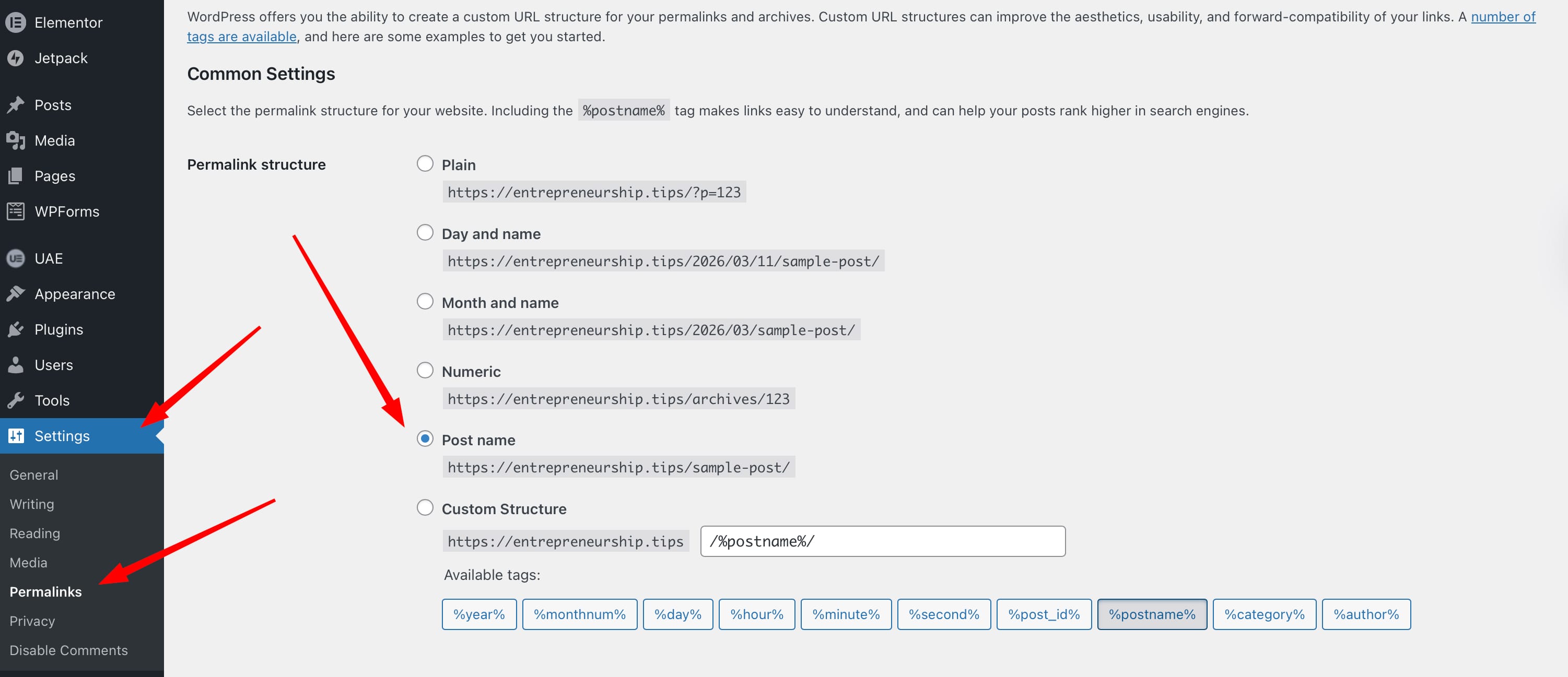
Follow these steps to change permalinks sitewide:
- Log in to your WordPress admin dashboard to access the main site management interface.
- In the left sidebar, open Settings, then click Permalinks to access the global permalink configuration page.
- Select the structure that best fits your website, such as Post name or another available format.
- Click Save Changes to apply the new permalink structure to the entire website.
- Open a few posts or pages on the front end to confirm that the new URL structure works correctly and loads the expected content.
How to Change a Single Post or Page Permalink?
Changing a single post or page permalink means editing the URL of one specific content item instead of changing the global permalink structure for the whole website. This is usually done when a URL should be clearer, shorter, or more relevant to the page content. The change affects only that individual post or page.
Follow these steps to update a single post or page permalink:
- Go to your WordPress dashboard and open Posts → All Posts or Pages → All Pages, then select the post or page you want to edit.
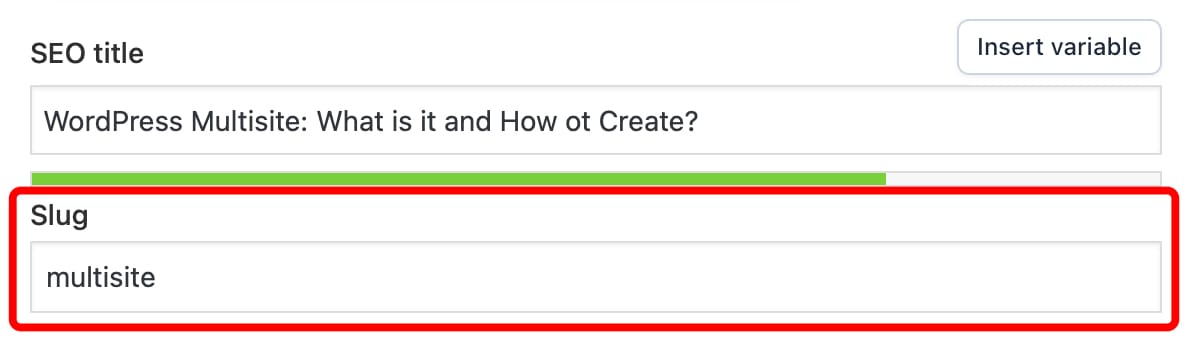
- Inside the editor, find the Permalink or URL field, usually shown near the title or in the sidebar settings panel.
- Modify the slug, which is the last part of the URL that identifies the page. Make sure the slug is short, descriptive, and relevant to the content.
- Click Update or Publish to apply the new permalink.
- Open the page on the front end to confirm that the updated permalink loads correctly and displays the expected content.
Example:

Old URL
https://example.com/my-post-123

Updated URL
https://example.com/wordpress-permalink-guide
How to Change Permalinks for WooCommerce?
WooCommerce permalinks are changed through store-related URL settings that control product pages and product taxonomies. Because an online store uses product URLs, category URLs, and tag URLs, WooCommerce permalink changes usually happen in two main fields.
Follow these steps to understand and change the right WooCommerce permalink area:
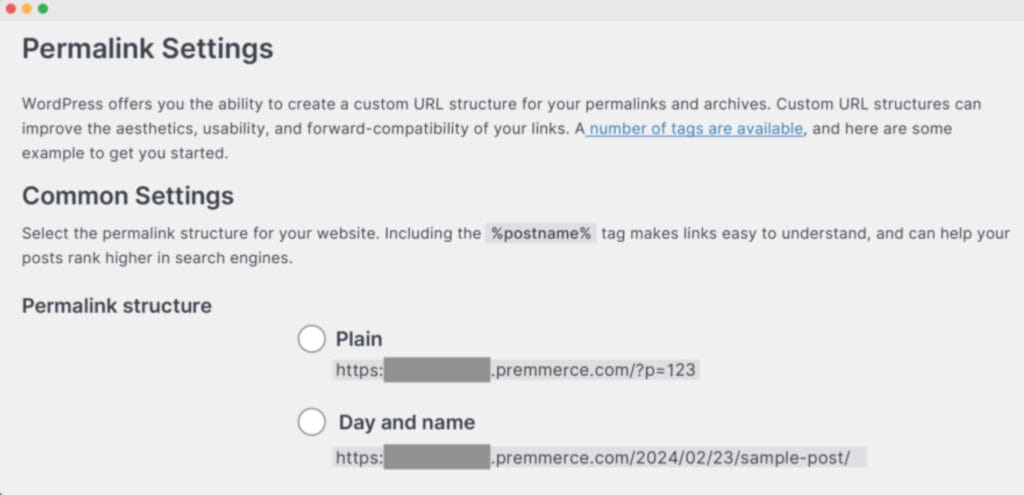
- Go to your WordPress dashboard, open Settings, and click Permalinks. This is where WooCommerce store URL settings are managed alongside the main WordPress permalink options.
- Find the product category and tag permalink field. This part controls taxonomy-based store URLs, such as product category and product tag archive pages. Change this area when you want store category or tag links to be clearer and more consistent.
- Find the product permalink field. This part controls the URL structure for individual product pages. Change this field when you want product page links to better match product names or store URL logic.
- Choose the correct scope before making changes. If you need to update archive-style store URLs, work with product category and tag permalinks. If you need to update the URL of one product page or the product URL format, work with product permalinks.
- Save the changes and verify the updated store URLs. After updating the relevant permalink field, save the settings and check category pages, tag pages, or product pages to confirm that the new WooCommerce URLs work correctly.
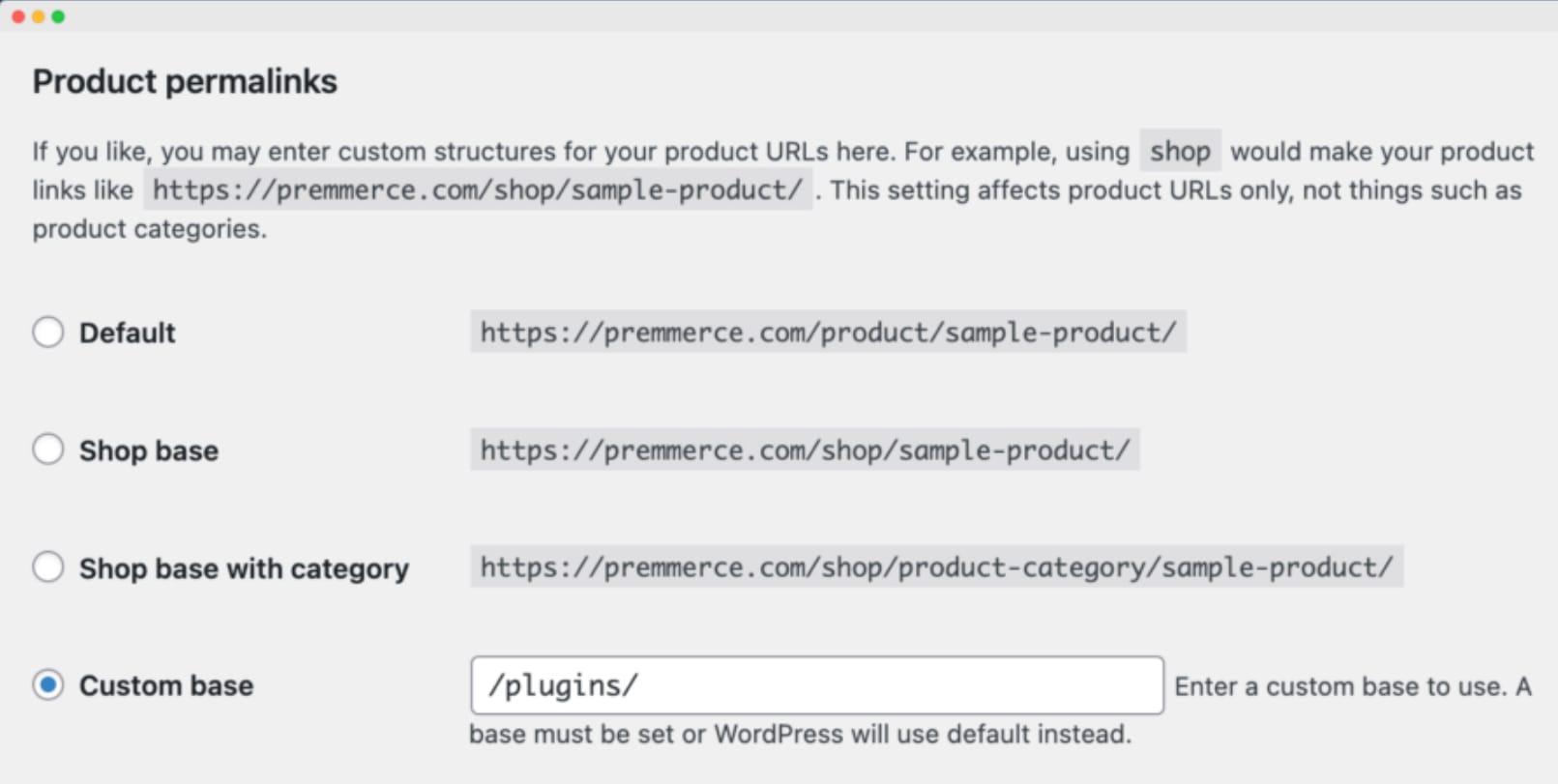
How to Change Product Category and Tag Permalinks?
Changing product category and tag permalinks means updating the WooCommerce URL base used for product category and product tag archive pages. This affects taxonomy archive URLs, not individual product page URLs.
- Sign in to your WordPress admin area so you can access the store URL settings.
Open Settings, then select Permalinks to reach the page where WooCommerce permalink options appear. - Scroll to the WooCommerce section that includes product permalink options and taxonomy URL fields.
- Update the product category base or product tag base with the URL wording you want to use for category and tag archive pages.
- Click Save Changes to apply the updated taxonomy permalink bases to your store URLs.
- Open a product category page or product tag page on the front end and confirm that the new taxonomy URLs load correctly.
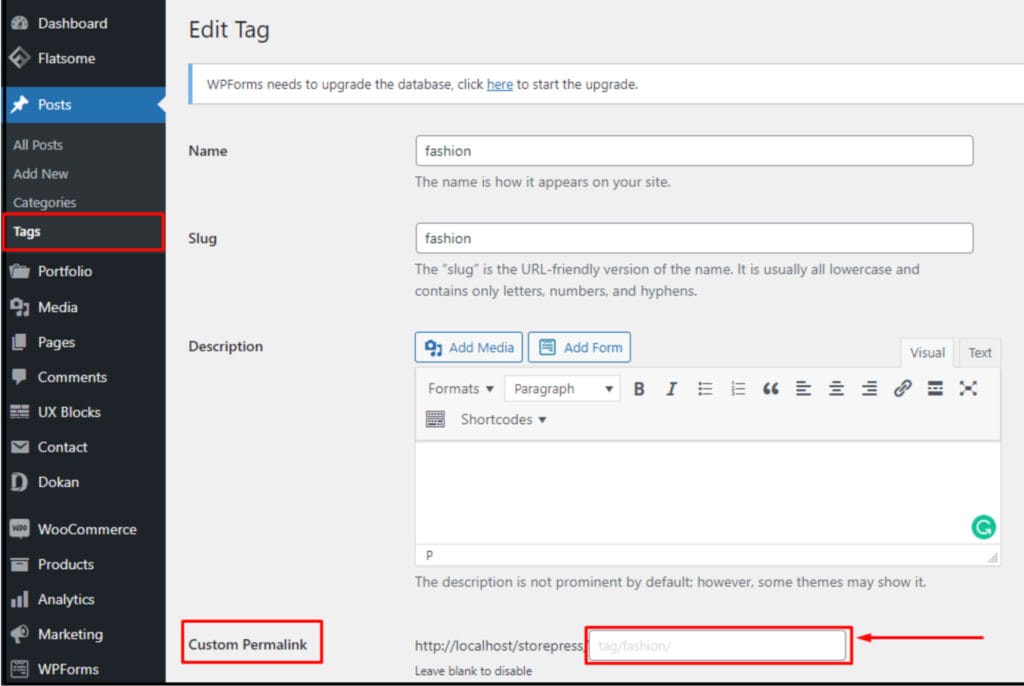
How to Change a Product Permalink?
Changing a product permalink means editing the URL of one specific WooCommerce product instead of changing sitewide settings or taxonomy URL bases. This affects only that individual product page. WooCommerce product URL settings and related product-editing screens are managed in the WordPress admin area.
- Go to your WordPress dashboard, open Products, and select the product you want to edit. This takes you to the individual product editing screen for that item.
- Inside the product editor, locate the permalink area or URL field connected to the product title and slug. This is the part that controls the product’s individual URL.
- Update the slug so the product URL is clearer, shorter, or closer to the product name. The slug is the editable part of the permalink that identifies that specific product page.
- Click Update or Publish to save the new product permalink. This applies the edited URL to that single product page.
- Open the product page on the front end and confirm that the updated permalink loads correctly. This final check makes sure the new product URL works as expected.
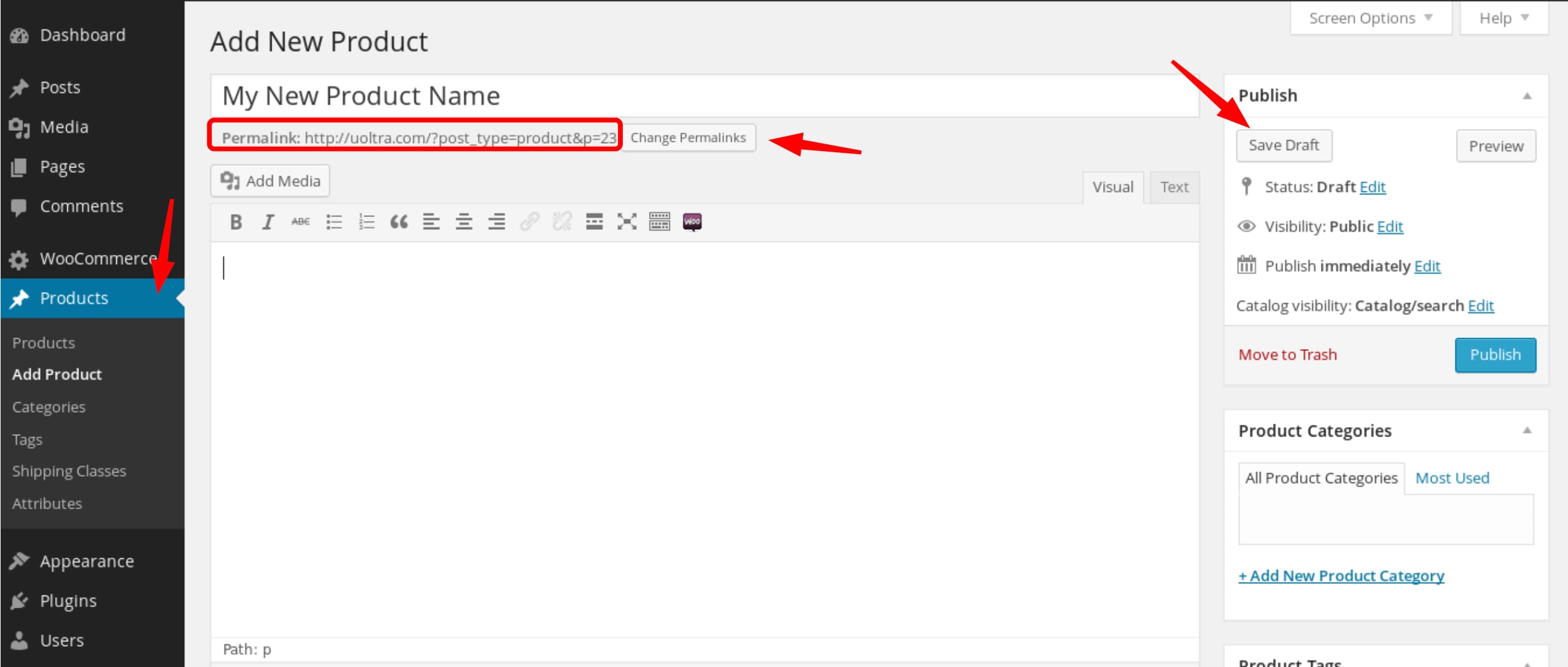
What to Do After Permalinks Changed?
After changing WordPress permalinks, you need to take follow-up actions to ensure the new URL structure works correctly and remains consistent across the website. Saving new permalink settings updates the URLs, but additional checks help confirm that both users and search engines reach the correct pages.
Take the following steps:
- Double-check redirects. Verify that old URLs send users and search engine crawlers to the correct new URLs. This prevents broken access paths and preserves link value from previously shared or indexed links.
- Refresh canonical URLs. Update the canonical tags so they reference the new permalink for each page. This confirms which URL should be treated as the primary version for indexing.
- Update hreflang references. If the site uses multiple languages or regional versions, make sure hreflang tags point to the updated permalink structure so language variants remain aligned.
- Refresh the XML sitemap. Regenerate or update the XML sitemap to list the new permalink versions. This helps search engines discover and index the updated URLs more efficiently.
Common Permalink Issues
Permalinks Settings Not Showing
Permalink settings not showing means the Permalinks option is missing or inaccessible in the WordPress admin area, so the user cannot open the permalink settings page. This issue usually appears when the current user lacks administrator permissions, when the site is part of a WordPress multisite network with restricted settings, or when a plugin or theme modifies the admin interface and hides certain options.
To solve this issue:
- Check whether the user account has administrator access, because only administrators can manage permalink settings.
- Confirm whether the website runs on a multisite setup, where permalink control may be handled at the network level.
If access should be available but the option is still missing, temporarily disable plugins or switch to a default theme to check whether a plugin or theme conflict is hiding the permalink settings.
Permalinks Returning 404 Errors
Permalinks returning 404 errors means that a WordPress post, page, or content URL exists but loads a “not found” page instead of the expected content. In this situation, the content is still present in the system, but the permalink does not resolve to it correctly.
This problem usually happens when rewrite rules are not refreshed, when permalink settings are changed but not applied properly, when redirects are misconfigured, or when the server configuration does not support WordPress permalink rewriting.
To fix this issue:
- Resave the permalink settings in WordPress to refresh the rewrite rules.
- Review any redirects that might interfere with the URL path.
- Confirm that the server configuration supports WordPress permalink rewriting so the content URLs resolve correctly instead of showing a 404 error page.
If the issue persists, reviewing the website’s 404 page design can also help improve user experience when broken URLs occur.
Permalink Changes Not Taking Effect
Permalink changes not taking effect means that the new permalink structure or edited URL is saved in WordPress, but the website still displays the old URL version or does not apply the expected change. The system accepts the update, but the visible result remains unchanged.
This issue usually occurs because of cached pages, delayed rewrite rule updates, plugin conflicts, or server-level caching behavior that still serves the previous URL structure.
To resolve the problem:
- Clear the website and browser cache so the latest URLs can appear.
- Resave the permalink settings to force WordPress to refresh the rewrite rules.
If the issue persists, temporarily disable plugins to test for conflicts and confirm that the server is applying the updated permalink configuration correctly.
Contact
Don't like forms?
Shoot us an email at [email protected]
