Explore our specialized services, tailored solutions, and industry expertise to elevate your digital presence. From custom WordPress development to seamless integrations, we build high-performing websites that deliver impact.
The campaign gets approved on a Monday. The offer’s locked, the copy is ready, and the launch date is already on the calendar. Then, two weeks pass before the landing page actually goes live. It happens not because anyone dropped the ball, but because the page has to be built from the ground up again.
A new layout is sketched out, the CTA button is redesigned, the form fields are rebuilt, and the whole thing goes through another round of design review before anyone can hit publish.
That’s usually the moment a marketing team realizes the issue isn’t content or design. It’s the lack of a design system.
What Is a Design System?
A design system is a shared set of reusable visual, content, and interaction patterns that a team draws on to build pages, instead of designing and coding each one from scratch every time.
People often mix this up with a style guide, but they’re solving different problems:
A style guide tells you what something should look like: the colors, the fonts, the logo rules, the tone of voice.
A design system goes further. It includes that appearance layer, sure, but it also hands you the actual pieces, like built components, ready templates, working patterns, etc., that snap together into a finished page.
Put another way: a style guide describes the CTA button. A design system gives you the button, already built, ready to drop in.
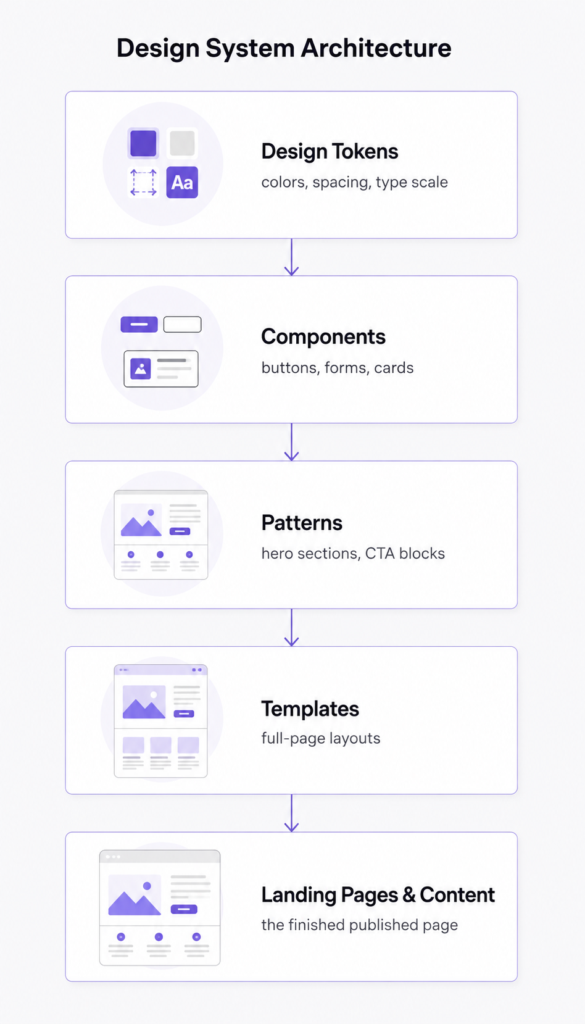
Most systems are organized roughly like this, building up from the smallest decision to the finished output:
Design tokens: the smallest building blocks: colors, spacing values, type sizes.
Components: buttons, forms, cards, nav elements.
Patterns: recurring combinations, like a hero section or a testimonial block.
Templates: full page layouts assembled from those patterns.
Landing pages & content: what actually ships, pulled together from everything above it.
Why Marketing Teams Feel the Impact First
Designers and engineers are usually the ones who build a design system, but marketing is the team that notices when it’s missing. Without one, marketing ends up waiting on a page, waiting on a sign-off, waiting on a developer’s calendar for work that should take an afternoon.
The same handful of problems show up again and again in teams without a system in place:
Slow campaign launches. What should take a day stretches into weeks because there’s no starting point to work from.
Endless design reviews. Every page is treated as new, so every page needs its own round of approvals.
Developer dependency. Marketing can’t ship even a small change without pulling someone from engineering into the work.
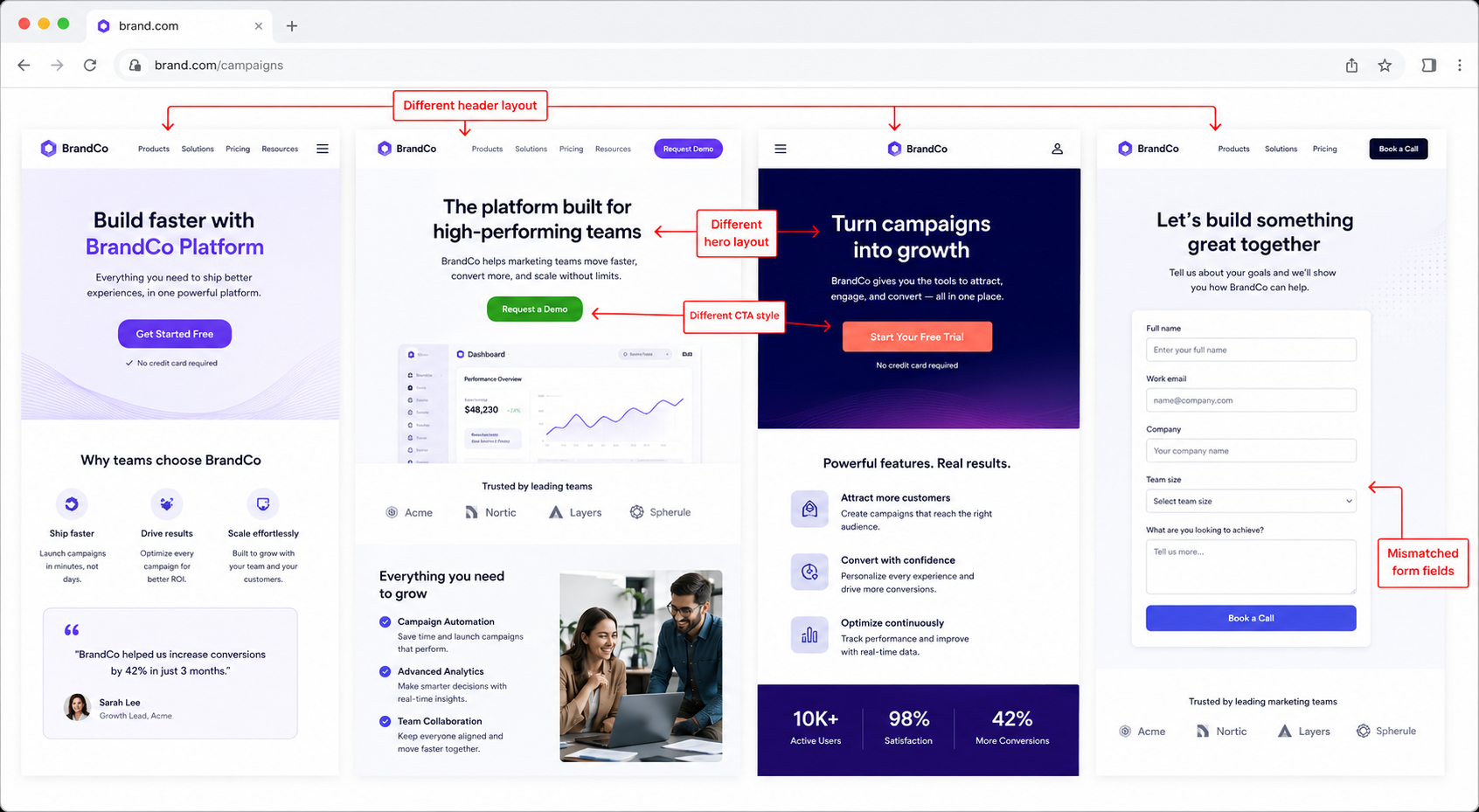
Inconsistent experiences. Visitors land on pages that don’t quite feel like they belong to the same brand, and that mismatch chips away at trust without anyone noticing exactly why.
Every Landing Page Shouldn’t Be a New Project
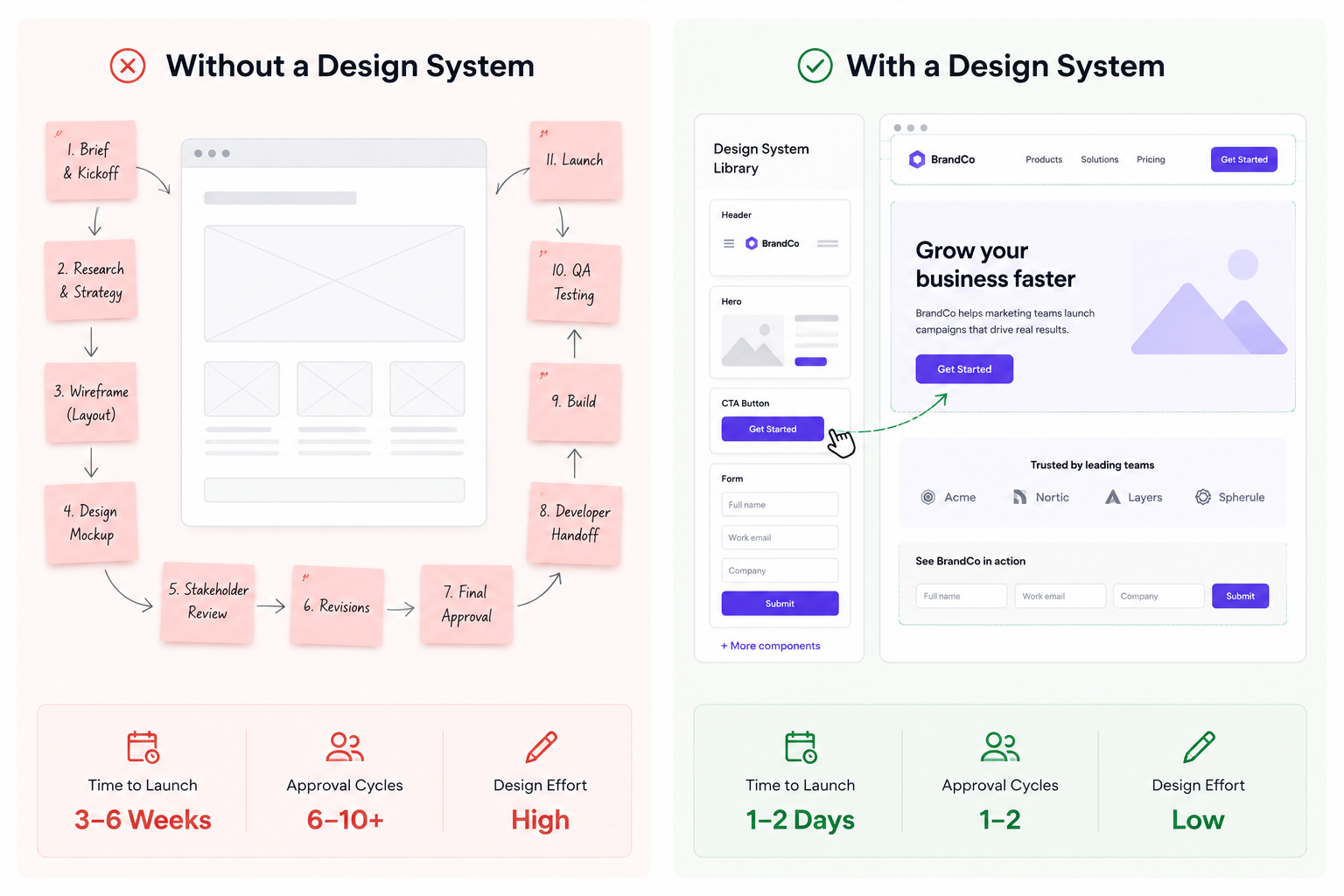
The clearest way to see the difference is to put the two approaches side by side.
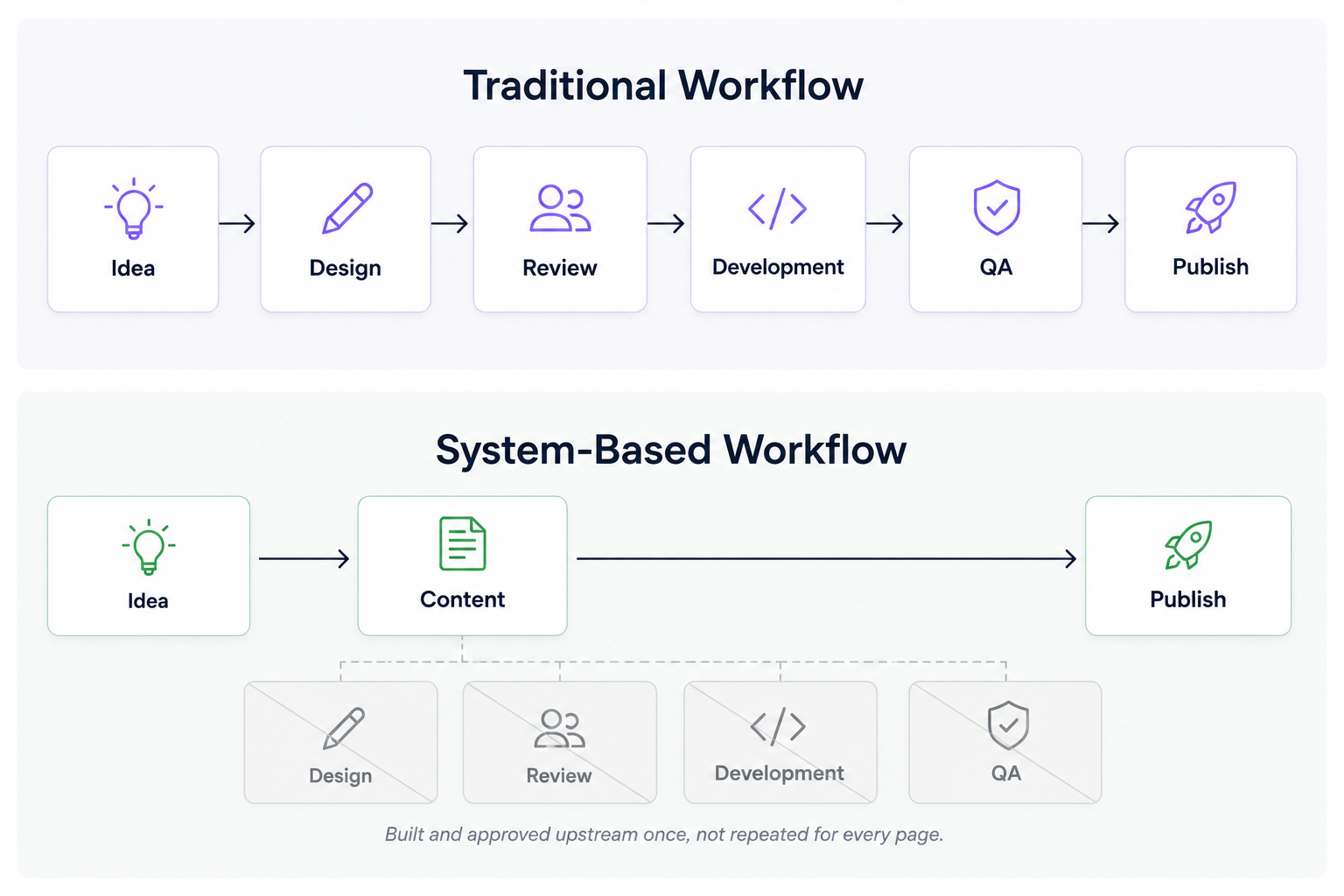
On the left, every landing page starts as a blank page: new layout calls, a fresh design pass, a development cycle that has to be scheduled and waited on.
On the right, the page comes together from pieces that are already built and already approved. The campaign team isn’t stuck waiting on anyone else; they’re assembling something out of parts that have already cleared review.
A team that can get a page live in a day can run more campaigns, test more variations, and respond to whatever’s happening in the market a lot faster than a team still stuck waiting on custom builds.
How Design Systems Help Teams Publish Faster
The real shift a design system brings is about how it pulls steps out of the publishing process entirely, rather than just making those steps go faster.
In the traditional version, every single page travels through design, review, development, and QA before it can go live.
In the system-based version, those same steps still occur once, when the component or template is built. After that point, marketing is working with pieces that are already approved, and the gap between an idea and a published page shrinks considerably.
Usually, it looks like:
Reusable blocks for headers, CTAs, forms, and testimonials that drop into any page without rework.
Pre-approved templates for the page types a team builds most often, so the layout decision is already settled.
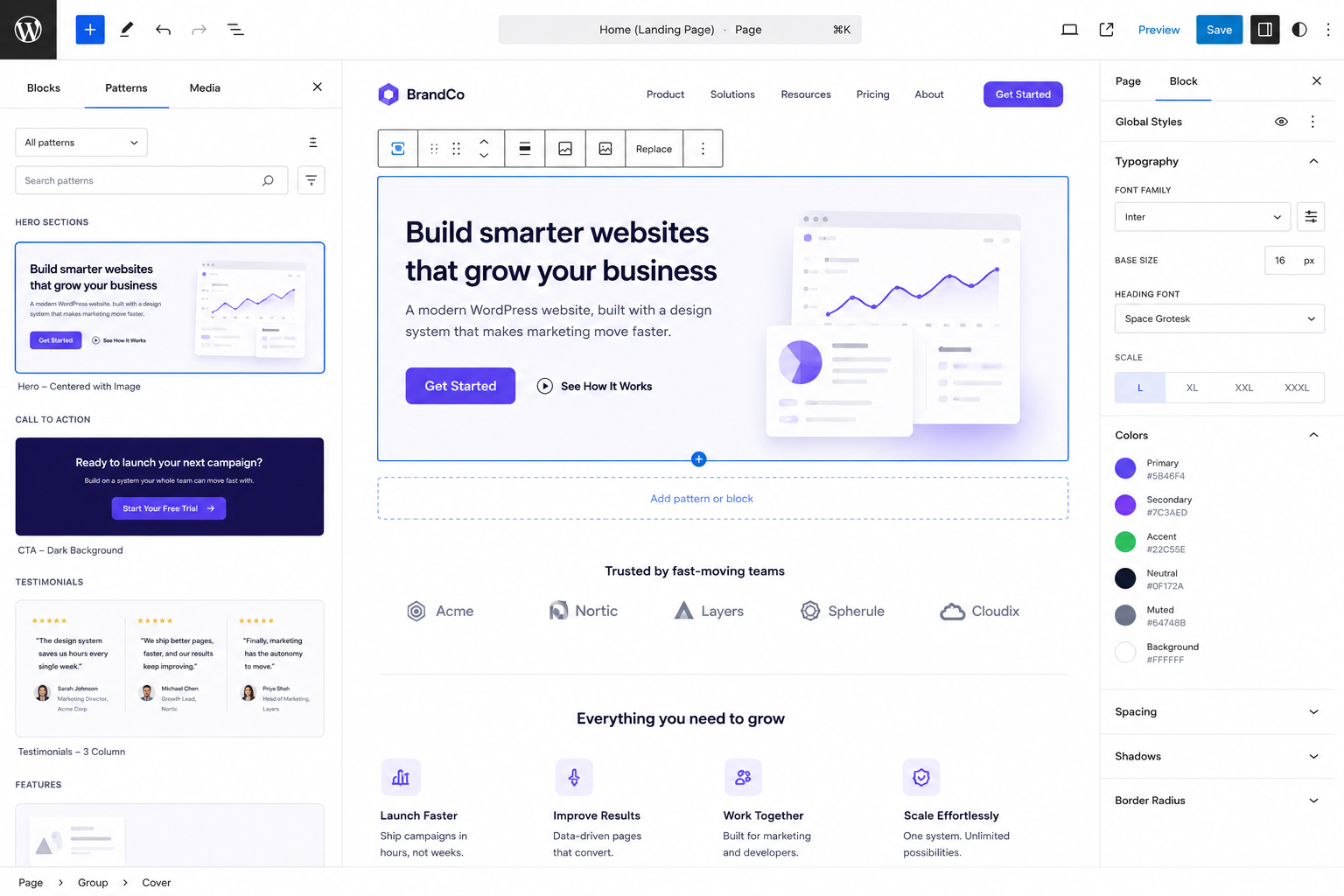
Gutenberg workflows in WordPress, where marketing assembles pages from blocks and patterns without writing a line of code.
Marketing autonomy: the ability to launch, edit, and test pages without filing a ticket and waiting on development’s queue.
The Relationship Between Design Systems and Conversion Rates
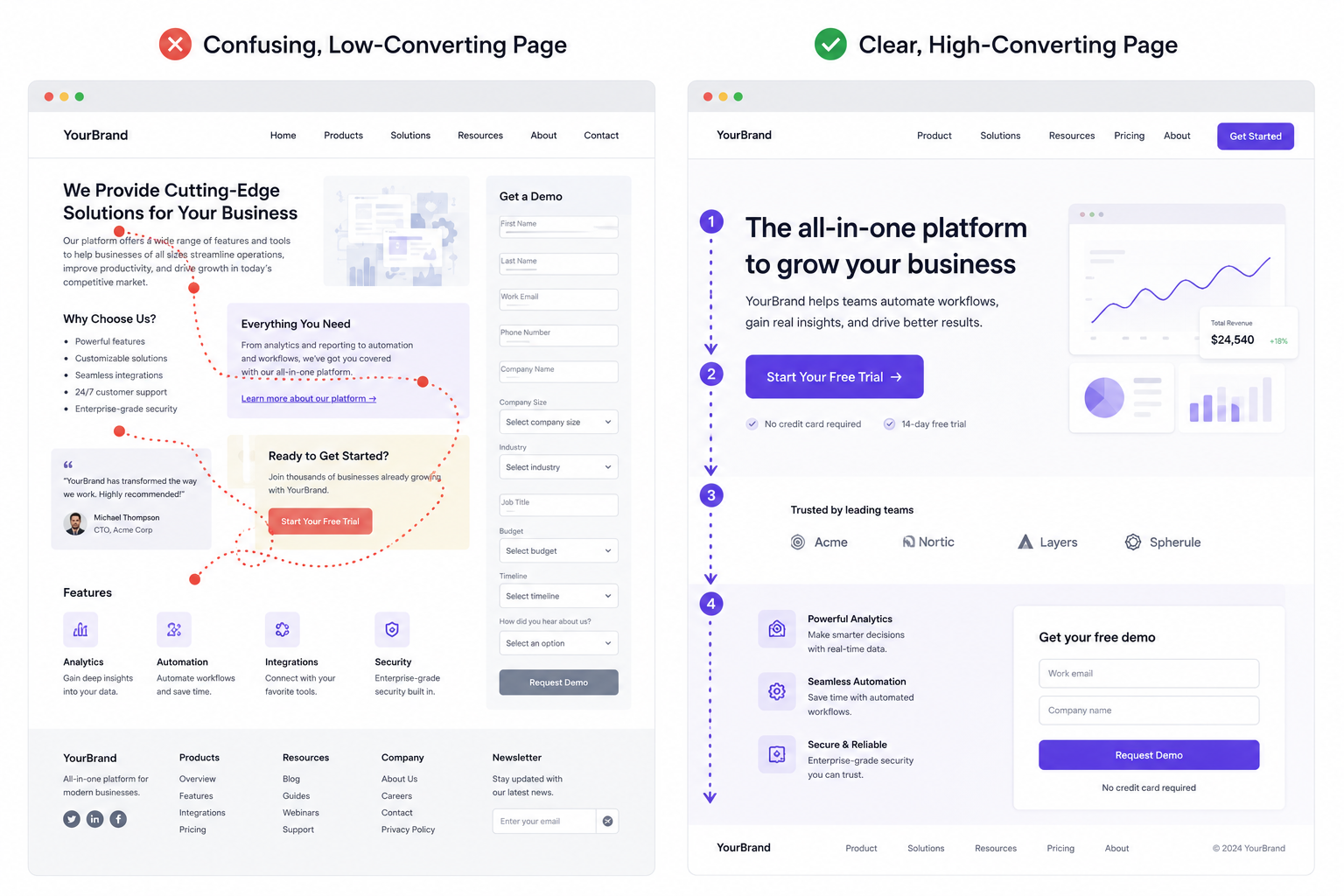
Consistency does more than make a site look put-together. It changes how people actually behave on a page. When a CTA appears in the same place, styled the same way, and pages follow a layout visitors have seen before, people spend less time figuring out where to look and more time actually engaging with what’s being said.
There’s a real mechanism behind this, and it’s worth naming honestly: trust and usability, not some kind of magic trick. A consistent CTA position, a form that looks familiar, a hierarchy that doesn’t surprise the visitor, all of that lowers friction. People have effectively learned how to use the page before they’ve even finished reading it.
It’s worth being precise here, too. A design system makes pages more usable and more consistent, and usability is a well-documented factor in how people engage with web pages. But it isn’t a guaranteed conversion lever on its own: the offer, the audience, and the messaging still carry most of the weight. The fair claim is that consistency removes friction. What a visitor does once that friction is gone still comes down to everything else on the page.
Why Design Systems Matter for SEO and GEO
Design systems started out as a UX and engineering concern. Lately, they’ve become an SEO and GEO (generative engine optimization) concern, too, because the same structural consistency that helps a human visitor also helps a machine figure out what it’s looking at.
Search engines and AI systems lean on predictable structure to pull information out of a page and make sense of it: consistent headings, repeatable layouts, content patterns that don’t change shape from page to page. When a site does that consistently, it’s easier for a crawler or a model to identify what a page is actually about and how its information is organized. When every page follows its own conventions, that job gets a lot harder.
A design system supports this just by enforcing the same heading structure, the same content blocks, and the same page architecture site-wide, which matters for pages indexed by traditional search and for pages getting surfaced by AI systems like Google’s AI Overviews, ChatGPT, Gemini, and Perplexity.
It’s worth being careful about what this does and doesn’t promise. A design system won’t guarantee better rankings or guaranteed placement in an AI-generated answer. What it actually does is remove a structural obstacle. It makes a site easier to parse consistently, for search engines and AI systems alike, which is a reasonable precondition for visibility. It’s not a substitute for whether the content itself is any good.
Signs Your Team Needs a Design System
Not every team needs to tear down its entire publishing process tomorrow. But a few recurring symptoms are a pretty reliable sign that the lack of a design system is quietly slowing things down.
Watch for these:
Landing pages routinely take far longer to launch than the campaign itself would suggest.
Pages across the site look like they came from entirely different teams.
Marketing keeps waiting on development for changes that should really be self-serve.
CTA buttons, forms, and page layouts shift from page to page with no real reason.
Content quality and formatting vary noticeably depending on who built the page.
If two or more of these sound familiar, the bottleneck probably isn’t the marketing team’s capacity. It’s the lack of reusable infrastructure underneath the work they’re trying to do.
What a Modern Design System Looks Like in WordPress
For teams running on WordPress, a modern design system tends to live in the Gutenberg block editor and in Full Site Editing, rather than in a custom theme that someone has to rebuild for every new page type.
In a well-built WordPress setup, marketing usually has access to:
Reusable blocks: pre-built CTAs, forms, and content modules ready to use.
A pattern library: combinations of blocks, like hero sections or comparison tables, ready to drop into a page.
A template library: full layouts for the page types that come up again and again: landing pages, case studies, comparison pages.
Global styles: typography, color, and spacing settings applied consistently across the site, without anyone making per-page styling calls.
Conclusion
The fastest marketing teams out there aren’t necessarily producing more work than everyone else. They’re working from systems that take the repetitive, structural overhead off their plate, the layout decisions, the design reviews, the dependency on development for every page that needs to go live.
A design system won’t write your strategy, your copy, or your campaign idea for you. What it does is clear away the friction between a good idea and a published page: consistency that builds trust with the people landing on it, structure that supports SEO and AI discoverability, and a publishing process built around assembling proven pieces rather than starting over every single time.
If your team is still treating every landing page like its own project, that’s usually the clearest sign of what’s missing. Not more hands on deck, the system underneath the work.





 ChatGPT
  Claude
  Grok
Grok  Gemini