Explore our specialized services, tailored solutions, and industry expertise to elevate your digital presence. From custom WordPress development to seamless integrations, we build high-performing websites that deliver impact.
WordPress 7.0 is the next major WordPress release, the version every site owner and developer must now plan around. It moves the platform floor and adds a capability that the prior line lacked. Hence, it lands differently for the two audiences: site owners inherit a changed admin and editor day-to-day; developers, a changed baseline to build against.
The headline gain is an AI integration layer with a redesigned editing and admin experience. The headline risk is readiness, because the raised PHP floor can gate the upgrade until a host and a site’s themes and plugins clear it, making a backup and a compatibility check non-optional.
WordPress 7.0 is scheduled to ship on May 20, 2026, per the WordPress 7.0 Release Candidate 3 announcement. One point is widely misread: real-time collaborative editing is not in this release. It was removed from 7.0 and moved to 7.1.
What is WordPress 7.0?
WordPress 7.0 is a major WordPress version release: a single, dated build of the WordPress software that consolidates new platform and editing capabilities under one version number, rather than a corrective update on an existing line. This is a major release, not a routine point release.
The new WordPress version is constituted by that set of additions taken together: editor improvements, a modernized admin surface, new editor blocks, a raised PHP floor, a redesigned revision interface, and an AI integration layer. The release is the bundle, and each piece is defined in turn.
WordPress 7.0 as a Major Version Release
A major version release changes the platform itself, not just its behavior. WordPress 7.0 reads clearest against a minor update: a point release ships fixes and incremental refinements without moving what the platform demands, while a major version differs on two axes at once, the scope of change and the platform requirements underneath it.
The raised PHP floor is plain evidence: a point release does not lift the language version a site must run on, a major release does, the signal to treat WordPress 7.0 as a real platform event, not a quiet bump.
Editor Improvements
Editor improvements in WordPress 7.0 are the changes that widen what the block editor can do with content and its appearance.
Three carry most of that weight:
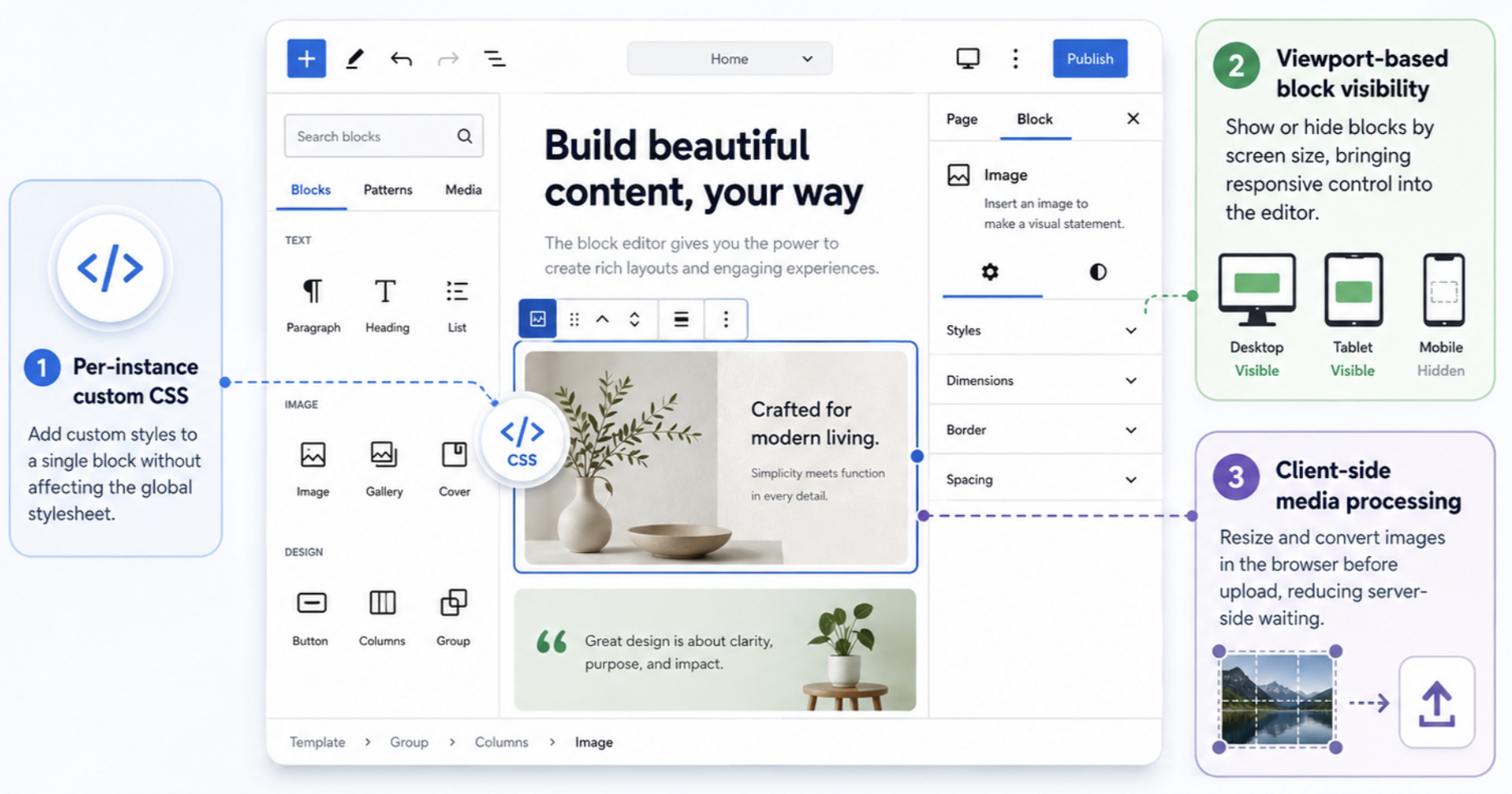
Per-instance custom CSS lets a single block hold its own styles, so a one-off tweak no longer leaks into a global stylesheet.
Viewport-based block visibility lets a block appear or remain hidden based on screen size, moving responsive decisions into the editor.
Client-side media processing handles image work in the browser before upload, so resizing and conversion no longer wait on the server.
Together, they raise the 7.0 block editor’s practical ceiling (finer styling control, conditional layout, and faster media handling in a single surface) ahead of the wider admin-side changes the modernized interface brings.
Modernized Admin Interface
The modernized admin interface is the reworked control layer WordPress 7.0 introduces for the screens that site owners and developers live in.
WordPress 7.0 redesigns this surface along two lines: a command palette for navigation, and DataViews, a rebuilt way of looking at content lists.
Smaller refinements surround them: the font library now applies to every theme rather than a privileged few, and navigation overlays can be customized per site. Finding a screen, scanning posts, and switching contexts mid-task all get faster. That navigation surface starts with the command palette.
Command Palette
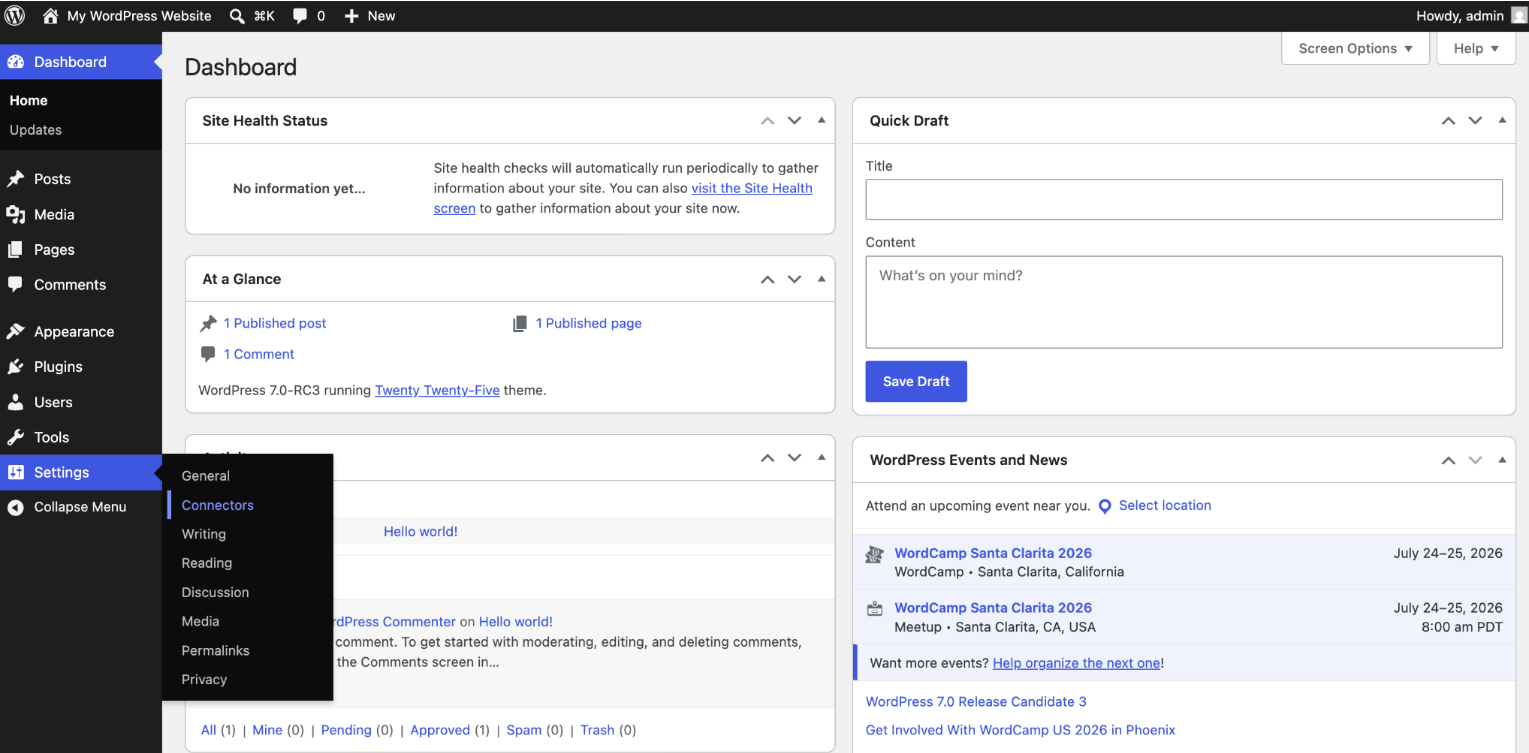
The command palette is the keyboard-driven navigation and action surface WordPress 7.0 introduces inside the modernized admin. From a single prompt, a site owner can search the admin, jump straight to a screen, and trigger an action without hunting through menus.
Type a few characters and the palette surfaces the matching destination or command. It is the navigation half of this interface, changing how a site is operated more than how it looks. The other half handles the data itself, DataViews.
DataViews
DataViews is the redesigned data-display layer that replaces the legacy WordPress list tables and was introduced in WordPress 7.0. Where the old list tables locked posts, pages, and other content into a fixed grid, DataViews lets a site owner control how items display, filter a list to what matters, and sort it on the fly, a layer that bends to the work rather than dictating it. The command palette completes the modernized admin. The editor gains new building blocks, too.
New Blocks in WordPress 7.0
The new blocks in WordPress 7.0 are release-specific additions to the editor: building blocks that did not exist in earlier versions and now ship with this version.
Two matter most for everyday content work:
The Breadcrumbs block inserts navigational breadcrumbs as a native, editable element instead of a plugin dependency or a theme-template hack.
The Icon block brings inline icons in as first-class content, placed the way an editor places an image or a heading.
Both extend what the WordPress 7.0 editor can compose in core rather than leaving it to add-ons. The features so far change what the software does; the next changes what it runs on.
PHP 7.4 Minimum
The PHP 7.4 minimum is the raised platform floor for WordPress 7.0, with PHP 8.3 recommended for new installs (figures stated in the WordPress 7.0 release documentation on wordpress.org). A jump in the minimum supported PHP version is one of the clearest signals that a release is a major one, rather than a routine minor update, which rarely moves the floor at all.
If the PHP version your web host runs does not meet or clear 7.4, WordPress 7.0 will not install, so confirming that figure with your host is the one readiness check that cannot be skipped. Most managed hosts already run PHP 8.3, so for many sites this box is already ticked. The next thing 7.0 reworks is how you review what changed on a page.
Redesigned Revision Interface in WordPress 7.0
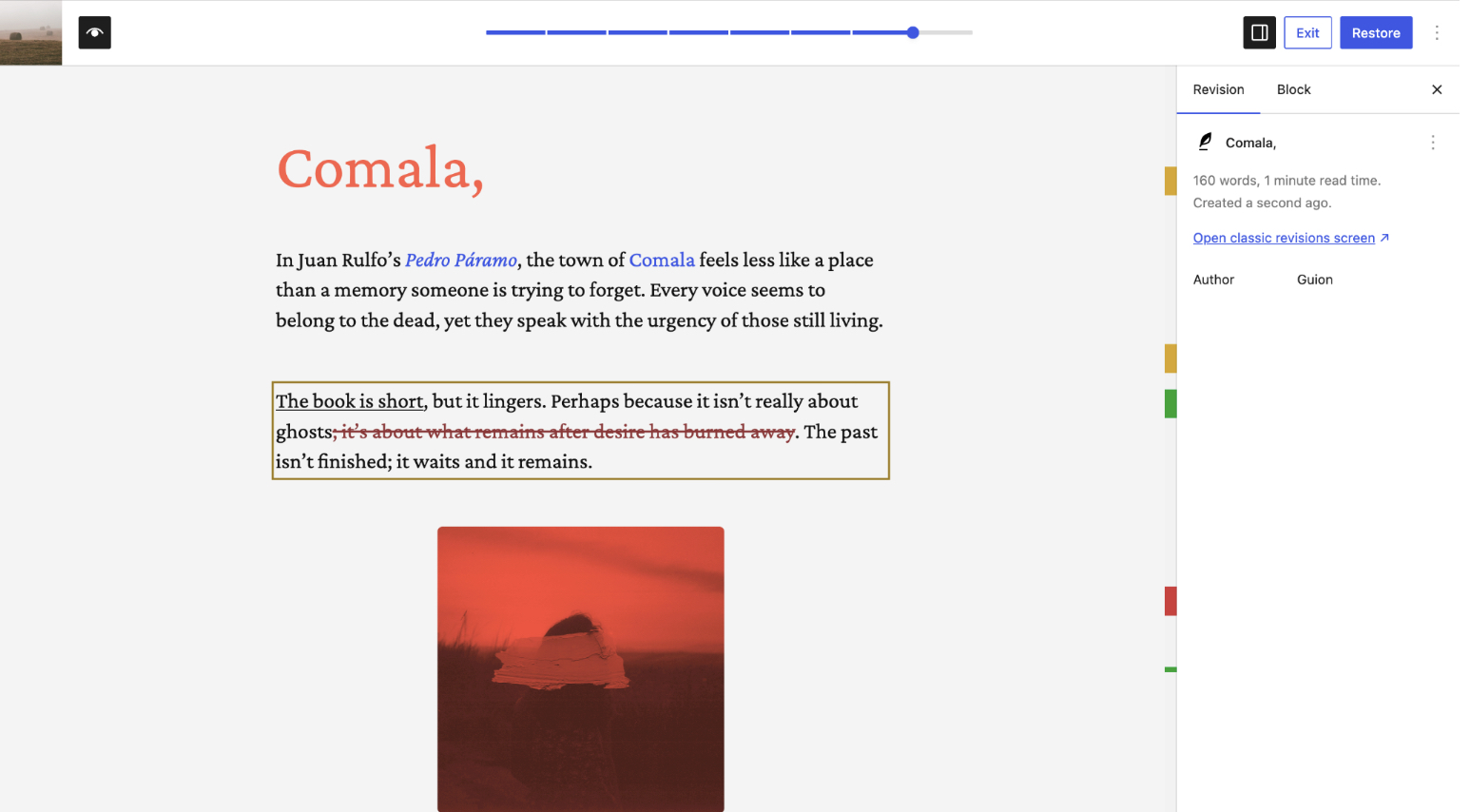
The redesigned revision interface in WordPress 7.0 is the reworked screen where editors compare and restore earlier versions of a post or page. For years, the surface showed two columns of plain inserted-and-deleted text. WordPress 7.0 reorganizes it around how people read history: what changed, when, and whether it is worth restoring.
Two parts carry the redesign.
A color-coded revision comparison replaces the flat diff with a visual one, so a glance shows the shape of an edit.
A revision timeline slider sits alongside it, a draggable control that moves the editor through saved versions in sequence rather than one click per step.
For site owners and editors, reviewing content history no longer means a squint at unstyled markup.
Color-Coded Revision Comparison
Color-coded revision comparison is the visual diff WordPress 7.0 uses to mark what changed between two versions of content. Rather than a wall of same-color text, the comparison view colors the change itself (one treatment for what was added, another for what was removed), so the eye lands on the edit while scanning, not after.
An editor opening a revision wants one answer: what is different here. Color coding delivers it without a line-by-line read, so distinguishing an added sentence from a deleted clause becomes a matter of recognition rather than comparison. Revisions, though, are the smaller, internal side of what 7.0 changes; the headline change sits in how the platform itself connects to artificial intelligence.
AI Integration in WordPress 7.0
AI integration in WordPress 7.0 is the new infrastructure that lets the platform connect to artificial-intelligence providers through a shared, built-in layer rather than a scatter of unrelated plugins. WordPress 7.0 introduces this layer as core plumbing, a provider-agnostic foundation other features build on, not one bolted-on AI feature.
That foundation has two sides: the AI architecture, the conceptual layer that sits below features rather than beside them, and the AI Connectors framework, the concrete mechanism that ships in 7.0 and wires the platform to outside providers.
WordPress 7.0 changes the question from “which AI plugin do I install?” to “what does my site do now that the connection is part of the platform.” That reframing is the substance of the release, and the picture now shifts from what 7.0 ships to when it ships and how to be ready.
WordPress AI Architecture: Basic Concepts
The WordPress AI architecture is the integration layer that conceptually defines how WordPress 7.0 communicates with artificial intelligence services. It is a contract: a consistent internal surface other code can call without knowing which provider sits behind it.
Provider-agnostic is the load-bearing idea. The architecture does not bind WordPress to one company’s model; it remains a neutral layer that any compliant provider can plug into and that any feature, theme, or plugin can build on. “WordPress can summarize a post” would be a feature; the architecture is what makes such capabilities possible and swappable underneath. That conceptual layer needs a working mechanism, and in 7.0 the AI Connectors framework supplies it.
AI Connectors framework
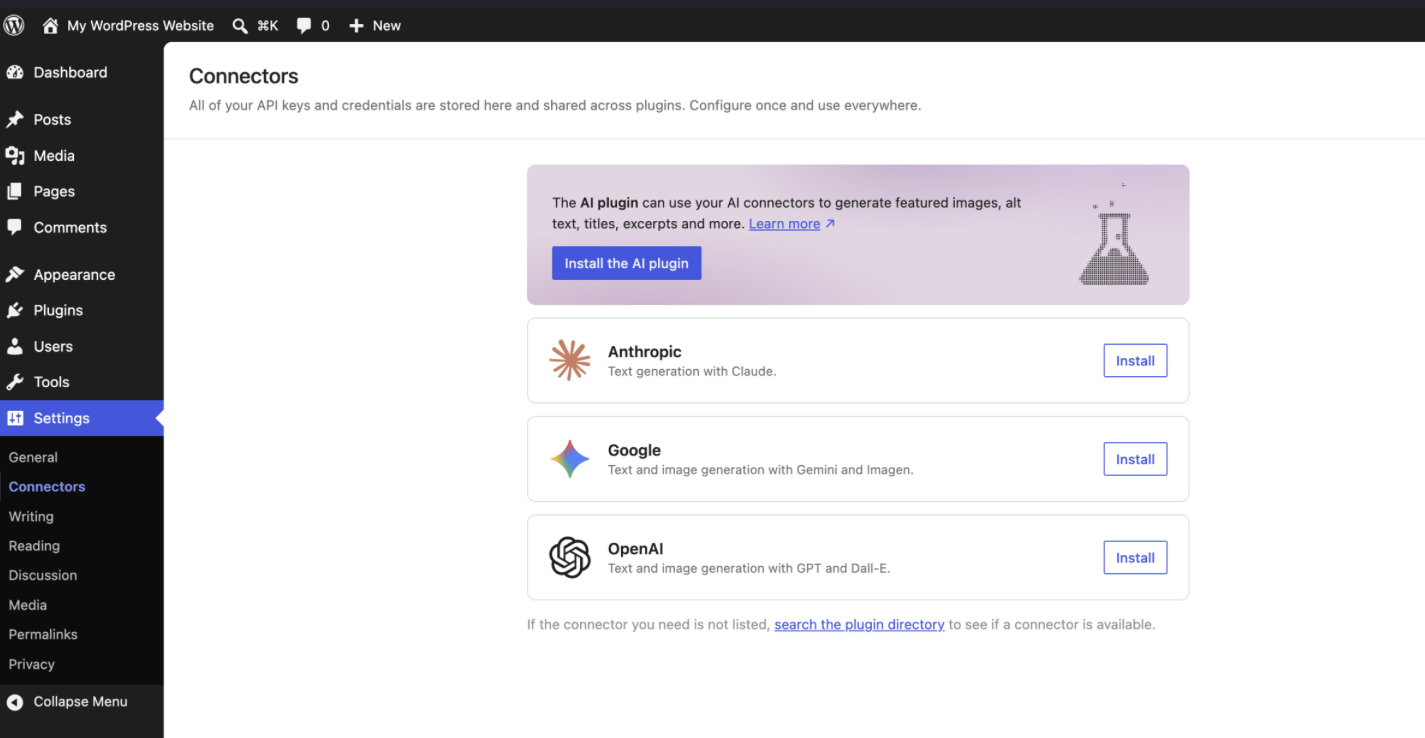
The AI Connectors framework is the AI provider-connection feature that ships in WordPress 7.0, the concrete mechanism that turns the AI architecture from concept into something a site can use.
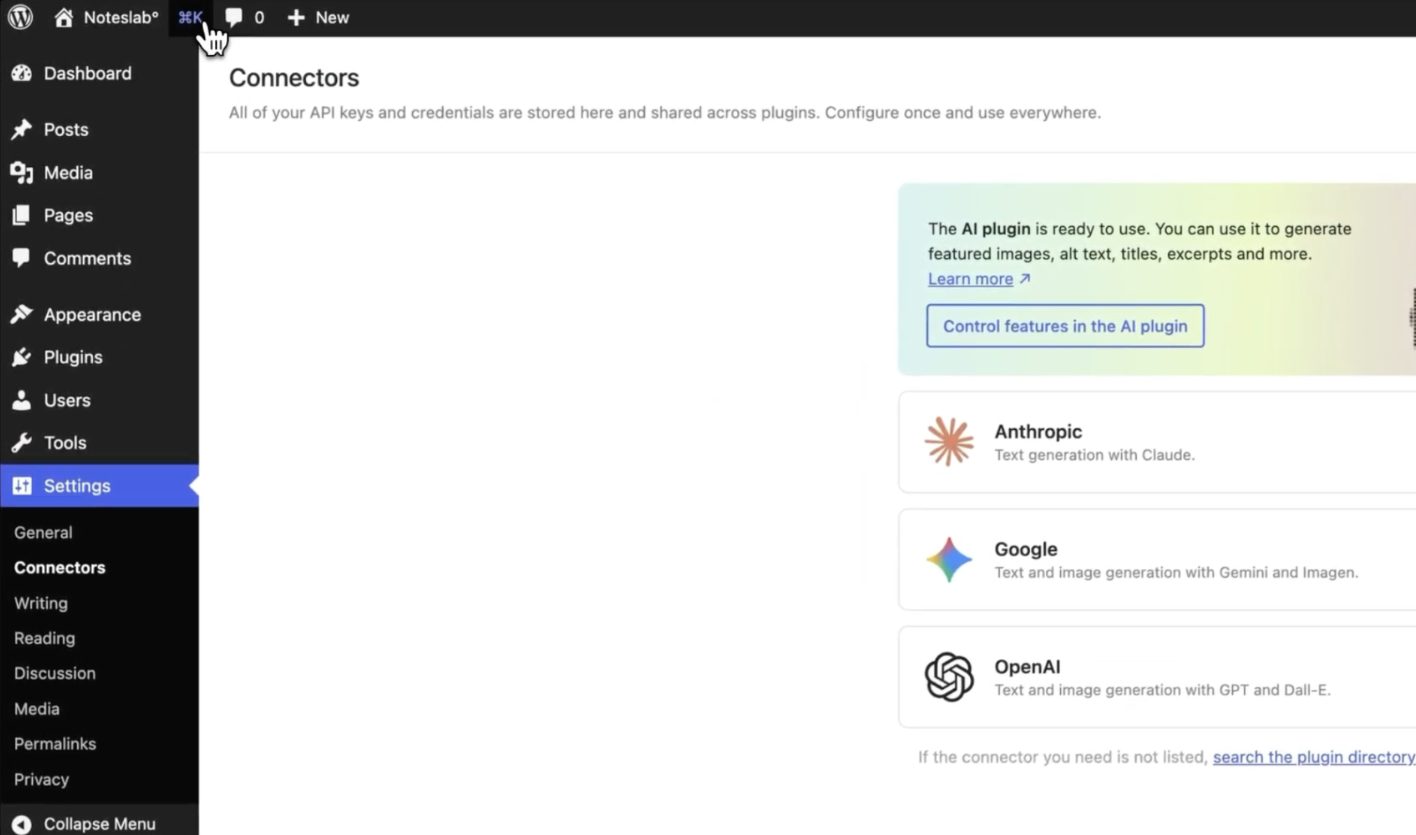
Through Connectors, WordPress 7.0 connects to major providers (OpenAI, Google, and Anthropic among them), and a site owner manages credentials and API keys on one configuration surface instead of per plugin.
Connectors operationalize the provider-agnostic architecture: the layer defines the contract, and the framework registers real providers against it.
One distinction matters and is easy to get wrong. The AI Connectors framework ships in 7.0. Real-time collaboration in the editor was removed in 7.0 and moved to 7.1. With the shipping features now defined, what remains is the practical side: when WordPress 7.0 arrives and what to have ready.
WordPress 7.0 Release Schedule
The WordPress 7.0 release schedule is the milestone cadence that carries the new version from an open beta with the feature set locked, through one or more release candidates that stabilize the build rather than expand it, to a single final release. Two points on that schedule matter for planning: 7.0 has a fixed final date, and it passes through a release-candidate phase first.
Final Release Date May 20, 2026
The new WordPress version has a confirmed final release date: WordPress 7.0 is scheduled to ship on May 20, 2026; that is the day the finished build becomes available. Coverage has been uneven; some write-ups discuss 7.0 without committing to a day, but the authoritative WordPress 7.0 Release Candidate 3 announcement, along with WPMarmite and BriteWeb, all settle on May 20, 2026.
Release Candidate Testing
Release-candidate testing is the feature-frozen stabilization phase WordPress 7 enters once the work shifts from adding to hardening the build. By the third release candidate, the stage 7.0 reached before its final date, the version is essentially the software you will run, minus last regression fixes. For a site owner the signal is the point: a release candidate means the version is near-final, the cue to start preparing.
Preparing for the WordPress 7.0 Update
Preparing for the new WordPress version means assessing your site against 7.0 before the update lands, from an agency’s vantage point, mostly a compatibility question with a few safeguards. Active themes and plugins should be reviewed against 7.0, since major version changes are when compatibility gaps surface.
The hosting environment needs to clear the PHP 7.4 floor 7.0 requires, with PHP 8.3 the better target. A staging copy shows the update behave before production does, and a fresh backup is the clean fallback if it does not.
What you prepare for is concrete: the redesigned revision interface, the modernized admin, the new blocks and editor improvements, that raised PHP floor, and the AI integration layer and Connectors framework. Preparation is warranted because the release is feature-significant and because not everything from the 7.0 conversation is included.
Real-Time Collaboration Postponed to 7.1
Real-time collaboration in the WordPress editor is not part of WordPress 7. It was removed from the 7.0 scope and postponed to WordPress 7.1, per the authoritative wordpress.org Release Candidate 3 announcement. Any framing that has 7.0 letting authors edit a post together live describes a version that does not exist yet.
The distinction matters because of what sits beside it. The AI Connectors framework does ship in 7.0, one of the AI-integration features the new version delivers. Real-time collaboration is a separate editor feature on a separate timeline, and conflating the two has been a recurring error in 7.0 coverage. The AI provider connection is now live; co-editing in 7.1.
WordPress 7.0 is the new major release, its substance the features defined and scheduled here: the redesigned revision interface, the modernized admin, the new blocks and editor improvements, the PHP 7.4 floor, and the AI integration layer and Connectors framework. It is due May 20, 2026 after its release-candidate phase, worth preparing for at the compatibility, staging, and backup level, with no expectation of live co-editing until 7.1.




 ChatGPT
  Claude
  Grok
Grok  Gemini