Explore our specialized services, tailored solutions, and industry expertise to elevate your digital presence. From custom WordPress development to seamless integrations, we build high-performing websites that deliver impact.
The WordPress download begins when a site owner or developer downloads WordPress from the official source, and the WordPress download refers specifically to acquiring the WordPress core software package from wordpress.org. As a software download, this process focuses on obtaining the latest version of the core package, saving the zip file, and preparing the package for the next stage. When downloading WordPress, the goal is to get the official package rather than themes, plugins, media exports, or other assets.
The download provides a saved file containing the core package components required before installation begins. From the official source and current version to the saved zip file and package contents, each part of the WordPress download serves as a handoff point before installing WordPress.
The download precedes installing WordPress. Every installation route, whichever one follows, starts from the same input: the downloaded core package.
The WordPress Download: A Free, Open-Source Content Management System
The WordPress download delivers a free, open-source content management system. A content management system is software for publishing and organizing a website’s content.
Free and open source are license facts. WordPress is free to download and free to use: no fee for the package, none for its use at any scale. Open source means the source code is accessible and modifiable, so every file in the package is open to inspection and to change.
A WordPress site runs on the downloaded software. A WordPress website of any shape, a blog, a portfolio, an online store, runs on it too.
Downloaded software alone is not yet a website. The download is the first step of how to install WordPress, and every step after it has the saved package as its input.
Visit the Official WordPress.org Download Page
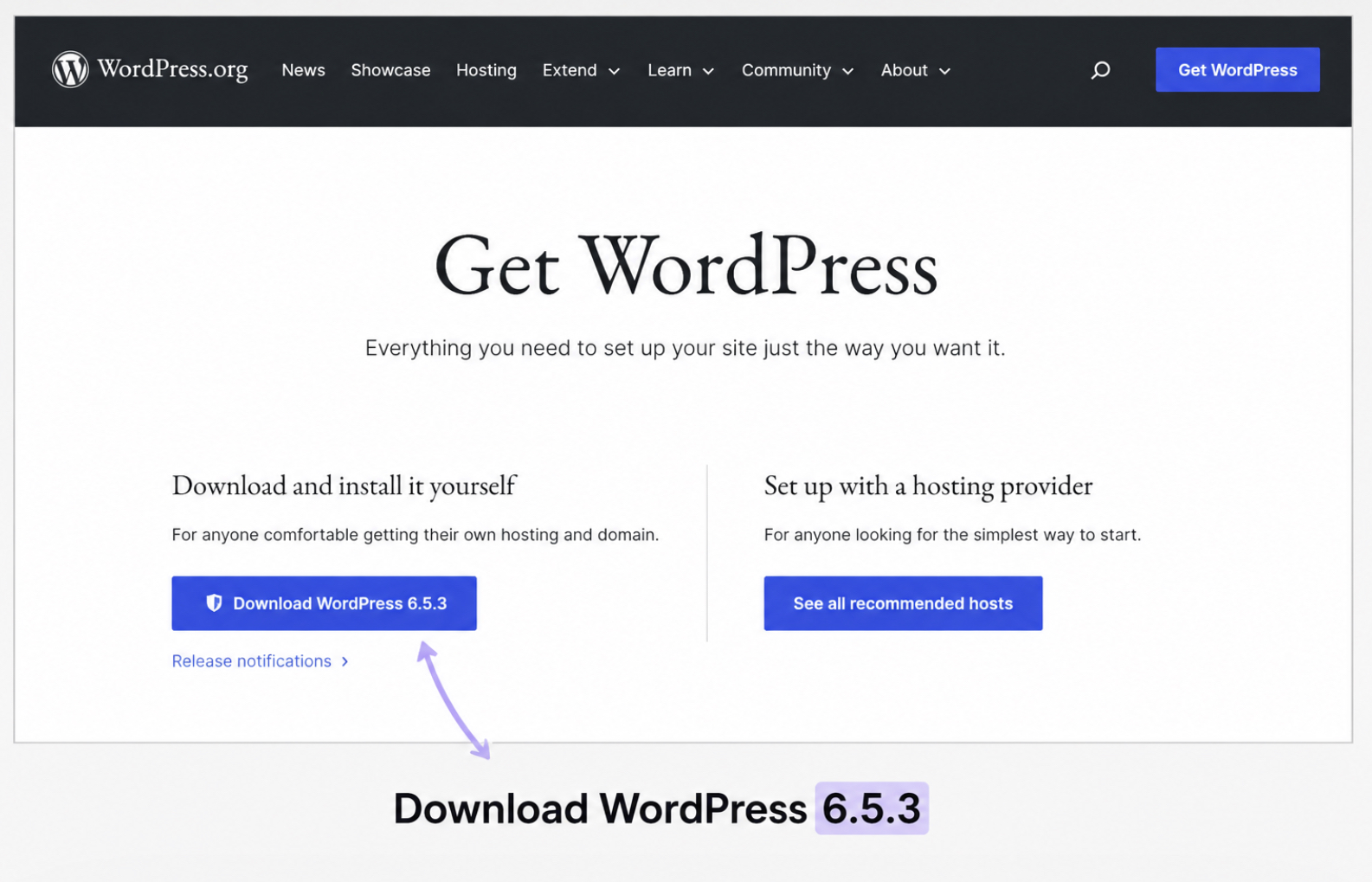
The site owner or developer visits the official WordPress.org download page to obtain the WordPress core package. The download page is published at https://wordpress.org/download, an address on the website the WordPress project itself maintains, and it serves the core software package directly.
Source identity matters before any click. A package obtained from a third-party mirror can differ from what the project released; the official page distributes the software unaltered. The site owner therefore confirms the address before the download itself. Two facts define this step: WordPress.org holds the position of official download source for every core release, and the page presents one primary button that starts the package transfer.
WordPress.org: The Official Download Source
WordPress.org is the official download source for the WordPress core package, the website the WordPress open-source project uses to publish its releases. As the official WordPress website, wordpress.org distributes every release of the core package free of charge: a wordpress.org download costs nothing for any version, current or archived.
WordPress.com is a hosted service where the software operates on servers the service provider manages, and it involves no download at all. That distinction settles the question of source. The core package comes from wordpress.org only.
Click the Download Button
Click the download button on the wordpress.org download page to begin the transfer of the core package. The WordPress download button is the page’s single primary control and carries the caption “Download WordPress” followed by the number of the current release.
The version number on the button’s caption identifies the release the click delivers, and that same number names the latest WordPress version the page offers. The “Get WordPress” button on the wordpress.org homepage leads to the same download page. One click on either surface starts the download.
The Latest WordPress Version
The latest WordPress version is the current release that the wordpress.org download page offers. At any given moment WordPress has exactly one current release, and each WordPress version is numbered in a major.minor format, such as 7.0, with a third patch figure added only for maintenance releases, such as 7.0.1. Confirm the release before saving anything: the release number is captioned on the download button, and the saved file contains the release the button’s number names.
Site owners and developers download the latest version straight from the official page, with no account, license key, or payment involved. The newest release also includes every security patch the WordPress project has distributed so far, which is why the page offers nothing older by default and why downloading the latest WordPress release is the standard path for a new site.
The file arrives as a single zip archive, named with the release number. Save the zip file to a designated folder on the local machine, a downloads directory or a project folder, so the package stays easy to locate. The release package from wordpress.org is roughly 25 MB (megabytes) in size, and the transfer finishes within seconds on a typical broadband connection.
The WordPress Zip File Contents
The WordPress zip file is the complete WordPress core package exactly as downloaded: the full software for one release, held in a single archive. wordpress.org distributes the same canonical package to every downloader, so the zip a developer saves for a client project matches the zip a site owner saves for a first website, byte for byte.
Unzipping the archive reveals the WordPress files inside one parent directory named wordpress; every release extracts to this same structure. Built-in archive tools on Windows and macOS unzip the package without extra software.
The WordPress zip file holds three directories and one configuration template as its defining contents.
Package content
What it is
wp-admin
The directory that contains the code of the WordPress administration dashboard.
wp-content
The directory that stores themes, plugins, and media files for a WordPress site.
wp-includes
The directory that holds the core function libraries of the WordPress software.
wp-config-sample.php
The configuration template that belongs to the installation step, included in every package as downloaded.
A set of loose core files accompanies the directories in the package root, and wp-config-sample.php is one of them. The download involves no changes to that template or to any other WordPress file in the package.
Once extracted, the WordPress files are ready for an installation route. Nothing further belongs to the download itself: the core package has moved from the official source to the local machine.
Install the WordPress Download
Installing the WordPress download is the download-to-install transition: the package is saved, the download itself is complete, and the files now need an installation route. The site owner or developer installs the WordPress download through one of three routes, and the saved zip package is the input every route consumes. The software at the end is the same WordPress in all three cases; only the steps in between are different.
The manual installation is the most granular route for the saved files: a file upload to the server, a MySQLdatabase and user, the wp-config file, and the install screen. Developers in direct control of the server install WordPress manually through exactly that sequence.
The browser wizard is the briefest handoff of the saved package among the three routes: a 5-minute install completed through a setup form in the browser. The same package is its starting point, and the WordPress 5-minute install is its name across WordPress documentation.
The command line is the third route, and the only one with no browser in it. WP-CLI is the command-line tool for WordPress, and its wp core download command obtains the core package without the wordpress.org browser download; the package itself is the same. Developers at a terminal install WordPress via WP-CLI from that command onward.
The sequence is unchanged whichever route follows: wordpress.org as the official source, the latest version confirmed on the download button, the zip file saved and extracted on the local machine, and an installation route at the end. The WordPress download is the constant in all three, and an installed WordPress site is where every route ends.






 ChatGPT
  Claude
  Grok
Grok  Gemini