Explore our specialized services, tailored solutions, and industry expertise to elevate your digital presence. From custom WordPress development to seamless integrations, we build high-performing websites that deliver impact.
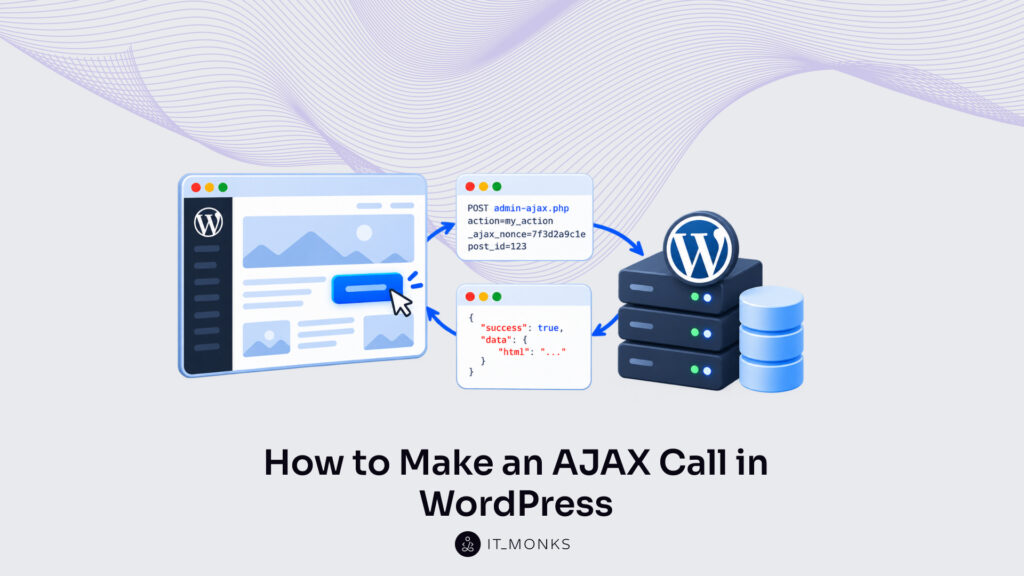
A WordPressAJAX call is an HTTP request that front-end JavaScript on a theme or plugin page sends to wp-admin/admin-ajax.php, and the action value it carries routes the request to the handler written for that action. When the reply from admin-ajax.php lands, the script reads it and writes the result into one element on the page: a title, a counter, a notice. The WordPress AJAX call updates that element without a full page reload, and the rest of the screen holds its state.
Every WordPress AJAX request is made from the same browser-side parts. A sending method, jQuery.ajax() or fetch(), sends it. Response handling reads the reply and updates the page, with a separate branch for failed requests. Request data holds the action value, a nonce and any field the feature needs. The POST method carries that data in the request body, where admin-ajax.php reads it. Last, the admin AJAX URL points the call at the right address; a theme or plugin gets that URL from WordPress and passes it to the script, rather than writing the path by hand.
For an AJAX call in WordPress, the front-end script sends the request to admin-ajax.php and handles what comes back; the PHP handler that admin-ajax.php calls for the action, and the server functions that print its reply, are written on the server side, outside the call. The call starts with a sending method: the browser function that posts the request data to the AJAX URL.
Sending Method for a WordPress AJAX Request
The sending method for a WordPress AJAX request is the browser function that sends the request data to the AJAX URL as one HTTP request. Two sending methods carry identical fields: jQuery.ajax(), behind a jQuery AJAX call in WordPress, and fetch(), behind a plain JavaScript one, each post action, _ajax_nonce and post_id to wp-admin/admin-ajax.php.
In the full exchange, the browser sends the request. A click on a .my-load-title element calls it, the POST reaches admin-ajax.php, a PHP handler on the server writes the reply, and the page script reads that reply to update the element. That browser step and the server half together make up AJAX in WordPress; the sending method is only the front-end JavaScript step.
In this WordPress AJAX call example, the jQuery.ajax() script attaches a click listener to every .my-load-title element and sends the three fields on each click. Two values are read from my_ajax_obj, an inline object that PHP prints into the page ahead of the script: ajax_url holds the full admin-ajax.php address, and nonce holds the token the handler checks.
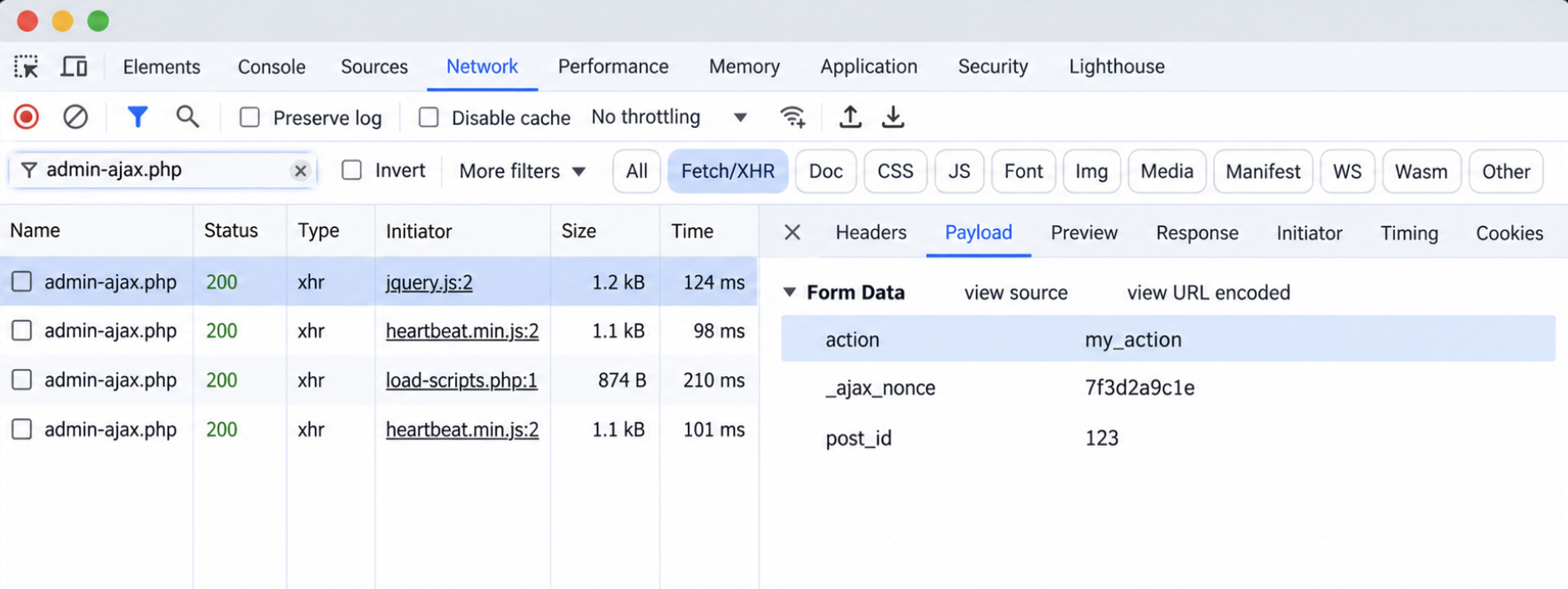
The browser’s DevTools Network tab holds the proof that the request was sent. With a handler already hooked to my_action on the server, the click adds one POST row for /wp-admin/admin-ajax.php that reaches status 200, and its Payload pane carries action, _ajax_nonce and post_id as form fields; with no hooked handler, the same row shows status 400 and the body ‘0’.
Every one of those fields gets into the request through the settings object that jQuery.ajax() reads.
jQuery.ajax() for a WordPress AJAX Request
jQuery.ajax() is jQuery’s general request method, and a jQuery AJAX call in WordPress passes it one settings object that holds every detail of the request. Four settings carry the whole request: url, method, data and dataType.
Setting
Value in the call
Purpose
url
my_ajax_obj.ajax_url
Address of admin-ajax.php
method
‘POST’
Default is ‘GET’
data
{ action, _ajax_nonce, post_id }
Request data, sent form-encoded
dataType
‘json’
Parses the reply into an object
Those setting names and defaults are the ones in the jQuery.ajax() settings list at api.jquery.com.
Method is the setting whose default changes where the fields travel. jQuery.ajax() sends a ‘GET’ request unless the settings object sets another method, and a GET request appends the data to the URL, so the call sets method to ‘POST’ and the fields are sent in the request body. Older code writes type: ‘POST’ instead; type is the alias for method, and jQuery versions before 1.9 read only type. Two more settings replace their defaults: url, which otherwise points to the current page, and dataType, which otherwise is an intelligent guess at the reply format.
The data object never reaches the server as an object. The contentType setting of jQuery.ajax() defaults to application/x-www-form-urlencoded; charset=UTF-8, and jQuery builds a key=value string from the fields before the POST is sent, which is the same encoding an HTML form carries.
jQuery.ajax() returns a jqXHR object, and the jqXHR methods done() and fail() handle the reply: done() for a successful request, fail() for a failed one.
$.post() is shorthand for jQuery.ajax() with type ‘POST’. fetch() sends the same request with no jQuery at all.
fetch() for a WordPress AJAX Request
fetch() for a WordPress AJAX request is the browser’s built-in request function, which sends the call from plain JavaScript with no jQuery dependency. A theme or plugin calls it with two arguments: the AJAX URL from my_ajax_obj.ajax_url, and an options object that sets the method and the body.
That body carries the fields. fetch() posts a FormData body with method ‘POST’, so admin-ajax.php reads form fields exactly as it does from the jQuery call.
A FormData object holds key/value pairs in the format an HTML form posts with multipart/form-data encoding. Each append() call writes one key and its value into it: action with ‘my_action’, _ajax_nonce with my_ajax_obj.nonce, post_id with the clicked element’s data-post-id.
The options object sets no Content-Type header. For a FormData body, the browser sets multipart/form-data on its own. The DOMContentLoaded listener waits for the parsed page, so the click listeners attach whether the script prints in the head or the footer.
fetch() returns a promise, and that promise is fulfilled with a Response object once the reply’s status and headers reach the browser. Reading that Response and updating the page from it is response handling, the reply half of the request.
Response Handling for a WordPress AJAX Request
Response handling for a WordPress AJAX request is the front-end script code that handles the reply once the call returns and writes the result into the page. It has two branches. The success branch reads the reply, through done() in jQuery and through response.json() after fetch(); the failure branch, fail() or .catch(), takes over when the request gets no usable reply.
In a jQuery AJAX call in WordPress, the done() method on the jqXHR object gets the response already parsed, because the call sets dataType to ‘json’, so the callback reads response.success and writes response.data straight into the page element. The jQuery branch has no separate parsing step.
In plain JavaScript, a WordPress AJAX call reads the reply in two steps instead. The Response object from fetch() holds a body that is still unread, and response.json() reads that body and returns a promise of the parsed object, which the second .then() gets as response. In the code, settings stands for the jQuery.ajax() settings object, formData for the FormData body and el for the clicked .my-load-title element, each as built in the sending code.
Both branches read the same two keys. response.success holds true or false; response.data holds the value the page shows. Those keys are set by the handler on the server, outside the browser script, and response handling reads them without touching how they were built. A reply with status 200 and success set to false still lands in done(), so the else branch writes a failure message instead of leaving the element unchanged. When success is true, the page element updates in place.
fail() for a WordPress AJAX Request
The fail() method for a WordPress AJAX request is the jqXHR callback that runs when the request fails: an HTTP error status such as 400, a network error, or, under dataType ‘json’, a reply body that is not valid JSON, per the jQuery.ajax() reference on api.jquery.com. On the jQuery side of a WordPress AJAX call, fail() gets the jqXHR object and a textStatus string. textStatus names the case (‘error’, ‘timeout’, ‘abort’ or ‘parsererror’), while jqXHR.status holds the HTTP code of any reply that arrived (the error code for an HTTP error status, 200 for a ‘parsererror’) and 0 when no reply arrived after a network error, timeout or abort.
That 400 has a fixed source in core. admin-ajax.php returns ‘0’ with HTTP status 400 when $REQUEST[‘action’] is empty, and again when no wp_ajax hook (logged-in user) or wp_ajax_nopriv_ hook (logged-out visitor) matches the action value. Both checks are in the admin-ajax.php source, ahead of any handler code.
fetch() does not fail on that 400. Its promise fulfills on a 400 status with response.ok set to false, because response.ok is true only for statuses 200–299; the promise rejects on network errors, not on HTTP error statuses, as MDN’s Using the Fetch API guide states. So the fetch() branch checks res.ok before reading the body, throws an Error carrying the status, and .catch() writes the failure message into the page element. A network error lands in that same .catch().
The status code and textStatus show that the call failed; finding the cause is troubleshooting work outside the call’s script. Whether admin-ajax.php can route the call at all rests on the fields the request carries.
AJAX Request Data in WordPress
AJAX request data in WordPress is the set of key/value fields a WordPress AJAX request sends to admin-ajax.php with the call. The set holds three kinds of field: the action key, the _ajax_nonce key, and app fields such as post_id.
The action key is required. admin-ajax.php reads its value and picks the handler hooked to wp_ajax_my_action for a logged-in user, or to wp_ajax_nopriv_my_action for a logged-out visitor, the routing step described in admin-ajax.php in WordPress. The developer.wordpress.org plugin handbook marks the action argument as mandatory for every WordPress AJAX request.
The _ajax_nonce key carries my_ajax_obj.nonce, the token printed into the page inside the my_ajax_obj object. Checking that token is handler work on the server; the call carries it and nothing more, under the default key name the handbook recommends.
App fields are the rest of the request: input the handler reads. In the click handler, post_id holds the data-post-id attribute of the clicked .my-load-title element, read through el.dataset.postId, a plain field value.
The fetch() FormData body carries the same three keys.
Where these fields travel, in the request body or in the URL, decides whether admin-ajax.php can read the action key at all. The jQuery.ajax() data object and the fetch() FormData body both reach admin-ajax.php through the POST method.
POST Method for a WordPress AJAX Request
The POST method for a WordPress AJAX request is the HTTP request method that sends the request data in the body of the request instead of the URL, and an AJAX POST in WordPress is a request of that method sent to admin-ajax.php, with the fields in its body.
A body alone is not enough, though. A POST body that is form-encoded or built as FormData reaches $_REQUEST, the array admin-ajax.php reads the action from, because PHP reads both Content-Type values, application/x-www-form-urlencoded and multipart/form-data, into $_POST, and $_REQUEST contains $_POST.
A JSON body is the exception: sent through fetch() with JSON.stringify(), it leaves $_REQUEST[‘action’] empty, so core returns ‘0’ with HTTP status 400 before any handler reads a field. PHP reads no request fields out of a JSON string, whatever Content-Type header the request carries.
GET is the other request method a WordPress AJAX request can use. GET sends the same fields as a query string in the URL, and admin-ajax.php still reads the action there, since $_REQUEST holds the query string too. A GET request exposes the nonce and the app fields in the address itself. POST keeps them out of the address by moving _ajax_nonce and post_id into the request body.
Four request shapes reach admin-ajax.php, and each one sends the action a different way:
Body
Sent by
admin-ajax.php result
Form-encoded POST
jQuery.ajax() data object
action read
FormData POST
fetch(), body: formData
action read
JSON body
fetch(), JSON.stringify()
$_REQUEST[‘action’] empty; ‘0’, HTTP 400
GET query string
method ‘GET’
action read; fields in the URL
Both sending methods already post a readable body. jQuery.ajax() with method ‘POST’ encodes its data object as application/x-www-form-urlencoded; fetch() with a FormData body sends multipart/form-data, and the browser sets that header on its own. So each POST request the two sending methods make passes the action check. What neither body holds is a destination, the one value both methods still need from PHP: the AJAX URL.
How to Get the Admin AJAX URL in WordPress
The admin AJAX URL in WordPress is the full address of wp-admin/admin-ajax.php on the current site, the request URL every WordPress AJAX call gets its destination from. admin_url( ‘admin-ajax.php’ ) returns that WordPress admin AJAX URL for whichever site runs the code, with its domain, its install folder and its admin scheme already in place.
A fixed path fails on other sites. ‘/wp-admin/admin-ajax.php’ points to the wrong address on a WordPress install that sits in a subdirectory, and jQuery has no way to get the correct value by itself, as the WordPress Plugin Handbook states.
The ajaxurl variable is defined on admin pages only, so a front-end script finds no ajaxurl at all and gets the URL from an object that PHP prints for it. Dashboard screens are the one place WordPress prints that global. Themes and plugins that send requests from public pages pass the AJAX URL themselves.
Getting the admin AJAX URL into a front-end script takes three PHP steps, and the object those steps print carries the nonce alongside it:
Enqueue the script on the wp_enqueue_scripts hook. wp_enqueue_script() enqueues js/my-ajax.js under the my-ajax-script handle with jQuery as a dependency and ‘in_footer’ => true, and wp_enqueue_scripts is the hook WordPress fires for front-end scripts. The in_footer argument prints the file at the end of the page body, after the .my-load-title elements the script attaches its listeners to. The plugin enqueues a file built with the @wordpress/scripts package the same way under my-ajax-script; the path in plugins_url() then points to the built file.
Build the URL and the nonce. WordPress gets the admin AJAX URL from admin_url( ‘admin-ajax.php’ ) for the ajax_url key, and wp_create_nonce( ‘my_action’ ) builds the nonce key’s value, the token the request posts back as _ajax_nonce.
Print my_ajax_obj inline, ‘before’ the script. wp_add_inline_script() prints the wp_json_encode() output as a const declaration ahead of my-ajax.js. Its position argument defaults to ‘after’, which would print my_ajax_obj after the code that reads it.
The complete enqueue callback belongs in a plugin file, because plugins_url() builds a URL for a file inside a plugin; a theme builds the script path with a theme URL function in its place.
In the browser, the script reads my_ajax_obj.ajax_url for both sending methods: jQuery.ajax() takes it as its url setting and fetch() as its first argument, so each request lands on admin-ajax.php. admin-ajax.php is one of two destinations for a WordPress AJAX call. A request meant for custom REST API endpoints in WordPress goes to a different address, the endpoint’s own route under the site’s /wp-json/ REST base, and never reaches admin-ajax.php.
The WordPress AJAX call behind a form submit, a load more button or a live search box lands on that same admin AJAX URL, and each of the three builds has its own walkthrough in AJAX forms, pagination, and search in WordPress.






 ChatGPT
  Claude
  Grok
Grok  Gemini