Explore our specialized services, tailored solutions, and industry expertise to elevate your digital presence. From custom WordPress development to seamless integrations, we build high-performing websites that deliver impact.
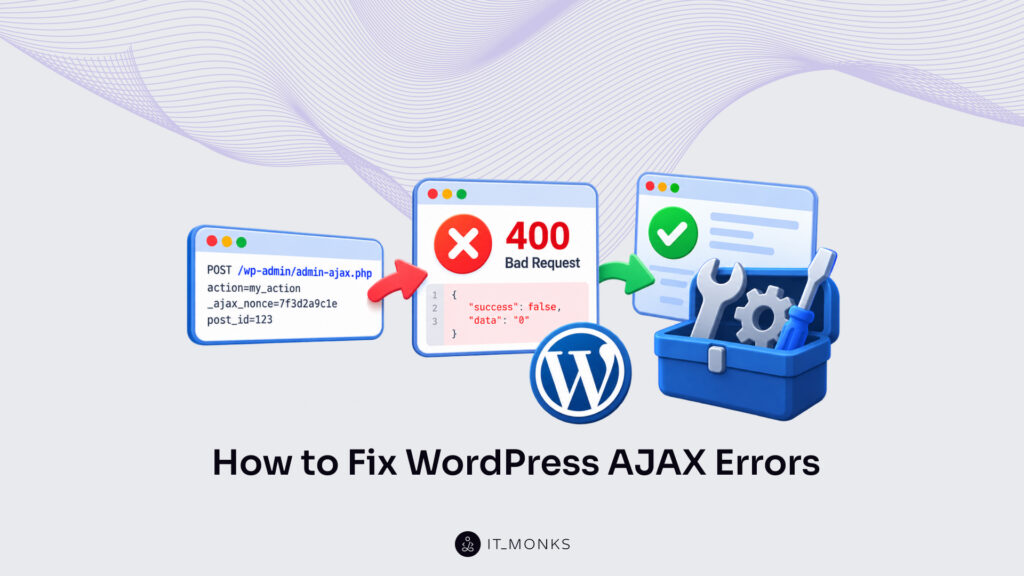
A WordPressAJAX error is an admin-ajax.php request that returns an error status or a response body the page script cannot use, the failure developers search for as WordPress AJAX not working. The status code and the response body, read together, form the request’s signature. That signature identifies the part of the exchange that failed.
Three kinds of failure produce those signatures. The WordPress AJAX 400 error returns ‘0’ with a 400 when admin-ajax.php stops the request before any handler code runs. A request with a correct action and hook can still fail: the page script never sends it, a server rule blocks it, or a nonce check rejects it with ‘-1’ and a 403. Last comes the WordPress AJAX JSON error, a 200 response whose body is not valid JSON because the handler printed output the page script could not parse.
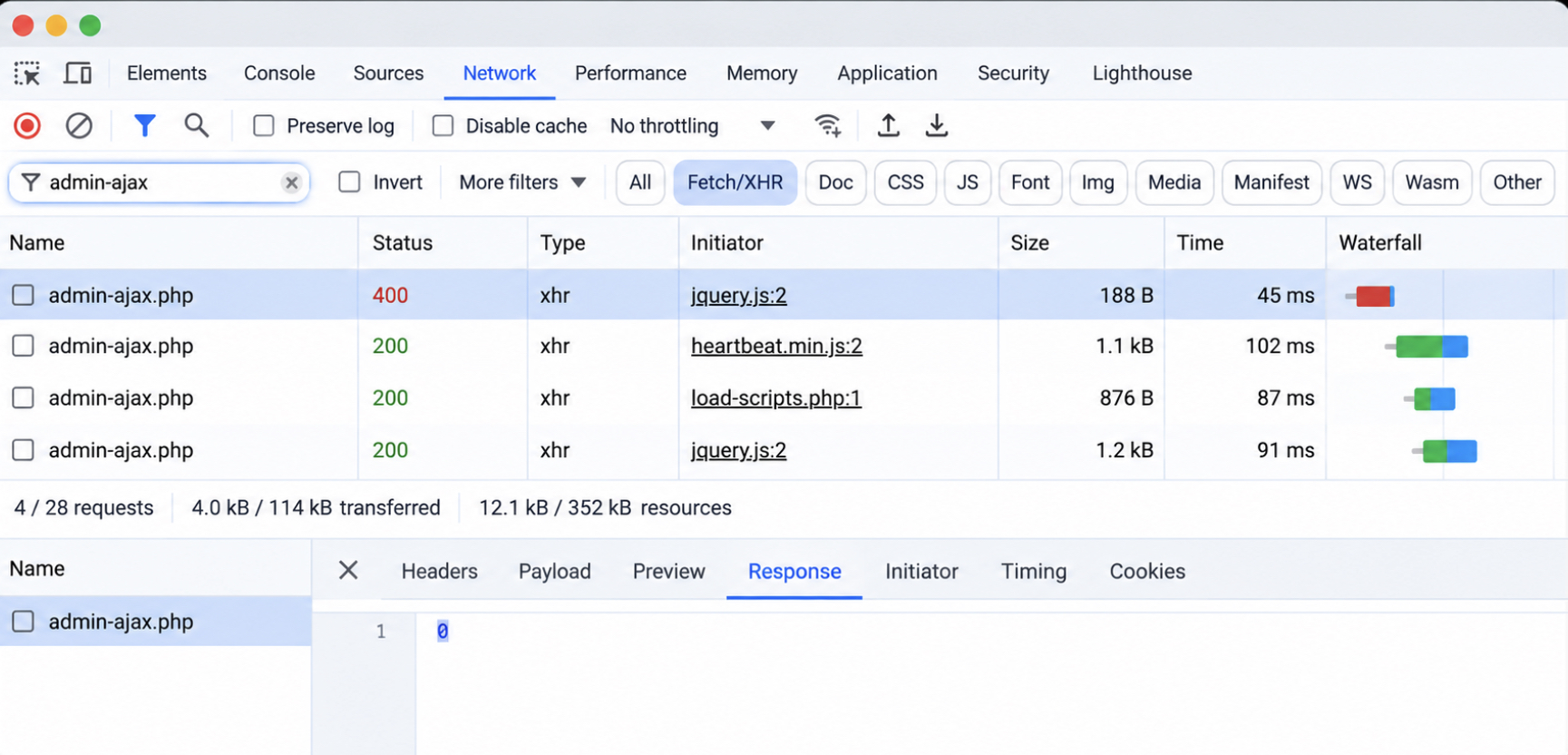
The check starts in the browser’s Network tab. Filter the list by admin-ajax.php, select the failed row and read two values, its status and its body; when no admin-ajax.php row appears at all, the Console shows the error that stopped the script.
The signature names the fix. If the matching fix does not clear it, deactivating plugins and switching the theme on a staging copy isolate the conflicting code, and the debug log records the PHP messages that an AJAX response never displays. Once the fix matches the signature, admin-ajax.php returns what the page script expects and the feature is working again. The 400 comes first, because core returns it before the handler starts.
WordPress AJAX 400 Bad Request Error
The WordPress AJAX 400 error is admin-ajax.php answering 400 Bad Request with the one-character body ‘0’ before any handler runs. Core returns it from two routing checks, and both end the request with the same call, wp_die( ‘0’, 400 ), which appears at three exits in the file. At that point the handler has not started, so its own error messages, logging and JSON output never appear.
Every WordPress AJAX exchange involves three parties: the page script sends the request, admin-ajax.php routes it, and the handler replies. That exchange, the working core of AJAX in WordPress, breaks at the routing step whenever the 400 comes back.
Core writes the two checks in wp-admin/admin-ajax.php as follows, with comments trimmed:
The first check rejects a request whose action value is empty or not a scalar. The second reads the login state and checks the matching hook for a callback, with its own 400 exit on each branch: wp_ajax_{action} for a logged-in user, wp_ajax_nopriv_{action} for a logged-out visitor.
All three exits return the same ‘0’ and 400, so the status code alone does not separate them. The request data does. That leaves two causes of a WordPress AJAX bad request, a missing action parameter and a missing hook for that action and login state, and each has its own fix.
A 403 with the body ‘-1’ is a different rejection. It comes from a failed nonce check inside the handler, after routing has passed.
A site-wide 400 page is a different error too. When every page on the site returns 400 Bad Request, the cause sits outside AJAX entirely. The WordPress 400 Bad Request AJAX response shows only on the admin-ajax.php row in the Network tab, while the page that sent the request loads with a 200. Check the action parameter first, since core checks it first.
Missing Action Parameter
The missing action parameter is a request condition in which the action field in $REQUEST is empty or absent, so admin-ajax.php stops at its first check and returns ‘0’ with a 400. The action field contains the name core appends to wp_ajax when it looks up the handler. Without that name there is no hook to check, and the request ends there, as the first cause of the WordPress AJAX 400 error.
Check the failed row’s request data, the fields the browser sent, for a field named action. The rejection follows when that field is absent from the request, when its key is misspelled as Action or acton, or when it exists only inside a JSON string body.
The JSON case is the hardest to spot, because the action value looks present in the request data. PHP fills $_POST only from bodies sent as application/x-www-form-urlencoded or multipart/form-data, according to the PHP manual’s $_POST entry; a JSON body stays in the raw php://input stream. A page script that sends JSON.stringify( { action: ‘my_action’ } ) leaves $_REQUEST[‘action’] empty, and core returns the 400 while the value sits unread in the body.
Fix the request by sending the action in a body format PHP reads. A jQuery data object and URLSearchParams both send a URL-encoded body. FormData sends multipart/form-data, the same format a file-upload form uses, and PHP reads that as well. The fetch() call sends the same fields with URLSearchParams in place of a JSON.stringify() body:
The action field carries my_action, and _ajax_nonce carries the nonce from my_ajax_obj, so both values match what the server side expects. The URL, the localized object and the rest of the request setup belong to an AJAX call in WordPress; for this 400, the body format is the fix. Retest the request. With the action value in $_REQUEST, the first check passes, and a 400 that still returns ‘0’ identifies the hook as the cause.
Missing wp_ajax_ Hook
The missing wp_ajax_ hook is the absence of any callback on wp_ajax_{action} for the request’s action value, so has_action() fails for a logged-in user and admin-ajax.php returns ‘0’ with a 400. It is the second cause of the WordPress AJAX 400 error, and it shows only after the action check passes. Core appends the action value to wp_ajax_ and checks that exact hook name, nothing close to it.
Login state switches the check. A logged-out visitor is checked against wp_ajax_nopriv_{action} instead, so a missing wp_ajax_nopriv_ hook returns the same ‘0’ and 400 for every logged-out request. That is why a feature can be working in the admin, where the developer is logged in, and fail for visitors on the front end.
Two checks reveal the missing hook. First, match the hook suffix to the action value character for character: an action of my_action needs wp_ajax_my_action, and a dash in place of an underscore, a capital letter or a prefix on one side breaks the match. Then check where add_action() sits. A plugin file or the active theme’s functions.php loads on the admin-ajax.php request, so a registration there is in place before core checks the hook, while a registration inside a page template never loads on that request.
Conditions can skip a registration as well. admin-ajax.php defines WP_ADMIN as true, so is_admin() returns true on the request and an add_action() call wrapped in ! is_admin() never runs; a registration placed inside a front-end-only action such as wp_enqueue_scripts misses the request the same way.
Two add_action() calls register the handler, each hook suffix matching the action value exactly:
The first line registers the handler for logged-in users, and the second registers the same handler for logged-out visitors. Leave the nopriv line out when the feature is for logged-in users only; a 400 on a logged-out request is then the intended rejection, not a defect. The full routing order inside the file, from the bootstrap to do_action(), belongs to admin-ajax.php in WordPress.
With the hook registered under the exact action name, has_action() returns true, the handler runs, and the request is working again. A request that still fails once the action and hook are correct is WordPress AJAX not working in the narrower sense: the script never sends it, a rule blocks it on the way, or it arrives without the login cookie and meets the nopriv check with a 400.
WordPress AJAX Not Working
WordPress AJAX not working, in its narrower sense, is the state in which the action and hook are correct in the code, yet the admin-ajax.php request is never sent, arrives without the login cookie, is blocked before it reaches the handler, or is rejected by the nonce check. The routing code is not at fault. The feature still fails, and the cause sits in the browser, the site’s addresses, a blocking layer or the nonce.
A JavaScript error is the first cause to check. An exception thrown earlier in the page script stops the sending code before fetch() or jQuery.ajax() runs, so the Console shows the error in red while the Network tab shows no admin-ajax.php row at all: the request was never sent. The message “jQuery is not defined” points to a missing dependency: the sending script ran before jQuery loaded.
Fixing the reported line, or loading jQuery as a dependency of the sending script, lets the request leave the browser.
The Site Address protocol fails more quietly. When an http page calls an https admin-ajax.php URL, the browser treats the two as different origins, because an origin includes the protocol, and it drops the login cookie from the request: fetch() sends cookies only to the same origin by default, and jQuery.ajax() sends them cross-origin only when withCredentials is set, according to MDN’s same-origin policy and Request.credentials pages and the jQuery.ajax() documentation.
WordPress then receives the request without a logged-in user. admin-ajax.php checks is_user_logged_in(), looks only for a wp_ajax_nopriv_ hook, and, when the handler is registered on wp_ajax_ alone, returns ‘0’ with 400 even though the developer is logged in on the same site. The Network tab shows the mismatch directly: the page URL starts with http, the request URL with https. Once the front end loads over https, setting both the WordPress Address and the Site Address to https in Settings > General makes the two schemes match, and the cookie travels with the request again.
When a security plugin or an .htaccess rule blocks admin-ajax.php, the request stops before it reaches the handler. The block replaces the answer core would give, so the response carries neither the ‘0’ nor the ‘-1’ that admin-ajax.php prints; the body holds the plugin’s or the server’s block page instead, or nothing. A 403 on that row is easy to confuse with a nonce failure, although the body tells them apart. Allowing admin-ajax.php in the security plugin’s settings, or removing the .htaccess rule that denies it, sends the request through to core.
Each cause leaves its own evidence in the Console or the Network tab, and each piece of evidence points to one fix:
Cause
Browser shows
Fix
JavaScript error or missing jQuery
Console error; no admin-ajax.php row
Fix the error; load jQuery as a dependency
Site Address protocol
http page, https admin-ajax.php URL; 400 with ‘0’
Set both addresses to https in Settings > General
Security plugin or .htaccess rule
Request blocked; no ‘0’ or ‘-1’ body
Allow admin-ajax.php
Invalid nonce
‘-1’ with 403
Match the nonce action, key and age
Fixing the cause in the matching row gets the feature working. The nonce is the cause left once the first three are ruled out: a request that reaches the handler through a matching wp_ajax_ or wp_ajax_nopriv_ hook, then comes back as ‘-1’ with 403, was rejected by the nonce check.
Invalid Nonce
An invalid nonce is a nonce that check_ajax_referer() cannot verify for the expected action, and in an AJAX request check_ajax_referer() stops with wp_die( -1, 403 ), so the admin-ajax.php row shows the body ‘-1’ with status 403 before the handler body runs. The routing worked; nonce verification did not.
That pair separates the nonce failure from the 400 error. A ‘0’ with 400 means admin-ajax.php found no action value or no matching hook and never reached the handler; a ‘-1’ with 403 means the hook matched, the handler started, and the check at its top rejected the request. A ‘-1’ body therefore points to one of three nonce checks, never to the hook.
The action string comes first. The string passed to check_ajax_referer() has to match the one passed to wp_create_nonce() exactly, because a nonce created for ‘my_action’ fails verification against any other string.
The request key comes second. With no second argument, check_ajax_referer() reads the nonce from _ajax_nonce and, when that key is absent, from _wpnonce; a nonce sent under any other name, such as security, reaches the check as an empty value and fails. The Payload tab shows which key the page script sent. When the script uses a custom key, the handler passes that key as query_arg, the second argument of check_ajax_referer().
Nonce age comes third. A WordPress nonce is valid for up to 24 hours, and verification returns 1 for a nonce 0–12 hours old and 2 for one 12–24 hours old, according to the check_ajax_referer() reference in the WordPress developer documentation. A nonce older than 24 hours, or one created before a logout that happened after the page loaded, no longer verifies. Only a newly generated page carries a fresh nonce; a page served from a page cache repeats the nonce it was cached with, so the cached copy has to be refreshed before the next request verifies.
The handler runs the check before anything else, so nothing in its body runs on a failed nonce:
// Nonce created with wp_create_nonce( 'my_action' ), sent as _ajax_nonce.
function my_action_handler() {
	check_ajax_referer( 'my_action' ); // reads _ajax_nonce, then _wpnonce
	// check_ajax_referer( 'my_action', 'security' ); // nonce sent under a custom key
	// Handler body runs only after the nonce verifies.
	wp_die();
}
A verified nonce lets the handler body run. The handler’s response is the next thing the browser reads: a response body that is not valid JSON still fails in the page script’s callback, even with a 200 status.
WordPress AJAX JSON Error
A WordPress AJAX JSON error is a failed admin-ajax.php request whose response body is not valid JSON, so the callback’s parse of that body fails even though the handler ran. The status still reads 200. What breaks the reply shows in the Response tab of the admin-ajax.php row: extra text printed before or after the JSON object.
The cause is printed output outside the JSON. A debug echo left in the handler, a print_r() or var_dump() call, or characters after a closing ?> tag in a plugin or theme file print into the same response body the page script reads as JSON. A handler that still carries a debug echo returns this:
One line of plain text is enough. The parser meets the D of “Debug”, rejects the whole body, and the success callback never runs, although the second line holds exactly the data the handler meant to send.
PHP warnings are a different case. WordPress core does not print PHP warnings or notices into an AJAX response body; the debug log records them instead. Stray text in the Response tab therefore matches an echo, a dump call or characters outside the PHP tags, not a PHP warning.
The fix is a handler that prints nothing except its JSON reply. Take the debug echo, print_r() and var_dump() lines out, check the plugin and theme files for characters before an opening tag, and send failures through wp_send_json_error(). wp_send_json_error() returns a parseable failure with success set to false and the details under a data key, then ends the request through wp_die(), so nothing is printed after it.
function my_action_handler() {
	$data = get_option( 'my_option' );
	if ( false === $data ) {
		wp_send_json_error( array( 'message' => 'Option not found' ) );
	}
	wp_send_json_success( $data );
}
A missing option sends {"success":false,"data":{"message":"Option not found"}}, which the callback reads like any other JSON reply and checks through its success key. Once the body contains the JSON object alone, the parse no longer fails. One stray character can still break a reply the handler printed correctly: a ‘0’ appended after the JSON.
Default 0 Response
The default 0 response is the ‘0’ that admin-ajax.php prints through its closing wp_die( ‘0’ ) when a handler returns without ending the request. The handler echoes its JSON and returns; the final wp_die( ‘0’ ) in admin-ajax.php then appends ‘0’ to the same body.
Echoed JSON followed by ‘0’ is no longer valid JSON. A body of {"count":3}0 fails the callback’s parse, and the JSON error shows at status 200, the wp_die() default for an AJAX request. The status code identifies which case is on screen: a ‘0’ alone with 400 is the 400 Bad Request error from a missing action or hook, while a ‘0’ after the handler’s own output with 200 is the default 0 response.
Fix the handler in one of two ways. End it with wp_die() after the echo, so admin-ajax.php never prints its own ‘0’. Or return through wp_send_json_success() or wp_send_json_error(), which call wp_die() themselves and wrap the payload in an object with success and data keys.
// Before: body is {"count":3}0
function my_action_handler() {
	echo wp_json_encode( array( 'count' => 3 ) );
}

// After: body is {"success":true,"data":{"count":3}}
function my_action_handler() {
	wp_send_json_success( array( 'count' => 3 ) );
}
With the trailing ‘0’ gone, the body is pure JSON and the callback is working again. Status and body, read together, keep the two 200 cases apart from the other failed admin-ajax.php requests: ‘0’ with 400, ‘-1’ with 403, stray text or a trailing ‘0’ at 200.
Server Response for a WordPress AJAX Error
The server response for a WordPress AJAX error is the status code and response body that admin-ajax.php returns for the failed request. Neither value is enough on its own. A 400 status comes back for two different causes, and admin-ajax.php prints the same ‘0’ body at four exits in its source: three with 400, the closing default with 200. Read as a pair, the status code and the response body name one signature, and each signature points to one fix.
Diagnosis starts in the browser’s Network tab whenever WordPress AJAX is not working on a live feature, because that tab shows both values for every admin-ajax.php request the page sends. It records traffic only while DevTools is open. A request fired before the panel opened never appears in the list. Reading the server response takes five steps:
Open DevTools, select the Network tab, repeat the failing action.
Type admin-ajax in the Filter box.
Select the admin-ajax.php row and read its Status.
Read the body in the Response tab.
In the Payload tab, check action and _ajax_nonce; compare page and request URL schemes.
The Payload tab contains the request data admin-ajax.php received, which is where the ‘0’ and the ‘-1’ get their explanation. An action field that is absent, misspelled or wrapped inside a JSON string explains a ‘0’ with 400; a missing or stale _ajax_nonce explains a ‘-1’ with 403. A page on http that sends its request to an https URL is the logged-out case, not a missing hook.
Each server response of a failed admin-ajax.php request pairs with one cause and one fix:
Status + body
Cause
Fix
400 + ‘0’
Missing action or hook
Send the action field; add a wp_ajax_ hook that matches it
400 + ‘0’, http page, https URL
Logged-out request
Set both addresses to https in Settings > General
403 + ‘-1’
Nonce check failed
Match the nonce action; send a current _ajax_nonce
Blocked, no ‘0’ or ‘-1’ body
Security plugin or .htaccess rule
Allow admin-ajax.php
200 + text before the JSON
Stray output
Remove the echo, print_r() or var_dump()
200 + ‘0’ ending the body
Handler did not end
End with wp_die() or wp_send_json_success()
500 + critical error message or empty body
PHP fatal error
Read the debug log
No admin-ajax.php row
Request never sent
Fix the JavaScript error in the Console
A 200 status on a broken feature moves the check from the status code to the response body. The handler ran; whatever it printed, and whatever followed it, shows up in the Response tab exactly as admin-ajax.php sent it. A 500 means the opposite: PHP stopped with a fatal error before the handler finished, and the body carries no PHP error message.
Not every failed request belongs to admin-ajax.php. A request URL under /wp-json/, or one carrying ?rest_route= in its query string, is a REST route with its own status codes and JSON error bodies, and those follow the separate steps to fix WordPress REST API errors.
A 500 from a PHP fatal error inside the handler sends the check to the debug log first, since the log records the error that admin-ajax.php hides. A status and body that match no known signature, or a matched signature whose fix does not clear it, identify plugin or theme code loaded on the same admin-ajax.php request.
Code Conflict for a WordPress AJAX Error
A code conflict in a WordPress AJAX error is plugin or theme code outside the handler that breaks the AJAX request, either by printing output into the response or by blocking the call before admin-ajax.php returns anything. admin-ajax.php loads wp-load.php, so active plugins and the theme run on the same request as the handler.
Isolating the conflicting plugin or theme is the fallback in two cases: the status and body match no known signature, or a matched signature’s fix does not clear it because the output or block comes from other plugin or theme code. A 500 from a PHP fatal error inside the handler is the exception, and the debug log comes first for it, since the log names the file that failed. WordPress AJAX not working past those checks means the conflicting code has to be found before anything changes on the live site.
Isolating the conflicting plugin or theme belongs on a staging copy, because deactivating plugins on a live site switches off features for every visitor. The conflict is isolated in five steps:
On a staging copy, deactivate every plugin except the one that sends the request.
Retest; an error that persists sits in the sending plugin or its handler: read the debug log.
Switch to a default WordPress theme and retest (skip when the sending code is part of the theme); an error gone here means the active theme is the conflict.
Reactivate plugins one at a time, retesting each.
The plugin whose reactivation brings the error back is the conflict; on the live site, update or replace it.
The last reactivated plugin is the answer, and the staging copy confirms it: with that plugin deactivated, the admin-ajax.php request returns its expected response.
An isolated conflict shows no new kind of failure. The admin-ajax.php row still carries stray text or a trailing ‘0’ at 200, or a blocked request with no ‘0’ or ‘-1’ body, and the PHP errors behind that output go to the debug log.
Debug Log for a WordPress AJAX Error
The debug log for a WordPress AJAX error is wp-content/debug.log, the file where WP_DEBUG_LOG records PHP errors, warnings and notices, including those from an AJAX request. It is a PHP error log, and for admin-ajax.php it is where a handler warning shows.
Why there and not in the browser? Core holds display_errors at 0 for every AJAX request: wp_debug_mode() switches it off whenever wp_doing_ajax() is true, whatever WP_DEBUG_DISPLAY holds. A WordPress AJAX JSON error traced to a PHP warning therefore has its cause in debug.log, not in the Response tab.
WP_DEBUG_LOG is inactive unless WP_DEBUG is true, since core reads the logging constants only inside the WP_DEBUG branch. WP_DEBUG_DISPLAY at false keeps errors off normal pages too, so the response body of an ordinary page stays free of PHP messages while the log fills. The three constants are placed in wp-config.php, above the line that reads “That’s all, stop editing!”:
Enable the three constants, retest the failing action, then read debug.log. Each entry records the PHP message with a file path and a line number. That path reveals the cause: a line inside the handler’s own file, or a file inside the plugin isolated on the staging copy. The remaining debugging constants and their default values are part of WordPress debug mode.
Debug tools on a live site go against the “Debugging in WordPress” page of the Advanced Administration Handbook, which limits them to local and staging installs, and debug.log holds server file paths. Once the admin-ajax.php request is working again, switch debugging off on the live site: set WP_DEBUG back to false and delete debug.log from wp-content.






 ChatGPT
  Claude
  Grok
Grok  Gemini