Explore our specialized services, tailored solutions, and industry expertise to elevate your digital presence. From custom WordPress development to seamless integrations, we build high-performing websites that deliver impact.
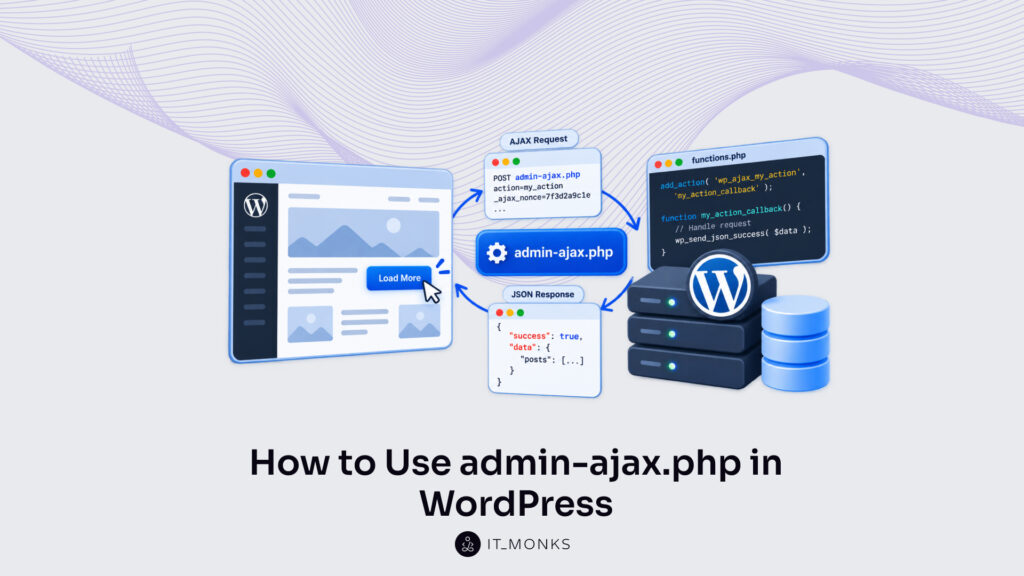
A developer uses admin-ajax.php as the server side of WordPress admin AJAX. For a plugin or a theme, admin-ajax.php runs a PHP handler function and returns that handler’s data to the page, without a page reload.
The handler function is added to a wp_ajax_ hook whose name carries an action value. admin-ajax.php reads the action parameter in each request, fires the hook with that name and calls the handler, returning whatever the handler echoes. Login state splits the route: admin-ajax.php fires wp_ajax_ hooks for logged-in users and wp_ajax_nopriv_ hooks for logged-out visitors, and it returns ‘0’ with HTTP 400 when no handler is added for the action in that state.
Outside those steps, admin-ajax.php has a request count per page view, a list of core actions for admin screens, and the WordPress code it loads before any handler runs.
What Is admin-ajax.php in WordPress?
admin-ajax.php in WordPress is the core endpoint for WordPress admin AJAX: one PHP file, wp-admin/admin-ajax.php, that runs the handlers added to the wp_ajax_ and wp_ajax_nopriv_ hooks.
Every action uses the same endpoint URL, so the URL path defines nothing; the action parameter in the request defines which handler admin-ajax.php calls, and one file routes the work of any number of plugins and themes that way. A page request returns a whole HTML document. A WordPress admin-ajax request returns only the output of the handler that admin-ajax.php calls.
admin-ajax.php is not the path for every AJAX request in WordPress, though. A request to the REST API is sent to a separate path with routes of its own, outside the file.
The WordPress admin-ajax.php file runs a plugin or theme PHP handler on the server and sends the handler’s data back to a page that is still open in the browser, with no reload. admin-ajax.php has shipped in WordPress core since WordPress 2.1.0, the release number on the @since tag at the top of the file.
admin-ajax.php is one step in the full exchange behind AJAX in WordPress: the page sends the request, the file calls the handler, and the response returns to the page. At the server end of that exchange, what admin-ajax.php calls is a handler function, added to a hook that has the action value in its name.
How to Add a Handler Function for admin-ajax.php
A handler function for admin-ajax.php is the PHP callback that admin-ajax.php calls when the action value of a request matches the hook that function is registered on. Any AJAX function in a WordPress plugin or theme is this kind of action hook callback, and it has every WordPress function available, because admin-ajax.php loads WordPress before the call.
To add a WordPress AJAX action, a developer registers the handler with add_action() on a hook named wp_ajax_ plus the action name, so the itm_get_posts action has the hook wp_ajax_itm_get_posts. The first argument is that hook; the second is the name of the callback. Registration is the same pattern as any of the WordPress action hooks, with one difference: admin-ajax.php, not a page load, triggers the wp_ajax_ family.
Matching is exact. The action value a request sends and the hook name a developer registers must be identical after the wp_ajax_ prefix, character for character. A request carrying itm_get_posts triggers wp_ajax_itm_get_posts; one carrying itm-get-posts, with hyphens, triggers nothing, and admin-ajax.php has no handler to call.
The itm_ prefix on the action value is a guard against collisions with core actions such as heartbeat and with actions other plugins register. One boundary remains: wp_ajax_itm_get_posts fires only for logged-in requests, while a logged-out request is routed to the wp_ajax_nopriv_ hook instead, which has a registration of its own.
On the PHP side, the complete WordPress AJAX action for itm_get_posts is one add_action() line and one function:
Inside the function, the handler reads the category value from $_POST through wp_unslash() and sanitize_text_field(). get_posts() returns up to five posts in that category. Their titles are echoed as one comma-separated string, escaped by esc_html(), and that echoed string is the response body admin-ajax.php sends back to the browser. A PHP return value from the handler is never part of the response; only echoed output is.
Then the handler ends with wp_die(), which stops the request once the output is complete. Without it, admin-ajax.php ends the request with its own closing wp_die( ‘0’ ), and a trailing ‘0’ follows the titles. A handler that ends on wp_die() answers with exactly what it echoed, and it answers only when admin-ajax.php routes a request to its hook.
Request Routing in admin-ajax.php
Request routing in admin-ajax.php is the step in which the value of a WordPress AJAX action, read from $_REQUEST['action'], defines exactly one hook for the file to fire: wp_ajax_{action} for logged-in users or wp_ajax_nopriv_{action} for logged-out visitors. The hook name is wp_ajax_ plus the action parameter, so an action parameter of itm_get_posts routes to wp_ajax_itm_get_posts.
A front-end script on the page sends that value as a POST field or a query-string argument, the same way all frontend AJAX requests in WordPress send it. Before login state comes into it, admin-ajax.php checks the value itself: an empty or non-scalar action stops the request ahead of any routing, and the file returns 0 with HTTP 400.
Login state is the second check, read through is_user_logged_in(). When it returns true, admin-ajax.php checks has_action() for wp_ajax_{action}, the hook add_action() defines when a developer adds a WordPress AJAX action, and then fires it; firing that hook is how the file calls the handler function.
When is_user_logged_in() returns false, admin-ajax.php runs the same check on wp_ajax_nopriv_{action} and fires that hook instead, which the docblock above the call lists as firing “non-authenticated Ajax actions for logged-out users.” A branch with no callback on its hook stops at has_action(), with the same response as an empty action.
admin-ajax.php sets the response on its own only where no handler runs. Where a handler fires, the handler’s output and status code are the answer:
Request
admin-ajax.php
Response
No action value
Stops before routing
0, HTTP 400
Logged in, wp_ajax_itm_get_posts hooked
Fires wp_ajax_{action}
Handler output, 200
Logged out, wp_ajax_nopriv_itm_get_posts hooked
Fires wp_ajax_nopriv_{action}
Handler output, 200
No hook for that login state
Stops at has_action()
0, HTTP 400
Handler skips wp_die()
Runs closing wp_die( '0' )
Output + trailing 0, 200
Neither branch falls back to the other. An action hooked only on wp_ajax_itm_get_posts stops at has_action() for every logged-out visitor, while logged-in users get the handler’s output.
wp_ajax_nopriv_ Hook for Logged-Out Users
The wp_ajax_nopriv_ hook is the action hook admin-ajax.php fires for logged-out visitors, and the WordPress AJAX reference entry for wp_ajax_nopriv_{$action}, its documentation page on developer.wordpress.org, lists it as “functionally the same as wp_ajax_{$action}” apart from login state.
Same dynamic name built from the action value, same callback, same wp_die() at the end; only is_user_logged_in() returning false separates the two. The nopriv hook has fired since WordPress 2.8.0, the release in its @since tag in admin-ajax.php, against 2.1.0 for wp_ajax_{action}.
A developer registers both hooks on the same callback when logged-out visitors and logged-in members use one action. Why both? admin-ajax.php fires one hook per request, and login state defines which, so an action added only to wp_ajax_nopriv_itm_get_posts stops at has_action() for every logged-in user, administrators included. For itm_get_posts, the pair is two add_action() lines on one function:
A handler behind the nopriv hook serves visitors with no account, and a logged-out request carries no role capabilities. A capability check therefore fits the wp_ajax_ branch only; on the nopriv path, it would turn away every visitor the hook exists for. The nopriv handler needs a nonce check, a nonce being a time-limited token WordPress generates for one action, plus validation of each value it reads from the request. The nonce check is the subject of WordPress AJAX nonces. With both lines in place, admin-ajax.php answers every itm_get_posts request that a logged-out visitor’s page view sends.
High admin-ajax.php Usage
High admin-ajax.php usage is a pattern in which one page view has many requests sent to wp-admin/admin-ajax.php, the WordPress admin AJAX endpoint, and the Heartbeat API is one core sender of them. Each admin-ajax.php request is an uncached request. It loads WordPress and the admin code, admin-ajax.php sends no-cache headers for every request that carries an action value, and page caches do not serve the file.
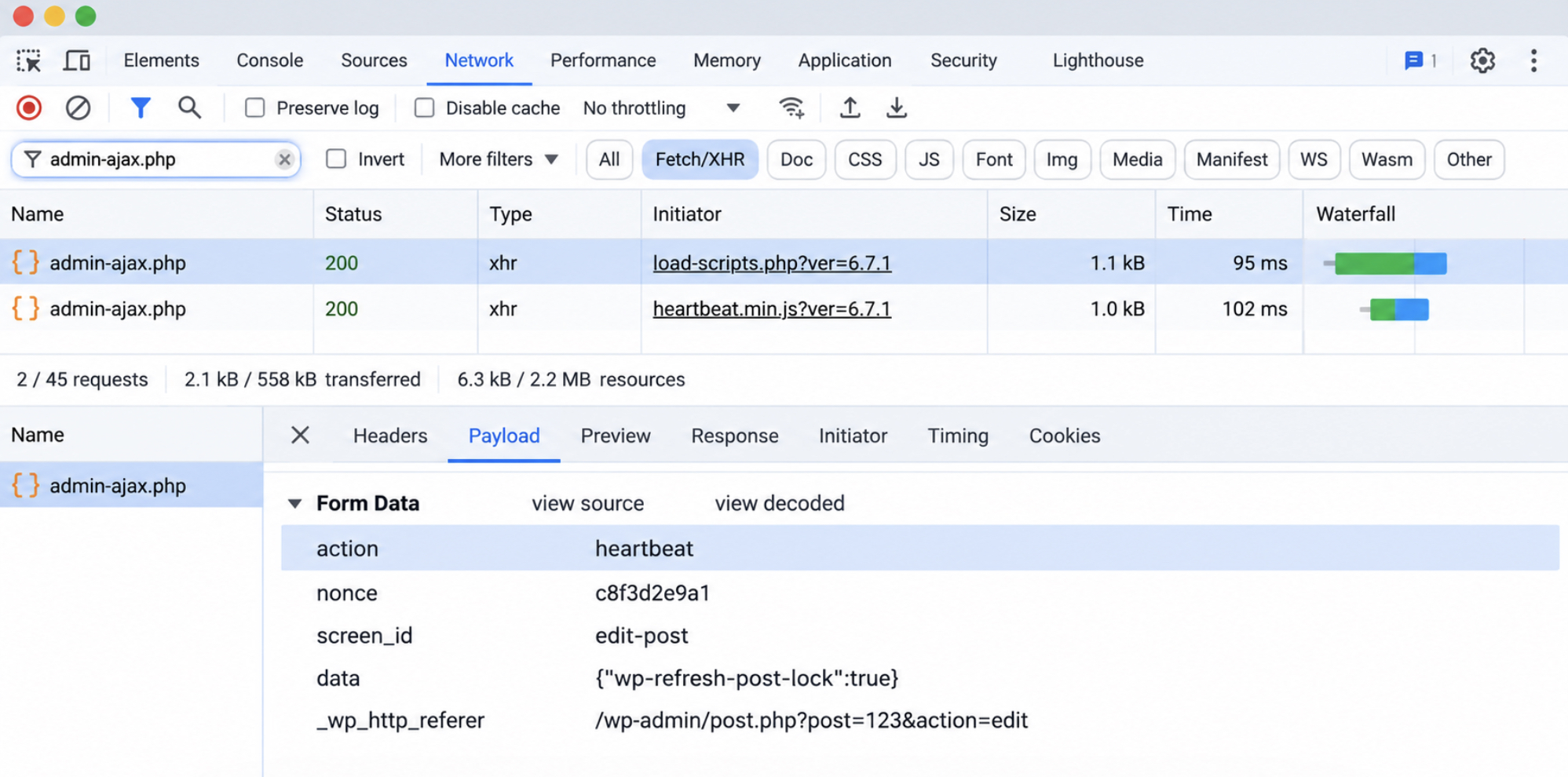
admin-ajax.php requests come from plugin, theme or core scripts, and the action value in each request identifies the sending script. The action value of an admin-ajax.php request is shown in the Payload tab of Chrome DevTools, which opens from a filtered Network panel.
Open the Network panel.
Reload the page or repeat the slow action.
Filter the list by typing admin-ajax.php in the filter box.
Select a request, open Payload and read the action value.
Check the Initiator column for the sending script.
That value is the string a handler was added for. A request with action=itm_get_posts is answered by the itm_get_posts callback; one with action=heartbeat comes from the Heartbeat API and is answered by core.
Heartbeat API
The Heartbeat API is a core WordPress JavaScript API that sends the heartbeat action to admin-ajax.php on a recurring tick, and each tick is a WordPress admin AJAX request with action=heartbeat in its body. admin-ajax.php calls wp_ajax_heartbeat(), the heartbeat action’s core handler for logged-in users since WordPress 3.6.0. The handler refreshes aged nonces through the wp_refresh_nonces filter, carries plugin data in through heartbeat_received and out through heartbeat_send, and returns the reply as JSON.
Requests with action=heartbeat that repeat in the Network panel while an admin screen stays open point to Heartbeat, and the heartbeat_settings filter sets the interval between them. Heartbeat is one of many core actions admin-ajax.php lists.
Core AJAX Actions in admin-ajax.php
Core AJAX actions are the action names admin-ajax.php lists in $core_actions_get and $core_actions_post, the arrays holding the actions WordPress admin screens send to the endpoint plugins use, get-tagcloud among them. When a request names a listed action, admin-ajax.php adds wp_ajax_{action} for that request only, at priority 1, and registers a callback named wp_ajax_ plus the action name, with hyphens turned into underscores.
The heartbeat action and the WordPress get-tagcloud AJAX action are both core AJAX actions, and each listed name maps to one handler function that admin-ajax.php calls.
A plugin action must not reuse a core name. The core handler runs first, at priority 1, and ends the request, so a plugin callback added to a reused name is never reached. By that rule, admin-ajax.php turns get-tagcloud into wp_ajax_get_tagcloud().
The get-tagcloud Action
The WordPress get-tagcloud AJAX action is a POST core action that admin-ajax.php routes to wp_ajax_get_tagcloud(), in core since WordPress 3.1.0. Only a POST request with action=get-tagcloud triggers it, because the name appears in $core_actions_post alone.
wp_ajax_get_tagcloud() reads the taxonomy from $_POST['tax'], checks that the current user has that taxonomy’s assign_terms capability, and reads up to 45 most-used terms, ordered by count, descending. It echoes them as a tag-cloud list and ends with wp_die(), the same ending the itm_get_posts handler uses, and admin-ajax.php returns the list as the response body. None of that handler code runs until WordPress has loaded in full.
Core Loading in admin-ajax.php
Core loading in admin-ajax.php is the fixed order in which the file loads WordPress and the admin code, and fires its hooks, before any handler function runs. The order follows the lines of wp-admin/admin-ajax.php, and it opens by defining DOING_AJAX, the constant behind every check for WordPress doing AJAX:
DOING_AJAX is defined as true, and WP_ADMIN is defined as true when no earlier code has defined it.
wp-load.php loads WordPress, the active plugins and the active theme.
A missing action value ends the request, and wp_die() sends '0' with HTTP 400.
wp-admin/includes/admin.php loads the Administration APIs.
wp-admin/includes/ajax-actions.php loads the core handler functions.
admin_init fires.
A request naming a listed core action has its wp_ajax_ hook added.
admin-ajax.php routes the request to wp_ajax_{action} or wp_ajax_nopriv_{action}.
Every admin_init callback therefore fires on every admin-ajax.php request that carries an action value, logged in or not. admin-ajax.php loads the Administration APIs and fires admin_init where REST API requests skip both, a difference behind any REST API vs admin-ajax decision. The first step defines the value those callbacks check.
The DOING_AJAX Constant
DOING_AJAX is the WordPress constant admin-ajax.php defines as true on its first line of code, before wp-load.php loads anything. The constant stays true for the whole request, so plugin code, theme code and admin_init callbacks can tell an AJAX request from a page load.
Plugin and theme code should check it through wp_doing_ajax(), the core wrapper, rather than the raw constant. The wrapper checks that DOING_AJAX is defined and true, then returns the result through the wp_doing_ajax filter, so one call replaces a defined() test plus a value check.
An admin_init callback that redirects non-administrators breaks their AJAX requests, because admin-ajax.php fires admin_init too and the redirect replaces the handler’s response. An early return when wp_doing_ajax() is true keeps the redirect out of admin-ajax.php:
add_action( 'admin_init', 'itm_redirect_non_admins' );

function itm_redirect_non_admins() {
	if ( wp_doing_ajax() ) {
		return;
	}
	if ( ! current_user_can( 'manage_options' ) ) {
		wp_safe_redirect( home_url() );
		exit;
	}
}
A subscriber’s AJAX request now reaches its handler, while the callback still sends that subscriber home from wp-admin screens. admin-ajax.php stays the one file every wp_ajax_ handler runs through, with DOING_AJAX true from its first line.






 ChatGPT
  Claude
  Grok
Grok  Gemini