Explore our specialized services, tailored solutions, and industry expertise to elevate your digital presence. From custom WordPress development to seamless integrations, we build high-performing websites that deliver impact.
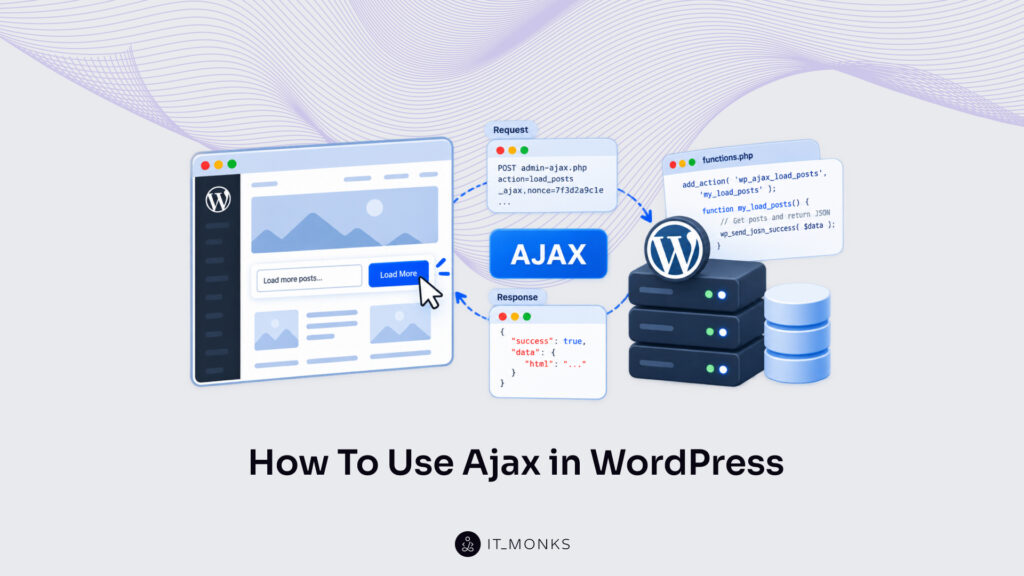
AJAX in WordPress is how a page feature requests data from the server while the visitor is still on the page. A product filter. A “load more” button under a post list. A form field checked the moment it has a value. Each one sends a small request, the server handles it, and only the data that belongs to that feature comes back.
How to use AJAX in WordPress is a matter of one exchange that follows five ordered steps: enqueue the script that sends the call, pass that script the AJAX URL and a nonce, send the call from a page event, handle the call in a PHP function, and use the response on the page. The order is fixed, because each step after the first uses a value created by the step before it.
The PHP for these steps belongs in the theme’s functions.php file or in a plugin. One set of names carries from the first step to the last, and a single mismatched string is enough to break the exchange. One common assumption fails early, too: the ajaxurl variable that admin screens carry does not exist on front-end pages, so a front-end script has the AJAX URL only when PHP passes it in. When the names line up and the URL arrives, the page updates without a reload.
What Is AJAX in WordPress?
AJAX in WordPress is an asynchronous request technique: a page requests data from the server and shows the result without a reload. A full page load returns the whole document for one changed value, while an AJAX request returns only that value. WordPress core uses the same technique on its own admin screens, where adding a tag on the Tags screen adds it to the list while the page never reloads; an example the Plugin Handbook on developer.wordpress.org gives for exactly this behavior.
In the five-step exchange, each request is sent to one file, wp-admin/admin-ajax.php, and admin-ajax.php reads the action value in that request to call the handler registered for it, so a single destination serves every handler a theme or plugin registers. The action value is what tells them apart.
Every exchange has two parts.
The first is a JavaScript call on the page, which starts on a page event such as a click, a change to a field or a form submit, and sends its data to admin-ajax.php.
The second is a PHP handler on the server, which handles that request and returns a result.
Both parts are ordinary theme or plugin code with no separate service behind them, so AJAX belongs to everyday WordPress development work on client sites, the work a WordPress development guide covers from build to launch.
The call contains the data; the handler contains the logic; the page updates with what the handler returns. None of it can happen until the JavaScript file is loaded on the page, which is where the exchange begins.
Script Enqueue for AJAX in WordPress
Step 1 of using AJAX in WordPress is script enqueueing: the JavaScript file that sends the AJAX call is enqueued through the WordPress script queue, the standard WordPress way to load a script. The enqueued script has a handle. Every later value, the AJAX URL included, is passed to the script through that handle rather than through its file path.
wp_enqueue_script() registers the script by its handle and four more arguments: the source URL, an array of dependencies, a version string and a footer flag. The handle is my-ajax-script, and the source is /js/my-ajax.js inside the active theme, with get_stylesheet_directory_uri() returning the URL of that theme’s folder. The dependency is jquery, because the $.post() form of the call uses jQuery, and WordPress bundles jQuery, so declaring the dependency loads the bundled copy before the script.
The version 1.0.0 is added to the file URL as a query string, so a new version number has browsers request the updated file instead of a cached one. The final true is the footer flag, which prints the script at the end of the page, after the markup the script reads.
The enqueue itself runs inside a function hooked to an action rather than being called on its own. The wp_enqueue_scripts hook runs that function on front-end pages, which is where most AJAX features for visitors belong. For a feature on an admin screen, the same function is hooked to admin_enqueue_scripts instead.
This code belongs in the theme’s functions.php file. A plugin uses the same call with a different source argument: plugins_url( ‘js/my-ajax.js’, FILE ) returns the URL of the file inside the plugin’s own folder, and the handle, dependency, version and footer flag stay exactly as they are.
With the hook in place, the enqueued script loads on every front-end page under the my-ajax-script handle. It holds no data yet. The AJAX URL it has to send its call to is still missing, and passing that URL to the same handle is step 2.
AJAX URL in WordPress
The AJAX URL in WordPress is the full address of wp-admin/admin-ajax.php, the one file every AJAX request in the admin-ajax pattern is sent to, for logged-in users and visitors alike. Each call a theme or plugin sends through that pattern requests the same address, and the destination file, admin-ajax.php in WordPress, is inside wp-admin even when the call comes from a public page.
That address comes from PHP. JavaScript has no view of where WordPress is on the server: one site is served from the domain root, another from a /blog/ subfolder, a third keeps WordPress core in its own subdirectory, and a staging copy served from its own domain has a different address from the live site.
jQuery cannot determine the URL on its own, a point the WordPress Plugin Handbook states outright. A literal path inside the script points to the wrong location on any site where the domain or the WordPress path differs from the one it was written for.
So the script enqueued in the first step, the one that sends the call, has no destination yet. It needs the AJAX URL passed to it.
The AJAX URL reaches the script by two routes: admin pages already carry it in a variable called ajaxurl, while front-end pages carry nothing and need the URL passed in from PHP alongside the enqueued script.
The ajaxurl Variable
The ajaxurl variable is a global JavaScript variable that holds the admin-ajax.php URL, so wherever it is defined, the AJAX URL is already in place before any script reads it, with no extra PHP on the page.
ajaxurl is defined on admin pages only. A script loaded on an admin screen through admin_enqueue_scripts uses ajaxurl directly as the address of its call and needs nothing passed from the server.
Front-end pages lack the variable. On a front-end page ajaxurl is not defined, so a front-end script that reads it throws Uncaught ReferenceError: ajaxurl is not defined and stops at that line; the AJAX call is never sent. Nothing on the site is broken, and admin-ajax.php is still in place. The cause is scope: ajaxurl belongs to admin screens, and the public pages of a theme have never had it.
A front-end script needs the same address anyway, and wp_localize_script() is the route that passes it.
wp_localize_script() for the AJAX URL
wp_localize_script() is the WordPress function that prints a JavaScript object for an enqueued script handle, carrying values set in PHP, and in the AJAX exchange it passes the AJAX URL to a front-end script. The function reuses the handle from the enqueue step, my-ajax-script, character for character. It also belongs after wp_enqueue_script() in the same wp_enqueue_scripts callback, because WordPress localizes data only for a handle it already has registered.
admin_url( ‘admin-ajax.php’ ) returns the full admin-ajax.php address for whichever site runs the code, domain and subfolder included, and that return value is the ajax_url entry. The URL is correct on a developer’s local copy, on staging and on the live site without a single edit.
The array carries a second value, nonce, returned by wp_create_nonce( ‘action_name’ ). It is the token the AJAX call sends with its data.
On the JavaScript side, the enqueued script reads my_ajax_obj.ajax_url and my_ajax_obj.nonce as ordinary properties of a global object. Unlike ajaxurl, my_ajax_obj is defined wherever the handle is enqueued, front end included, so the script has the URL and the token for the call it sends.
AJAX Call in WordPress
An AJAX call in WordPress is a POST request that the script on the page sends to the AJAX URL, the address held in my_ajax_obj.ajax_url, which points to wp-admin/admin-ajax.php. A page event starts the call. A click on a button, a change in a select field, a submit event on a form: any of them can fire the request, and the page updates without a reload once the answer comes back.
Every AJAX call posts one data object, and the action inside it is the one key admin-ajax.php cannot do without. Beside the action, the object includes a nonce and whatever values the handler needs as input:
Key
Purpose
Value source
action
Names the handler
my_action, fixed in the script
_ajax_nonce
Shows the call came from the site
my_ajax_obj.nonce
App data, e.g. post_id
Handler input
The element that fired the event
The post_id key stands in for any app data; a button that loads a post’s title sends the post ID, a live search sends the typed term. The _ajax_nonce key is the one to get right. An AJAX request in WordPress that can change the database should send the nonce, so the handler can verify that the request came from a legitimate source, as the Plugin Handbook puts it.
Themes and plugins use this same POST pattern for their front-end features, and larger features repeat frontend AJAX requests in WordPress across many elements and many calls on one page. In the script, the call takes one of two forms: jQuery $.post(), the form the Plugin Handbook documents, or the Fetch API, which the browser has built in. Both send the same keys. The first of them, the action value, is what picks the handler on the server.
The Action Parameter
The action parameter is the required string that every AJAX call sends in its data, under the key action. Without it, admin-ajax.php has nothing to match the request against.
That string names a hook. WordPress builds two hook names from the action value, wp_ajax_ plus the value and wp_ajax_nopriv_ plus the value, so a logged-in call with action: 'my_action' routes to the handler registered on wp_ajax_my_action, and a logged-out call routes to wp_ajax_nopriv_my_action.
The server side needs nothing else to find the right function. A short, descriptive value works best, and the Plugin Handbook recommends a very brief description of the call’s purpose.
A missing action ends the request early, and so does an action value with no handler hooked for the caller’s login state, such as a visitor call with only a wp_ajax_ handler registered: admin-ajax.php returns 0 with HTTP status 400. Neither case reaches any handler code. The action picks the handler; the nonce is the value the call sends alongside it.
The Nonce in the AJAX Call
The nonce in the AJAX call is a security token that the call sends so the handler can verify that the request came from the site; PHP creates the token before the page loads. wp_create_nonce() creates the nonce during the localize step, from the action string 'action_name', and the script reads the result as my_ajax_obj.nonce.
Send the token under the key _ajax_nonce. The handler check reads that key by default, so the PHP side finds the token with no extra argument: the value of my_ajax_obj.nonce goes out under _ajax_nonce.
Despite the name, a WordPress nonce is not single-use. The same token stays valid for up to 24 hours, or until the user logs out, and a nonce created from the same action string changes its value every 12 hours, according to the Plugin Handbook.
One token therefore lasts across many calls from the same page. The 12-hour tick also limits page caching: cached HTML older than 12 hours can carry an expired token, which the handler check rejects, and cache-safe token handling is part of WordPress AJAX nonces.
Action, nonce and app data now sit in one object, and the script has two ways to send it.
jQuery $.post() for the AJAX Call
jQuery $.post() is the jQuery shorthand for a POST request and the client-side form the Plugin Handbook uses for the AJAX call. The method takes three arguments: the URL, the data object, and a callback that handles the server response. $.post() sends the call to my_ajax_obj.ajax_url, so the URL arrives from PHP rather than being written into the script.
The jquery dependency declared in the enqueue step already covers the library. In the script, a click on any .my-load-title element starts the call. The URL and the nonce come from my_ajax_obj, the action my_action matches the handler hook, and post_id comes from the button’s data-post-idattribute, which the theme template prints on each button inside the Loop as data-post-id="<?php the_ID(); ?>":
jQuery( function ( $ ) {
	$( '.my-load-title' ).on( 'click', function () {
		$.post( my_ajax_obj.ajax_url, {
			_ajax_nonce: my_ajax_obj.nonce,
			action: 'my_action',
			post_id: $( this ).data( 'post-id' )
		}, function ( response ) {
			// read response.success and response.data
		} );
	} );
} );
The same request, sent with no jQuery at all, is the Fetch API’s job.
The Fetch API
The Fetch API is the browser’s built-in interface for network requests, and its fetch() function sends the AJAX call without any jQuery dependency. The URL, the action and the nonce are the same three values $.post() sends: my_ajax_obj.ajax_url, my_action, my_ajax_obj.nonce.
The request body is where fetch needs care. Fetch has to send the data as URLSearchParams or FormData, with the method set to POST, because admin-ajax.php reads the action from form-encoded fields. A JSON body leaves the action unread, and admin-ajax.php answers 0.
In the fetch version, querySelectorAll() attaches a click listener to every .my-load-title, as the jQuery version does. The first .then() reads the reply through the Response object’s json() method and hands it to showResult(), the callback function that writes the result into the page; .catch() sends a network error or a reply that is not JSON to the same function as null, so a failed call still shows a message:
When the script uses fetch alone, drop jquery from the dependency array in wp_enqueue_script(); nothing else in the enqueue step changes. Either form ends at the same place, a PHP handler on the server that receives the call.
PHP Handler for AJAX in WordPress
The PHP handler is the server-side function that the call’s action value routes to through admin-ajax.php, and writing it is step 4 of how to use AJAX in WordPress. It is an ordinary PHP callback function, and its code belongs in the theme functions.php or in a plugin file, next to the enqueue code.
add_action() hooks the PHP handler onto an action hook inside admin-ajax.php, the same mechanism every other callback uses across WordPress hooks and filters. Because it is hooked rather than requested as a separate file, the handler has access to all WordPress functions, from database queries to user checks, which a standalone PHP file does not.
Its order of work is fixed. The handler checks the nonce first, reads the fields the AJAX call sent, handles the requested job, and returns a response. Every value in $_POST is raw request input, so the handler sanitizes it before the job uses it.
admin-ajax.php reads the my_action value from step 3 to pick the hook; the handler reads the other two fields the call sent, the nonce under _ajax_nonce and the post_id data. Which requests it handles is defined by the two hook names it is registered on.
The wp_ajax_ Action Hook
wp_ajax_{action} is the action hook WordPress fires inside admin-ajax.php when a logged-in user sends an AJAX call. Registering the handler takes one add_action() call per hook, the part of how to use AJAX in WordPress that tells admin-ajax.php which function answers.
The action value completes the name. A call that sends my_action fires wp_ajax_my_action, so the string in the JavaScript matches the suffix in PHP.
wp_ajax_nopriv_{action} is the second hook, and it fires only for logged-out visitors. A logged-in user never triggers it: a handler registered on wp_ajax_nopriv_my_action alone never handles a request from a signed-in account. The reverse holds too: when no handler is registered on wp_ajax_nopriv_my_action, admin-ajax.php answers a logged-out visitor’s call with 0 and HTTP status 400.
That split is the basis of the choice. Public features, such as a load-more button or a front-end filter, use both hooks with one handler; admin screens and member-only features use wp_ajax_ alone, and no handler is registered for logged-out requests. The registration hooks my_handler on both names:
Whichever hook fires, my_handler runs next, and its first line checks the nonce.
check_ajax_referer() in the PHP Handler
check_ajax_referer() is the WordPress function that verifies the nonce the call sent against the action string passed to wp_create_nonce(), and in the PHP handler for AJAX in WordPress it runs as the first line. wp_create_nonce() and check_ajax_referer() receive the same string, ‘action_name’, character for character, so the check passes.
With no key argument, check_ajax_referer() reads the nonce from _ajax_nonce, the same key the AJAX call uses.
The check has two outcomes. A failed check stops the request with -1 and HTTP status 403 before any work runs. On success, check_ajax_referer() returns 1 if the nonce was created 0–12 hours ago, or 2 if it is 12–24 hours old, the two halves of the 24-hour nonce window in the WordPress Plugin Handbook.
A passed check proves the call came from the site, not that the visitor may see the data it asks for. A handler on the wp_ajax_nopriv_ hook therefore still checks what it returns before sending it.
function my_handler() {
    check_ajax_referer( 'action_name' ); // reads _ajax_nonce
    $post_id = absint( $_POST['post_id'] ?? 0 );
    // Check the visitor may see $post_id, then send the result back.
    wp_die();
}
After the check, absint() casts the post_id value from $_POST to a non-negative integer, and a missing field becomes 0. A checked handler, holding an integer post_id, has one job left: to return its result to the AJAX call.
How to Use the Server Response to an AJAX Call in WordPress
The server response is the HTTP response the PHP handler returns when an AJAX call in WordPress completes, and it carries the handler’s result back to the page that sent the request. Using the response is two moves. On the server, the handler returns JSON that contains a success flag and a data value. On the page, the callback reads that JSON and updates the page without a reload.
The response comes in two forms with one shape. A success response is JSON whose success value is true and whose data key contains the result; an error response is the same object with success false and the reason in that same data key. Nothing else about the exchange differs between them. Which of the two forms arrives is what decides the page result: the requested value, or an error message in its place.
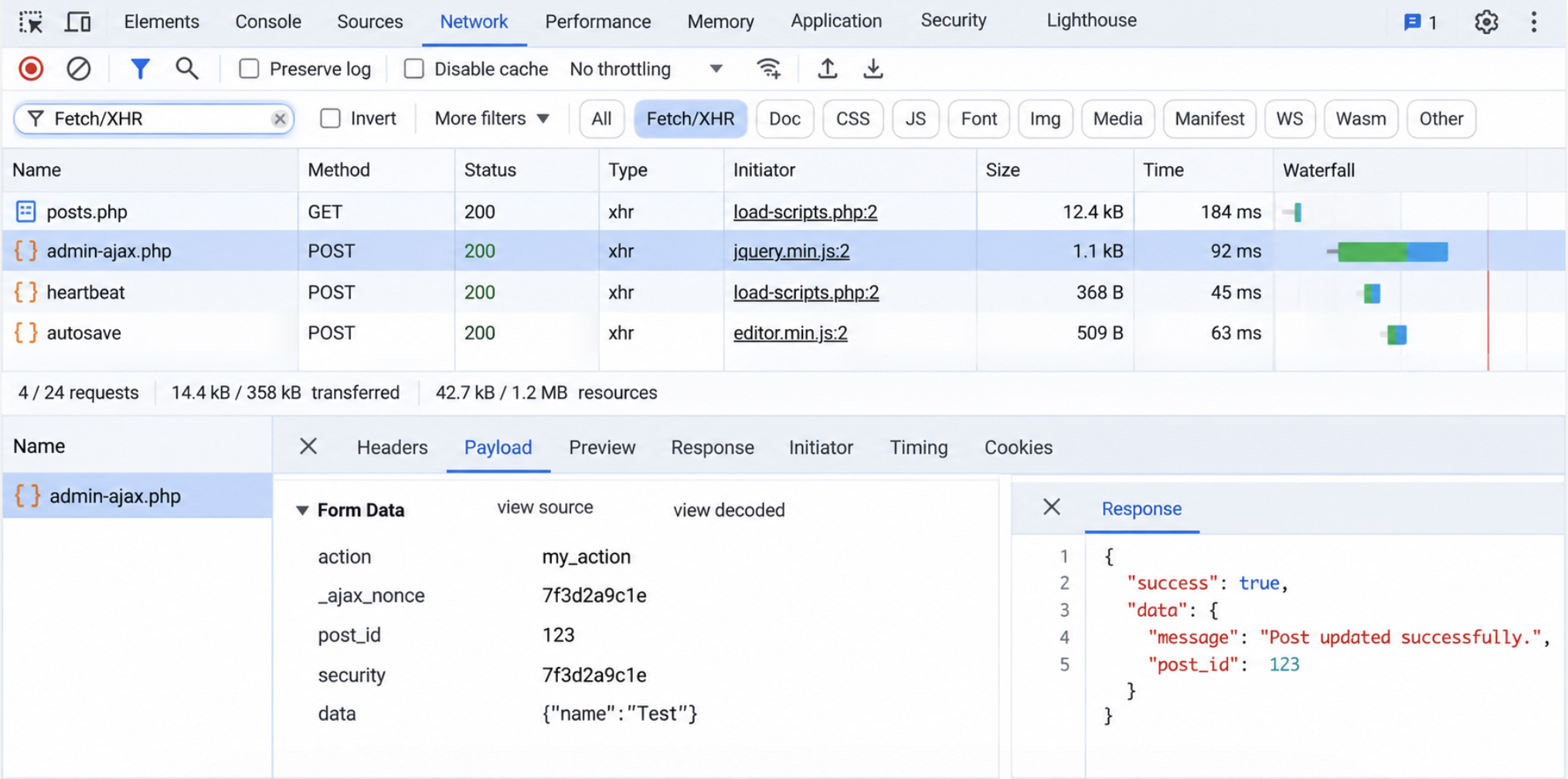
Verification uses the browser’s DevTools. Send the call, filter the Network tab to Fetch/XHR, and read the admin-ajax.php POST row the Network tab lists for that request. A working exchange returns status 200, the Payload panel contains the action value my_action beside the _ajax_nonce value, and the Response panel contains {"success":true,"data":{...}}.
WordPress core returns both forms through two JSON functions, so the handler calls a function instead of writing that object by hand.
wp_send_json_success() in the Server Response
wp_send_json_success() is the WordPress function that returns the handler’s result to the AJAX call as JSON, with success set to true in the server response. The finished handler is the same my_handler() that opened with check_ajax_referer(): the send branch takes the place of its closing wp_die().
wp_send_json_success() has a fixed output shape. It sends a JSON header first, then returns the body {"success":true,"data":{"title":"..."}}, where data contains whatever value the handler passed in, and after that the request ends.
wp_send_json_error() is the WordPress function that returns the JSON error response, and the handler’s failure branch calls it. When get_post_status() reports anything other than publish for the post_id (a draft, a private post, or no post at all), it sends {"success":false,"data":"Post not found."} instead: same header, same two keys, success false. The title goes back only for a published post, so a visitor calling through the wp_ajax_nopriv_my_action hook reads no draft or private title.
Each send function already ends the request, so a wp_die() placed after wp_send_json_success() or wp_send_json_error() never runs; it is unnecessary rather than an error. wp_die() matters in handlers that echo plain output instead of JSON: without it, admin-ajax.php reaches its own closing wp_die( '0' ) and a stray 0 is added to the end of the response.
On the page, the JavaScript reads exactly two keys from that body: success and data.
The Callback Function
The callback function is the JavaScript function that handles the server response once the AJAX call returns, and the callback reads response.success before it reads response.data. Reading success first keeps an error reply away from the line that expects response.data.title. When response.success is true, the callback updates a DOM element with the value in response.data; when it is false, the callback shows the error message the handler sent. The theme template that prints the buttons also prints an empty element with the id ajax-result, such as <div id="ajax-result"></div>, for the callback to fill; without it, box is null and the callback throws on textContent.
One function covers both send forms for their JSON replies. showResult is the third argument to $.post(), and it is also the last .then() in the fetch chain, so jQuery and the Fetch API call the same callback with the same parsed object. On the jQuery path, $.post() runs that callback only when the request succeeds, so a 400 or 403 goes to .fail(), which calls showResult( null ) and shows the same “Request failed.” message.
The fetch path reaches that message another way. Fetch resolves on a 400 or 403 status as well, not only on a 200, so the chain still calls showResult when core returns a bare 0 or -1. Neither body contains a success flag. The error branch handles both, and the element shows “Request failed.” A network error, or a body that is not valid JSON, rejects the promise instead, and the closing .catch() sends those cases to the same message.
With the element updated, the page has changed without a reload, and the AJAX exchange is complete.
Is admin-ajax.php Obsolete in WordPress?
No, admin-ajax.php is not obsolete in WordPress: it is supported, and WordPress core admin screens still send requests to it. The exchange a theme or plugin runs through the five steps (enqueue the script, pass the URL and nonce, send the call, handle it in PHP, use the response) remains a working admin-ajax.php exchange.
The REST API is the other request destination in WordPress, used for new endpoints, and WordPress core keeps both sides of the REST API vs admin-ajax pairing supported. Both destinations are requested from the same page JavaScript: $.post() or the Fetch API sends the request, and a callback uses the server response that comes back to the page. A REST endpoint answers each request at a route of its own instead of through an action value, the request model behind WordPress REST API integration.






 ChatGPT
  Claude
  Grok
Grok  Gemini