Explore our specialized services, tailored solutions, and industry expertise to elevate your digital presence. From custom WordPress development to seamless integrations, we build high-performing websites that deliver impact.
WordPress REST API authentication is the process by which a client presents a credential and the server verifies it before granting access to a protected REST route. REST API authentication sends that credential with the request and verifies it before any data leaves the server or any change is written to the database. An unverified request receives only the public surface of the API and is handled as anonymous.
Why the credential has to be explicit comes down to who sends the request. REST API authentication identifies same-origin code differently from an outside caller. A theme template or an admin screen that WordPress renders itself already runs inside an authenticated browser session, so the platform identifies it with no extra step. A mobile application, a scheduled sync script, or a separate frontend served from another domain arrives with no such session. Cross-origin requests sit in the same position: the identity a browser session would normally supply is absent, and the API has nothing to check unless the caller provides a credential of its own.
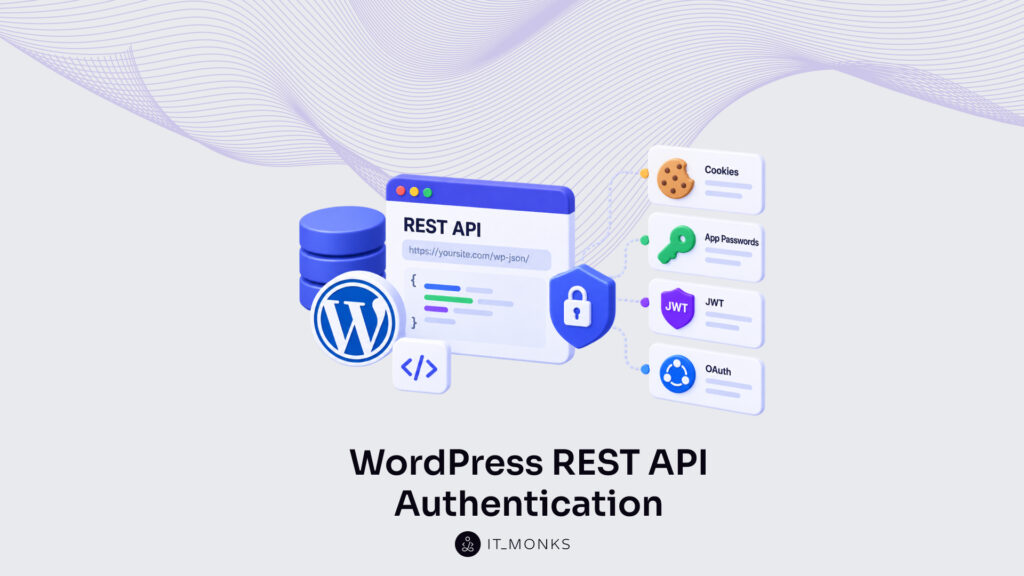
Four methods provide that credential, ordered here from the least setup to the most: cookie authentication, Application Passwords, JSON Web Token authentication, and OAuth 2.0. Each one answers a single question, how does this client prove who it is, with a different artifact and a different trust model. Which method fits each client integration, the protections the four share against a stolen credential, and the authentication errors a rejected request returns all extend from that same question. The sequence begins with cookie authentication, the one method that reuses a session WordPress already maintains rather than issuing a fresh credential.
Cookie Authentication
Cookie authentication is the WordPress-core method that relies on the browser session cookie of an already-authenticated user, with no plugin to install and no token to issue. WordPress issues that session cookie once a user authenticates through the standard admin flow, and the same cookie then accompanies any REST request the browser makes back to the site. Because the cookie is already present, cookie authentication is the default path for code that runs inside WordPress itself.
One firm constraint defines the method: cookie authentication serves same-origin requests only. A theme file, a block editor script, and an admin-screen fetch all originate from the same domain as the site, so the browser attaches the session cookie automatically and the request authenticates without further configuration. A server-to-server job or an external client running on another domain receives no such cookie, which is why the cookie method does not fit those integrations.
The session cookie on its own is not enough. Alongside it, the request must carry a nonce, a second required element that proves the call came from a trusted, already-authenticated page rather than a request forged on another site. The cookie establishes which user is behind the request; the nonce establishes where the request came from. Generating that nonce and attaching it to each call is what makes cookie authentication usable from front-end code.
Nonce for Cookie Authentication
A nonce is a short-lived token that proves a REST request came from the trusted, already-authenticated page that produced it, not from a forged cross-site request. The name is literal, a number used once, and the value stays usable only for a limited window, twenty-four hours by default in WordPress before it expires. Within cookie authentication, the nonce is the element that binds a session cookie to one specific request origin.
WordPress generates the nonce on the server with wp_create_nonce( 'wp_rest' ), where the wp_rest action scopes the token to REST requests. The generated value then has to reach the front-end code that will send it, and wp_localize_script handles that by attaching the nonce to a JavaScript object the application can read:
WordPress reads that header when the request arrives, recomputes the expected value, and verifies the two match. A missing header, a wrong value, or an expired nonce all end the same way: the server rejects the call and returns an authentication error instead of the requested data. This verification blocks a valid session cookie from being replayed by a page the user never authorized.
The cookie-plus-nonce pair works only while the request shares an origin with the site. A client that runs on a separate server or on another domain cannot use it and needs a credential it can carry on its own, which is the role Application Passwords fill.
Application Passwords
Application Passwords are a WordPress-core credential that lets a non-interactive client authenticate against the WordPress REST API. The feature ships inside WordPress itself from version 5.6 onward, so issuing one needs no plugin and no third-party library. The capability already sits in every current install.
Where cookie authentication holds only inside a same-origin browser session, a WordPress application password authenticates a request from any origin: a cron job on another host, a mobile backend, a scheduled synchronization script that never touches a browser at all.
Each application password belongs to a single user account and carries exactly that account’s capabilities, nothing wider. A shared site password grants access to the whole dashboard; an application password authenticates API traffic alone and can be withdrawn on its own, leaving the account’s real password untouched. A per-user, revocable scope separates a credential built for machines from a login handed to a script that was never meant to hold it.
The credential is carried in the Authorization header under the Basic scheme. On every request the server reads that header, matches the supplied value against the stored hash for the user, and grants or refuses the call on that single exchange, no session is kept between requests. Putting an application password to work takes two moves: generate the value once inside the user profile, then send it on each request. Generating it comes first, and it happens on the account’s own profile screen.
Application Password Generation
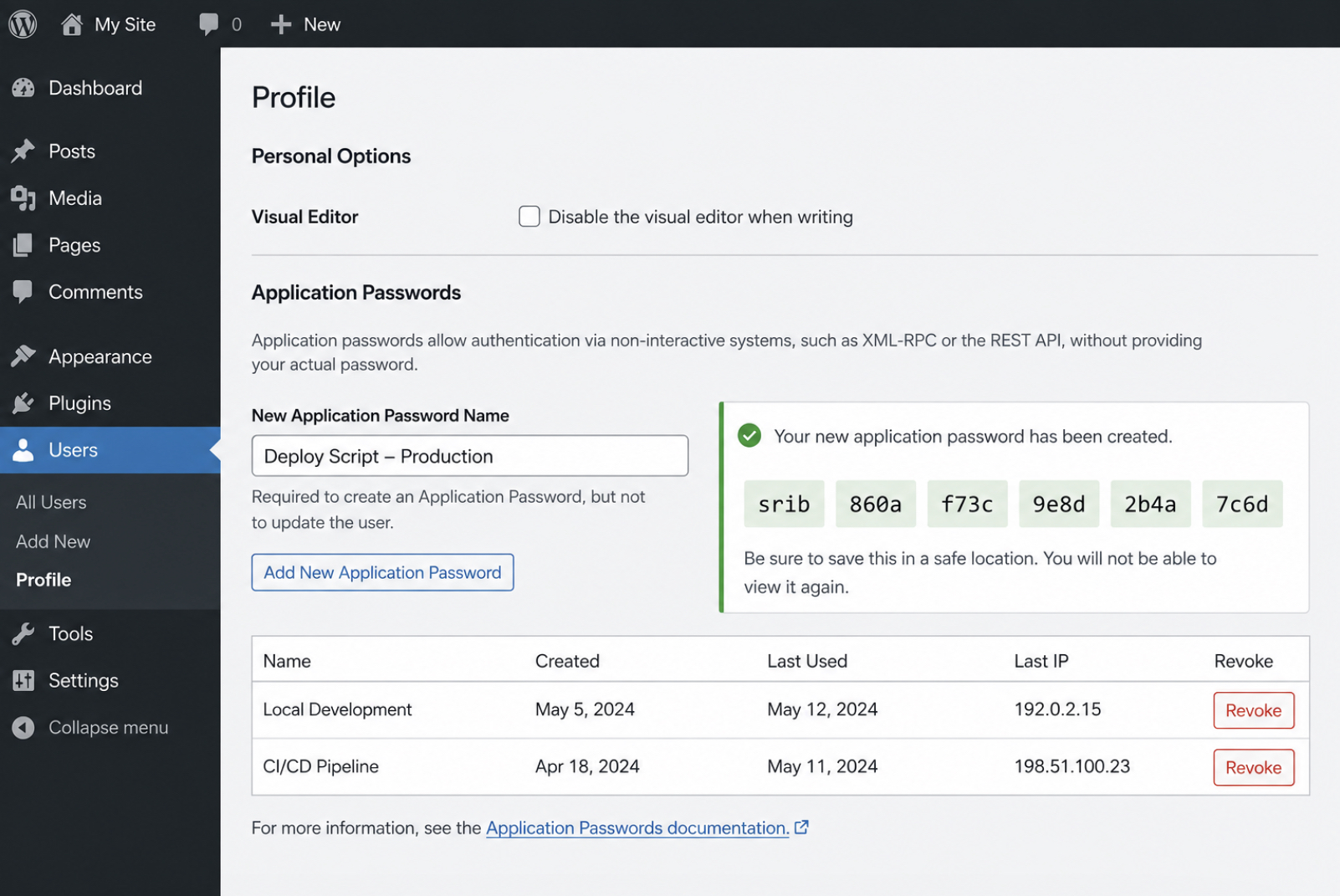
Generating an application password happens on the user’s own profile screen, inside the Application Passwords panel that WordPress places near the foot of the profile. The panel asks for one input before it produces anything, a name. Naming the credential per integration is what makes it manageable afterward: the label is how a particular script or service is identified in the list and revoked later without disturbing any other.
Once the name is entered and the request confirmed, WordPress generates the value and shows it a single time, a 24-character string displayed in grouped blocks of four so it copies cleanly. Copying it at that moment is the only opportunity. The value is stored as a hash, and the readable form is never displayed again; a password that was not copied cannot be recovered, only replaced by generating a new one.
Every row in the panel stands on its own. Revoking one application password stops the integration that relied on it and leaves every other credential, and the account’s login password, working as before. Because each row can be revoked without touching the others, one password per integration remains the pattern worth keeping, and the value copied here is the credential a request carries in its header.
Application Password in the HTTP Header
Sending an application password means placing it in the Authorization header of each request under the Basic scheme. The header joins two values with a colon: the WordPress username and the application password, and the request carries that pair to the REST API. Nothing sits behind it: no session cookie, no state held between calls, one header authenticating one request.
The Basic scheme expects the username:application_password pair base64-encoded. With curl, the --user flag builds that header directly. It takes the username and the application password, joins them with a colon, base64-encodes the result, and attaches the finished Authorization: Basic header to the request. Base64 is an encoding, not encryption; it makes the pair transport-safe, not secret, which is why the value still has to travel over a protected connection.
A complete request against a protected endpoint pairs the --user credential with the target endpoint URL in one call:
The username here is editor, and the value after the colon is the generated application password. The spaces inside that value can stay or be stripped. WordPress accepts the grouped form and the unspaced form equally. The endpoint, wp-json/wp/v2/posts filtered to status=draft, returns draft posts only when the request presents a valid credential; the same call without an Authorization header is refused.
A standing password works only where a client can store it safely. A public frontend cannot keep one out of reach, and for those clients a short-lived token requested at sign-in replaces the stored credential, the approach JSON Web Token authentication takes.
JWT Authentication
JWT authentication proves a client’s identity to the WordPress REST API with a signed token instead of a credential resent on every call. A JSON Web Token, the JWT the method takes its name from, is a compact signed string that a client obtains once and then presents as a bearer token on each later request. The signature lets the server verify that the token came from this site and has not been altered along the way. It guarantees integrity, not secrecy, which is why the token is signed and not encrypted, and why the transport is protected separately.
The method does not ship with WordPress. Core exposes no JWT issuer, so JWT authentication relies on three pieces working together: a plugin that adds the issuing route, a secret key that signs and verifies each token, and a token endpoint that exchanges a username and password for a signed JWT. Install the plugin, configure the secret key, and the endpoint begins issuing tokens; the client then sends each one back in the Authorization header, prefixed with Bearer.
Unlike a per-request Application Password credential, JWT authentication issues a token once and reuses it until that token expires. The distinction suits a cross-origin client, or a session meant to lapse on its own: the stored token holds no reusable password, and the server grants access by verifying a signature rather than re-reading a credential on every call. A client that authenticates from a separate origin, or one that needs its access to end after a set period, relies on the token-based method for that reason. Setting it up starts with the plugin that supplies the missing issuer.
JWT Authentication Plugin
The JWT authentication plugin is the component that adds a token endpoint to the WordPress REST API, because WordPress core lacks a JWT issuer of its own. The plugin adds that endpoint and the routes around it; without the plugin, the REST API contains no route that returns a signed token, and the method has nothing to build on.
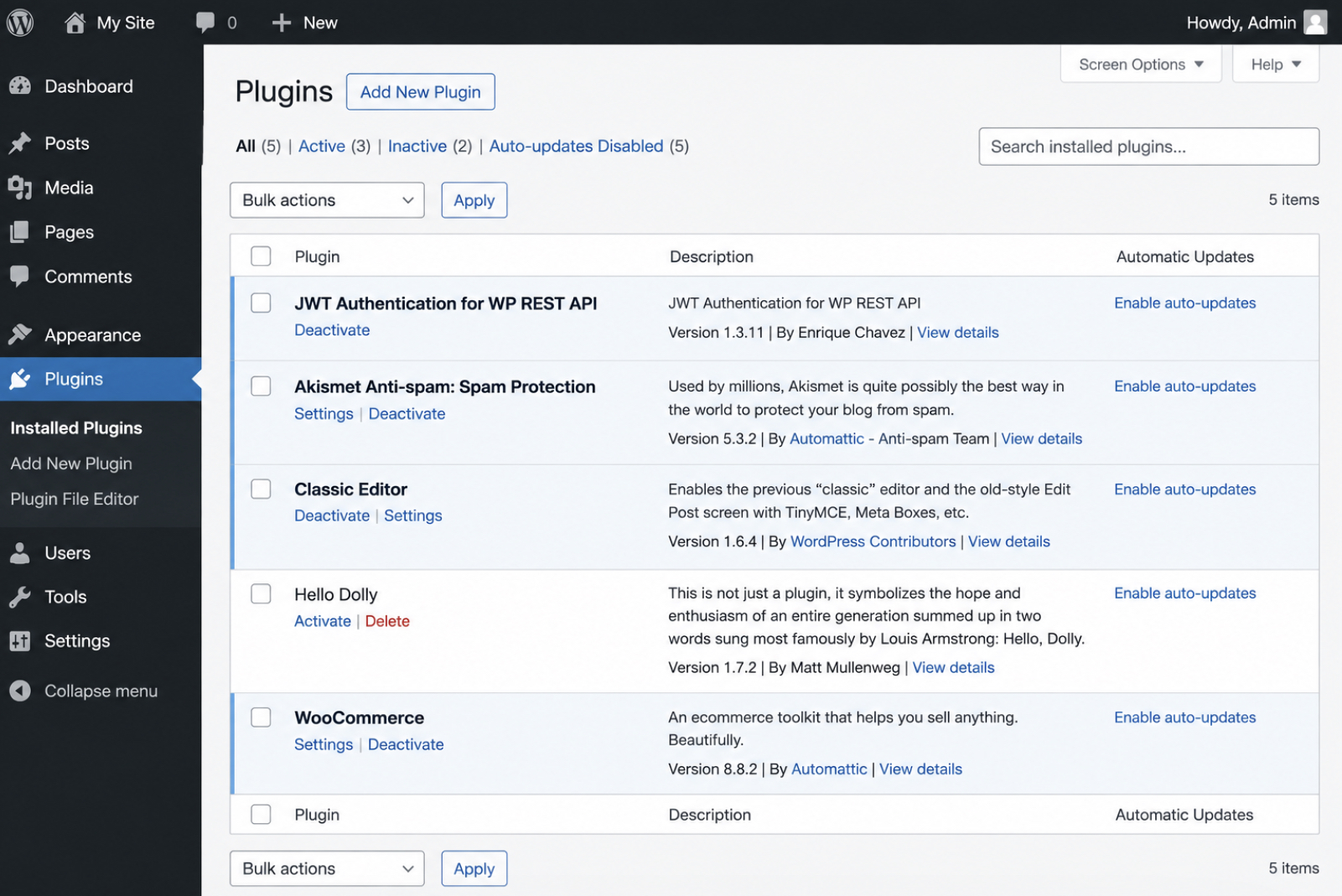
Installation uses the standard plugin path. From Plugins > Add New, search for a maintained JWT authentication plugin such as “JWT Authentication for WP REST API”, install it, and activate it. On the Plugins > Installed Plugins screen, the state that matters is the plugin present and active, its Deactivate link visible, its name and version legible before any further setup. A plugin left inactive, or one flagged as unmaintained, adds no working endpoint, so the active and current one is worth confirming first.
Activation on its own returns no tokens. The plugin adds the route, yet the route stays inert until a signing key exists in the site configuration. Defining that secret key is the step the method still requires: the endpoint is in place, but it has no value to sign with until the key is set.
JWT Secret Key
The JWT secret key is the value that signs every JWT the site issues and verifies that same token on each request, which makes it the trust root of the entire method. One key does both jobs. It signs the token at issuance, and it verifies the signature when the token returns inside an Authorization header. The key signs; it does not encrypt, so the token’s contents stay readable and only its integrity is guaranteed. A weak or leaked key dissolves that trust, because anyone who holds it can sign a token the server will accept as genuine.
The key lives in wp-config.php as a PHP constant. Define JWT_AUTH_SECRET_KEY with a long, random value, alongside the constant that enables cross-origin requests:
// wp-config.php — above the "/* That's all, stop editing! */" line
define( 'JWT_AUTH_SECRET_KEY', 'REPLACE-WITH-A-LONG-RANDOM-STRING' );
define( 'JWT_AUTH_CORS_ENABLE', true );
Generate the value from the WordPress.org secret-key generator rather than typing a string by hand, since the generator produces the kind of long, high-entropy string a signing key requires. Two rules then keep the key trustworthy. It must stay out of version control, because a committed wp-config.php carries the signing key into every clone of the repository, and one exposed key lets an outsider forge a token that verifies cleanly. And it should rotate the instant exposure is suspected.
Rotating the secret key invalidates every outstanding token at once, because tokens signed with the old key no longer verify against the new one, and each client has to obtain a fresh token afterward. With the key defined and protected, the token endpoint has the value it needs to sign what it issues.
JWT Token Endpoint
The JWT token endpoint is the route a JWT authentication plugin registers at /wp-json/jwt-auth/v1/token to exchange a set of credentials for a signed JSON Web Token. Two requests define how the endpoint works. The first request obtains a token; every request after it presents that token.
A first request authenticates the client against the site. It sends the username and password in the POST body (carried over HTTPS, never pinned to a URL query string), and the endpoint returns a signed token in the response. The token is not encrypted. It is signed and base64-readable, so no secret data belongs inside its payload: anyone holding the token can decode the claims it contains, and the signature, not secrecy, is what proves the server issued it.
On each later request, the client presents the token in the Authorization header as a Bearer credential, and the server verifies the signature before it returns the requested data.
# Exchange credentials for a token
curl -X POST https://example.com/wp-json/jwt-auth/v1/token
  -H "Content-Type: application/json"
  -d '{"username":"USER","password":"PASSWORD"}'
# Present the token on later requests:
curl https://example.com/wp-json/wp/v2/posts
  -H "Authorization: Bearer <JWT>"
The token’s lifetime is set in seconds (the JWT Authentication for WP REST API plugin defaults to 604800 seconds, seven days) and once that window passes the token expires. An expired token no longer authenticates anything. The client repeats the first request and obtains a fresh token from the same endpoint before it can call the REST API again.
Credential exchange of this kind still hands the plugin a real username and password. When a third-party application has to act for a user without ever holding that password, delegated authorization takes over.
OAuth 2.0
OAuth 2.0 is a delegated-authorization method: a third-party client acts for a user against the WordPress REST API without ever holding the user’s site password. Authorization is delegated rather than shared. The user grants a scoped permission, and the client works inside it.
A WordPress OAuth server plugin makes that delegation practical. The plugin registers each third-party client and issues access tokens, and every access token stands in for one grant of delegated consent instead of for the account password. Delegation is what separates OAuth 2.0 from the direct-credential methods, where the client itself holds the password, the Application Password, or the signed token, a credential OAuth 2.0 never exposes to the third-party client at all.
The delegation depends on two mechanisms. An authorization code flow carries the client through a consent step and a token exchange, and a set of grant types covers the different kinds of client that need access: a browser application, a background service, or a device with no browser of its own. Each grant type reaches an access token by a route suited to how that client runs.
As the fourth WordPress REST API authentication method, OAuth 2.0 is the one built for access it does not fully control: applications owned by other parties, acting on behalf of the site’s users. How that access is actually granted starts with the authorization code flow.
OAuth Authorization Code Flow
The authorization code flow is the redirect-and-exchange sequence OAuth 2.0 uses to exchange a user’s consent for an access token. It runs in three moves (a redirect, a code, and an exchange), and the client’s password never appears in any of them.
The sequence starts in the browser. The user is sent to an authorize URL, approves the request there, and is redirected back to the client with a single-use authorization code attached to the callback. That authorization code is worth nothing by itself. The third-party client exchanges it, together with its own client secret, at the token endpoint, and the server returns an access token in response.
# 1. Send the user to the authorize URL (browser):
#    /oauth/authorize?response_type=code&client_id=CLIENT_ID&redirect_uri=CALLBACK
# 2. Exchange ?code=... for an access token:
curl -X POST https://example.com/oauth/token
  -d grant_type=authorization_code -d code=AUTH_CODE
  -d client_id=CLIENT_ID -d client_secret=CLIENT_SECRET
  -d redirect_uri=https://app.example/cb
# 3. Call the API with the token:
curl https://example.com/wp-json/wp/v2/posts
  -H "Authorization: Bearer ACCESS_TOKEN"
From there the client presents the access token in the Authorization header as a Bearer credential on every REST API call. The access token’s lifetime is set in seconds, often quoted in hours, and once it expires the flow runs again to obtain a new one. This exchange is how OAuth 2.0 authenticates a WordPress REST API call while the user’s password stays on the server it belongs to.
The authorization code flow is only one of several grant patterns. Which pattern a client uses depends on the grant type it was built for.
OAuth Grant Types
OAuth grant types are the defined ways an OAuth client obtains an access token from the authorization server. Each grant type suits a particular kind of client, and the client scenario is what decides which one applies. A browser application acting for a signed-in user requires the authorization code grant. A background server with no user behind it uses the client credentials grant. A long-lived session that must outlast any single token relies on the refresh token grant.
Grant type
Client scenario
Credential presented
Note
Authorization code
Browser app acting for a user
consent → code → access token
Most common for third-party apps
Client credentials
Server-to-server, no user
client ID + secret directly
Machine-to-machine
Refresh token
Long-lived sessions
refresh token → new access token
Renews an expired token, no re-consent
The authorization code grant suits a browser application that acts for a user: the user consents, the client receives a short-lived code, and the client exchanges that code for an access token through the consent-then-code exchange named in the authorization code flow. The client credentials grant suits a server-to-server client with no user present at all, where the client presents its own client ID and secret directly and requests a token in return.
The refresh token grant renews an expired access token without a fresh round of consent. The client presents a stored refresh token, the authorization server returns a new access token, and the long-lived session stays alive as each access token reaches the end of its lifetime and the next one takes its place.
Whichever grant a client uses, OAuth 2.0 grants access through the token that grant returns, and every later request to the WordPress REST API presents that same token. Which of the four authentication methods a given client should use, OAuth among them, depends on the integration it serves.
Authentication Method for Each Client Integration
WordPress REST API authentication methods differ less in how they work internally than in which client integration each one fits, so the practical decision is a selection question: which method suits the integration in front of the developer. Four methods answer it (cookie authentication with a nonce, Application Passwords, JWT authentication, and OAuth 2.0), and each maps to a distinct client scenario, presents its own kind of credential, and carries one security tradeoff worth naming up front.
Method
Client integration scenario
Credential presented
Security note
Cookie authentication
Same-origin theme and admin code
Logged-in session cookie + nonce
Same-origin only; no external client
Application Passwords
Server-to-server integration
Username + Application password in the Basic header
Per-application and revocable; requires HTTPS
JWT authentication
Headless frontend
Bearer token signed with a secret key
Stateless; the token expires and needs refreshing
OAuth 2.0
Third-party application access
Delegated access token via a grant
Scoped and user-consented; most involved to set up
Every method authenticates requests against the same WordPress REST API endpoints, so the choice changes the credential presented, not the routes each method reaches. Selection therefore turns on the shape of the client, not on the API surface. That mapping starts with the narrowest scenario of the four, where the calling code and the WordPress site share a single origin.
Cookie Authentication for Same-Origin Theme Code
Cookie authentication for same-origin theme code fits the request that a WordPress theme or admin screen makes back to its own site, where the browser and the WordPress REST API share one origin. Same-origin means the calling code runs on the very domain that serves the API: theme templates, admin-dashboard scripts, and block editor code all qualify, because each one executes inside a page the WordPress site itself rendered.
A same-origin request of this kind already carries what authentication needs. The logged-in browser session sets a cookie, and the nonce travelling with the request confirms that the call originates from the site’s own interface rather than a forged one. The session cookie and the nonce together authenticate the caller, which is why no separate credential store is provisioned for this scenario. Nothing extra is issued, saved, or rotated, and the already-open session is sufficient on its own.
The fit ends at the origin boundary. A client that calls from a different domain (a decoupled frontend, a mobile app, an outside service) sends no valid session cookie and no usable nonce, so cookie authentication does not fit a cross-origin caller. At that boundary, a server sitting outside the browser, with no session to inherit, needs a credential of its own.
Application Passwords for Server-to-Server Integration
Application Passwords suit server-to-server integration, the class of work where one server authenticates to another with no person present to log in. A customer-relationship-management sync, a scheduled cron task, a background job reconciling orders overnight, each runs unattended, and each still has to prove identity to the WordPress REST API on every call.
Application Passwords match that shape. The method issues a per-integration credential that the calling server sends in the request header, so it authenticates on its own, with no interactive login screen to clear and no browser session behind it.
The per-integration part carries as much weight as the header part. Each Application Password is revocable on its own and scoped to the single integration it was minted for, so revoking the credential for a retired connector leaves every other server-to-server link working. When a background service writes content (needing, say, to create posts through the REST API on a schedule) that same header credential authorizes the write without exposing the account’s primary login. Containment of that kind fits an unattended server, where a rotated or leaked credential costs one integration rather than the whole site.
When the caller is not a server but a browser application rendering on its own, a fixed per-integration password stops fitting, and a token the client can hold and refresh takes its place.
JWT Authentication for a Headless Frontend
JWT authentication suits a headless frontend, a decoupled client, commonly React or Next.js, that renders in the browser separately from WordPress and reaches the site only through the REST API. Nothing on the WordPress side keeps a session for that client. The frontend authenticates once, receives a signed bearer token, and attaches it to each request that follows. The bearer token carries proof of identity across an application whose rendering and its data source no longer share a server.
Because the client holds the token itself, JWT fits a browser app far better than a static header credential would. The headless frontend stores the bearer token client-side and requests a fresh one when the old token expires (the lifetime is set in seconds and configurable, the plugin’s 604800-second, seven-day default shortened where the integration warrants), so a token that leaks or lapses is replaced on schedule instead of staying valid indefinitely. A decoupled build also has to settle where its data comes from, and that choice, WPGraphQL versus the REST API, shapes how the token travels and which queries the client can run.
Trusting the client with its own token works when a single frontend acts for one signed-in user. An external application acting for many users at once calls for a different arrangement.
OAuth 2.0 for Third-Party Application Access
OAuth 2.0 suits third-party application access, the case where an external application acts for many users rather than for the single owner of one site. A scheduling tool, an analytics service, a publishing platform wired into hundreds of WordPress sites at once. Each acts on behalf of users it does not own, and each needs a way to make authorized REST API calls for every one of them. OAuth 2.0 fits that multi-user shape because it delegates authorization rather than copying credentials.
The pattern it replaces is shared-password access: handing the external application each user’s WordPress login so it can act as them. Shared-password access spreads reusable site passwords across a service no one on the site controls. OAuth 2.0 removes the need for it. Through delegated consent, each user grants the application scoped permission, and the application then acts under that consent without ever holding the user’s site password: revoke the consent and the application’s access ends, while the password itself never changed hands. Separating consent from the password suits an integration serving many users at once.
Every method covered here, from the same-origin nonce through delegated consent, still relies on a shared set of protections (transport security, credential lifetime, and revocation) that hold regardless of which one a given integration selects.
REST API Authentication Security
WordPress REST API authentication security is the layer of rules that holds across all four methods at once (cookie authentication with its nonce, Application Passwords, JSON Web Token, and OAuth 2.0) instead of belonging to any single one of them. Each method answers a narrow question: how a client proves identity to the server. The security level answers a different one, and it is measured by how little a single stolen credential or token can accomplish. Four controls carry most of that answer, and each applies to every method equally.
Transport encryption is the first. HTTPS wraps each request so the credential inside it (a session cookie, an Application password, a bearer token, an access token) stays unreadable while it moves between the client and the server. Expiration is the second: a token with a bounded lifetime limits how long a leaked credential keeps working, because a copy that outlives its window is refused like any other stale token.
Revocation is the third control. A credential the server can switch off on demand ends access the moment an integration is retired or a secret is exposed, without waiting for a clock to run down. Least privilege binds the three together. It scopes each credential to exactly the endpoints and capabilities its integration requires: a read-only reporting job never carries write access, and a single-site plugin never holds a network-wide key. The narrower the scope, the smaller the reach of any one leaked credential.
Secrets themselves need somewhere to sit outside application code. The signing key behind every JSON Web Token, and the salts behind every WordPress session, belong in server configuration where they can be stored and rotated safely; the wp-config.php security keys hold precisely those values. Transport encryption is where the security level begins, because every control after it assumes the credential reached the server unread.
HTTPS
HTTPS is the encrypted transport that every WordPress REST API authentication method depends on, the protocol that carries each request over TLS so no credential crosses the network as readable text. HTTPS protects the credential in transit by encrypting the whole request from the client to the server, secret included. Under plain HTTP, the same request travels in the clear: a session cookie, an Application password, a bearer token, or an OAuth access token moves as plain text and can be captured by anyone positioned on the connection.
Enforcement sits with the server. It redirects every plain-HTTP request to the matching HTTPS address and rejects any API call that arrives unencrypted, so a credential is never accepted over an open connection. A request that reaches the REST API over plain HTTP is refused before authentication even runs, the failure state is designed in, not left to chance. Encryption on the wire is the precondition; a bounded lifetime on the token is what follows it.
Token Expiration
Token expiration is the lifetime after which a bearer or access token stops being valid and the server refuses it. It governs the JSON Web Token bearer token and the OAuth 2.0 access token, the two credentials in WordPress REST API authentication that carry a built-in expiry. A short-lived token narrows the window in which a leaked credential stays usable: once the lifetime elapses, a stolen copy stops working just as the original does when its time runs out.
That lifetime is set as a time-to-live measured in seconds. The JWT Authentication for WP REST API plugin defaults to 604800 seconds, seven days, for its bearer token, and a hardened deployment shortens that to 3600 seconds, one hour, or less, with OAuth access tokens often configured shorter still; the smaller the number, the tighter the exposure window. A refresh strategy keeps the integration running across those boundaries: when a token expires, a longer-lived refresh token renews it and the server issues a fresh access token, so the session continues without re-sending a stored password.
Not every credential works this way. The cookie nonce is short-lived by design, regenerated on its own schedule rather than by a configured time-to-live, and an Application password does not expire at all. It stays valid until the server withdraws it. Expiration controls the tokens that carry a built-in lifetime; the credential that has to be cut off on command needs a separate control.
Credential Revocation
Credential revocation invalidates one credential on its own, without disturbing the other credentials a WordPress REST API authentication setup still has in use. The scope is deliberately narrow. Revoking a single Application Password ends one integration’s access while every other Application Password, and the account’s own login, keeps working untouched.
Each credential carries its own revocation path. An Application Password is revoked per integration, row by row, from the user profile screen where it was first generated. One deployment loses access the moment its row is deleted, and no other row is affected. An OAuth token is revoked per client, at the OAuth server that issued it, so a single third-party application can be cut off while the remaining clients keep their grants. A credential can also be rotated rather than fully revoked: a fresh secret is issued and the old one disabled, which fits the case where a key is suspected of exposure rather than confirmed lost.
A revoked credential is not a silent state. The next request that presents it returns a 401 from the API, the same response an expired token produces, and that is the point where credential problems surface as authentication errors.
REST API Authentication Errors
A REST API authentication error is the failure response the WordPress REST API returns when a credential is rejected, malformed, or never reaches the request handler at all. The status code names the reason. Every one of these errors traces back to one of the four authentication methods (a broken nonce, an expired or revoked Application Password, an invalid JWT bearer token, or a mangled OAuth grant), so diagnosis always opens with the same question: which credential did the request carry, and what happened to it on the way in.
Four responses account for nearly every rejected REST API request.
Status / error
Likely cause
Fix
401 Unauthorized
No credential presented, or the presented credential is invalid
Supply a well-formed, current credential in the Authorization header
403 Forbidden
Credential is valid, but the authenticated account lacks the required capability
Grant the account the capability, or authenticate as a user who already holds it
CORS error
A browser blocks the cross-origin request before the credential is ever checked
Return the correct cross-origin response headers from the server for the calling origin
Missing Authorization header
The server strips the Authorization header before WordPress reads it
Restore header pass-through in the server or PHP configuration
The first of these is the one a rejected credential produces most often. A 401 indicates that the API never accepted the identity behind the request, and that is where the diagnosis starts.
401 Unauthorized Error
A 401 unauthorized error means the WordPress REST API received a request whose credential was missing or invalid, and returned the error instead of acting on it. The response says nothing about permissions. It reports only that the API could not establish who is asking. Three causes produce it, and checking them in this order resolves most cases.
The first is a malformed Authorization header. The header has to carry both the right scheme and the right encoding: Basic credentials, base64-encoded, for an Application Password; or Bearer followed by the raw token for JWT. A wrong scheme, a truncated encoding, or a stray space returns a 401 before the credential is ever compared against anything. Inspect the header the request actually sent, correct the scheme and the encoding, and the request moves past this cause.
The second is an expired token. A JWT that has passed its lifetime is rejected exactly like a forged one. The token is expired, so the API returns a 401. Verify the token’s expiry, request a fresh token from the token endpoint, and retry the call.
The third is a revoked or mistyped Application Password. An Application Password that was revoked on the user profile screen, or copied with a character dropped, is invalid, and an invalid Application Password returns a 401. Confirm the password still matches a live row for that account, regenerate it if the row is gone, and re-enter it without the display spaces the profile screen shows for readability.
A well-formed, current credential resolves the 401 outright: the API establishes the identity, and the request proceeds. What a correct credential cannot settle is whether that established identity is permitted to do what it asked. An accepted credential attached to an account that lacks the required capability produces a different response, one that reports authorization rather than identity as the obstacle.
403 Forbidden Error
A 403 forbidden error returns when the credential authenticated but the authenticated user or client is not permitted to perform the request. That single distinction separates it from the 401: a 401 means the WordPress REST API never accepted the identity, while a 403 means the API accepted the identity and then refused the action. The credential is valid. The permission is not, and the diagnosis works through three checks in order.
The first check concerns the user role. Every request to the WordPress REST API runs as an authenticated user, and each route demands a specific capability: editing a post requires the edit capability, changing site settings requires the manage-options capability. When the user role lacks the required capability for the endpoint, the API returns a 403. Granting that capability to the role, or authenticating as a user whose role already carries it, corrects this cause.
The second check concerns the nonce on a same-origin cookie request. A cookie-authenticated request carries a nonce that verifies intent, and when that nonce is expired or mismatched the API returns a 403 even though the session cookie itself is still valid. Refreshing the nonce so the request sends a current value clears the mismatch.
The third check concerns the scope of the credential. An Application Password or a token can be issued with permissions narrower than the endpoint demands; the scope limits which actions the credential may perform, so a request that reaches past that scope returns a 403. Re-issuing the credential with a scope that matches the endpoint, or sending the request through a credential that already holds the wider permission, restores the access.
Granting the missing capability or matching the scope to the endpoint resolves the 403 in each case, because every fix adjusts permission rather than identity. A different failure surfaces earlier than any of these, before the WordPress REST API evaluates a credential at all, when the browser itself stops the request from leaving.
CORS Error
A CORS error occurs when the browser blocks a cross-origin request because the WordPress REST API does not return the matching Access-Control-Allow headers. Cross-origin describes a request whose frontend and API sit on different origins, a headless application served from one domain calling a WordPress backend on another. The browser enforces this cross-origin policy before authentication runs, so the request fails before any credential is evaluated. Because the browser check runs first, a CORS error stands apart from an authentication failure, even when it appears on a request that carries a valid credential.
For a cross-origin request that sends an Authorization header, the browser first issues a preflight request and waits for the API to state which origins, methods, and headers it permits. When the Access-Control-Allow headers are absent from that response, the browser blocks the call, and the credential never reaches WordPress to be checked.
Registering the four response headers on the WordPress REST API, with the allowed origin scoped to the trusted frontend, allows the request through:
The Access-Control-Allow-Origin value names the trusted frontend explicitly instead of a wildcard, because a wildcard origin becomes invalid the moment the request sends credentials — a browser rejects the pairing of a wildcard with Access-Control-Allow-Credentials set to true. The allowed methods and headers cover the verbs the frontend uses and the Authorization header it attaches.
This condition reaches browser clients only. A server-to-server call issues no preflight and answers to no cross-origin policy, so a backend integration never meets it. One failure remains that clears every earlier check, the credential is correct and the origin is allowed. Yet authentication still fails, because the header the client sent never arrives at WordPress.
Missing authorization header
A missing authorization header failure occurs when the client sends a valid Authorization header, but the server strips it before WordPress reads it. Apache running PHP through CGI or FastCGI is the setup where this most often happens: the transport drops the Authorization header during hand-off, so WordPress receives a request with no credential and rejects it as though none was ever sent. The symptom is precise. The credential is correct, and the request is still rejected, which is what separates this failure from a plain 401, where the credential itself is wrong or absent.
Adding a forwarding rule to .htaccess passes the Authorization header through to PHP:
# Forward the Authorization header to PHP on Apache / CGI-FastCGI
SetEnvIf Authorization "(.*)" HTTP_AUTHORIZATION=$1

RewriteEngine On
RewriteCond %{HTTP:Authorization} ^(.+)$
RewriteRule .* - [E=HTTP_AUTHORIZATION:%{HTTP:Authorization}]
The forwarding rule in .htaccess captures the incoming Authorization header and re-exposes it to PHP as an environment variable, so WordPress reads the credential the client actually sent. Once the header passes through, the same request that was rejected a moment earlier authenticates on the first attempt.
With the header reaching PHP, the chosen authentication method works end to end. Setting up WordPress REST API authentication resolves to a small set of decisions: one method carries each integration (cookie authentication with a nonce for same-origin theme code, an Application Password for a server-to-server integration, JWT authentication for a headless frontend, or OAuth 2.0 for third-party application access), each matched to the integration it serves, hardened over HTTPS with expiring tokens and revocable credentials, and cleared of the error that would otherwise stand between the request and its response. A correctly authenticated request that returns its data is the working, secured integration every one of these methods exists to produce.





 ChatGPT
  Claude
  Grok
Grok  Gemini