Explore our specialized services, tailored solutions, and industry expertise to elevate your digital presence. From custom WordPress development to seamless integrations, we build high-performing websites that deliver impact.
Take a company that sells custom printed boxes to other businesses. We made it up for this article, but each step below is one we have met on real B2B websites.
A purchasing manager at a cosmetics brand needs a packaging supplier. She finds one of the company’s articles through a search, moves on to the “Custom mailer boxes” page, reads about materials and minimum order sizes, and clicks “Request a quote.”
Up to that click, marketing has done its job. Then the button opens the general “Contact us” page. The form asks for a name, an email address, and a message, and nothing on it mentions mailer boxes. She sends a short note. It arrives in a shared inbox, between a customer who can’t log in and an agency offering guest posts.
In the marketing report, this is a conversion. For the buyer, it is the start of a wait. Someone has to open the inbox, recognize her note as a sales request, and forward it. When a salesperson finally writes back, the first line is: “Which product are you interested in?”
A quote form is not the reason behind every weak campaign result. But it is one place where a buyer you have already won over can be left waiting, and you can check it yourself. This article follows a quote request through both halves of its journey: what the buyer meets on the way to the form, and what happens after she sends it.
Does Your Quote Request Disappear into “Contact us”?
Start the check the way the buyer did. Open one of your own service or product pages, click the button that asks for a quote, and ask two questions about the page you land on.
First, does it still talk about a quote? If the page is headed “Contact us” and invites any kind of message, the buyer has to work out whether she is in the right place. Second, does the form know which page she came from? If it doesn’t, she has to describe the product again, even though she was reading about it ten seconds ago.
The first problem appears when one form does several jobs. On many B2B websites, the same form collects quote requests, demo requests, customer problems, and supplier offers. A form that serves everyone can ask only what applies to everyone, so it can’t ask for the quantity or the delivery date that a quote depends on.
The second problem is a separate gap: the product page doesn’t tell the form which product the buyer was reading about. Together, they produce a quote request that looks like every other message in the inbox until someone opens it. And because a person sorts the messages by hand, the buyer waits until that person gets to hers.
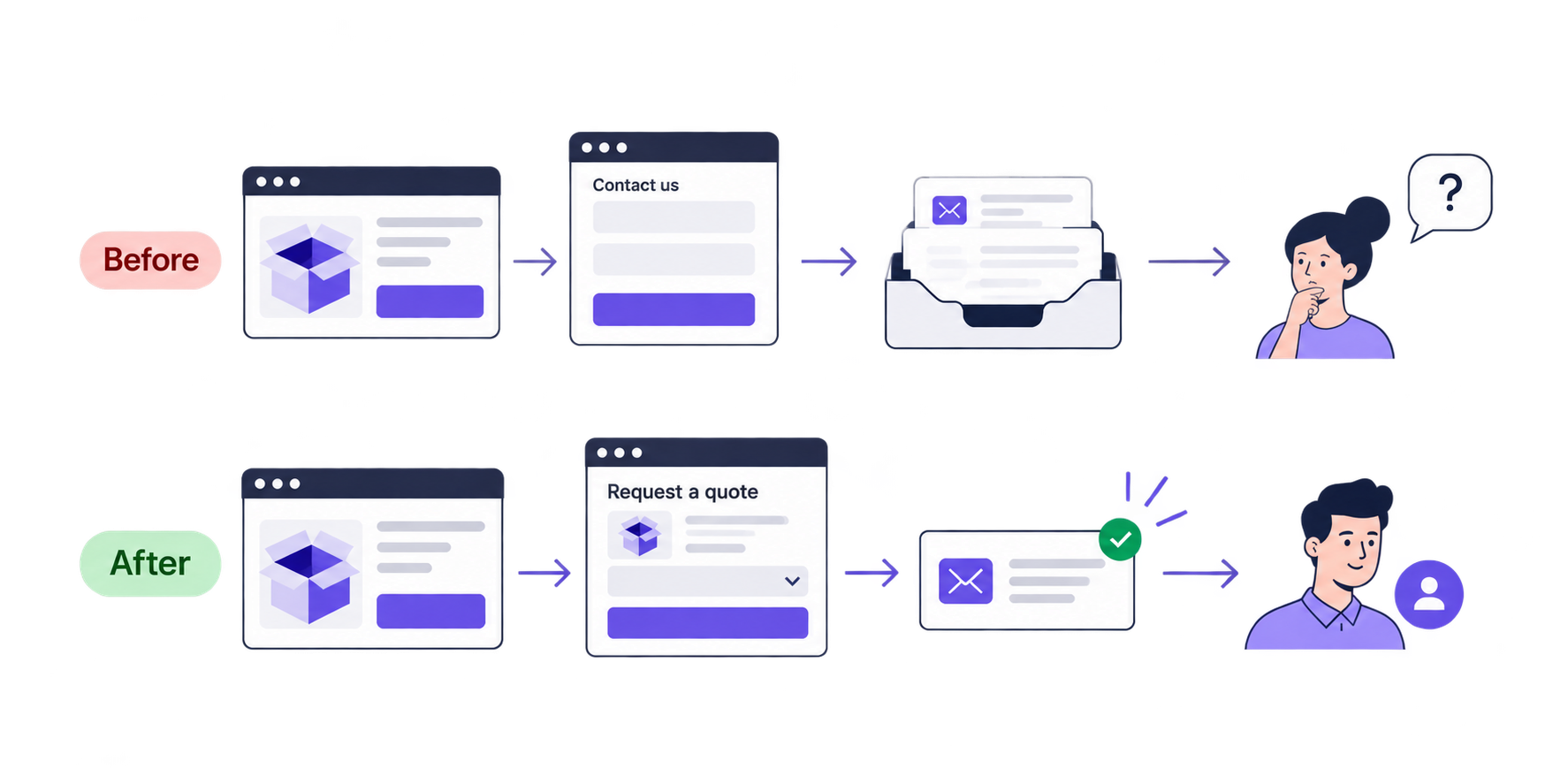
Here is the box company’s path as it works today, next to the path it could have.
Before: product page → general contact form → shared inbox → someone sorts the messages by hand → sales asks which product the buyer meant.
After: product page → quote request form for that product → the request arrives with the product named → one salesperson is assigned to it → the buyer gets a confirmation and a follow-up.
On the “after” path, the buyer should also learn what she will get. Requesting a quote is not the same as receiving a price on the spot, because a custom box can’t be priced until someone knows its size, print, and quantity. So say on the form what comes next: for example, an email from a packaging specialist with a price or a few questions.
Separate Requests by the Response They Need
The “after” path works because the quote request no longer shares a form with everything else. To get there, sort the requests your website receives by the response each one needs. A buyer asking for a price and a customer who can’t log in need different questions, and different people to answer them.
What the visitor wants to do
Information needed to act
Where it goes and who owns it
Request a quote
Contact details, product or service, brief requirements; quantity or timing if needed
Sales queue, with an assigned salesperson
Request a demo
Contact details and what they want to use the product for
Demo booking or the sales team
Get customer support
Contact or account details and a description of the problem
Support process, with a support owner
Propose a partnership
Company name and what they propose
Partnerships owner or a named reviewer
The fields in the middle column are examples, because yours depend on what you sell. Two request types can also share a route when one team handles both well. Quotes and demos are the usual example.
Separate pages with separate forms are one way to build this. Another is a single form that first asks “What do you need?”, then shows only the questions for that answer and sends the request to the matching team. Either works, as long as each request type has a person responsible for answering it. Four forms that all deliver to the same unwatched inbox leave the buyer waiting exactly as before.
A real project shows what the separation changes. Alex Osmichenko, CEO of IT Monks, described it in a LinkedIn post. For a B2B platform client, each request type got its own form and its own place in the CRM, the system where the sales team keeps its contacts and deals. After the change, buyer requests stopped getting mixed up with support tickets.
Ask What Sales Needs for the Next Useful Response
Once a quote request has its own form, you can decide what that form should ask. The usual advice is to cut fields. A more useful test is to take one question at a time and ask: do we need this answer to send the request to the right person, or to make our first reply useful? If yes, make the question required. If no, make it optional, or ask it later in the conversation.
For the box company, product and quantity pass the test. Without them, the salesperson can’t say anything about price, so the first reply would be another question. A budget range doesn’t pass. A buyer who is still working out what she needs has no number yet, and a required budget field forces her to guess or to leave.
That is why no number of fields is right for every form. A short form without the quantity produces requests that sales can’t answer without writing back. A longer one can work well, as long as the buyer sees why each question is there. When a question asks a lot, such as exact box dimensions, add a line that explains it: “We ask for dimensions so that our first reply can include a price.”
The buyer also has to be able to complete the form, or her request never reaches sales. Give each field a plain label and each error a message that says what to fix. Test the form on a phone, and with a keyboard and a screen reader. Show the product or service on the form too, so the buyer can confirm it is the right one.
Give Every Quote Request an Owner
A form like that gets the request sent. The second half of the journey starts there, and marketing reports rarely show it. Follow the request past the thank-you message and check five steps:
The confirmation is accurate. It tells the buyer what happens next, and it promises only what your team really does.
The request arrives where it should. It lands in the right inbox or CRM queue, marked as a quote request, with the product and the buyer’s answers attached.
Someone owns the reply. A named person or team is responsible for answering, with a backup for the days when they are away.
Unanswered requests are easy to see. Sales has a response time it can realistically meet and a list of the requests still waiting.
Failures are visible. If the website fails to pass a request on, someone who can fix it finds out.
An automatic “We received your request” email doesn’t count as the reply in step 3. It only tells the buyer that the form worked. The reply is a message from a person who deals with what she asked for.
A request can lose a lot of time in these steps. For a study of response times, Workato sent demo requests to 114 B2B companies and timed the replies. A personalized email reply took 11 hours and 54 minutes on average, and nearly one in five companies never replied by email at all.
Each of those requests went in through the form on the receiving company’s website, so a marketing report would have counted it as a conversion. The wait began after that point. This is the part of the journey where an owner and a response target make the difference, and a quote request needs both.
What This Requires from Your WordPress Website
The five steps describe what should happen to a request. On a WordPress website, someone has to build that behavior, because WordPress doesn’t send form requests to a CRM by default. Forms, routing, and the CRM connection are added with plugins or custom development. Your developers need to know exactly what to build, so give them these five requirements:
The right form on the right page. Each service or product page leads to a quote form, or to a shared form that shows only the questions for a quote.
Context that travels with the request. The product or service is passed along automatically, together with the page and the campaign the buyer came from, where that data is available and your privacy rules allow it.
Fields mapped on purpose. Every form field and request type has a defined place in the CRM or whichever system receives it.
Assignment, alerts, and a fallback. Rules assign each request to an owner and notify that person. If delivery fails, the request is kept and someone is told.
Forms that stay consistent and checked. Every quote form is built from one shared form block, so a new campaign page gets a form that already asks the right questions and delivers to the right place. When a page, a form, or a plugin changes, someone tests that requests still arrive.
A small operation may not need a CRM for this. If you receive a handful of quote requests a week, a dedicated inbox that one person checks every day can be enough, as long as that person owns the replies. For anything larger, someone has to build the forms and connect them to the CRM, and that is the work our custom WordPress development services cover.
Quote requests are only one of the jobs a website does for a marketing team. Landing pages, tests, and tracking place their own requirements on how the website is built, and we go through those requirements one by one in a separate, longer guide, How a WordPress Website Should Be Built for Marketing Teams.
Measure Whether Better Quote Requests Reach Sales
You will want to know whether the new path works better than the old one. The total number of submissions can’t tell you, because it counts a quote request, a support question, and a partner offer as the same thing. Measure three stages separately instead, before the change and after it: whether buyers complete the form, whether their requests arrive, and what sales does with them.
Measure
What it tells the team
Confirmed submissions ÷ form starts
Whether visitors complete the form. Look at it by request type and by device.
Delivered requests ÷ confirmed submissions
Whether requests reach the inbox or CRM queue they were meant for.
Quote requests accepted by sales ÷ all quote requests, with spam and tests removed
Whether sales finds the requests relevant, under criteria you agreed together.
Time to the first personal reply, and the share of replies within the team’s target
Whether the handoff leads to a timely answer.
Sales conversations or opportunities that start from quote requests
Whether requests move forward. Allow for the length of your sales cycle.
Start with the current form, before you change anything. It doesn’t label request types, so sort the last two or three months of submissions by hand with someone from sales: quote request, support question, or something else. Agree at the same time which quote requests sales will accept as relevant. Without that starting point, nobody can say afterwards what improved.
Four rules keep the numbers reliable:
Count confirmed submissions, where the buyer saw the thank-you message, not clicks on the button.
Leave out spam and your own test submissions, the same way every time.
Send your analytics tool an event and a request ID, not the buyer’s name, email, or message.
Compare similar traffic sources and periods, and note what else changed, such as a new campaign, so you don’t credit the form for a change it didn’t cause.
Expect one result that looks bad at first: the quote form may receive fewer submissions than the old contact form did, because support questions and partner offers now go elsewhere. So read the number of relevant quote requests together with their share of everything the form receives.
If you receive only a few quote requests a month, the percentages will swing too much to rely on. In that case, add two checks you can do by hand: watch a few people fill in the form, and trace your last twenty requests from the inbox to the reply.
Follow One Request All the Way Through
Everything above comes down to one exercise. Send a quote request through your own website, as a buyer would, and follow it to the person who answers. Do it together with someone from sales and someone from your website team, and go through these questions:
Does the quote button open a page about requesting a quote?
Does every required question help to route the request or to prepare the first reply?
Does the person who receives the request see which product or service it is about?
Does the request reach the right place, and does it have an owner?
Does the buyer understand what happens next?
Can the team spot requests that failed to arrive or were never answered?
Can marketing tell a recorded submission from a relevant sales request?
For every “no,” write down three things: what you saw, who is responsible for it, and what happens next. That list is your improvement brief. It can be short: one form to change, or one routing rule to add.
If your website loses context between a quote request and a sales response, talk to IT Monks about improving that flow.







 ChatGPT
  Claude
  Grok
Grok  Gemini