Explore our specialized services, tailored solutions, and industry expertise to elevate your digital presence. From custom WordPress development to seamless integrations, we build high-performing websites that deliver impact.
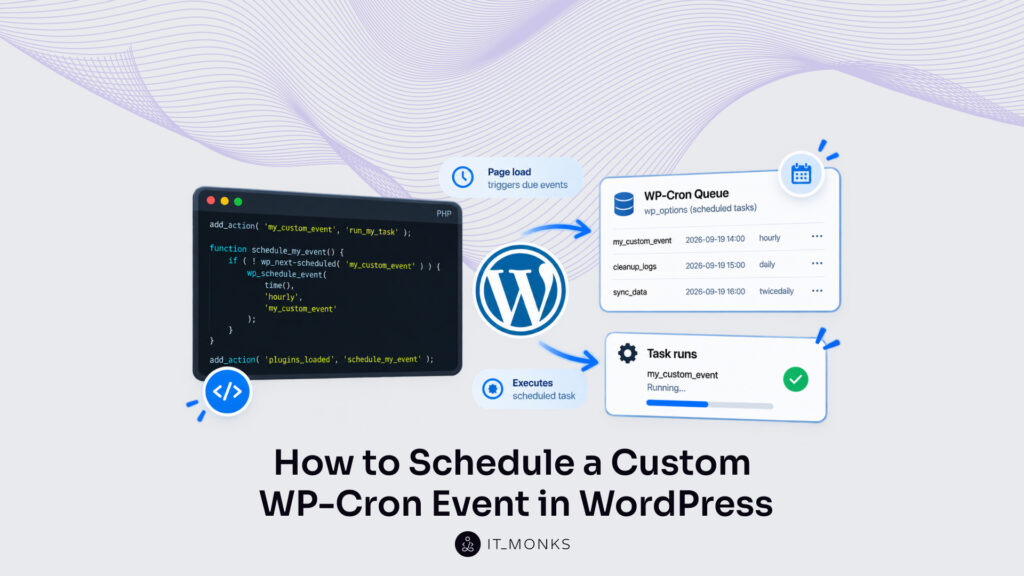
A WP-Cron event is the queued record that schedules a WordPress cron job in code: it holds an action hook, a next run time, and a recurrence that repeats the run. None of that sits on the server’s clock. A system cron entry fires at a fixed server time, while a WP-Cron event is stored as a scheduled task in the wp_options table and runs when a page load reaches WordPress and the queue is due.
On agency work, the record is booked by code rather than by hand. A small plugin on the client site handles the whole route: a function is registered on an action hook, and one scheduling call puts the event in the queue with a recurrence, so it repeats as long as the booking sits in the queue and the plugin’s deactivation hook hasn’t removed it. No admin screen is part of that route. WordPress cron jobs created this way are defined entirely in PHP, from the hook registration to the recurrence that keeps the event repeating.
Booking one takes five steps in plugin code. A function is registered on an action hook, so WordPress has a name to call when the event is due. The scheduling call then books the event with a first run time and a recurrence. A check against the existing queue prevents the same hook from being scheduled twice if a plugin activates more than once, and the booking is confirmed against that queue rather than assumed. The deactivation hook removes the event when the plugin is deactivated. A page load fires whatever is due, and only a page load, so on a client site that takes few visits the event sits in the queue past its next run time. The first step carries the rest: the action hook names what WordPress calls when the event comes due.
Action Hook for a WP-Cron Event
The action hook of a WP-Cron event is the name WordPress calls when the event comes due, together with the function registered on that name. Custom scheduling is one part of WordPress cron jobs as a whole, and the action hook is where its code path starts. A name with nothing registered runs nothing when the event fires: the queue comes due, WordPress calls the hook, finds no registered function, and nothing runs.
Two pieces make up the action hook, and a practitioner writes both. The hook name is a string, an identifier chosen in the plugin, prefixed to keep it distinct from every other piece of code on the site. The hook function is the PHP function that holds the work the event exists to do, whether that is clearing a transient cache, sending a digest, or pushing a nightly export. The event record stores only the name. It holds no code or file path, so WordPress must register the function on every page load to find it when the queue comes due.
Registering the function and booking the event are separate acts, and the order matters. WordPress registers the name first, even though the function it points to may not exist yet. Registration adds a function to a name; the scheduling call, written later, books the event that carries that same name in its record.
Hook Name
The hook name is the string WordPress stores in the WP-Cron event record and calls when the event comes due. A hook name is registered with add_action, which takes the name first and the callback second:
The first argument, itm_daily_cleanup, is the hook name. WordPress stores that exact string in the event record once the event is booked, and calls it when the run time arrives. The second argument, itm_run_daily_cleanup, names the callback, the PHP function WordPress runs at that moment. Two arguments are the whole of it for a cron registration; the name and the callback carry everything WordPress needs.
Both names carry a prefix for a reason. An unprefixed hook name such as daily_cleanup collides with any other code on the client site that registers on the same string, and every function registered on a name runs when that name is called. A short prefix tied to the agency or the plugin, itm_ here, keeps the event calling one function and nothing else.
Registration on its own schedules nothing. add_action tells WordPress what to run when itm_daily_cleanup comes due; it does not put that name into the queue, and it does not create the function it points at. itm_run_daily_cleanup is a pointer to code that still has to be written.
Hook Function
The hook function is the code WordPress runs when the named hook comes due, and the hook name registered earlier is the string that points at it.
function itm_run_daily_cleanup() {
	delete_expired_transients();
}
delete_expired_transients() is a core call that clears expired transient rows out of the options table: work WordPress core already runs on its own daily recurrence, which makes it a measure of callback size here rather than a job a client site is short of. It is small deliberately. Recurring work belongs inside this function; a long batch does not. WP-Cron fires on a page load, but the callback runs in the separate wp-cron.php request that page load creates, not in the visit itself, and a batch that runs long holds that request open, so every other due event behind it runs later.
Two pieces of work, then, written in two places. One half without the other is a common sight: a registration line with no function behind it, or a function with no name pointing at it. Neither half runs alone. itm_daily_cleanup is the name; itm_run_daily_cleanup is what that name resolves to when the event comes due, and the two only mean anything together.
So the pair is complete, and it still does nothing at all. Nothing has put itm_daily_cleanup into the WP-Cron queue, so the hook never comes due, and a function no hook calls never runs.
Scheduling Function for a WP-Cron Event
The scheduling function is the call that takes a registered hook name and puts the WP-Cron event into the queue with a next run time and a recurrence, and wp_schedule_event() is that call. One line is the whole booking. It sits inside a callback that WordPress runs once, when the plugin carrying it is activated.
register_activation_hook() takes two things: __FILE__, which resolves to the plugin’s main file, the one holding the plugin header, and the name of a callback. WordPress calls that callback a single time, at the moment the plugin is activated. The booking therefore happens in the plugin’s own code, alongside the hook name and the hook function, and no settings screen is involved anywhere in it.
The full signature holds five parameters, three of them required:
$timestamp (int, required): the next run time, as a Unix timestamp in seconds. time() returns exactly that, the current moment counted in seconds, which is why it is the argument the call passes. A formatted date string fails here: the parameter is a count of seconds, never a wall-clock reading and never a site-timezone value.
$recurrence (string, required): how often the event repeats after that first run, named by a schedule WordPress already holds, such as daily. Every call carries this argument. A name WordPress does not hold queues nothing at all.
$hook (string, required): the hook name set up earlier, itm_daily_cleanup. A mismatch here still queues an event cleanly, and no callback ever runs, because the name sitting in the queue points at nothing.
$args (array, optional): the arguments handed to the callback when it runs, defaulting to array(). The array is part of what the queue stores for the event, alongside the hook name and the run time.
$wp_error (bool, optional, added in WordPress 5.7.0): set to true, a failed call returns a WP_Error object carrying the reason instead of a plain false, as the wp_schedule_event() function reference at developer.wordpress.org records the parameter. On a client site, that difference matters: a failed activation that holds the reason the event never reached the queue versus one that holds nothing at all.
Three required arguments, one call, one event in the queue. What that call does not account for is a second activation: a plugin deactivated and activated again runs itm_schedule_daily_cleanup() a second time, and a second daily event sits in the queue beside the first.
Check for an Already Scheduled WP-Cron Event
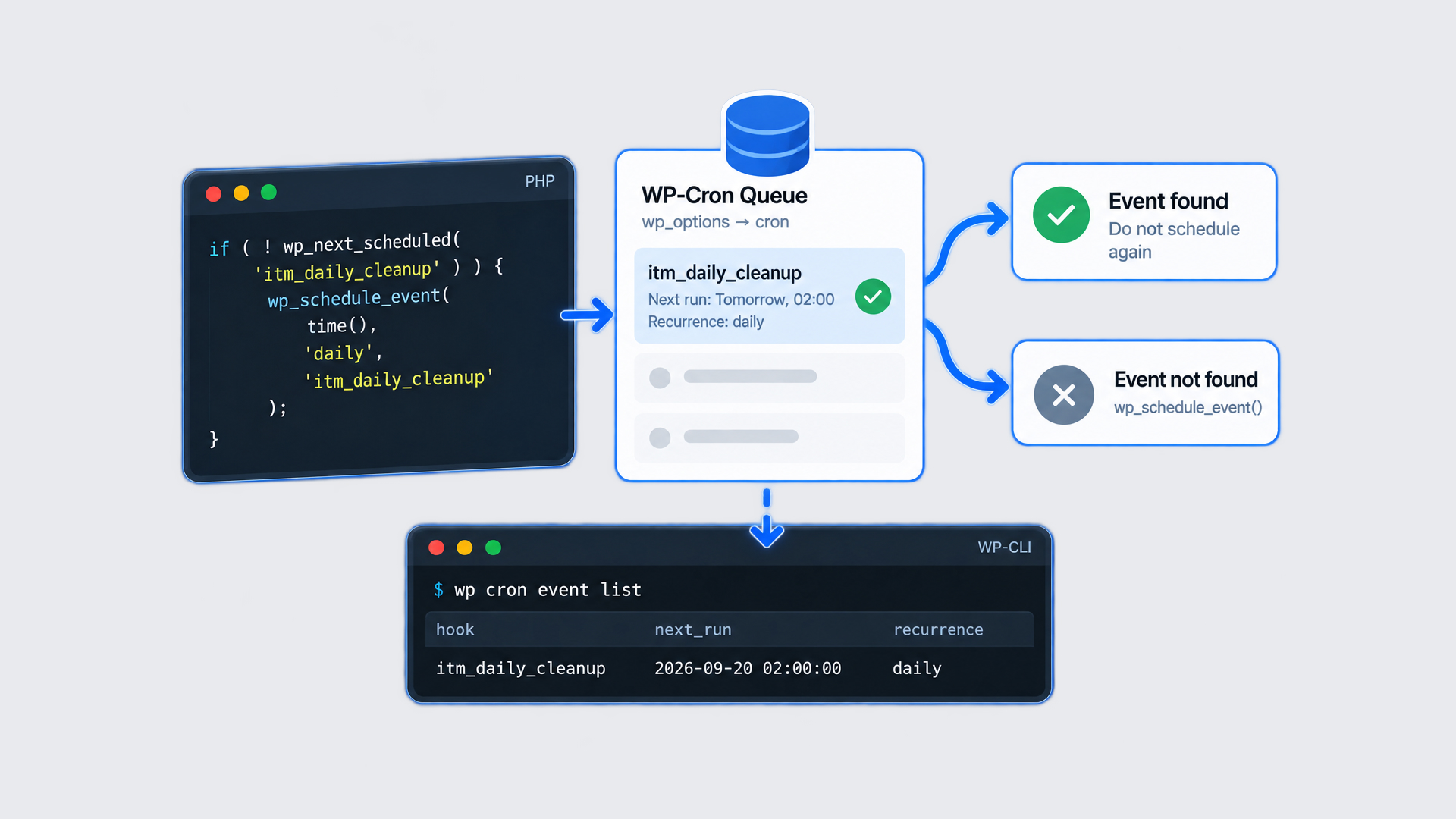
The already-scheduled check is the guard that shows whether a hook is in the WP-Cron queue before anything schedules it again, and wp_next_scheduled() is the function that shows it. Activation is not a once-ever moment in a plugin’s life. Each repeat adds another copy of the same event, each copy runs the callback on its own recurrence, and a daily cleanup quietly becomes two.
function itm_schedule_daily_cleanup() {
	if ( ! wp_next_scheduled( 'itm_daily_cleanup' ) ) {
		wp_schedule_event( time(), 'daily', 'itm_daily_cleanup' );
	}
}
This guarded itm_schedule_daily_cleanup() replaces the unguarded version the activation hook already calls. The guarded body is the whole function, not a second path beside it. wp_next_scheduled() takes the hook name and tells the caller one of two things: the next run time already booked under it, on the same seconds convention, or false when nothing under that name is queued. false is the only condition under which the booking proceeds. Where the scheduling call passed a non-default $args array, the same array goes to wp_next_scheduled() as its second argument, because two different $args values describe two different events and the guard then reports an empty queue for an event that is already in it.
wp cron event list
How are WordPress cron jobs checked on a client site? One command lists them. wp cron event list, run over WP-CLI, prints every scheduled hook on the site with its next run time and its recurrence, and it reads them from where WordPress keeps the queue: a single row in the wp_options table named cron. That row is the whole schedule. wp_next_scheduled() reads it too, one hook at a time, from inside PHP. Between them, the two checks confirm that itm_daily_cleanup is booked, that it is booked once, and when it next comes due.
A confirmed booking and a working one are different claims, though. Events that are not running can still sit in the queue exactly as booked: an event can appear in wp cron event list, hold a next run time already in the past, and still never fire. That case is the subject of debugging WP-Cron events that are not running, and the check stops short of it. What the check does settle is that exactly one event exists under the right name. The booking also outlives the plugin that made it, the row in wp_options holds it whether or not the plugin is still active.
Deactivation Hook for a WP-Cron Event
The deactivation hook is the plugin hook that decides when a WP-Cron event leaves the queue, and its mirror is the activation hook that puts the event into the queue in the first place. One of the pair holds the wp_schedule_event() call. The other holds the call that removes the booking. Both are registered in the plugin’s main file, and neither runs on a recurrence. Each fires exactly once, at the moment the plugin is activated or deactivated.
register_deactivation_hook() takes the same two arguments as its activation counterpart: the plugin file that __FILE__ resolves to, and the name of a callback, here 'itm_unschedule_daily_cleanup', which WordPress calls when that plugin is deactivated.
Inside the function, wp_next_scheduled( 'itm_daily_cleanup' ) returns the next run time already booked under that hook name, the same lookup that keeps a second copy of the event out of the queue at scheduling time, used here to find the booking rather than to check for one. wp_unschedule_event() then takes that timestamp together with the hook name and deletes that single booking. Neither argument is optional: the timestamp says which occurrence to remove, the hook name says which event it belongs to.
An event left in the queue at deactivation is an orphaned event. The booking stays in wp_options, WordPress keeps firing itm_daily_cleanup on its recurrence, and nothing answers the call, because the file that registered the callback is no longer loaded. A recurring event books its next occurrence each time it runs, so an orphan does not expire on its own. It repeats on a client site that stopped getting anything from it.
Removal at deactivation is the last decision the plugin’s code makes about the event. Up to that point the event sits in the queue in one particular state: booked, not yet run, carrying a next run time that says when it becomes eligible. Nothing in that code decides the moment it actually runs.
Page Load Trigger for a WP-Cron Event
The page load trigger is the request that makes a booked WP-Cron event actually run, and the scheduled task queue is the list that request gets checked against. No process on the server watches a clock on the event’s behalf. WordPress reads the queue when a page is loaded, which is why a scheduled event fires at the next page load after it comes due rather than at the next run time stored with it. A single page load carries a due event from stored booking to finished run in four steps.
A page on the client site is loaded: any page, by any visitor.
The scheduled task queue, stored in wp_options, is read, and every event whose next run time has already passed counts as due now.
WordPress sends a separate request to wp-cron.php, which does not hold up the page being served.
Those due events fire in that request: each stored hook name is called, and the function registered on it runs.
So the next run time is the earliest the event can run, not a time it is guaranteed to run. It is time() plus the chosen interval, on the same seconds convention, and it marks the point from which the event counts as due. A due event runs at the next opportunity, and the next opportunity is a page load. Between the two sits however long the site goes without one.
Reading the queue on a request separates a WP-Cron event from work running on a fixed server clock time. That read happens on a visit, not on the hour, so the event’s timing is inherited from the client site’s traffic rather than from the code that booked it. Events still run in the order they come due. How close each run lands to its next run time depends entirely on how often a page is loaded.
Missed Cron on a Site Without Much Traffic
A missed cron is what the page-load trigger costs a client site with low traffic: the WP-Cron event comes due, no page load arrives to read the queue, and the event stays queued past its next run time until someone visits. The event misses its next run time for that reason alone, not because the booking is wrong, but because nothing triggered the queue.
A busy client site rarely meets this at all. Requests arrive often enough that the queue is read soon after any event comes due, and the delay never grows large enough to matter to the work. A quiet site is the other case. A brochure site, an internal tool, a seasonal shop between seasons. Each can go long stretches with no request at all, and every one of those stretches is time the queue is not read.
The daily recurrence on itm_daily_cleanup makes the cost concrete. Booked daily, the event does not run daily on a quiet site; it runs on whatever days a visit happens to follow the moment it came due. Some work tolerates that. A cleanup that trims stale rows is no worse for running late, and a recurring job that only has to happen eventually loses nothing. Work whose value is tied to when it happens is the opposite case: a batch that has to leave before a cut-off, or a synchronization another system expects on its own timetable, is worth less the longer it sits in the queue.
The signal to watch for is that mismatch. When a recurring job needs a run time it can count on and the client site does not supply the visits that produce one, WP-Cron is the wrong scheduler for that job, and the work belongs on a real server cron entry that fires on a clock rather than on a visit. The route from there is disabling WP-Cron and using real server cron. Short of that signal, the page load trigger stays the mechanism, which leaves one value in the scheduling call still open: the recurrence string passed as its second argument, the last thing to check before the event goes into the queue.
Default Schedule for a WP-Cron Event
A default schedule is one of the recurrences WordPress core already holds for a WP-Cron event, and the default cron schedules in core number four: hourly, twice daily, daily and weekly. Weekly is one of the four. It has been in core since WordPress 5.4, as the Plugin Handbook chapter on WP-Cron scheduling at developer.wordpress.org records it, and no plugin supplies it.
Each of the four names holds a fixed interval, measured in seconds.
Recurrence
Interval (seconds)
hourly
3600
twicedaily
43200
daily
86400
weekly
604800
An hourly event comes due every 3600 seconds, one hour apart. Twice daily is 43200 seconds, so twelve hours sit between runs; daily is 86400 seconds, a full day; weekly is 604800 seconds, seven days apart. The four intervals are the ones the wp_get_schedules() function reference at developer.wordpress.org lists.
Nothing outside those four names is core. An event that needs to repeat every six hours, or every fifteen minutes, takes an interval that comes from the cron_schedules filter, and custom intervals built that way belong to WordPress cron schedules and custom intervals.
The recurrence argument of wp_schedule_event() takes one of the four names as a plain string, which makes the choice of schedule and the choice of interval a single decision rather than two: itm_daily_cleanup on daily repeats every 86400 seconds for as long as the event sits in the queue. A recurring WP-Cron event on a client site is all of those pieces at once, an action hook that holds the callback, a scheduling call that runs behind a check against the queue so the event is booked once rather than twice, a recurrence taken from the core set, and a removal on the deactivation hook that takes the event back out.
On larger client sites the same recurring work eventually runs from WP-CLI commands that a system cron entry fires on a fixed clock instead of from WP-Cron. That route is WP-CLI and system cron automation.






 ChatGPT
  Claude
  Grok
Grok  Gemini