Explore our specialized services, tailored solutions, and industry expertise to elevate your digital presence. From custom WordPress development to seamless integrations, we build high-performing websites that deliver impact.
A published post, a completed order, a freshly registered user: WordPress records these events by the thousand, and by default each one stays inside the database. A WordPress webhook changes that. It sends event data outbound to an external service the instant the event fires, making the site one half of an event-driven integration with the tools that run beyond WordPress.
The need turns up fast in real projects. A developer wants a new order to reach a CRM, a published post to notify a Slack channel, a form submission to start a Zapier or Make automation, and none of it should wait on a manual export or a nightly sync. WordPress holds the event, the external service needs it, and nothing native carries it across. The outbound webhook is what carries the event out.
Building an outbound webhook is a short, strictly ordered job, and keeping it reliable is the second half of the work. The build connects a WordPress event to an external destination, while the reliability layer adds retry recovery, a signed payload, a delivery test, and scheduled batching once event volume climbs. Both halves depend on a single prior question: what a WordPress webhook actually is, and how the outbound kind this build produces differs from the inbound kind that receives.
What Is a WordPress Webhook?
A WordPress webhook is an automated HTTP callback that WordPress fires when a site event occurs, sending the event data straight to an external service. Three words in that sentence carry the weight: callback, event, and external. WordPress webhooks do not wait to be asked; they react on their own the moment a defined event happens, and they push the resulting data out of WordPress to a system that sits somewhere else. That combination is what makes webhooks the most direct form of event-driven WordPress integration.
Direction is the attribute that matters most. An outbound webhook, the kind this build produces, originates inside WordPress and delivers event data out to a destination such as Zapier, Make, Slack, or a CRM. An inbound webhook does the reverse: it is a receiver that sits on the WordPress side and accepts data arriving from another system. Both are webhooks, and only the direction of travel differs. Everything here concerns the outbound webhook, the one WordPress fires.
Two parts define what an outbound webhook actually moves. The payload is the body of event data the webhook sends (the order details, the post fields, the user record) formatted as JSON. The destination is the external service on the receiving end, the endpoint the payload is addressed to. Both are required: a webhook without a payload has nothing to send, and one without a destination has nowhere to send it.
Stripped to its parts, an outbound WordPress webhook has a fixed anatomy:
A WordPress event: the trigger, such as publish_post, comment_post, or user_register, that marks the moment something happened.
A handler: the function bound to that event, which runs the instant the event fires.
The payload: the event data the handler builds, formatted as JSON for transport.
wp_remote_post(): the WordPress function that delivers the payload over HTTP.
The destination: the external service that receives the payload and reacts to it.
Those five parts share one idea: a system can react the instant an event fires somewhere else, instead of checking on a schedule. That idea has a name.
What Is an Event-Driven Integration?
An event-driven integration is a connection in which one system reacts the moment an event fires in another, instead of polling for changes on a schedule. That contrast defines it. A scheduled integration queries the source at fixed intervals whether or not anything has changed, while an event-driven integration stays idle until the event actually occurs and then responds immediately. The event drives it, not a timer.
Here WordPress is the event source and the external service is the reactor. WordPress fires the event, the reactor responds to it, and neither system has to poll the other. The webhook is what connects them, the mechanism that carries each event out of WordPress and makes the integration event-driven rather than scheduled. Without it, the two systems fall back to timed checks that lag behind real activity. With the webhook in place, they respond as each event occurs.
The reactor on the receiving end is never abstract. It is a concrete external service with a real address, the destination every outbound webhook is built to reach.
The Destination for an Outbound Webhook
The destination is the external service an outbound webhook routes its payload to, the endpoint that sits at the receiving end of a WordPress integration and consumes the event data. Every outbound webhook needs one before it can deliver anything. Name the destination and the shape of the whole flow settles: WordPress produces an event, the payload gets built, and the destination is where that payload lands.
Most destinations are third-party automation and messaging platforms, and each one exposes a webhook URL that accepts an HTTP POST. Zapier supplies a catch-hook URL that starts a multi-step automation the moment data arrives. Make exposes a scenario webhook that receives the payload and routes it through connected apps. Slack provides an incoming-webhook URL that posts the payload into a channel as a message. A CRM offers a webhook endpoint on the customer platform that files the event against a contact record.
Whatever the platform, the destination reduces to a single value: a webhook URL. That URL is the endpoint wp_remote_post() will target, the address the WordPress side POSTs to when the event fires. Store it, and the outbound webhook has somewhere concrete to send.
A destination URL on its own delivers nothing. Nothing leaves WordPress until a handler fires on an event and calls wp_remote_post() against that URL. What supplies that trigger is a handler bound to a WordPress event.
A Handler for a WordPress do_action Event
A handler is the callback function bound to a WordPress do_action event, the code that runs the moment that event fires, and where the outbound webhook is sent from. WordPress fires hundreds of do_action events as it works: a post gets published, a comment arrives, a user registers. A handler is what listens for one of them.
add_action() does the binding. It attaches the handler to a named core event, so the callback runs the moment WordPress fires that event and nothing sooner. Hook the handler to publish_post, and every published post triggers the callback:
add_action( 'publish_post', 'myplugin_fire_webhook', 10, 2 );
function myplugin_fire_webhook( $post_id, $post ) {
    // the handler fires here — build and POST the payload out
}
The first argument names the do_action event to listen for, the second names the handler, and the trailing 10 and 2 set the priority and how many arguments the event passes through, here the post identifier and the post object the handler works from.
Core events are not the only event source. A plugin or theme can define its own do_action calls, and a handler attaches to those exactly as it attaches to a core one. The mechanics of authoring custom hooks in WordPress differ, yet any custom hook can be the do_action event that fires an outbound webhook.
Once it fires, the handler is where the work happens: it builds the payload from the event data and POSTs it out to the destination. Which event does the firing comes down to which action hook the handler binds to.
WordPress Action Hooks
An action hook is the named point where WordPress fires do_action(), the labeled moment in the request lifecycle a handler can attach to. WordPress ships with a long list of them, and each one marks a specific event: a post moving to published, a comment being saved, a new account being created. A webhook handler picks one and hooks onto it.
Three core action hooks cover the events most outbound webhooks care about:
publish_post fires when a post transitions into the published state.
comment_post fires when a new comment is stored.
user_register fires when a new user account is created.
Each is a candidate webhook trigger. Attach the handler to publish_post and the outbound webhook fires on publication. Attach it to user_register instead and the same handler runs on signup rather than on a post. Choosing the action hook is how the firing event gets selected, and the hook decides which WordPress event sends the payload out.
What the handler sends once one of these hooks fires is the next question, and the answer is the wp_remote_post request that carries the payload to the destination.
The wp_remote_post Request for an Outbound Webhook
The wp_remote_post() request is the WordPress HTTP function a webhook handler calls to POST an outbound webhook’s payload to its destination. Once the do_action event has fired and the bound handler is running, wp_remote_post() is the call that sends the request off the server: it assembles an outbound HTTP request, addresses it to the destination URL, and delivers the event data to the external service set as the target.
The call takes two arguments. First comes the destination URL, the endpoint that Zapier, Make, Slack, or a CRM supplied when the integration was connected. Second comes an array of request arguments: body carries the payload, headers declares its content type, and timeout sets how many seconds WordPress allows before it abandons a request that never returns. Fifteen seconds is a reasonable ceiling for a synchronous delivery.
What returns is a response, and wp_remote_retrieve_response_code() reads the HTTP status code out of it: 200 when the destination accepts the delivery, a 4xx or 5xx when it rejects the request or does not process it. A second outcome is separate. When the request never completes at all, whether from an unreachable host or a dropped connection, wp_remote_post() returns a WP_Error object rather than a response array. A response with a status code and a WP_Error are two different results, and the delivery has to recognize which one it holds.
This single call is where the event-driven integration delivers. The event that fired inside WordPress arrives at an external service as an HTTP request, and at that point the outbound webhook is complete, since the site’s event data has been sent. Two parts of that request decide whether the destination can act on it: what the body holds, and the method the request is sent under.
The JSON Payload
The payload is the JSON body of event data the wp_remote_post() request carries to the destination. It reports what happened on the site and to which object, and it reports in JSON, the format nearly every integration platform parses without configuration.
Assembling it starts with the event data itself, a PHP array of the fields the destination needs. A publish event populates that array with the event name, the post ID, and a timestamp. wp_json_encode() then serializes the array into a JSON string, and that string becomes the body argument of the request. The Content-Type: application/jsonheader is set alongside it, declaring the encoding so the destination parses the body as JSON and not as raw text.
Encoded and assigned, the payload is what gives the outbound webhook its content. Without it, wp_remote_post() would deliver an empty request. The JSON body is the WordPress event expressed as data an external service can read, and the request exists to carry exactly that.
HTTP POST
HTTP POST is the outbound method the wp_remote_post() request uses to submit event data to the destination. The function name states it outright: wp_remote_post() sends the HTTP POST method by definition, with no method argument to set. Every request it builds travels as a POST.
// wp_remote_post() sends the HTTP POST method by definition — no method arg needed.
POST matters here because of what it means against GET. A POST request submits new data and asks the destination to create or act on it, while a GET request only retrieves data that already exists. An outbound webhook has something to report, such as a post that was published or a comment that came in, so it pushes that data outward with POST rather than pulling anything back with GET. WordPress transmits the event, and the destination receives it.
That push model is what the outbound webhook is built on, and it is also what has to be made reliable. A POST that leaves WordPress is not a POST the destination is guaranteed to accept. A status code can come back in the 4xx or 5xx range, or nothing can come back at all. Handling a delivery that does not succeed on the first attempt is what the webhook needs next.
Retry Handling for a WordPress Webhook
Retry handling recovers a failed outbound delivery so a triggered event is never lost. When the WordPress webhook fires but the destination does not accept the send, retry handling is the recovery path: it inspects what the send returned, and where the delivery failed, it requeues the payload and resends it.
The signal to recover comes from the return of wp_remote_post(). A delivery has failed when that return is a WP_Error object, or when the HTTP status code comes back at 300 or above rather than as a 200. Those two conditions, read together, are enough to know the outbound webhook did not arrive.
$response = wp_remote_post( $url, $args );
if ( is_wp_error( $response )
     || wp_remote_retrieve_response_code( $response ) >= 300 ) {
    // failed delivery — requeue and resend after a backoff interval
    schedule_webhook_retry( $payload, $attempt + 1 );
}
On a failed delivery, the payload is requeued and resent after a backoff interval, a short wait measured in seconds that grows with each attempt. The whole cycle is capped at an attempt count, so a destination that stays unreachable does not resend forever. That cap is what keeps the outbound webhook reliable. Transient failures recover on their own, while a permanently down endpoint stops the retries instead of drawing endless resends.
A delivery that arrives reliably still has to arrive provably. Securing the same payload the retry cycle resends is the next concern, and it starts with a shared secret.
A Shared Secret for the Outgoing Payload
A shared secret is a single key that both the WordPress sender and the destination hold, used to sign the outgoing payload before it leaves the site. The secret itself never travels inside the request. It stays on both ends, and signing the outgoing payload with it is what lets the destination trust where the request came from.
The signing step computes an HMAC-SHA256 digest over the payload using the secret, then attaches that digest to the request as an X-Webhook-Signature header.
On the receiving side, the receiver recomputes the same digest from the payload it got and its own copy of the secret, then compares the two with a constant-time check such as hash_equals(). A match proves the request origin. This signature check works alongside, not in place of, the credential methods a receiving WordPress endpoint can require.
The WordPress REST API authentication guide covers the cookie, Application Passwords, JSON Web Token, and OAuth options on the inbound side, which the outbound signing step here references rather than rebuilds. Signing proves the payload came from the holder of the shared secret. Deciding whether the endpoint answers at all is the inbound credential’s job.
What the receiver actually reads is the value carried in that header, the payload signature.
The Payload Signature
The payload signature is the HMAC digest the receiver verifies to accept the request. Running SHA-256 over the outgoing payload with the shared secret yields the signature as a 256-bit hex value, and that value is carried in the X-Webhook-Signature header the sender attached.
// the X-Webhook-Signature header carries the SHA-256 HMAC digest
'X-Webhook-Signature' => hash_hmac( 'sha256', $payload, $secret )
The signature belongs to its parent shared secret and to the outgoing payload it protects. Change a single byte of that payload and the digest the receiver recomputes no longer matches the one in the header, so a tampered request fails verification before the receiver acts on it. The 256-bit hex value is deterministic: the same payload and the same secret always produce the same signature, which is precisely what makes a mismatch meaningful.
A signed payload the receiver would accept still has to reach the destination in the first place, and a delivery test at the destination is what confirms it arrives.
A Delivery Test at the Destination
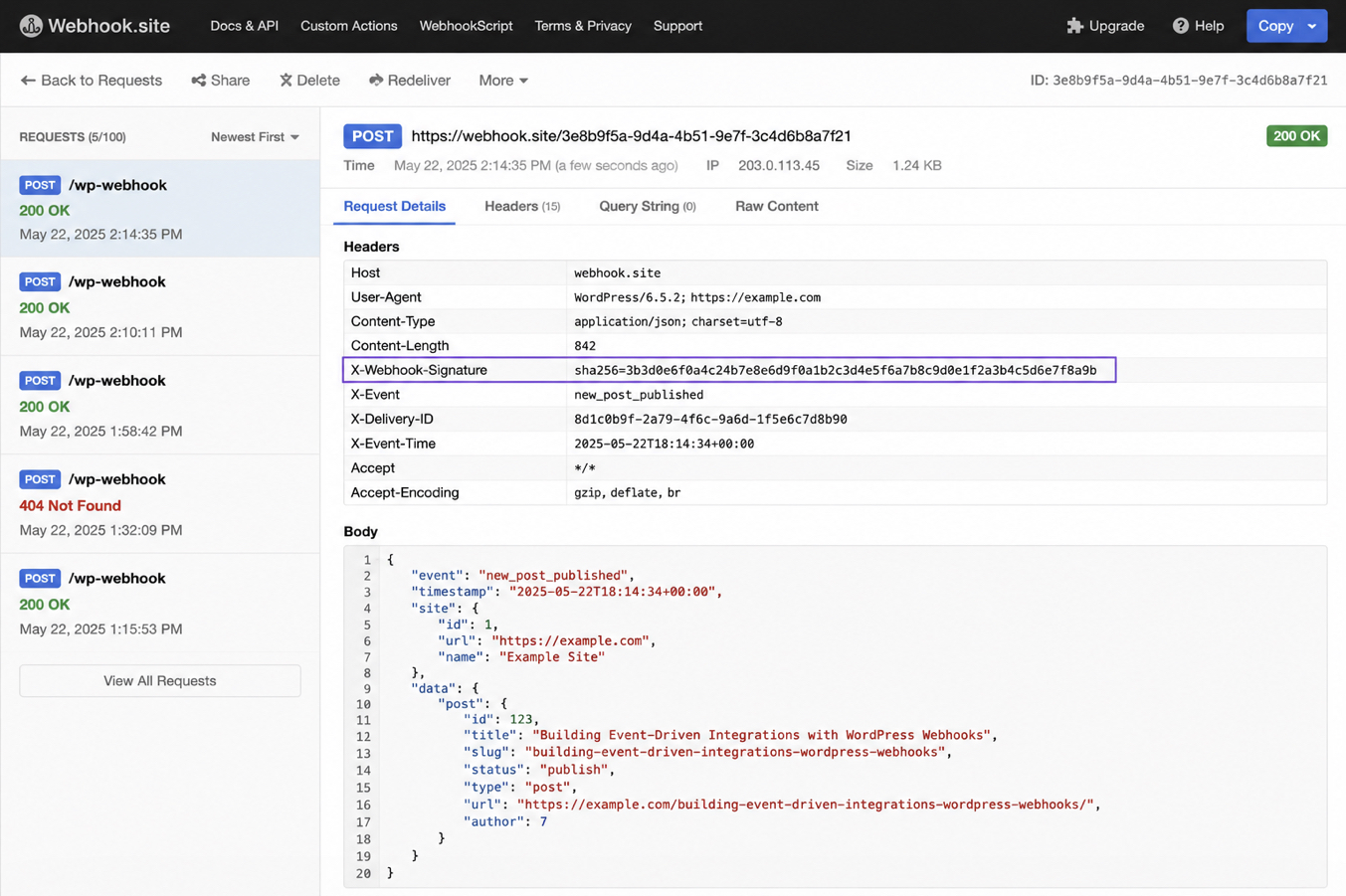
A delivery test at the destination fires the WordPress event once and confirms the signed payload reaches the destination it was routed to. The test proves the outbound webhook works from end to end. Trigger the event, then inspect the destination inbox for the POST that lands there. Arrival is read directly from wherever the webhook is aimed, never assumed from the WordPress side alone.
Triggering the bound event supplies the first half of the delivery test. Publishing a post, completing an order, or whatever do_action event the webhook is bound to sets the callback in motion, and wp_remote_post() sends the POST outward. Inspecting the destination inbox supplies the second half. That inbox holds the received POST, and a task-history entry in Zapier, a capture in webhook.site, or a logged request in RequestBin shows exactly what arrived.
The received POST at the destination inbox: the JSON payload body, the X-Webhook-Signature header among the request headers, and a 200 status on the delivery.
Two fields in the arrived POST carry the proof. The JSON payload body holds the event data WordPress serialized before sending, and sitting in the request headers, the X-Webhook-Signature header holds the HMAC-SHA256 value computed over that payload. Payload and signature header arrive together in the same request, which is what lets the destination match one against the other. The destination answers the delivery with a 200 status code, the HTTP outcome that says the POST was accepted.
With the payload visible, its signature header alongside it, and a 200 returned, the outbound webhook is verified end to end. Confirming arrival closes the sending direction. A webhook travelling the opposite way, one WordPress receives rather than fires, reaches the site through a different mechanism.
The Inbound Webhook Receiver: A Custom REST Endpoint
The inbound webhook receiver is a custom REST endpoint that accepts an incoming webhook, the mirror image of the outbound webhook. Outbound and inbound are opposite directions of the same idea. Outbound fires a do_action event and sends the POST out through wp_remote_post() to a destination. Inbound reverses the flow: an external service sends the POST, and WordPress accepts it at a custom REST endpoint the site exposes.
Because the direction flips, the receiver cannot reuse the outbound do_action-to-wp_remote_post path. Sending pushes a payload out. Receiving listens for one coming in. The receiving surface is a custom REST endpoint, and building custom REST API endpoints that accept and validate an incoming request is a separate subject. In the outbound context, the receiver stands only as the counterpart to the webhook being sent.
What connects the two directions is the signed payload. The outbound webhook signs its POST with a shared secret before it leaves, and an inbound receiver checks a signature on the payload it accepts by the same shared-secret logic. One side produces the signature, and the other reads it back. Sending and receiving each handle a single webhook at a time. Sending many at once raises a separate question: how the outbound side behaves when the volume of events climbs.
WP-Cron Batching for Outbound Webhooks
WP-Cron batching queues outbound webhooks and fires them together on a schedule instead of sending one wp_remote_post() call per event. Batching alters the timing of delivery, not its content. The same signed payloads still go out, only they leave in a group rather than one at a time.
Firing immediately and queue-and-batch work in opposite ways. Fire-immediately means each do_action event triggers its own wp_remote_post() on the spot, and that call blocks the request that triggered it until the destination answers, which suits low event volume but grows costly when many events fire in quick succession. Queue-and-batch defers the send instead: every event appends its payload to a stored queue, and a WP-Cron callback flushes the whole queue later.
The callback reads the queued payloads, dispatches each one through wp_remote_post(), and then empties the queue so the next cycle starts clean. Two measurements describe how it runs. The schedule interval, expressed in seconds or minutes, sets how frequently the flush fires, and the batch size is the count of queued webhooks waiting when it does. A short interval keeps delivery close to real time with small batches, while a longer interval trades immediacy for fewer, larger flushes. The interval itself comes from scheduling a custom WP-Cron event with wp_schedule_event(), and batching flushes against a schedule that already exists.
Batched or immediate, the outbound webhook stays one thing throughout: an event-driven HTTP callback WordPress fires to an external service. Immediate delivery suits a low volume of events. Queue-and-batch keeps delivery reliable when event volume climbs past what a single blocking call can process in the request cycle.




 ChatGPT
  Claude
  Grok
Grok  Gemini