Explore our specialized services, tailored solutions, and industry expertise to elevate your digital presence. From custom WordPress development to seamless integrations, we build high-performing websites that deliver impact.
WordPress names the theme template file it reaches for after the custom post type itself. A custom post type template therefore carries a file name built from the registered slug (single-book.php for one entry in a post type registered as book, archive-book.php for the list of them), and WordPress picks that file by its name before anything else is considered. No dashboard setting affects that name-based resolution; WordPress resolves the file by name and nothing else.
The lookup continues rather than failing when the theme holds no slug-named file. WordPress resolves the next name in an ordered chain: the generic single.php or archive.php, then singular.php for one entry, then index.php, which every theme carries. Entry and archive resolve independently, so a post type can have its own file for single entries while falling back to a generic file for its archive.
The name must match the registered slug verbatim, character for character. A file name that is close but not exact resolves nothing, and WordPress falls back to the generic template as though the purpose-built file were never createdб with no error anywhere.
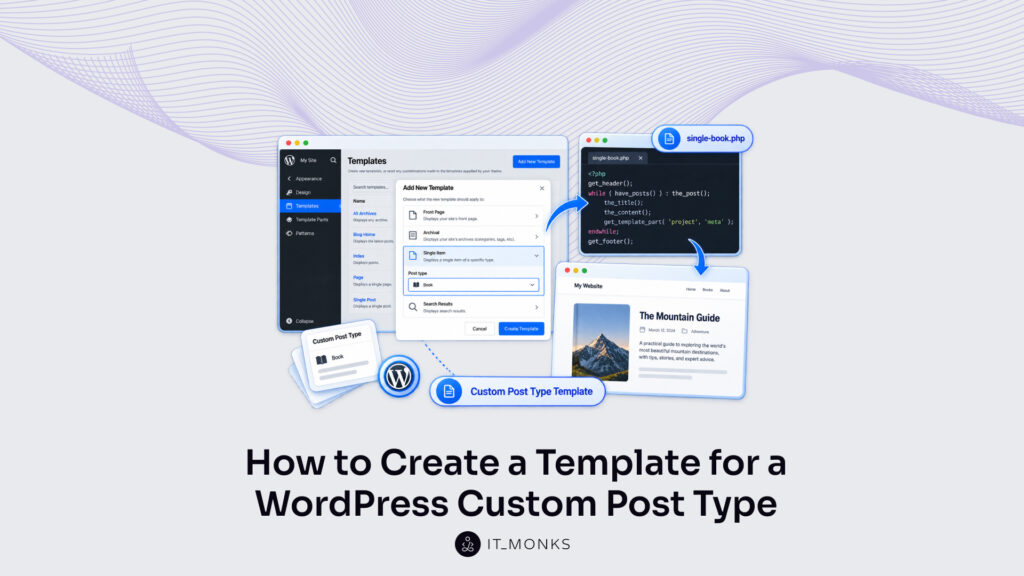
Two routes place such a file into a theme, and which one applies depends on the theme rather than on the post type. A classic theme takes a PHP file: copy the nearest existing template, rename it to match the slug, adjust the markup inside. A block theme takes an HTML template saved inside its templates folder, or an entry created visually in the Site Editor and stored in the same place.
The classic PHP file carries template tags that place the entry’s title and content, and (where a theme shares markup across its templates) a template part. A file named for one post type carries the registered slug; generic single.php and archive.php carry no slug, and WordPress resolves them the same way for every post type.
One route creates no such name at all: a page template that carries a Template Post Type header names the post type it is offered to, a developer assigns it to one entry at a time rather than to every entry of the type, and for that entry WordPress resolves it ahead of the slug-named file.
The WordPress template for a custom post type works on one condition: the file created in the theme and the file WordPress resolves carry the same name. When those two names agree, the resolved file displays the entry on the front end.
The Template Hierarchy for a WordPress Custom Post Type
The template hierarchy is the ordered list of file names WordPress works through to resolve a custom post type template. It contains no logic beyond order and presence. WordPress matches each name in turn against what the active theme actually holds, and the first file present wins — every later name in the chain is irrelevant for that request the moment an earlier one matches.
Two chains matter for a custom post type, each written left to right from first choice to last resort:
A single entry: {custom-template}.php → single-{post_type}-{slug}.php → single-{post_type}.php → single.php → singular.php → index.php. {custom-template} is a name a theme author chooses freely for an assigned page template, derived from no slug at all. {post_type} is the registered post type slug. {slug} is the individual entry’s own slug, so single-book-moby-dick.php matches one entry where single-book.php matches every entry of the type. An assigned page template sits at the opening position, and only where a developer has assigned one to that individual entry; with no assignment and no entry-specific file, resolution opens at single-book.php, the registered slug sitting inside the file name.
The archive: archive-{post_type}.php → archive.php → index.php. Nothing is assigned per entry on this side, so the archive chain opens at archive-book.php and falls back to archive.php and then to index.php.
WordPress works through the chain from its opening name, and a file sitting earlier overrides every name after it. An assigned page template overrides single-book.php on the one entry it was assigned to, and nowhere else. Adding single-book.php to a theme that previously fell back to single.php replaces the generic file for that one post type, and the WordPress custom post type template in use from then on is single-book.php. Built-in posts keep resolving through the generic hierarchy untouched, because the slug inside the file name restricts the override to entries of that type alone.
A custom post type build arrives at this layer last. Registration comes first, the archive URL and the admin behaviour follow, and only then does the question of which file renders the entry on the front end arise, which is why the template chain sits more naturally as one layer of WordPress custom post types than as a subject of its own.
A theme that contains no slug-named file and no single.php resolves the entry through singular.php instead, the last name the chain offers before index.php.
singular.php in the Custom Post Type Template Hierarchy
singular.php sits in the WordPress custom post type template hierarchy as the shared fallback for any single entry, whether that entry belongs to a custom post type, to a built-in post, or to a page. Each name above it in the chain matches a narrower set. single-book.php matches one registered post type. single.php matches a single entry of any post type, custom post types included, which is why it sits directly above singular.php in the chain. singular.php matches all of those and pages besides, which is why it sits last in the chain before index.php.
singular.php sits at a fixed place in that chain: below single.php, directly before index.php, and after every name that carries a post type slug. A theme that contains singular.php therefore never reaches index.php for one entry.
Which file actually resolves depends on what sits above singular.php: a theme that contains single.php resolves the entry through single.php and never falls back to singular.php at all, while a theme that consolidated on singular.php and contains no single.php resolves every custom post type entry through singular.php until a slug-named file replaces it. singular.php therefore renders the entries of a newly registered post type on the front end before a template file exists for that type anywhere.
That holds for single entries only. The archive chain falls back through a different set of file names to answer the same question. Beyond the custom post type path, the same first-present rule governs pages, taxonomies, search results and every other request type, and those chains belong to the wider WordPress template hierarchy rather than to any one post type.
The archive-{post_type}.php Template for a Custom Post Type
A custom post type archive template is one theme file (archive-{post_type}.php) and it outputs the list of entries a single registered post type contains. The braces mark a slot, not literal characters. WordPress builds the candidate name by dropping the registered slug into that slot exactly as it was registered, with no change of number, case or spelling: a post type registered as book puts archive-book.php at the head of the lookup.
A slug registered in the plural stays plural there, so books names archive-books.php, and a theme file already spelled that way needs no correction. Singular or plural is settled at registration, never by the file-naming rule. What fails is any name the slug did not produce: archive-boo.php against a slug of book, or archive-book.php against a slug of books. Each one is a near miss, and WordPress names no near miss at any point in the lookup.
archive-book.php separates a post-type-specific archive from a generic one. A theme that contains it outputs books through markup created for books: the cover, the author line, the fields a book list is built on. Without it, WordPress names archive.php instead, then index.php, and the book archive ends up with the same markup as every other list on the site.
Inside, archive-book.php is ordinary theme markup with one call specific to an archive. post_type_archive_title() outputs the archive heading: the plural label named at registration, not a string this file contains. A theme that hard-codes the word Books in place of that call contains two sources for one label, and only one of them is the registration. At minimum, the file contains four parts: the theme header, that title call, the entry list, and the theme footer.
A minimal archive-book.php names where each part sits and stops there; a production file carries more. A link to each entry comes first, and the_permalink() outputs that address inside the title markup; an archive of bare titles names every entry and opens none of them. The theme author creates the rest of the entry markup: an excerpt, a thumbnail, a meta row, a card grid.
A production file also contains a have_posts() check around the list, so a post type with no published entries outputs an empty-state message rather than a heading above nothing. A file that also calls the_posts_pagination() places the page links beneath the list; one that omits the call outputs the first page of entries and nothing past it.
archive-{post_type}.php renders at the custom post type archive URL, the address the registered post type names through its has_archive argument and its rewrite slug, and those two registration settings are the subject of custom post type archive URLs, not of the template file itself.
Both file names, archive-{post_type}.php and single-{post_type}.php, are PHP, and a classic theme contains them at its own root. A block theme names the same two templates in HTML and places them in the templates/ folder.
Block Theme Templates for a Custom Post Type
A block theme template for a custom post type is an HTML file (single-{post_type}.html or archive-{post_type}.html) that sits in the theme’s templates folder and contains block markup instead of PHP. Two routes create one: an HTML file added to that folder by hand, or the same template created in the Site Editor from the WordPress admin. A custom post type block theme adds no new resolution rule: the slug-named .html file is what WordPress renders for that post type’s entries, as the slug-named .php file is in a classic theme.
A block theme contains one HTML counterpart for each classic PHP file, in a folder of its own.
Classic PHP theme
Block theme
single-{post_type}.php
single-{post_type}.html
archive-{post_type}.php
archive-{post_type}.html
theme root
templates folder
In full site editing, the Site Editor creates a custom post type template with no HTML edited by hand. The Site Editor and block theme support have been part of WordPress since release 5.9.
One word overlaps here. register_post_type() contains a template argument, and that argument is a default block layout for new entries, not a theme template file and not a file name at all. That argument sits in block templates and template_lock, a separate reference on registration-side block markup.
Only the file route writes anything to disk, and it writes that file to the templates folder.
The single-{post_type}.html Template in the templates Folder
The single-{post_type}.html template is the block theme file for a single entry of a custom post type, and the templates folder is the only place a block theme loads it from. The template names one post type inside its own file name: single-, the registered slug, then .html. In a custom post type block theme, a file placed anywhere else is not a template WordPress loads, whatever it is called.
The slug in that name is the registered slug verbatim, character for character, following the same rule as PHP files, with .html in place of .php. A post type registered as books names single-books.html, plural, and all. archive-{post_type}.html sits in the same folder under the same rule, with archive- in place of single-.
The classic counterpart names the same slug and sits at the theme root instead:
A correctly named HTML template placed at the theme root is never loaded, and the entry displays through the generic single template instead. Only placing the file in the templates folder loads it; renaming it at the theme root does not.
The file route adds an HTML template to the theme folder. The Site Editor creates the same template and adds no file at all.
The Site Editor Template for a Custom Post Type
The Site Editor template for a custom post type is a block-markup template for that post type’s entries, created from the WordPress admin rather than placed in a theme folder by hand. Full site editing custom post type templates are added on an admin screen instead of in a folder.
The Add New Template list contains only the post types that registration arguments offer the Site Editor. A custom post type absent from that list is absent for a registration reason, not for a missing template.
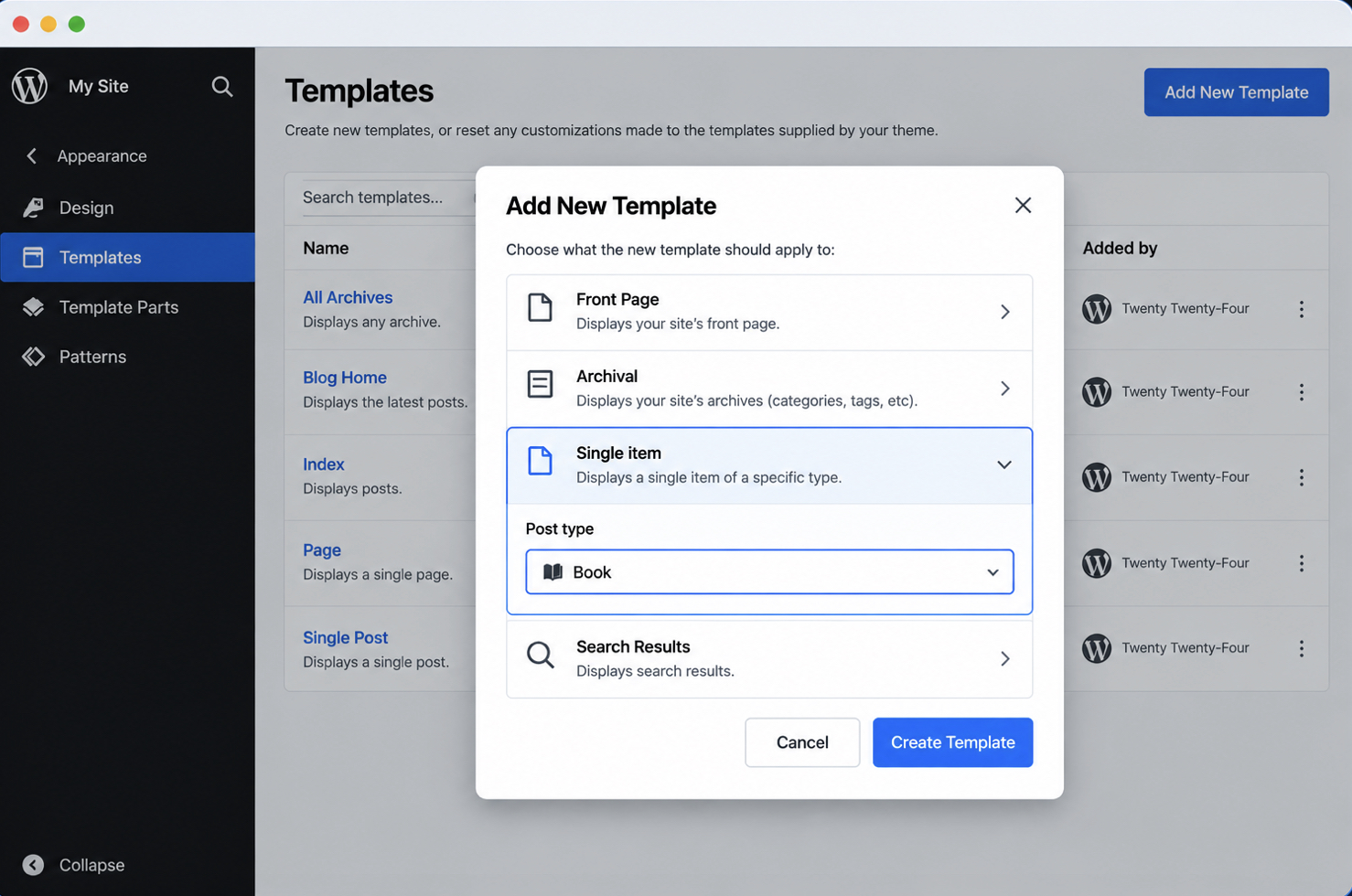
In the Site Editor, choose Templates, then Add New Template. The modal offers a Single item entry, and the picker inside it contains the book post type under its registered label.
The Add New Template modal open over the Templates panel, Single item visible and the custom post type name readable in the picker.
The Site Editor offers the single post template as the start of the new one, and the new template is edited in blocks rather than in markup. A template added for the book post type saves under the file-based name, single-book.
A custom post type Site Editor template is saved to the database, not to the theme folder, and a theme export offers a downloadable zip containing templates/single-book.html while the active theme folder contains no new file. The database entry is still there after that export, and for as long as the Templates list contains it, that entry is the template in effect, a same-named theme file is not.
One route to the same entries adds no template of either kind: the Query Loop block renders a post type’s entries inside an existing page or template.
Whichever route creates it, the block template is one half of a pair. The classic half (single-{post_type}.php at the theme root) contains the registered slug in its name, the template tags that output the entry, and a template part for the markup those tags omit.
What Is in the single-{post_type}.php Template for a Custom Post Type?
A single-{post_type}.php template for a custom post type is created as a copy of an existing theme file, and three parts in it carry the work specific to one post type. Everything else is layout any theme file contains: header, footer, sidebar, the same structural markup that surrounds an ordinary post.
The registered slug, inside the file name. single-project.php matches a post type registered as project, and the file name is the only connection between the two.
Template tags, inside the loop. the_title() and the_content() output the entry’s title and its body.
A template part. get_template_part() loads markup the theme carries in one file and includes from several.
The slug in that file name is the post type name passed to register_post_type(), reproduced exactly. A post type registered as product_review matches single-product_review.php. single-product-reviews.php matches nothing at all, however close it reads, and WordPress loads the generic single.php instead.
Template tags sit inside the loop. The entry is already in place before single-project.php loads, so the tags output its data directly, with no arguments of their own; the arguments behind a different set of entries belong to WP_Query rather than to a template file.
get_template_part( ‘project’, ‘meta’ ) loads project-meta.php from the theme and places its markup inside the entry, after the title and the body the two template tags have already output. What the part carries is everything those tags do not: a client row, a delivery date, a gallery, a block of related projects.
The name matters here as much as anywhere else in the theme: a part named content-project.php carries the entry’s own title and content by convention, so loading one of those in the same loop iteration as the_title() and the_content() outputs the entry twice. Named for what it adds instead, the part stays in one file, and single-project.php, an archive file, or any other template includes the same copy rather than carrying a duplicate.
The file itself belongs in the theme root, next to single.php and index.php. That root is the classic counterpart of the templates/ folder a block theme uses.
A classic theme creates that file from one it already contains. Copy single.php into a second file in the theme root, and let the copy’s name carry the registered slug: single-project.php for a post type registered as project.
Where the theme consolidated on singular.php and contains no single.php, singular.php is the file to copy; where it contains neither, index.php is. Then add the fields and layout the post type needs, and add nothing that belongs to blog posts alone. WordPress loads the new file for project entries on the next request, and the new file displays them from then on.
The slug places WordPress on the file, the template tags output the entry, and the template part carries the surrounding markup in one copy. That same loop and that same wrapper are in single.php; the registered slug on the front of the file is the only difference between the two. The definition of a custom post type template rests on that difference.
What Is a WordPress Custom Post Type Template?
A WordPress custom post type template is a theme file named for one post type, holding the markup that renders that post type’s entries. single-project.php and archive-project.php are custom post type templates because project appears in them; single.php and archive.php are not, because they name no post type at all.
The file name is the distinguishing attribute, and it is categorical: a file either names a post type or it does not. The generic files render a project, a book and a blog post identically: same title, same content area, same surrounding structure, whatever the type. A custom post type template separates one type from all the others before a line of markup is written, so the file is free to contain the fields and layout that would make no sense on an ordinary post.
Both routes create the same object. A classic theme creates the file as PHP in its root; a block theme creates it as an .html template in templates/, or through the Site Editor. Either way the result is one file named for one post type, and it resolves in the same position for the same reason.
One file names a post type from inside itself. A page template contains that name in its file comment, under the label Template Post Type, and the name applies to one entry rather than to the file.
The Template Post Type Header for a Custom Post Type
Template Post Type is a line in a page template’s file comment that offers that page template to one custom post type. It names the post type by its registered slug, and that line is all the pairing needs, the file name plays no part.
A page template can be offered to a custom post type, and the header never stands alone in doing it. Template Name is the label an author sees, and Template Post Type names which post type is entitled to that label. Add both to a page template in the theme, and WordPress offers that template in the editor sidebar for entries of the named post type.
Save that file as project-showcase.php in the theme, and every project entry offers Project Showcase in its Template control. An author chooses it on one entry and saves; the next project entry stays on the theme’s ordinary template until someone assigns it too.
Template Post Type names one post type, or a comma-separated list of them: Template Post Type: project, product offers the same page template to project and product entries alike. Without the comma, the value names one post type that does not exist, the template is offered to nothing at all, and no error explains the silence.
The header sets itself apart from every other template file here: an assigned Project Showcase sits ahead of single-project.php for the one entry that carries the assignment, and WordPress chooses it there. Every project entry with no assignment on it is still on single-project.php. So a single-project.php that is the template on every project entry but one is not a broken file; on the exception, an author has assigned a page template by hand.
Template Post Type headers are available from WordPress 4.7 onward; before that release, a Template Name header named a page template for pages alone.
A WordPress custom post type template sits inside the theme, on either route. A single-{post_type}.php or archive-{post_type}.php file in the theme root, a single-{post_type}.html file in templates/, a Site Editor entry in the admin.
Each of these names a custom post type, and WordPress chooses it by that name. The Template Post Type header names one too, from inside a page template’s comment, where an author assigns it by hand on one entry. The archive URL a custom post type answers at, the arguments behind an entry list, and plugin-built template tools sit elsewhere, under rules of their own. Every WordPress custom post type template is a name, a location, and the markup in between.






 ChatGPT
  Claude
  Grok
Grok  Gemini