Explore our specialized services, tailored solutions, and industry expertise to elevate your digital presence. From custom WordPress development to seamless integrations, we build high-performing websites that deliver impact.
Getting WordPress support is what you do when a site stops functioning properly: a plugin breaks the checkout, a theme update half-renders the homepage, a white screen replaces the login. You notice the problem, reproduce it, decide who is best placed to help, compose the request, and wait for an answer that fits.
By saying “you,” we mean the site owner, the editor, or the small-business operator who sits at the center. The first fork is which WordPress you run, because the name covers two products with two different support models.
WordPress.org is an open-source software with no headquarters and no central phone line; help comes from the people who run each piece of the stack.
WordPress.com runs differently, since Automattic hosts it and answers tickets directly. From there, the path is the same for everyone: settle the platform question, do the self-diagnosis homework that resolves most reports on its own, learn where WordPress support actually lives across three channel tiers:
match a specific problem to the channel that fits,
compose a request that earns a useful first reply,
recognize when the math has tipped toward paid help.
Two quick questions sit at the end: whether WordPress has support at all, and the truth about the phone number people keep hunting for. Three forces run underneath every choice: the type of problem, how quickly it needs to clear, and how much you can spend.
What Is the Difference Between WordPress.com and WordPress.org Support?
WordPress.com support and WordPress.org support are two distinct support models because WordPress is two different products under one name.
WordPress.com is a hosted SaaS-style platform from Automattic, the company hosts the software, and your contact for help is Automattic itself.
WordPress.org is the open-source self-hosted software anyone can download and install on hosting they arrange themselves; help for that version comes from community forums, the official Developer Resources at developer.wordpress.org, plugin and theme vendors, and managed hosts who package response time into their plans.
The distinction governs every other choice, because the channel that answers a WordPress.com question (a logged-in chat or email tied to your account) will not answer it for a self-hosted site. If you log in at wordpress.com, you are on the hosted platform; if you log in at your own domain via yourdomain.com/wp-admin, you are on self-hosted WordPress.org.
WordPress.com Support
WordPress.com is the hosted version of WordPress provided as a service by Automattic. Because Automattic hosts the software, it runs the support: the platform is your support contact.
Support is tiered by plan. Free-tier users get the WordPress.com community forum and self-help documentation. Paid plans unlock direct response channels:
Live chat with Automattic support staff (paid plans only)
Email support (paid plans only)
Priority response on higher-tier paid plans (the same chat and email channels, moved to the front of the queue
WordPress.com does not market a phone-support line on its standard plan ladder; chat and email are the direct channels. Phone access exists only on separate Automattic products aimed at very large customers, not on a WordPress.com plan tier.)
WordPress.com support covers the platform itself: hosting, core software, account, billing. It does not cover third-party plugins or themes; for those, the route is the vendor.
WordPress.org Support
WordPress.org is the open-source self-hosted version of WordPress, the software you download from wordpress.org, install on your own hosting, and operate as software you own. No single company hosts it, so no single company supports it either.
Two free resources sit at the center of that landscape, both run by the WordPress community:
The support forum at wordpress.org/support: public threads staffed by peer volunteers
Developer Resources at developer.wordpress.org: the maintained handbooks for plugin, theme, REST API, and Block Editor development; the legacy Codex at codex.wordpress.org is still online but no longer updated
WordPress.org has no central phone line, by design. Forum responses come from volunteers reading threads in their own time, so a reply lands in hours or days rather than minutes. Around the forums sit per-product layers: plugin and theme vendors run their own forums with paid premium tiers, and managed hosts offer per-plan support for the installation they manage. With the platform side settled, the second decision comes before you reach for any of these channels, the self-diagnosis homework that clears most reported breakages without a single forum post.
Pre-request Check Before Asking for WordPress Support
Pre-request check is the self-diagnosis a WordPress site owner runs before contacting any support channel: documenting the symptom, checking the environment, and searching the existing answer set. Three preconditions make up that work: document the problem, check the basics, and search for existing solutions. Many “broken site” reports either narrow to a specific cause or disappear during this stage, and the request you eventually send arrives in far better shape for having done it first.
Document the Problem
Problem documentation is the precise written statement a site owner produces before asking for WordPress support: symptom, trigger, reproducibility, error message, and the location where it appears. “My WordPress is broken” is too vague to act on; a precise statement gives the channel enough surface to respond without a back-and-forth.
Document these seven items:
The precise symptom, in one sentence
When it started: date, time of day if you can pin it, sudden or gradual
What changed just before: a core, plugin, or theme update; a toggled setting; a host move; a DNS change
Whether it is reproducible: every time, intermittent, or only under specific conditions
The exact steps to reproduce, in order
The error message, copied verbatim
The URL where it appears: page, admin screen, REST endpoint, or login
A strong statement reads like this: contact form stopped sending email after the WordPress 6.5 update, form submits but no email arrives, spam folder checked, fails every time, and the PHP error log shows wp_mail() returned true. Paste errors verbatim, the literal message is what matches against forum threads. If no error appears, say so.
Check Your Basics
Basic environment checks are the routine plugin-update, theme-update, cache-clear, and browser-test steps a WordPress site owner runs before asking for help, because many reported breakages resolve at one of those steps: a stale plugin, an unupdated theme, a cached page, or a misbehaving browser extension.
Run these six checks first:
Update every plugin to its current version, then test again
Update the active theme (parent and child if relevant) and test again
Clear the WordPress page cache and the browser cache
Test the page in a different browser, or in incognito mode
Check the hosting provider’s status page, an upstream outage looks like a site problem
Deactivate plugins one at a time to find a conflict, reproducing the symptom after each
After each check, reload and note which one, if any, made the symptom disappear. The one-at-a-time rule matters most on that last step. Deactivate plugin A, reproduce, reactivate A, deactivate plugin B, and so on. Switch off every plugin at once and “all plugins off, bug gone” tells the helper only that some plugin is involved.
Search for Existing Solutions
An existing-solution search is the quick scan of public WordPress answer sets (forums, vendor documentation, Stack Exchange, the developer handbooks, and a plain web search) that a site owner runs before posting a new question. Most common WordPress problems have already been asked, answered, and indexed, so a short search often closes the issue outright.
Search these five resource categories, ranked here by usefulness:
The WordPress.org support forums: volunteer threads against core and most plugins and themes hosted there
The plugin or theme vendor’s own support page or knowledge base, especially for premium products
WordPress Developer Resources at developer.wordpress.org: the maintained reference for functions, hooks, and REST endpoints
Stack Exchange WordPress: developer-flavored answers, useful when the symptom hints at code
Reputable WordPress blogs and tutorial videos, plus a plain web search with the error message in quotes
Quote the error verbatim in double quotes so the search engine matches the exact string. Include the WordPress version. When an older answer no longer applies, reference the thread in your request. With the homework done and the existing answer set searched, the next decision is where WordPress support actually lives, the channel inventory that handles every request the self-diagnosis could not close.
Where to Find WordPress Support
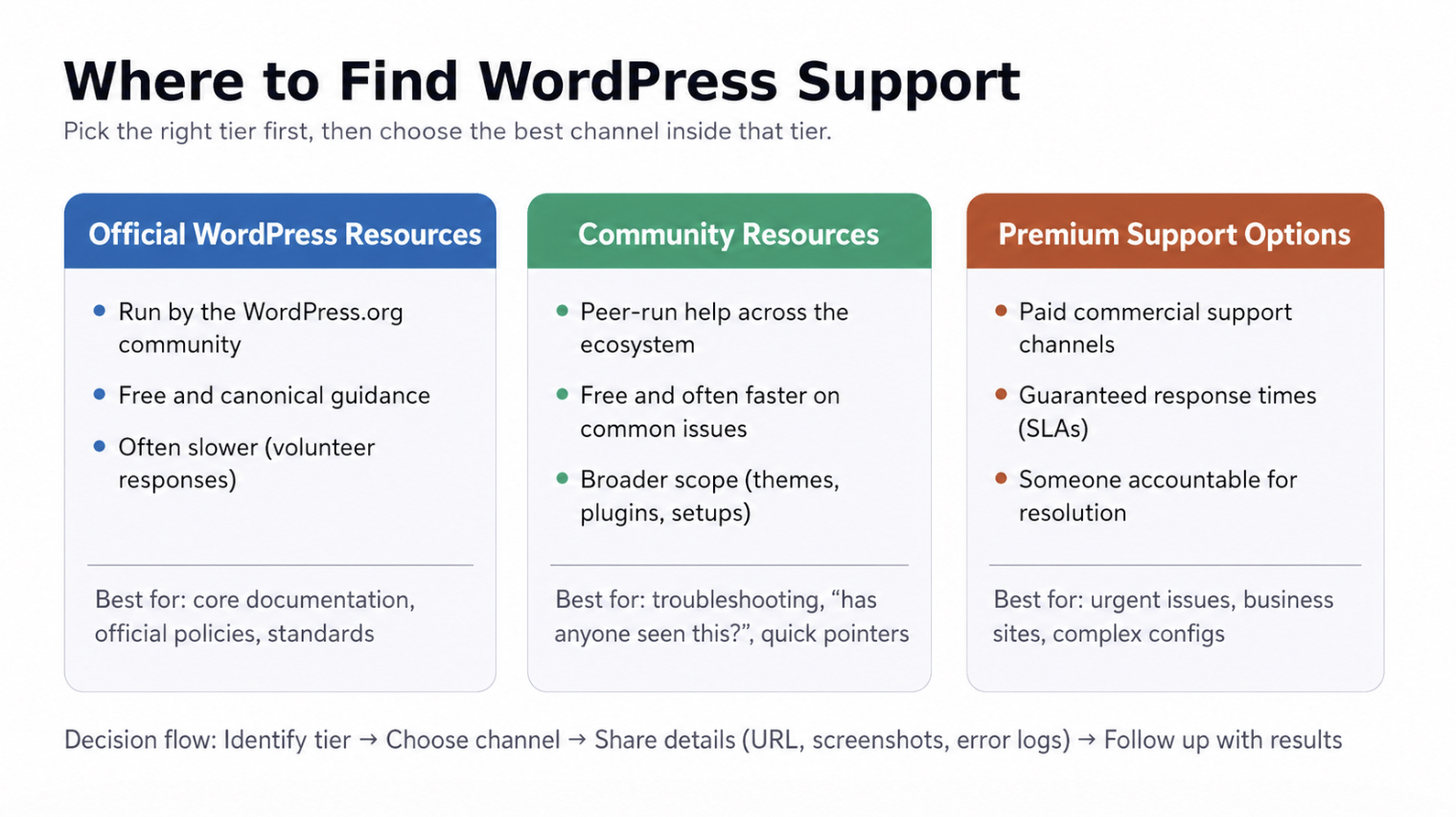
WordPress support lives at three channel tiers: Official WordPress Resources, Community Resources, and Premium Support Options, and readers find help by picking the right tier first and the right specific channel inside that tier second.
Official Resources are run by the WordPress.org community itself: free, canonical, slow because the people answering are volunteers.
Community Resources are peer-run: still free, faster on common questions, broader in scope.
Premium Support Options are paid commercial channels where a customer relationship buys a guaranteed response time and somebody whose job depends on resolving the ticket.
Official WordPress Resources
Official WordPress Resources are the support channels the WordPress.org community runs itself, free, canonical, and the first place experienced WordPress users check.
Four official channels do most of the work:
WordPress Developer Resources at developer.wordpress.org: the official, maintained reference for core, plugin, and theme development; function references, hook documentation, API examples (the older Codex at codex.wordpress.org remains readable but is no longer updated)
The WordPress.org support forums at wordpress.org/support: the main general-purpose forum, triaged by volunteer moderators; threads stay searchable
Plugin support forums in the WordPress plugin repository: every plugin hosted on WordPress.org has its own sub-forum for bug reports and compatibility issues
Theme support forums in the WordPress theme repository: the same pattern, scoped to themes
WordPress.org has no central phone-support line. The Official Resources tier is asynchronous by design: every channel here answers in writing, on the volunteers’ schedule, and the recurring “what is the phone number” question has its own honest answer: there is no central line, and the narrow paid exceptions live elsewhere in this map.
Community Resources
Community Resources are peer-run WordPress support channels: groups, technical Q&A sites, real-time chat servers, and in-person events.
Four peer channels cover most situations:
Stack Exchange WordPress at wordpress.stackexchange.com: the right channel for precise code-level questions; highest-voted answers persist publicly and often rank in Google
Facebook WordPress groups: Advanced WordPress (developer-heavy) and WPBeginner’s WordPress Help (newer site owners); good for crowdsourced answers, though information stays inside Facebook and is hard to search later
Reddit’s r/Wordpress and topic Discord servers: user-run spaces for quick, informal questions; threads are searchable on Reddit, while Discord is faster for live back-and-forth but harder to find later
Local WordPress Meetups and WordCamp events: in-person communities running in most major cities, hosting an annual or biannual WordCamp conference
Peer channels solve a lot of common WordPress problems at no cost. They cannot guarantee a reply by a deadline or take responsibility when a fix breaks a live business site. Those guarantees only come with the paid tier, the channels where a customer relationship buys a deadline and an owner for the ticket.
Premium Support Options
Premium Support Options are paid commercial WordPress support channels, for problems that exceed free help, need a guaranteed response, or sit on a site where downtime costs real money.
Three premium categories cover most paid WordPress assistance:
Premium plugin and theme support: many paid plugins and themes bundle premium support or offer it as a paid add-on; the right channel for problems specific to a single paid product
Managed WordPress hosting support: bundles WordPress-focused support directly into the hosting subscription; the right channel for problems where the environment is the suspect (server config, caching, database, file permissions)
Dedicated WordPress maintenance services: agencies and freelancers offering ongoing maintenance and on-demand fixes as a recurring service; the right channel for general problems or revenue-critical sites needing on-call coverage
Paid support here is a category, not a brand list. The right paid channel depends on whether the problem is hosting-side, plugin-or-theme-side, or general WordPress-side, not on which named provider tops a marketing roundup.
WordPress Support Channels by Problem Type and Urgency
Channel selection by problem type and urgency is the routing rule that maps a specific symptom and its time pressure to the right tier: Official, Community, or Premium. Naming the channels is one half of getting help; matching one to the problem in front of you is the other half. Selection turns on three axes: problem type, urgency, and cost tolerance.
Read across from a scenario to the channel category that fits:
Low-urgency learning + free-only → community-tier (WordPress.org forums, Stack Exchange, the r/Wordpress and Discord spaces)
High-urgency revenue-critical + dedicated-budget → premium-tier (managed-host support, or an agency retainer)
Security incident at any urgency → premium-tier (managed-host support, or a dedicated WordPress security firm); community forums are not the venue for a live breach
Plugin-specific question + open-to-paid → premium-tier at the plugin vendor
Theme misbehavior at medium urgency → official-tier first (the theme’s WordPress.org forum), premium-tier at the theme vendor if a paid license is active
White-screen-of-death at emergency urgency → premium-tier (managed-host support, or a freelance developer on-call)
A few “support” queries are really different problems wearing a support label: a site too broken to fix economically points to a fresh build, a host change or domain move points to the WordPress migration guide, and a need for someone to own the codebase points to hiring a WordPress developer. Once the right channel is identified, the work shifts from picking where to ask to composing the request itself, the mechanics that earn a useful answer on the first reply rather than three rounds of clarifying questions.
How to Ask for Help Effectively
An effective WordPress support request is one that gives the helper enough to answer in the first response, separating a thread that resolves in one reply from one that drags through three rounds of clarifying questions. Three mechanics get a request to that bar: specificity in the problem statement, the installation context that lets the helper rule out environment factors, and the patience and tone that match the staffing reality of community help.
Be Specific and Clear
A specific WordPress help request is the one-line problem statement, the verbatim error message, and the named feature or screen where the symptom appears.
“My site is broken” is the worst possible version. It tells the helper nothing. A specific opening carries three components: a one-line statement of the broken behavior; the exact error message quoted verbatim (or “no error appears”); and the named location: page, post type, admin screen, or feature.
“My contact form doesn’t work, please help” gives the helper nothing to act on. A specific version names the plugin, the failure mode, the trigger event, and the log output in one breath, enough to answer on the first read. Never paraphrase an error message; the literal string is what matches against existing threads.
Provide Context
Installation context is the WordPress version, the active theme with its version, and the active-plugin list with versions a helper needs to rule out environment-specific causes. The same plugin behaves one way on Astra 4.6.2 with Yoast 22.4 and another way on a custom theme, so the helper cannot diagnose blind.
A context block lists three items:
WordPress version: with point release (“WordPress 6.5.3,” not “current version”)
Theme name and version: exact as it appears in the Themes screen (“Astra 4.6.2”)
Active plugins with versions: every plugin currently enabled
A complete block reads: “WordPress 6.5.3 / Astra 4.6.2 / Contact Form 7 5.9.5, Yoast SEO 22.4, WooCommerce 8.8.” Three optional items expand it when relevant: hosting environment, browser tested, and any plugin, theme, or core change within seven days.
Be Patient and Polite
Patient and polite help-request behavior is the responder-etiquette layer of free community support: short replies, no bumping, a brief thanks, and a returned resolution once the fix lands. The person answering a WordPress.org forum thread is a peer donating time, not a paid agent, so replies arrive in hours or days rather than minutes; a thread sitting unanswered for an afternoon is normal, not a sign of being ignored. Do not re-post to bump; do not @-tag community members unless one has previously helped.
A brief greeting and a “thanks in advance” add nothing to the diagnostic content and a great deal to the tone. Treat the first response as a starting point even when it asks for clarification. Once a fix is found, post the resolution, that updates the public answer set for the next person searching the same problem.
When to Choose Paid WordPress Support
Paid WordPress support is the option you choose when the cost of a problem outruns the cost of the help.
Four conditions push the answer toward paid support:
Guaranteed response times. Paid plans publish a service window (minutes, hours, or same-business-day) and that window is the product you are buying
A business-critical site. Every hour offline has a price tag; once that price exceeds the monthly fee for a managed-host plan, the math has chosen for you
Complex technical issues: a database dropping connections under load, a checkout failing for one payment processor, a theme conflict on a specific browser version
Time on maintenance. Two evenings chasing a plugin conflict cost more than a vendor tier that solves it in an afternoon
The paid side is a category, not a brand list. Managed-host plans bundle support into the hosting subscription. Maintenance services, sometimes called WordPress support services, package ongoing care across plugins, themes, security, performance, and small fixes for a monthly fee. Premium vendor tiers help with the specific product you bought, nothing else.
If the problem is bigger than ongoing help, the right move is starting fresh, the companion guide to reset or rebuild a WordPress site covers that path.
Is There a WordPress Support Phone Number?
There is no central WordPress support phone number. WordPress.org is open-source software maintained by a global community; it has no headquarters, no call center, no toll-free line. WordPress.com, the hosted product, answers paid-plan tickets by chat and email rather than phone, so it adds no phone line either.
Two narrow sources cover the phone-based help that genuinely exists:
Managed-hosting plans: phone availability varies by host and by plan; the honest answer for any host is whatever appears on its pricing page
Third-party agencies and maintenance services: phone numbers reach the company you hired, not WordPress itself
Third-party call centers sometimes present themselves as “WordPress support” or “official WordPress help” and are neither. A real provider’s about page names the company and explains the service; a number that goes straight to a hard upsell is the warning sign. Confirm the company name matches the host or vendor you do business with, and verify the number against that company’s own contact page before sharing credentials.
Two products, a self-diagnosis habit, three channel tiers, and a clear line for when paid help earns its cost — that is the whole map for getting WordPress support. For the wider context that frames building, hiring, and launching a site, the WordPress development guide sits alongside the question of how to get help once the site is live.
Common WordPress Customer Support Questions
Does WordPress Have Customer Support?
Yes for WordPress.com on paid plans, no in the conventional sense for WordPress.org. WordPress.com, the hosted product from Automattic, answers through chat and email on its paid tiers. WordPress.org has no central support team because there is no central company; the role distributes across community forums, plugin and theme makers, managed-hosting plans, and premium retainers from agencies and freelancers.
Is WordPress Support Free?
Some WordPress support is free and some is paid. The free side costs nothing: WordPress.org forums, the Developer Resources handbooks at developer.wordpress.org, Stack Exchange’s WordPress site, and user-run community spaces on Reddit, Facebook, and Discord. The paid side starts where guaranteed response times, dedicated personnel, or scope of work enter the picture: managed-host support, premium vendor tiers, maintenance agencies on retainer, and the chat and email support that ships with WordPress.com paid plans. Most owners use a mix.
What Is the WordPress Support Phone Number?
No single number reaches WordPress itself: the dedicated phone-number question gets its full honest answer as a standalone topic, including the two narrow places where phone help genuinely exists and the warning signs of a fake “official WordPress support” caller.




 ChatGPT
  Claude
  Grok
Grok  Gemini