Explore our specialized services, tailored solutions, and industry expertise to elevate your digital presence. From custom WordPress development to seamless integrations, we build high-performing websites that deliver impact.
WordPressdatabase repair is the process of restoring the WordPress database (the MySQL or MariaDB data store that contains site content, settings, and metadata), so the website can function correctly again after database corruption affects one or more tables.
For site owners and administrators, WordPress database repair begins with confirming that the database needs attention, creating a complete backup, and then choosing an appropriate repair method, whether through the built-in WP_ALLOW_REPAIR feature, phpMyAdmin, WP-CLI, or a trusted repair plugin.
After the repair process, the database should be verified to confirm that content, configuration, and metadata are loading as expected, while a recent backup provides a reliable recovery path if the repair cannot fully restore the affected tables.
This guide covers how to repair a WordPress database by following a structured workflow that moves from diagnosis to backup, repair, verification, and, when necessary, restoration, keeping the focus on repair WordPress tasks that apply specifically to the database rather than the website’s files or installation.
How to Diagnose WordPress Database Corruption
WordPress database corruption is damage to one or more of the wp_-prefixed core tables (wp_posts, wp_options, wp_postmeta and their siblings) that leaves WordPress unable to read from or write to them cleanly. Diagnosing that corruption is step zero of any repair: confirm that a table is genuinely damaged, and identify what damaged it, before a single fix is applied. Skipping the step is the common mistake. Plenty of walkthroughs run a repair command against a database that was never corrupted in the first place, which wastes effort and obscures the real fault.
A damaged table is not the same thing as a connection failure. When WordPress shows the “error establishing a database connection” message, the database engine itself is unreachable, usually because the credentials in wp-config.php are wrong or the MySQL service is down. That is a configuration problem, not corruption. Corruption sits inside the tables and surfaces only once the connection succeeds and a query returns broken or missing data. Telling the two apart early decides whether the next move is a repair or a configuration check.
One more reading belongs to diagnosis, because it decides whether the four repair methods apply at all: the storage engine behind the damaged table. All four (the built-in repair.php tool, the phpMyAdmin Repair table operation, the wp db repair command, and a repair plugin) issue MySQL’s REPAIR TABLE statement underneath, and REPAIR TABLE only operates on MyISAM tables, along with the ARCHIVE and CSV engines.
InnoDB, the default storage engine on every modern WordPress install running MySQL 5.5.5 or later, does not support the operation; run against an InnoDB table it returns “The storage engine for the table doesn’t support repair” and changes nothing. Corruption inside an InnoDB table is resolved not by any of the four methods but by the restore-from-backup fallback. Identifying the engine of the damaged table first, MyISAM or InnoDB, tells the site owner whether a repair method or a restore is the route back.
Diagnosis rests on two things: the symptoms that reveal a table is damaged, and the causes that put it in that state. The symptoms come first, since they are what a site owner actually sees.
Symptoms of WordPress Database Corruption
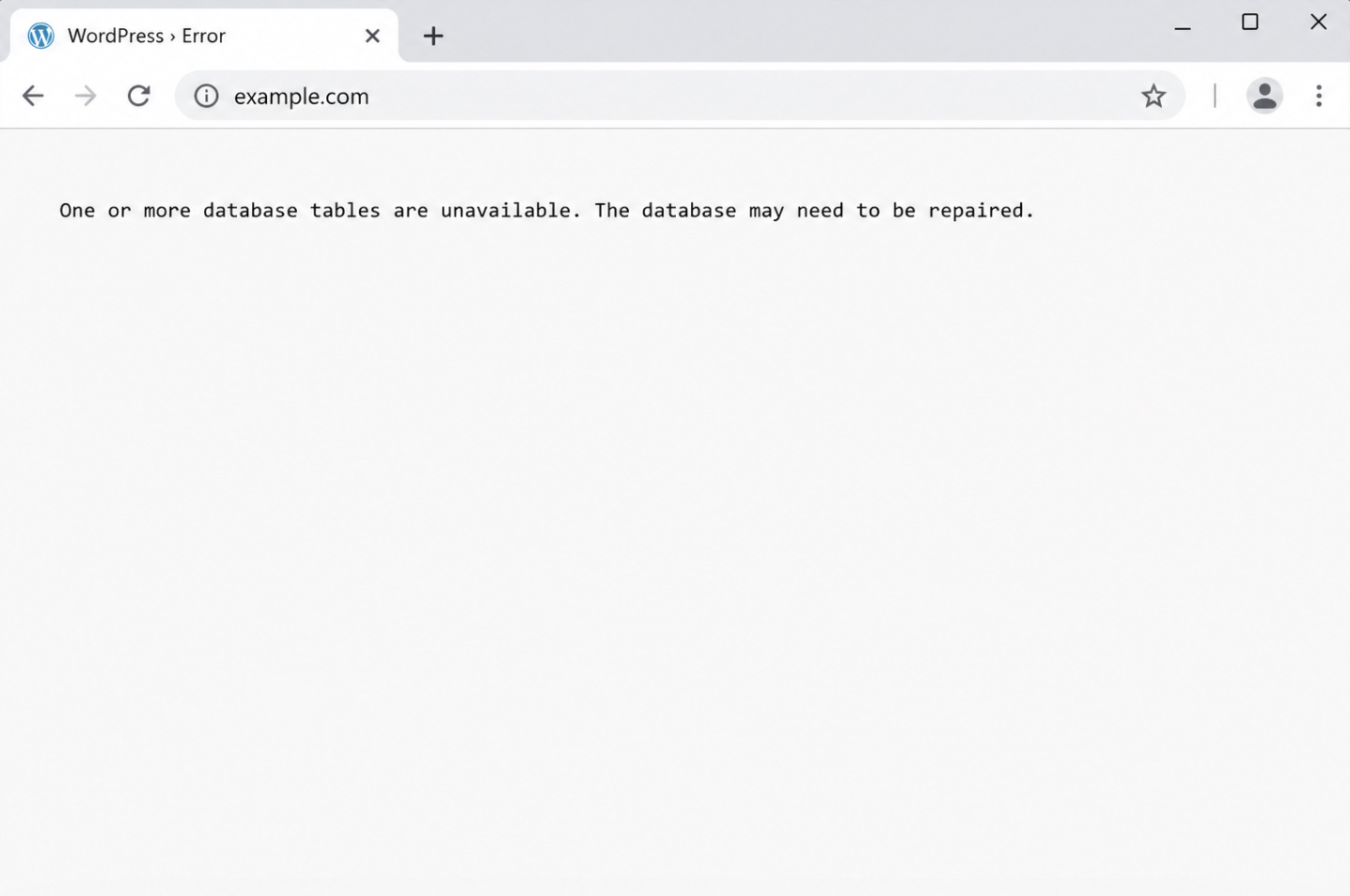
The symptoms of WordPress database corruption are the visible signs that a table has stopped serving valid data. The clearest of them is a plain-text notice WordPress prints in the browser in place of the page: “One or more database tables are unavailable. The database may need to be repaired.” That message names the problem outright, and it appears when core tables fail an integrity check.
Other symptoms are less explicit and have to be read against the background of which table is at fault. Missing posts or blank archives point at wp_posts. Lost settings, a changed site address (for example, after you change a domain name for a WordPress site), or a theme that reverts to the default signal trouble in wp_options. A white screen with no message at all, often called the white screen of death, tends to mean a query failed silently before the page could render. Comments that disappear, or an admin dashboard that loads half-empty, trace back to their own tables the same way. Each symptom maps to a table, and that mapping is what turns a vague failure into a located fault.
Reading the symptom correctly also confirms that the site owner is looking at corruption rather than a connection error, where nothing loads at all. Once the damaged table is identified from what it displays, the next question is what put it in that state.
What Causes WordPress Database Corruption?
The causes of WordPress database corruption are the events that damage a table’s stored rows or its index. Most of them share one mechanism: a write that begins but never finishes cleanly, leaving the table in an inconsistent state the engine can no longer trust.
A handful of recurring events account for most WordPress database corruption:
Interrupted or incomplete writes, when a query is cut off mid-operation and the table is left half-updated.
Crashed tables on the older MyISAM storage engine, which flags a table as crashed after an unclean shutdown and refuses to read it until the table is checked.
Plugin conflicts, where two plugins write to the same table in ways that collide or leave malformed rows behind.
Exceeded PHP memory, when a process runs out of memory partway through a database write and abandons it unfinished.
A full disk, when the server has no space left to complete a write and the table is truncated.
A server crash or hard power loss, which drops every in-flight write at once.
Each cause narrows down which method resolves the damage. A single crashed MyISAM table responds to a straightforward table check; corruption spread across several core tables usually calls for a broader recovery. One trigger earns its own mention. A database often arrives corrupted straight after a host move, because the character-set mismatches and interrupted transfers that happen when administrators migrate a WordPress site to a new host can leave tables half-written or wrongly encoded. Spotting that origin points the recovery toward re-importing a clean .sql dump rather than patching tables in place.
Whatever the cause, one safeguard comes before any method runs: a full backup of the database exactly as it stands, so the diagnosis just completed is never lost to the fix that follows.
How to Back Up the WordPress Database Before Repair
Backing up the WordPress database before repair means saving a restorable copy of the database while it is still readable, captured before any repair command touches a single table. This is step 1 of the whole procedure. A repair operation rewrites table data in place, and when it goes wrong the damage is not always reversible, so the backup is the safeguard that makes every later step recoverable. A failed repair then costs nothing permanent, because the pre-repair copy still holds every post, option, and metadata row exactly as it stood.
Two routes produce that copy. The command-line route runs mysqldump, which reads the live database and writes its full contents to a single .sql file:
mysqldump -u user -p db_name > backup.sql
The command asks for the database password, then streams every table into backup.sql in the current working directory. That one file is the entire database, schema and rows together, in plain text, and it is the exact artifact the restore step reads from if a later repair fails.
The second route runs a phpMyAdmin Export, which produces the same kind of .sql dump through a browser rather than a shell. The export screen, its format options, and the download step all belong to a workflow that a companion walkthrough already covers end to end, so instead of repeating export here, work through the WordPress phpMyAdmin guide for the export path and come back with the downloaded dump in hand.
Wherever that dump lands (the server directory that received the mysqldump output, or the local download folder from the export, the location needs noting, and the file needs keeping until the repair is confirmed good. The restore fallback reads directly from this .sql dump: if a repair fails to recover the database, the same file is imported back to restore the site to its pre-repair state. With a restorable backup saved and its whereabouts recorded, the repair itself can begin.
The first and most accessible method needs no external tools at all. WordPress ships its own database repair, driven by a single constant and a built-in page.
How to Repair the WordPress Database with the Built-in Repair Tool
The built-in repair tool is WordPress’s own database repair, run through the WP_ALLOW_REPAIR constant and the wp-admin/maint/repair.php page: repair method 1, the most accessible one, requiring nothing installed beyond the site itself. Repair WordPress, in most cases, resolves to exactly this layer: the database, not the core files and not a fresh reinstall. When the corrupted layer is the database, WordPress repair means WordPress database repair, and the native tool handles it in two moves.
The first move defines the repair constant in wp-config.php:
define('WP_ALLOW_REPAIR', true);
That line goes near the other define() statements, above the “That’s all, stop editing” comment. Enabling the constant switches on a maintenance page that stays inaccessible the rest of the time. The second move opens wp-admin/maint/repair.php in the browser.
The page loads with two buttons: “Repair Database” and “Repair and Optimize Database.” Repair Database checks every wp_-prefixed table, repairs the ones flagged as corrupted, and reports the result table by table. The neighboring “Repair and Optimize Database” button also exists, but it folds a separate optimization pass onto the run; a database repair on its own needs only Repair Database.
One step here is not optional, and skipping it leaves a hole open. The repair page runs without a login precisely because WP_ALLOW_REPAIR turns it on, which means that as long as the constant sits in wp-config.php, anyone who reaches the URL reaches the repair endpoint. Remove define('WP_ALLOW_REPAIR', true); from wp-config.php the moment the repair finishes, so the page locks itself again. That removal is confirmed once more once the repaired database is verified.
The built-in tool clears most corruption on the first pass. Some damaged tables, though, refuse to repair through it and need a table-level operation run directly against the database, the Repair table command inside phpMyAdmin.
How to Repair WordPress Database Tables in phpMyAdmin
Repairing WordPress database tables in phpMyAdmin means running the “Repair table” operation on individual corrupted wp_-prefixed tables, a table-by-table fix aimed at the exact tables the built-in repair tool leaves broken. This is the second repair method, and it earns its place when the native tool clears most of the database yet one stubborn table, say wp_posts or wp_options, still reports errors. phpMyAdmin repairs those tables one at a time, so the fix stays precise rather than wholesale.
The operation runs from the graphical database interface, which means opening phpMyAdmin and selecting the WordPress database before any table can be repaired. Getting into that interface is a procedure of its own; how to log in and open the right database is covered in full when a site owner learns to access the WordPress database with phpMyAdmin. With the database open and its table list on screen, the repair itself begins.
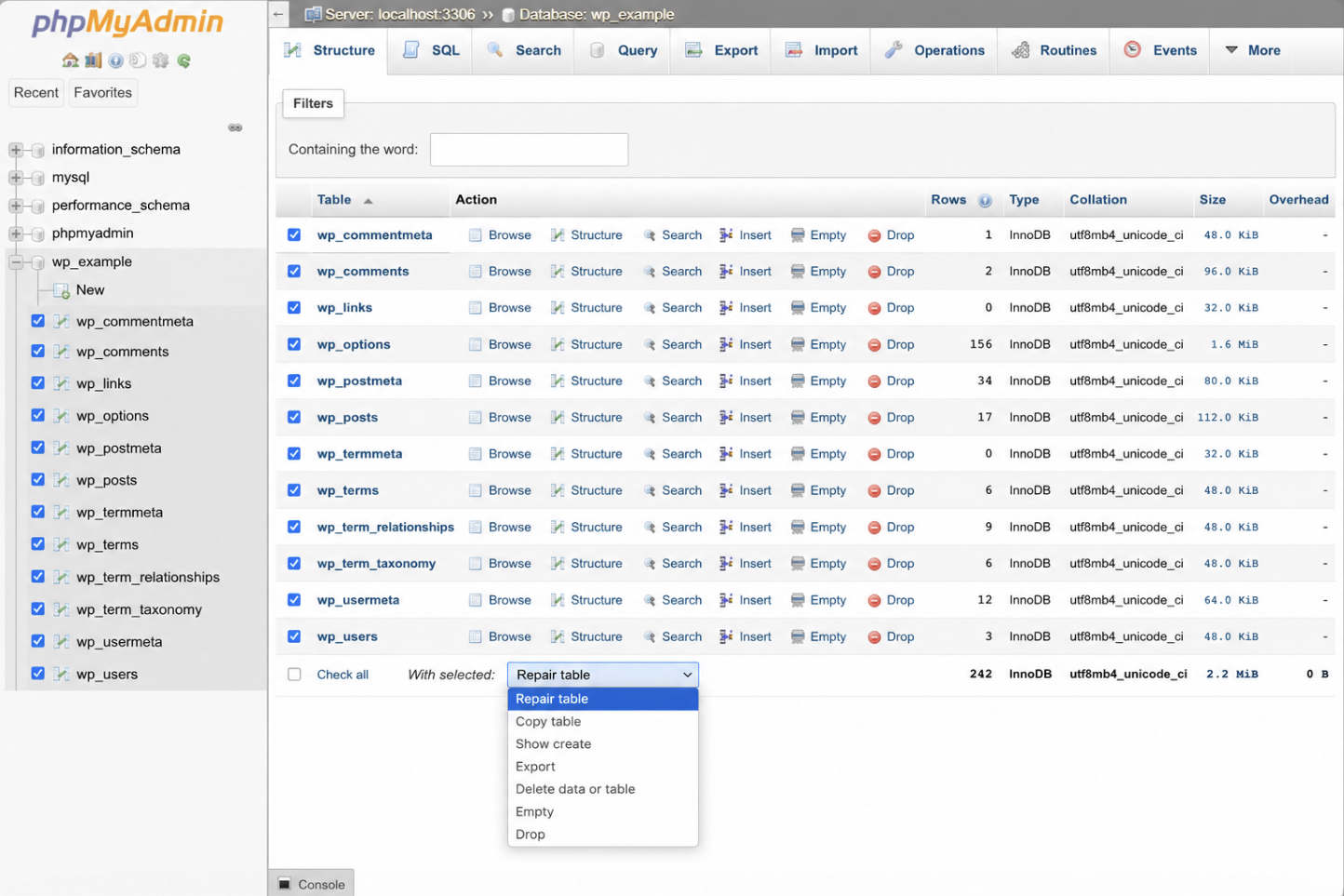
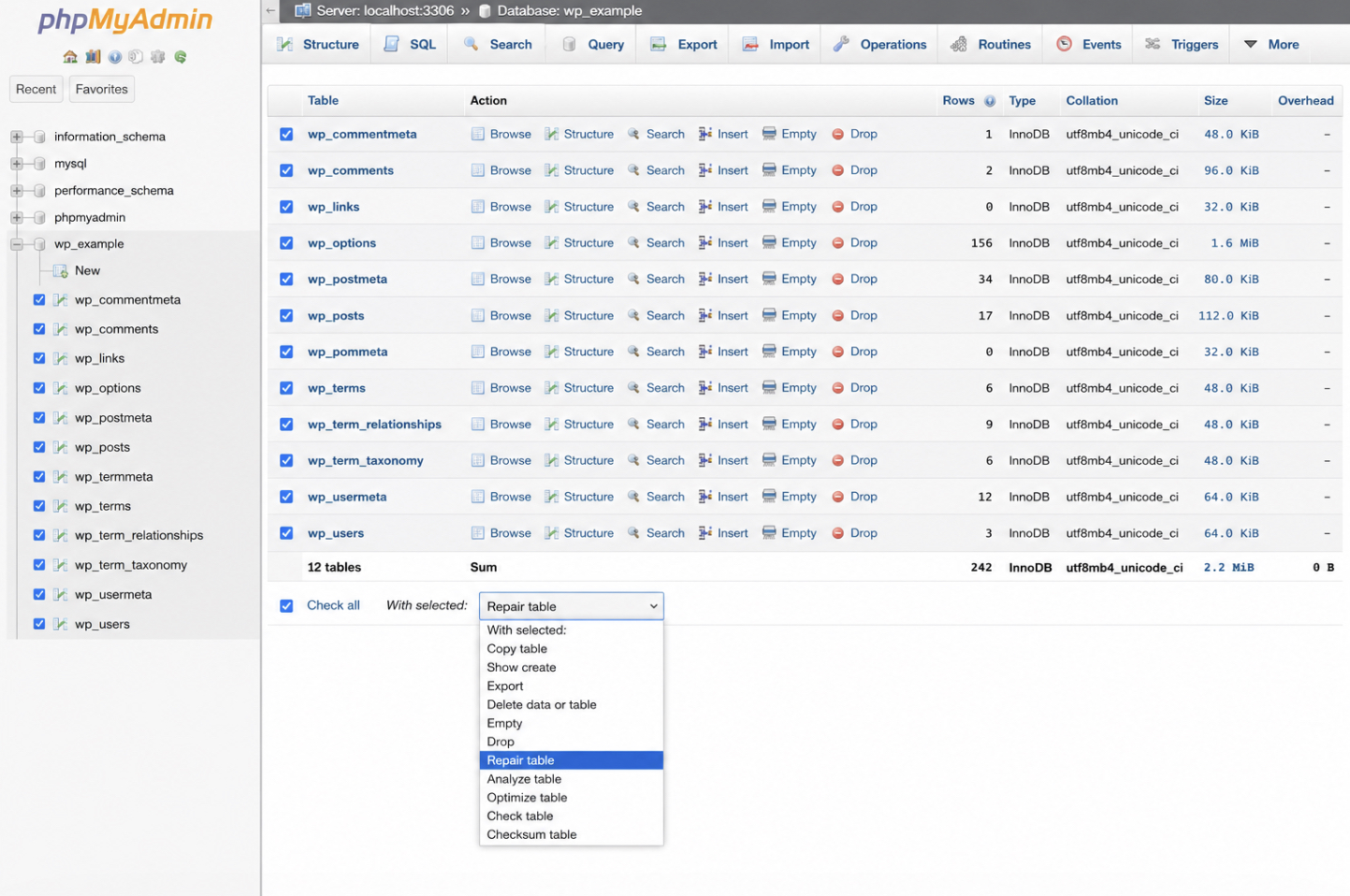
Every table in that list carries a checkbox. Tick the corrupted tables (the ones flagged during diagnosis, or every wp_-prefixed core table when the source is unclear) then open the “With selected:” dropdown beneath the list and choose “Repair table”.
phpMyAdmin runs the operation at once and returns a result row for each table it touched: an “OK” status confirms a clean table, while an error message marks one the operation could not recover. Reading that per-table output is what tells the site owner precisely which tables the repair fixed and which still need another route.
Some databases sit on a server with no graphical panel, or belong to a developer who would rather never leave the terminal. For that situation, the command line runs the same repair without a browser.
How to Repair the WordPress Database with WP-CLI
WP-CLI repairs the WordPress database through a single command, wp db repair, run from the command line instead of any browser panel. This is the third repair method, built for servers reached only over SSH and for repairs where neither the admin dashboard nor phpMyAdmin is available. The command connects directly to the database, checks every table WordPress registers, and repairs the ones that come back damaged.
Run wp db repair from the WordPress root, the directory that holds wp-config.php, so the command reads the site’s own database credentials and connects with no extra flags:
wp db repair
The command works through the tables in turn and reports as it goes, printing a line per table: a success line for each table it repairs, and a plain confirmation for the tables that were already sound. That per-table output is the record of what happened — the terminal equivalent of the status rows phpMyAdmin returns. A parallel command, wp db optimize, sits alongside it and belongs to a different job, reclaiming space and defragmenting tables, so it stays out of a repair run entirely.
The command line assumes a level of server access that not every site owner has or wants. When neither SSH nor phpMyAdmin is available, a repair plugin runs the same fix from inside the WordPress admin, with no terminal required.
How to Repair the WordPress Database with a Plugin
A repair plugin runs the same table repair from inside the WordPress admin, which makes it the fourth repair method and the one that asks the least of a site owner. Where the native tool needs a constant added to wp-config.php, phpMyAdmin needs database credentials, and WP-CLI needs shell access, a plugin needs only an admin login. That puts plugin-assisted repair within reach of less technical users who have neither command-line nor phpMyAdmin access to the WordPress database.
Two plugins handle the repair directly:
WP-DBManager: installs a database management panel under the admin menu and exposes a Repair DB action that runs the repair across the wp_-prefixed tables.
Advanced Database Cleaner: provides a table repair operation from its own admin page, alongside its other database tools.
Installing either follows the ordinary route: add the plugin from the WordPress plugin directory, activate it, and open its page in the admin. From there the repair is a single action: select the corrupted tables, or accept the full set, then run the repair. The plugin reports the outcome table by table, the same per-table result the native tool and phpMyAdmin return, only surfaced inside a screen the administrator already knows.
A plugin repair is still a repair, so it ends the way the other three routes do; with a check that proves the WordPress database actually recovered.
How to Verify the WordPress Database Repair
Post-repair verification confirms the WordPress database works after the repair, and it is the terminal step that proves the repair succeeded rather than merely finished. A repair method reporting “OK” against each table is a claim; verification is the evidence. Skipping it leaves the state of the database unconfirmed.
Verification starts at the front end. Reload the site and open the pages that failed before, the ones that returned the “One or more database tables are unavailable” notice, a white screen, or a broken query. If those load cleanly, the tables behind them read and write again. Then move to the data itself: spot-check wp_options, where the site configuration is stored, and wp_posts, where the content is stored, confirming that both settings and posts are present and intact before you start a blog on Gutenberg.
One task remains after a clean check. The native repair tool was opened by adding a constant to wp-config.php, and that constant leaves the repair endpoint reachable by anyone until it is taken out. Remove it:
// Delete this line from wp-config.php once the repair is verified
define('WP_ALLOW_REPAIR', true);
With that line gone, wp-admin/maint/repair.php is locked again and the repaired database is both working and secured.
A failed verification reads differently. When the errors persist, or wp_options and wp_posts still return missing or garbled rows, the repair did not fully recover the database. The corruption sits deeper than any of the four methods could reach. That outcome is not a dead end; it is the signal to fall back on the restorable copy captured before any repair ran.
How to Restore the WordPress Database from a Backup
Restoring the WordPress database from a backup replaces the still-corrupted database with the restorable copy captured before any repair began, and it is the recovery path for the two cases the four repair methods cannot cover: a repair that runs but does not bring the database back, and corruption inside an InnoDB table, which the REPAIR TABLE statement behind all four methods cannot act on at all. When verification fails, the fastest route to a working site is not a fifth repair attempt but a clean overwrite: the damaged tables go, and the known-good backup takes their place.
The restore reverses the export. A backup saved as a .sql dump is imported back into the same database, overwriting every table with its pre-repair contents. From the command line, one statement does it:
mysql -u user -p db_name < backup.sql
The same import runs through a browser for anyone without shell access: open phpMyAdmin, select the WordPress database, and use the Import tab to upload the .sql file. Either route replaces the corrupted tables wholesale, and the database returns to the exact state it held the moment before the repair began.
With the backup restored, the corruption that started the whole process is undone, much like restoring a duplicated WordPress page after testing changes. A broken WordPress database comes back to working order along one dependable sequence: confirm the corruption and its cause, secure a restorable backup before any repair begins, run one of the four repair methods (the native WP_ALLOW_REPAIR tool, the phpMyAdmin Repair table operation, the wp db repair command, or a repair plugin), verify that the site and its tables recovered, and, when a repair falls short, restore that backup so the WordPress database is intact and the site runs again.







 ChatGPT
  Claude
  Grok
Grok  Gemini