Explore our specialized services, tailored solutions, and industry expertise to elevate your digital presence. From custom WordPress development to seamless integrations, we build high-performing websites that deliver impact.
A website used to be “a brochure.” A few pages, a contact form, maybe a newsletter box, and you move on. In 2026, that approach is a slow leak, because most websites aren’t just marketing anymore; they’re where leads, demo requests, trial sign-ups, quotes, and bookings actually start.
The problem isn’t that people can’t fill out a form. It’s what happens after. If submissions land in an inbox and someone copies them into the CRM later (sometimes into a spreadsheet too, because “that’s how we track it”), you end up with messy data and delayed follow-ups. The lead sits there getting colder while your team does admin work.
A static site in 2026 is a dead end for business, not because it looks dated, but because it behaves like this: it doesn’t route, it doesn’t track intent, and it doesn’t connect the dots between “visitor” and “pipeline.” And the manual transfer cost is bigger than most teams want to admit: people-hours spent moving data around, plus the mistakes that come with it. Wrong email, missed UTM, duplicate records, a form that never makes it into the CRM at all. None of that sounds dramatic, but it’s how money quietly disappears.
That said, let’s look at five of the most widely used CRM platforms and the real-world implementation cases completed by the team at IT Monks that show how proper CRM integration can scale business operations, improve internal workflows, and reduce manual work across marketing and sales teams.
Popular CRMs
There are many CRMs out there, but these five come up frequently in client conversations: HubSpot, Salesforce, Pardot, Zoho CRM, and Pipedrive. We picked these five solutions for the showcase not only because they’re the only good options, but because they cover most scenarios: SMB, enterprise, B2B lead nurturing, budget-friendly suites, and sales-first pipeline teams.
HubSpot
Best for: SMBs and inbound-focused teams that want things working fast.
HubSpot is usually the quickest “yes” when a smaller team wants the website and CRM to behave like one system, not two separate islands. The free plan is a real starter kit: you can set up forms, collect contacts, and run a basic pipeline without the usual “enter your card first” procedure, which is why teams actually try it and keep using it.
The website connection is also the point. In many setups, it’s literally a single JS snippet, and your web forms start pushing contacts straight into the CRM without pulling engineers into weeks of mapping work. For inbound teams that work on landing pages, lead magnets, chat, and email follow-ups, that matters more than fancy features. And because the UX is clean, the system doesn’t die after onboarding: people open it, update deals, and don’t hate doing it.
HubSpot’s contact activity tracking is another quiet advantage. You can see what a lead looked at, what they clicked, and which forms they filled out, and it’s there by default. That kind of visibility sounds “nice,” but it changes how sales follow up. You stop guessing and start responding with context.
Customization can also feel limiting when you’ve got complicated sales processes. HubSpot works great when your pipeline is fairly standard, but it can feel rigid when you’re trying to model a more complex org. Reporting is another tradeoff: it’s fine for many teams, but if you’re used to Salesforce-level dashboards, you’ll notice the difference.
Also, HubSpot can get bloated over time. It’s easy to keep adding hubs and paying for stuff that sounded useful at the time, only for nobody to be touching half of it six months later.
Pros
Cons
Free plan is genuinely practical (contacts, forms, pipelines) and doesn’t force a credit card up front.
Pricing climbs quickly once you need deeper automation, segmentation, or reporting.
Website embed is straightforward: one snippet and your forms can push data into the CRM.
Custom sales processes can feel boxed in as you get more complex.
CRM + email marketing + live chat + landing pages are in one place, so less duct-taping tools together.
Reporting depth is fine for many teams, but it’s not on the same level as enterprise systems.
Clean UX, which sounds fluffy, but it’s why teams actually use it.
It can get bloated if you keep adding hubs and paying for features that never become part of your process.
Contact activity tracking (page views, clicks, form fills) is solid out of the box.
EC English Case Study
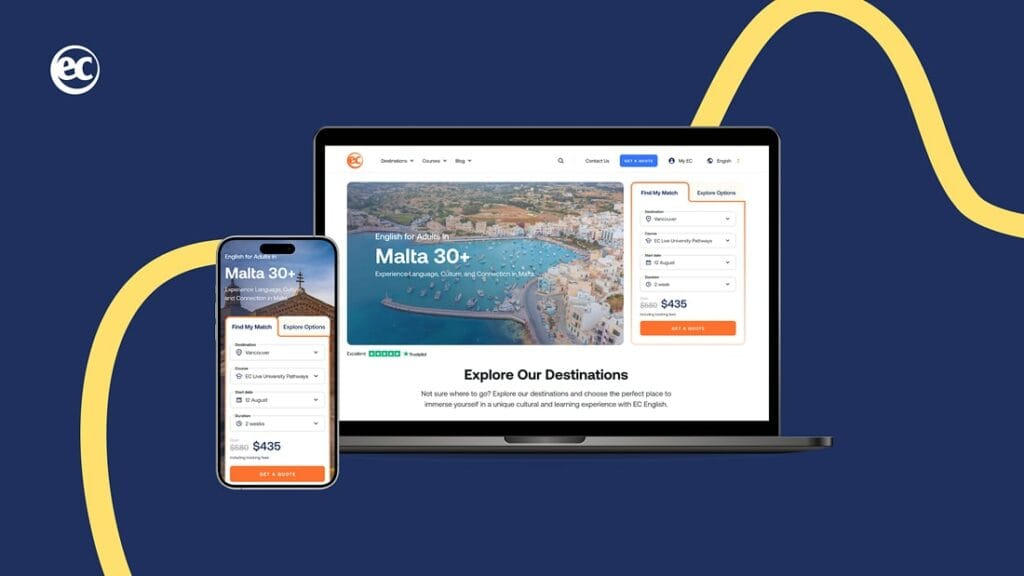
One good example of what “website connected to systems” looks like in practice is the EC English project. The brief was about rebuilding a global education platform so that marketing teams could run campaigns and content across regions, while bookings could be made directly on the site and then synced into internal systems.
The outcome wasn’t just a nicer site; it was a multilingual platform (8 languages) with a booking flow connected to the client’s ERP and CRM, so booking data moves automatically instead of being handled manually. That kind of setup is exactly why CRM + website integration stops being a “nice-to-have” once you’re doing real volume.
Language Learning Platform with Booking
EC English
EC English’s website redesign unified its corporate and educational functions into a scalable, mobile-first platform with booking capabilities, enhancing global reach, user experience, and operational efficiency.
Salesforce
Best for: Enterprise teams with complex workflows, multiple pipelines, and lots of integrations.
Salesforce is what you pick when your “CRM” isn’t just a place to store leads, it’s the operating system for sales. Big teams, multiple pipelines, lots of roles, approvals, custom objects, weird edge cases that only exist in your industry. Salesforce can handle all that, because you can shape almost everything in it.
That flexibility is the main selling point. You’re not stuck with a rigid set of fields and one way of doing deals; objects, workflows, permissions, and automations can be tailored to how your company actually runs. Then there’s AppExchange, which is basically the reason Salesforce ends up in so many enterprises. If you need it to talk to a website, data warehouse, ERP, support system, or some niche tool your ops team loves, there’s usually a connector or a solid integration path.
On the website side, Salesforce also has native options like Web-to-Lead and Web-to-Case, so you can capture form submissions straight into the CRM without inventing a workaround. And once you’re deep into reporting, the analytics side is strong, especially if you’re the kind of org that wants dashboards for everything and expects leadership to check numbers daily. It also scales cleanly; moving from 10 users to 10,000 doesn’t force you to “graduate” to another platform.
The downside is that Salesforce is expensive in a real way, not just “monthly subscription expensive.” Licenses add up, implementation is a project, and maintenance is ongoing work. Most companies either hire Salesforce admins or keep a consulting partner around, because otherwise the system turns into a messy kitchen drawer of fields and half-built automations.
Website integration can also be deceptively tricky. Yes, you can connect forms, but “out of the box” usually still means developer time, mapping decisions, and testing. For marketing-heavy setups, teams often add extra tools (Pardot is the usual direction) to get the tracking and nurturing they want. And if you’re an SMB, Salesforce can easily become overkill; you’ll spend more time managing the tool than selling.
Pros
Cons
Extremely customizable: objects, fields, workflows, permissions, the whole thing.
Cost is high, not just licensing; implementation and maintenance are the real bill.
AppExchange ecosystem is huge, so integrations are rarely a dead end.
Learning curve is steep; most companies need admins or a partner.
Native ways to capture website data into leads/cases.
Out-of-the-box website integration often isn’t “plug and play” unless your needs are simple.
Enterprise reporting and analytics are strong, and the AI layer can help in mature setups.
Overkill for many SMBs; the system can end up heavier than the process it’s meant to support.
Scales well without needing to “switch platforms later.”
Rudd Case Study
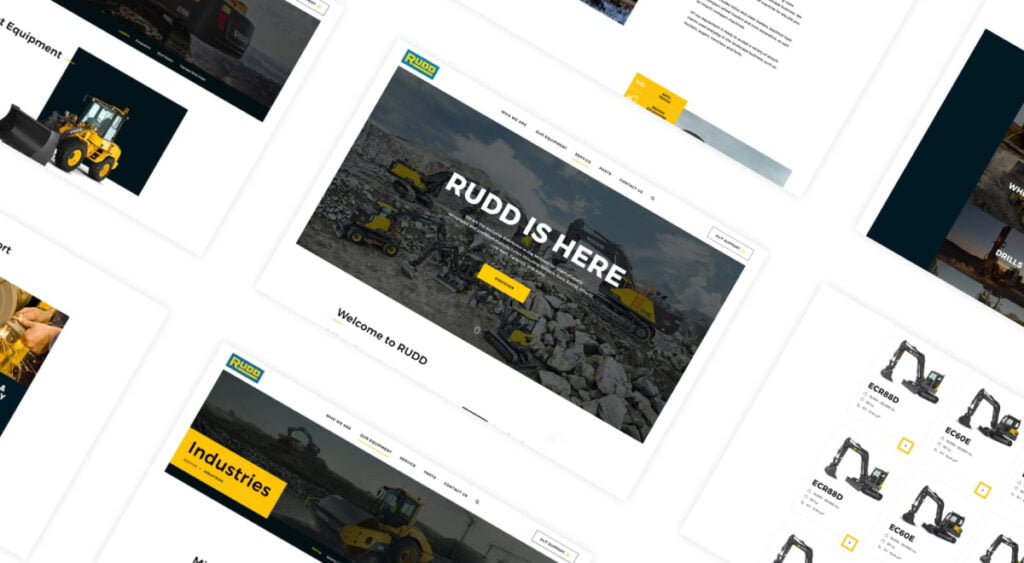
Rudd’s case is a good reminder that not every business needs a flashy site, but every business needs a site that works. They’re a heavy equipment distributor in Kentucky with 12 offices, and the goal was a modern, practical website that clearly guides visitors to what they need.
The rebuild focused on clean UX and performance, and the results they highlight are pretty straightforward: improved load time (1.6 seconds), more keyword visibility (254+ keywords), and a big jump in organic traffic since launch.
Heavy Machinery Distributor
RUDD
Exclusive distributor in the Midwest for internationally recognized and preferred manufacturers including Volvo, Hitachi, Sandvik, and Link-Belt.
Best for: B2B lead nurturing on top of Salesforce.
Where Marketing Cloud Account Engagement shines is the tight sync with Salesforce. If you’re running Salesforce and you want website submissions to land in the right place without somebody babysitting inboxes, Marketing Cloud Account Engagement handles that well. It’s also strong for B2B lead scoring and grading, especially when you’re dealing with longer sales cycles and multiple touchpoints.
Page visits, downloads, repeat views of a pricing page. Those signals matter in B2B, and Marketing Cloud Account Engagement is built around them.
The drip campaign side is another reason teams stay with the platform. You can trigger sequences based on real behavior (someone visited a product page twice, someone opened an email and then returned through branded search, etc.), and that’s the difference between “we sent a newsletter” and “we’re actually moving deals forward.”
There are tradeoffs, though, and they’re not small. You need Salesforce. The pricing is also very much enterprise-level pricing, not “SMB-friendly monthly tool” pricing. And while Salesforce continues improving the experience, some teams still find the interface less intuitive compared to newer marketing automation platforms. It’s also not the best fit for B2C brands focused on short buying cycles and quick conversions.
Pros
Cons
Tight sync with Salesforce so website submissions flow cleanly into SF records.
Requires Salesforce; it’s not meant to live on its own.
Strong lead scoring/grading based on website behavior.
Expensive for most SMBs.
Drip campaigns triggered by real actions (visits, downloads, form fills).
UI feels dated compared to newer marketing tools.
Visitor tracking can show which companies are browsing, even pre-form in some setups.
Not a great fit for B2C; it’s built for longer B2B buying journeys.
Trialbee Case Study Trialbee is a good example of why Marketing Cloud Account Engagement often comes up in website projects. Their old site was slow, outdated, and, very importantly, losing visitors before they became leads. The marketing team struggled to launch campaigns effectively, and there was a weak connection between website leads and the CRM.
The rebuild focused on speed, mobile usability, and conversion optimization, but the key point for this article is the integration layer: IT Monks connected Salesforce and Marketing Cloud Account Engagement directly to the contact forms so every lead is captured and tracked automatically.
That’s what closes the quiet leak in the funnel. No copying data manually, no missed demo requests, no guessing where the lead originated. Trialbee also reported a 35% reduction in bounce rate and a 27% increase in organic traffic after the rebuild, which tends to happen when the technical foundation finally supports the marketing workflow instead of slowing it down.
Global Patient Recruitment Platform
Trialbee
Trialbee’s website rebuild transformed a slow, outdated platform into a high-performance digital presence
Zoho CRM
Best for: Cost-conscious teams that still want a broad feature set.
Zoho CRM is the option people circle back to when they want something “serious enough” but aren’t excited about paying Salesforce or rebuilding half their processes around a tool. The price-to-feature ratio is honestly the headline here. You get a wide set of modules, automation, pipelines, and reporting without feeling like every click is a paid add-on.
Website integration is usually smooth if you stay inside the Zoho ecosystem. Zoho Forms can push submissions straight into contacts or leads without coding, and that alone removes the boring admin work that quietly eats hours every week. If the company already uses Zoho tools (Desk, Books, Sites, Campaigns, whatever), the connections tend to feel natural, as if they were designed to talk to each other rather than “integrated” later with glue.
Zoho’s also pretty flexible once you start tailoring it. Workflows, custom fields, and modules can be adjusted without dragging developers into every small change. And Zia, their AI assistant, can help with lead scoring and engagement predictions (useful when it’s set up properly and the data going in isn’t messy).
The downsides are mostly about experience, not capability. The UI can feel uneven, especially if your team has used HubSpot or Pipedrive and expects everything to be polished and obvious. Support is a bit of a coin flip too; simple questions get handled, but weird edge cases can take time. And the moment you step outside Zoho’s own suite, integrations can become more fiddly than you’d expect.
There’s also the “too much stuff” problem. Zoho gives you a lot, which is great, but new teams can get lost in it. If nobody owns the setup, people end up using 20% of the system and improvising the rest in spreadsheets.
Pros
Cons
Strong price-to-features ratio.
UX can feel inconsistent across the suite.
Web forms can sync to contacts/leads without heavy custom work.
Support experience varies; simple issues are fine, messy ones can drag.
Fits well with the broader Zoho ecosystem (Sites, Desk, Books, etc.).
Third-party integrations outside Zoho can take more effort.
AI assistant can help with scoring and engagement predictions (useful when configured right).
There’s a lot in there, which is great, but it can overwhelm new teams.
Pipedrive
Best for: Sales-led teams that live and die by their pipeline.
Pipedrive is for teams that don’t want a “platform,” they want a pipeline that people actually use. It’s built around deals moving forward, and the interface nails that simple, slightly addictive drag-and-drop flow. Sales folks tend to adopt it fast because it feels like a sales tool, not a database someone from ops forced on them.
From a website-to-CRM angle, Pipedrive does the basics well. Web Forms can be embedded on pretty much any site and can auto-create a lead or a deal, which already saves the usual back-and-forth of “did we log this inquiry?” If you add LeadBooster, you can catch visitors with live chat or a chatbot and push those conversations straight into the pipeline, so the site isn’t just collecting emails and hoping someone checks them later.
Pricing is also refreshingly predictable. You don’t get that “surprise, you need the expensive tier for one feature” feeling as often, and scaling seats usually doesn’t turn into a budgeting drama. Automation is decent for the day-to-day stuff, too. Follow-up reminders, moving stages, and small workflow tasks that keep deals from stalling because someone forgot.
Where Pipedrive starts to feel thin is marketing. If you need complex nurture flows, deep segmentation, and long drip sequences based on a mix of website behavior and campaign logic, it’s not the strongest fit. Reporting can also feel basic once leadership asks for forecasting, custom dashboards, or “show me this by segment, region, and channel” type questions; Salesforce and HubSpot are simply stronger there. And unlike HubSpot, there’s no free tier, so even a solo user is paying from day one.
It’s also pretty sales-shaped by design. If you’re trying to use the CRM for customer success, support, or a more cross-functional setup, customization has limits, and you can feel that ceiling.
Pros
Cons
Pipeline UX is excellent; salespeople actually enjoy using it.
Marketing automation is thin compared to HubSpot or Pardot.
Web Forms embed cleanly and can auto-create leads/deals.
Reporting is okay, but not deep for advanced forecasting.
LeadBooster helps capture visitors via chat and funnels them into the pipeline.
No free tier.
Pricing is pretty transparent.
Customization is mostly sales-oriented; less ideal for support or customer success workflows.
Automation for routine follow-ups and reminders is solid.
Closing Words
For SMBs that want the easiest path from website forms to a working CRM, HubSpot and Zoho are usually the smoothest options to start with. They get you moving quickly without turning integration into a separate engineering project.
If you’re enterprise, already running complex processes, or you need heavy custom objects and reporting, Salesforce is the safer long-term home. It’s not lightweight or cheap, but it can handle the messiness of real enterprise sales.
And if you’re somewhere in between and your sales team basically lives in the pipeline all day, Pipedrive is often the most practical pick.
If you’re unsure which direction fits, we can look at your current site flow (forms, routing, lead sources, follow-up timing) and map it to the CRM setup that won’t create extra work later.











 ChatGPT
  Claude
  Grok
Grok  Gemini