Explore our specialized services, tailored solutions, and industry expertise to elevate your digital presence. From custom WordPress development to seamless integrations, we build high-performing websites that deliver impact.
A WordPress shortcode is a short text tag, written inside square brackets and placed directly in content, that WordPress replaces at render time with the HTML output of a handler. The brackets mark the spot. The handler decides what appears there. Once a handler is registered for the tag, a visitor to the finished page never sees the bracketed tag itself, only the markup that stands in its place. Without that handler, the tag has nothing to call and stays on the page as literal bracket text.
That handler is a small piece of functionality supplied by WordPress core, a plugin, or a theme, and it holds the logic the tag points to. For a site owner, one bracketed tag adds a packaged feature to a page while the surrounding content stays free of code. For a developer, the same tag is a stable, public handle on functionality kept out of the editor entirely. Shortcodes in WordPress exist so that a single line of readable text can do the work that would otherwise sit in a template.
Every shortcode takes one of two forms: a self-closing tag or an enclosing pair. WordPress shortcodes predate the block editor and still run inside it; the Gutenberg block is a separate mechanism for a related job, not a replacement for the bracketed tag.
Behind that plain bracket sits a fixed order. The tag passes through the same handful of steps every time WordPress assembles a page, carries its own syntax, appears as bracketed text where it is added, and belongs to a small set of tags the platform ships ready to use. The processing itself turns a saved bracket into finished markup.
Shortcode Processing
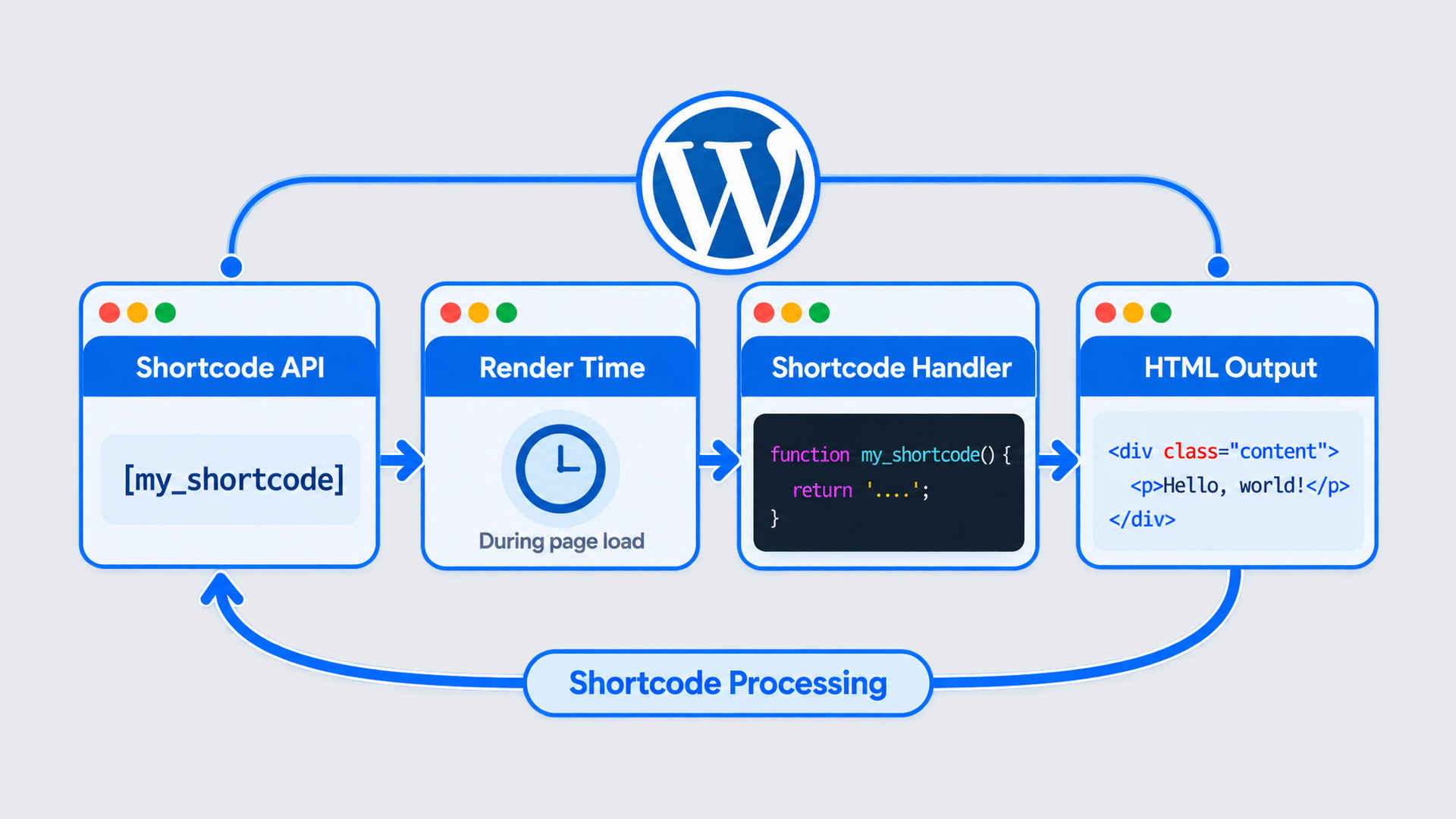
Shortcode processing is the fixed sequence WordPress runs (the Shortcode API, render time, the handler, the HTML output) to turn a bracketed tag into the markup a visitor actually sees. Stored content keeps the tag as plain text. Processing is the work that stands between that saved bracket and the displayed page.
The order never varies. First, the Shortcode API binds each tag name to a handler function. Then, at render time, WordPress scans the stored content and matches every registered bracket it parses. The matched handler runs, and its return value replaces the tag with HTML output. Every step happens on the server; by the time markup reaches the browser, the bracket is already gone, and only its result remains.
None of this touches the page a second time, and none of it runs in the visitor’s browser. The tag is inert text until the server reaches it, and finished HTML once the server has passed it. The first link in that sequence, the binding that makes every later step possible, belongs to the Shortcode API.
Shortcode API
The Shortcode API is the WordPress mechanism that binds a shortcode tag name to its handler function. One name, one handler: the API keeps that pairing so WordPress knows which function answers for which bracket. Without the binding, a bracket is just text; with it, the bracket becomes a recognized instruction.
A pairing enters the API through registration. WordPress core, a plugin, or a theme registers a handler through a single function, add_shortcode(), which is where a tag name and its handler are paired. Naming the tag in the API is all registration means at this point. The function marks where the binding is recorded, not a procedure to follow. Once a pairing is registered, the tag is recognized every time content renders. The API does not run the handler on its own; it points to the handler and includes the tag in the set WordPress watches for as a page is built. One registration holds, and every later render honors it.
Registering a handler that WordPress does not ship, a tag defined for one specific site, is a separate task, walked through in how to create a custom shortcode in WordPress. The API guarantees that a bound tag is recognized, and that recognition takes effect at render time.
Render Time
WordPress, the self-closingRender time is the page-load moment when WordPress scans saved content and finds a shortcode tag. A saved post keeps only the bracket text (the literal [ gallery ] or [ caption ] characters entered in the editor), and holds nothing of what those brackets stand for. The visible result is never stored with the post. WordPress produces it on each load: every request parses the saved content again, locates the tag, and calls the handler bound to it. Because nothing about that result is written back into the post, the same scan repeats from scratch the next time the page loads.
Shortcode Handler
A shortcode handler is the function WordPress calls the instant its scan finds the tag. Each shortcode points to exactly one handler, and the handler is where the real work runs. It takes the bracket tag as its cue and produces something to stand in its place.
Three sources supply that function.
WordPress core supplies the handler for every built-in shortcode, which is why a tag such as already works on a fresh WordPress site with nothing added.
A plugin supplies the handler for any shortcode it adds, registering its own function once the plugin is active.
A theme supplies its own handlers for the tags it defines.
Whatever the source, the behaviour at render time is identical: WordPress runs the function and waits for what it returns. That output becomes what the tag renders on the page.
HTML Output
HTML output is the markup the handler returns in place of the tag, and it replaces that tag on the page the moment WordPress renders it. The finished markup a visitor reads is gallery or caption output (an image, a figure, a line of caption text) never the square brackets typed into the editor. The bracket tag expands into HTML that the browser can display, and the handler’s return value becomes the real elements in the page source.
A core [ caption ] tag, for instance, returns a figure element that wraps the image and its caption:
That exchange depends on a handler being registered for the tag. When none is bound, WordPress finds nothing to call, and the brackets stay on the page as literal characters. The visitor reads the raw [ caption ] text instead of a caption. That case, and what causes shortcodes showing as plain text, sit with the no-handler condition rather than the processing chain. What the server reads before any of this runs is the tag’s own construction — the bracketed characters that make a shortcode a shortcode.
What Is the Syntax of a Shortcode?
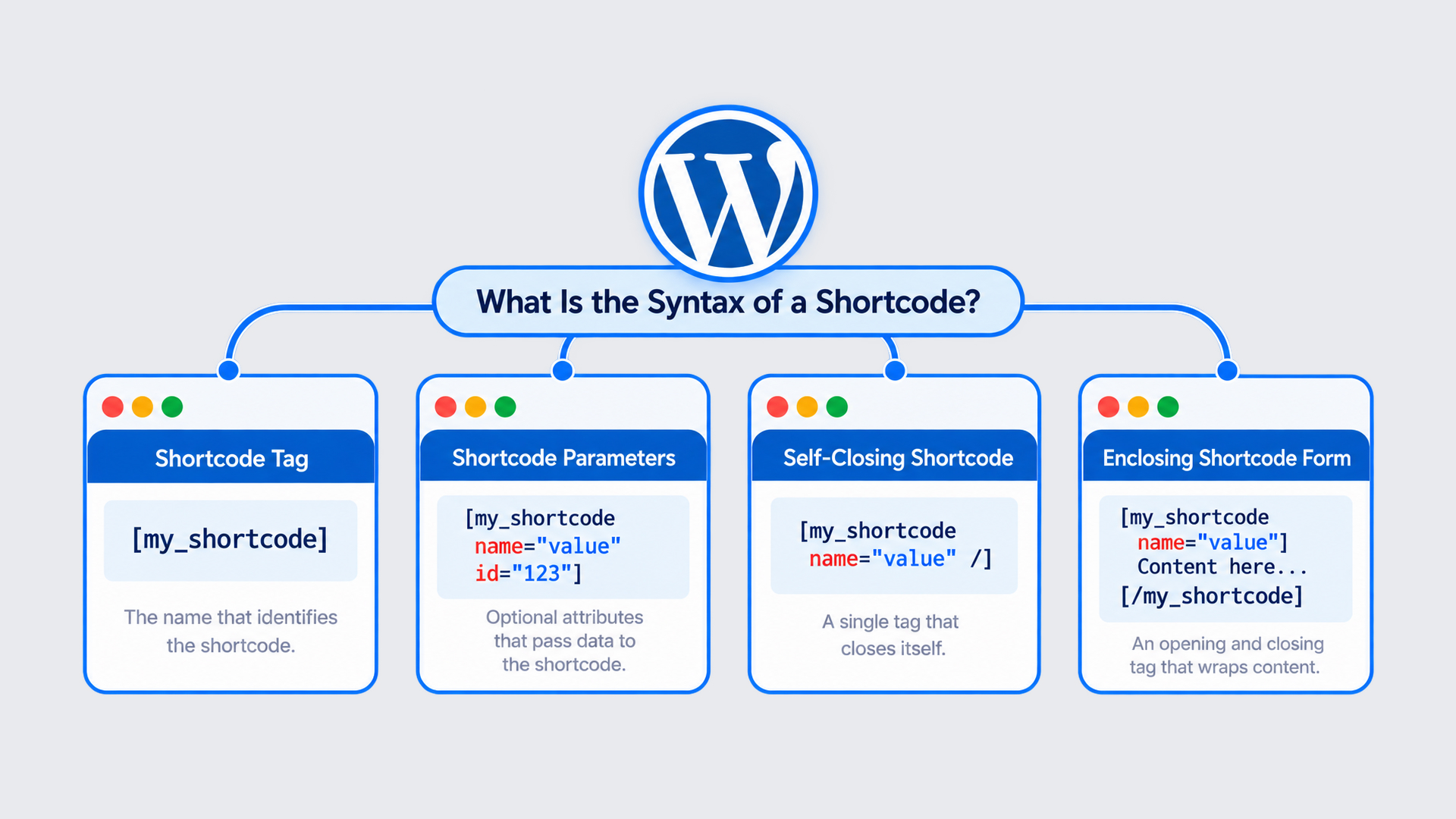
Shortcode syntax is a tag name written inside square brackets and dropped straight into post or page content. Those square brackets do the signaling work: they tell WordPress to interpret the enclosed text as an instruction, not to print it verbatim on the page. Remove the brackets and the same characters read as ordinary words; keep them, and the tag is live.
After the tag name, an optional key="value" parameter, one, or several, can follow, still inside the same brackets, tuning what the shortcode gives back. And the whole construct settles into one of two shapes. A single self-closing tag stands on its own, while an enclosing pair wraps a stretch of content between an opening tag and a matching closing tag.
[tag param="value"]
[tag]content[/tag]
Both lines share a starting point. The upper one is self-closing: a single bracketed tag, optionally carrying a parameter. The lower one is enclosing: an opening tag, some content, then a closing tag marked with a slash. Whichever form a WordPress shortcode takes, it opens with the same element: the tag name, the first part written inside the brackets.
Shortcode Tag
The shortcode tag is the name written inside the square brackets: the label WordPress reads first and matches against a handler registered under exactly that name. A bare tag carries that name and nothing else:
[gallery]
Here gallery is the tag: no parameters, no wrapped content, just the name between the brackets. WordPress checks that name against its list of registered handlers, and a match hands rendering to the code behind the tag. The check is literal and whitespace-sensitive. A shortcode tag must sit flush against the opening bracket, with no gap between the two; add a space and the name stops matching, so the text stays exactly as it is. Rarely, though, does the tag name travel alone. Directly after it, inside the same brackets, come the parameters that adjust what the WordPress shortcode produces.
Shortcode Parameters
Shortcode parameters are optional key="value" pairs written after the tag name, inside the same square brackets. Each pair passes a setting to the shortcode and changes what its handler returns: a wider gallery, a specific set of images, a particular media source. Parameters describe the result, never the mechanism that produces it.
[gallery ids="1,2,3" columns="3"]
Here the gallery tag takes two parameters: ids, naming which images to pull, and columns, setting how many run across a row. Swap in an src or a type pair on another core shortcode and the effect shifts once more: same tag, different output, driven entirely by the values between the quotation marks. Parameters, then, settle what a shortcode outputs. What they leave open is how the tag is written around content: whether it closes itself in a single bracketed unit, or opens, wraps a passage of content, and closes again.
Self-Closing Shortcode
A self-closing shortcode is a single bracket pair that stands on its own, with no closing tag to match it. One tag, opened and closed inside the same set of square brackets, is the whole of it. Because nothing wraps around it, the handler’s output is inserted exactly where the tag sits. The rendered result replaces the bracketed text.
In use, the self-closing form reads as a lone tag on the line:
[video src="demo.mp4"]
That single bracket pair carries a name and, here, one parameter, and it needs no partner tag to be complete. Some shortcodes, though, do the opposite: they wrap around a block of content between two tags. That second shape is the enclosing form.
Enclosing Shortcode Form
The enclosing shortcode form is a tag pair that wraps content between an opening tag and a closing tag, and the closing tag repeats the same name with a leading slash. The opening tag marks where the wrapped content begins; the slash on the closing tag marks where it ends. Everything held between the two is the content the shortcode acts on. The handler receives that wrapped content and changes how it displays, styling it, framing it, or reformatting it around whatever sits inside.
Written out, the enclosing form brackets the text it governs:
[caption]Image caption text[/caption]
Here the words between the tags are the payload, and the closing [/caption] (name plus slash) closes the pair. Self-closing stands alone; enclosing wraps. A real instance of each makes the difference plain.
Example WordPress Shortcode Tags
A WordPress shortcode example is the bracket tag shown as text, exactly as typed into content before WordPress renders it. The two forms differ only in shape:
[gallery]                        <- self-closing form
[caption]Wrapped text[/caption]  <- enclosing form
To provide an example of a shortcode in WordPress, the self-closing [ gallery ] is enough on its own; to give an enclosing one, [ caption ]…[ /caption ] shows the pair that wraps its text. The self-closing [ gallery ] and the enclosing [ caption ]…[ /caption ] are the WordPress shortcode example in plain form: bracketed names, nothing rendered yet. Both are core shortcodes, part of WordPress core rather than any add-on, so they resolve on any WordPress site the moment the tag is placed. The question then becomes where these tags belong in the first place.
Where to Find a WordPress Shortcode?
A WordPress shortcode is found in the same place it was typed, inside post or page content, so the answer to where a shortcode is found in WordPress starts with the content editor rather than a hidden panel. Look where the tag was written, not where its finished output later appears. To find a WordPress shortcode, scan four spots: the body of a post or page, a Shortcode block in the block editor, a widget area, and a plugin’s settings screen.
The block editor keeps that behavior intact. When a tag goes into a post assembled from blocks, the editor places it inside a dedicated Shortcode block, a small container that holds the raw bracketed tag until render time. That editor is what Gutenberg is at its foundation, and the Shortcode block is its slot for text WordPress will process later.
Two other spots carry shortcodes. A widget can hold a tag, so the shortcode sits in a sidebar or footer area, though whether that tag renders depends on the widget: a Shortcode block in a block-based widget area (WordPress 5.8 and later) runs it, while a classic Text widget shows it as plain text unless do_shortcode is filtered onto widget_text. A plugin’s settings screen is the fourth: many plugins generate a tag and show it for copying, which is why a shortcode frequently turns up on a configuration page rather than in the content itself.
Every one of these places holds tags a site owner put there deliberately. Before any plugin adds one of its own, though, WordPress already carries a short set of shortcodes on its own.
Default WordPress Core Shortcodes
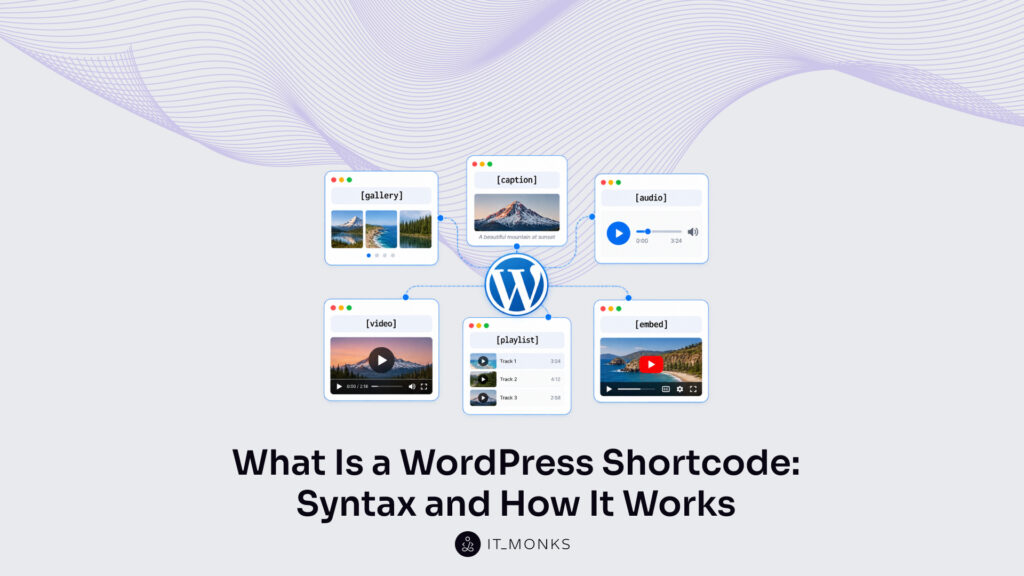
Default WordPress core shortcodes are the tags every WordPress site has without a plugin: the standard entries on the default shortcodes list that ship with the software itself. Unlike the tags that arrive with a plugin, these come with WordPress from the start. WordPress ships six of them as the standard set:
[ gallery ] image gallery
[ caption ] captioned image
[ audio ] audio player
[ video ] video player
[ playlist ] media playlist
[ embed ] media from a URL
Each entry on this WordPress shortcodes list points at a handler that ships inside WordPress core. Because those handlers live in core rather than in an add-on, the six tags render on any site, a new one or a years-old one, with nothing extra switched on. A gallery tag produces a gallery, an embed tag pulls in media from a URL, and none of them need a download to work.
That core status is what keeps the WordPress shortcode useful right beside the block editor: it stays a compact way to place dynamic output into content that blocks alone would handle differently.






 ChatGPT
  Claude
  Grok
Grok  Gemini