Explore our specialized services, tailored solutions, and industry expertise to elevate your digital presence. From custom WordPress development to seamless integrations, we build high-performing websites that deliver impact.
The WordPress 5 minute installation is the famous five-minute install, a canonical and named WordPress.org install pattern that has become the standard starting point for getting a new WordPress site online. Often referred to as the WordPress 5 minute install, it is designed around a simple idea: the install script writes the configuration for you rather than requiring manual configuration work during setup. Because the install script writes the configuration and guides the process, a complete run can typically produce a working site in roughly five minutes.
Within the broader category of WordPress installation methods, the famous five-minute install sits alongside approaches such as a manual install, package download workflows, and local install environments, while remaining the best-known named installation pattern. This article focuses on that canonical WordPress.org process by explaining the pattern, outlining what it assumes before you begin, walking through the standard installation run, and finishing at the point where you can log in to a working site.
For site owners, developers, and agency staff who need to stand up a WordPress site efficiently, the five-minute installation remains the reference workflow and the starting point for understanding how WordPress defines its most recognizable installation experience.
What is WordPress 5-Minute Installation
The Famous 5-Minute Installation is the WordPress 5 minute installation as wordpress.org names it, the canonical install pattern the official documentation presents as Basic Instructions for getting WordPress running. The five-minute installation names a definite arc: the WordPress package is obtained, a database and database user are created, wp-config.php holds the database parameters, the files are uploaded to the web server, the install script runs at wp-admin/install.php, the install form collects the site title and credentials, and the first login opens the finished site. Each stage is named in order, and each belongs to a sibling that owns its depth.
The five-minute install compresses the manual install by letting the install script write the configuration. WordPress reads the database parameters from wp-config.php, then the install script at wp-admin/install.php creates the database tables, records the site title and administrator account, and produces the login prompt. That compression, where the install script writes the table prefix, the credentials, and the connection settings in one pass, is what defines the pattern as a five-minute installation rather than a long sequence of manual edits.
The famous 5-minute installation is distinct from three neighboring paths that the pattern names but does not develop. The granular manual procedure, with its file-transfer steps, control-panel database setup, and hand-edited wp-config.php values, is a separate walkthrough. The bare package download is its own task that precedes the install. The local install on a development machine runs the same WordPress on an offline stack rather than a live host. The five-minute installation assumes the manual depth is handled elsewhere and keeps its own focus on the compressed canonical run, which assumes a short list of prerequisites before the install script can run.
Prerequisites Before Installing
Prerequisites before installing are the conditions the five-minute install assumes are already in place before the install script can run. The five-minute install requires three things to be ready, and the canonical wordpress.org pattern treats them as settled before the on-screen install begins. Each prerequisite is named here and routed to the resource that develops it, because the named pattern states the requirement rather than re-teaching the procedure:
The WordPress package, the core files obtained from wordpress.org before anything is uploaded. The package is the starting material the run uploads to the server, and the dedicated walkthrough on how to download WordPress covers the steps to obtain and extract it before the run begins.
A database and database user, created with the privileges WordPress writes to during the install. The install script records the site data in that database, and the full manual path on how to install WordPress manually develops the database creation and the user setup in depth.
A PHP and MySQL host, the environment the install script executes inside, serving a MySQL or MariaDB database.
These three prerequisites are what let the canonical run take roughly five minutes. WordPress assumes the package is ready, the database exists, and the host serves PHP and MySQL, and on those conditions the install script handles the configuration in a single short pass. With the prerequisites met, the five-minute install moves to the compressed canonical run, where the install script reads wp-config.php, the files reach the web server, and wp-admin/install.php finishes the install.
Installing WordPress with the Install Script
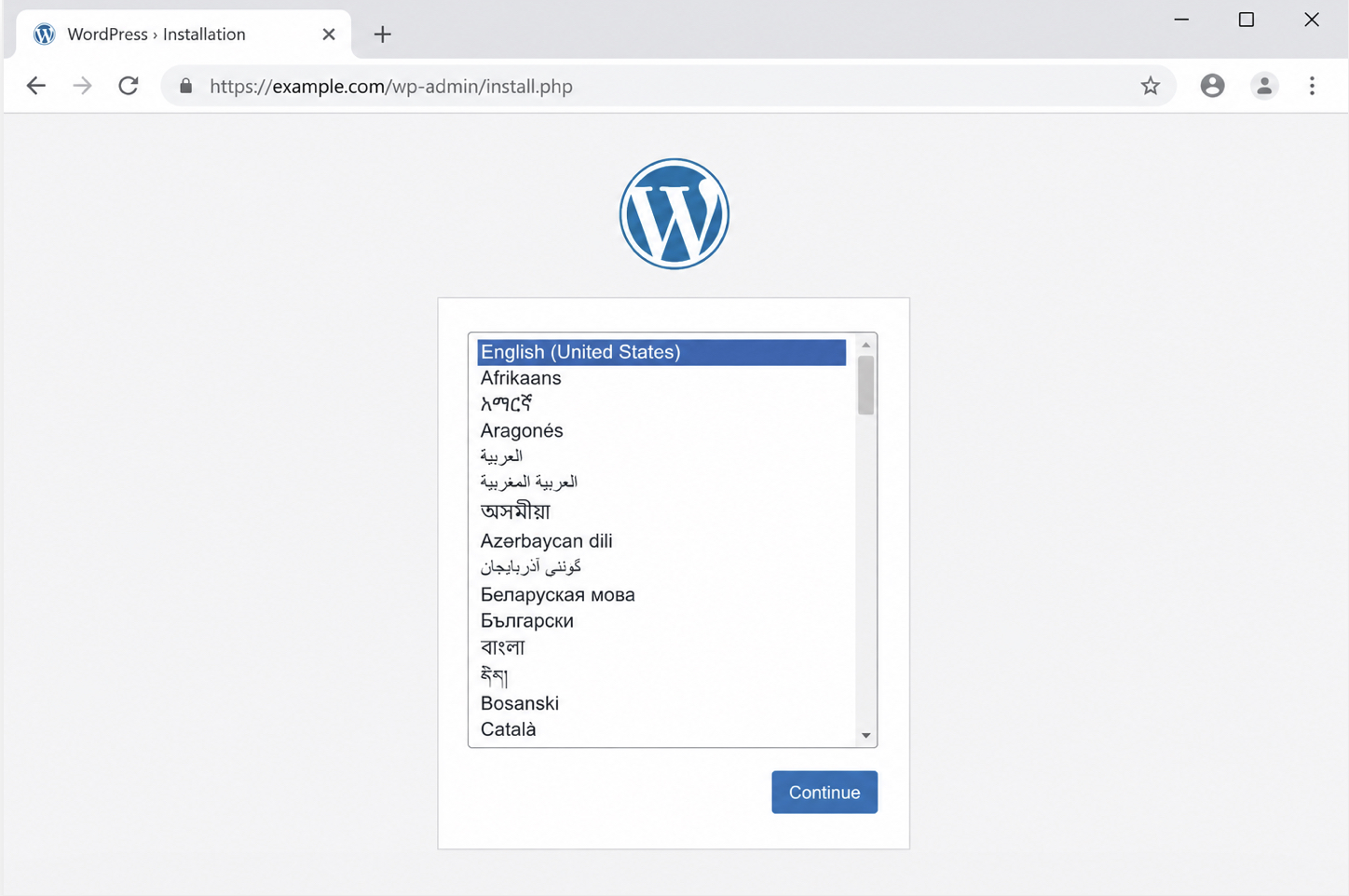
The WordPress five-minute install runs from the install script at wp-admin/install.php, the canonical mechanism that drives the on-screen install once the prerequisites are in place. The install script is the small WordPress program that a browser loads at the wp-admin/install.php address, and it is what compresses the manual configuration work into the famous five-minute window.
No configuration files are edited and no database tables are touched by hand during this run; the install script reads the database credentials, writes the connection settings, and presents the on-screen install. This is the part of the five-minute install that actually takes about five minutes, because the script performs the configuration that the granular manual procedure would otherwise demand step by step.
The compressed canonical run is an ordered sequence of three steps:
Have the database credentials ready, the values the install script writes into wp-config.php, the configuration file that connects WordPress to its database.
Upload the WordPress files to the desired location on the web server.
Load wp-admin/install.php in a browser to run the install script, which writes wp-config.php from the supplied credentials.
The first two steps gather the database credentials and place the package files; both assume the prerequisites named earlier, the WordPress package and a created database, are already met. The third step is where the install script takes over.
With the credentials in hand and the files in place, the install script accessed at wp-admin/install.php writes wp-config.php from those credentials, begins the on-screen install, and produces the installation form. The mechanic that makes the pattern famous is the division of labor during this run: the site owner only supplies the credentials and accesses the URL in a web browser, and the install script writes the configuration file and does the rest.
The wp-config.php Setup
The wp-config.php setup is the install script writing the configuration file that connects WordPress to its database, and in the five-minute install the setup happens without any hand-editing. The configuration file named wp-config.php holds the database connection settings WordPress needs to read and write content, and the install script generates it from the credentials supplied on the install screen.
When the database credentials are present, the install script writes wp-config.php directly: the site owner supplies the values on the install screen and the install script produces the file. The config file therefore is not pasted together in a text editor during the five-minute run, which is the granular manual path owned by a separate procedure.
The install screen collects a short set of field-and-value pairs, and the install script writes each one into the configuration file:
Field
Value
Database Name
The name of the database created for WordPress
Username
The database user that connects to that database
Password
The password for that database user
Database Host
The database server address (default: localhost)
Table Prefix
The prefix applied to WordPress table names (default: wp_)
The Database Host field defaults to localhost, which is correct for most hosts where the database server runs alongside WordPress. The Table Prefix field defaults to wp_, the standard prefix the install script applies to every WordPress table name. These are the values the site owner has ready before the run, and the install script writes them into the configuration file when it loads at wp-admin/install.php, after the package files are in place on the server.
The WordPress Files Upload
The WordPress files upload is placing the package files on the web server at the desired location, the second step of the WordPress five-minute install. The WordPress files are the contents of the downloaded package, and the upload moves them onto the web server so the install script can run from them. Where the files go determines the address of the finished site: the package files placed at the site root produce a site that loads from the main domain, while the package files placed in a subdirectory produce a site that loads from that subdirectory path.
The transfer itself, the FTP client or the hosting file manager that moves the files onto the server, belongs to the granular manual procedure named at the prerequisites and is not repeated here. The upload is step two, completed before the install script loads. Once the package files are on the web server, the run moves to loading wp-admin/install.php, where the install script writes the configuration file from the supplied credentials and the on-screen install proceeds to the installation form and the login that confirm the finished site.
The Installation Form and Login
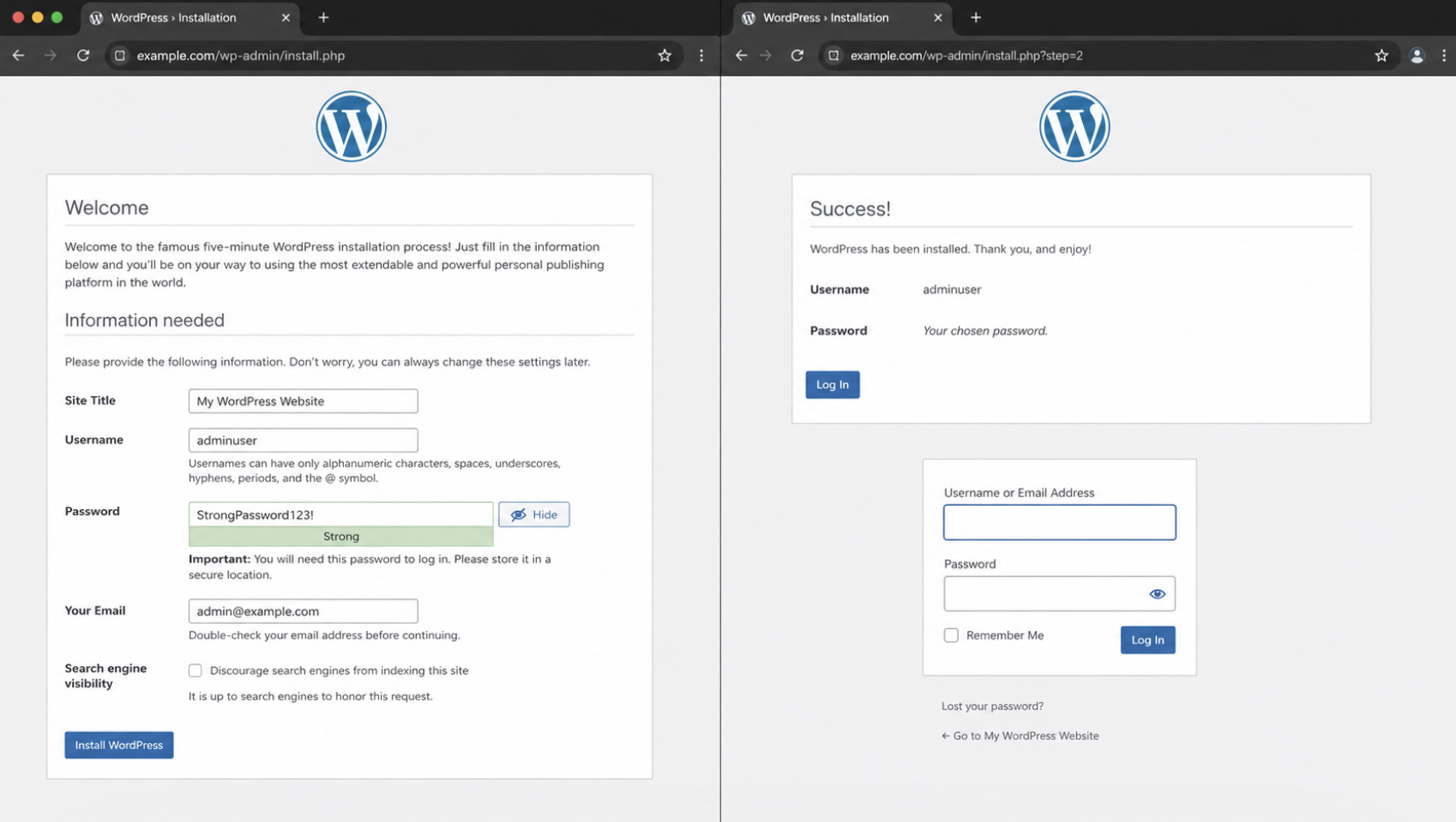
The installation form finishes the WordPress five-minute install. This on-screen form is the final step of the famous five-minute run, the screen that appears once the install script loads in the browser and the database connection is confirmed. The form names itself the Welcome screen, and completing it is what turns a freshly connected set of files into a working WordPress site.
The install form is short by design, which is the reason the five-minute install earns its name. It asks for a Site title, a Username and a Password for the first administrator, and an Email address for that administrator account. A single Search engine visibility checkbox sits below those fields and controls whether search engines are asked to index the new site at launch. Each value enters the form once, and the form holds them as the founding settings of the install. No file editing and no database work happen at this stage, since the install script already handled the connection before the form appeared.
Submitting the install form produces a working site. The install script writes the entered values into the database, creates the administrator account, and completes the WordPress five-minute install in a single pass. A success notice then names the next move and presents the login prompt for the new account.
Logging in to wp-admin with the Username and Password just set confirms that the install is complete, opens the dashboard of the finished site, and marks the end of the five-minute run. Running that sequence by hand is one route to a working site; a managed host can run the same install automatically and skip the manual pass entirely.
Host One-Click Install as the No-Manual Alternative
Host one-click install is the no-manual alternative to the WordPress five-minute install. A host one-click installer is a tool a managed host provides that runs the entire installation automatically, so the manual five-minute run is skipped rather than performed by hand. Where the famous five-minute pattern asks for a database, uploaded files, and a quick pass through the install form, the one-click path collapses all of that into a single action on the host’s side.
The contrast is the point. On the one-click path the host runs the install, which means the wp-config connection, the database setup, and the install script are handled automatically before any form appears. The famous five-minute run remains the canonical manual method and the reference for what a WordPress installation actually performs underneath; the one-click installer automates that same outcome for accounts on a managed host.
For the host-specific walkthrough of that automated route, the dedicated guide to install WordPress on Bluehost covers the one-click steps in full, from the host control panel through the installer screen to the finished login. Once that automated route is clear, the wider context becomes useful as well. For the broader sequence that places the five-minute pattern alongside every other install method, the overview of how to install WordPress gathers the canonical install flow in one place.






 ChatGPT
  Claude
  Grok
Grok  Gemini