Explore our specialized services, tailored solutions, and industry expertise to elevate your digital presence. From custom WordPress development to seamless integrations, we build high-performing websites that deliver impact.
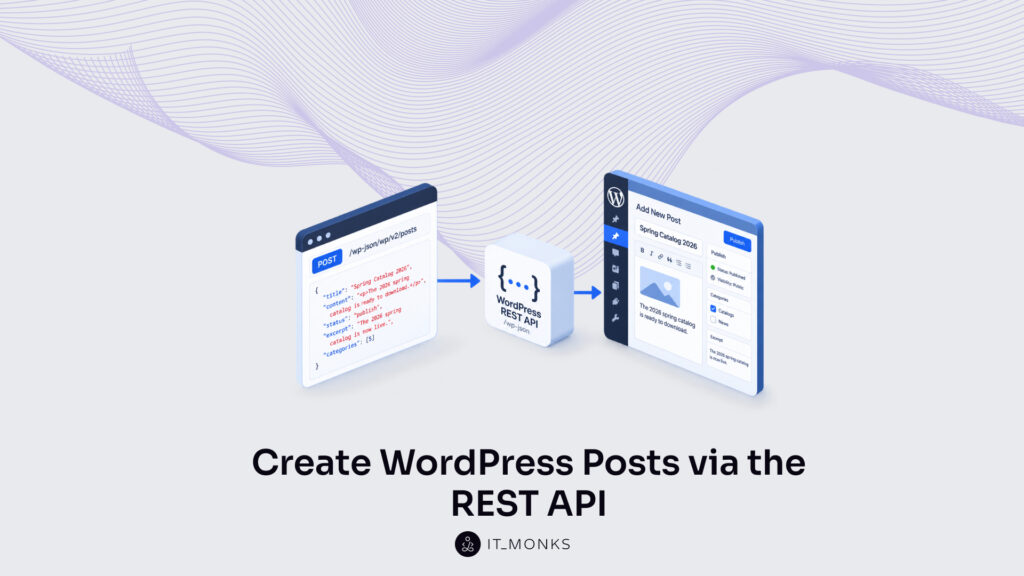
The WordPress REST API create-post operation brings a new post into existence by sending an authenticated POST to the wp/v2/posts endpoint. It is a write, not a read, a create request that hands WordPress a block of post data over HTTP and gets back a stored post in return. Where a GET only fetches posts that already exist, this operation makes one.
The work belongs to a particular setting: a developer creating WordPress content programmatically, away from the wp-admin editor, from a script, an application, or another service that needs to publish into WordPress on its own. Nothing is typed into a screen. A request carries the post, and the post appears.
Getting there follows a fixed order. The create request targets the posts endpoint, arrives authenticated, sets a status that decides draft or publish, carries a request body of post fields inside its POST, and finishes when WordPress returns a 201 Created response confirming the new post. Publishing is not a second step: a POST that sets the status to publish creates the post live in the same call, while omitting it saves a draft. Five ordered steps, one direction: data in, a post created. Each step depends on the one before it, and the sequence never skips.
The whole sequence depends on the route the create request is aimed at. That route is the wp/v2/posts endpoint.
The Posts Endpoint
The posts endpoint is the built-in REST route (wp/v2/posts) that represents the WordPress posts collection. In the WordPress REST API documentation, the posts endpoint is the resource that stands in for every post on a site: one route the create request targets to add another. The WordPress post API exposes that collection as structured data, so a program can reach the posts the same way the editor screen reaches them, only over HTTP rather than through the dashboard.
POST /wp-json/wp/v2/posts
What the route exposes is the post object, the record a create POST brings into existence. Every post the endpoint holds is a structured object with a defined set of fields: a title, a body of content, a status, an author, a set of categories. Reading the endpoint returns those objects; posting to it produces a new one. The object is the unit the endpoint deals in, and the create operation adds exactly one of them.
One route carries two directions. A GET on wp/v2/posts reads the collection and returns the posts already stored. A POST to that same route creates. It does not retrieve a post, it writes one. That contrast, GET for reading and POST for writing, is the reason the create operation targets this endpoint at all: the collection is both what a caller reads from and what a caller adds to, and the HTTP method decides which.
So the posts endpoint is where the create request arrives. Addressing a POST to wp/v2/posts is the first fixed part of creating a post over the REST API. The route alone, though, will not accept the write. The POST has to reach it authenticated.
The Authenticated POST Request
The authenticated POST request is the HTTP POST, carrying valid credentials, that creates a post on wp/v2/posts. POST is the method that writes; a GET on the same route only reads. So the create request is specifically a POST, and specifically an authenticated one, because WordPress refuses to let an anonymous caller write to the posts collection.
The request has to be authenticated before it will create anything. WordPress accepts a write only from a caller it can identify, so every create POST carries an Authorizationheader the server checks before the post is stored. The <credential> shown below is a placeholder for the encoded value the chosen scheme produces, not a string to paste as written.
Application Passwords is the canonical way to supply that credential over REST, and the full set of methods (cookie authentication, Application Passwords, token-based schemes) belongs to the WordPress REST API authentication guide rather than to the create operation itself. Here, authentication is a precondition the request satisfies, not a procedure the create step performs.
POST /wp-json/wp/v2/posts
Authorization: <credential>
Once the POST is authenticated, what it carries decides what gets created. The request holds a body of post fields together with a status value, and those two together determine both the content of the new post and whether WordPress saves it as a draft or publishes it live. The credential authorizes the request to write; the payload defines what is written.
Authenticated and addressed at wp/v2/posts, the POST is a complete create request in form: permission to write, and a target to write to. What is left is the content, and the first thing the body settles is the choice that separates a saved draft from a published post: the status field.
The status Field for a New Post
The status field is the request-body value that sets a new post’s state at the moment the create POST brings it into existence. One field, assigned once, inside the same request, not a follow-up publish step run against a post that already exists. It determines whether the new post lands as an unpublished draft or goes live the instant WordPress writes it.
The values used most often at create time are:
draft: the post is saved but unpublished, visible only in the editor.
publish: the post is live immediately and appears on the public site.
pending: the post is held for review, awaiting an editor’s approval.
private: the post is stored and readable only by authorized roles.
WordPress also accepts future, which schedules the post for a later date. The four above cover the everyday create decision: hold as a draft, go live, queue for review, or restrict to authorized roles.
Publishing over the REST API is not a second action. Setting status to publish is the create: one POST assigns the value and the post exists in the published state, with no separate call to flip it live. Creating a post with status=publish and publishing a post through the API describe the same request, not two.
Omit the field and WordPress falls back to draft. An absent status defaults the new post to an unpublished draft, the conservative choice, since nothing reaches the public site until the field is explicitly set to publish. Assign publish, and the single create POST produces a live post in one call.
Whichever value the field carries, it travels inside the request body next to the title, content, excerpt, and categories that describe the new post: one payload, assembled next.
The Request Body for a New Post
The request body is the JSON payload the create POST carries: the object that holds every field describing the new post, populated once and sent in a single request. Where the WordPress REST API documents creating a post, this payload is the thing being sent: title, content, status, excerpt, and categories packaged together and delivered to wp/v2/posts in one authenticated POST.
Those five fields move as one payload, not five separate requests. Title names the post, content fills its body, status sets the create-time state, excerpt supplies the summary, and categories assigns it to one or more terms by ID:
{"title":"My New Post","content":"Post body.","status":"publish","excerpt":"Summary.","categories":[5]}
Send that body to wp/v2/posts and WordPress creates the whole post in one operation: every field populated, the status applied, the record written. No build-then-fill sequence stands between the request and the result; the single POST carries the complete description of the new post.
This wp/v2/posts route is the built-in write endpoint, and it is the same pattern that custom REST API endpoints extend when a project needs a route WordPress does not ship by default. The built-in create is the reference shape; a custom endpoint reuses it for data of its own.
Once the authenticated POST sends this body, WordPress answers, and the answer reports whether the create succeeded.
The 201 Created Response
The 201 Created response is WordPress’s confirmation that the POST created the post, the HTTP reply the create call returns the moment the new record is written. Its status code carries the meaning: 201 signals that a resource was created, so the response is proof the request did what it set out to do rather than a generic acknowledgment.
The body returns the new post object, including the id WordPress assigned and the status it stored:
{"id":123,"status":"publish","title":{"rendered":"My New Post"}}
// Confirm: GET /wp-json/wp/v2/posts/123 → 200 OK
That id identifies the new post in every call that follows. Read the post back with a GET on wp/v2/posts/ and a 200 OK returns the stored record: independent proof the post exists on the server, not merely an echo of the request just sent. The create reports 201; the read-back reports 200; together they confirm the post was created and can then be found.
Verification is what completes the create operation. A POST that returns 201 has created the post, and a read-back that returns 200 confirms it persisted. The create is not finished until the new post can be retrieved by its own id. With the response confirmed, the whole sequence runs from start to finish in one worked call.
A Worked Create-Post Example
A worked create-post example runs the whole create sequence as one authenticated POST to wp/v2/posts. Rather than assemble the request in stages, the example sends every part of the create at once: the Authorization header, the five body fields, and the status value that decides whether the new post goes live. One call goes out; one post comes back.
The example creates a published post from a single curl request:
curl -X POST https://example.com/wp-json/wp/v2/posts
  -H "Authorization: <credential>"
  -H "Content-Type: application/json"
  -d '{
        "title": "Spring Catalog 2026",
        "content": "<p>The 2026 spring catalog is ready to download.</p>",
        "status": "publish",
        "excerpt": "The 2026 spring catalog is now live.",
        "categories": [5]
      }'
The request carries title, content, status, excerpt, and categories together in the request body, and the Authorization header lets the POST through as an authenticated call. Its status value, publish, is what makes WordPress create the post live rather than hold it back as a draft. Every field the create needs travels in this one request, nothing is set afterward.
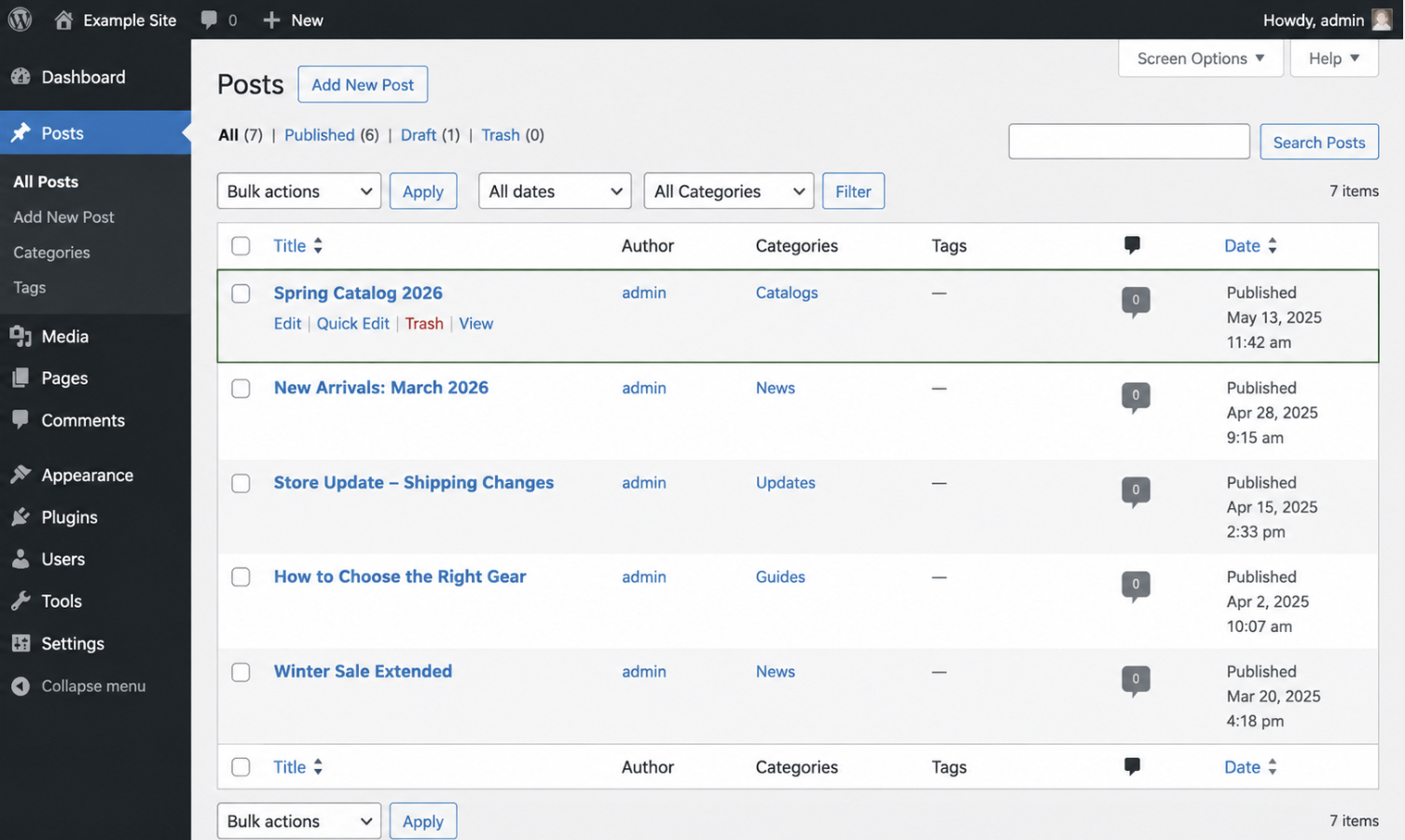
WordPress answers with a 201 Created response, and the new post appears straight away in the WordPress admin posts list, titled “Spring Catalog 2026” and marked Published.
The create call’s result in the WordPress admin posts list. The post “Spring Catalog 2026” listed as Published, exactly the title and status sent in the request body.
The 201 status and the post now sitting in wp-admin confirm the same result from two sides: the create succeeded. One call assembled the request body, carried its credential, set its status, and generated a live post. For teams weighing a REST create against a GraphQL mutation before settling on this pattern, WPGraphQL vs the REST API sets the two write paths side by side. That same single POST is not tied to posts, though, pointed at a different endpoint, it creates a different kind of content.
The Pages Endpoint
The pages endpoint, wp/v2/pages, is the built-in REST route that creates a page over the WordPress REST API. It is the parallel route to the posts endpoint, and the same create POST targets it:
POST /wp-json/wp/v2/pages
Everything the create operation already does applies here without change: the authenticated POST, the request body with its title, content, and status fields, and the 201 Created response that confirms the record. Only the route in the request line differs.
A page is another registered post type, and that is why the create pattern reaches beyond posts. Any post type registered with show_in_rest is exposed on its own REST route, and the same create POST targets that route to create the content. Posting to a custom post type’s REST route extends the pattern once the type itself is registered. Custom post types covers registering one, the step that exposes its REST route in the first place. One create pattern applies across many post types.
The create operation stays one thing from the first request to the last: an authenticated POST that brings a new WordPress record into existence. The wp/v2/posts endpoint receives it, the Authorization header lets it through, the request body carries title, content, status, excerpt, and categories in a single call, the status field settles draft against publish, a 201 Created confirms the record, and that same POST, aimed at wp/v2/pages or any post type registered with show_in_rest, generalizes the whole operation well past posts.




 ChatGPT
  Claude
  Grok
Grok  Gemini