- Expertise
Expertise That Drives Results
Explore our specialized services, tailored solutions, and industry expertise to elevate your digital presence. From custom WordPress development to seamless integrations, we build high-performing websites that deliver impact.
Solutions- Booking System Integrations
- Headless & REST API WordPress
- Hubspot Integration
- Enterprise WordPress
- Website Migration
- Internal Collaboration Platforms
- External Communications Hubs
- Work
- About
- Proof
- Contact
Learn more


WordPress Security Salts and Secret Keys in wp-config.php

WordPress security salts and secret keys are stored in wp-config.php as a set of eight authentication constants. The two names refer to a single kind of value: a salt and a secret key are both long random strings that WordPress relies on to protect how people sign in.
Their purpose is defensive. Each constant makes the authentication cookie that keeps an administrator logged in much harder to forge, and that one job is what earns the salt keys a place on every wp-config hardening list. Replacing them matters just as much. Rotating the values, swapping the current strings for newly generated ones, re-secures the site whenever the current keys can no longer be trusted, invalidating every session tied to them.
That makes it an as-needed security response to specific events rather than scheduled maintenance. Behind the two names stand eight named constants, each carrying its own defensive role.
What Are WordPress Security Salts and Secret Keys?
WordPress security salts are random hashing strings stored in wp-config.php that are mixed into the hashes protecting a site’s authentication cookies. The term “salt” refers to exactly that function: extra random data added before a value is hashed, so the result cannot be reproduced or reversed without it. A WordPress salt and a WordPress secret key are two labels for the same thing here. The software keeps both as constants, and each salt key does the same defensive work whether the code labels it a key or a salt.
The set contains eight constants in total, four key constants paired with four matching salt constants:
define('AUTH_KEY', 'put your unique phrase here');
define('SECURE_AUTH_KEY', 'put your unique phrase here');
define('LOGGED_IN_KEY', 'put your unique phrase here');
define('NONCE_KEY', 'put your unique phrase here');
define('AUTH_SALT', 'put your unique phrase here');
define('SECURE_AUTH_SALT', 'put your unique phrase here');
define('LOGGED_IN_SALT', 'put your unique phrase here');
define('NONCE_SALT', 'put your unique phrase here');
Four of them, AUTH_KEY, SECURE_AUTH_KEY, LOGGED_IN_KEY, and NONCE_KEY, are the secret keys. The other four, AUTH_SALT, SECURE_AUTH_SALT, LOGGED_IN_SALT, and NONCE_SALT, are their salts. On a real install each put your unique phrase here placeholder holds a long random string instead of that default text, and the two groups always travel together as one block of eight.
What the eight constants protect is the login session itself. WordPress signs and salts the authentication cookie it issues to a logged-in administrator with these values, and that salting is what makes the cookie hard to forge. Copy the cookie without the matching salt keys and it is useless. That is the whole reason the WordPress salts belong in every wp-config security review, next to the other settings gathered in a wp-config.php constants cheat sheet. None of those eight unique phrases are typed by hand; a dedicated generator produces them.
How to Generate WordPress Salts with the Secret-Key Generator
The WordPress salt generator is a WordPress.org service that produces a complete set of cryptographically random salt values, already formatted for wp-config.php. Instead of inventing eight long strings by hand, the site owner asks the secret-key generator for them and gets back the finished define() lines. It answers at one endpoint:
# Generator endpoint (v1.1):
https://api.wordpress.org/secret-key/1.1/salt/
# Returns eight populated define() lines, e.g.:
define('AUTH_KEY', 'Xp7&r…64 random chars…');
# …plus AUTH_SALT and the other six constants.
Every request returns a fresh set. Eight define() lines come back, each carrying a 64-character random string generated on the spot, so no two visits produce the same keys. Putting a set into wp-config.php takes three steps:
- Visit the secret-key generator at
https://api.wordpress.org/secret-key/1.1/salt/. The endpoint renders the eight populated define() lines directly in the browser. - Copy the eight define() lines exactly as they appear, from AUTH_KEY through NONCE_SALT.
- Paste them into wp-config.php over the eight placeholder lines that ship with a default install, replacing the
put your unique phrase heretext, then save the file.
Once the new lines are saved, the site is running on freshly generated salts. Generating values this way is also the first half of replacing them: the same generator supplies the new strings whenever the existing keys need to be swapped out.
How to Change WordPress Salt Keys
Changing WordPress salt keys means replacing the eight existing values in wp-config.php with a freshly generated set. The constants keep their names: AUTH_KEY, SECURE_AUTH_KEY, LOGGED_IN_KEY, NONCE_KEY, and their four matching salts stay exactly as they are written. Only the long random strings assigned to them change. Rotate those strings and the previous ones stop working, because every login cookie that was signed with the old set now depends on a secret the site no longer recognizes.
The workflow behind a rotation is short. Generate a fresh block of values, swap it in over the current one, and write the file back to the server:
- Generate a new set of values from the WordPress.org secret-key generator.
- Replace the old
define()lines in wp-config.php with the newly generated block. - Save the file back to the server.
Because those define() lines sit inside wp-config.php, the safe way to make the swap is through the standard procedure to edit the wp-config.php file, one stray character in that file is enough to break the whole site, so the replacement belongs in a careful edit rather than a quick paste. Once the new block is saved, the site is re-secured: every authentication token now depends on secrets that exist only in the current version of the file, and nothing generated before the swap can validate against them.
Rotation earns its place at particular moments rather than on a fixed calendar, and the instant the file is saved it carries one immediate consequence for anyone already signed in.
When to Change WordPress Salt Keys?
A WordPress salt key change follows a specific security event, not a fixed calendar. Rotation is not a routine chore run to a schedule. It answers to specific events, moments where the current secrets can no longer be assumed trustworthy. Two triggers stand out:
- After a host migration. When a site moves to different infrastructure, wp-config.php travels along with the site files, salts included, which leaves the same secrets sitting on a new server that other parties may have had access to during the transfer. Rotating the keys is standard hardening whenever a team has to migrate a WordPress site to a new host, and it resets that exposure without disturbing anything the migration itself set up.
- After any suspected credential leak. If a password, a database export, or the wp-config.php file itself may have been exposed, the salts should be treated as compromised. There is no way to tell whether a copied secret has been read, so the safe assumption is that it has.
Both triggers point to the same response: rotate the salts and invalidate the old secrets. And the moment those secrets change, everyone currently holding a session feels the effect.
The Force-Logout Effect of Changing WordPress Salt Keys
The force-logout effect is what changing the salt keys does to everyone who is already signed in. WordPress signs each login cookie with the current salts, so swapping the salts makes every cookie built on the old set fail validation at once. No gradual expiry, no grace window, the switch is instant.
Every active session is invalidated the moment the new values load. All users are logged out (subscribers, editors, and the administrator running the rotation alike) and each of them has to sign in again with the usual credentials. Passwords stay untouched. What gets discarded is only the proof-of-login carried inside the cookie, which is why the next sign-in works normally and no account needs resetting.
That makes the force-logout something to expect before rotating, not a fault to chase down afterward. On a small site the interruption lasts a few seconds; on a busy multi-author site it is worth timing for a quiet stretch. The one credential the rotation never touches is the separate salt that protects stored passwords, which works on a different mechanism entirely.
What Is the WordPress Password Salt?
The WordPress password salt is the random string applied when WordPress hashes and stores an account password, a mechanism distinct from the eight authentication-cookie salts defined in wp-config.php. The two salts differ by what each one protects. A password salt hardens the stored password itself, so a leaked database exposes no directly reusable credential.
The wp-config authentication salts protect something else: the login cookies that keep a browser session valid after the site owner signs in. One salt applies when WordPress stores its passwords; the eight security salts and secret keys in wp-config.php protect the login sessions that begin once a correct password is accepted.
More Articles by Topic
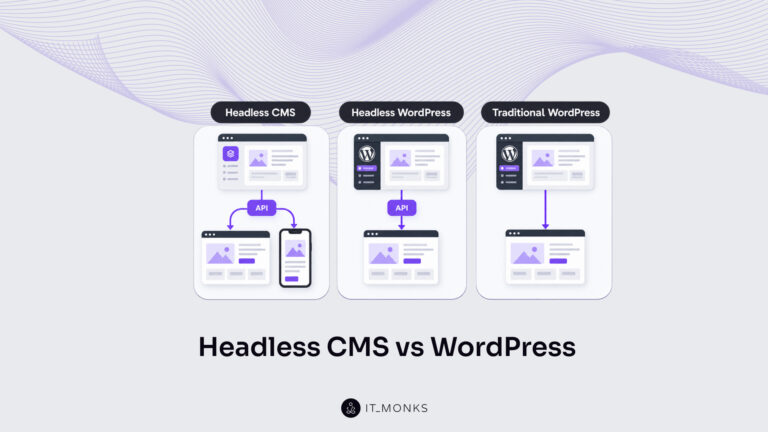
Headless CMS vs WordPress is a comparison of two choices made at once: an architecture choice between a coupled site…
Learn more 
The new campaign copy is approved. The ads go live on Monday, and the landing page they point to still…
Learn more 
Imagine a marketing team two days before a campaign launch. The copy is approved, the images are ready, and the…
Learn more Contact
Feel free to reach out! We are excited to begin our collaboration!
Don't like forms?
Shoot us an email at info@itmonks.com
Don't like forms?
Shoot us an email at info@itmonks.com
CEO, Strategic Advisor
Reviewed on Clutch
 ChatGPT
  Claude
  Grok
Grok  Gemini
 Send a Project Brief
Fill out and send a form. Our Advisor Team will contact you promptly!