Explore our specialized services, tailored solutions, and industry expertise to elevate your digital presence. From custom WordPress development to seamless integrations, we build high-performing websites that deliver impact.
The WordPress site URL is the site address an installation answers on in a browser, not the permalink or slug that ends any individual post’s link. Changing that site URL in wp-config.php means defining two constants, WP_SITEURL and WP_HOME, directly in the file WordPress loads before it runs anything else.
Three places can hold that address.
The Settings → General screen in the dashboard exposes it as two fields, the wp_options rows store it in the database, and wp-config.php can fix it in code.
The wp-config.php route hard-codes the address in a single file and takes precedence over both of the others, which is what makes it the dependable option when the dashboard is unreachable or a move has to be scripted.
The dashboard screen and the database rows reach the same setting by different paths and serve only as the alternatives to it.
The procedure itself runs in four parts: defining what WP_SITEURL and WP_HOME each set, writing the two define() lines with the correct address, confirming why the hard-coded values win over the dashboard and the database, and removing the lines again once the change has settled.
Around that procedure sit two more considerations: the specific situations that make the wp-config.php route the right call over the dashboard, and the one setup where hard-coding the two constants is the wrong move: a multisite network. For an agency practitioner handing off a migrated site, and for a site owner managing an install without help, the wp-config.php method is the most direct way to point one WordPress site at a new address.
What Are the WordPress Address and Site Address in wp-config.php?
The WordPress Address and the Site Address are the two location values that a WordPress installation stores. The WordPress Address, defined as WP_SITEURL, is where the core files reside. The address WordPress loads its own program files from. The Site Address, defined as WP_HOME, is the front-end address a browser loads to reach the homepage. Both are the site address in the sense wp-config.php uses the term, and neither one describes the permalink or slug that ends a single post’s link.
On an ordinary install, the two hold the same value, because WordPress runs from the same place a visitor reaches. They diverge only when the core files sit in their own subdirectory while the homepage still answers from the domain root: WP_SITEURL then points into that subdirectory and WP_HOME stays on the root. That split is the exception, not the rule, and most sites set both constants to one identical address.
Two constants carry these addresses inside wp-config.php, each pairing a dashboard label with the value it sets:
Constant
What it sets
Example value
WP_SITEURL
The WordPress Address: where the core files reside and WordPress loads itself from
'https://example.com'
WP_HOME
The Site Address: the public address a browser loads to reach the site
'https://example.com'
Because both values sit in wp-config.php as plain text rather than in the database, one define() line re-points the whole site address to a new WP_SITEURL and WP_HOME, the procedure that hard-codes the change.
How to Change the Site URL with the WP_SITEURL and WP_HOME define() Lines
Changing the site URL through wp-config.php means writing two define() lines (one for WP_SITEURL, one for WP_HOME), so WordPress reads the new address straight from the file instead of the database. The action is a single edit to one file, and it takes effect the moment that file is saved.
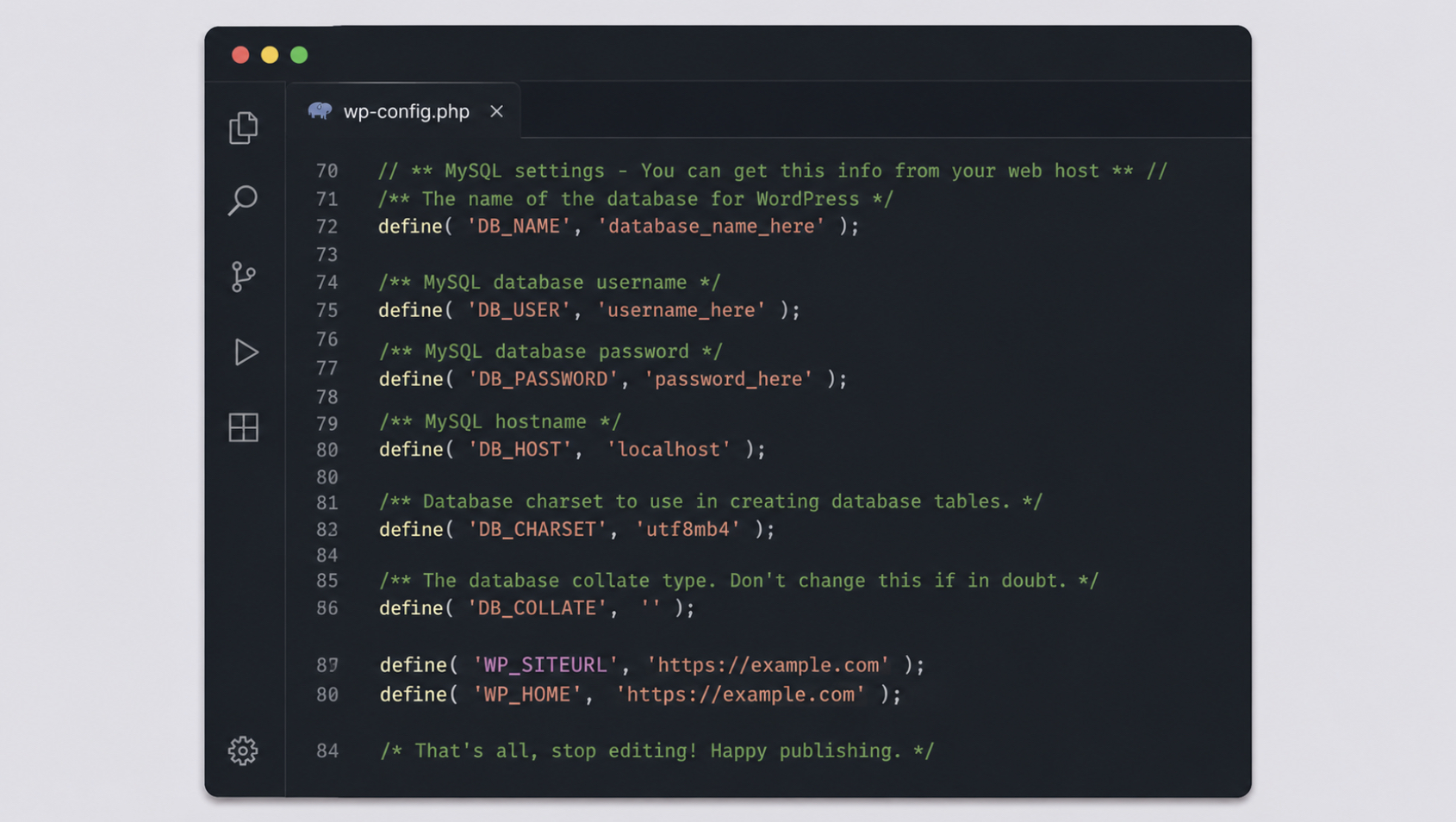
The one prerequisite is a wp-config.php that is safe to touch. The file loads on every request, so one stray character can take an entire site offline with no dashboard left to recover from, which is why it pays to know how to edit the wp-config.php file without breaking a live install before adding anything to it. With that groundwork in place, the two lines go in exactly as written:
Each value is an absolute URL: the scheme, then the host, and nothing after it (https://example.com, never https://example.com/) with a closing slash. The no-trailing-slash rule holds for both constants, because WordPress adds its own path separators when it assembles addresses from the value, and the stored address therefore ends at the host. Switching a site from http to https is expressed right here too, in the scheme of that value; the host stays identical and only the protocol in front of it moves from http to https.
Placement matters as much as the values themselves. Both lines belong above the comment that reads /* That's all, stop editing! */, because WordPress only reads constants defined before that marker.
The complete change runs as five ordered steps:
Back up wp-config.php, then open it in a plain-text or code editor.
Add the two define() lines for WP_SITEURL and WP_HOME above the “stop editing” comment.
Set each value to the target address, the correct scheme, the host, and no trailing slash.
Save the file, and upload it back to the server if it was edited on a local copy.
Reload the site in a browser to confirm it resolves at the new address.
If the reload does not resolve, the cause is almost always the value just written: re-open wp-config.php and check that the scheme is the right one — http or https, and that no trailing slash follows the host. Because the correction is another edit to those same two lines rather than a dashboard action, it works even when the site is offline and its dashboard is unavailable.
Once the file is saved, the hard-coded pair takes effect at once, ahead of anything the dashboard or the database might still hold. Which of those three sources wins when they disagree decides the address the install actually serves, the precedence that makes hard-coding the site URL a reliable change rather than a competing one.
How Do the wp-config Values Override the Dashboard and Database Settings?
The wp-config values override the dashboard and database settings by taking precedence over both: WordPress treats the WP_SITEURL and WP_HOME constants as the highest authority among the WordPress URL settings that decide the site address. Three locations inside a single install can each hold that address, yet only one wins when they disagree, and the wp-config.php define() values are the ones that override the other two. That is the whole reason the hard-coded values take effect: they sit at the top of a fixed order of precedence.
Two of those three locations are the familiar ones. The Settings → General screen exposes a WordPress Address field and a Site Address field, and the wp_options database table stores the same pair as its siteurl and home rows. The third location is wp-config.php itself. While the constants are absent, the dashboard and the database hold the address between them. Define the constants, and precedence changes, the hard-coded values supersede both.
One visible change settles any doubt about which source is in charge. Once WP_SITEURL and WP_HOME are present, the two URL fields on the Settings → General screen turn greyed out; WordPress disables them, because editing a value that a constant already overrides would change nothing. A site owner who opens that screen sees the target address displayed but locked, a direct signal that wp-config.php now governs the site address.
The full order of precedence runs from the configuration file down to the dashboard:
The wp-config.php define() values: WP_SITEURL and WP_HOME take precedence over everything else and set the address the install actually uses.
The wp_options database rows: siteurl and home hold the address only while no constant supersedes them.
The Settings → General fields: WordPress Address and Site Address sit lowest, and go inert the instant the constants appear.
That order holds only while the two define() lines stay in wp-config.php. Once a move is complete and the site resolves at the new address, those same two lines are removed again, though only after the database itself holds the new address, which the constants never write on their own.
How to Revert the WP_SITEURL and WP_HOME define() Lines
Reverting the WP_SITEURL and WP_HOME define() lines means removing the two lines from wp-config.php once the site URL in wp-config.php no longer needs to be hard-coded; that is, once the wp_options database holds the new address on its own. This is the cleanup step, and it turns on one fact about how the constants behave.
Defining WP_SITEURL and WP_HOME overrides the site address at runtime, but it never writes those values into the wp_options database. The siteurl and home rows keep whatever address they held before, so the constants and the database can point at two different addresses at the same time, the constants winning while they stay in the file. A permanently hard-coded site URL is a fixed value that can no longer be changed through the dashboard or the database, which is exactly why removing the two lines is conditional rather than automatic.
Whether the two lines can come out safely depends on how the new address reached the database. When the change also updated the database, a full domain migration or a localhost-to-live deploy, each handled as its own procedure that moves the database along with the site. The siteurl and home rows already carry the new URL, and the constants are now redundant. Remove them and the address stays.
When the change was constants-only, with the database never touched (a quick override, or regaining entry after an admin lockout that left the dashboard unreachable) the two define() lines are the only thing pointing the install at the new address. Strip them out then, and the site drops straight back to the old address still stored in the database. In that case the lines stay until the database is updated through the migration procedure, not before.
Once the database holds the new address, the cleanup runs in four short moves:
Confirm the wp_options database values, the siteurl and home rows, already hold the new site URL, so the address survives without the constants.
Remove the two define() lines for WP_SITEURL and WP_HOME from wp-config.php.
Save the file.
Reload the site and confirm it still resolves at the new address.
With the lines gone and the site still resolving, the wp-config method is complete. The two constants defined the target address, they overrode the dashboard and the database while the move settled, and removing them restores a clean configuration with no stale hard-coding left behind. The method still has two edges the core procedure never shows: the specific situations that call for changing the site address in wp-config.php rather than through the dashboard, and the one network arrangement where hard-coding WP_SITEURL and WP_HOME is the wrong move.
When to Change the Site URL in wp-config.php?
The wp-config define() method for changing the WordPress site URL applies in a narrow set of situations, the ones where the site address has to move but the dashboard route is either unavailable or too fragile to trust.
Editing WP_SITEURL and WP_HOME straight in the file earns its place precisely when the Settings → General fields cannot do the job, or cannot be reached at all. Four scenarios account for almost every case that calls for changing the WordPress site URL in the file rather than the dashboard.
A domain change. When a site moves to a new domain name, WP_SITEURL and WP_HOME have to point at the new absolute address (scheme plus host, no trailing slash) before the old address stops resolving. The full procedure for how to change a WordPress domain name reaches past the two constants into stored content and redirects; the define() pair is the part that settles the address WordPress reports for itself.
An http-to-https switch. Once a TLS certificate goes live, both constants have to carry the https scheme so WordPress stops building front-end URLs on the old insecure address. The edit is a single character in each value, http to https, and nothing else about the address changes.
A localhost-to-live deploy. A site built on a local machine answers to an address such as http://localhost, which means nothing the moment the files land on a public server. Setting the two constants to the live domain is one step inside the larger task of how to move WordPress from localhost to live server; the wp-config pair fixes the address portion of that deploy.
Admin-lockout recovery. When a wrong address has already been saved and the dashboard is unavailable (the login screen loops, or the admin area refuses to load), the Settings → General fields cannot be opened to correct it. Hard-coding WP_SITEURL and WP_HOME in wp-config.php is then the only way back in, because the values take effect before the dashboard ever has to render.
One trait runs through all four. The dashboard route is either gone or unreliable, so the change has to happen at a level that does not wait on a working admin screen. That same independence, the thing that makes the file-level method dependable on an ordinary install, is exactly what turns it into a hazard on one kind of network.
The Multisite Caveat for Changing WP_SITEURL and WP_HOME
Changing the WordPress site URL on a multisite network is the single case where hard-coding WP_SITEURL and WP_HOME is the wrong move. The reason is structural. A single-site install pins one address, and the two constants set it cleanly; a multisite network hosts many sites under one WordPress instance and resolves each site’s address on its own, at runtime.
Drop a single hard-coded pair into wp-config.php and it overrides that per-site address resolution for the whole network at once, which breaks every site whose real address differs from the value written in the file, misroutes requests meant for the others, and disrupts the network’s ability to tell one site from another. On a network, adjusting those addresses is work for the network admin tools and the dedicated handling multisite installations require, not for the two constants this method defines on a single site.






 ChatGPT
  Claude
  Grok
Grok  Gemini