Explore our specialized services, tailored solutions, and industry expertise to elevate your digital presence. From custom WordPress development to seamless integrations, we build high-performing websites that deliver impact.
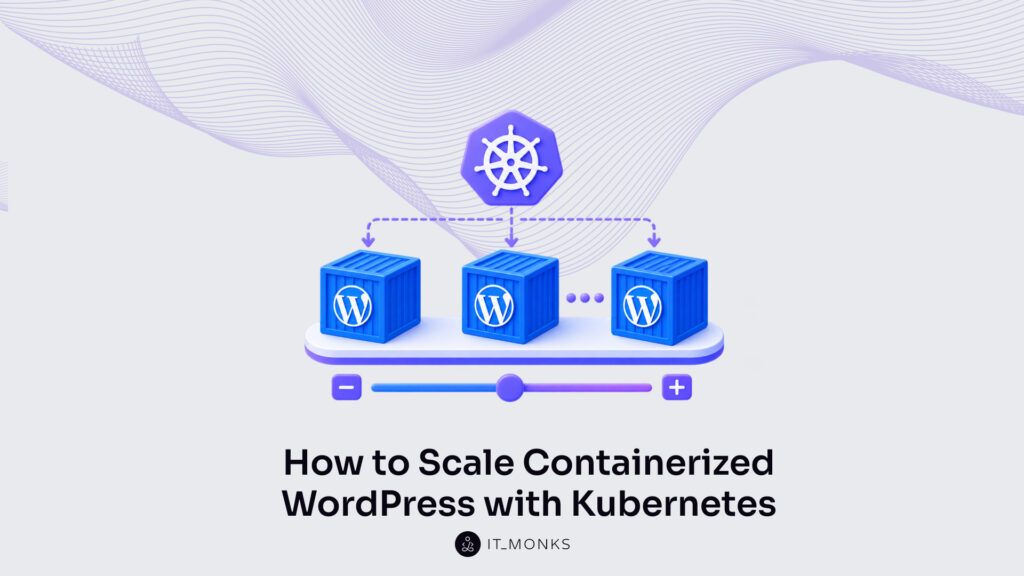
Containerized WordPress on Kubernetes is the WordPress stack (the application, its MySQLdatabase, and its stored files) orchestrated across multiple cluster hosts instead of a single machine. A single Docker host runs every container on one server. Kubernetes runs that same stack across a pool of hosts: identical copies of WordPress run as pods, and the platform keeps the right number of them running as traffic shifts. This is one level up from the single Docker host, the same containers, no longer confined to one host.
The reason to move up is narrow and practical. Once a WordPress site pushes past what one host can serve, the work stops being about running WordPress and starts being about scaling it beyond a single host, which is exactly what Kubernetes is built to do. Deploying WordPress across many hosts and then scaling it horizontally (adding more pods rather than a bigger server) is the central task, the thing that keeps a high-traffic site responsive when one machine could not keep up.
Reaching that point involves a few distinct parts. Portable Kubernetes manifests describe the stack in plain configuration that runs on any cluster. A Helm chart packages those manifests into one installable release. Horizontal pod autoscaling scales WordPress pods automatically, adding and removing them as live demand rises and falls.
And a set of stateful concerns (the database, the shared uploads directory, and the object cache) has to be settled before a multi-pod site can scale cleanly. High-traffic sites and the agencies that manage them reach these questions first. Whether the move to Kubernetes is worthwhile at all is where the decision begins.
When Should Containerized WordPress Scale with Kubernetes?
The decision to scale containerized WordPress with Kubernetes comes down to one threshold: the point where a single Docker host is outgrown and a Kubernetes cluster becomes worthwhile. A single Docker host has a hard limit. Its CPU and memory are finite, every container competes for the same pool, and the host itself is a single point of failure. If it goes down, the whole site goes with it. Containerized WordPress scales with Kubernetes at the point where that ceiling starts to constrain the site: when the traffic, the uptime requirement, or the risk of one server failing outgrows what a single host can safely hold.
This decision assumes the WordPress stack already runs in containers on one host. A developer who has not yet built that single-host stack, or who is still learning how images and containers fit the WordPress workflow, gets more from starting with Docker for WordPress developers than from a cluster. Kubernetes orchestrates containers that already exist; it does not replace the container fundamentals underneath them.
Three conditions, taken together or on their own, make the move worthwhile:
Sustained traffic runs past one host’s capacity. When CPU or memory on the single host sits near its limit at ordinary peak, not only during rare spikes, one server has stopped being enough, and horizontal scaling across pods is the direct answer.
Updates cannot take the site offline. When a deployment or a plugin update can no longer be allowed even a short maintenance window, a Kubernetes cluster rolls new pods out alongside the running ones and shifts traffic across with no downtime, which one host on its own cannot offer.
One host is an unacceptable single point of failure. When availability matters enough that a single server crashing becomes a business problem, spreading WordPress pods across several cluster nodes removes that lone failure point.
Once the answer is yes, the work turns concrete. The first move is to describe the WordPress stack to the cluster (every container, its storage, and its network endpoint) as a set of Kubernetes manifests the cluster can read and act on.
How to Deploy the WordPress Stack with Kubernetes Manifests?
A WordPress Kubernetes deployment begins with a manifest, the declarative object that tells the cluster what to run rather than scripting, step by step, how to run it. A manifest is a plain YAML file: it declares the desired end state, and the cluster reconciles reality toward that state on its own. That single shift, from imperative commands to declared intent, is what makes the stack portable in the first place.
On a single host, the WordPress stack runs as a handful of linked containers described in one Compose file. Moving that same stack onto Kubernetes rewrites the description, not the application. The container that serves the site, the network path in front of it, and the disk beneath it each become a distinct, portable object the cluster can schedule across many machines. Nothing about the WordPress application code changes; what changes is the shape of the description around it.
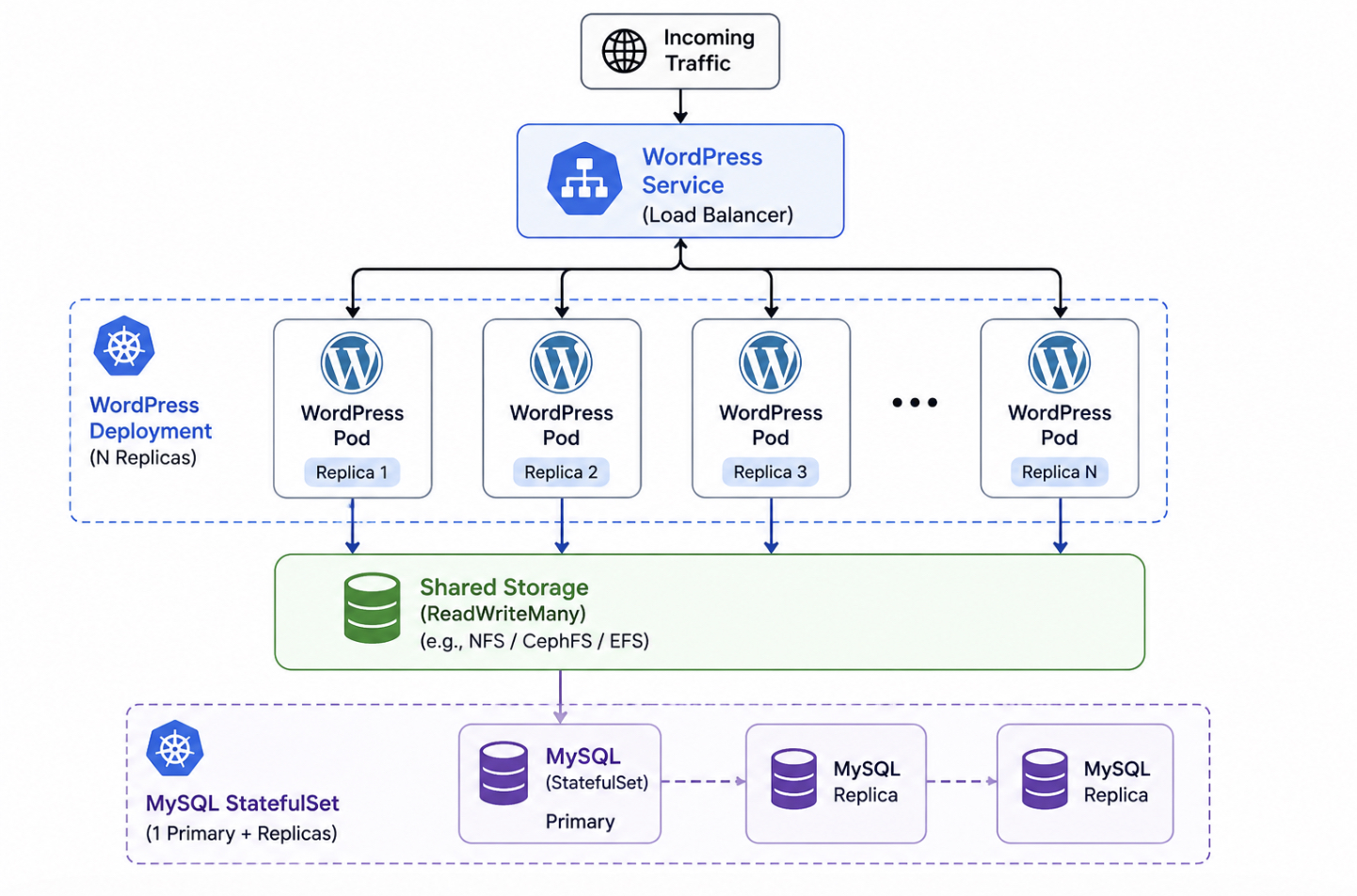
Three objects carry the whole stack. A Deployment declares the WordPress pods and how many identical copies run at once. A Service gives those pods one stable address on the cluster network. A PersistentVolumeClaim requests the durable disk that keeps uploaded files after any pod restarts. Each is a separate Kubernetes object, and each answers a different question: what runs, how it is reached, where its data resides.
Where a single-host production deploy tops out at the capacity of one machine, this trio is written to spread. The Deployment’s replica count is the field that later raises two pods to ten. The Service is built from its first line to sit in front of many pods, not one. The claim marks the boundary that separates disposable pods from data that must outlive them. A Kubernetes WordPress deployment assembled this way is portable by construction, because none of the three names anything a single vendor owns.
The same YAML applies to a laptop cluster, a bare-metal rack, or a managed control plane, since every object references only Kubernetes primitives, no proprietary load balancer, no storage driver tied to one provider. Handed to the cluster together with a single kubectl apply -f, the three objects come up as one set and begin reconciling at the same time. The Deployment is where that set starts.
The WordPress Deployment Manifest
The WordPress Deployment is the Kubernetes object that manages the pods. It declares a desired pod template and a replica count, then works continuously to keep exactly that many identical pods running. If a pod dies, the Deployment starts a replacement; if a node fails, it reschedules the lost pods elsewhere. That self-healing behaviour is the reason the running site is described through a Deployment and not through bare pods.
The pod template is the specification every replica is built from. It pins the official wordpress:6-php8.2-apache image, opens container port 80 for Apache, and passes the database host as an environment variable so the pods find MySQL at the wordpress-mysql address. Each pod also declares a resource request (250m of CPU and 256Mi of memory) the guaranteed baseline every replica reserves on its node. Every pod the Deployment creates is stamped from this one template, which is why they are interchangeable.
The database password is not written into the manifest. WORDPRESS_DB_PASSWORD reads its value from a Secret named wordpress-db, keeping the credential in the cluster’s secret store instead of in plain text committed to version control. The manifest references the credential; it never contains it.
replicas: 2 sets the pod count to an integer, two identical WordPress pods on day one. Two is a starting point, not a ceiling, and the same field is what horizontal scaling later raises to meet demand. Because every pod the Deployment manages is identical, incoming requests can land on any of them without changing the result. Something in front, though, has to distribute that traffic evenly across the set. That something is the Service.
The WordPress Service
The Service is the Kubernetes networking object that gives the WordPress pods one stable endpoint, a single cluster address that stays fixed while individual pods behind it are created and destroyed. Pods are disposable and their individual addresses change with every reschedule; the Service address does not. A WordPress Kubernetes deployment needs that constancy, because nothing upstream should have to track which pods happen to exist right now.
A Service finds its pods through a selector, and this one selects every pod labelled app: wordpress: the exact label the Deployment stamps onto its template. The match is what wires the two objects together: no address list to maintain, no manual registration. Any pod that carries the label is automatically in rotation the moment it becomes ready, and out of rotation the moment it stops.
One endpoint in front of many replicas is the entire reason the Service exists on a scaled stack. When the Deployment runs ten pods instead of two, the Service spreads requests arriving on port 80 across all ten healthy pods, and callers keep using the same single address throughout. Add pods, remove pods, replace a crashed one, the endpoint the rest of the world talks to never moves.
Together the Deployment and the Service form the running-app pair: one keeps the pods alive, the other keeps them reachable. What neither of them keeps is the pod’s files. Media uploaded through the admin dashboard, written inside a pod’s own container filesystem, disappears the instant that pod restarts. Making those files outlast the pod is the job of persistent storage.
The WordPress PersistentVolumeClaim
The PersistentVolumeClaim is a request for durable storage that a pod mounts, so files written by WordPress survive a pod restart instead of vanishing with the container. Ephemeral pod storage resets on every restart; a PersistentVolumeClaim is how a pod asks the cluster for disk that does not. The claim states what it needs (a capacity, an access mode) and Kubernetes finds or provisions a volume that satisfies it.
This claim asks for 10 gibibytes (Gi), roughly 10.7 gigabytes, of storage under the name wordpress-data. The cluster binds a matching volume to the claim, and the WordPress pod mounts it at wp-content, where uploaded media and any files a plugin or theme writes are then stored on real disk. The access mode ReadWriteOnce allows one node to mount the volume for reading and writing at a time. For a single WordPress pod, that is exactly enough: the pod owns its disk, and its data persists across every restart and reschedule.
One claim stops being enough the moment many pods serve the same site. Ten replicas each mounting a separate ReadWriteOnce disk would each see a different copy of wp-content, so an image uploaded through one pod would be missing from the other nine. Fixing that mismatch calls for a volume many pods can write to simultaneously (a ReadWriteMany access mode) and that shared-storage problem is a distinct build from this single-pod claim, taken up where multi-pod uploads are handled.
With durable storage in place, the portable trio is complete. The Deployment runs the pods, the Service fronts them with one address, and the PersistentVolumeClaim keeps their data across restarts. Written by hand, these three files stay readable and fully under the operator’s control. Written once and reused across staging, production, and every developer’s cluster, they also turn repetitive. The same values copied and edited by hand each time. Packaging them as a Helm chart closes exactly that gap.
How to Deploy WordPress with a Helm Chart?
A WordPress Helm chart is one installable release that packages the Deployment, Service, and PersistentVolumeClaim into a single unit Kubernetes applies with one command. Rather than applying three separate manifests and editing each by hand, a WordPress developer installs the whole set as one release and configures it through chart values. Chart values are the configuration inputs (image tag, replica count, storage size) that the chart templates into finished manifests at install time, so the same objects written out by hand now arrive pre-assembled and parameterized.
The Bitnami WordPress chart is the most common example of this. Two commands add the repository and install the release:
Under that release, Helm still creates the same Deployment, Service, and PersistentVolumeClaim; the chart bundles those objects rather than replacing them. What changes is the editing surface. A values file or a set of --set flags now controls what previously lived in raw manifest fields. That packaged release is also the unit that scales, and scaling the pods it runs is the next concern for a multi-host WordPress stack.
How to Scale WordPress Pods Horizontally on Kubernetes?
Horizontal scaling adds more WordPress pod replicas rather than enlarging a single pod, and Kubernetes WordPress horizontal scaling is what keeps a busy site responsive as demand climbs. Vertical scaling does the opposite. It hands one pod more CPU and memory, but a single larger pod still fails as a single point, which is why the horizontal direction matters here. Adding replicas spreads the same WordPress application across several identical pods that run side by side.
WordPress pods sit behind a single Service, which spreads incoming traffic across every replica so no one pod absorbs the full load. More pods, though, means more copies of a system that assumes it runs alone. Several replicas now share one database, one pool of uploaded media, and one cache, and each of those turns into a shared-state concern the moment a second pod starts. Those concerns get resolved by the stateful pieces further into the build; the scaling mechanism itself stays plain: add replicas, remove replicas.
For an agency running many client sites on one cluster, this is the reason to scale out at all. A team that has already learned to deploy WordPress in Docker to production reaches the ceiling of one machine sooner or later, and horizontal scaling on Kubernetes is what carries the same containers beyond that single host.
The number of those replicas can be set by hand or adjusted automatically. The fixed count comes first.
The WordPress Pod Replicas
Pod replicas are the identical WordPress pods a Deployment runs, each an interchangeable copy serving the same site. The replica count is the field that sets how many of them run, and declaring a fixed number is the manual baseline of horizontal scaling. Aet replicas: 3 and the same Deployment that manages the pods holds three identical WordPress copies steady.
Three is only a starting point. A fixed replica count holds steady whether traffic is flat at midnight or spiking during a campaign, which means the operator either over-provisions for the quiet hours or runs short when a surge arrives. Editing the number and re-applying works, but it depends on someone watching the graphs. That fixed count is the manual end of Kubernetes WordPress horizontal scaling, and removing the person from the loop is what automatic scaling adds.
Horizontal Pod Autoscaling for WordPress
The Horizontal Pod Autoscaler adds and removes WordPress pod replicas automatically, reading a measured metric and adjusting the Deployment’s replica count to match live load. Autoscaling is the automatic end of Kubernetes WordPress horizontal scaling: it watches a signal, most often average CPU utilization across the pods, and scales the replica set up when the metric crosses a target, then back down once demand falls, always inside bounds the operator sets.
A HorizontalPodAutoscaler points at the WordPress Deployment, targets a CPU-utilization percentage, and holds the replica count between a floor and a ceiling:
With this in place, the autoscaler keeps at least 3 pods for baseline availability and expands toward 10 whenever average CPU utilization pushes past 70 percent, then contracts when the surge passes. That 70 percent is measured against the 250m CPU request each WordPress pod declares in the Deployment: the request is the baseline the autoscaler reads utilization against, so it has to be present for the target to mean anything. On the Bitnami chart the same behavior turns on through a single value, autoscaling.enabled: true, which templates an equivalent autoscaler alongside the release instead of a separate manifest.
This is the capability most containerized-WordPress guides stop short of. A Compose-based production setup can run WordPress reliably, yet it cannot add and remove pods against a live metric, and that measured, automatic scaling is precisely what the move to Kubernetes adds beyond single-host production. With the pods now scaling on their own, the open questions are all about state: the database, the shared uploads, and the cache each need a design that survives many pods running at once.
The MySQL StatefulSet on Kubernetes
The MySQL StatefulSet is the persistent database tier that backs the WordPress pods with a stable identity and storage of its own. It runs as a StatefulSet rather than a Deployment because the two workload objects solve opposite problems.
WordPress pods are interchangeable. Any replica can serve any request, so a Deployment schedules them as a stateless, disposable set. The database cannot work that way. It holds the single authoritative copy of the site’s content, and that copy has to survive a pod restart, a reschedule, or a node failure without changing where it sits.
Two properties separate the StatefulSet from the Deployment. First, stable pod identity: each pod keeps a fixed, ordinal name (wordpress-mysql-0) instead of the random suffix a Deployment hands out, so the database always comes back as the same member. Second, a per-pod PersistentVolumeClaim. A StatefulSet declares its storage through volumeClaimTemplates, which provisions a dedicated PersistentVolumeClaim for every pod it manages and re-binds that exact claim to the pod when it restarts. The data tier persists across the pod’s whole lifecycle.
A single replica with a 10Gi claim is enough to back a WordPress site here, and the ReadWriteOnce access mode fits a database that expects one writer. On a single host the database is just another container beside the web container in one file, and that pairing is walked through end to end in the WordPress Docker Compose setup.
On Kubernetes the same relationship is expressed as a StatefulSet backing a Deployment: the database keeps its identity and its volume, the WordPress pods stay stateless in front of it. One thing the database tier does not solve, though, is the files. Every replica still writes to the same uploads directory, and that needs a different kind of storage.
Uploads on ReadWriteMany Shared Storage Across Pods
Shared upload storage is the volume that lets many WordPress pods read and write one common wp-content/uploads directory without drifting out of sync. The problem it answers is specific to running more than one replica. When a single pod served the site, its uploads lived on one claim and only that pod touched them. Scale the Deployment to several replicas and each pod would, by default, mount its own disk. An image uploaded through the pod behind one request would simply not exist for the pod that handled the next. Media, and any plugin or theme file written at runtime, has to stay coherent across every replica.
The access mode is the mechanism. A ReadWriteOnce claim, the kind that backs the database, binds to a single node for writing: correct for one writer, wrong for a shared directory. ReadWriteMany lifts that limit and lets every replica mount the same volume for both reads and writes at once, so wp-content/uploads becomes one directory that all the pods share.
This is Kubernetes-native persistence: a PersistentVolumeClaim requesting 20 gibibytes (Gi), roughly 21.5 gigabytes (GB), provisioned from a storage class that supports many concurrent writers, mounted into the uploads path of every pod in the Deployment.
It is a distinct concern from the Docker bind-mounts and named volumes that handle a single-host container, the shared claim is a cluster object, provisioned once and mounted across replicas. Coherent files across pods settle the storage side of stateful WordPress. The other piece of shared state is held in memory, in the cache.
The Redis Object Cache for Multiple Pods
The Redis object cache is a shared in-memory store that holds WordPress cache entries and session data for every pod at once. WordPress builds an object cache to avoid repeating expensive database queries, and by default that cache is non-persisten. It resides inside a single request or, at best, inside a single pod.
Across multiple replicas, a per-pod local cache breaks coherence: one pod warms its cache from a query, the next pod knows nothing of it and runs the query again, and a logged-in session created on one replica can vanish when the load balancer routes the next request elsewhere. Multiple WordPress pods need one place to share cache and session state, and a per-pod cache cannot be that place.
A single Redis Service serves all the replicas from one store. Redis runs as its own Deployment inside the cluster, exposed through a Service, and the object-cache drop-in points every WordPress pod at that one Service name. The drop-in replaces the in-process cache with calls to Redis, so a cache entry or a session written by any pod is immediately readable by the others.
With WP_REDIS_HOST set to the Redis Service name, every replica reads and writes the same cache, and sessions stay valid no matter which pod answers a request. Shared uploads and a shared object cache complete the topology the database began: the file state, the cached state, and the persistent data tier all sit outside the interchangeable web pods, coherent across the replica set. That is the full set of stateful concerns a horizontally scaled site has to resolve, which leaves one question to settle directly.
Can Containerized WordPress Scale on Kubernetes?
Yes. Containerized WordPress can scale on Kubernetes, and it scales on exactly the pieces assembled here. The web tier ships as portable Deployment, Service, and PersistentVolumeClaim manifests that run on any conformant cluster with no vendor lock. A Helm chart packages that same stack into one installable, configurable release. And a HorizontalPodAutoscaler adds and removes replicas against a CPU-utilization target, between a minimum and maximum bound, so the running pod count tracks real load instead of a fixed guess.
The one condition that has to hold first is state. A stateless web tier scales cleanly only once the stateful concerns are resolved: a MySQL StatefulSet gives the database a stable identity and its own persistent storage, a ReadWriteMany claim keeps wp-content/uploads coherent across every replica, and a shared Redis object cache holds cache and session data so no pod falls out of step. Settle those three, and adding replicas neither loses data nor splits sessions.
Deploying and horizontally scaling containerized WordPress on Kubernetes comes down to that arrangement: portable manifests for the stack, Helm to package it, horizontal pod autoscaling to size it, and a resolved data tier underneath. Containerized WordPress is ready to scale out on Kubernetes once those parts are in place.




 ChatGPT
  Claude
  Grok
Grok  Gemini