- Expertise
Expertise That Drives Results
Explore our specialized services, tailored solutions, and industry expertise to elevate your digital presence. From custom WordPress development to seamless integrations, we build high-performing websites that deliver impact.
Solutions- Booking System Integrations
- Headless & REST API WordPress
- Hubspot Integration
- Enterprise WordPress
- Website Migration
- Internal Collaboration Platforms
- External Communications Hubs
- Work
- About
- Proof
- Contact
Learn more


Headless CMS vs WordPress

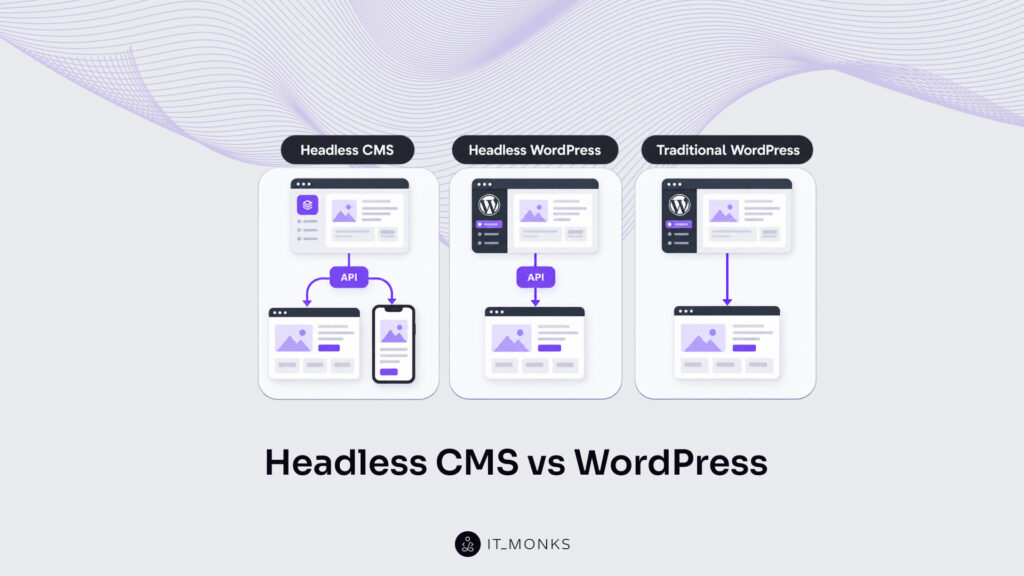
Headless CMS vs WordPress is a comparison of two choices made at once: an architecture choice between a coupled site and a headless one, and a platform choice between WordPress and an API-first headless CMS. WordPress can run either way.
A headless CMS runs headless only, because it has no frontend of its own. The short verdict: a headless CMS suits API-first, multi-channel builds backed by developer capacity; WordPress suits editorial teams that publish pages themselves; and headless WordPress sits between the two, pairing the WordPress admin with a separate frontend.
That framing turns a two-way debate into three options: headless CMS, traditional WordPress and headless WordPress. Most of the differences between a headless CMS and WordPress depend on which WordPress is meant. Against traditional WordPress, a headless CMS leads on frontend freedom and multi-channel delivery, while WordPress leads on editing and launch cost.
Against headless WordPress, the contrast narrows to the backend: content modeling, the API, preview, plugins, hosting, lock-in and hiring. A WordPress vs headless CMS decision made on the coupled version alone misses the middle option entirely.
What Is a Headless CMS?
A headless CMS is a content management system that stores and structures content and delivers it only through an API, with no built-in frontend. The “head”, meaning the theme or template layer that turns content into pages, is missing by design. Editors fill in entries in an admin interface; developers request those entries from the API and decide how they appear.
Contentful, Strapi and Sanity are examples of the class. Contentful and Sanity are hosted services, while Strapi is open source and can be self-hosted. All of them hand content to a separate application the team builds itself: a website on a JavaScript framework, a mobile app, a screen in a store. That separate frontend is the cost of entry. It is also the reason teams shortlist these products as headless CMS alternatives to WordPress when one content source has to feed more than a website.
What Is WordPress?
WordPress is an open-source content management system that ships coupled: the same install stores content in a database and renders pages through PHP themes. An editor publishes a post, and the theme turns it into HTML on the same server. That coupled setup is what most people mean by WordPress, and it remains the default on a fresh install.
WordPress can also run headless. Content goes out through the built-in WordPress REST API, or through a GraphQL plugin, to a separate frontend, and the theme no longer renders the public pages. Knowing what headless WordPress is changes the whole comparison: it has three sides, not two. Headless WordPress vs traditional WordPress is an architecture question on one platform. Setting either one against a headless CMS adds a platform question on top.
Headless CMS vs WordPress at a Glance
In a WordPress vs headless CMS comparison, the gap between the three options sits in architecture, editing, and backend upkeep.
| Criterion | Headless CMS | Traditional WordPress | Headless WordPress |
|---|---|---|---|
| Architecture | API-first, decoupled | Coupled backend and theme | WordPress backend, separate frontend |
| Frontend | Any framework, built by the team | PHP theme | Any framework, built by the team |
| Content modeling | Content types and references at the core | Posts, pages, custom post types and fields | Posts, pages, custom post types and fields |
| API | API-first: REST, GraphQL or a query language | REST API built in, rarely central | REST API built in, GraphQL via plugin |
| Editor and preview | Form-based entry, preview needs setup | Block editor with instant preview | Block editor, preview needs frontend work |
| Plugins | Smaller app marketplaces | Large plugin directory | Backend plugins only |
| Performance | Prebuilt or edge-cached frontend | Request-time rendering plus page caching | Prebuilt or edge-cached frontend |
| Security | No public admin on delivery domain | Public admin, plugins and themes exposed | Admin can sit off the public domain |
| Hosting | Vendor or self-hosted backend, plus frontend host | One PHP and database host | PHP backend plus frontend host |
| Cost profile | Licence or usage tiers plus frontend build | Low upfront, one hosting bill | Open-source backend plus frontend build |
| Hiring pool | Frontend developers, smaller per product | Large WordPress pool | WordPress plus frontend developers |
Read as a headless WordPress comparison, the table shows where the middle option closes the gap with a headless CMS, namely frontend freedom and delivery, and where it does not: the WordPress backend still needs upkeep, and plugins reach only as far as the admin.
How Does a Headless CMS Compare to Traditional WordPress?
A headless CMS compares to traditional WordPress as a decoupled system against a coupled one, and the differences show up in five places: frontend flexibility, performance, security, editing and cost. Frontend flexibility and performance headroom lean toward a headless CMS, the editing experience and launch cost lean toward traditional WordPress, and security depends on who maintains each system. In a WordPress vs headless CMS decision, this pairing is the one to weigh first while the architecture is still open.
Frontend Flexibility and Omnichannel Delivery
Frontend flexibility favors a headless CMS, because its content reaches any framework and any channel from one API. The same product description can feed a JavaScript website, a native app and a kiosk screen without being copied, and each frontend team picks its own tools. Omnichannel delivery is the starting assumption, not an add-on.
Traditional WordPress renders pages through the active theme. For a single website that is efficient: templates, menus and widgets already exist, and a page appears the moment it is published. A mobile app cannot use a PHP theme, so it has to read content from the WordPress REST API anyway, at which point part of the site already runs headless. Coupled WordPress handles one web channel well; every extra channel pushes it toward the API.
Performance and Scalability
Performance and scalability differ by mechanism rather than by a fixed speed gap. A headless frontend can be prebuilt into static files or cached at the edge, and it scales apart from the content store, so when pages are prebuilt or cached, a traffic spike hits the delivery layer while the CMS stays untouched. Traditional WordPress renders pages on request with PHP and database queries, then leans on page caching to avoid repeating that work. Plugin weight matters too: each plugin that loads scripts or runs queries adds to the cost of every uncached page.
None of that makes coupled WordPress slow. A well-cached WordPress site on solid hosting can be fast. The difference lies in the maximum delivery speed under load and in the effort needed to reach it. A headless build starts closer to static delivery, while WordPress gets there through caching layers and plugin discipline.
Security
Security in a headless CMS starts from a smaller public surface: no admin login or theme layer sits on the delivery domain, and with a SaaS product the vendor patches the backend. Visitors reach the frontend and, behind it, an API that hands out published content.
Traditional WordPress keeps the admin, plugins and themes on the public site, and that combination is the usual attack surface. Out-of-date plugins and themes are a common entry point. Security on coupled WordPress therefore depends on update discipline, careful plugin choice and hosting that adds firewalls and backups. Neither approach is safe by default; each one shifts where the risk sits and who handles it.
Editing Experience
Editing experience leans toward traditional WordPress, where the block editor lets editors build pages visually and see an instant preview of the result. Many editors already know it, so training is short and a new landing page rarely needs a developer.
A headless CMS offers structured, form-based entry instead: a title field, a body field, a reference to an author. Layout sits in the frontend code, not in the CMS. Editors therefore depend on developers for changes to how a page looks, unless the vendor adds a visual editor on top. The upside is cleaner, reusable content that fits any channel. The trade-off is less direct control over the page itself, and a longer path from idea to published layout.
Cost and Time to Launch
Cost and time to launch usually favor traditional WordPress at the start. WordPress is open source, ready-made themes and plugins shorten the build, and a single hosting bill covers the backend and the public site. A small team can launch a working site without writing a frontend.
A headless CMS costs more upfront. SaaS products charge through licence or usage tiers, the frontend has to be built from scratch, and that frontend needs its own hosting. Long-term cost is less clear-cut: it depends on scale, on how many channels share the content, and on the team that maintains it. A multi-channel operation is more likely to recover the upfront spend than a brochure site.
How Does a Headless CMS Compare to Headless WordPress?
A headless CMS compares to headless WordPress on far more even terms, because once WordPress runs headless, most frontend and delivery arguments stop applying. Both options use a separate frontend, both serve content over an API, and both can be prebuilt or edge-cached.
What still differs sits in the backend: how content is modeled, how the API is exposed, how preview works, which extensions remain, who hosts the backend, how easy it is to leave and who can be hired to run it. These backend points decide headless WordPress vs other CMS options. The full set of headless WordPress benefits and trade-offs reaches further, but the platform choice turns on the backend contrast.
Content Modeling
Content modeling is the core of a headless CMS: content types, fields and references are designed first, then reused across channels. An author entry can attach to articles, podcasts and app screens without being duplicated, and the model is shaped around the data rather than around pages.
Headless WordPress starts from posts and pages and extends them. Custom post types add new kinds of content, and custom fields, often through Advanced Custom Fields, add structured data to each entry. The result is workable for most sites, including complex ones. Still, the underlying model was built for a page-and-post website, so deep relationships between content types take more setup and rely on plugins or custom code rather than core support. Teams with heavily relational content notice the difference sooner than teams publishing articles and landing pages.
The API Layer
The API layer is the product in a headless CMS. Vendors usually offer REST and GraphQL endpoints, documented and versioned, because every frontend depends on them.
Headless WordPress has the REST API built into core, so posts, pages and taxonomies are available without extra software. GraphQL comes through WPGraphQL, a free plugin; REST returns fixed resources per endpoint, while GraphQL lets the frontend request exactly the fields it needs. Custom fields need to be exposed to the API, either through the field plugin’s settings or a small amount of code. The headless WordPress REST API architecture shows how those pieces connect. The core REST API ships ready; GraphQL and custom-field exposure are the parts the team adds.
Preview and Editorial Workflow
Preview and editorial workflow suffer the same loss on both headless options: the instant preview of a coupled site, where the theme renders a draft the moment it is saved. Headless WordPress keeps the familiar block editor, so editors write as before, but the preview button needs extra frontend work, including authenticated API access to drafts, to show them in the new design. Until that work is done, editors see drafts in the old theme or not at all.
Many SaaS headless CMSs ship preview or visual-editing features as part of the product. Those features still need wiring to the frontend, since the CMS cannot know how a separate application renders content. In both cases a working preview is a development task, not a default.
Plugins and Extensions
Plugins and extensions in headless WordPress fall into two groups: admin-side features keep working, and anything that renders on the public site does not. Custom fields, user roles and editorial tools run in the admin as before. SEO and form plugins sit across the line: editors still enter metadata and collect submissions in the admin, but meta tags, schema, sitemaps and the forms themselves appear on the new frontend only once they are pulled through the API and rendered there. Page builders, sliders and frontend widgets assume WordPress renders the page, so on a separate frontend they stop working and their features have to be rebuilt.
A headless CMS has smaller app marketplaces, focused on integrations such as search, translation or media. Anything missing is built in the frontend or connected through another service, so more custom work is expected from the start.
Hosting and Maintenance
Hosting and maintenance cover two surfaces for headless WordPress instead of one: a backend and a frontend, each hosted and kept current. The PHP and database backend still needs core and plugin updates, security hardening and backups, exactly as a coupled site does. The frontend adds a second deployment, often on a platform built for static or server-rendered JavaScript, with its own build pipeline and monitoring.
A SaaS headless CMS removes backend hosting and patching from that list: the vendor runs the servers, and the team hosts only the frontend while still managing content models, roles and API access. That arrangement changes once a headless CMS is self-hosted. Strapi, for example, can run on the team’s own servers, and then the backend upkeep returns, with updates, database care and backups back on the team’s list.
Lock-in and Hiring
Lock-in favors headless WordPress over SaaS headless CMS products, while hiring is mixed. WordPress is open source, content stays in the team’s own database, and moving hosts means moving files and a database export. The WordPress developer pool is large, though headless work also needs frontend developers who know the chosen framework, so the team ends up hiring for two skill sets.
A SaaS headless CMS keeps content and content models on the vendor’s platform. Export tools exist, but moving out means exporting entries and rebuilding the models, integrations and preview setup elsewhere. A self-hosted open-source option such as Strapi keeps content in the team’s own database, much as WordPress does. The hiring pool per product is smaller, since experience with one headless CMS transfers only partly to another.
Which Should You Choose?
Choose by channels, team and backend ownership: a headless CMS for multi-channel builds with developer capacity, headless WordPress for WordPress teams that need a modern frontend, and traditional WordPress for a single website run by editors. For teams already on WordPress, a headless WordPress decision framework narrows the same three points to one question: whether the team can run a second, frontend surface. Channels decide whether a separate frontend is needed at all; team skills and backend ownership then decide which platform carries it.
When a Headless CMS Fits
A headless CMS fits projects where content is shared across several channels and the team has frontend developers to build each one. These signals point to that fit:
- Content feeds a website, an app and other screens from one source.
- Structured content such as products, locations or documentation is reused widely in different layouts.
- Frontend developers are on the team, or on contract for the long term.
- Nobody wants to run, patch or back up a backend server.
- No WordPress history exists, so there is no content or editor habit to migrate.
When most of these hold, an API-first platform matches the shape of the project, and the extra frontend build can pay for itself across channels.
When Headless WordPress Fits
Headless WordPress fits when a team already has WordPress content and editors but needs a modern frontend or an app. Keeping the admin avoids a content migration and retraining, while the separate frontend brings the delivery freedom of a headless build. It also suits organizations that want to stay on open source and keep the data in their own database rather than on a SaaS vendor’s platform, without changing the admin their editors know.
The condition is capacity: the team must run two surfaces, a WordPress backend and a frontend application, and keep both updated. Startups testing an idea can take this route too, since building headless WordPress for a product MVP pairs a familiar admin with a frontend that can grow into the full product.
When Traditional WordPress Fits
Traditional WordPress fits when one website is the only channel and editors build pages themselves. A marketing site, a blog or a small business site gains little from a separate frontend, and the block editor, themes and page builders give editors direct control over layout. Projects that rely on plugins for forms, bookings or shops keep full use of them, since plugins that render on the frontend work as designed on a coupled site. A limited developer budget points the same way: a coupled site launches faster and needs one hosting setup instead of two. With no second channel on the roadmap, coupled WordPress is the practical choice.
More Articles by Topic
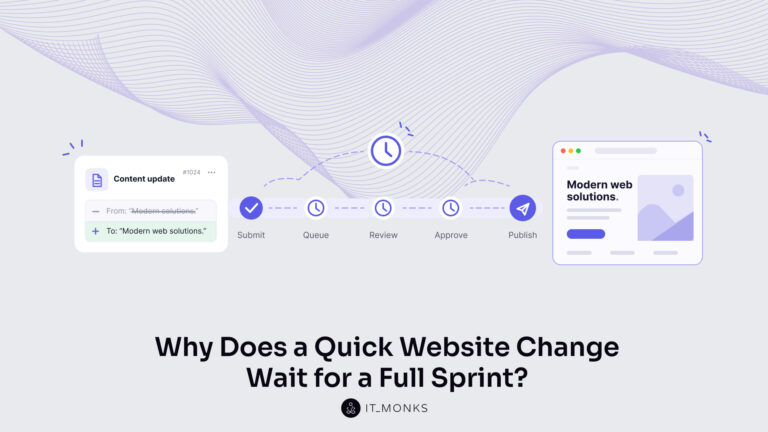
The new campaign copy is approved. The ads go live on Monday, and the landing page they point to still…
Learn more 
Imagine a marketing team two days before a campaign launch. The copy is approved, the images are ready, and the…
Learn more 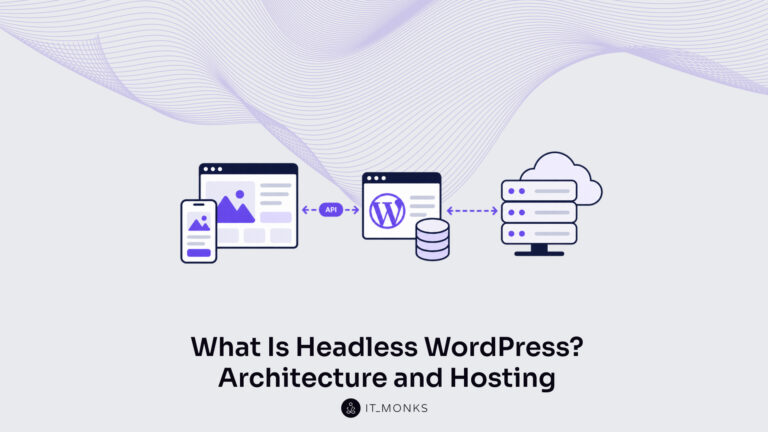
Headless WordPress is WordPress used as a content store and editorial interface only, with the public site rendered by a…
Learn more Contact
Feel free to reach out! We are excited to begin our collaboration!
Don't like forms?
Shoot us an email at info@itmonks.com
Don't like forms?
Shoot us an email at info@itmonks.com

CEO, Strategic Advisor
Reviewed on Clutch
 ChatGPT
  Claude
  Grok
Grok  Gemini
 Send a Project Brief
Fill out and send a form. Our Advisor Team will contact you promptly!