Explore our specialized services, tailored solutions, and industry expertise to elevate your digital presence. From custom WordPress development to seamless integrations, we build high-performing websites that deliver impact.
MySQLdatabase enumeration is the operation of listing every database an account can see on a MySQL server, forming the complete MySQL database list available to that connection. For an administrator, developer, or WordPress site owner, this enumeration provides a clear view of accessible databases associated with the current account before any further action is taken on the server. MySQL database enumeration serves backup verification, migration preparation, access review, and WordPress-install checks by exposing the full set of databases visible to that account.
This MySQL database list is generated through multiple methods, including SHOW DATABASES, command-line clients, privilege-scoped visibility, LIKE-based narrowing, graphical interfaces, queries against the information_schema, and checks of the current database context. Together, these paths define how listing databases on a MySQL server is expressed across environments, framing the exact scope of what the current account can see before moving into the command-level details.
What Is the SHOW DATABASES Command in MySQL?
The SHOW DATABASES command in MySQL is the SQL statement that lists every database the current account can see on the server. It returns a single-column result named Database, and the rows in that column are the database names the account has at least one privilege on, for the sufficiently privileged, every other database the server is hosting. The canonical reference syntax appears in the MySQL 9.1 Reference Manual’s SHOW DATABASES Statement section as:
SHOW {DATABASES | SCHEMAS} [LIKE 'pattern' | WHERE expr]
The braces mark a synonym. SHOW SCHEMAS is the built-in synonym for SHOW DATABASES, same behaviour, same output, interchangeable:
SHOW SCHEMAS;
Whichever form the account issues, the server treats the two statements identically. The optional LIKE ‘pattern’ and WHERE expr clauses constrain the result against the single Database column, and each clause carries its own syntax and scope against that one column.
MariaDB ships SHOW DATABASES with identical syntax and output; the rest of this article uses MySQL for all commands and examples.
How to List MySQL Databases from the Command Line
The MySQL command-line client is the primary way to run SHOW DATABASES, executed from a shell rather than through a graphical tool. The command-line approach to listing MySQL databases covers the two shell-driven utilities that ship with the MySQL distribution, both of which return the same listing the server can produce. Most hosting environments already have one or both utilities available on the box, which is why shell-driven enumeration tends to be the lowest-friction option in production.
The pattern for the interactive client runs in two steps. The reader reaches a mysql> prompt first( login is a prerequisite) and only then issues SHOW DATABASES; inside the prompt. The session persists until it is closed, so subsequent statements run against the same connection without re-authenticating.
The alternative is mysqlshow, a second MySQL-bundled utility that lists databases from the OS shell without a login-and-run sequence. It is a one-shot CLI command: the shell invokes it, it authenticates, it prints the database list, and it exits. Neither path is “better” in the abstract. Each one addresses a different invocation pattern against the same underlying listing.
mysql Client Login
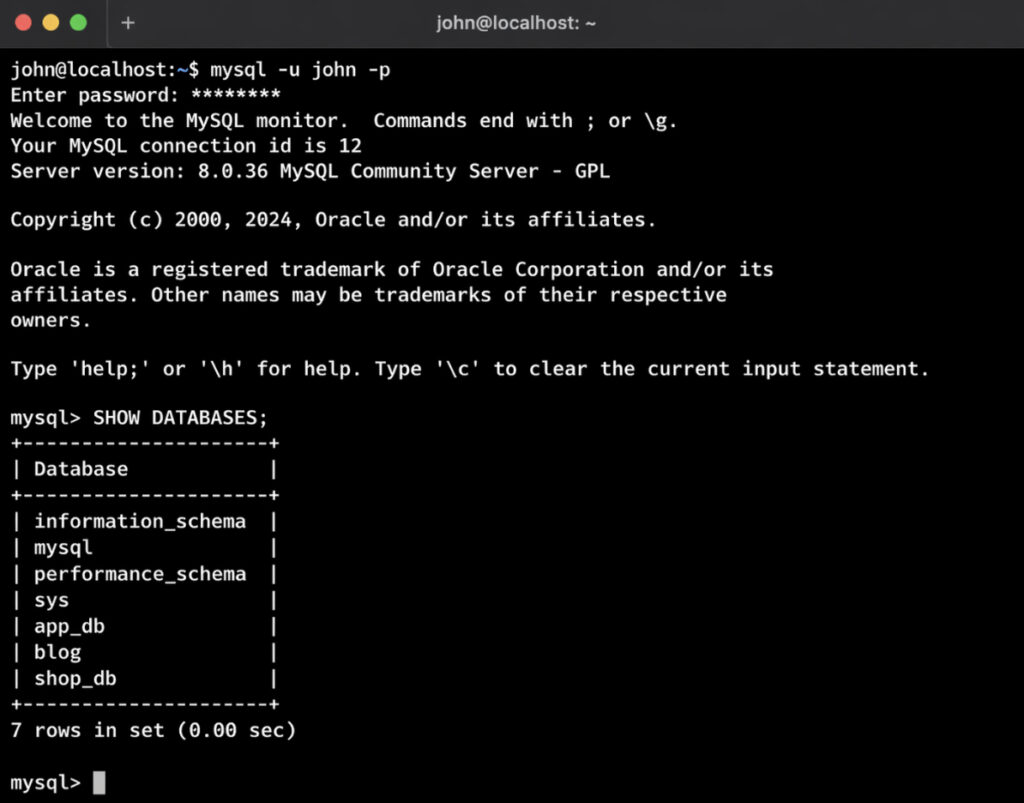
The mysql client login sequence is the interactive gateway to SHOW DATABASES at the mysql> prompt. The login invocation takes the form:
mysql -u <username> -p
The -u flag supplies the account username; the -p flag asks the client to prompt for the password rather than accepting it on the command line, which keeps the password out of shell history. On successful authentication the client arrives at the mysql> prompt, and from there the enumeration statement runs interactively:
SHOW DATABASES;
The client renders the result as a bordered table. A Database column header labels the rows, each database appears on its own line, and the familiar +—-+ ASCII frame bounds the table top and bottom. A default MySQL install lists the four internal schemas (information_schema, mysql, performance_schema, and sys) followed by whatever user databases the account can see.
Reading the output is straightforward once the frame is recognised: every row is a database name, and the row count equals the number of databases visible to the connected account. For a one-shot listing where keeping the session open has no purpose, mysqlshow lists the same database set from the shell without opening an interactive prompt.
mysqlshow Command
The mysqlshow command is a MySQL-bundled command-line utility that lists databases from the OS shell without opening a mysql> prompt session. The invocation mirrors the interactive client but skips the persistent session entirely:
mysqlshow -u <username> -p
After the password prompt the utility authenticates, prints a tabular listing of the accessible databases, and exits to the shell. The output format matches what the interactive client shows (the same Database column, the same rows) because both paths call into the same server-side operation.
mysqlshow lists the same database set as SHOW DATABASES, and the account privileges that apply to one apply to the other. Nothing about running outside a prompt session changes the visible list; the authentication step still governs what the server is willing to reveal.
That property is why scripting pipelines, remote one-shot checks, and CI jobs lean on mysqlshow. A shell script that pipes the listing into grep or a backup tooling call has no reason to open a persistent client; it needs a single command that returns a single result and exits. Interactive sessions fit that workflow poorly, whereas the one-shot utility drops in cleanly.
Even when either command succeeds, the returned list may still look incomplete — shorter than the reader expected, or missing a database known to exist on the server. That outcome is rarely a command-line issue. The MySQL server decides which database names to reveal based on what the authenticated account is allowed to see, so a short or partial listing is almost always a symptom of the privilege layer rather than of the command that invoked the listing.
SHOW DATABASES Privilege in MySQL
The SHOW DATABASES privilege in MySQL is the account-level permission that governs whether SHOW DATABASES reveals every database on the server or only the subset the account already has some grant on. Any reader working through a mysql check database pass starts here, because the account’s privileges rather than the disks on the server control which database names appear in the statement’s output.
A freshly created user sees very little. A user with broad grants across the server sees everything. The gap between those extremes is entirely a function of what the server’s privilege tables say about that account.
Granting the relevant privilege widens the visible set. Revoking it contracts the visible set again. Visibility per user type plays out along four common states:
User type
Privilege state
What SHOW DATABASES returns
Administrator (root-equivalent)
Holds the SHOW DATABASES privilege globally
Every database on the server
Standard account with targeted grants
No SHOW DATABASES privilege; has some privilege on selected databases
Only the databases it holds some privilege on
Guest / minimal account
No SHOW DATABASES privilege; no object grants
Often only information_schema
Account after REVOKE
Had the privilege, now revoked
The remaining granted set; previously visible databases disappear
Beyond the per-account layer, there is a second control surface: the skip_show_database option. It is a server-side switch that entirely hides the SHOW DATABASES statement from unprivileged accounts: not by trimming the list to zero rows using a LIKE pattern, but by denying the statement outright. Check both the grants and the server option before concluding that a database has gone missing, because the same symptom (a short or empty list) can come from either side.
SHOW DATABASES Privilege
The SHOW DATABASES privilege is the MySQL account permission that controls which databases are visible in the statement’s output, and it is the first setting to check during a mysql check database pass when the returned list appears short.
It is a global privilege. It applies at the server level rather than being scoped to a particular database, and its presence or absence on the account is what determines the default listing behavior.
Without the privilege, the account sees only the databases it already has some privilege on. A user with SELECT on two specific databases sees only those two in the listing, even if the server hosts dozens more. With the privilege granted, the picture changes: the account can see every database on the server, regardless of whether it has any object-level privileges on each one.
The administrator adds the privilege with a global grant:
GRANT SHOW DATABASES ON *.* TO 'username'@'host';
The *.* pair signals global scope: all databases, all objects within them. The matching REVOKE SHOW DATABASES ON *.* FROM ‘username’@’host’; is the inverse, and the visible set contracts on the next execution the account runs. Per-account grants handle most privilege adjustments. The server-wide option handles the rest.
skip_show_database Option
The skip_show_database option is a server-configuration option set in my.cnf or on the server command line, which restricts SHOW DATABASES at the server level rather than per account, and it is the second setting to confirm during a mysql check database pass when the statement refuses to run at all. Whereas the per-account privilege controls what the statement returns, this option controls who may run it at all.
[mysqld]
skip_show_database
The option is read at server start. A running MySQL instance does not pick it up until the next restart, which matters operationally: enabling it on a live server requires a restart window, not a plain config reload.
With the option enabled, only accounts holding the SHOW DATABASES privilege can execute the statement. Every other account receives an error in place of a filtered list: no empty result, no short list, a plain refusal. Multi-tenant hosting and hardened deployments lean on this behaviour: the goal there is to block unprivileged enumeration entirely, because even knowing the names of other tenants’ databases leaks useful information to an attacker.
The account-side privilege and the server-side option sit as siblings. The privilege controls what fills the output. The option controls whether the statement runs at all.
SHOW DATABASES LIKE Filter in MySQL
The SHOW DATABASES filter is a pair of clause-level affordances—LIKE and WHERE—layered on SHOW DATABASES, where the filter lists only the databases a pattern or expression matches against the single Database column in MySQL enumeration. On large MySQL servers where SHOW DATABASES shows hundreds of rows, the filter trims the list for scripted sweeps tied to naming conventions and for WordPress prefix checks such as the wp_ pattern. The LIKE clause matches a string pattern against the Database column using wildcard symbols such as %, while the WHERE clause attaches a broader expression that restricts the returned list through combined conditions. In both forms, the filter runs against the one-column result and narrows the enumeration to a concise list that matches the defined pattern or expression.
SHOW DATABASES LIKE 'wp_%';
SHOW DATABASES WHERE `Database` LIKE 'prod%' OR `Database` = 'mysql';
LIKE Pattern Match
The LIKE pattern match is the simplest filter form in MySQL enumeration, where a LIKE clause applies a string pattern with wildcard symbols to database names in the Database column.
In this pattern, % matches any number of characters, while _ matches a single character, making the wildcard behavior central to how names are narrowed and returned. Because _ itself is a wildcard, a literal underscore in real database names requires an escape with a backslash, so an underscore escape like _ ensures the pattern matches the actual character rather than any single position—an important detail for WordPress prefix checks such as wp_. Patterns such as ‘wp_%’ match names starting with that prefix, while a suffix-style pattern like ‘%_prod’ matches names ending with a specific segment. SHOW DATABASES shows only the names matching the pattern, and the resulting list reflects that narrowed match set.
SHOW DATABASES LIKE 'test_%';
WHERE Clause
The WHERE clause is the richer filter form in MySQL, where a WHERE clause attaches a SQL expression to SHOW DATABASES and evaluates it against the single Database column returned. This clause supports compound predicates with AND and OR, along with negation using <> or NOT LIKE, enabling combinations and exclusions that a LIKE-only pattern cannot represent. Because the returned column is named Database, which is a MySQL reserved word, the expression must use backtick quoting (`Database`) so the statement parses correctly. SHOW DATABASES shows only the names for which the expression evaluates true, and the resulting list reflects the combined conditions defined in the clause.
SHOW DATABASES WHERE `Database` LIKE 'prod%' AND `Database` <> 'prod_archive';
GUI Tools for Listing MySQL Databases
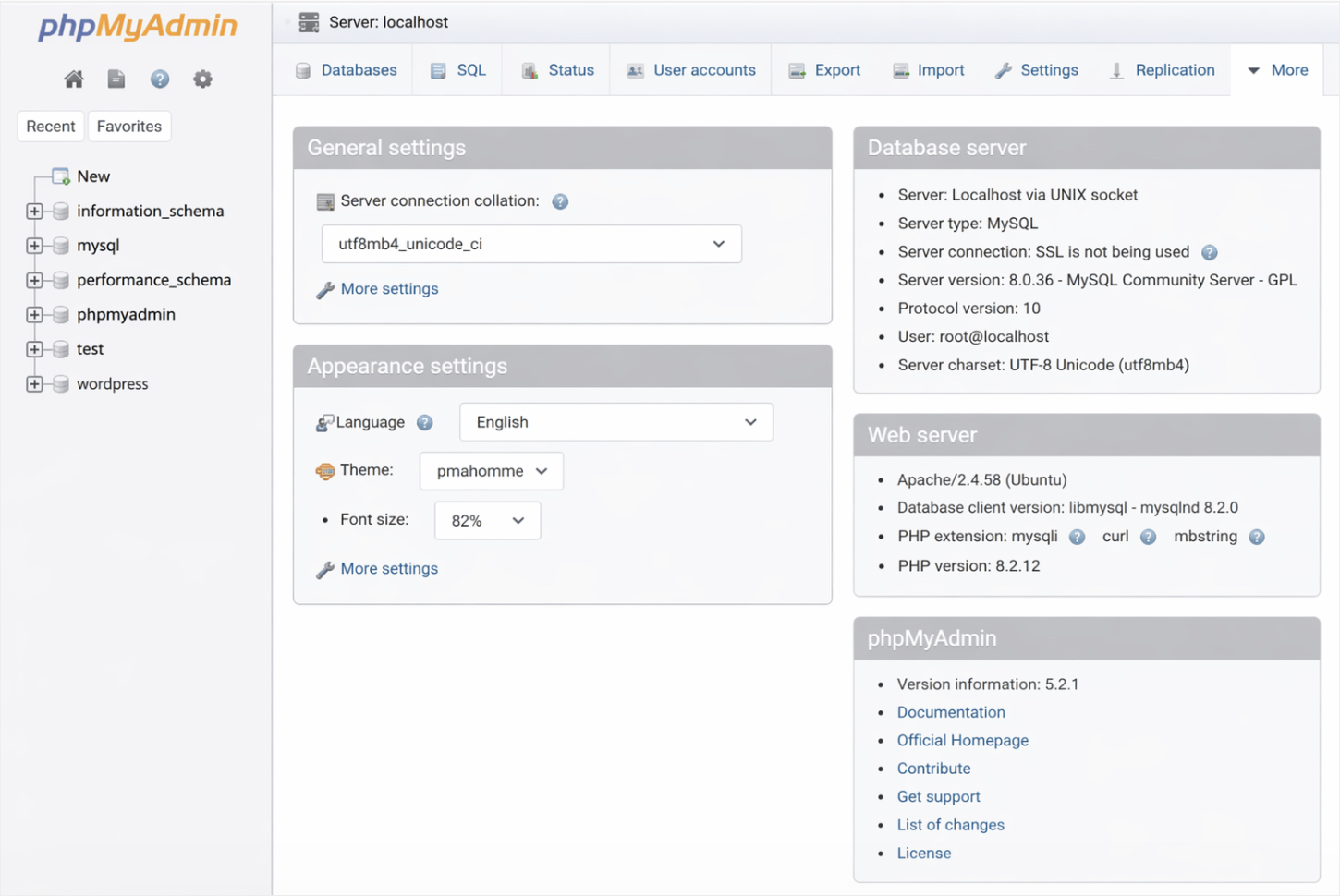
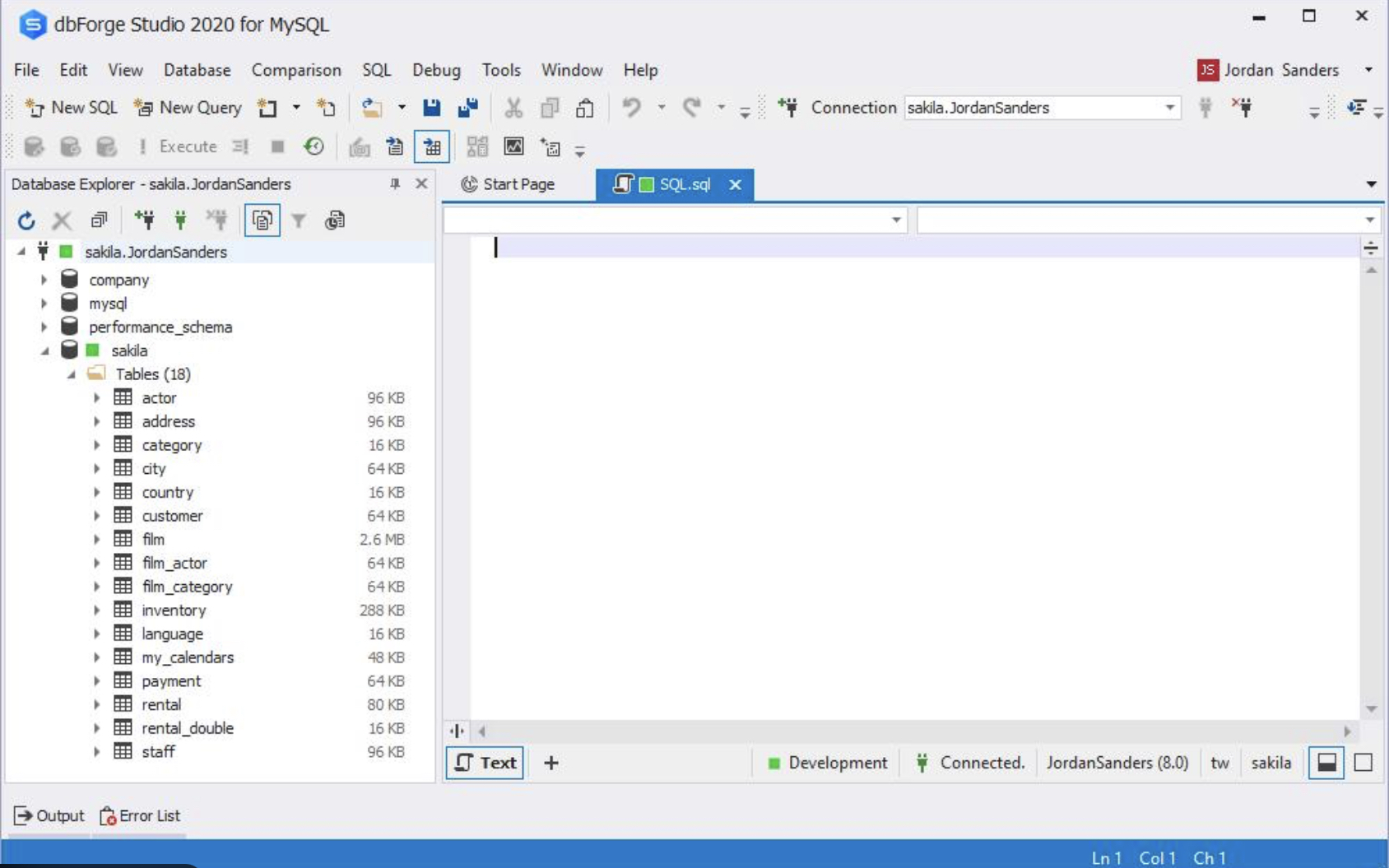
GUI tools for listing MySQL databases are graphical MySQL clients that render the SHOW DATABASES result in a visual navigation pane instead of a text-based prompt. phpMyAdmin, dbForge Studio, and Adminer each render the database list in a left-side pane, and the contents of that pane are the databases the logged-in MySQL account can see. The pane does nothing the server-side statement cannot; it is a presentation layer over the same underlying enumeration.
The navigation pane enumerates every database the logged-in MySQL account can see, and SHOW DATABASES privilege rules apply identically to what it shows. An account without the privilege sees a shorter list in the pane for the same reason the statement returns a shorter list at the prompt. An account denied the statement via skip_show_database runs into the same block in the GUI, the underlying server does not care whether the call came from a prompt, a utility, or a graphical client.
One factual line per tool is enough to place each in context. phpMyAdmin bundles with shared-hosting control panels, which is how most WordPress site owners first encounter it. dbForge Studio runs as a desktop client aimed at developers who prefer a thick-client workflow over a browser tab. Adminer ships as a single PHP file that drops onto any web server with PHP support, which is why it turns up in small-footprint admin setups.
The GUI path reads the same enumeration through a different surface. A metadata-table path exposes it as ordinary SELECT rows instead.
The information_schema Method for Listing MySQL Databases
The information_schema method for listing MySQL databases is the SELECT-based path that reads from the information_schema.SCHEMATA metadata table, whose rows correspond one-to-one with databases on the server. One row per database, keyed by the database name:
SELECT SCHEMA_NAME FROM information_schema.SCHEMATA;
SELECT SCHEMA_NAME FROM information_schema.SCHEMATA returns the same MySQL databases set SHOW DATABASES returns. No extra entries in the database lists, no fewer. The two paths to list database names are views onto the same server-side enumeration — one as a dedicated statement, one as a metadata-table read.
The reason this path exists is that SCHEMATA behaves as an ordinary table in a standard SELECT. These patterns handle ORDER BY clauses, filter clauses, and script composition inside a larger SQL pipeline without special handling:
SELECT SCHEMA_NAME FROM information_schema.SCHEMATA WHERE SCHEMA_NAME LIKE 'wp_%' ORDER BY SCHEMA_NAME;
That shape (filter plus deterministic ordering) is harder to assemble cleanly around SHOW DATABASES, which was built as a standalone listing statement rather than a composable expression. Scripts that embed database listing inside a larger query reach for information_schema.SCHEMATA for precisely that reason.
Privilege parity is the same point as everywhere else on the server. Visibility in information_schema.SCHEMATA follows the same account-privilege rules that govern SHOW DATABASES; an account without the SHOW DATABASES privilege sees only the databases it holds some privilege on in the metadata table too. The path changes, the rules do not.
The server-wide listing answers the question of which databases exist on the server. A tighter, session-scoped question runs in parallel.
How to Check the Current Database in MySQL
The current database is the single database the current MySQL session is operating on right now, which is a different question from the full set of databases the server hosts. A session has at most one database selected at a time, the one that unqualified table references resolve against, and the server-wide SHOW DATABASES paths answer a different question than the session-scoped lookup does. The session-level lookup answers the search query “mysql check database” for readers who want the single value for the active connection, not the enumeration of every database the account can see.
The built-in function that returns it is DATABASE():
SELECT DATABASE();
SELECT DATABASE() returns the currently selected database for the session, or NULL when none has been selected. A fresh connection that has not named a database since logging in receives NULL, not an error, not an empty string, literally the SQL null. That distinction matters in scripts, which have to treat NULL as “no current database” rather than “a database named NULL.”
USE <database_name>; is the session-level switch that makes DATABASE() return a non-NULL value:
USE <database_name>;
SELECT DATABASE();
After the USE, the session’s current database is the one named in the statement, and DATABASE() confirms it. The pairing is how readers check what the session is pointed at after a USE — the check closes the loop between the intention (USE) and the state (DATABASE()).
Beyond the server-wide enumeration and the session-level DATABASE() check, one concrete application anchors the practical question: confirming which specific database on the MySQL server holds a given WordPress site’s content.
How to Check the MySQL Database of a WordPress Install
The MySQL database of a WordPress install is the single MySQL database, named by the DB_NAME constant in wp-config.php, that stores that WordPress site’s posts, options, users, and related tables. A developer or site owner confirming which database belongs to a given WordPress install reconciles two sources: the WordPress-side configuration and the MySQL-side session state.
wp-config.php is the canonical source of truth on the WordPress side. The DB_NAME constant names the database WordPress connects to:
define( 'DB_NAME', 'your_wp_database' );
Whatever value the constant holds is what WordPress passes to MySQL at connection time. Reading wp-config.php first is faster than any in-server check — the file is right there in the install, and the line is unambiguous.
In-MySQL verification is the other half of the check. The reader connects to MySQL with the credentials from wp-config.php (the DB_USER, DB_PASSWORD, and DB_HOST constants, alongside DB_NAME). The connection must be scoped to the right database before SHOW TABLES returns anything useful: either pass -D database_name on the mysql command line at login, or issue USE database_name; once at the prompt.
Without either step, the session has no current database and SHOW TABLES returns zero rows regardless of whether the WordPress tables are physically present. With the scope set, the two-line check confirms the match:
SELECT DATABASE();
SHOW TABLES LIKE 'wp_%';
SELECT DATABASE() shows the active database for the session. It should equal the DB_NAME value, and if it does not, the connection opened against a different database than the config declared. SHOW TABLES LIKE ‘wp_%’ is a bounded prefix check: the rows it returns are the WordPress tables, scoped strictly to the wp_ prefix the default install uses, and their presence confirms the database is in fact a WordPress database rather than an empty shell named the same thing.
One caveat applies when the install customises the table prefix: wp-config.php can set $table_prefix to any value (many security-hardened installs do this deliberately), so a zero-row result from ‘wp_%’ does not automatically mean “not WordPress.” It may mean “WordPress with a non-default prefix,” in which case the reader reads the $table_prefix line in wp-config.php and substitutes that value into the LIKE pattern.
The enumeration paths that handle server-wide listing apply to the WordPress-install case unchanged. WordPress narrows the question, one specific database belonging to one specific install, without changing the mechanics of how MySQL answers it.





 ChatGPT
  Claude
  Grok
Grok  Gemini