Explore our specialized services, tailored solutions, and industry expertise to elevate your digital presence. From custom WordPress development to seamless integrations, we build high-performing websites that deliver impact.
register_taxonomy() hooked to init registers a WordPress custom taxonomy in code when a post type needs its own grouping by term. Categories and tags, the built-in WordPress taxonomies, group posts; a post type such as ‘book’ has none until a custom taxonomy such as ‘genre’ attaches to it. The five steps run in execution order: register the taxonomy on init, set the arguments, set the rewrite slug of the custom taxonomy URL, display the terms in the theme, and register custom fields on the terms; the result is one more instance of the WordPress taxonomy type.
Step 1: How to Register a Custom Taxonomy with register_taxonomy()
register_taxonomy(), called inside a function hooked to init, registers the custom taxonomy on every load, because a custom taxonomy is not stored in the database; only its terms are. init runs after plugins and the theme load and before the main query, the same hook on which post types register.
register_taxonomy() expects three parameters in order: taxonomy slug, object_type, $args. Five sub-steps:
Declare the slug ‘genre’ and $labels (‘name’ => ‘Genres’, ‘singular_name’ => ‘Genre’).
Write the function that declares $args.
Hook it to init with add_action( ‘init’, … ).
Call register_taxonomy( ‘genre’, ‘book’, $args ) inside it.
Place the code in a plugin file or the theme’s functions.php.
Plugins such as Custom Post Type UI or Meta Box create the same taxonomy from an admin form instead of PHP, a distinct method. In code, the taxonomy slug comes first.
What Is the Taxonomy Slug in register_taxonomy()?
The taxonomy slug in register_taxonomy() is the first parameter and the internal key under which WordPress registers the custom taxonomy. Template tags such as the_terms() name it, query_var defaults to it, and taxonomy-{slug}.php resolves to taxonomy-genre.php. The slug must be lowercase alphanumeric characters, dashes, and underscores, no spaces, at most 32 characters, per the WordPress developer reference for register_taxonomy(); a WordPress reserved term such as ‘type’ or ‘author’ collides with a core query variable.
// $args as declared in step 1
register_taxonomy( 'genre', 'book', $args );      // valid: lowercase, under 32 characters
register_taxonomy( 'Book Genre', 'book', $args ); // invalid: uppercase, space
// invalid: 'book_genre_classification_terms_list' exceeds 32 characters
The taxonomy slug differs from the rewrite slug set in step 3: the taxonomy slug is the internal key, the rewrite slug the public segment of the custom taxonomy URL, and the two match only while rewrite stays unset. The second parameter names the post type the taxonomy attaches to.
What Is the Post Type in register_taxonomy()?
The post type in register_taxonomy() is the second parameter, object_type, the post type the custom taxonomy attaches to; it is registered elsewhere, and the call only binds to it. object_type accepts a string for one post type or an array for several, as ‘book’ versus array( ‘book’, ‘post’ ).
The ‘book’ post type is one of the WordPress custom post types registered with its own init callback. register_taxonomy() stores object_type by name and does not check that the post type exists yet, so either callback may run first; the existence check belongs to register_taxonomy_for_object_type(), which returns false for an unregistered post type. A later post type such as ‘magazine’ attaches, once registered, through register_taxonomy_for_object_type( ‘genre’, ‘magazine’ ).
Step 2: register_taxonomy() Arguments for a Custom Taxonomy
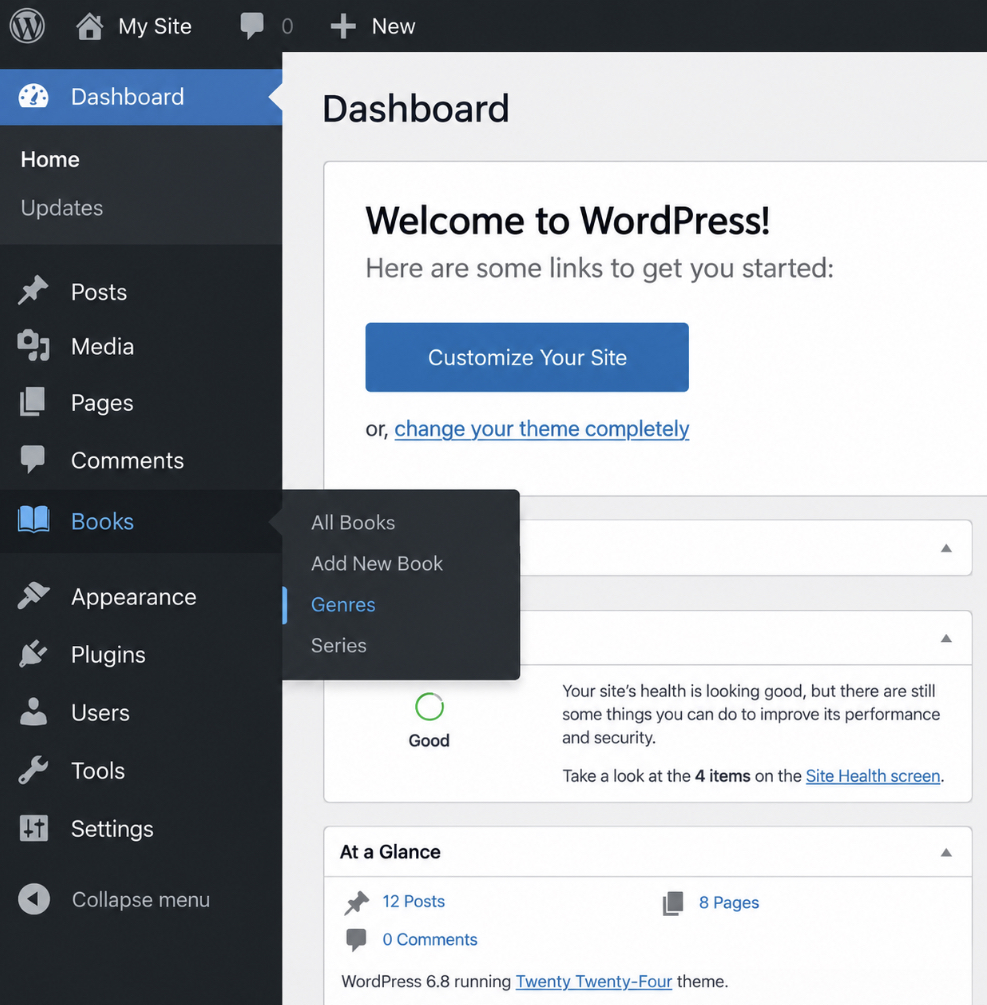
Set the labels. The labels argument is an array of strings that set the names the admin UI displays for the custom taxonomy. Without it, a hierarchical taxonomy displays as Categories in the Books menu.
Set hierarchical. The hierarchical argument is a boolean that controls whether the custom taxonomy is category-like or tag-like. true enables terms with parents, so Science Fiction can have Fiction as its parent once an editor assigns it; false sets non-hierarchical, flat terms.
Set the visibility flags. public, show_ui, show_admin_column, show_in_rest and query_var control where WordPress exposes the custom taxonomy; show_in_rest exposes it to the REST API and the block editor taxonomy panel.
Pass rewrite as an array. The rewrite argument controls the custom taxonomy URL; step 2 passes array( ‘slug’ => ‘genre’ ) and step 3 sets the remaining keys.
The argument reference lists all eight with their PHP types, defaults and effects.
Argument
Type
Default
Controls
labels
array
label set of category (hierarchical) or post_tag (non-hierarchical)
the names the admin UI displays for the taxonomy and its terms
hierarchical
bool
false
category-like terms with parents and a checklist, or tag-like flat terms
public
bool
true
front-end queries for the taxonomy; the base value for show_ui
show_ui
bool
value of public
the admin menu entry and the term edit screens
show_admin_column
bool
false
a taxonomy column in the post type list table
show_in_rest
bool
false
exposure to the REST API and the block editor taxonomy panel
query_var
string / bool
the taxonomy slug
the public query variable, ?genre=fiction; false disables it
rewrite
bool / array
true (taxonomy slug as URL slug)
the custom taxonomy URL slug; set in step 3
itm_genre(), hooked to init, passes both arrays to register_taxonomy() and registers ‘genre’ on ‘book’.
With this array the custom taxonomy has a Genres menu, a Genre column, a block editor panel and hierarchical terms; rewrite, passed with its slug only, controls the custom taxonomy URL in step 3.
Step 3: Rewrite Slug in a Custom Taxonomy URL
The rewrite slug in a custom taxonomy URL is the public segment WordPress places before each term name, set by the rewrite argument of register_taxonomy(): with ‘slug’ => ‘genre’, /genre/fiction/ resolves to the fiction archive. It differs from the taxonomy slug of step 1: public segment versus internal key.
slug holds the segment; with_front true (the default) keeps the /blog/ permalink base, false drops it; hierarchical set to true adds parent terms to the URL; false keeps one term per URL.
No slug value (taxonomy key book_genre): /book_genre/fiction/
‘slug’ => ‘genre’: /genre/fiction/
‘hierarchical’ => true: /genre/fiction/thriller/
The rewrite slug is set in three sub-steps.
Set the rewrite array in $args.
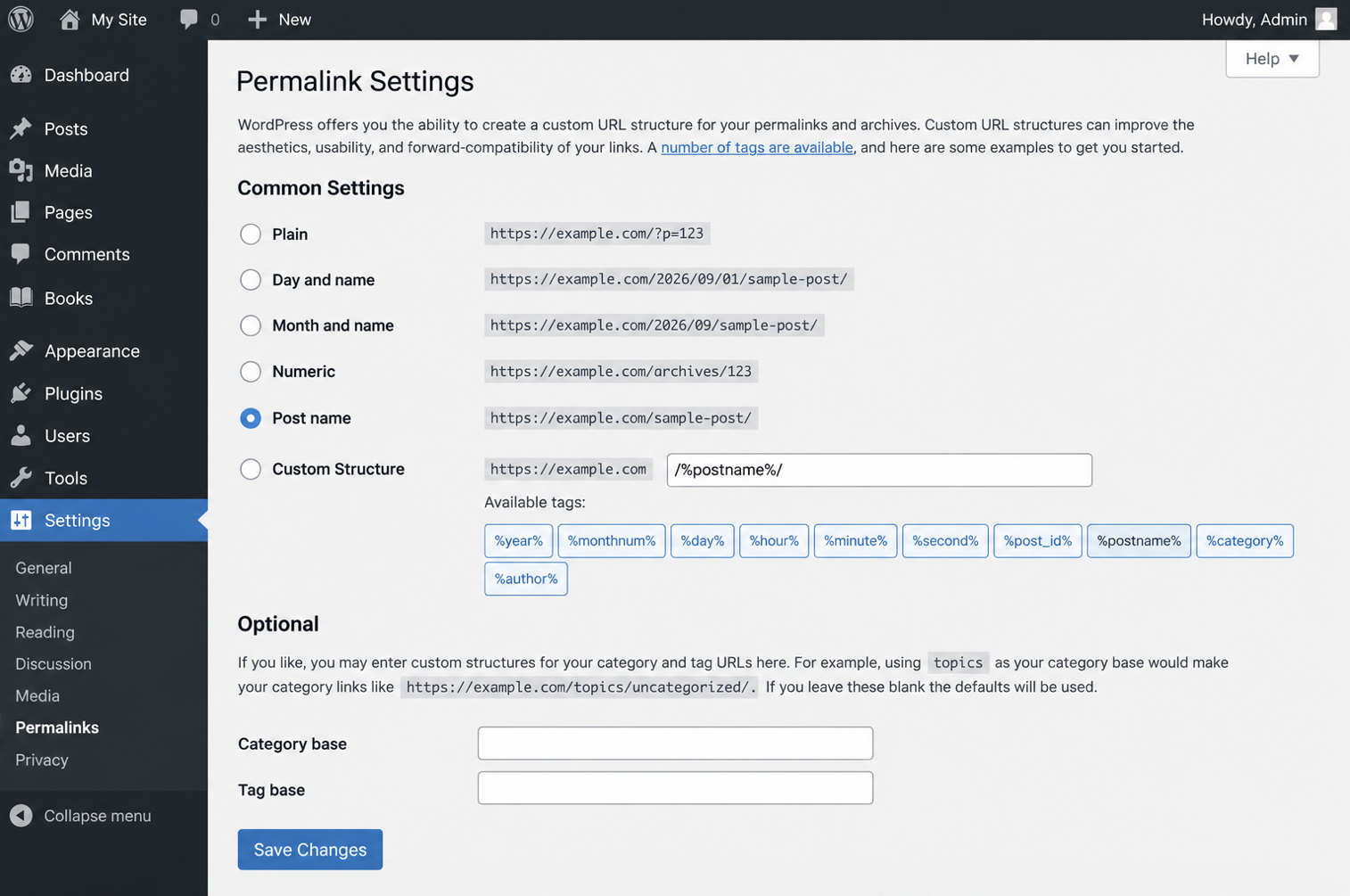
Refresh the Permalinks settings (3a).
Check the slug for conflicts (3b).
Permalinks Settings Refresh for a Custom Taxonomy URL
The Permalinks settings refresh for a custom taxonomy URL regenerates the rewrite rules in the rewrite_rules option, so /genre/ resolves instead of returning HTTP status 404. A term archive with no posts also returns 404, so create the term fiction and assign one book to it before the test. The admin route of sub-step 3a regenerates the rules in three steps.
Open Settings > Permalinks.
Click Save Changes, nothing altered.
Load /genre/fiction/ and expect the archive.
The code route, flush_rewrite_rules() on plugin activation, requires the named itm_genre() from step 2, not the step-1 closure.
function itm_genre_activate() {
  itm_genre();            // registers the genre taxonomy first
  flush_rewrite_rules();  // regenerates the rewrite rules once, on activation
}
register_activation_hook( __FILE__, 'itm_genre_activate' );
// never call flush_rewrite_rules() on init
Flushing on init is wrong: every request would write the rewrite_rules option.
A 404 gone after the refresh came from stale rules; a 404 on a term with no assigned post is an empty archive; a 404 that persists with a post assigned points to a slug conflict (3b).
Slug Conflicts in a Custom Taxonomy URL
A slug conflict in a custom taxonomy URL is two rewrite rules claiming one URL segment; the term archive returns HTTP status 404 when the other rule resolves the request. It survives every refresh: the 404 is a rewrite outcome, not a hosting or cache fault.
Three sources collide with the rewrite slug.
A page or post slug equal to it: a Genre page at /genre/ makes /genre/fiction/ return 404 or resolve to the page.
A post type rewrite slug equal to it: two archives collide, one returns 404.
A built-in rewrite base (category, tag, author, page): the term archive returns 404.
Sub-step 3b resolves the conflict in three moves.
Check page slugs, post type rewrite slugs and built-in bases for it.
Rename the rewrite slug, ‘slug’ => ‘book-genre’; the taxonomy key stays.
Refresh the Permalinks settings (3a).
The archive then resolves at the slug’s URL: /genre/fiction/ for ‘genre’, /book-genre/fiction/ after the rename. Step 4 displays those terms in the theme with the_terms() and the taxonomy template file.
Step 4: Custom Taxonomy Term Display in the Theme
Term display is the theme output of the terms of a custom taxonomy registered in WordPress in step 1. After step 3 the custom taxonomy URL of each term resolves to a term archive, yet a post’s own terms show on the single post only once a theme template outputs them.
The terms of a custom taxonomy display on two theme surfaces, one per sub-step:
The single post: the single template shows a post’s terms via the_terms() (sub-step 4a).
The term archive: the taxonomy template file lists the posts of one term at the custom taxonomy URL (sub-step 4b).
Both surfaces reuse the taxonomy slug from step 1: the_terms() takes it as an argument; the template file carries it in its name.
What Is the_terms() for a Custom Taxonomy?
the_terms() is the WordPress template tag that prints a post’s terms for one named custom taxonomy as linked text; the taxonomy it names is the slug registered in step 1. the_category() and the_tags() do the same for the built-in taxonomies only. the_terms() takes five parameters in call order: post ID, taxonomy slug, before string, separator (defaults to a comma and a space), after string.
Placing the_terms() in the theme takes three steps:
Open single.php in the theme.
Call the_terms() with get_the_ID() and the slug ‘genre’, inside the loop.
Reload a book post with a saved genre; the term names print as links.
get_the_terms() is the non-echo alternative: it takes the first two arguments of the_terms(), the post ID and the taxonomy slug, and returns an array of term objects for a custom loop to output. Each printed term links to that term’s archive, which the taxonomy template file renders.
What Is the Taxonomy Template File for a Custom Taxonomy?
The taxonomy template file is the theme file that renders the term archive at the custom taxonomy URL, and WordPress names it from the taxonomy slug registered in step 1: the ‘genre’ taxonomy matches taxonomy-genre.php in the theme root. The template hierarchy matches four file names for a term archive and falls back to the next when one is missing:
taxonomy-{slug}-{term}.php, one term, for example taxonomy-genre-science-fiction.php
taxonomy-{slug}.php, every term of the taxonomy, here taxonomy-genre.php
taxonomy.php, every custom taxonomy
archive.php, the general archive template
Without the first three, archive.php renders the term archive with default markup. Creating the ‘genre’ template file takes three steps:
Create taxonomy-genre.php in the theme root.
Paste the skeleton: header, term title, term description, the loop, footer.
Open the custom taxonomy URL of one genre, /genre/science-fiction/; the archive renders that term’s title and its books.
single_term_title() outputs the queried term’s name, term_description() its saved description, and the loop each book’s title. The custom taxonomy procedure is complete through four steps: the taxonomy registers on init with its arguments (steps 1 and 2), its term URLs resolve after the Permalinks refresh (step 3), and its terms render on the single post and the term archive (step 4). The terms still carry only name, slug, and description; step 5 registers custom fields on them.
Step 5: How to Register Custom Fields on Custom Taxonomy Terms
Custom fields on custom taxonomy terms are registered as term meta: WordPress taxonomy custom fields are key-value pairs that belong to a term rather than to a post, registered with register_term_meta(). Term meta is in WordPress since version 4.4 and register_term_meta() since 4.9.8, per WordPress Developer Resources.
Registration has four sub-steps:
Register the meta key on init, in the callback that registers the taxonomy.
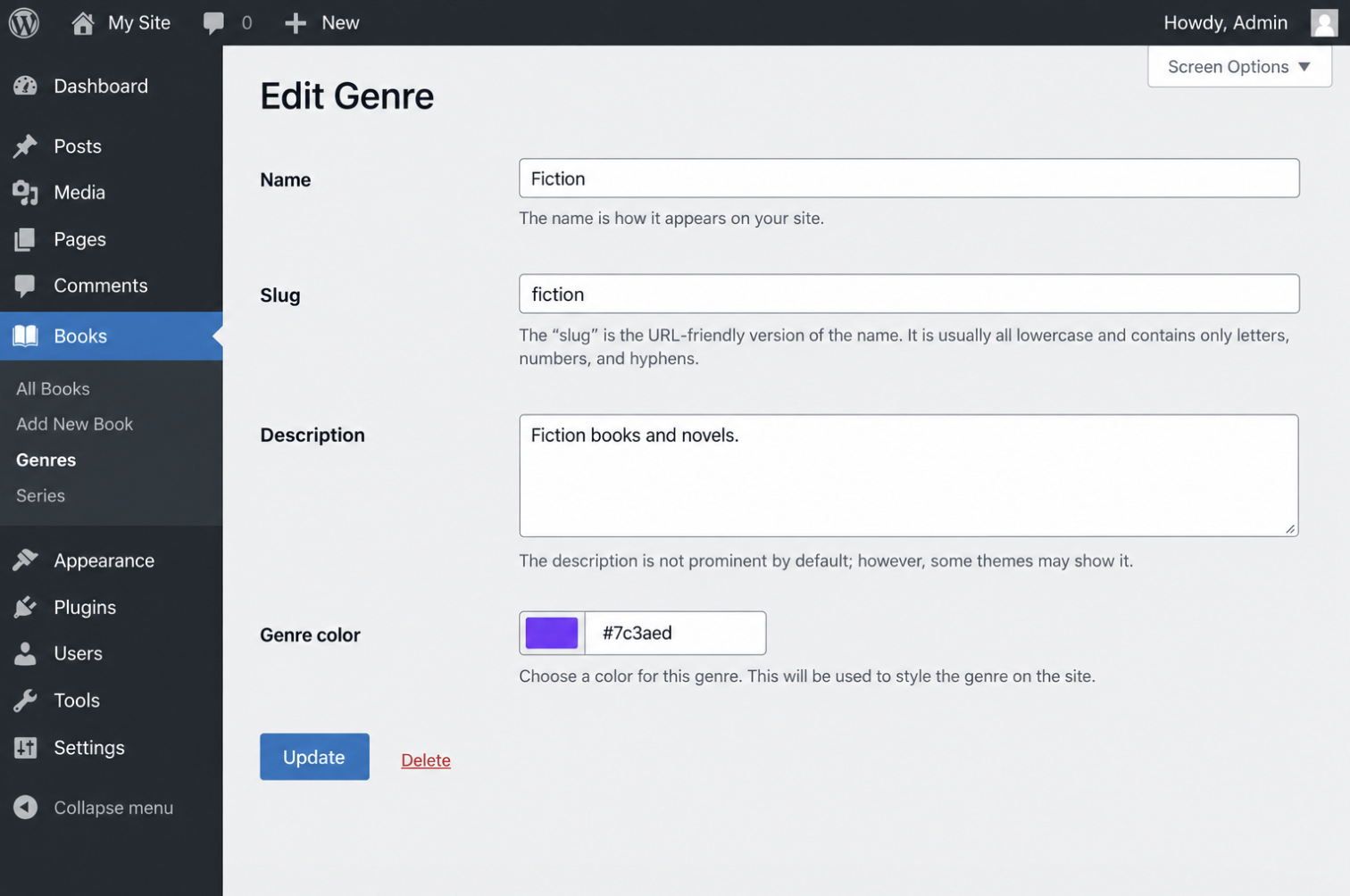
Add the input to the term edit form with the genre_edit_form_fields action.
Save the submitted value with the edited_genre action.
Output the stored value in taxonomy-genre.php.
register_term_meta() accepts the taxonomy slug, the meta key and an arguments array that sets the type, one value per term (single), REST exposure (show_in_rest) and the sanitize callback.
The callback hooked to genre_edit_form_fields outputs an input row on the Edit Genre form; the callback hooked to edited_genre, which fires after the term is saved, passes the value through sanitize_hex_color() into update_term_meta() only when genre_color is in the form, since Quick Edit fires edited_genre without it. On the genre archive, get_term_meta() with get_queried_object_id() outputs the color.
Post meta is the counterpart: WordPress custom fields on posts store data that differs per post, while term meta stores data shared by every post in a term. A term is the unit a taxonomy groups.
What Is a WordPress Taxonomy?
A WordPress taxonomy is the classification system that groups posts by term: a taxonomy has terms, and a post can belong to one or more of them. WordPress has three built-in taxonomies that attach to posts.
category, hierarchical: parent and child terms.
post_tag, non-hierarchical: a flat term set.
post_format, non-hierarchical: a fixed term set.
The hierarchical argument set in step 2 picks the kind for a custom taxonomy: true gives parent-child terms like category, false gives flat terms like post_tag. Taxonomy in WordPress is a type; the ‘genre’ taxonomy registered in steps 1 through 5 is an instance of it. A registered taxonomy and its terms also have typed fields in a site’s GraphQL API through a WPGraphQL schema extension, the plugin code that registers a taxonomy’s GraphQL type and fields for a headless front end.







 ChatGPT
  Claude
  Grok
Grok  Gemini