- Expertise
Expertise That Drives Results
Explore our specialized services, tailored solutions, and industry expertise to elevate your digital presence. From custom WordPress development to seamless integrations, we build high-performing websites that deliver impact.
Solutions- Booking System Integrations
- Headless & REST API WordPress
- Hubspot Integration
- Enterprise WordPress
- Website Migration
- Internal Collaboration Platforms
- External Communications Hubs
- Work
- About
- Proof
- Contact
Learn more


How to Use AJAX in a Custom WordPress Plugin: Full Example

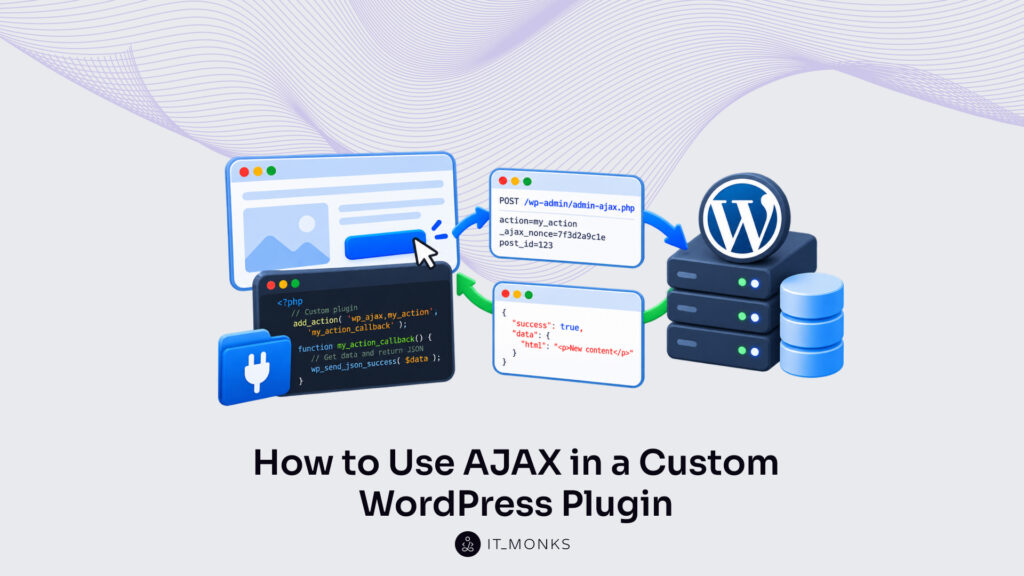
AJAX in a WordPress plugin is the exchange in which the plugin’s script sends a request to wp-admin/admin-ajax.php, a handler the plugin registers returns the answer, and the page updates without a reload. Every request the plugin sends points to admin-ajax.php and never to the plugin’s own PHP file, according to the Plugin Handbook. Without AJAX, the same result requires a full page reload; with it, the script updates one part of the page and the rest holds its state.
To use AJAX in a custom WordPress plugin, a developer completes five build steps in order: the file layout, the script enqueue, the localized URL and nonce, the handler, and the JSON response. Every later step uses the folder, file and function names an earlier step creates.
The main risk of the build is in the handler: a nonce verifies that a request came from the site’s own page, not whether the user may run the action, so a public action and a privileged action require different checks. The steps end in the jQuery script that sends the request and one complete plugin example, a button whose click loads a post tag count into the page without a reload. Step one is the file layout.
File Layout for AJAX in a WordPress Plugin
The file layout for AJAX in a WordPress plugin is a plugin folder in wp-content/plugins that contains one main PHP file and a /js/ subfolder. The main PHP file, my-ajax-plugin.php, holds the header comment plus the PHP of the four later steps: the enqueue, the localized object, the handler and the JSON response. The /js/ subfolder holds js/my-ajax-plugin.js, the jQuery file that sends the request.
Each file holds one end of the exchange. Within the full exchange of AJAX in WordPress, the plugin holds both ends: its script sends the request from the page, and its PHP handler returns the response from the server. The build requires no third file.
Create the folder under the plugin’s slug, my-ajax-plugin, and place both files in it:
wp-content/plugins/my-ajax-plugin/
├── my-ajax-plugin.php
└── js/
    └── my-ajax-plugin.js
A folder named after the plugin is the place the Plugin Handbook recommends for a plugin’s files, and WordPress reads the plugins folder and its subfolders for PHP files that contain a header comment. The my-ajax-plugin folder therefore holds every file of the AJAX build under one name. Before WordPress lists the plugin, though, the main PHP file requires its header comment.
Plugin Header Comment
The plugin header comment is the PHP comment block at the top of the main PHP file that WordPress reads to list the file as a plugin on the Plugins screen. The header requires one field, Plugin Name. Description and Version are optional, and the Plugins screen lists both beside the plugin name when the header contains them.
For AJAX in a WordPress plugin, the header of my-ajax-plugin.php uses the required field plus those two optional ones:
<?php
/**
 * Plugin Name: My AJAX Plugin
 * Description: Loads a post tag count through AJAX.
 * Version: 1.0.0
 */
According to the Plugin Handbook, only one file in the plugin folder holds the header comment. A plugin with several PHP files still places the header in my-ajax-plugin.php alone; the other files are plain PHP that the main file loads. Add the block at the top of the file, before any function or hook.
With the header added and the plugin active on the Plugins screen, the file’s set up as a plugin, and WordPress loads my-ajax-plugin.php on every request. The plugin places the script of the AJAX exchange in the plugin folder as well, in a subfolder of its own.
The /js/ Subfolder
The /js/ subfolder is the folder inside the plugin folder that holds js/my-ajax-plugin.js, the script of the AJAX build. The enqueuing examples of the Plugin Handbook place their scripts in a /js/ folder below the plugin folder, and the AJAX build uses the same convention. A script placed elsewhere still loads. The /js/ subfolder, though, holds the page-side jQuery apart from the server-side PHP of the main file.
The main PHP file points to the script through plugins_url( ‘js/my-ajax-plugin.js’, FILE ), which resolves the file’s URL relative to the folder that holds my-ajax-plugin.php. Because FILE is the main file’s own path, the URL points to the right file on every site where the plugin is active, whether a staging copy, a WordPress site in a subdirectory or another domain. A fixed URL typed into the code points to one site only.
The script file is in place in the plugin folder, yet WordPress loads it on a page only once the plugin enqueues it.
Script Enqueue for AJAX in a WordPress Plugin
The second build step is the script enqueue for AJAX in a WordPress plugin, where a plugin callback uses wp_enqueue_script() so WordPress loads js/my-ajax-plugin.js on the page with jQuery as a dependency. Until the plugin enqueues it, the file in the /js/ subfolder is not part of any page.
The plugin passes five arguments to wp_enqueue_script(), and each one controls how the plugin’s AJAX script loads. The handle, my-ajax-plugin-script, is the unique name WordPress holds the script under; every later call that points to the script uses it. The source is plugins_url( ‘js/my-ajax-plugin.js’, FILE ), the URL of the script in the /js/ subfolder.
Then comes the dependency array. It holds the jquery handle, so WordPress prints jQuery before the plugin’s script, which requires jQuery to send its request. The version, ‘1.0.0’, is added to the script URL as a query string; after a plugin update, a changed number gives the script a new URL, so the browser loads the new file instead of a cached copy. The fifth argument is the $args array with in_footer set to true, which prints the script tag at the end of the page; that array form is available from WordPress 6.3, according to the wp_enqueue_script() function reference, and earlier versions read a plain boolean in the same position.
The plugin hooks the callback to an action and doesn’t use wp_enqueue_script() when WordPress loads the plugin file, because scripts must be enqueued from an action hook, according to the enqueuing page of the WordPress Plugin Handbook. The right hook is the one for the page that holds the AJAX feature. For front-end pages, it is wp_enqueue_scripts:
add_action( 'wp_enqueue_scripts', 'my_ajax_plugin_enqueue' );
function my_ajax_plugin_enqueue() {
	wp_enqueue_script(
		'my-ajax-plugin-script',
		plugins_url( 'js/my-ajax-plugin.js', __FILE__ ),
		array( 'jquery' ),
		'1.0.0',
		array( 'in_footer' => true )
	);
}
A plugin admin page is different. There the hook is admin_enqueue_scripts, and admin_enqueue_scripts passes $hook_suffix, the identifier of the current admin screen, to the callback. The callback returns early unless $hook_suffix matches the hook suffix that add_submenu_page() returned when the plugin added its admin page, then runs the same enqueue and localize calls, so the plugin’s AJAX script loads on that one screen and on no other page in wp-admin.
Once loaded, js/my-ajax-plugin.js sends one request per click: an AJAX call in WordPress to admin-ajax.php with the action my_ajax_get_count. The enqueued script still requires two values it cannot read on its own, the full admin-ajax.php URL and a nonce, so the plugin passes both to it through the handle my-ajax-plugin-script.
Localized Object for AJAX in a WordPress Plugin
The localized object for AJAX in a WordPress plugin is my_ajax_obj, a JavaScript object that WordPress prints on the page before the plugin’s script and that holds values created in PHP. It is the third build step. PHP-to-JavaScript data of this kind is how the plugin passes its script the two values the AJAX request requires: the admin-ajax.php URL and the nonce.
wp_localize_script() creates the object, and it requires a handle that is already enqueued, so the plugin places wp_localize_script() after wp_enqueue_script() inside my_ajax_plugin_enqueue() and passes it the same handle, my-ajax-plugin-script. The second argument is the object name. Because my_ajax_obj is a JavaScript variable name, it contains underscores rather than dashes, plus the plugin prefix, so it’s unlikely to match an object another plugin prints.
The object contains two keys. ajax_url holds admin_url( ‘admin-ajax.php’ ), which returns the full URL of admin-ajax.php for the current site, so the same plugin points to the right endpoint on any domain or subdirectory install. The nonce key holds wp_create_nonce( ‘my_ajax_nonce’ ), a token created for the action string my_ajax_nonce, and the plugin’s handler verifies that string.
// Inside my_ajax_plugin_enqueue(), right after wp_enqueue_script().
wp_localize_script(
	'my-ajax-plugin-script',
	'my_ajax_obj',
	array(
		'ajax_url' => admin_url( 'admin-ajax.php' ),
		'nonce' => wp_create_nonce( 'my_ajax_nonce' ),
	)
);
In the page source, WordPress prints my_ajax_obj in an inline script tag directly before the tag that loads js/my-ajax-plugin.js, so the object is in place before the script’s first line. The wp_localize_script() reference points to wp_add_inline_script(), available from WordPress 4.5, as the best practice for general PHP-to-JavaScript data; wp_localize_script() still works for the plugin’s two values, and the AJAX pages of the Plugin Handbook use it for exactly this pair.
With the call in place, js/my-ajax-plugin.js holds both values the plugin’s AJAX request needs: my_ajax_obj.ajax_url as the address and my_ajax_obj.nonce as the token. The PHP side is next: the handler that checks that token for every request sent to admin-ajax.php.
AJAX Handler in a WordPress Plugin
An AJAX handler in a WordPress plugin is the plugin function that add_action() hooks to wp_ajax_{$action}, the fourth build step and the PHP code that reads the request the script sends. The hook name is the fixed wp_ajax_ prefix plus a suffix that matches the action value in the request, so add_action() registers my_ajax_plugin_get_count for the action value ‘my_ajax_get_count’ on wp_ajax_my_ajax_get_count, the same call used for all WordPress action hooks. That hook fires for logged-in users only.
Logged-out visitors reach the same handler through a second hook, wp_ajax_nopriv_{$action}, and a handler that updates data also checks the logged-in user’s capability with current_user_can().
Inside the handler, the nonce check comes first. check_ajax_referer( ‘my_ajax_nonce’ ) reads the nonce from the _ajax_nonce field, reads _wpnonce when _ajax_nonce is absent, verifies it against the my_ajax_nonce action, and on failure stops the request with the body ‘-1’ and HTTP status 403, according to the check_ajax_referer() function reference.
A WordPress nonce stays valid for up to 24 hours: check_ajax_referer() returns 1 for a nonce generated 0–12 hours ago and 2 for one generated 12–24 hours ago. A cached page holds the nonce it was printed with, so a page cache that serves one copy for longer than 24 hours sends an expired nonce, and check_ajax_referer() rejects every click from that copy with ‘-1’ and status 403. check_ajax_referer() verifies that the request came from a page the site printed, not who may run the action.
The posted tag is next. $_POST[‘tag’] passes through wp_unslash() and then sanitize_key() before the handler uses it: wp_unslash() returns the value without the slashes WordPress places in request data, and sanitize_key() returns a string that holds only lowercase letters, digits, dashes and underscores. A request with no tag field leaves $tag as an empty string.
add_action( 'wp_ajax_my_ajax_get_count', 'my_ajax_plugin_get_count' );

function my_ajax_plugin_get_count() {
	check_ajax_referer( 'my_ajax_nonce' );

	$tag = isset( $_POST['tag'] ) ? sanitize_key( wp_unslash( $_POST['tag'] ) ) : '';

	// Step 5: send the JSON response.
}
With a verified nonce and a sanitized tag, the handler holds a clean value to answer with. It serves logged-in visitors only so far, because wp_ajax_my_ajax_get_count is the one hook registered for the action.
wp_ajax_nopriv_{$action} Hook
The wp_ajax_nopriv_{$action} hook is the hook admin-ajax.php fires for an action when is_user_logged_in() returns false, so it serves the logged-out visitors of a plugin page and is otherwise functionally the same as wp_ajax_{$action}. The hook is the logged-out path to the same AJAX handler in the WordPress plugin.
Each login state fires only its own hook. A logged-in request never fires wp_ajax_nopriv_my_ajax_get_count; a logged-out request never fires wp_ajax_my_ajax_get_count. A public action such as my_ajax_get_count therefore registers one handler on both hooks, and those two lines serve both states:
add_action( 'wp_ajax_my_ajax_get_count', 'my_ajax_plugin_get_count' );
add_action( 'wp_ajax_nopriv_my_ajax_get_count', 'my_ajax_plugin_get_count' );
admin-ajax.php routes each request between them. It checks the login state after WordPress has loaded every active plugin, my-ajax-plugin.php included, and fires one hook or the other, the routing that applies to every request sent to admin-ajax.php in WordPress. When no wp_ajax_nopriv_ hook is registered for the action, a logged-out request returns ‘0’ with HTTP status 400, according to the core admin-ajax.php source, while the logged-in path still returns the handler’s answer.
WordPress defines the ajaxurl JavaScript global on wp-admin screens, not on the front end the nopriv hook serves, so the plugin’s front-end script reads the admin-ajax.php address from my_ajax_obj.ajax_url, the localized object of step 3.
A nopriv request carries no logged-in user. A public action, a public form submission included, therefore requires the nonce check plus sanitization and validation of every input it reads. Privileged actions stay off the nopriv hook altogether: they register on wp_ajax_ alone, with current_user_can() checking the user.
current_user_can() in the AJAX Handler
current_user_can() in the AJAX handler is the check that the logged-in user holds a capability, such as manage_options, before the plugin’s AJAX action updates any data. In the AJAX handler of a WordPress plugin, the capability check is the authorization step the nonce cannot supply.
A nonce is never authentication, authorization or access control, according to the check_ajax_referer() reference, which points plugin code to current_user_can() instead. The two checks answer different questions. check_ajax_referer() verifies the request; current_user_can() checks the user.
The capability check is placed after check_ajax_referer() and before any line that updates data, and a failed check returns a JSON error with HTTP status 403:
add_action( 'wp_ajax_my_ajax_save', 'my_ajax_plugin_save' );

function my_ajax_plugin_save() {
	check_ajax_referer( 'my_ajax_nonce' );

	if ( ! current_user_can( 'manage_options' ) ) {
		wp_send_json_error( array( 'message' => 'Not allowed' ), 403 );
	}

	// Change data here, then answer with wp_send_json_success().
}
wp_send_json_error() ends the request, so the handler stops at a failed check and no data is updated. The privileged my_ajax_save action registers on wp_ajax_ only, with no wp_ajax_nopriv_my_ajax_save line. A logged-out request for it returns ‘0’ with HTTP status 400 from admin-ajax.php, which finds no wp_ajax_nopriv_my_ajax_save hook and never calls the handler; a logged-in user without manage_options is rejected with the 403 error. Both branches end through the JSON response functions of step 5: wp_send_json_error() for the rejected user, wp_send_json_success() once the handler has updated the data.
JSON Response for AJAX in a WordPress Plugin
The JSON response for AJAX in a WordPress plugin is the handler’s result printed as JSON with a success key, and printing it also ends the request. It is build step 5, the last one on the server side. wp_send_json_success() sends an object whose success key is true and whose data key contains the value passed to it; wp_send_json_error() sends the same shape with success set to false. Both encode the array through wp_json_encode(), the core wrapper around json_encode, and print it with a Content-Type of application/json.
Both functions answer with HTTP status 200 unless a status code is passed as the second argument, as the capability check does with 403. An error branch without that argument therefore still arrives with status 200, and on a 200 answer the plugin’s script uses response.success, never the status code, to pick the branch. An answer with an error status, such as ‘-1’ with 403, ‘0’ with 400 or the passed 403, skips the script’s success callback altogether.
In my_ajax_plugin_get_count(), the response code follows the $tag line. get_term_by() reads the post tag by its slug; an unknown slug ends in the error branch with a “Tag not found” message, and a found tag sends its post count:
	$term = get_term_by( 'slug', $tag, 'post_tag' );
	if ( ! $term ) {
		wp_send_json_error( array( 'message' => 'Tag not found' ) );
	}
	wp_send_json_success( array( 'count' => $term->count ) );
}
For a found tag, the body the script receives is {"success":true,"data":{"count":N}}, where N is the tag’s post count.
Why does the error branch need no return statement? Inside an AJAX request both functions call wp_die() after printing, so the handler ends at the error line and never reaches the success line. A handler that prints its output with echo instead must end with wp_die() itself. Without it, admin-ajax.php runs its own closing wp_die( ‘0’ ) and appends ‘0’ to the body, and the JSON the script expects is no longer valid. A plugin request that still answers 400 or a bare ‘0’ points to one of the WordPress AJAX errors, each with its own status and body signature.
On the browser side, the JSON response completes the plugin’s AJAX exchange only once the script’s callback reads it.
jQuery Script for AJAX in a WordPress Plugin
The jQuery script for AJAX in a WordPress plugin is js/my-ajax-plugin.js, the plugin file that sends the action value and the nonce to admin-ajax.php and reads the returned JSON in its callback. A click on the #my-ajax-count button uses one $.post() call to send three fields to my_ajax_obj.ajax_url, the URL localized in step 3: action, whose value ‘my_ajax_get_count’ matches the suffix of both hooks; _ajax_nonce, which holds the nonce check_ajax_referer() reads first; and tag, read from the button’s data-tag attribute.
The callback runs only when the request succeeds and reads response.success: true updates the button text with response.data.count; false shows response.data.message instead. A response with an error status code, such as ‘-1’ with 403, ‘0’ with 400 or the 403 capability error of a privileged action, never reaches that callback, and a $.post() request without an error handler fails silently, according to the jQuery.post() documentation. The .fail() handler chained to $.post() catches those responses and shows the status code on the button.
jQuery( function( $ ) {
	$( '#my-ajax-count' ).on( 'click', function() {
		var $btn = $( this );
		$.post( my_ajax_obj.ajax_url, {
			_ajax_nonce: my_ajax_obj.nonce,
			action: 'my_ajax_get_count',
			tag: $btn.data( 'tag' )
		}, function( response ) {
			$btn.text( response.success ? 'Posts: ' + response.data.count : response.data.message );
		} ).fail( function( xhr ) {
			$btn.text( 'Request failed: ' + xhr.status );
		} );
	} );
} );
The button itself sits in a theme template or in post content, as <button id="my-ajax-count" data-tag="news">Count posts</button>, where news is the slug of an existing post tag.
The complete my-ajax-plugin.php file shows how to use AJAX in a WordPress custom plugin from top to bottom: the header comment, the enqueue callback with its localized object, both hook lines, and the handler with its nonce check, sanitized tag and JSON branches. It sits in the plugin folder next to js/my-ajax-plugin.js in the /js/ subfolder.
<?php
/**
 * Plugin Name: My AJAX Plugin
 * Description: Loads a post tag count through AJAX.
 * Version: 1.0.0
 */

add_action( 'wp_enqueue_scripts', 'my_ajax_plugin_enqueue' );
function my_ajax_plugin_enqueue() {
	wp_enqueue_script(
		'my-ajax-plugin-script',
		plugins_url( 'js/my-ajax-plugin.js', __FILE__ ),
		array( 'jquery' ),
		'1.0.0',
		array( 'in_footer' => true )
	);
	wp_localize_script(
		'my-ajax-plugin-script',
		'my_ajax_obj',
		array(
			'ajax_url' => admin_url( 'admin-ajax.php' ),
			'nonce' => wp_create_nonce( 'my_ajax_nonce' ),
		)
	);
}

add_action( 'wp_ajax_my_ajax_get_count', 'my_ajax_plugin_get_count' );
add_action( 'wp_ajax_nopriv_my_ajax_get_count', 'my_ajax_plugin_get_count' );

function my_ajax_plugin_get_count() {
	check_ajax_referer( 'my_ajax_nonce' );

	$tag = isset( $_POST['tag'] ) ? sanitize_key( wp_unslash( $_POST['tag'] ) ) : '';

	$term = get_term_by( 'slug', $tag, 'post_tag' );
	if ( ! $term ) {
		wp_send_json_error( array( 'message' => 'Tag not found' ) );
	}
	wp_send_json_success( array( 'count' => $term->count ) );
}
Activate the plugin on the Plugins screen and click the button: the handler answers with JSON and the button text changes to the post count, an update that AJAX in a WordPress plugin makes without a page reload.
More Articles by Topic

Imagine a marketing team two days before a campaign launch. The copy is approved, the images are ready, and the…
Learn more 
Headless WordPress is WordPress used as a content store and editorial interface only, with the public site rendered by a…
Learn more 
Take a company that sells custom printed boxes to other businesses. We made it up for this article, but each…
Learn more Contact
Feel free to reach out! We are excited to begin our collaboration!
Don't like forms?
Shoot us an email at info@itmonks.com
Don't like forms?
Shoot us an email at info@itmonks.com

CEO, Strategic Advisor
Reviewed on Clutch
 ChatGPT
  Claude
  Grok
Grok  Gemini
 Send a Project Brief
Fill out and send a form. Our Advisor Team will contact you promptly!