Explore our specialized services, tailored solutions, and industry expertise to elevate your digital presence. From custom WordPress development to seamless integrations, we build high-performing websites that deliver impact.
Post-to-post relationships between custom post types sit behind some of the most familiar content models on WordPress: a movie tied to its cast, a course tied to its lessons, an event tied to the bands on the bill. Each of those pairings joins two separate custom post types, and WordPress, left to its own defaults, does remarkably little to help. It registers every custom post type as its own self-contained store of records and then stops there. No native many-to-many post relationship ships in core, ready to switch on.
A developer building a site with several custom post types hits that gap early. Relating two of them comes down to a short list of methods, running from the single field WordPress already provides to plugins written specifically for the job: the built-in post_parent, a hand-coded meta box, and dedicated relationship-field plugins. Whichever method establishes the connection, a second move reads it back, querying the connected records so they surface on the front end.
Collecting posts under a shared taxonomy term is a separate mechanism, not a post-to-post relationship. Before any of the wiring makes sense, though, the term itself needs pinning down: what a post-to-post relationship actually is, and what shapes it can take.
What Are Post-to-Post Relationships Between Custom Post Types?
A post-to-post relationship between two custom post types is a direct, queryable link that connects one record to a chosen record in a second post type, the record-level WordPress post relationship, expressed as a one-to-one pairing, a one-to-many branch, or a many-to-many web. The link is stored, so a later query reads it back and pulls the connected records out on demand.
That stored link separates a genuine relationship from a shared taxonomy. A taxonomy (a category, a tag, a custom term) collects many posts under a single shared term; it labels, it does not connect a specific record to a specific other. A custom field on one post type is different again: it holds a value on a single record, not a link between two. A custom post type relationship always concerns two records and the connection running between them.
Every relationship carries a cardinality, which is how many records may sit on each side of the link:
One-to-one: each record connects to exactly one record on the other side. A book links to its single author profile, and that profile links back to the one book.
One-to-many: a record on one side connects to many records on the other, while each of those connects back to just one parent. A course holds many lessons; each lesson belongs to a single course.
Many-to-many: records on both sides connect freely to several partners at once. A movie lists many actors, and each actor appears across many movies.
Cardinality decides which mechanism fits a given content model. A strict one-to-one or one-to-many hierarchy maps onto WordPress with almost no work, because the platform already understands parent-and-child records. A many-to-many web asks for more, since nothing in core stores connections in both directions. WordPress hands a developer exactly one of these shapes without any code, and leaves every other shape to a meta box or a plugin.
How to Relate Custom Post Types with the Built-in post_parent
Relating two custom post types through the built-in post_parent field means using the one connection WordPress ships out of the box, a single field that stores a parent post’s ID on a child post, so the child post points straight back to its parent post. Nothing extra is installed, and nothing extra is registered. The field already exists on every post; the native route puts it to work between two content types.
post_parent stores and queries a parent link on any post type, hierarchical or flat, and it produces one shape and one shape only: a one-to-many, parent-to-child branch. A child holds a single parent ID, so a parent can own many children while each child answers to just one parent. Registering the child type as hierarchical only adds the Parent dropdown to the editor and enables WordPress’s ancestry behavior; it isn’t needed for the field to hold or return a value. Setting the field means passing it when a post is created or updated, and reading it back is an ordinary query filtered on the same value.
// Make a "lesson" the child of a "course" by setting post_parent.
wp_insert_post( array(
    'post_type'   => 'lesson',
    'post_title'  => 'Getting Started',
    'post_parent' => 42,        // ID of the parent "course" post
    'post_status' => 'publish',
) );

// Reassign an existing lesson to a different course.
wp_update_post( array(
    'ID'          => 128,
    'post_parent' => 57,
) );

// Fetch every lesson that belongs to course 42.
$lessons = get_posts( array(
    'post_type'   => 'lesson',
    'post_parent' => 42,
    'numberposts' => -1,
) );
The field carries real limits. A child post stores just one parent ID and has nowhere to record a second, so post_parent cannot express a many-to-many connection: a movie-and-actor model, or events shared across several bands, falls outside what a single parent pointer can hold. The other catch sits in the editor: the built-in Parent dropdown appears only for hierarchical post types, so a flat post type keeps its parent link in code with no native selector behind it. When a model needs more than one parent per record, the native field runs out, and a hand-coded meta box takes the connection the rest of the way.
How to Relate Custom Post Types with a Custom Code Meta Box
A custom-code meta box is the native way to relate two custom post types without a plugin, built entirely from functions already in WordPress core. Where post_parent connects only hierarchical types in a one-to-many parent-to-child shape, a hand-coded meta box relates any two post types, including a many-to-many pairing, by storing the chosen connections as post meta.
Three core functions carry the whole method: add_meta_box() registers the selection interface on the edit screen, save_post fires the handler that persists the selection, and update_post_meta() writes the related post IDs into post meta. None of this reaches for enterprise schema; it is ordinary theme-or-plugin PHP that a developer maintains alongside the post types themselves.
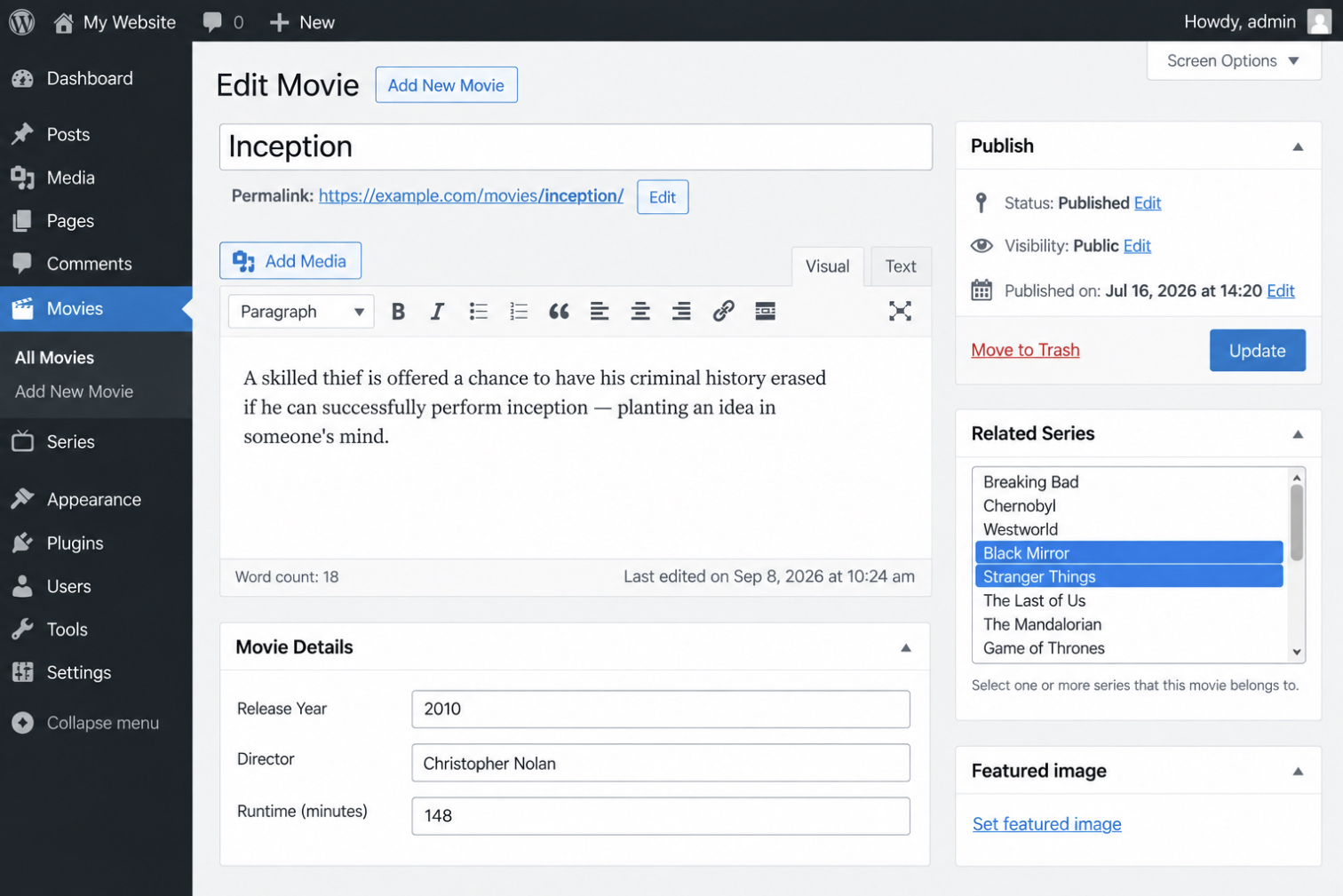
add_meta_box() registers the box on the edit screen of the post type that owns the connection. Registering it on the movie edit screen, for a site that relates movies to the series they belong to, places a control there that lists every series post. The callback named in the registration renders that control. A multi-select populated from the related post type through get_posts(), with each option marked selected when its ID already sits in the movie’s stored meta. A nonce printed by wp_nonce_field() is submitted with the form, so the later save step can confirm the request came from this box and not from a spoofed one.
add_action( 'add_meta_boxes', 'itmonks_register_series_box' );
function itmonks_register_series_box() {
    add_meta_box(
        'itmonks_related_series',        // id
        'Related Series',                // title
        'itmonks_related_series_html',   // callback
        'movie'                          // screen: the post type that owns the relationship
    );
}

function itmonks_related_series_html( $post ) {
    wp_nonce_field( 'itmonks_series_save', 'itmonks_series_nonce' );

    $selected = (array) get_post_meta( $post->ID, '_related_series', true );
    $series   = get_posts( array(
        'post_type'   => 'series',
        'numberposts' => -1,
        'orderby'     => 'title',
        'order'       => 'ASC',
    ) );

    echo '<select name="itmonks_related_series[]" multiple style="width:100%;height:8em;">';
    foreach ( $series as $item ) {
        printf(
            '<option value="%d"%s>%s</option>',
            $item->ID,
            in_array( $item->ID, $selected ) ? ' selected' : '',
            esc_html( $item->post_title )
        );
    }
    echo '</select>';
}
The multi-select is what turns a plain box into a relationship control. Its options come from get_posts() on the related type, so every series post becomes a candidate connection, and the [] in the field name lets the editor pick more than one the shape a many-to-many relationship needs. Reading the stored meta before the loop runs is what pre-selects the current connections: get_post_meta() returns the array of series IDs saved earlier, and each matching option renders already selected, so a movie’s existing links appear the moment its edit screen loads.
Selecting series in that control changes nothing until a handler hooked to the type-specific save_post_movie variant of save_post records the choice. The save_post_movie action fires whenever a movie is saved, narrowing the hook to that one type so the handler never runs on unrelated posts. It runs three guards before it writes anything: a nonce match, an autosave skip, and a capability check. Then, it stores the submitted IDs in post meta. Casting each incoming value to an integer keeps the stored data to clean post IDs and nothing else.
wp_verify_nonce() confirms the token the box printed, which proves the save came from the box rather than a forged request. The autosave guard bails when DOING_AUTOSAVE is set, since a periodic autosave carries no meta box fields and would otherwise overwrite the saved series with an empty array. current_user_can( 'edit_post', $post_id ) limits the write to a role permitted to edit that movie. Once the three guards pass, update_post_meta() stores the array of series IDs against the movie under the _related_series key, and the relationship is now recorded, readable again through get_post_meta() the next time the edit screen loads.
Hand-coding this box means writing and maintaining the same registration, nonce, and save handler for every pair of post types that needs a connection. Dedicated relationship-field plugins register that same connection and store it through a configured field instead, which relates two custom post types with far less code.
How to Relate Custom Post Types with a Relationship Field Plugin
A relationship field plugin relates two custom post types through a prebuilt field on the editor screen instead of hand-written PHP. It performs the same job as a coded meta box, connecting one record to another and reading that connection back on the front end, without writing the add_meta_box and save_post code by hand. The cost is a single dependency; the return is a maintained interface, built-in validation, and a query method that ships with the plugin.
Every plugin in this family does two things. It stores the connection between two custom post types, and it provides a query method that fetches the related records without a manual post-meta lookup. What sets them apart is cardinality and storage. Some keep the connection in post meta and fit a one-to-many link; others register a dedicated database table designed for many-to-many. Four plugins handle this, each with a different mechanism: Advanced Custom Fields, MB Relationships, Toolset, and the older Posts 2 Posts. The Advanced Custom Fields Relationship field stores the connection as a field configured inside a field group.
ACF Relationship Field
The ACF Relationship field is a field type in Advanced Custom Fields that connects two custom post types by storing the IDs of the related posts. It is a narrower tool than the plugin’s general WordPress custom fields, which attach single values (text, numbers, an image) to one post type; the Relationship field instead records a link from a post of one type to one or more posts of another.
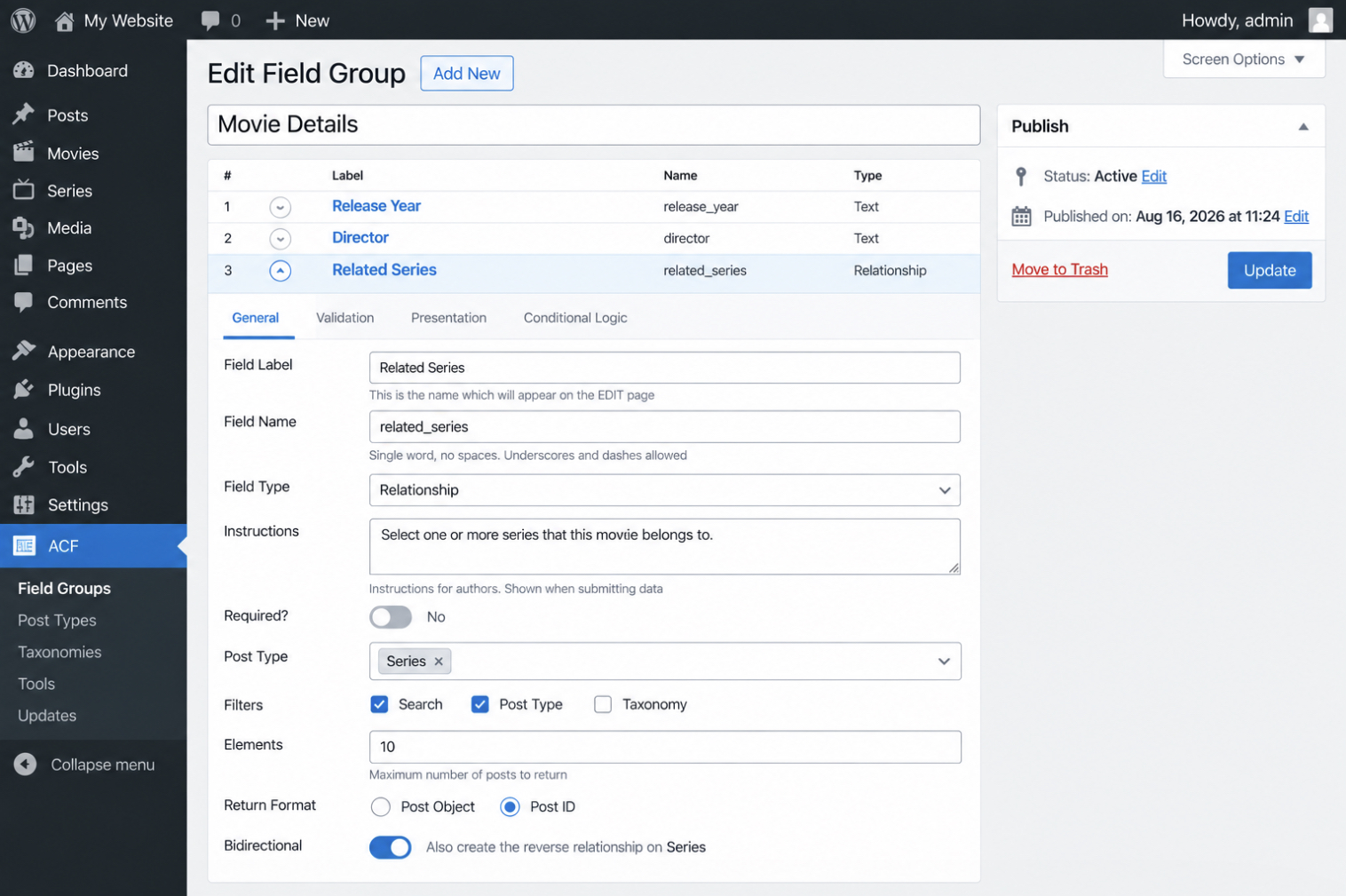
Setup starts in a field group. Add a field, set its type to Relationship, and point its post-type filter at the type meant to appear as options: movies, say, on a series field group. The Return Format then decides what a later query receives: the full post object, or just the post ID.
On the edit screen the field renders as a searchable list, and selecting a related post writes its ID into the group. By default the link runs one way: the series knows its movies, but a movie does not know its series. Enabling the plugin’s bidirectional setting mirrors the connection, so choosing a movie on a series also records the series on that movie. That two-way link is what most models spanning two custom post types need, and it is the point where a dedicated relationship table becomes a better storage choice than IDs kept in post meta.
MB Relationships
MB Relationships is the Meta Box extension that creates many-to-many connections between custom post types in a dedicated custom table. It is the maintained successor to Posts 2 Posts, and it keeps the same principle: a connection is its own record, not a value packed into either post.
That custom table holds one row per connection, with a from_id and a to_id naming the two related posts. Because the link lives in its own table rather than in post meta, a query for connected posts reads an indexed row instead of scanning serialized meta values across the posts table, and that difference grows with the number of connections. The table is also symmetric by design, so a query can travel from either side of the relationship.
A connection is registered once, then queried:
add_action( 'mb_relationships_init', function() {
    MB_Relationships_API::register( array(
        'id'   => 'series_to_movies',
        'from' => 'series',
        'to'   => 'movie',
    ) );
} );

// Fetch the movies connected to the current series.
$movies = new WP_Query( array(
    'relationship' => array(
        'id'   => 'series_to_movies',
        'from' => get_the_ID(),
    ),
    'nopaging' => true,
) );
register() names the connection and its two post types: here a series and its movies. That same registered id then drives the query: passing from with a series ID returns the series’s movies, and passing to with a movie ID returns the movie’s series instead. One registration, both directions. For a link that only ever runs one way and needs no code at all, a no-code reference field handles it without any query code.
Toolset Post Reference Field
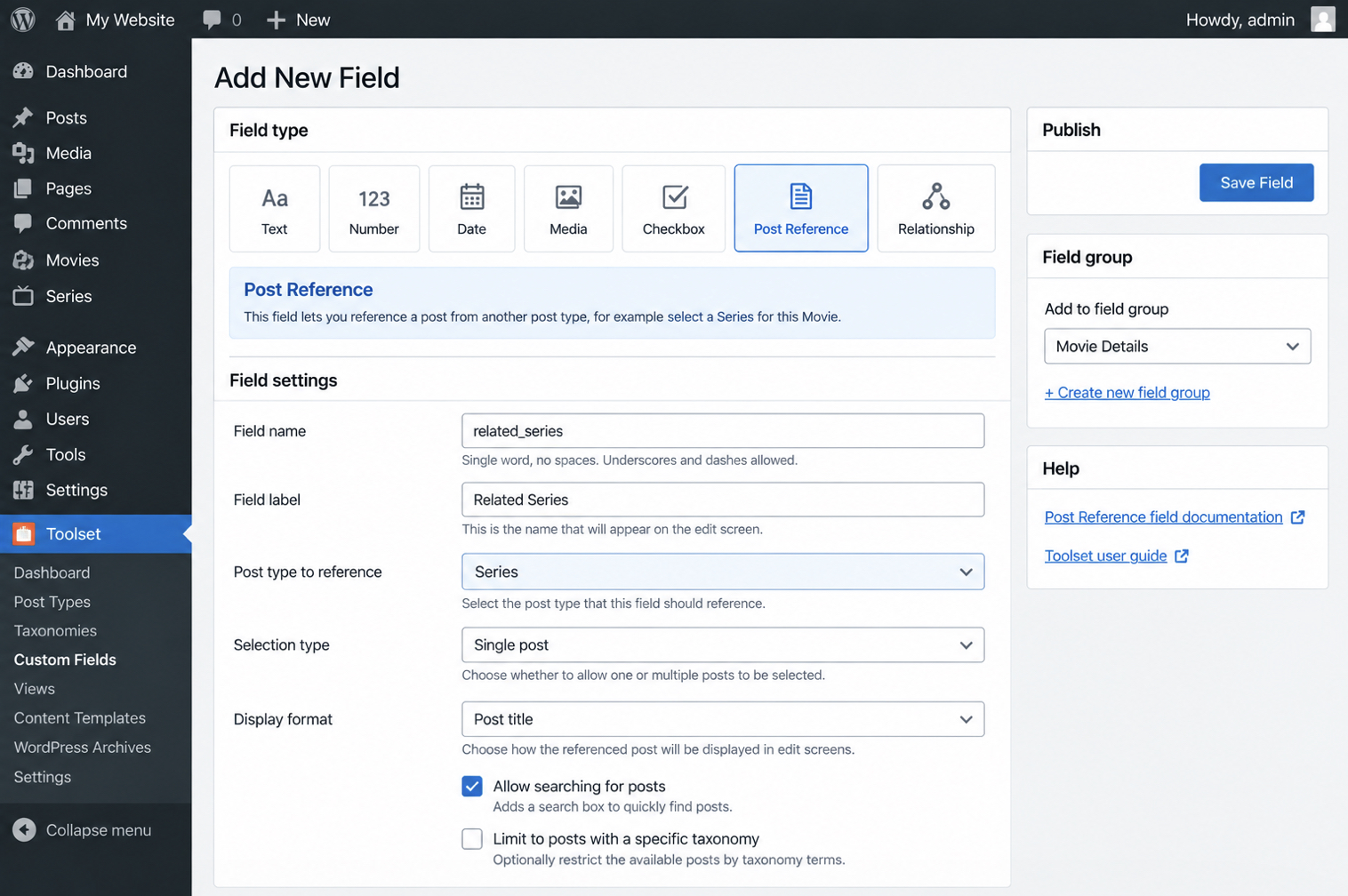
The Toolset Post Reference Field is a no-code way to connect two custom post types in a one-to-many link without touching PHP. Toolset registers the connection and generates the query behind the field, so the work stays inside the WordPress admin.
Setting one up takes a short sequence:
Open Toolset and add a new Post Reference Field to the post type that will hold the link.
Choose the post type it should point to, then save the field.
Edit a post of that type and select the related post from the field’s search box.
Once the reference is set, the connected post is stored against the record and ready to read back on the front end. Displaying those related fields happens when the posts are queried, not when the field is set up. Toolset is a current, supported option; the many-to-many plugin that developers reached for before it, Posts 2 Posts, no longer is.
Posts 2 Posts
Posts 2 Posts is a once-standard but now deprecated plugin for building many-to-many connections between custom post types. For years it was the default answer for relating posts of two types, and it introduced the custom-table pattern that later plugins kept.
It has not been maintained in a long time and receives no updates for current WordPress or PHP versions, which makes it a liability on any site still running it. New projects that need many-to-many relationships should register them with MB Relationships instead, which carries the same model forward on maintained code. Whichever mechanism creates the connection (post_parent, a coded meta box, a field plugin, or a relationship table), the connected posts still have to be read back and shown, and that retrieval is the step that turns a stored link into something visitors actually see.
Querying Connected Posts
Querying connected posts is the retrieval step: it reads a relationship that one of the preceding mechanisms already stored, then returns the linked records so a template can display them. Creation runs first, retrieval second. A query has nothing to fetch until post_parent, a custom meta box, or a relationship field plugin has recorded the connection, so retrieval is where each of those creation methods leads. The code that shows a movie’s series never establishes the link. It only reads what is already there.
Two pieces sit between a stored relationship and a rendered list: the identifiers that name the related records, and WP_Query, the core class that turns those identifiers into post objects. The custom meta box and ACF’s relationship field both persist a connection as an array of post IDs in post meta, so get_post_meta() retrieves the stored IDs first, and post__in passes them straight into WP_Query.
// Read the related series IDs the meta box (or ACF, set to return IDs) saved on this movie.
$related_ids = get_post_meta( get_the_ID(), '_related_series', true );

if ( ! empty( $related_ids ) ) {
    $connected = new WP_Query( array(
        'post_type'      => 'series',
        'post__in'       => (array) $related_ids,
        'orderby'        => 'post__in', // keep the saved order
        'posts_per_page' => -1,
    ) );

    while ( $connected->have_posts() ) {
        $connected->the_post();
        the_title( '<h4><a href="' . esc_url( get_permalink() ) . '">', '</a></h4>' );
    }
    wp_reset_postdata();
}
Plugins that store the connection in a custom table expose their own query API instead of a raw meta key, and the retrieval reads a little differently. MB Relationships, for one, registers a relationship argument on WP_Query, so the connection ID and the current post are enough to fetch the linked side, no manual ID array.
$connected = new WP_Query( array(
    'relationship' => array(
        'id'   => 'movies_to_series',
        'from' => get_the_ID(), // the current series; returns its connected movies
    ),
    'posts_per_page' => -1,
) );
Either way the pattern holds: retrieve the related IDs, build a WP_Query from them, then loop the connected posts and render each one on the front end. The loop is ordinary template code (the_title(), the_permalink(), a thumbnai), running against records stored in a second post type rather than the one being viewed. The same few lines render a series page that lists its movies, a course page that lists its resources, and a festival page that lists its bands. What differs between those is not the query. It is the content model that made the relationship worth building.
Custom Post Type Relationship Use Cases
Custom post type relationships are worth building on sites where two kinds of records belong to each other, and a handful of recurring content models show when that is the case. Each one pairs two post types and needs the connection to run in both directions: from one record to its counterparts, and back.
A TV series database relates two custom post types, movies and series, so a series page can list every episode or film it contains while each movie links back to the series it belongs to.
An events site relates events and bands as a many-to-many connection: one festival books many bands, and one band plays many festivals, which is exactly the shape a custom relationship table represents cleanly.
A courses site relates courses and resources, attaching a shared pool of downloads, readings, and lessons to the several courses that reference them, without duplicating a single file per course.
Each scenario stays small and concrete: two post types, one connection, queried on the front end. That is deliberately the developer-tier version of a much larger discipline. Planning entities, keys, and cardinality across a whole system is relationship modelling at enterprise scale, a formal practice that stands well beyond connecting two WordPress post types and remains its own subject.
One distinction marks the limit of this mechanism: a post relationship is not a category. A shared taxonomy sorts records under a common term. It collects the posts that carry the same label, but it never ties one specific record to another specific record. That makes a taxonomy the right tool for “these posts are all documentaries” and the wrong one for “this movie belongs to that series,” where only a relationship answers the question. To sort records under a common term across two post types instead, a site can share one taxonomy.




 ChatGPT
  Claude
  Grok
Grok  Gemini