Explore our specialized services, tailored solutions, and industry expertise to elevate your digital presence. From custom WordPress development to seamless integrations, we build high-performing websites that deliver impact.
register_post_type() is the WordPress core function that creates a custom post type in code, the call a developer writes in PHP instead of a screen someone fills in. WordPress register_post_type() takes two parameters: a post type key, the short string that identifies the type everywhere, and an $args array, which contains every setting the type has.
Creating a custom post type in WordPress without a plugin means writing that one call correctly and running it at the right moment: the route is code a developer writes, in a theme file, a site plugin or an mu-plugin, rather than an off-the-shelf custom post type plugin. The function has no effect until WordPress fires the init hook.
Seven steps produce a working type:
put the code in a PHP file WordPress loads,
name the post type key,
write the call with the labels array,
set hierarchical,
set the visibility arguments,
enable the block editor with show_in_rest,
and register on init with a rewrite flush on activation.
Each one sets a named parameter or argument, and they run in the order a developer types them. The seven do not exhaust the function. The supports array enables the editing features a type gets, the argument list register_post_type() accepts runs well past the ones the steps set, and the register_post_type_args filter reaches a post type someone else already registered.
Once that call runs, the custom post type appears in the admin menu, its edit screens open, and its URLs resolve on the front end. What a custom post type is, and the decision to reach for a tool instead of code, sit on other pages of this custom post type set. The code route starts one level earlier than the call itself, with the file that holds it.
Where to Put the register_post_type() Code?
Step one settles where to put custom post type code, and the requirement is narrow: the register_post_type() code belongs in a PHP file WordPress loads on every request. Three files qualify. They differ in what happens to the post type afterwards.
Theme functions.php: the registration runs while that theme is active. Switch themes and the custom post type functions.php registration goes with it: the type disappears from the admin, though its rows stay in the database.
A site plugin: a single PHP file with a plugin header. Register a custom post type in plugin form, and the type survives a theme switch, stopping only when someone deactivates the plugin.
An mu-plugin: a file in wp-content/mu-plugins, which WordPress loads automatically. It has no activation state and cannot be deactivated from the admin at all.
Developers asking whether registration belongs in the theme itself or in an accompanying plugin land on the plugin for client work. A post type is content structure rather than presentation, and a redesign that swaps the theme should not take the content structure with it. The mu-plugin goes further, for builds where editors must never switch the type off; the same property makes it awkward to disable during debugging. The code route is the call, its arguments and its timing, while WordPress custom post types as a concept, and the plugin-or-code choice, belong to the parent guide.
A site plugin needs a header comment and nothing more before WordPress will list it:
<?php
/**
 * Plugin Name: Book Post Type
 * Description: Registers the book post type.
 */
The registration function goes into that file, and each step from here fills it in. With the file chosen, the call needs a name for the type.
The Post Type Key in register_post_type()
Step two names the type with the post type key: the first parameter of register_post_type(), the string WordPress stores in the post_type column and then uses in queries, admin screen URLs and front-end URLs. Every argument that follows describes the type; the key is what identifies it.
WordPress does not take the key exactly as it was typed. sanitize_key() runs on whatever is passed, so a key that reads one way in the source can register as something else entirely. Four rules govern what the key can be:
A maximum of 20 characters, and never an empty string. An empty or over-length key is the one registration failure register_post_type() reports, and it reports it as a WP_Error.
Lowercase letters, digits, dashes and underscores only: sanitize_key() lowercases uppercase letters and removes spaces and punctuation, so Book registers as book.
Not a key WordPress already uses: post, page, attachment, revision, nav_menu_item, wp_block, wp_template, wp_template_part, wp_navigation and the rest of the wp_ family.
A project prefix on anything generic.
Reusing a reserved key produces no error at all. register_post_type() holds no guard against one: the call builds a post type object and overwrites the existing entry in the registry, so post passed as the key replaces the core Posts type with nothing reported anywhere. A collision between two registrations of the same key ends the same way, and it settles on whichever call runs last: a theme and a client plugin both registering book leave only the type the later call built, its arguments whole and the earlier call’s gone rather than merged into it, with no error message anywhere. The load order decides which call runs last, and plugin files load before the active theme’s functions.php. A prefixed key such as acme_book carries the project namespace and removes both risks, which is why production builds prefix by default.
These steps use book as the key, in the short unprefixed form that keeps the code readable. Once the key becomes the first parameter, the call needs the labels array that names the type on screen.
The register_post_type() Call with the Labels Array
Step three writes the register_post_type() call itself: a function that takes the post type key chosen in step two plus an $args array, with the labels array as the first entry a developer fills in. Registering a post type in WordPress is that single call, wrapped in a named function of its own so it can be hooked later.
A working WordPress register_post_type() example puts the labels array at the top, singular_name sitting directly beside the plural name, and then hands the finished $args array to the function alongside the key book:
Each key in the labels array names one place the WordPress admin reads it:
name: the plural label, which names the post type’s entry in the admin menu.
singular_name: one entry of the type, used wherever the editor names a single item.
add_new_item: the heading on the Add New screen, so “Add New Book” replaces the generic wording.
edit_item: the heading that opens above an existing entry when it is edited.
menu_name: the menu text itself, useful when it should read differently from name.
Two arguments in that call carry values; the following steps change(public and supports, which includes title and editor for now) while has_archive keeps the value set here. The function is not attached to anything yet, so nothing registers until step seven adds the hook. Of the arguments already sitting in $args, hierarchical is the first to decide.
The hierarchical Argument for a Custom Post Type
Step four sets hierarchical, the argument that decides whether entries of a custom post type can have a parent and child entries beneath them. A hierarchical custom post type has the same parent-and-child arrangement WordPress pages have. With hierarchical left at its default of false, the post type stays flat like posts, and every entry is a sibling of every other one, the flat form a stream of reviews needs, while a manual whose chapters belong under a parent entry requires the parent-and-child arrangement.
Setting it to true changes what WordPress does with two values it already keeps. post_parent, the ID of the entry an item belongs to, and menu_order, an integer that fixes its position among its siblings, sit on every post row of every type and default to 0. hierarchical set to true is what makes the pair meaningful for the post type: WordPress then offers a parent for an entry, orders the admin list by parent and position, and lets permalinks nest.
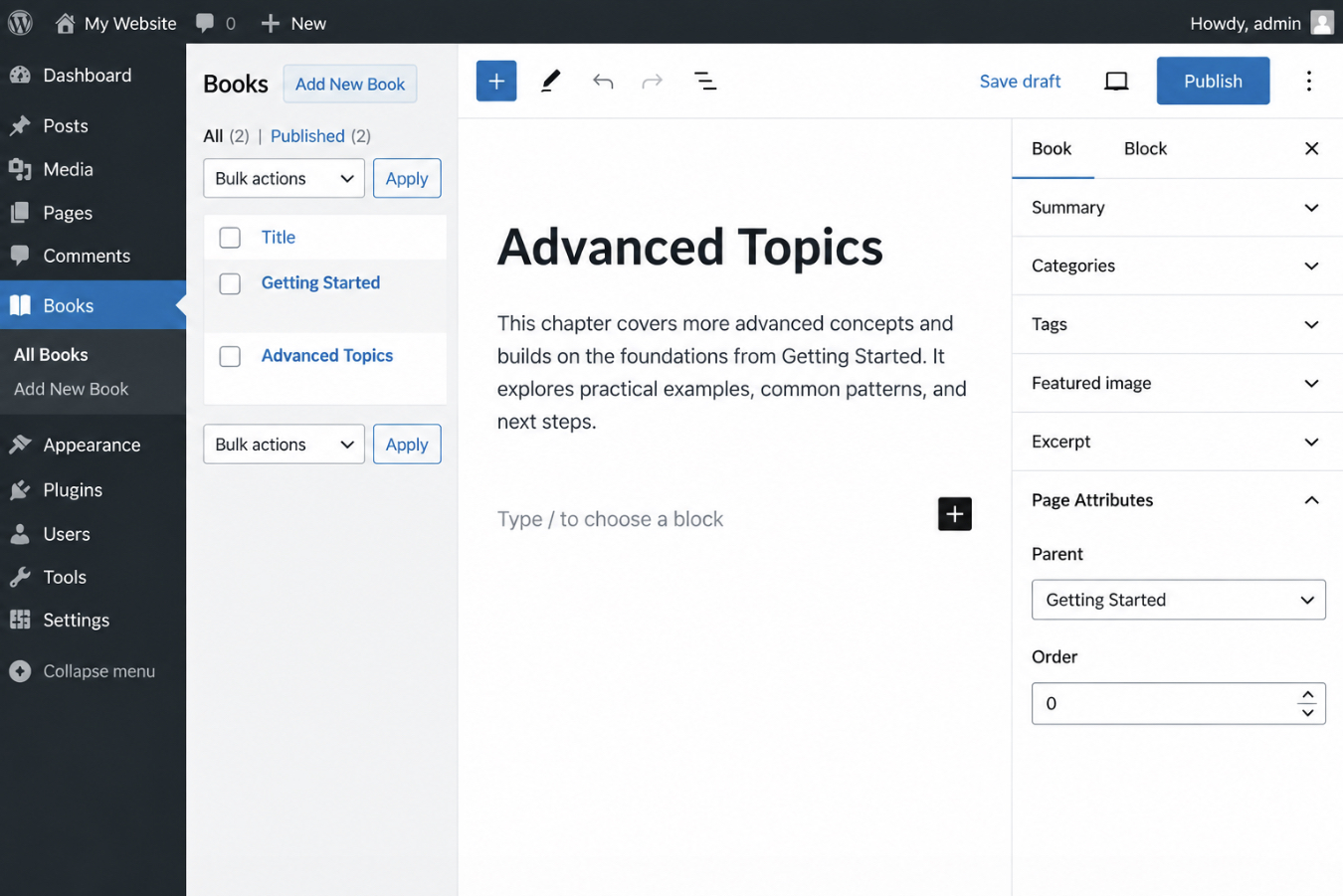
Neither value has its own control in the editor. The Page Attributes box is what holds both the Parent dropdown and the menu_order field, and it appears only when the supports array includes page-attributes. Missing that dependency is what stalls forum threads: hierarchical is true, the post type registers cleanly, and no Parent dropdown ever shows up, because supports was left as title and editor. Custom post type page attributes come from supports, not from hierarchy, so both arguments go in together:
The Page Attributes box on a hierarchical book post type, captured on a test site with two entries: the Parent dropdown lists the other book, and Order takes the integer position.
Hierarchy settles structure, not access. Which visitors and which queries reach the post type at all is decided by a separate group of arguments.
How to Hide a Custom Post Type from the Public with the Visibility Arguments
Step five sets the visibility arguments: the four register_post_type() flags that hide a custom post type from the public: public, publicly_queryable, exclude_from_search and show_ui. A post type registered with public set to true is reachable at its own front-end URLs, turns up in the site’s search results, and has a menu entry in the WordPress admin, three behaviours that look like they come from three separate settings.
They come from one. public is the parent flag, and WordPress uses its value as the default of the other three. Each of the three still accepts an explicit value, and the explicit value wins. That dependency is where most registration trouble starts: a post type registered with 'public' => false vanishes from the admin menu as well, which is rarely what the site-builder had in mind: hidden from visitors, yes; hidden from the editorial team, no. Each of the four arguments carries its own default and one behavior it controls:
Argument
Default
Effect
public
false
Sets the default of the other three visibility arguments
publicly_queryable
value of public
Front-end URLs for single entries and post type archives
exclude_from_search
inverse of public
Keeps entries out of the site’s front-end search results
show_ui
value of public
The post type’s admin menu entry and editing screens
Overriding show_ui is what rescues the admin screens. This combination of the four flags registers a private custom post type. One that exists entirely inside wp-admin:
publicly_queryable set to false removes the front-end URLs, so a direct request for a single book entry resolves to nothing. exclude_from_search set to true removes those entries from the search results a visitor gets through the site’s own search form. show_ui set to true, against the public default, keeps the Books menu and its editing screens where the editorial team expects them. Together, the four flags produce an internal record type (orders, applications, internal briefs) that never surfaces on the public site.
A second combination covers the softer case, where entries keep real URLs but should not compete inside site search:
// Public entries, excluded from the site's search results:
'public'              => true,
'exclude_from_search' => true,
Both combinations work the same way in the admin and in site search: show_ui and exclude_from_search are read at registration, so a change to either applies from the next request onward. The front-end URLs are the exception. public and publicly_queryable decide which rewrite rules the post type contributes, and those rules stay as WordPress last stored them until they are flushed, which is step seven. Visibility settled, the remaining choice for step six is which editor loads when someone opens a book for editing.
How to Enable the Block Editor for a Custom Post Type with show_in_rest
Step six enables the block editor for a custom post type, and one argument controls it: show_in_rest. The block editor loads on a post type’s edit screen only when show_in_rest is true and supports includes editor. Both conditions hold at once. Either one on its own leaves the post type on the classic editor: the post type registers cleanly, its Add New screen opens, and the old editor loads instead.
The reason is architectural. A block editor session reads and saves post content through the REST API, so a post type with no REST route gives the editor nothing to read from, and show_in_rest is the argument that registers that route. The second half of the condition belongs to supports: editor has to be present in the array, because that entry is what gives the post type a content field for blocks to occupy in the first place.
Both keys belong to the same $args array passed to register_post_type():
// Inside the $args array of prefix_register_book_post_type() from step 3:
'supports'     => array( 'title', 'editor', 'thumbnail' ),
'show_in_rest' => true,
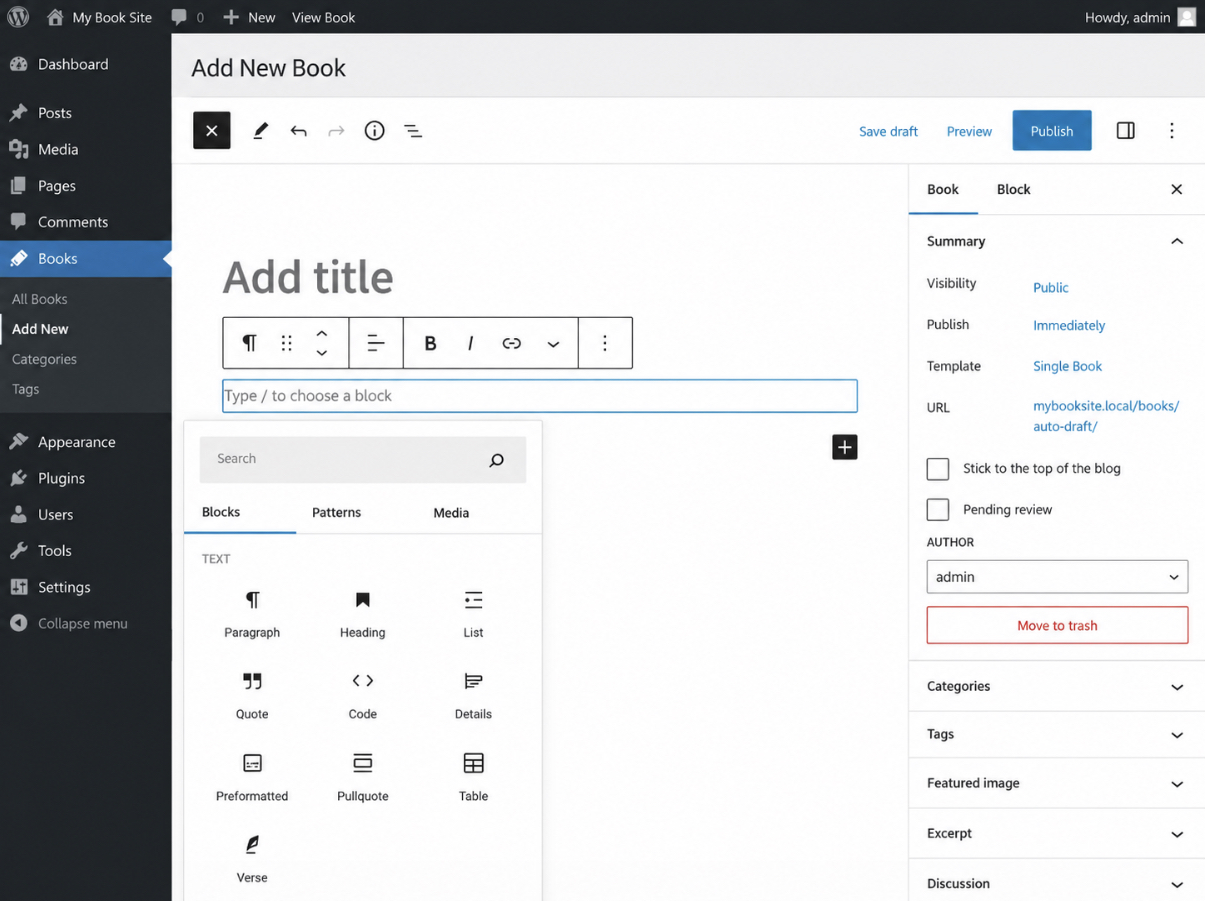
Setting show_in_rest to false, or keeping the Classic Editor plugin active on the site, keeps the classic editor on the post type. With the pair above in place, a new book opens on Gutenberg’s block editor instead, with the inserter and the block toolbar available exactly as they are on a standard post.
Books > Add New after show_in_rest is set to true: the block toolbar and the inserter are in place, and the post type’s singular label appears in the admin bar.
The template argument sets what a new entry of the post type opens with: the starting blocks already in place before anyone types.
The template Argument for a Block Template
The template argument of register_post_type() contains the blocks every new entry of the post type opens with. It is an array of arrays. Each entry consists of a block name and, optionally, an attributes array for that block — a placeholder, a default value, a preset alignment. A book that should always open as a heading, a paragraph and an image is set once, at registration, rather than left to editorial habit:
template_lock is the companion key, and it restricts what an editor does with those starting blocks. 'all' is the strictest value: the template blocks accept no moving and no removal, and no additional block is inserted. 'insert' restricts additions and removals while moving stays available. false, the default, restricts nothing, so the template supplies a starting layout that anyone is free to rearrange.
Both keys apply only when the block editor is enabled. With show_in_rest false the template argument has no effect, since the classic editor has no blocks to place, and this is the post type’s own starting layout, not a theme template file. Every argument set so far (labels, hierarchical, the visibility flags, show_in_rest and template) belongs to that one $args array, which register_post_type() takes alongside the post type key, and none of it applies until the call runs at the moment WordPress expects.
Registration Timing for register_post_type()
Registration timing, the seventh and last step in creating a custom post type in WordPress without a plugin, is the point in the WordPress load sequence at which the register_post_type() call runs, and on a working registration that point is the init hook. WordPress core loads, init runs on every request, and the registration runs there with it. Two short pieces of code hold that timing together. One attaches the registration function to init. The other runs a one-time rewrite flush when the plugin or theme holding the code is activated.
init is one action hook among many, and its neighbours are the common substitutes. They fail on different grounds. plugins_loaded fires before core has built the rewrite object a registration writes into, so there is nothing there to receive it. after_setup_theme runs late enough for the registration itself to complete, and the cost lands elsewhere: the post type exists before anything hooked to init can filter or extend it, which is why core documents init and the hooks after it and nothing earlier.
Worse is the call hooked on nothing at all: left at file load, it runs the moment the file is parsed, against a core that has not finished assembling the pieces the registration needs. A missing rewrite flush produces a failure of its own, one that reports no error and takes longer to diagnose. Without it the post type registers and saves entries, while its URLs return 404 against rewrite rules that were built before the post type existed.
Correct timing produces a result visible in two places at once. The post type appears in the admin menu with its own editor screens, and its URLs resolve on the front end. Creating a custom post type in WordPress programmatically is finished at that point, and not before.
The add_action Call on the init Hook
The add_action call on the init hook attaches the registration function to init, so register_post_type() runs after WordPress core loads, on every request. One line carries that work, placed after the function that holds the labels array and the rest of the arguments:
// after prefix_register_book_post_type() from the labels step
add_action( 'init', 'prefix_register_book_post_type' );

// fails: runs at file load, before init
prefix_register_book_post_type();
The callback name in add_action matches the function name character for character, and the hook name stays ‘init’. Nothing else in the line varies between projects.
The second call in that sample is the one WordPress does not support. register_post_type() is documented for init and for the hooks that run after it, and the effect of a call before init depends on the file holding it. A plugin file loads before core has created the rewrite object the registration writes to, so a call before init there ends the request in a critical error, the fault behind a white screen. A theme’s functions.php is included after that object exists and after core has registered its own initial post types, so the same call registers with no error at all: a silent fault, with the post type created before anything hooked to init can modify it. A hook later than init fails in a third way. Attach the same function to admin_menu, and the post type is missing from the admin, with no error anywhere to point at.
With the hook in place, the post type appears in the admin menu on the next request. Its URLs are a separate matter, and they stay unresolved until the rewrite rules are rebuilt.
The Rewrite Flush on Activation
The rewrite flush on activation is a single call to flush_rewrite_rules() that rebuilds the URL rules WordPress keeps for every registered post type, so the new post type’s URLs resolve instead of returning 404. It runs once, at activation, and the callback registers the post type first, so the rules being rebuilt already contain it:
The deactivation hook flushes again on the way out, clearing the rules of a post type that no longer registers. Registration code kept in a theme uses after_switch_theme in place of the activation hook, since a theme has no activation hook of its own. Either way the flush belongs to activation and to nothing else: on init it would rebuild every rewrite rule on the site on every request and degrade performance for a result the site needs once. Custom taxonomies registered on the same site write into that same set of rewrite rules.
That single call closes creating a custom post type in WordPress programmatically. A 404 after a core upgrade, or after a move of the registration code from one file to another, comes from rewrite rules saved before the post type existed. Activation has already happened by then and the hook does not fire twice, so the rebuild takes deactivating and reactivating the plugin — or re-switching the theme, on the after_switch_theme route.
One activation flush covers both registrations: WordPress custom taxonomies registered alongside the post type share it rather than needing a second one. With the timing settled and the URLs resolving, what the post type offers on its own edit screen is set by one more argument.
What Does the supports Array Enable in register_post_type()?
The supports array in register_post_type() enables the editing features a custom post type gets, and it is put into $args as the supports key. Every string inside that array turns on one element of the edit screen: a field, a meta box, or a behaviour attached to the post type. Anything the array leaves out is absent from that screen. A registration that never states supports at all still receives title and editor and nothing else, because those two are the WordPress defaults.
Each key maps to one part of the editor:
supports key
What it turns on for the post type
title
The post title field at the top of the edit screen
editor
The main content editor
author
The Author meta box, which reassigns a post to another user
thumbnail
The Featured Image box
excerpt
The Excerpt meta box
revisions
Revision history, with the Revisions meta box on saved posts
page-attributes
The Page Attributes box, holding the parent dropdown and menu_order
custom-fields
The Custom Fields meta box
comments
Comment support, with the Discussion box
Three keys account for the absences that surface on the edit screen: excerpt, revisions and thumbnail, each one removing a visible box when it is left out. To enable an excerpt on a custom post type, excerpt has to sit in the array, a missing Excerpt panel is not a theme bug but a missing key. Revisions behave the same way: register_post_type() supports revisions only where revisions is listed, so a post type registered without it keeps no history at all. The Featured Image box follows a longer route, because thumbnail in the array is only half of what it needs.
How does a developer get the post type of a post in WordPress, and confirm that book is registered at all? Two core functions answer both. get_post_type_object() returns the registered object, or null when the key was never registered or the check ran before init. Inside the loop, get_post_type() returns the key of the post being rendered.
if ( get_post_type_object( 'book' ) ) { /* registered */ }
echo get_post_type(); // in the loop: 'book'
Where the whole registration is placed is the remaining choice: a custom post type in a theme or plugin registers identically, and only the durability of the file differs. Teams that would rather not maintain PHP at all register the same arguments through an admin screen, which is what the best custom post typeplugins offer. One key in the array, though, needs a second call before its box ever appears.
Featured Image Support with thumbnail
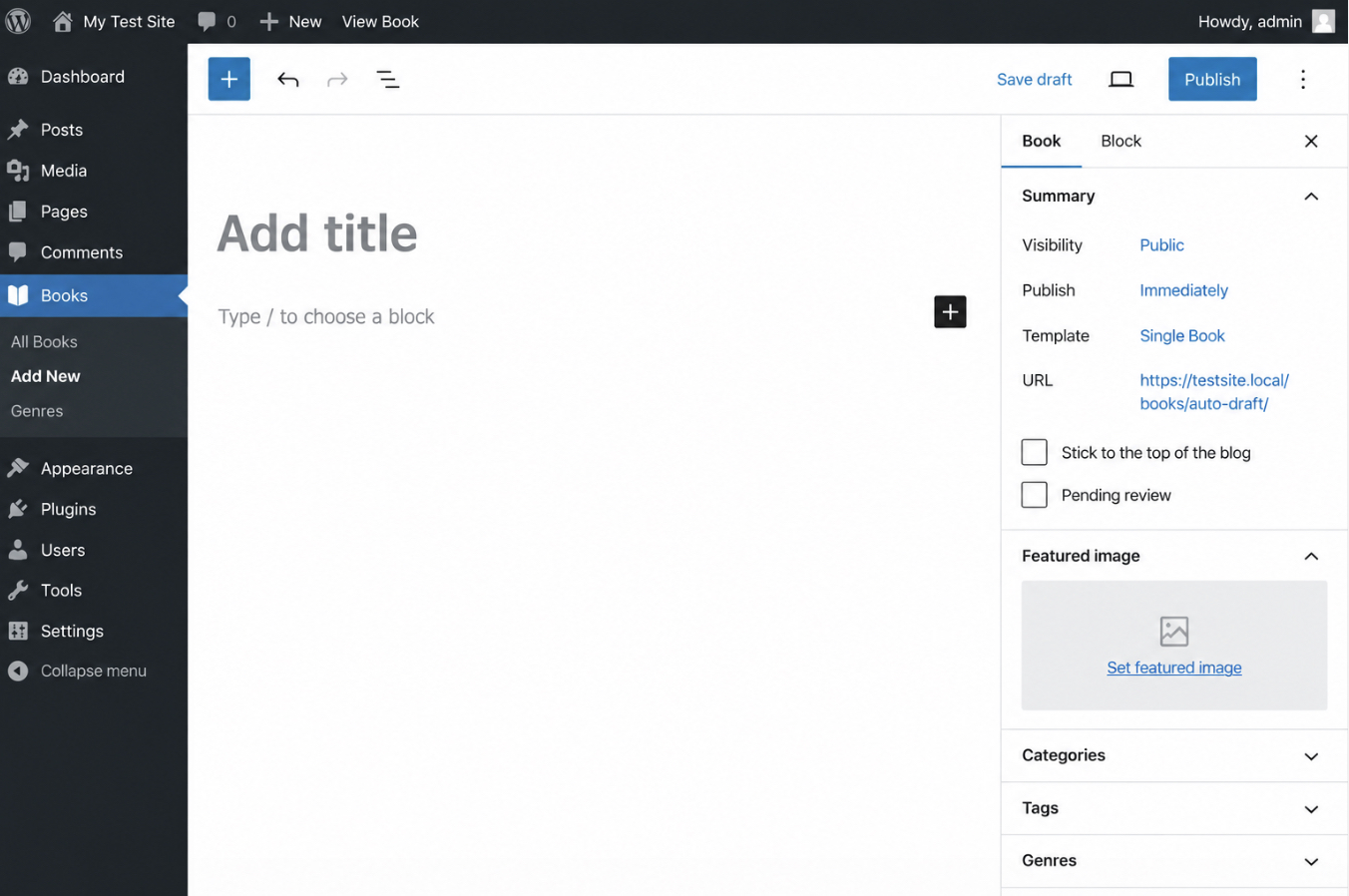
A featured image on a custom post type requires two registrations rather than one: thumbnail in the supports array, and theme support for post-thumbnails. The first entitles the post type to the Featured Image box. The second establishes that the active theme handles featured images at all, and without theme support for post-thumbnails, the box stays hidden no matter what supports lists.
Most themes register post-thumbnails globally, which is why the single supports key is enough on those themes. It stops being enough when a theme declares that support for a limited set of post types, or declares none. add_theme_support( 'post-thumbnails', array( 'book' ) ) hooked to after_setup_theme is the call for both of those themes: it adds support where the theme declared none, and it widens a limited declaration to take in book. Where the theme already supports post-thumbnails globally, WordPress returns early and the call changes nothing, which is why the line is safe to keep on any theme.
// in the $args array from the labels step:
// 'supports' => array( 'title', 'editor', 'thumbnail' ),

function prefix_book_thumbnails() {
    add_theme_support( 'post-thumbnails', array( 'book' ) );
}
add_action( 'after_setup_theme', 'prefix_book_thumbnails' );
The Book edit screen sidebar after both calls: the Featured Image box appears with its Set featured image link.
Featured image support ends at the admin box. Getting the stored image onto the front end belongs to the theme’s templates, not to the registration call. thumbnail is one key of many a registration can carry, and the arguments the seven steps never set arrive with defaults of their own.
register_post_type() Arguments Reference
The register_post_type() arguments reference is the part of the WordPress register_post_type() documentation that contains the $args keys the seven registration steps did not set, each with its own type and its own default value. A working registration uses a handful of keys. The rest belong to the $args array with defaults already chosen, which is why a call that names only the labels, the hierarchy and the visibility arguments still creates a functioning post type.
Fifteen register_post_type arguments carry a type and a default of their own:
Argument
Type
Default
Use
description
string
''
Short description of the post type, exposed through the REST API
menu_icon
string
null
Dashicon name or image URL for the admin menu entry
menu_position
int
null
Slot the post type occupies in the admin menu order
capability_type
string/array
'post'
Base capabilities the post type inherits
map_meta_cap
bool
false
Whether WordPress maps meta capabilities for the type
has_archive
bool/string
false
Whether the post type has an archive, and under which slug
rewrite
bool/array
true
Permalink handling, shared with custom taxonomy registration
query_var
bool/string
true
Public query variable for the post type
taxonomies
array
[]
Existing taxonomies attached at registration
show_in_menu
bool/string
show_ui
Where the post type belongs in the admin menu
show_in_nav_menus
bool
public
Availability of the post type in navigation menu selection
show_in_admin_bar
bool
show_in_menu
Presence of the post type in the admin bar
delete_with_user
bool
null
Whether posts of the type belong to a deleted user’s data
can_export
bool
true
Inclusion of the post type in the WordPress export file
show_in_rest
bool
false
Block editor and REST API support, set in step 6
Each key has a default, and that default is what the post type inherits when $args omits the key. Three of them inherit from another argument rather than from a fixed value: show_in_menu defaults to show_ui, show_in_nav_menus to public, and show_in_admin_bar to show_in_menu. That chain includes more than it appears to, a post type registered with public set to false inherits three hidden defaults, not one, which is the mechanism behind the visibility arguments of step 5.
show_in_rest is the one key the procedure already sets, in step 6, and the register_post_type show_in_rest documentation is that same key seen from the reference side rather than from inside the registration call. Those types and defaults match the register_post_type() entry in the WordPress Code Reference, the developer documentation the WordPress project maintains, as of WordPress 6.8. The official WordPress register_post_type reference holds the full key list, capability and rewrite sub-arrays included, which an ordinary registration has no use for. A developer uses those same keys on a post type somebody else registered, through one filter rather than through a second call.
The register_post_type_args Filter for an Existing Post Type
The register_post_type_args filter is the WordPress filter hook that modifies the arguments of an existing post type (one that a plugin, a theme, or WordPress itself registered) without a second register_post_type() call. Re-registration is the wrong route: a second call on the same key builds the type from scratch, and the next plugin update builds it right back. The filter has none of that fragility, because it modifies the register_post_type arguments on their way into the post type registry rather than after the fact.
The callback receives two arguments. $args arrives as the full argument array, $post_type as the key of the type currently registering, and the callback checks that key, modifies the one argument it needs, and returns the array. Priority 10 with two accepted arguments is the standard registration for the hook. The key check is the part that matters most: without it, the filter modifies every post type on the site, core types included.
product is a third-party post type, registered by an ecommerce plugin rather than by the code in this procedure, and the callback enables the block editor on it by setting show_in_rest to true. One feature of the supports array needs no filter at all. add_post_type_support() adds a single supports feature to a type that already exists (excerpt, in this case), and it belongs on the init hook alongside the registration it modifies.
The arguments the seven steps set govern every registered post type in WordPress: the labels array, hierarchical, the visibility arguments, show_in_rest and the template argument. Two more pieces sit outside that group and govern it just as firmly: the post type key the call takes as its first parameter, and the init timing of the call itself. The seven steps register a new type with all of them. The register_post_type_args filter applies the same arguments to a type that already exists, whoever registered it first.





 ChatGPT
  Claude
  Grok
Grok  Gemini