Explore our specialized services, tailored solutions, and industry expertise to elevate your digital presence. From custom WordPress development to seamless integrations, we build high-performing websites that deliver impact.
The WordPress missed schedule error is a publishing failure in which a scheduled post’s publish time passes while the post remains in post_status future, caused by WP-Cron not running at that scheduled time. Nothing about the post is lost. The content is intact, the date is intact, and the one thing that did not happen is the run that was supposed to move the post from future to published.
That distinction sets the work. Fixing a WordPress missed schedule post error is a matter of finding which part of the scheduling chain stalled, and there are four pieces of work in order: confirming that the post is genuinely stuck rather than waiting, establishing whether the scheduler ran at all at the moment the post was due, working through the causes that keep it from running, and verifying afterwards that a scheduled post publishes on time.
Skipping the second piece is what makes the error feel intermittent. A missed schedule in WordPress is a symptom, not a cause, and several unrelated conditions produce exactly the same outcome on the same screen, which is why a WordPress post that missed its schedule is diagnosed from evidence rather than from the most commonly repeated explanation. That evidence starts in the admin, before anything is changed.
Missed Schedule Status on the Post
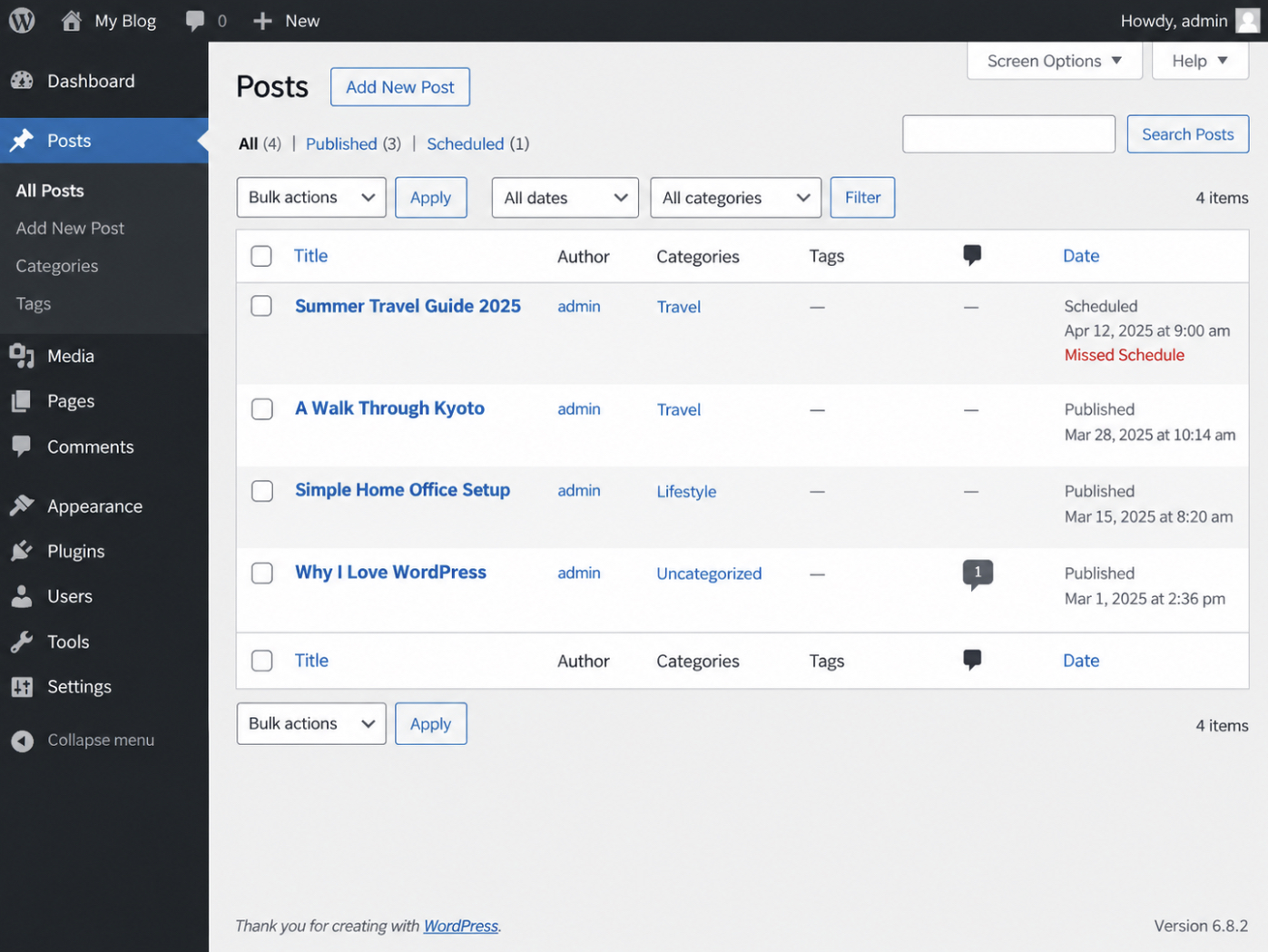
A WordPress post carries missed schedule status when its scheduled date has passed and the Posts list still holds the post as unpublished. The status has no screen of its own. It is read off the row the post already occupies at Posts > All Posts, in the Date column, where the scheduled date and time appear in the site’s own timezone with the Missed Schedule label directly beneath them.
That single row carries two readings. The Missed Schedule label is the first: it names the outcome, stating that the moment the post was due has gone by. The Scheduled state is the second: the post is still held as Scheduled, exactly as it was before its time arrived, so the post has not moved out of the queue it was placed in. Read together, the two say that the post is a WordPress scheduled post whose missed schedule is a matter of timing rather than content: one row, one post, two pieces of information about the same failed moment. Orientation on how that queue works sits with WordPress cron jobs as a whole.
What the label does not mean matters as much as what it does. It is not a save error, a permissions error, or a sign that the post was written incorrectly; a post that failed to save never reaches the Posts list with a date on it at all. The label is evidence of a run that did not happen. WP-Cron was the thing due at that moment, and the post is the record of its absence. A practitioner checking a client site can therefore stop treating the post as broken and start treating the moment as the thing to account for.
One thing the row cannot show is whether the scheduler stayed silent through that moment or worked through it and left this post behind. Both produce the same label on the same date.
WP-Cron Run at the Scheduled Time
WP-Cron is how WordPress handles scheduling time-based tasks, and a scheduled post’s publish is one of those tasks, so WP-Cron not running when the post is due is what leaves the post unpublished. The trigger is a page load, not a clock. WordPress checks the queue when a request reaches the site, which means the scheduled publish time is a time the site has to be visited at or after, rather than a time the site keeps for itself.
Four points define the behavior, as documented on the Cron page of the WordPress Plugin Handbook:
WP-Cron is triggered on page load.
On that page load, WP-Cron checks a list of scheduled tasks to see what needs to be run, and any task due is called during that same page load.
WP-Cron does not run constantly as the system cron does.
A task scheduled for a moment when no page load occurs waits.
The handbook’s own example of a scheduling error is a task set for one hour of the afternoon on a site whose next page load does not arrive until the evening. Applied to publishing, a publish time that comes and goes with no request reaching the site is a publish that does not happen at that time.
Every WordPress missed schedule error resolves into one of two readings, and each has its own evidence. The first is a scheduler that never ran: no request reached the site near the publish time, which is common on a low-traffic client site, a staging copy, or a site that sees traffic only during working hours.
The evidence is breadth: several posts scheduled around the same window are all sitting unpublished, and they are all equally stuck. The second is a scheduler that ran without publishing this post: another post scheduled in the same window went out on time, which shows that a page load arrived and that the queue was checked and worked. The evidence there is narrowness: one post held while the rest completed.
Both readings rest on an assumption worth settling first, because the whole diagnosis depends on it: that the scheduled time is the time the site meant. WordPress schedules against the hour configured for the site, not the hour of the server it runs on, and an hour that is off by a fixed amount produces a post that looks stuck to an editor while the queue is working exactly as configured.
WordPress Timezone Setting for the Scheduled Time
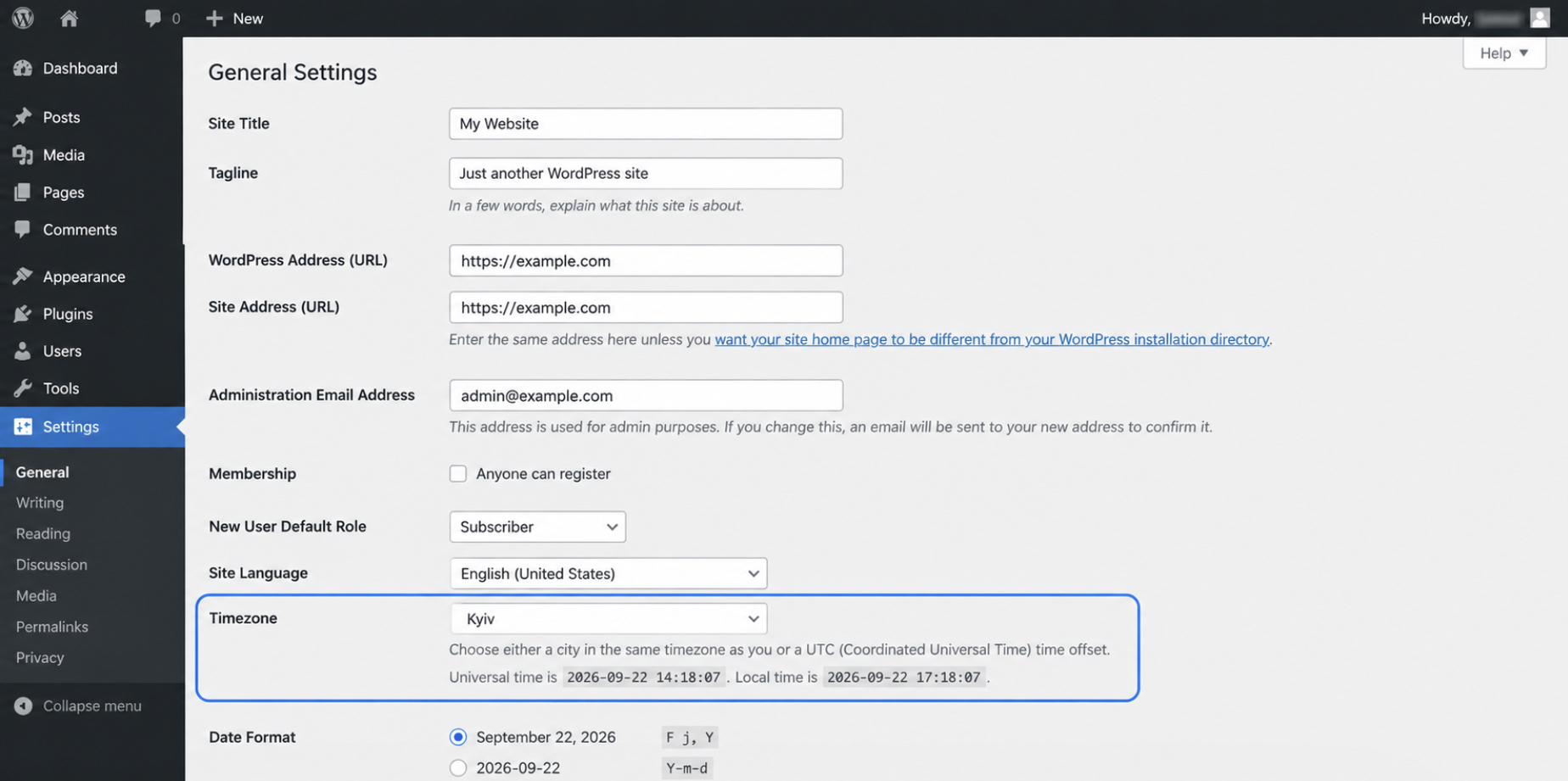
The WordPress timezone setting is the clock a scheduled time is read against, which makes it the only setting that can cause WordPress to miss a scheduled run while the post goes out exactly as planned. It is set at Settings > General, on the same screen that shows the site’s current local time. The control takes a city-based timezone or a UTC offset, and whichever of the two is selected, a publish time stored on a scheduled post represents a moment in that zone and in no other.
A timezone mismatch makes an on-time run look missed. An editor who schedules a post against a local clock some hours away from the site’s setting stores that publish time in the site’s timezone, not the editor’s, so the moment it arrives on the site falls at a different point in the editor’s day. Check the Posts list before that moment and the post is there, still held as Scheduled, apparently late. It is not late. Its scheduled time has not arrived.
Two readings settle which of the two cases is on the screen. The site’s current local time is printed under the timezone control at Settings > General; the scheduled time is on the post. Where the scheduled time is still ahead of the site’s current local time, nothing has been missed and there is no cause to look for. Where that time has passed and the row carries the Missed Schedule label, the timezone is clean and the run is the problem.
Matching the site timezone to the timezone used when scheduling removes the false positive for every post scheduled after the change. Nothing in the scheduler is touched by it: what changes is the clock a publish time is read against, not the run itself, and a post already carrying the Missed Schedule label stays exactly where it was. That post still has to go live.
Manual Publish of the Post That Missed Its Schedule
The post that missed its schedule is published by hand from the Publish control, and that manual publish is the immediate fix for a WordPress missed schedule post error: the post goes out now, the run that did not happen is worked after. Two jobs, and the order matters for anyone with finished copy sitting unpublished on a live site.
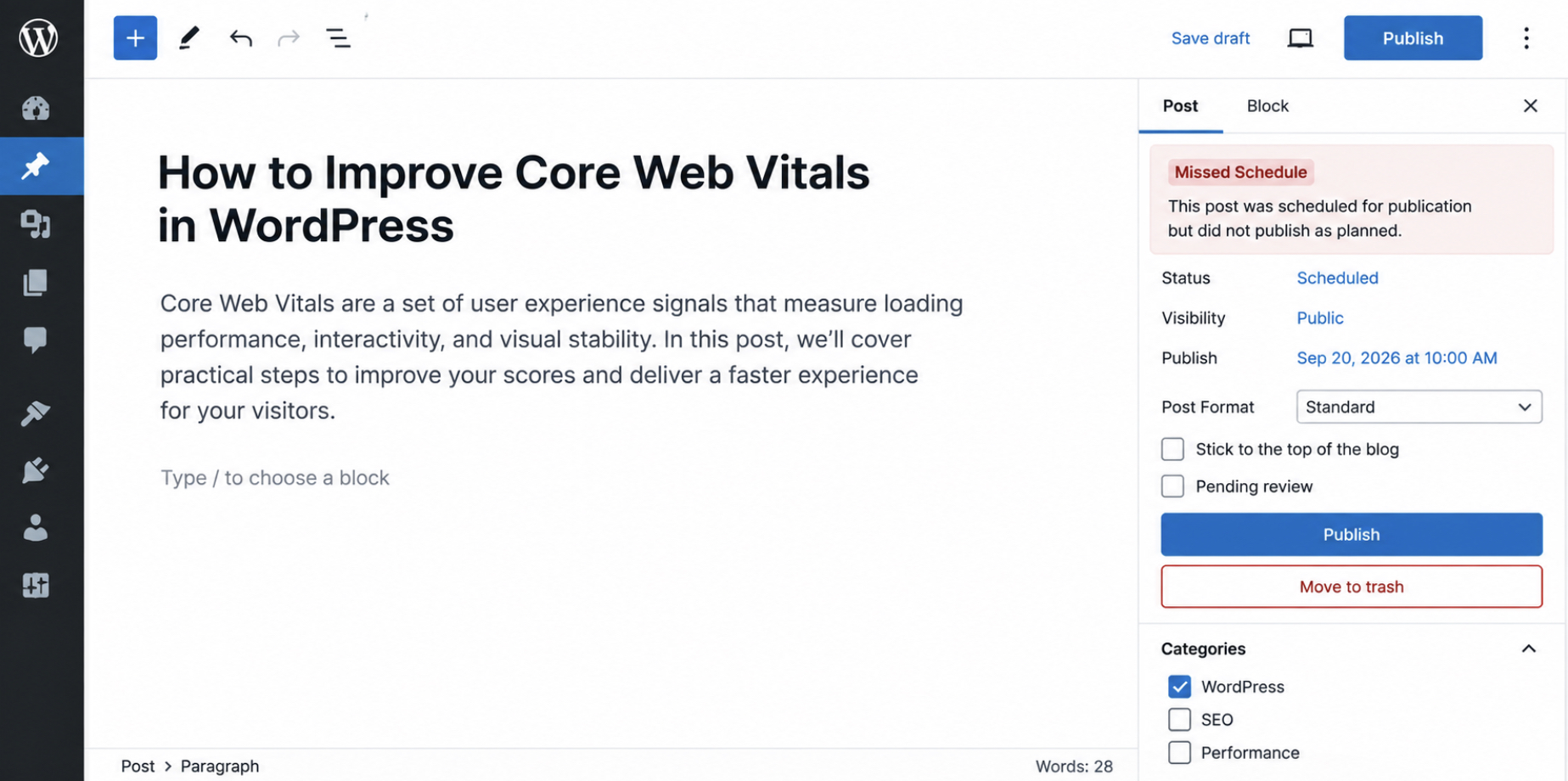
Both controls sit on one screen. The Publish control on the post clears a post row with the Missed Schedule label, and Quick Edit shows that control and the scheduled date field together. Nothing about the post has to change first: title, content, author and category all stay as they are. The second option is on that screen too: instead of publishing outright, reschedule the post by setting the scheduled date field five or ten minutes ahead of the site’s current local time, and the page load that arrives after that time publishes it.
Which applies depends on the run. A manual publish uses no scheduler at all, so it works whatever is wrong underneath, and it is the option for a post that should already have been out. A reschedule depends on the same run that missed once already, so it holds only where that miss was isolated: no page load reaching the site around the scheduled moment, nothing more. Where the Missed Schedule label has appeared on earlier posts, the Publish control is the safer of the two.
A manual publish clears the post. It does not clear the cause. The conditions that stopped the scheduled run are still on the site, unchanged by the click, and the next post scheduled there meets every one of them. When page loads reach the site (traffic arrives, pages are served), the missed run points straight to the request to wp-cron.php and whether it finishes.
wp-cron.php Request That Does Not Complete
A wp-cron.php request that does not complete is a request the site makes on a page load and that stops before it finishes, and it is what WP-Cron not running looks like on a site whose pages are still being served normally. Page loads are arriving. WordPress checks its list of scheduled tasks on each one and calls whatever is due, so the request to wp-cron.php is being made every time somebody opens a page. What fails is the finish.
Traffic arriving is what separates this case from a site that has no page loads at the scheduled time. With no page load, nothing checks the queue and nothing runs, which is a different problem with a different answer. Here pages are being served, visitors come and go, and WordPress cron not working is the one thing out of place.
One case inside this territory has no change attached to it at all. The request to wp-cron.php is one the site makes to itself, a loopback request, and some hosting environments block that request before it comes back, so the request is made and never completes. It belongs on the list as a case to recognize rather than a setting to check.
The rest behave differently. Each pairs with one change inside WordPress that clears it, and four causes account for a wp-cron.php request that does not complete on a site still serving pages.
Page caching on wp-cron.php
DISABLE_WP_CRON set with no replacement
Maintenance mode
Memory limit
An exclusion rule, a constant value, a status toggle, a higher ceiling: one change each, and each is worth checking in that order. The cache comes first, because a stored response for wp-cron.php keeps the request from reaching the scheduler at all.
wp-cron.php Excluded From the Page Cache
A page cache holding a stored response for wp-cron.php is the plainest cause behind WP-Cron not running on a site where everything else checks out. The cache keeps a copy of a response and hands it to the next request for the same address. When wp-cron.php has such a copy, the request is answered from storage, never reaches the scheduler, and nothing in the queue is checked.
Everything reads as healthy while this happens. Pages render fast, the cache does exactly what it was configured to do, and the scheduled work stalls behind it all. Speed and a frozen queue sit together comfortably, which is why caching is easy to miss as the cause.
The change is to exclude wp-cron.php from the cache, and from every delay or optimisation rule applied alongside it. An excluded request that is still deferred fails the same way a cached one does. The run does not happen when the page load happens, and the post stays where it was.
Exclusion has to hold at every layer that can answer a request, and an ordinary WordPress site puts four of them in front of wp-cron.php.
The caching plugin’s page cache
A host-level page cache
A content delivery network cache
Any delay or optimisation rule applied to requests
Sites frequently run more than one of these at once, and an exclusion that covers only the first still leaves wp-cron.php answered from storage somewhere further out. Checking every layer present is what completes the change. With the cache cleared from the path, the next thing that stops the run is the constant that turns the page-load trigger off.
DISABLE_WP_CRON Changed to False
DISABLE_WP_CRON is the configuration constant in wp-config.php that turns off the page-load trigger WP-Cron runs on. WordPress checks its list of scheduled tasks on a page load and calls what is due; with this constant set to true, the site no longer requests wp-cron.php on that page load, and WP-Cron not running is the exact, intended result. The line sits in wp-config.php above the line that stops the file being read further, and it reads:
define( 'DISABLE_WP_CRON', true );
One condition makes that setting safe: a scheduler outside WordPress already calls wp-cron.php directly, so the queue keeps running without help from a page load. Where no such scheduler is configured, the constant has turned off the only trigger the site had and nothing has taken over, and that is the cause of the missed schedule here.
The change is one value:
define( 'DISABLE_WP_CRON', false );
Removing the line entirely works as well, since WordPress treats an undefined constant as false. Note the bare keyword. Quoted as 'false', the value is a non-empty string, PHP reads it as true, and the trigger stays off while the file appears to say otherwise.
Events already in the queue are untouched by either edit. They stay where they are and run at the next opportunity, which is the next page load after the trigger comes back. Some sites do turn the page-load trigger off deliberately and call the file from the server instead, and that setup carries its own requirements, covered under disabling WP-Cron and using real server cron. With the trigger restored and the queue still frozen, one site-wide state is the next thing to check.
Maintenance Mode Status Toggled to Deactivated
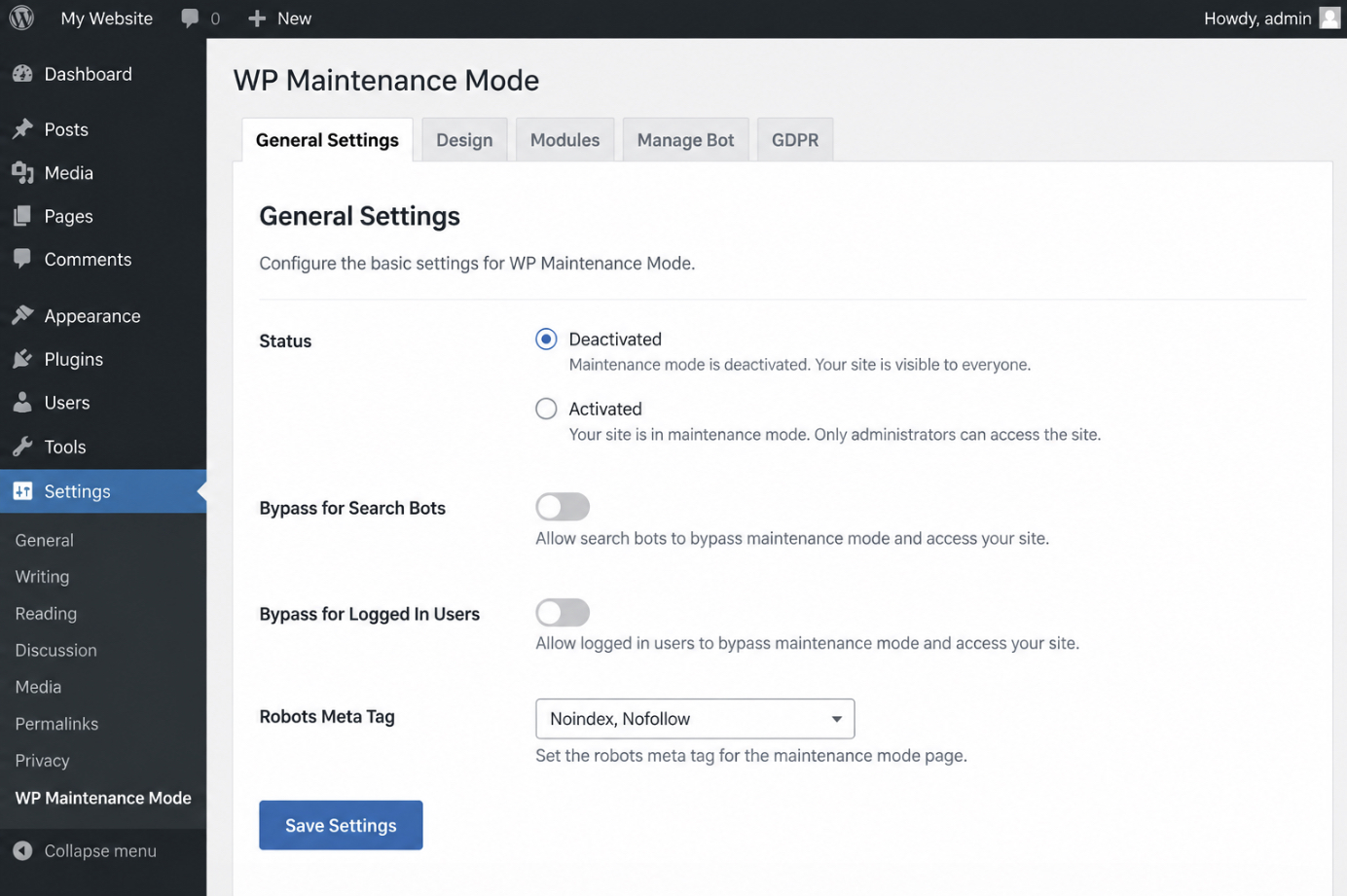
Maintenance mode is a site-wide state that stops scheduled tasks of all kinds from running, so a site left in it publishes nothing on time regardless of how healthy the rest of the configuration is. This is the quietest cause behind WP-Cron not running. The post keeps its date, the admin screens work normally, and the queue stays frozen underneath.
One control holds the mode. Under Settings, then WP Maintenance Mode, then General Settings, the Status control is what keeps the mode active or ends it.
Toggle Status to Deactivated and save the settings. Scheduled tasks run again from the next page load, and the post that was sitting behind the mode goes out with the rest of the queue. Where the mode is already off and the post still misses its time, the ceiling the run works inside is what to measure next.
WP_MEMORY_LIMIT Raised to 128M in wp-config.php
WP_MEMORY_LIMIT is the memory ceiling WordPress works inside, defined in wp-config.php, and a ceiling set too low stops a cron run partway through. Of the causes behind WP-Cron not running, this one leaves the least evidence: the run starts, uses up what it has, and ends before the post moves. What surfaces is a missed schedule, not an error message, and nothing on screen points at memory.
The define line sits in wp-config.php above the line that stops the file being read further, and it carries its value with the M suffix the file takes:
define( 'WP_MEMORY_LIMIT', '64M' );
At 64 megabytes an ordinary page render has room to spare. A cron run that fires several callbacks in one pass (an import, a feed pull, a scheduled clean-up) measures well above a page render, and it stops where the ceiling is rather than where the work ends. Raise the value:
define( 'WP_MEMORY_LIMIT', '128M' );
At 128 megabytes most runs that were stopping at 64 complete. Where a site carries heavier scheduled work, and posts still miss their time, 256M is the next step. The saved file is what takes effect: wp-config.php is read on every request, so the new ceiling applies from the next page load with nothing further to do.
Memory does not account for every run that fails to complete, though. Where the ceiling is generous, and the queue still will not clear, what interferes with scheduling is the site’s own code.
Plugin Conflict on Cron Behavior
Plugin conflict on cron behavior is the missed schedule cause that remains once the others check out. The scheduler runs, the wp-cron.php request completes, the clock on the site is right, and a scheduled post still misses its time. From the outside, it looks like WP-Cron isn’t running. Inside, WP-Cron works and site code is what interferes with scheduling.
Site code has two values here, and one pass covers both. A plugin that changes cron behavior holds scheduled posts back: cron management tools that rewrite the event queue, security layers that filter the wp-cron.php request, optimization code that reaches into the same queue for its own housekeeping. A function in functions.php interferes with scheduling and arrives at the identical outcome with no plugin involved: a callback that throws a fatal error partway through, a hook that runs on every request and never returns, a filter applied to the scheduled event itself. Same missed schedule error on the Posts list either way. Same isolation pass.
The pass is ordered, and the order is what keeps the result readable:
Hold site code aside with Troubleshooting Mode, which suspends plugins for the signed-in administrator while visitors continue on the live site.
Reschedule a test post ten minutes ahead.
Wait the slot out and watch whether the post goes out.
Restore one piece at a time, re-running the test post after each, until a run misses again (the piece restored immediately before that miss is the one that interferes).
Repeat the run on a default theme, which takes the functions.php file out of the picture.
Read the debug log for a fatal error in a cron callback.
What the pass narrows down, the debug log names outright. With WordPress debug logging active, a fatal error thrown inside a cron callback is written out with the file path and the line that produced it, the exact point at which the scheduled post stopped short of publishing. A report of WordPress cron not working that comes back clean on the scheduler and clean on every setting almost always resolves to one of those paths. Switching on WordPress debug mode is what makes that record available to read in the first place.
None of this ends in a named plugin, and it should not. It ends in a file path, a line number, and one test post that went out the moment the offending code was held aside. That is evidence. A culprit picked from a support thread is not.
Scheduled Post That Publishes on Time
A scheduled post that publishes on time is the end state the WordPress missed schedule error is worked toward: the post leaves the Scheduled state at the time set for it, and it does so without a page request forced by hand. Watched, not assumed. The post that stayed stuck also looked correct on every settings screen, which is why a fix read off a screen counts for nothing until a real post proves it.
The evidence is a test post. Scheduling one for ten minutes ahead of the current time, in site local time, gives a window short enough to sit through and long enough to leave the scheduled time still ahead.
Waiting that window out matters more than it appears to. WP-Cron works on page requests, so a practitioner who keeps refreshing the admin screen has measured the refresh rather than the schedule. Leave the browser alone until the scheduled time has passed, then load the Posts list once. That single load stands in for the visitor arrival that would have triggered the run anyway.
The status change is the visible evidence: the post moves off Scheduled, shows a published date in place of a scheduled one, and carries no Missed Schedule label under it.
One confirmation is not enough, because the post and the event are two different objects. The post carries the outcome; the queue carries the event that produced it. After the test post goes out, the queue should hold no overdue event. A queue that clears alongside the post covers the scheduler generally, not only the single article that happened to be watched.
Two readings in agreement (the post out at its own scheduled time, the queue empty of overdue events) is what makes the fix for the WordPress missed schedule post error hold rather than merely appear to. What is left is the value the Posts list was reporting the whole time. Missed Schedule is a label. The status underneath it is a stored value with its own name, and that name is what WP-Cron read when the post didn’t go out.
post_status future Behind the Missed Schedule Label
post_status is the field that records where a WordPress post sits at any given moment, and the value that field holds is exactly what the Missed Schedule label on the Posts list reports. A post scheduled for a later slot carries future in post_status: written, dated, waiting for its slot, not yet public. Neighboring values sit in the same field and describe different situations: draft for a post nobody has scheduled, pending for one that has gone to review, publish for one that is live.
When the scheduled run does not happen, the value stays future. Nothing rewrites the field on its own. A post that missed its slot still holds future long after that slot has gone by, and the Posts list shows that stale value on screen as Missed Schedule. The label is a reading of the field, not a state of its own.
Once the run does happen, post_status moves to publish, and the post is live from that moment. Same field, one value further along.
A post still holding future leaves one thing unresolved. The scheduled run itself, whose time has already gone by.
Does an Overdue WP-Cron Event Run at the Next Opportunity?
An overdue WP-Cron event runs at the next opportunity, and that opportunity is the next page load. When WP-Cron doesn’t run at the scheduled moment, it delays the event instead of canceling it. The condition is traffic. Something, or somebody, has to request a page on the site.
The queue is where the difference is. An overdue event stays in the queue, and the queue still contains that event after its time has gone by, so the run is late rather than lost. Under the system scheduler that UNIX hosts provide, an event whose time has passed is not run again, and no second attempt follows. Under WP-Cron the same overdue event stays in the queue and runs at the next page load, which the WordPress Plugin Handbook states directly: all scheduled tasks are put into a queue and will run at the next opportunity. Timing is never fully certain; execution is. WordPress cron not working at the due moment is a fault in when, not in whether: the post, its date, and its post_status are all still there.
For a scheduled post, that difference has one practical value: it publishes late, not never.
The overdue event is visible in the queue before any page load reaches it, and reading it directly runs through WP-CLI and system cron automation. A missed schedule error that has been checked, fixed and verified leaves a scheduled post publishing at its own time again, on the same queue that scheduling a custom WP-Cron event writes to.







 ChatGPT
  Claude
  Grok
Grok  Gemini