- Expertise
Expertise That Drives Results
Explore our specialized services, tailored solutions, and industry expertise to elevate your digital presence. From custom WordPress development to seamless integrations, we build high-performing websites that deliver impact.
Solutions- Booking System Integrations
- Headless & REST API WordPress
- Hubspot Integration
- Enterprise WordPress
- Website Migration
- Internal Collaboration Platforms
- External Communications Hubs
- Work
- About
- Proof
- Contact
Learn more


How to Build AJAX Forms, Pagination, and Search in WordPress

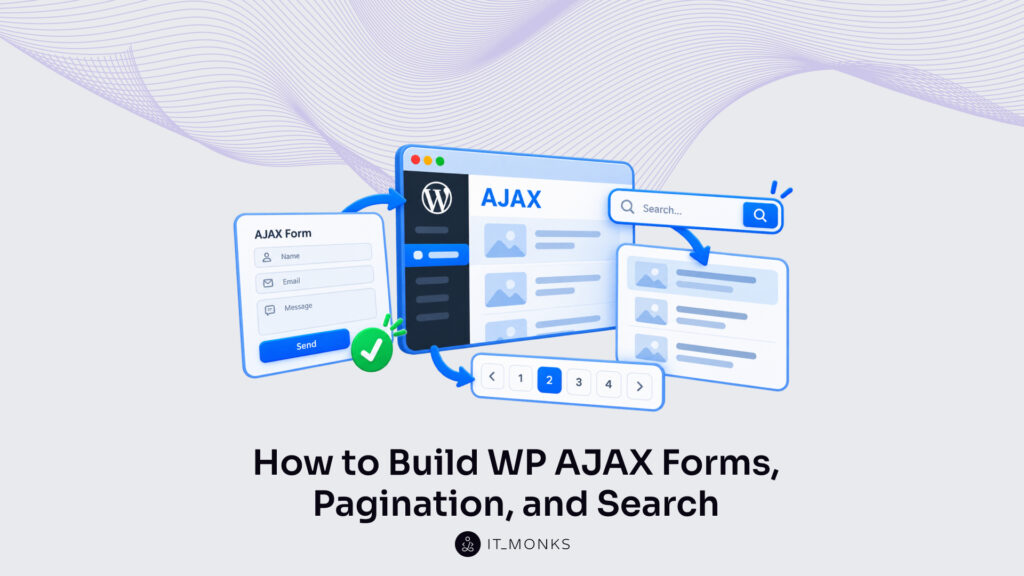
AJAX UI patterns in WordPress, such as AJAX search, AJAX pagination and an AJAX form, are front-end patterns in which a page event sends a request to admin-ajax.php and a PHP handler returns markup or a message that the page shows without a page reload.
One exchange serves all three patterns: the page event, the request, the PHP handler and the rendered response. Only the payload changes. A search field sends a keyword, a page link a page number and a WordPress AJAX form its fields; the handler returns JSON that the script inserts into one element of the page.
Search with a category filter, numbered and infinite-scroll pagination, and contact and login forms each get built as custom theme code, without a plugin: PHP in functions.php, one script file and the theme templates.
All three patterns share one script, one localized URL and one nonce, so the setup that search needs also serves pagination and forms without change. The main limit sits on the server: without the wp_ajax_nopriv_ hook or a valid nonce, admin-ajax.php answers ‘0’ (status 400) or ‘-1’ (status 403) instead of markup.
AJAX Search in WordPress
AJAX search in WordPress is a search form that sends the typed keyword to admin-ajax.php and replaces the results list with matching posts without a page reload. The keyword travels as the s parameter, and the same form carries an AJAX category filter, a WordPress select that needs no plugin, so one request searches by keyword and filters by category at once.
Every pattern runs on the enqueue-and-localize setup that the full exchange of AJAX in WordPress uses. A wp_enqueue_scripts callback in the theme’s functions.php loads js/ajax-patterns.js in the footer under the handle ajax-patterns. Then wp_localize_script() sends the script an ajaxPatterns object: ajaxUrl holds the admin-ajax.php URL, and nonce holds a token for the action ajax_patterns_nonce.
add_action( 'wp_enqueue_scripts', function () {
	wp_enqueue_script( 'ajax-patterns', get_theme_file_uri( 'js/ajax-patterns.js' ), array(), '1.0.0', true );
	wp_localize_script( 'ajax-patterns', 'ajaxPatterns', array( 'ajaxUrl' => admin_url( 'admin-ajax.php' ), 'nonce' => wp_create_nonce( 'ajax_patterns_nonce' ) ) );
} );
The search form in the theme template contains one search field named s and, next to it, an empty results container:
<form id="ajax-search-form"><input type="search" name="s"></form>
<div id="ajax-search-results"></div>
The form’s input event fires on every keystroke, yet a debounce resets its timer each time and sends the search 300 ms after the last keystroke, so a six-letter keyword typed with gaps under 300 ms sends one request, not six. FormData reads the named fields of the form, the script appends the action ajax_patterns_search and the nonce as _ajax_nonce, and fetch() sends the body to ajaxPatterns.ajaxUrl as a POST. Add the code to js/ajax-patterns.js:
const form = document.getElementById( 'ajax-search-form' );
const out = document.getElementById( 'ajax-search-results' );
let timer;
let latest = 0;
function ajaxSearch() {
	const id = ++latest;
	const body = new FormData( form );
	body.append( 'action', 'ajax_patterns_search' );
	body.append( '_ajax_nonce', ajaxPatterns.nonce );
	fetch( ajaxPatterns.ajaxUrl, { method: 'POST', body } ).then( ( r ) => r.json() ).catch( () => ( {} ) )
		.then( ( json ) => { if ( id !== latest ) return; out.innerHTML = json.success ? json.data.html : 'Search failed.'; } );
}
if ( form ) {
	form.addEventListener( 'input', () => { clearTimeout( timer ); timer = setTimeout( ajaxSearch, 300 ); } );
	form.addEventListener( 'submit', ( e ) => e.preventDefault() );
}
When json.success is true, data.html replaces the contents of #ajax-search-results. Anything else gets the one fallback message. A nonce stays valid for 12 to 24 hours: check_ajax_referer() returns 1 for a nonce generated 0–12 hours ago and 2 for one generated 12–24 hours ago, according to the developer.wordpress.org reference, and past that admin-ajax.php answers ‘-1’ with status 403.
A full-page cache that serves logged-out visitors an old copy hands them expired nonces too, so pages carrying ajaxPatterns.nonce need a cache lifetime under 12 hours. That ‘-1’, a network failure and a malformed response all show “Search failed.” rather than stale results. The latest counter drops an answer that arrives after a newer request, so a slow earlier response never overwrites newer results.
The submit listener stops the Enter key from sending the visitor to the theme’s own search page. Because js/ajax-patterns.js loads on every page, the if ( form ) check keeps an unguarded listener from throwing a TypeError on pages without #ajax-search-form and stopping the shared script.
In the WordPress AJAX search, s drives the query.
The s Parameter
The s parameter is the WP_Query argument that holds the search keyword; in AJAX search it holds what the visitor typed, and WP_Query returns the posts that match it.
Before the query runs, the handler reads s from $_POST, removes the slashes WordPress adds to request data with wp_unslash(), and sanitizes the value with sanitize_text_field(). Ahead of that, check_ajax_referer() verifies the ajax_patterns_nonce token sent as _ajax_nonce.
The handler registers on two hooks, wp_ajax_ajax_patterns_search for logged-in users and wp_ajax_nopriv_ajax_patterns_search for everyone else, the two hook families through which admin-ajax.php in WordPress runs an action. Without the wp_ajax_nopriv_ hook, admin-ajax.php rejects every logged-out search with ‘0’ and status 400. Add the handler to functions.php:
add_action( 'wp_ajax_ajax_patterns_search', 'ajax_patterns_search' );
add_action( 'wp_ajax_nopriv_ajax_patterns_search', 'ajax_patterns_search' );
function ajax_patterns_search() {
	check_ajax_referer( 'ajax_patterns_nonce' );
	$s    = sanitize_text_field( wp_unslash( $_POST['s'] ?? '' ) );
	$args = array( 'post_type' => 'post', 's' => $s, 'posts_per_page' => 6 );
	$query = new WP_Query( $args );
	ob_start();
	while ( $query->have_posts() ) {
		$query->the_post();
		get_template_part( 'template-parts/content', 'card' );
	}
	wp_reset_postdata();
	wp_send_json_success( array( 'html' => ob_get_clean() ) );
}
The loop renders each matching post through template-parts/content-card.php, a theme file the developer creates or swaps for the theme’s own card part. Output buffering collects those cards into one HTML string, and wp_send_json_success() returns it as data.html. If the card file does not exist, get_template_part() returns false and the results stay empty while json.success still reads true.
A second field in the same form narrows that query by category.
Category Filter
The AJAX category filter is a category select in the search form whose value narrows the same WP_Query through the cat parameter, which holds a category ID.
wp_dropdown_categories() prints the select. With name set to cat, each option sends a term ID, the function’s default value. The “All categories” option that show_option_all adds carries the value 0. Place the call inside #ajax-search-form in the theme template:
<?php
wp_dropdown_categories( array(
	'name'            => 'cat',
	'show_option_all' => 'All categories',
) );
?>
On the server, the handler reads cat as an integer through absint() and adds it to $args only when the value is not 0. A 0 leaves the argument out, so the query keeps every category; any other value filters to that category ID, and WP_Query’s cat also matches posts in its child categories. Insert these lines before new WP_Query( $args ):
$cat = absint( $_POST['cat'] ?? 0 );
if ( $cat ) {
	$args['cat'] = $cat;
}
A change to the select also fires the form’s input event, so the search script sends keyword and category together in one request, and the filtered results replace the list in #ajax-search-results.
Every search answer arrives as one batch of at most six posts. A long archive needs pages.
AJAX Pagination in WordPress
WordPress AJAX pagination without a plugin is theme code that loads a requested page of posts into the current page through an AJAX request, so the visitor stays on the same screen. Two front ends share it: numbered page links, which swap one page for another, and infinite scroll, which adds the next page under the last card.
The script sends the page number as paged in an AJAX call in WordPress to admin-ajax.php, with the action ajax_patterns_load_posts and the shared nonce. The handler runs on both the wp_ajax_ and wp_ajax_nopriv_ hooks for logged-out visitors, reads paged through absint() with 1 as the floor, then runs WP_Query with that paged value and posts_per_page 6.
The first render must hold the same 6 posts: the blog index’s main query takes posts_per_page from Settings > Reading, “Blog pages show at most”, 10 by default, so set it to 6. With page 1 showing 6 posts, a handler at 5 per page returns posts 6 to 10 as page 2 and repeats post 6; at 8 per page it returns posts 9 to 16 and skips posts 7 and 8. The index template, usually home.php, prints page 1 inside #ajax-posts with the page count in data-max-pages:
<?php global $wp_query; ?>
<div id="ajax-posts" data-max-pages="<?php echo esc_attr( $wp_query->max_num_pages ); ?>">
	<?php
	while ( have_posts() ) {
		the_post();
		get_template_part( 'template-parts/content', 'card' );
	}
	?>
</div>
The handler’s response returns three values. data.html holds the cards from template-parts/content-card.php. data.links holds the page-link row paginate_links() builds for the same query. data.max_pages holds $query->max_num_pages: found_posts divided by posts_per_page, rounded up, so 20 published posts at 6 per page give 4 pages. Both scripts shown stop at that number.
add_action( 'wp_ajax_ajax_patterns_load_posts', 'ajax_patterns_load_posts' );
add_action( 'wp_ajax_nopriv_ajax_patterns_load_posts', 'ajax_patterns_load_posts' );
function ajax_patterns_load_posts() {
	check_ajax_referer( 'ajax_patterns_nonce' );
	$paged = max( 1, absint( $_POST['paged'] ?? 1 ) );
	$query = new WP_Query( array( 'post_type' => 'post', 'posts_per_page' => 6, 'paged' => $paged ) );
	ob_start();
	while ( $query->have_posts() ) {
		$query->the_post();
		get_template_part( 'template-parts/content', 'card' );
	}
	wp_reset_postdata();
	$links = paginate_links( array( 'base' => '%_%', 'format' => '?paged=%#%', 'current' => $paged, 'total' => $query->max_num_pages ) );
	wp_send_json_success( array( 'html' => ob_get_clean(), 'links' => $links, 'max_pages' => $query->max_num_pages ) );
}
This handler queries every published post, which matches the blog posts index. A category, tag or author archive sends its term or author ID with paged and adds it to the WP_Query arguments, as the category filter adds cat; otherwise page 2 of that archive loads posts from the whole blog.
Leave offset out: with it set, WP_Query ignores paged and every request returns the same posts; the WP_Query reference states that offset “overrides/ignores the paged parameter and breaks pagination”.
Numbered Pagination
Numbered pagination is a row of page links where a click loads that page’s posts with no page reload, replacing the posts and the row in place. paginate_links(), the core function behind the row, returns paginated links for archive post pages.
paginate_links() defaults total to the global WP_Query max_num_pages, or 1; current defaults to the paged query var, or 1; base defaults to the current URL. Inside admin-ajax.php none of them matches the handler’s query, since the global query holds none of its posts and the current URL is admin-ajax.php, so the $links line in the handler passes base, format, current and total. With base ‘%_%’ and format ‘?paged=%#%’, each link is a relative href such as ?paged=3.
The page-1 link, and Previous on page 2, carry an empty href, because paginate_links() drops the format for page 1. With fewer than 2 pages the function returns null, and the row stays empty.
The first-render row needs the same arguments. With pretty permalinks on, paginate_links() defaults format to the pagination base, so a row printed on defaults links to /page/2/, and the script’s paged= match would miss. The template prints the row after #ajax-posts with the handler’s base and format:
<nav id="ajax-pagination"><?php echo paginate_links( array( 'base' => '%_%', 'format' => '?paged=%#%', 'current' => max( 1, get_query_var( 'paged' ) ), 'total' => $wp_query->max_num_pages ) ); ?></nav>On the page, loadPosts() sends action, nonce and paged as FormData and returns json.data only when json.success is true, otherwise null. Infinite scroll reuses the function, so loadPosts() and the posts constant stay at the top level of js/ajax-patterns.js. The file loads on every page, where an unguarded pager.addEventListener() call without #ajax-pagination throws a TypeError and stops the script, so the listener attaches only when the row exists:
const posts = document.getElementById( 'ajax-posts' );
const pager = document.getElementById( 'ajax-pagination' );
function loadPosts( paged ) {
	const body = new FormData();
	body.append( 'action', 'ajax_patterns_load_posts' );
	body.append( '_ajax_nonce', ajaxPatterns.nonce );
	body.append( 'paged', paged );
	return fetch( ajaxPatterns.ajaxUrl, { method: 'POST', body } )
		.then( ( response ) => response.json() )
		.then( ( json ) => ( json.success ? json.data : null ) );
}
if ( pager ) {
	pager.addEventListener( 'click', ( event ) => {
		const link = event.target.closest( 'a.page-numbers' );
		if ( ! link ) return;
		event.preventDefault();
		const match = link.getAttribute( 'href' ).match( /paged=(d+)/ );
		loadPosts( match ? match[1] : 1 ).then( ( data ) => {
			if ( ! data ) return;
			posts.innerHTML = data.html;
			pager.innerHTML = data.links;
		} );
	} );
}
The listener reads the page number from the href; for an empty href loadPosts() requests page 1. data.html and data.links replace the cards and the row, and a null answer leaves both untouched.
Some archives skip the click altogether and load pages on scroll.
Infinite Scroll
WordPress AJAX infinite scroll without a plugin is theme code that loads the next page of posts when the visitor reaches the end of the list and appends it after the last card, with no page reload and no page links.
The Intersection Observer API, which MDN lists for “infinite scrolling”, detects that moment: an IntersectionObserver observes an empty sentinel element placed after the posts and calls back when the sentinel enters the viewport, with no scroll event listener involved. rootMargin ‘200px’ grows each side of the viewport box by 200 pixels, so the request starts before the sentinel is visible. threshold stays at its default 0, a ratio on a 0 to 1 scale, which runs the callback as soon as the sentinel touches that grown box.
The template prints <div id="ajax-scroll-sentinel"></div> after #ajax-posts in place of the page-link row; the code runs only when both elements exist, and observes only when data-max-pages exceeds 1:
const sentinel = document.getElementById( 'ajax-scroll-sentinel' );
if ( sentinel && posts ) {
	let paged = 1;
	let loading = false;
	const observer = new IntersectionObserver( ( entries ) => {
		if ( ! entries[0].isIntersecting || loading ) return;
		loading = true;
		loadPosts( paged + 1 ).then( ( data ) => {
			observer.unobserve( sentinel );
			if ( ! data ) return;
			paged++;
			posts.insertAdjacentHTML( 'beforeend', data.html );
			if ( paged < data.max_pages ) observer.observe( sentinel );
		} ).catch( () => observer.unobserve( sentinel ) )
			.finally( () => { loading = false; } );
	}, { rootMargin: '200px' } );
	if ( Number( posts.dataset.maxPages ) > 1 ) observer.observe( sentinel );
}
Each callback sends paged + 1 to the same handler, and insertAdjacentHTML( ‘beforeend’ ) appends data.html after the last card. The loading flag holds true while a request is in flight, so a second intersection sends nothing until finally() clears it. After each append the script re-observes the sentinel, and the observer calls back the first time it watches a target, so the next page still loads when 6 cards leave the sentinel inside the grown viewport on a tall screen.
Three conditions stop the observer. Once paged reaches data.max_pages, the sentinel is not observed again. Core’s bare ‘0’ or ‘-1’ parses as a JSON number with no success key, so loadPosts() returns null. A network failure or non-JSON body rejects, and catch() unobserves the sentinel.
Pages and search both return posts the site already holds. Forms send the other way, carrying the visitor’s own data to the handler.
AJAX Form in WordPress
An AJAX form in WordPress is a form whose submit event sends its fields to admin-ajax.php and shows the PHP handler’s message in the page without a page reload. Two AJAX forms are built as theme code: the WordPress AJAX contact form, which mails a visitor’s message to the site’s admin address, and the AJAX login form in WordPress, which logs a visitor in. Search and pagination send a keyword or a page number, while a form sends the visitor’s own data.
The script stops the browser’s normal submit with event.preventDefault() and builds the request body with new FormData( form ). FormData reads every field that has a name attribute and holds each one as a key/value pair, so the names in the markup become the keys the handler reads from $_POST. A hidden input named action holds the action name, which tells admin-ajax.php which handler to run. Then the script appends the nonce as _ajax_nonce, the field check_ajax_referer() reads first.
The shared form script goes in js/ajax-patterns.js and serves every element with the ajax-form class:
document.querySelectorAll( '.ajax-form' ).forEach( ( form ) => {
	form.addEventListener( 'submit', async ( event ) => {
		event.preventDefault();
		const button = form.querySelector( 'button' );
		const message = form.querySelector( '.form-message' );
		const body = new FormData( form );
		body.append( '_ajax_nonce', ajaxPatterns.nonce );
		button.disabled = true;
		try {
			const response = await fetch( ajaxPatterns.ajaxUrl, { method: 'POST', body } );
			const json = await response.json();
			message.textContent =
				json.data && json.data.message ? json.data.message : 'Request failed.';
		} catch ( error ) {
			message.textContent = 'Request failed.';
		} finally {
			button.disabled = false;
		}
	} );
} );jQuery’s serialize() is the alternative for a theme that already loads jQuery. It returns the same named fields as a query string, but file inputs never reach the request: “Data from file select elements is not serialized,” according to the jQuery API documentation. FormData keeps them.
What the form prints depends on the response. When the handler sends data.message, success or error, the script inserts that text into the form’s .form-message element. A bare ‘0’ with status 400 or ‘-1’ with status 403 returns no data object at all, so the form shows the generic ‘Request failed.’ text; the diagnosis steps for WordPress AJAX errors cover a form request that answers 400, 0 or a JSON error.
A network failure, or a body that is not JSON such as a PHP fatal error page, rejects the fetch() or response.json() promise, and the catch block shows the same text. The submit button stays disabled while a request runs, so a double click sends one request instead of two. That guard matters most on the first form the script serves, the contact form, where every request sends an email.
Contact Form
A WordPress AJAX contact form is a contact form whose fields a PHP handler sanitizes, mails to the site’s admin address and confirms in the page without a reload. Its name, email and message fields sit beside a hidden action input set to ajax_patterns_contact and an empty .form-message paragraph for the reply. That markup extends a standard contact form in WordPress, which covers field design, and the AJAX version adds only the no-reload submission:
<form class="ajax-form">
	<input name="name">
	<input type="email" name="email" required>
	<textarea name="message"></textarea>
	<input type="hidden" name="action" value="ajax_patterns_contact">
	<button>Send</button>
	<p class="form-message"></p>
</form>
Logged-in users and logged-out visitors both submit a contact form, so the handler registers on wp_ajax_ajax_patterns_contact and wp_ajax_nopriv_ajax_patterns_contact. check_ajax_referer( ‘ajax_patterns_nonce’ ) verifies the nonce before any field is read.
The nonce does not stop automated submissions, though: any bot that loads the page receives a valid nonce, so a public endpoint that sends mail needs separate spam protection. Each field then passes through wp_unslash() and one sanitizer matched to its content: sanitize_text_field() for the name, sanitize_email() for the address (it strips every character an email address cannot contain) and sanitize_textarea_field(), which keeps the line breaks of a multi-line message.
is_email() then verifies the sanitized address and rejects a malformed one with the ‘Invalid email.’ error before any mail runs. Once the address passes, wp_mail() mails the message to the address stored in the admin_email option, with the visitor’s name in the subject and a Reply-To header set to the visitor’s email, so a reply from the admin inbox reaches the person who wrote in.
add_action( 'wp_ajax_ajax_patterns_contact', 'ajax_patterns_contact' );
add_action( 'wp_ajax_nopriv_ajax_patterns_contact', 'ajax_patterns_contact' );
function ajax_patterns_contact() {
	check_ajax_referer( 'ajax_patterns_nonce' );
	$name    = sanitize_text_field( wp_unslash( $_POST['name'] ?? '' ) );
	$email   = sanitize_email( wp_unslash( $_POST['email'] ?? '' ) );
	$message = sanitize_textarea_field( wp_unslash( $_POST['message'] ?? '' ) );
	if ( ! is_email( $email ) ) {
		wp_send_json_error( array( 'message' => 'Invalid email.' ) );
	}
	if ( wp_mail( get_option( 'admin_email' ), 'Contact: ' . $name, $message, array( 'Reply-To: ' . $email ) ) ) {
		wp_send_json_success( array( 'message' => 'Thanks!' ) );
	}
	wp_send_json_error( array( 'message' => 'Not sent.' ) );
}
Each wp_send_json_ call ends the request, so the contact handler answers once. A true return from wp_mail() means the mail request was processed without errors, not that the message was delivered, according to the wp_mail() function reference. The ‘Thanks!’ reply therefore confirms that WordPress processed the mail, and a false return sends ‘Not sent.’ instead. The login form reuses the same script and markup pattern, with credentials in place of a message.
Login Form
An AJAX login form in WordPress is a login form whose credentials a PHP handler authenticates with wp_signon() while the page stays open. Only the nopriv hook registers for ajax_patterns_login. A logged-in request finds no wp_ajax_ajax_patterns_login hook and gets ‘0’ with status 400, which is why the theme renders the login form for logged-out visitors only.
With no credentials array passed, wp_signon() reads log, pwd and rememberme from $_POST, so the inputs carry exactly those names. A checked rememberme box makes the authentication cookie persistent for 14 days; without it, the cookie is a browser session cookie and the login expires after 2 days or when the browser closes, according to the wp_set_auth_cookie() function reference. The password is never sanitized; any change to the string would alter the password itself.
<form class="ajax-form">
	<input type="text" name="log" required>
	<input type="password" name="pwd" required>
	<label><input type="checkbox" name="rememberme" value="forever"> Remember me</label>
	<input type="hidden" name="action" value="ajax_patterns_login">
	<button type="submit">Log in</button>
	<p class="form-message"></p>
</form>
The handler verifies the nonce, then passes nothing to wp_signon(), which reads the posted fields itself:
add_action( 'wp_ajax_nopriv_ajax_patterns_login', 'ajax_patterns_login' );

function ajax_patterns_login() {
	check_ajax_referer( 'ajax_patterns_nonce' );
	$user = wp_signon();
	if ( is_wp_error( $user ) ) {
		wp_send_json_error( array( 'message' => 'Wrong username or password.' ) );
	}
	wp_send_json_success( array( 'message' => 'Logged in.', 'redirect' => home_url( '/' ) ) );
}
wp_signon() returns a WP_User object on success and a WP_Error on failure. Every failure gets the same message, ‘Wrong username or password.’, rather than the WP_Error text, because that text names whether the username or the password failed. A failed nonce never reaches wp_signon(): check_ajax_referer() answers ‘-1’ with status 403, and the form shows the generic ‘Request failed.’ text.
wp_signon() sets the authentication cookies but not the current user, so is_user_logged_in() returns false until the next request, and the script redirects to show the logged-in state. The redirect check goes right after the const json line of the shared form script:
if ( json.success && json.data.redirect ) {
	window.location.href = json.data.redirect;
}
A valid login ends on that redirect to the home page, the one deliberate navigation after an AJAX credential check that ran, like every AJAX form, pagination and search request in WordPress, without a page reload and without a plugin.
More Articles by Topic

Imagine a marketing team two days before a campaign launch. The copy is approved, the images are ready, and the…
Learn more 
Headless WordPress is WordPress used as a content store and editorial interface only, with the public site rendered by a…
Learn more 
Take a company that sells custom printed boxes to other businesses. We made it up for this article, but each…
Learn more Contact
Feel free to reach out! We are excited to begin our collaboration!
Don't like forms?
Shoot us an email at info@itmonks.com
Don't like forms?
Shoot us an email at info@itmonks.com

CEO, Strategic Advisor
Reviewed on Clutch
 ChatGPT
  Claude
  Grok
Grok  Gemini
 Send a Project Brief
Fill out and send a form. Our Advisor Team will contact you promptly!